
TL;DR
Small business video production is a provider decision, not a marketing calendar. Compare five paths by queue, included revision rounds, who locks accuracy, and whether the next change can reuse the same source pack. Film or hire a crew when the proof does not exist yet. Use a freelancer or hybrid editor when you already own footage and need craft. Use an asset-led workflow when approved copy, product images, screenshots, or a URL already contain the explanation. Do not buy a polished file you cannot open again.
Small business video production is the work of turning one business fact into a video someone can approve, publish, and change later. The expensive part is rarely the camera. It is the wait for a shoot day, the extra revision round, and the moment you discover the finished file cannot be edited without starting over.
That is a narrower job than video marketing. Marketing decides which story belongs on the homepage or in an ad. Production decides who makes the file, how long the queue is, and whether a price change or a new screenshot can be fixed without another crew day. It is also narrower than product video production, which owns claim-to-scene accuracy for one product. Use this page to pick a provider path you can run more than once.
Start from the explainer workflow
01
Small business video production paths at a glance
Start with the constraint you cannot move: time, proof, or changeability. The table below is a production router, not a format menu. If two jobs sit in one brief, split the project before anyone books a day.
| Path | Best fit | Typical cash outlay | Queue and revision reality | Can you change it later? |
|---|---|---|---|---|
| DIY shoot and edit | Informal social clips, internal updates, a founder talking to a phone | $0 to $200 in extras, plus owner time | No vendor queue. Your calendar is the queue. Changes are free and slow | Yes, if you kept the original clips |
| Hybrid: you film, someone else edits | Recurring clips where you can shoot, but cannot spend 4 to 8 hours in an editor | $200 to $800 per finished video in one published range | Faster than a full crew. You still wait on the editor's book and included rounds | Only if the editor returns project files or agrees a cheap recut |
| Freelancer | One clear task: a half-day shoot, a testimonial, or an edit of footage you already have | $1,500 to $4,000 is a common explainer band on one comparison page | One person. Fast when they are free. The project pauses if they get sick or overbooked | Variable. Ask who holds the timeline and raw files |
| Agency or production company | A high-stakes film that needs a crew, logistics, and a managed process | $3,000 to $15,000+ per video in one SMB guide. Explainers often sit higher | Weeks, not days. Two to three revision rounds are common. Extra rounds are billed | Often no. The deliverable is usually a master file, not a living source pack |
| Asset-led source-material workflow | Explainers, feature updates, and how-tos whose proof already lives in approved copy and visuals | Tool or credit cost instead of a shoot day | No location hold. The wait is review time, not a crew calendar | Yes, when you can change one scene or one claim and keep the rest |
Those cash bands are published vendor ranges, not TapVid quotes. Shootsta's April 2026 guide puts DIY at $0 to $200, phone plus professional editing at $200 to $800, a traditional agency at $3,000 to $15,000+ per video, and a full-time videographer at $50,000 to $80,000 a year plus equipment. MyPromoVideos quotes a 90-second explainer at $1,500 to $4,000 from a freelancer and $8,000 to $20,000+ from a full-service agency. Treat every number as a check against your own bids. A local day rate can sit outside these bands.
The column that most small businesses skip is the last one. A cheap first video that cannot be opened again is an expensive second video.
02
Choose the production constraint before you hire
Choose the production constraint before you hire
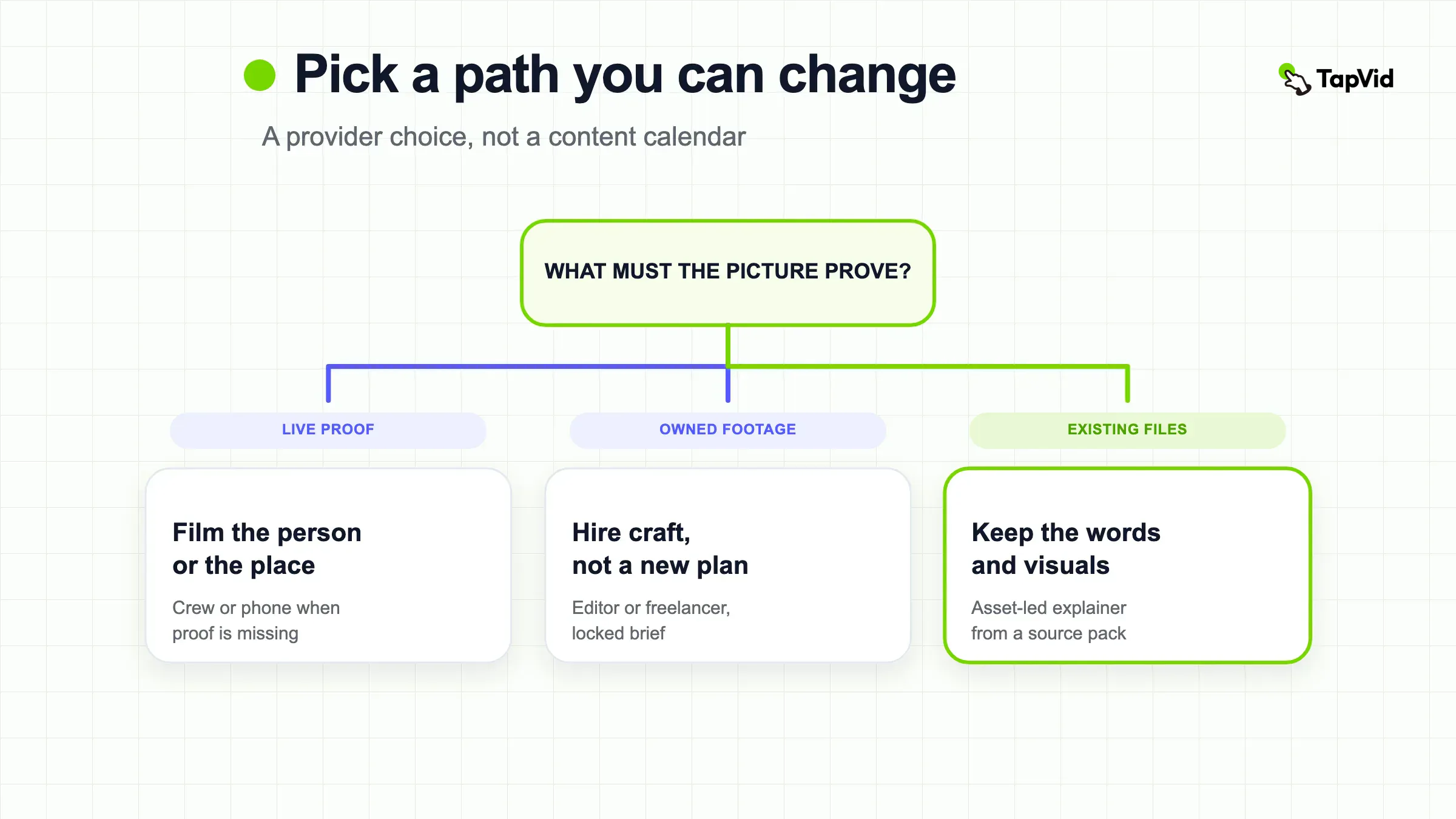
If the proof is a physical process, a place, or a named customer
you need live capture.
If the proof is already in a help doc, a product image set, a screenshot, or an approved script
a crew day is optional.
Most wasted spend starts before a camera turns on. LocalEyes describes the usual trap: one video is asked to explain the offer, impress a homepage visitor, support ads, help sales, and recruit. The shoot gets bigger. The message gets softer. The revision loop gets longer.
Name one viewer decision and one proof the picture must make inspectable. "We need a video" is not a brief. "A buyer should see the current checkout flow and the refund rule on screen" is a brief. If the proof is a physical process, a place, or a named customer, you need live capture. If the proof is already in a help doc, a product image set, a screenshot, or an approved script, a crew day is optional.
Then name the change you expect in the next 90 days. Prices move. Screens change. Offers expire. A path that cannot absorb that change will charge you again for the same story. That is why this page does not start with lights, lenses, or a content calendar. Those matter after the path is chosen. They do not decide the path.
Assign one internal owner who can say yes. LocalEyes lists unclear approvals as a direct cause of revision loops. If five people send separate notes, you are not buying production. You are buying a meeting that happens inside someone else's timeline. Put the owner in the quote. If that person will be on leave during review week, do not book the shoot.
Decide what "done" means in files, not in feelings. A useful finish line is an approved master, the named source of truth used to check it, and a written rule for the next change. A weak finish line is "make it look professional." The second one has no stop condition, so it burns revision rounds.
03
What agency queues and revision rounds actually cost
A quote that lists only a day rate is incomplete. Ask three clocks: when the first hold happens, how long the first cut takes, and what a change costs after the included rounds.
Post-production is where those clocks slip. Marmalade Media puts post at 30% to 40% of the budget and says a 60-second video can take 4 to 8 hours to edit, while a 3-minute brand piece can take 20 to 40+ hours. Shootsta makes the same shape smaller: filming can take 20 minutes, editing can take 4 hours. If you hire a person to "just film," you still bought the longer clock.
Revision rounds are a priced unit. AgencyPro treats 2 to 3 rounds as the usual inclusion and puts extra rounds at $100 to $300 per hour. Marmalade lists 2 to 3 rounds on simpler packages and 3+ rounds on corporate and brand films. A "round" should mean one consolidated, timestamped pass, then one implementation pass. Drip notes across a week are not one round. They are several unpaid project-management hours that the vendor will either absorb once or bill later.
Queue risk is not only "they are busy." MyPromoVideos flags the one-person show: illness, failed gear, or a larger client can move your date. An agency charges more because it sells a bench and a process. That premium is real. It is worth it when a missed launch is more expensive than the fee. It is waste when the video is a 45-second feature update and the product already exists in screenshots.
Hidden line items move the real number. AgencyPro estimates music licensing, talent usage, re-edits, and platform reformats can add 15% to 25%. Ask whether vertical and square cuts are in the fee. Ask whether stock music is licensed for paid ads, or only for the website. Ask what happens if legal rejects a claim after picture lock. Those answers belong in the statement of work, not in a later email.
Batching still helps when you have chosen a live path. Marmalade tells clients to shoot several pieces in one session because setup time is paid once. That is good advice for testimonials and talking-head FAQs. It does not fix a story that needs a new screenshot every month. Batching a shoot you should not have booked is just a larger write-off.
If you want a format-level price check after the path is chosen, use how much an explainer video costs. That page owns quote bands by style. This page owns the provider clock that sits underneath those bands.
04
Accuracy and editability after the file is delivered
Accuracy is not a vibe. It is a named source of truth that the finished video can be checked against. For a service business, that source may be the current offer page and a price list. For software, it is the live UI and the approved changelog. For a physical product, it is the current model, the current packaging, and any claim legal will defend.
Write the source pack before you hire. Include the words that must appear as written: product names, prices, SKUs, warranty terms, and the call to action. Include the visuals that must not be invented: screenshots, product photos, diagrams, and logos. If a vendor asks to "punch up" those facts, that is a risk, not a creative upgrade. A video that looks expensive and states the wrong price is a liability.
Editability is a property of the files you receive, not of the compliment you give the editor. Ask these questions in writing:
- Who owns the raw footage, project file, fonts, and licensed music?
- How many years can you keep using the faces and the track?
- What is the price of a 15-second claim change after delivery?
- Can that change be done from the existing timeline, or does it need a reshoot?
- Will you receive a version that still has editable captions and graphics?
A master MP4 with no project file is a poster. You can post it. You cannot maintain it. That is acceptable for a one-off event recap. It is a poor buy for a homepage explainer that will be wrong the next time you change a plan name.
Freelancers can be the right answer here if you already own the footage and the brief. You are buying a specialist task, not a strategy department. MyPromoVideos is blunt about that split: a freelancer is strong at execution when the job is defined, and weak when you still need someone to invent the plan. The hidden cost is that you become the producer. If you cannot review a cut within the agreed window, you created the delay.
Agencies reduce that coordination load. They also tend to sell a closed master. That is fine when the film is meant to last a year and the proof will not move. It is the wrong contract when the next version is a caption change, a new UI state, or a different CTA. Pay for craft when craft is the product. Do not pay for craft when the product is a maintainable explanation.
If the work is already in an editor and you need stage-by-stage craft, the 13-stage editing workflow is the downstream page. Do not open a timeline to decide whether you should have hired a crew.
05
When a repeatable source-material workflow is the better path
Use this path when the explanation already exists on paper or in the product. The job is to keep names, numbers, and supplied visuals intact, then make the story watchable. The job is not to invent a day in the life of your warehouse.
A usable source pack is small and strict:
- One viewer decision and one next step
- Approved copy, including the words that cannot be paraphrased
- The current screenshots, product images, or diagrams that prove those words
- Brand colors and logo
- A named reviewer and a review window
If any of those are missing, stop. A source-material workflow cannot create a customer face you did not record. It cannot prove a machine motion you did not capture. Those jobs stay on the film paths above.
TapVid belongs only on this path. It takes approved scripts, PDFs, URLs, screenshots, and brand assets and turns them into a structured explainer. The official explainer workflow states that supplied visuals stay as supplied, approved wording stays literal, and you can review the brief, script, and scene plan before the final export. When one scene is wrong, the same page says you can describe the caption, visual, pacing, or CTA change in plain language and rerun that scene while the rest stays fixed. That is the editability test this article has been using: can the next change reuse the same source pack?
Human review still matters. The official page does not claim zero errors. It moves the review job to exceptions: a mismatched screenshot, a stale price, a weak CTA. If you skip that check, you have only moved the mistake from an editor's timeline into your own publish button.
TapVid is not a filming studio and does not invent missing physical evidence. If the video must show a technician on site, a packed dining room, or a customer saying a specific result, hire a camera. If you need volume across many SKUs or a team operating system, that is scalable video production, not this page.
In this guide's single, user-authorized run on 2026-08-25, TapVid produced a 30-second Harbor Desk explainer at https://tapvid.ai/video/8gr8R0I7. Chapter 02 at 0:10 kept `$12 booking fee` on the card. Chapter 04 at 0:30 kept `$12 booking fee`, `48-hour cancel window`, and `Book a weekday slot` in one result.
After a scene-local change, Chat named Scene c3-s1 and chapter 03 cards showed `24-hour cancel window`. Chapter 02 still showed `$12 booking fee`. Chapter 04 still showed `48-hour cancel window`. The spoken caption in chapter 03 briefly still said 48-hour. Do not read that as the whole video now saying 24-hour.
These frames are product-workspace views, not output-only crops. They do not prove a filmed customer or a live location. Do not read this section as "the software replaces your agency." It replaces a crew day only when the crew day was never the right proof method.
06
A buying checklist that keeps the next video cheaper
A buying checklist that keeps the next video cheaper
- Write the viewer decision in one sentence. If you cannot, you are not ready to buy.
- Attach the source of truth. Circle the words and visuals that must survive into the cut.
- Choose the path from the table. Do not let a vendor choose it by sending a crew menu.
- Ask for the queue in dates: kickoff, first cut, included rounds, and final files.
- Define a revision round as one document with timestamps, sent by one owner.
- Write the price of the next change. A 15-second caption fix should have a number.
- Write the file list: master, captions, project or scene files, and licensed assets.
- Write the kill rule. If the proof is not on camera or in the source pack, the project stops.
Use this list on every quote, including a quote you write for yourself.
- Write the viewer decision in one sentence. If you cannot, you are not ready to buy.
- Attach the source of truth. Circle the words and visuals that must survive into the cut.
- Choose the path from the table. Do not let a vendor choose it by sending a crew menu.
- Ask for the queue in dates: kickoff, first cut, included rounds, and final files.
- Define a revision round as one document with timestamps, sent by one owner.
- Write the price of the next change. A 15-second caption fix should have a number.
- Write the file list: master, captions, project or scene files, and licensed assets.
- Write the kill rule. If the proof is not on camera or in the source pack, the project stops.
Refuse three common add-ons unless they have a job. Unlimited revisions usually mean there is no process. A "we will figure out the story on set" line means you are paying for discovery at crew rates. A deliverable described only as "video for social" can mean one clip or ten. AgencyPro lists those as proposal red flags. They are also how a $3,000 conversation becomes a $6,000 file.
If you already have a company story and the proof is interviews plus a place, a company profile video is the format page. If you already have a long article and only need short cuts, how to make social media videos is the output page. Neither page should decide your provider.
Keep the first paid project small enough to test the relationship. One 60 to 90 second piece with a locked script teaches you the vendor's queue, the quality of the first cut, and whether they return usable files. A six-video retainer taught by a vague brand film is how small businesses fund someone else's process design.
07
Common production failures that look like creative problems
"The video feels generic" is often an accuracy problem. The cut used stock motion and paraphrased claims because nobody attached the real screenshots and the approved sentence. Fix the source pack before you buy a more expensive look.
"The vendor is slow" is often an approval problem. Notes arrived from three inboxes, two of them after the included rounds. The clock the vendor sold you assumed one owner. Restore that owner or pay for the extra rounds on purpose.
"We cannot afford video" is often a path problem. You priced a crew for a story that already exists as a PDF and a product URL. Or you priced a year of DIY editing when one hybrid editor would have closed the gap. Re-run the table. The constraint is usually queue or editability, not taste.
"The tool should just finish it" is a category error. A source-material workflow can keep your facts intact and rerun a scene. It cannot replace a missing interview, a missing location, or a missing decision. If you treat software as an agency, you will still be the unstaffed producer, only with a faster wrong draft.
"We will reuse this forever" is a file problem. If you do not own the project, the music license, or the talent term, "forever" is a hope. Put the term on the invoice. When the term ends, the path has to be runnable again from the source pack, not from a memory of the last shoot.
08
Frequently asked questions
Small business video production gets cheaper when the second video is a change, not a reboot. Pick the path that matches the proof you have, write the revision rule before anyone shoots, and keep the source pack you would need to make the next version on a Tuesday. If that proof is already in approved copy and visuals, start from the explainer workflow. If the proof still has to be captured, hire the camera, then demand files you can open again.
How much does small business video production cost?
Published ranges run from nearly free DIY to $15,000+ for a traditional agency video. Shootsta puts phone-plus-edit work at $200 to $800 and full-service agency work at $3,000 to $15,000+ per video. MyPromoVideos puts a freelancer explainer at $1,500 to $4,000 and an agency explainer at $8,000 to $20,000+. Your real number also includes queue time, extra revision hours, and whether the next change needs a reshoot.
How many revision rounds should a quote include?
Two to three rounds is the common inclusion on the cost pages used for this guide. AgencyPro also prices extra rounds at $100 to $300 per hour. Define a round as one consolidated, timestamped document from one owner. Unlimited rounds are a process smell, not a gift.
Should a small business hire a freelancer or an agency?
Hire a freelancer when the task is defined, the risk is low, and you can produce. Hire an agency when the project needs a crew, logistics, and someone else to carry the process. MyPromoVideos uses that split. Add a third check: if the proof already lives in approved files, neither a freelancer nor an agency is the first call.
Can I produce professional videos with just a phone?
Yes, for informal or authentic clips, if audio is clean and the room is quiet. Shootsta treats a modern phone plus a lavalier, light, and tripod as enough for much of that work. A phone does not solve accuracy or editability. A shaky, well-lit clip of the wrong price is still the wrong video.
When should I skip a shoot and use existing source material?
Skip the shoot when the viewer decision can be proven with current copy, product images, screenshots, diagrams, or a URL. Keep the shoot when the proof is a person, a place, or a physical behavior that does not exist in those files. If you skip the shoot, keep a review step that checks names, numbers, and supplied visuals before publish.
Who should approve the video inside a small business?
One named owner with authority at script lock, first cut, and final delivery. Extra reviewers can comment into that owner's document. They should not send separate emails to the vendor. Split ownership is how included rounds disappear.
Does a source-material tool replace a video production company?
No. A tool that starts from approved files can replace a crew day you should not have booked. It cannot replace a filmed customer, a location, or a managed live production. TapVid sits on the source-material path only. It does not bid against a filming agency for a shoot.