
TL;DR
If you need a lasting trust story, use a company profile video. If the cut must stay exact to website product assets, use a website promo. Stay here when you want official promotional examples grouped by launch, explanation, brand meaning, and offer. The useful question is not “Which promotional video looks best?” It is “Which video solves the same campaign job with source material and production constraints similar to mine?” This guide breaks down 12 official promotional videos by job, source, hook, proof, CTA, transferable move, and constraint. For a repeatable brief, choose one goal, gather the approved assets and copy that can prove it, map each claim to a scene, and write the CTA before you choose a visual style.
A search for a company promo video usually mixes three jobs. A company profile answers why a viewer should trust the business now. A website promo turns approved landing-page copy into a short page embed with one action. This page is for the remaining job: study real promotional videos by campaign, offer, and CTA, then turn one reference into a brief a small team can produce. Promotional examples are easy to collect and hard to use. A launch film may rely on a famous athlete, city-wide shoot, or years of brand recognition. Copying its camera moves will not give you the same result.
Turn approved assets and copy into an explainer with TapVid
01
The 12 examples at a glance
Search results for “company promo video” often show corporate overviews, brand films, and investor pitches next to genuine campaign spots. Those overview films belong with a company profile video: one audience, one trust decision, and no time-bound offer. A website promo video is narrower still. It has to sit on a page and stay true to approved copy and original product assets.
Stay on this page when the job is a campaign, offer, or CTA you can brief from a real reference. The 12 examples below are grouped that way. Do not copy a brand film’s budget or a profile’s founding story into an offer cut.
A better benchmark is operational. What was the campaign trying to make the viewer understand, feel, or do? What source material carried the message? Where did the video place proof? Which parts could another team reproduce without the same budget, product, or audience?
The 12 examples cover launches, explainers, demos, brand films, direct offers, and community-led promotion. At least half rely on moves a small team can reuse: a before-and-after, visible mechanism, founder voice, customer journey, product output, or single collaboration idea.
| Example | Primary campaign job | Main source of proof | Most transferable move | Main constraint |
|---|---|---|---|---|
| Descript — The New Descript | Feature launch | Product workflow and UI | Demonstrate the change through real editing actions | Needs accurate product capture |
| Amazon Go | New-concept launch | End-to-end shopping journey | Turn an unfamiliar mechanism into one simple trip | Physical store and custom production |
| Microsoft Surface Laptop 4 | Product launch | Product detail and use contexts | Organize features around moments of use | Premium product footage |
| Slack — Work, simplified | Category explainer | Familiar workplace friction | Compress many pains into one promise | Benefits can become generic without specifics |
| GoFundMe — How GoFundMe Works | Process explainer | Step-by-step user journey | Make the next action obvious at every stage | Trust claims need careful substantiation |
| Okta — What Is Okta? | Technical explainer | Capability map | Start with one known task, then widen the system | Technical density |
| Google — Year in Search 2022 | Brand meaning | Cultural moments and search behavior | Build one emotional argument from a repeated motif | Licensed footage and global brand scale |
| Rare Beauty — Only at Sephora | Brand and retail announcement | Founder presence and product world | Let a recognizable point of view carry a short message | Founder access and established audience |
| Spotify — How It’s Made: Wrapped | Campaign story | Behind-the-scenes process | Show the system behind a familiar output | Existing flagship campaign required |
| Dollar Shave Club | Direct offer | Founder explanation and price-value contrast | Say the offer plainly and make the voice distinctive | Humor and claims must fit the brand |
| GoPro — Cascadia | Product capability | Footage created with the product | Demonstrate value through the output itself | Athlete, location, and production risk |
| Dropbox Paper — My shot + Your illustration | Social feature promotion | A single collaboration | Reduce a product benefit to one visible exchange | Very narrow message |
This is a selection tool, not a ranking. Descript and GoFundMe suit workflow explanation; Dollar Shave Club makes the offer the story. Google and GoPro provide emotional or experiential proof, but their production conditions are harder to transfer.
02
Choose the campaign job before you copy the creative
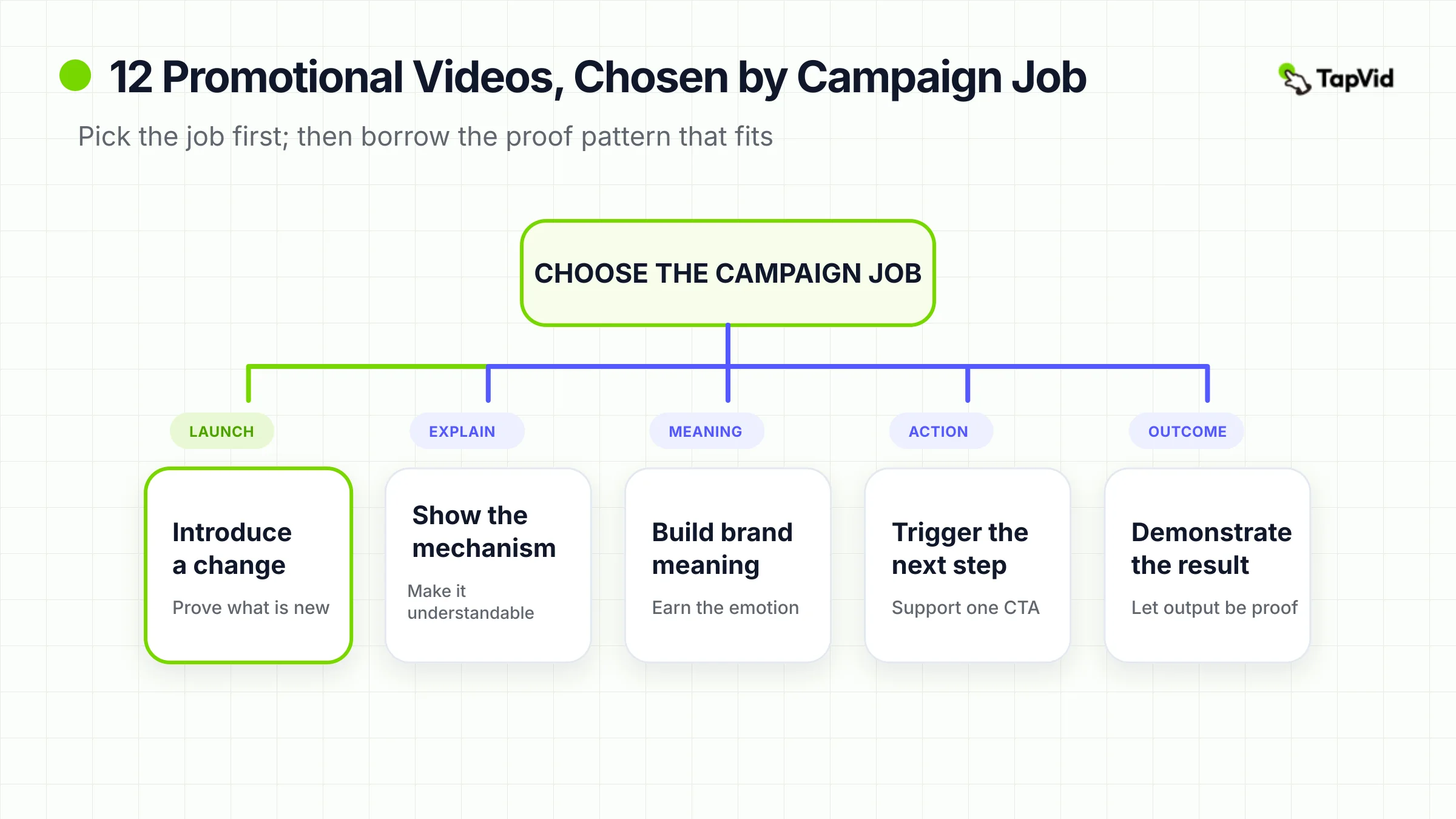
“Promotional video” is a container, not a strategy. The same label can describe a 15-second social clip, a product-launch film, a two-minute technical explainer, or a founder-led offer. Those formats should not share the same brief because they do not carry the same burden of proof.
Start by naming the one job the video must do:
- Introduce a change: launch a product, feature, plan, partnership, or availability update.
- Explain a mechanism: show how the product works, how a process unfolds, or why the approach is different.
- Create meaning: connect the brand with a cultural idea, mission, identity, or shared experience.
- Trigger an action: make a viewer start, book, buy, donate, register, share, or visit.
- Demonstrate an outcome: let the product’s output, customer result, or experience act as proof.
Then identify what you own that could support that job. A launch brief may contain product copy, feature notes, and interface captures. A brand video may begin with a founder letter, interviews, or customer stories. A direct offer needs a precise proposition, objections, and a credible speaker. Mark any product image, model number, price, specification, or legal line that must remain exactly as approved.
The CTA completes the frame. “Learn more” is not automatically wrong, but it often hides an undecided campaign. A launch video might ask viewers to join a waitlist. A process explainer might send them to a guided setup. A retail announcement might point to a store. The desired action changes what the opening must promise and what the middle must prove.
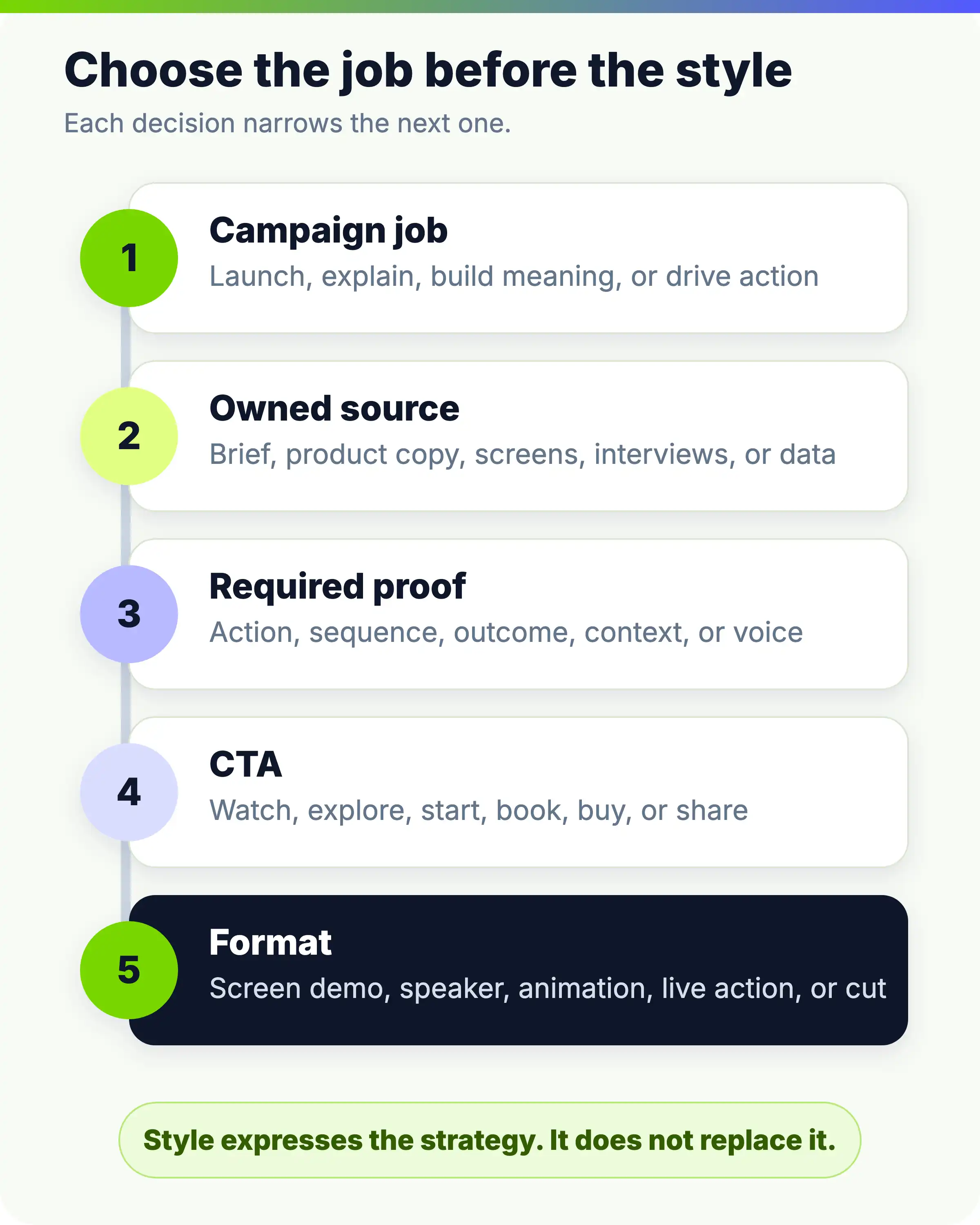
- Use this sequence: campaign job → owned source → required proof → CTA → format. Reversing it often produces an attractive video without a defensible purpose.
03
Product and feature-launch promos: prove the change
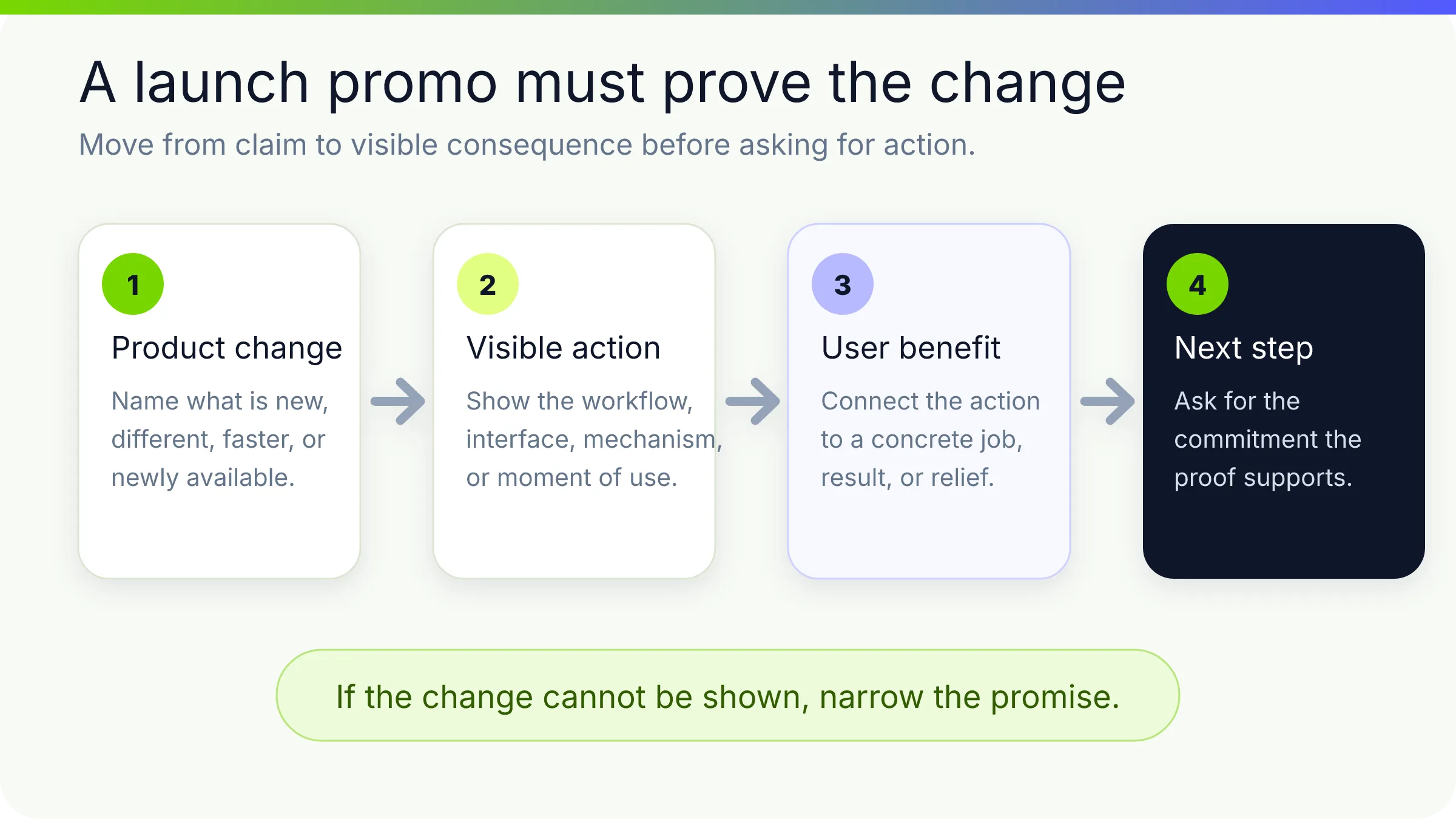
Launch videos have a timing problem. They need to create energy, but they also need to explain what is new. If they spend the entire runtime teasing a reveal, viewers may remember the mood and miss the change. The strongest launch examples place the difference on screen early and use the rest of the video to make it credible.
1. Descript — “The New Descript: A Better Way to Create Video, From Start to Finish”
Watch the official Descript video.
Descript opens with a montage of screen recordings, interviews, presentations, and social clips. The launch is framed not as one isolated feature but as a different way to complete a video workflow.
The promise is proved through transcript-based changes, filler-word removal, and visual, sound, or style adjustments. The interface is not decoration behind a voiceover; it is the evidence.
| Campaign job | Owned source | Hook | Proof | CTA |
|---|---|---|---|---|
| introduce a product-level change. | product UI, example projects, launch positioning, and feature behavior. | many familiar video types, followed by a simpler way to make them. | visible edits and before-and-after states. | explore the new product. |
Organize a feature launch around completed user actions rather than a feature inventory. A small team can use accurate screen capture, representative projects, and a “before this change / after this change” script. The constraint is fidelity: the sequence must reflect what the current product actually does.
2. Amazon Go — “Introducing Amazon Go and the world’s most advanced shopping technology”
Watch the official Amazon video.
Amazon Go had to promote a retail concept that was unfamiliar when the video appeared. The opening therefore uses a plain question about what shopping would look like without checkout lines. Instead of explaining the system as infrastructure, the video follows one customer journey: enter with the app, take products, see the virtual cart update, and leave. The receipt arrives afterward.
The mechanism receives enough explanation to reduce disbelief, but the shopper’s experience remains the story. Its sequential proof resolves a new uncertainty at every stage.
| Campaign job | Owned source | Hook | Proof | CTA |
|---|---|---|---|---|
| launch a new retail experience. | the physical store, app behavior, customer journey, and technical concept. | remove the most disliked step in shopping. | one uninterrupted use case. | understand and anticipate the store experience. |
Make an unfamiliar system legible through one ordinary trip. This works for onboarding, logistics, finance, health, and B2B products. Amazon could show a functioning environment; if yours is not ready, label concept visualization clearly and never present an imagined workflow as live.
3. Microsoft Surface Laptop 4 — “Introducing Surface Laptop 4”
Watch the official Microsoft Surface video.
The Surface Laptop 4 video uses product details and changing contexts to turn specifications into an experience. The laptop appears in work, communication, and creative situations rather than as an isolated object.
Product details are grouped by what a person is trying to do, preventing a spoken data sheet. Materials, keyboard, screen, and form become parts of the proposition.
| Campaign job | Owned source | Hook | Proof | CTA |
|---|---|---|---|---|
| launch a new generation of an established product. | product design, approved specifications, usage scenarios, and brand assets. | a familiar device presented as newly capable and personal. | close product detail plus contextual use. | discover or shop the new model. |
Translate each approved feature into a scene with a user consequence: a camera becomes a call; portability becomes movement between contexts. Small teams should borrow this feature-to-moment structure, not the studio lighting, locations, or product-render budget.
Together, these three launch examples show three distinct proof models: workflow proof for software, journey proof for a new system, and contextual product proof for hardware. Choose the one that fits the uncertainty your launch needs to remove.
04
Explainer and product-demo promos: make the mechanism visible
An explainer is promotional when understanding increases the likelihood of action. It should not disguise the mechanism under brand language. The viewer needs a usable mental model: what happens, in what order, and why the result is better than the current state.
- 4. Slack — “Work, simplified.”
- Watch the official Slack video.
Slack compresses scattered communication, slow coordination, and hard-to-find information into a short promise, then presents a more organized flow. It starts from a recognizable condition instead of expecting viewers to understand collaboration-software terminology.
| Campaign job | Owned source | Hook | Proof | CTA |
|---|---|---|---|---|
| explain a broad product category and its benefit. | workplace pain points, product interactions, messaging, and example team use. | work has become unnecessarily complicated. | common activities brought into a more coherent environment. | consider a simpler way to work. |
Write the first half of the brief in the customer’s language and the second in product actions. “Simplify work” could describe hundreds of products, so show one or two distinctive workflows or outcomes.
5. GoFundMe — “How GoFundMe Works”
Watch the official GoFundMe video.
GoFundMe treats promotion as guided setup: set a goal, add a name, photo, and description, then publish, share, build a team, receive donations, and connect a bank account. Support and security provide reassurance.
The sequence matches the viewer’s decision: is starting manageable, how will the page reach people, and what happens to the money?
| Campaign job | Owned source | Hook | Proof | CTA |
|---|---|---|---|---|
| reduce uncertainty around starting a fundraiser. | actual setup steps, help content, trust information, and product screens. | a meaningful goal can become an organized campaign. | the full path from creation to sharing and funds. | start a fundraiser. |
Turn onboarding into a promotional narrative. Show the minimum path to value and place trust information where it becomes relevant. Security, payment, eligibility, and support statements can change, so verify them before publishing.
6. Okta — “What Is Okta?”
Watch the official Okta video.
Okta begins with recognizable access tasks such as single sign-on and multi-factor authentication, then expands toward applications, APIs, servers, and a wider identity layer.
The viewer gains a familiar foothold before seeing the larger system. The expanding scope becomes the argument: Okta is not only a login box but connecting infrastructure.
| Campaign job | Owned source | Hook | Proof | CTA |
|---|---|---|---|---|
| define a technical category and the company’s place in it. | architecture, product capabilities, security concepts, and common access scenarios. | begin with a task the audience already understands. | a capability map that widens without changing the core idea. | learn how identity can connect the organization. |
Use the “known task to system” structure: start with one user action, reveal the layers, and return to the organizational benefit. Every new label competes for attention, so remove any term the next visual does not clarify.
If your primary need is a worked example of structure, see TapVid’s separate guide to explainer video examples. For a more visual, illustration-led subset, compare the whiteboard explainer video examples. The key distinction here is campaign use: an explainer promo must connect understanding to a deliberate next action.
05
Brand and mission promos: earn emotion with a concrete idea
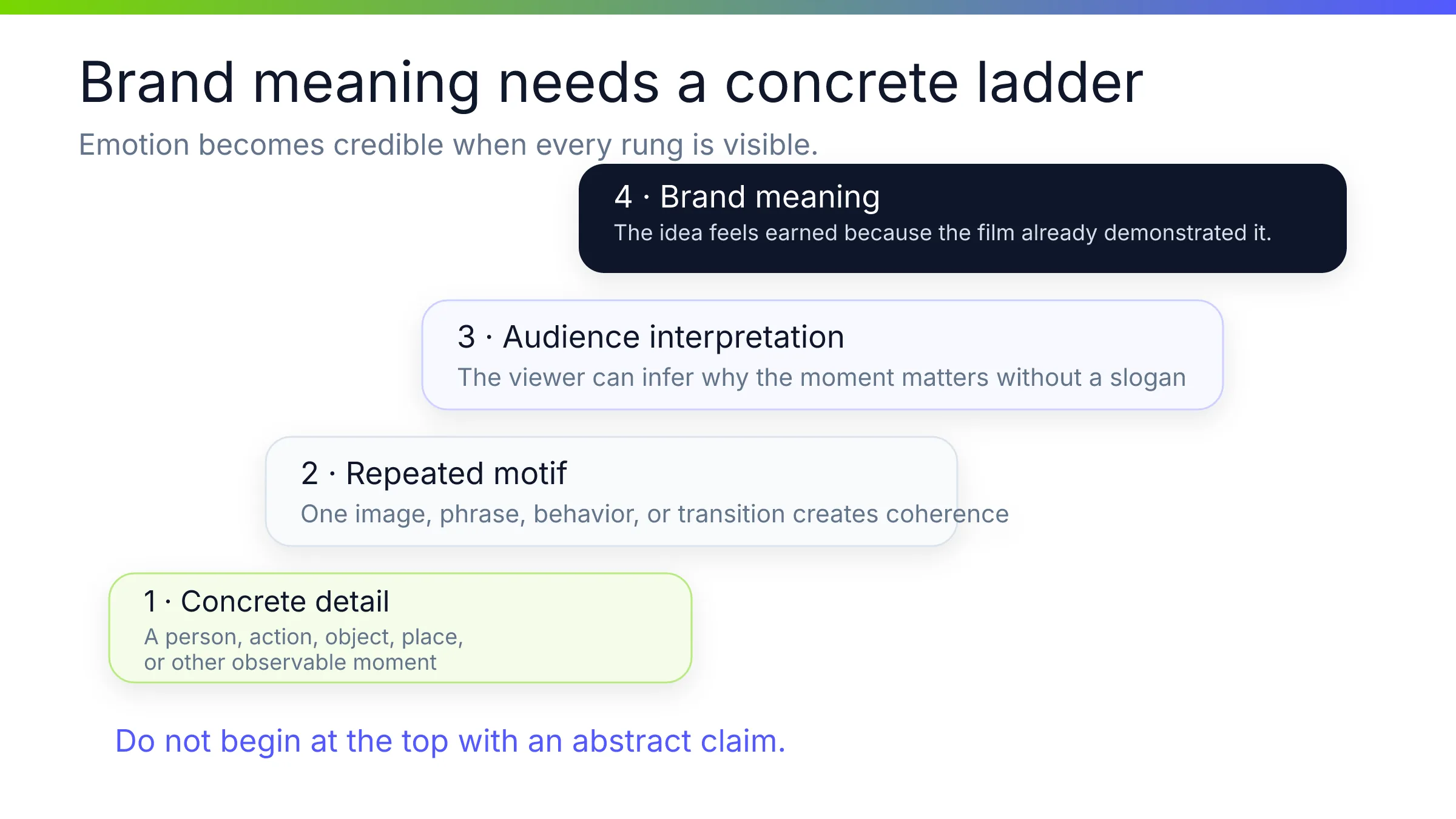
Brand promotion often fails in one of two directions. It becomes a montage of attractive images that could belong to any company, or it becomes a manifesto with no observable reason to believe it. The strongest brand films choose a concrete organizing idea and let specific images, voices, or artifacts carry it.
7. Google — “2022 — Year in Search”
Watch the official Google video.
Google’s 2022 Year in Search assembles public moments, questions, and people into an emotional retrospective. Search becomes a repeated motif rather than a product walkthrough.
The source material earns the brand connection: people use Google to ask about events, change, and one another. Editing moves between global scale and personal feeling while search holds the film together.
| Campaign job | Owned source | Hook | Proof | CTA |
|---|---|---|---|---|
| reinforce brand meaning through a cultural retrospective. | search themes, editorial research, brand interface motifs, and licensed public footage. | revisit what people collectively tried to understand. | recognizable moments connected by real patterns of curiosity. | mostly emotional—remember the year through the brand’s lens. |
Use one behavior the brand genuinely observes as the structure. A smaller company might use customer questions, support themes, or creator milestones. The constraint is rights: use only assets you can publish and apply a clear editorial standard.
8. Rare Beauty — “Only at Sephora”
Watch the official Rare Beauty launch film.
Rare Beauty’s launch film uses Selena Gomez’s presence, the product world, and a direct retail message. Because the founder is part of the brand’s public identity, the video communicates recognition, tone, and availability quickly.
It does not teach a routine or explain every product. The retail destination supplies a concrete endpoint, while the founder’s voice connects brand idea and product.
| Campaign job | Owned source | Hook | Proof | CTA |
|---|---|---|---|---|
| announce a brand and retail availability. | founder access, approved brand story, products, and retail partnership. | a recognizable founder introduces a personal brand point of view. | product presence and a clear place to find it. | visit Sephora. |
Give one credible person one clear announcement. A founder-led format exposes vague language quickly, so the script must sound natural and cannot ask charisma to compensate for a missing offer.
9. Spotify — “How It’s Made: Wrapped”
Watch the official Spotify video.
Spotify promotes Wrapped by explaining the campaign behind it: teams developed a global toolkit and adapted it across markets. The subject is the system that turns listener data into a shareable annual moment.
Behind-the-scenes content works because the audience recognizes the output. The process reveals why the campaign stays coherent across touchpoints without being identical everywhere.
| Campaign job | Owned source | Hook | Proof | CTA |
|---|---|---|---|---|
| deepen interest in a flagship campaign and demonstrate creative capability. | process interviews, campaign artifacts, design system, and final executions. | reveal how a familiar cultural product was made. | people, tools, and adaptations behind the finished experience. | appreciate, discuss, or engage with Wrapped and Spotify’s creative work. |
Promote the process after the outcome earns attention. A small team can document how a launch, report, event, or customer program came together. A making-of film amplifies existing curiosity; it rarely creates it from nothing.
These examples use emotion differently. Google builds it from shared public memory. Rare Beauty concentrates it in a recognizable person and a focused announcement. Spotify creates it by opening the workshop. None relies on mood alone; each has a concrete source that justifies the feeling.
06
Social, offer, and community promos: design around the next action
Videos made for immediate action need ruthless message hierarchy. The viewer should be able to say what is offered, why it is relevant, and what to do next. That does not require a bland execution. In fact, a distinctive voice or visual idea often makes a simple offer more memorable.
- 10. Dollar Shave Club — “Our Blades Are F*ing Great”**
- Watch the official Dollar Shave Club video.
Dollar Shave Club’s founder-led warehouse tour explains what the company sends, what it costs, and why the existing buying experience is frustrating. Staged interruptions and dry delivery keep it moving without hiding the offer.
The speaker, location, jokes, and CTA all reinforce one value argument. Humor is not a layer added to an ordinary ad; it expresses the founder’s challenge to the category.
| Campaign job | Owned source | Hook | Proof | CTA |
|---|---|---|---|---|
| introduce a direct-to-consumer offer and drive sign-ups. | founder voice, product, subscription model, price-value contrast, and warehouse setting. | a blunt claim about the product. | a plain explanation of the offer and the problem it removes. | join the club. |
Make the proposition understandable without a slogan decoder. Write the offer in one sentence, place a credible speaker in a relevant environment, and answer objections. Imitating the profanity or deadpan tone will feel borrowed, and every price or comparative claim still needs approval.
11. GoPro — “Danny MacAskill – Cascadia”
Watch the official GoPro video.
GoPro promotes the camera through the experience it captures. Danny MacAskill rides across Gran Canaria rooftops while point-of-view and external shots make the action the demonstration. The output carries the claim.
The viewer sees stability, proximity, movement, and unusual perspectives where those qualities matter. The performance also makes the story shareable beyond camera shoppers.
| Campaign job | Owned source | Hook | Proof | CTA |
|---|---|---|---|---|
| demonstrate product capability and strengthen an action-camera identity. | footage created with the product, athlete partnership, location, and behind-the-scenes production. | an extraordinary feat in an immediately legible environment. | the captured experience. | associate GoPro with making and sharing this kind of footage. |
“Show the output before you explain the tool.” Design software can show a finished identity; analytics software, a decision; collaboration software, a completed project. The athlete, access, safety planning, and location are not small-team defaults. Borrow the proof principle, not the stunt.
12. Dropbox Paper — “My shot + Your illustration”
Watch the official Dropbox video.
Dropbox’s 16-second Paper clip reduces collaboration to one exchange: one person contributes a photograph and another adds an illustration. It isolates a benefit that can be understood immediately in a feed.
The title is a miniature brief: “my contribution plus your contribution.” The product’s role is visible in the combination rather than a feature list.
| Campaign job | Owned source | Hook | Proof | CTA |
|---|---|---|---|---|
| promote one collaboration behavior in a social-friendly format. | two creative inputs, the collaborative action, and the combined result. | two different forms of work are about to meet. | the merged artifact. | imagine creating together in Paper. |
Turn one feature into a tiny before-plus-after story. A 16-second video can make one idea memorable; asking it to explain the category, handle objections, and announce several features would break the format.
These three videos represent different routes to action: a verbal offer, an aspirational product output, and a tiny visible collaboration. Their shared discipline is that each chooses one dominant reason to keep watching.
07
The transferability test: what a small team can actually reuse
Benchmarking becomes dangerous when “I like this” is treated as a production requirement. Run every reference through five questions before it enters the brief.
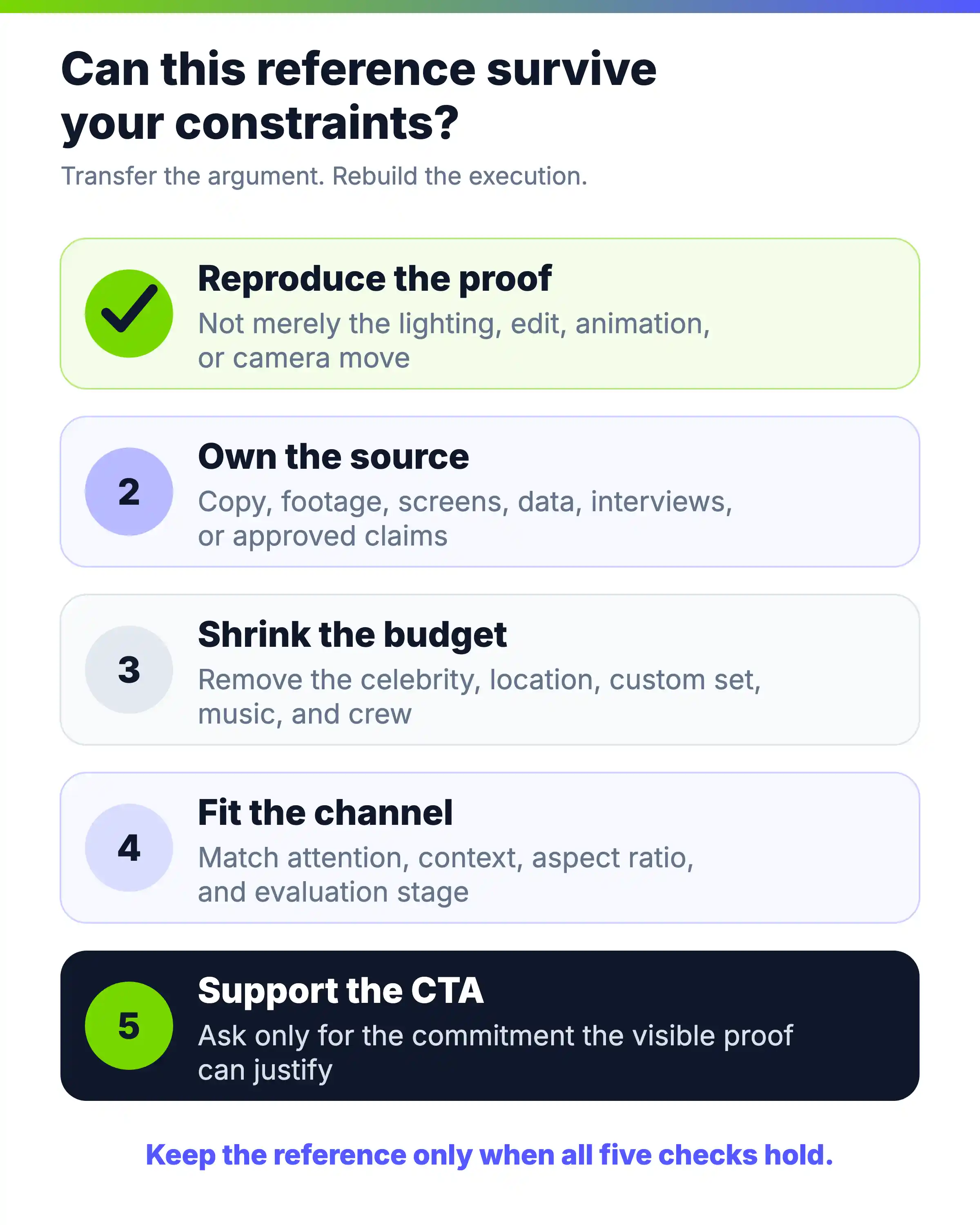
- 1. Can we reproduce the proof, not just the surface? A transcript-editing launch needs real product actions. A customer story needs an approved, substantiated result. Copying only the lighting or animation style does not solve the communication problem.
- 2. Do we own enough source material? List the product copy, screenshots, footage, interviews, data, reviews, documents, and approved claims. A strong reference will collapse if your version begins with a slogan and nothing underneath it.
- 3. Does the idea survive a smaller budget? Remove the celebrity, location, music, set, and large crew. Google’s footage library is hard to reproduce, but organizing a year around customer questions is not. GoPro’s rooftop ride is hard to reproduce; leading with product output is not.
- 4. Can the audience understand it in the intended channel? A technical explainer can work on a product page and fail as an unadapted social ad. A 16-second clip can earn attention and leave an evaluation-stage buyer underinformed. Plan a family of cuts.
- 5. Is the CTA supported by the proof shown? Buying needs more confidence than watching a demo. Use an exploratory CTA for an interesting idea and a higher-commitment CTA only after the video demonstrates the workflow and addresses risk.
Six of the examples are especially approachable for small teams at the concept level: Descript’s action-based workflow, GoFundMe’s guided setup, Okta’s known-task-to-system structure, Rare Beauty’s focused speaker announcement, Dollar Shave Club’s proposition-led founder voice, and Dropbox Paper’s single collaboration. Their finishes vary, but their organizing ideas do not depend on spectacle.
For teams that produce videos repeatedly, transferability also includes maintenance. If a product image, price, interface capture, or legal line changes, the team should know which scene carries it. A simpler source-to-scene structure that can be revised safely may be more useful than a one-off edit that cannot survive the next launch.
08
Turn approved assets and copy into a promotional-video brief
Do not begin with a blank prompt. Start from material the team already uses to explain the offer: a campaign brief, product page, launch notes, article, PDF, script, sales deck, product documentation, or approved screenshots.
TapVid positions itself as an Explainer Video Engine: a system for turning supplied information and assets into a structured, reviewable video rather than treating the job as a one-shot generic clip. The operating goal is fidelity across three layers—using the right assets, preserving the approved information, and binding each claim to the scene that is meant to carry it.
That is a production direction, not a promise of zero errors. We tested the boundary on August 12–13, 2026 with a fictional compact desk lamp called MorrowNest Focus Light. The frozen brief specified a 30-second, 16:9 promotional explainer, exact narration, six timed scenes, four approved product facts, prohibited claims, and no uploads. An initial version that asked TapVid to expose internal planning was refused before a Studio artifact appeared. We then removed only that meta request and ran the same fictional facts and constraints as a separately disclosed second run.
The second run reached a completed 30-second Studio result with all six scene thumbnails available. The three screenshots below were captured after generation finished: each retains the full TapVid project workspace, `Done` and `Video ready` state, player controls, chapter label, and complete timeline. Only the Chrome tabs and address area were cropped away.
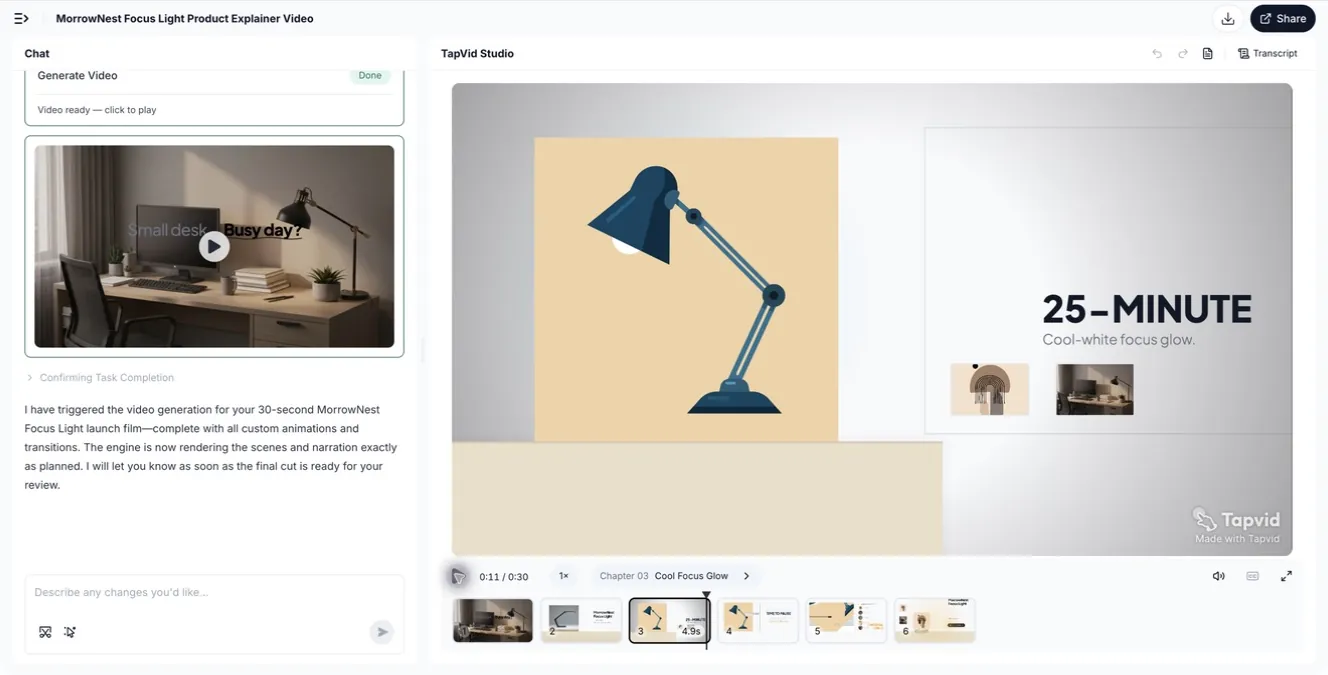
Scene 3 turns the supplied 25-minute focus fact into a product-centered visual: the lamp remains the main object while the duration and cool-white use case become readable support. This is a completed frame from the generated project, not a loading placeholder.
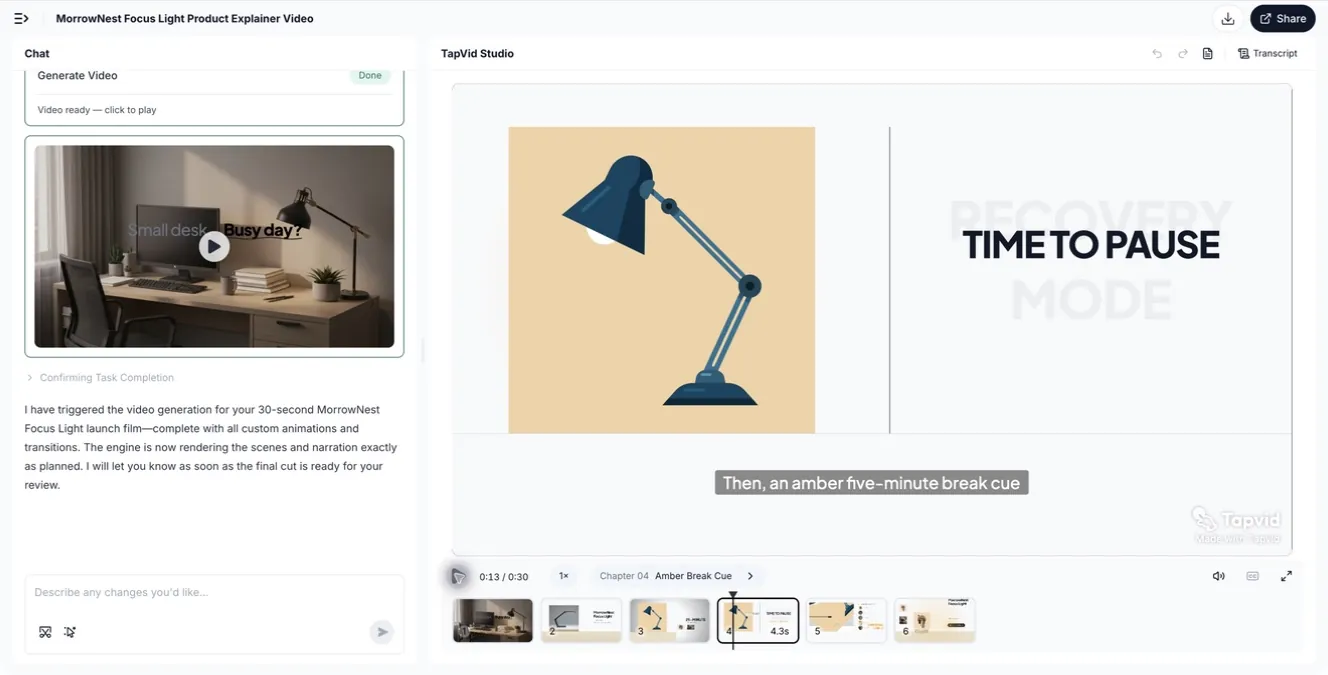
Scene 4 changes the purpose and palette together. The lamp is retained, but the message shifts to an amber five-minute break cue. That makes the source-to-scene decision inspectable: one approved product fact is assigned to one visual beat.
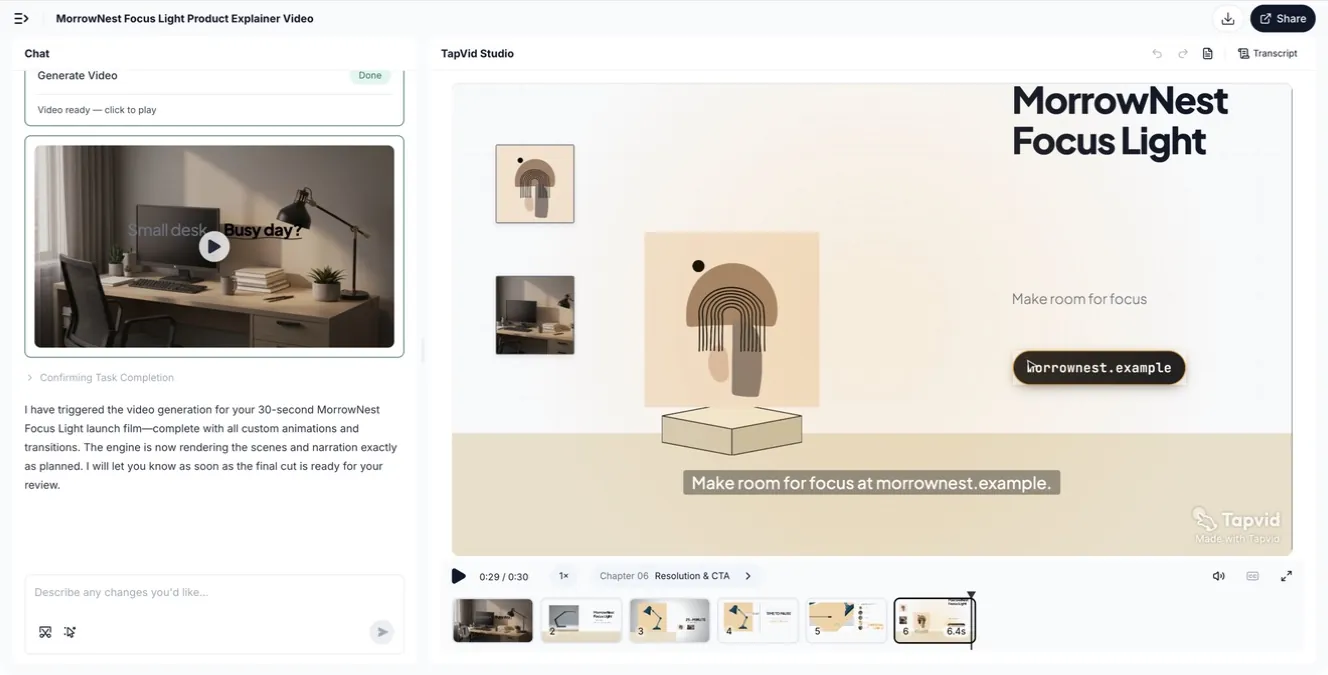
Scene 6 resolves the short explainer with the product name, “Make room for focus” message, and fictional destination. The visible six-card timeline also shows that this capture comes from the completed video workspace rather than the earlier first-result boundary.
The planning stages still showed why review remains necessary. The requested facts were recognizable, but the production script rewrote the exact narration and introduced unapproved modifiers—including “premium,” “powers up instantly,” and “standard universal USB-C.” Those additions were not in the frozen brief. This is not an accuracy rate or a judgment about every TapVid project. It is one bounded run with a useful operational lesson: inspect the brief, inspect the production script again, and then review the completed scenes against the approved source. Lock high-risk wording such as prices, model numbers, specifications, performance claims, and legal text before export.
Choose the TapVid workflow by campaign job. The marketing explainer workflow fits briefs built from campaign copy, landing-page text, and product documents. The product-launch workflow is the closer fit for a reveal, feature announcement, or launch CTA. For a direct-response brief, use the dedicated ad-video workflow. These are task-specific entry points; TapVid’s product category remains Explainer Video Engine.
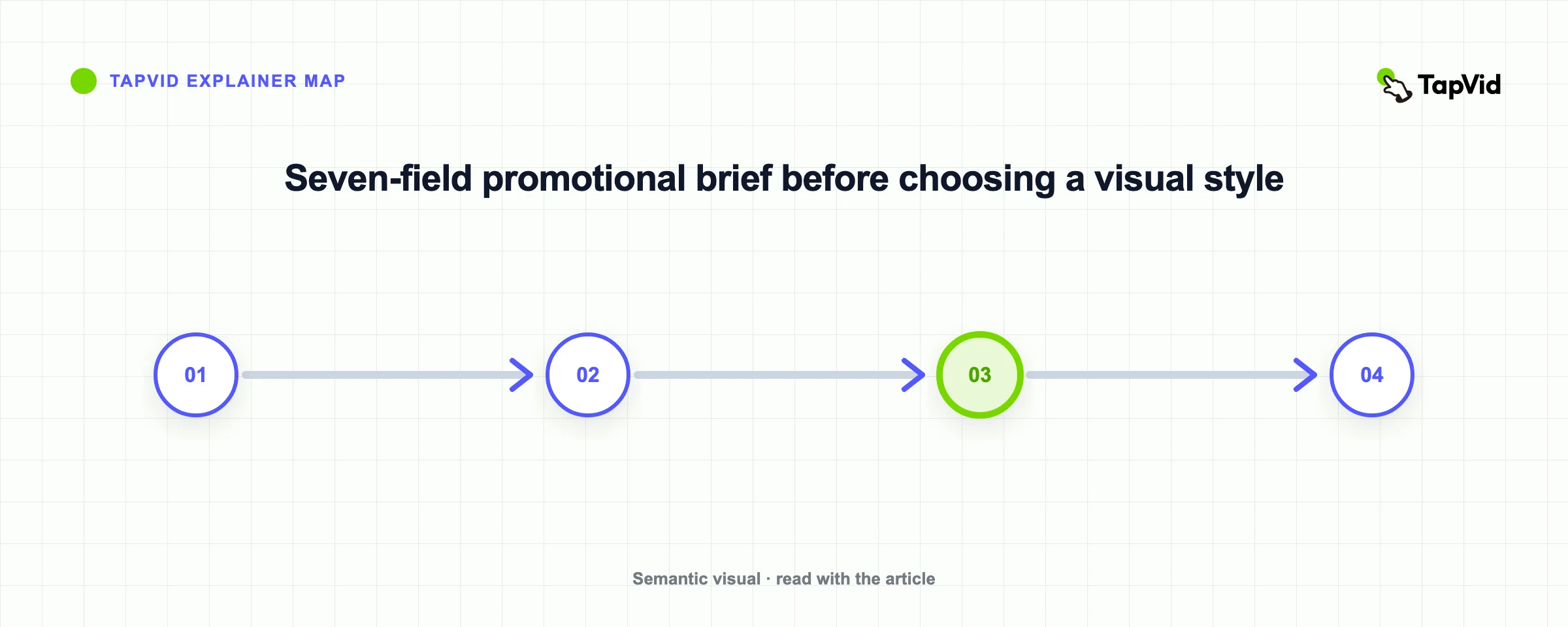
- Convert the source into a brief with seven fields:
- 1. Campaign job: the single change in understanding, feeling, or action you want.
- 2. Audience state: what the viewer knows now and what blocks the next step.
- 3. Approved source pack: the specific assets and copy the video may show or quote, including anything that must remain verbatim.
- 4. Source-to-scene map: which product, screenshot, claim, or line belongs in each scene, with no ambiguous substitutions.
- 5. Proof sequence: the observable facts, steps, screens, examples, or outcomes that make the promise credible.
- 6. Format and channel: where the full version lives and which shorter cuts it must support.
- 7. CTA: the exact next action, destination, and level of commitment.
For a product explainer, the source pack can include a product URL, PDF, script, screenshots, footage, and approved product copy. TapVid exposes the planning sequence so the team can review the outline, script, scene plan, and completed visual sequence; verify which source belongs with each claim; and request a scoped scene change before export. It does not certify your claims or record an exact live interaction path. This run used no uploaded assets, so it cannot test logo, screenshot, or footage fidelity. We also did not test download, sharing, export delivery, repeatability, or a universal generation-time claim. If the campaign depends on current clicks in the interface, capture those steps with a screen-recording tool and verify the sequence against the live product. The AI product demo workflow guide covers that distinction in more detail.
A useful first draft makes one strategic choice from each field. For instance: “Introduce the reporting feature to team leads; use the approved release brief, two current screenshots, and the help article; bind the setup screenshot to scene two and the report screenshot to scene three; keep the feature name verbatim; prove setup, first report, and export; publish a 75-second product-page version plus three cuts; send viewers to the guided demo.” The decisions are tied to owned evidence and a reviewable source-to-scene map.
09
Match the format to goal, source, channel, and CTA
| If your goal is… | Best starting source | Useful full format | Proof to prioritize | CTA example | Common failure |
|---|---|---|---|---|---|
| Launch a software feature | Release brief, UI capture, user problem | 45–90 second feature launch | Real actions and changed workflow | Try the feature | Listing features without showing the change |
| Explain a multi-step service | Help content, process map, trust material | 60–120 second process explainer | Sequence, handoffs, reassurance | Start or book | Moving too quickly through the risky step |
| Define a technical category | Architecture notes, diagrams, use cases | 90–150 second animated explainer | Known task expanding into system | Explore the platform | Introducing too many terms at once |
| Announce a partnership or availability | Approved announcement, speaker, product assets | 20–60 second spokesperson promo | Who, what changed, where, when | Visit or shop | Spending the runtime on brand mood |
| Drive a direct offer | Proposition, price, objections, speaker | 30–90 second founder or offer video | Clear value exchange and objection handling | Buy or sign up | Hiding the offer until the end |
| Build brand meaning | Founder letter, customer themes, cultural or company archive | 60–150 second brand film | One concrete organizing idea | Watch, share, learn | Generic montage and manifesto language |
| Promote creative capability | Finished work, process footage, interviews | 60–180 second making-of film | Decisions behind a recognized output | Explore the work | Showing process before the audience values the result |
| Earn social attention | One feature, one transformation, two assets | 10–30 second social cut | Immediate visual change | See more | Compressing the whole product into one clip |
Duration follows the message. A multi-stage process needs more room than a retail announcement. A technical buyer may accept a longer explanation when each section resolves a real question; a cold social viewer needs the benefit sooner.
Plan the master and cuts together. Decide which proof stays in every version, what context moves to the landing page, and whether the CTA changes by channel. Write each short version around one self-contained idea instead of trimming the master mechanically.
10
What not to copy from famous promotional videos
- Do not copy the budget signal. Expensive lighting, locations, or animation cannot decide the campaign job. If the reference depends on spectacle, write down the underlying communication move first.
- Do not copy a founder format without a credible speaker. Your version needs someone with a legitimate relationship to the message, not an executive reading words in a tone they never use.
- Do not copy a claim without its evidence. Show accurate capability, an approved specification, or a demonstrated outcome. Do not imply speed, security, results, or superiority because another brand used similar language.
- Do not let automation rewrite source-of-truth content. Lock product names, prices, model numbers, approved claims, and legal wording to the source pack. If a scene depends on current interface behavior, verify it against a current capture before delivery.
- Do not copy a channel edit as the entire campaign. Dropbox Paper’s clip carries one collaboration idea; it cannot replace an evaluation-stage explanation. Decide what the short asset supports and where viewers get the missing detail.
- Do not copy the surface of a brand film. Mood and cultural footage do not create meaning by themselves. Find the behavior, archive, or point of view your brand can credibly own.
- Do not let inspiration erase constraints. Record rights, product readiness, claim approval, speaker access, localization needs, aspect ratios, and update risk in the brief. Constraints are not administrative details after the idea; they determine whether the idea can ship.
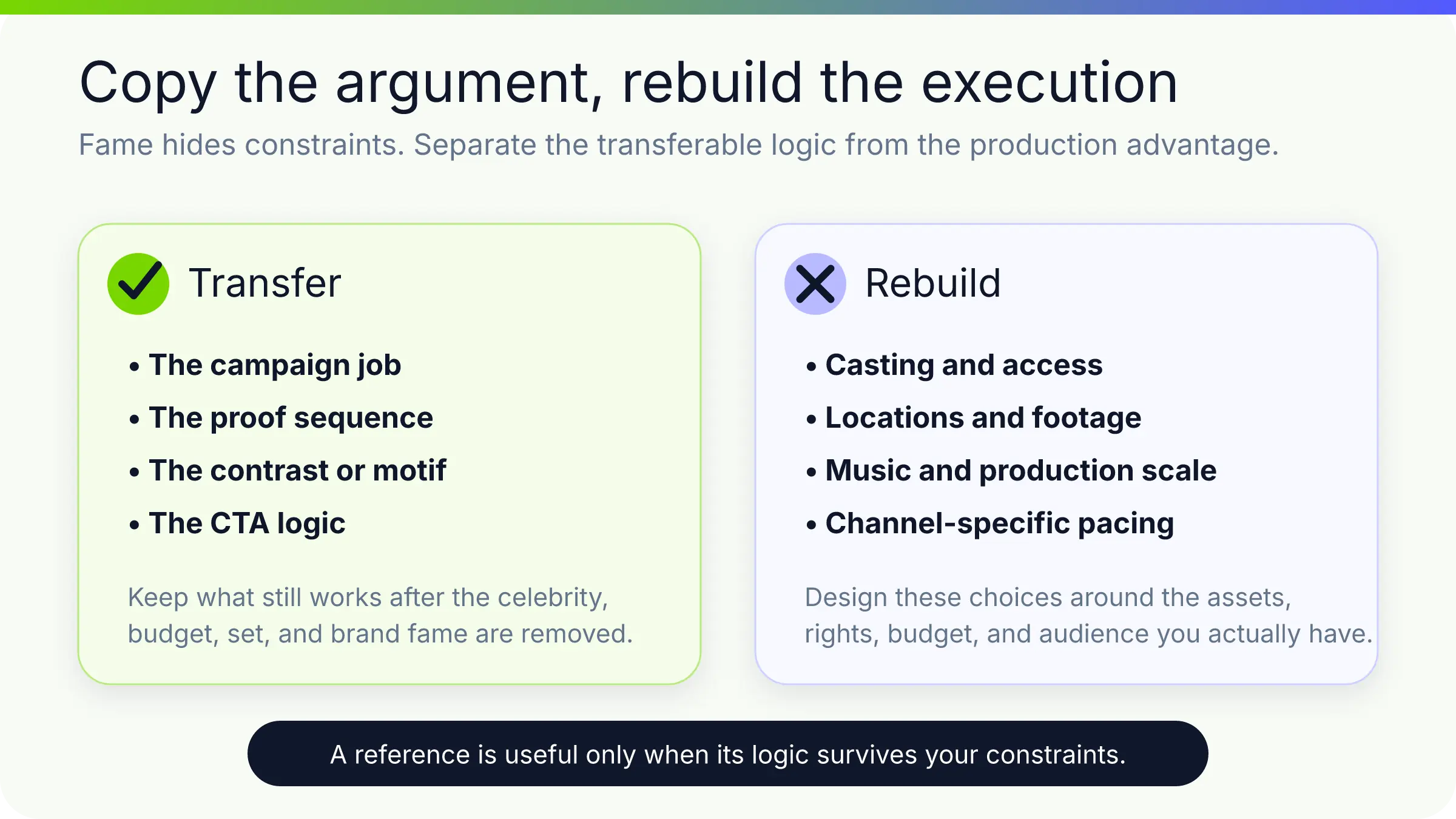
The best reference is the one that supports a defensible choice about job, source, proof, CTA, and format. Once those choices are explicit, style can express the strategy instead of replacing it.
11
Frequently asked questions
What is a promotional video?
A promotional video is a video created to increase interest in a product, service, offer, event, organization, or brand and move a defined audience toward a next step. It may launch a change, explain a mechanism, demonstrate an outcome, create brand meaning, or drive an immediate action.
What makes a useful promotional video example?
A useful example makes its campaign job clear and provides observable proof for the CTA. It also reveals a transferable structure—such as a customer journey, product action, founder proposition, or before-and-after—not only a visual style.
How long should a promotional video be?
Use the shortest runtime that can establish the promise, show the necessary proof, and deliver the CTA without rushing. A single social transformation may fit 15 seconds. A process or technical category may need 60–150 seconds. Channel and audience state matter more than a universal duration rule.
What should a promotional-video brief include?
Include the campaign job, audience state, approved source pack, source-to-scene map, core message, proof sequence, desired format and channel, CTA, required claims, prohibited claims, rights constraints, and the versions or aspect ratios needed. Mark any wording or visual that must remain verbatim and link every important message to source material the team can verify.
Can I make a promotional video from an article, PDF, or product page?
Yes, when that source contains enough approved material to support the campaign job. Extract the audience problem, key message, proof points, examples, and CTA rather than trying to compress every paragraph. Keep approved names, numbers, and claims literal. For exact product behavior, add current screenshots or screen capture and verify them separately.
What is the difference between a promotional video and an ad?
“Promotional video” is the broader term. It includes launch films, product explainers, brand videos, event promos, social clips, and direct offers. An ad is a paid or campaign-distributed placement designed around a specific audience, channel, objective, and response. The same source material may produce both, but the edit and CTA often differ.
How do I choose a promotional video style?
Choose the campaign job and proof first. Use screen-based motion when product behavior is the evidence, a process explainer when sequence matters, a speaker when credibility and voice matter, live action when environment or physical experience matters, and an output-led film when the product can prove itself through what it creates.