
TL;DR
A useful website promo video should not redraw the product or rewrite approved claims. Lock asset fidelity, information fidelity, and claim-to-scene correspondence before storyboarding; then map the source into hook, problem, mechanism, proof, and action. Plan a focused 30–60 second master and create separate hero, launch, and social cuts when the opening or CTA changes.
A useful website promo video is a short decision path built from material your team already trusts: approved copy, original product assets, one mechanism, one proof point, and one call to action.
Turn your landing-page copy into a structured promo with TapVid
01
Start with the action the video must earn
“Make a video for our website” sounds like a production request, but it is missing the decision that controls the production. What should a viewer do after watching?
The answer might be “understand the product well enough to keep reading,” “start a free trial,” “join a waitlist,” or “watch a detailed demo.” Pick one. If the page has three primary actions, the video will usually inherit all three and become a moving navigation menu.
- Write a one-line contract before you draft a script:
- After watching, [specific audience] should understand [one promise] and feel ready to [one action].
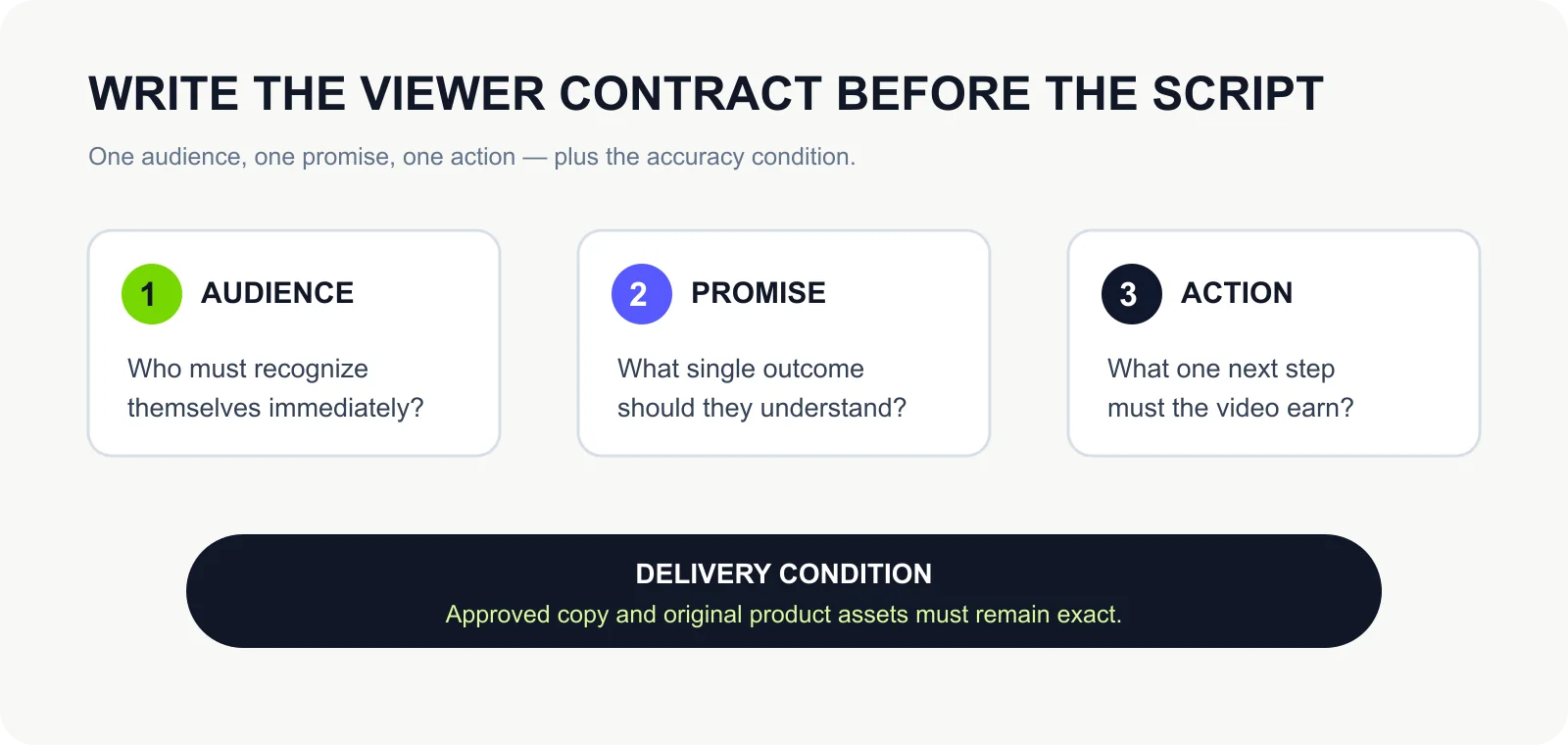
This contract gives you an editing rule. A feature, quote, animation, or UI clip stays only if it helps the viewer understand the promise or take the action. Everything else can remain on the page, where the visitor can inspect it at their own pace.
For a professional content team, agency, SaaS company, or merchant, there is a second contract: the result must be safe to deliver. If the script says Product A while the frame shows Product B, or a model number changes by one character, the video has failed even if the motion looks polished. Accuracy therefore comes before speed.
A promo is closer to a trailer than a compressed manual. Lemonlight makes the same distinction in its promo-video guide: the job is to create interest around one idea and point to a clear next step. That is especially important on a website, where the rest of the explanation is already one scroll or click away. If you meant a company story or trust profile, use the company profile video guide. If you wanted off-page campaign, offer, or CTA examples rather than a page embed, start with promotional video examples.
02
Decide whether you need a promo, demo, explainer, or launch video
| Format | Viewer starts with | Main job | Best evidence | Typical next action |
|---|---|---|---|---|
| Website promo | Low awareness or weak urgency | Make one promise memorable | One mechanism plus one proof point | Explore, sign up, or keep reading |
| Product demo | Interest in the product, uncertainty about how it works | Show a real workflow or result | Interface states, input, output, and boundaries | Try the workflow or book a demo |
| Explainer | Confusion about a product, idea, or process | Build understanding in a logical sequence | Diagram, example, comparison, or narrated mechanism | Continue learning or evaluate fit |
| Launch video | Awareness of a category or company, attention on a release moment | Announce what changed and why it matters now | New capability, reveal, or release-specific proof | Join, upgrade, share, or read release details |
These formats can use the same screenshots, copy, and product brief, but they solve different reader jobs. Choosing the format first prevents a familiar failure: a video that opens like an ad, becomes a tutorial, and ends with a company history.
Use a website promo when the page needs a concise front door. Use a demo when the viewer’s next question is “show me.” Use an explainer when the problem or mechanism needs more context. Use a launch video when timing and novelty are part of the message.
The boundary matters for SEO and for production. If you promise a “demo,” recognizable product behavior needs to be visible. If you promise a “promo,” you can be selective, but the video still needs enough mechanism and proof to avoid becoming a generic brand montage.
03
Lock what must stay exact before you storyboard
| Accuracy layer | What must remain true | What to review |
|---|---|---|
| Asset fidelity | The product image, logo, UI state, packaging, or supplied footage remains the source asset rather than a newly imagined substitute | Compare the input asset with the relevant output frame |
| Information fidelity | Approved wording, prices, model numbers, specifications, and legal text stay verbatim where exact wording matters | Compare on-screen copy and voiceover with the approved source |
| Correspondence | The visual shown at each moment matches the product, feature, or claim being discussed | Review the script and storyboard scene by scene |
Website promo production often starts with a creative question—what should the video look like? For a deliverable business video, start with a stricter question: what is not allowed to change?
The three checks catch different failures. A recognizable product shown under the wrong claim passes asset fidelity but fails correspondence. A correct scene paired with rewritten pricing fails information fidelity. Review all three before the storyboard becomes expensive to change.
Create a small source-of-truth package before generation. Give every product image or UI capture a clear filename. Mark copy that must remain verbatim. Pair each proof statement with the asset that can visibly support it. Record the one primary CTA and its destination.
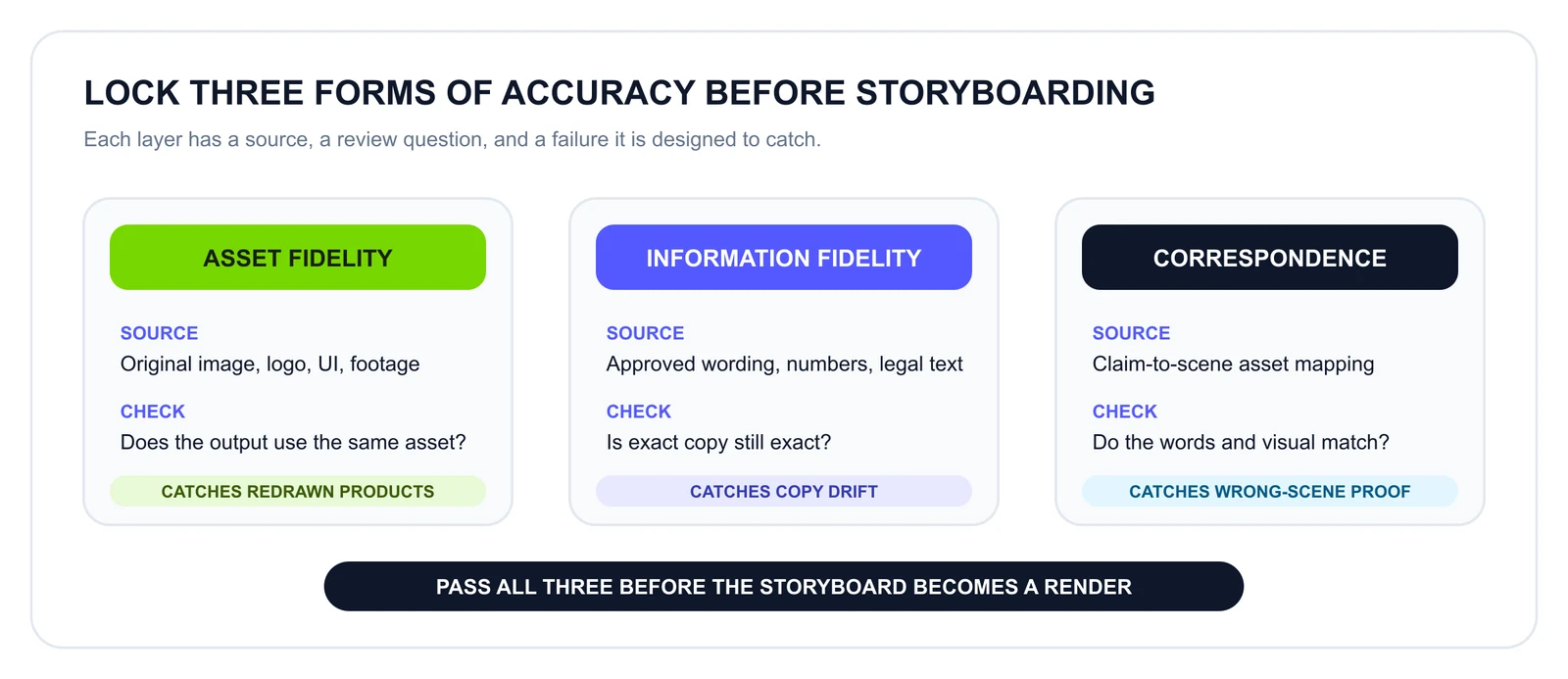
This is not a promise of zero errors. It is a review design: the team can see what must stay fixed, inspect the mapping before rendering, and rerun or correct a scene when something does not match.
04
Audit the landing page before you write the script
Do not feed the entire website into a script and hope the most important message survives. A landing page was designed for scanning: navigation, repeated CTAs, feature cards, testimonials, FAQs, and footer links can coexist because the reader chooses a path. Video is sequential. Every second arrives in an order you control.
Extract four source blocks instead:
| Source block | Question to answer | Good source material | What to leave behind |
|---|---|---|---|
| Promise | What changes for the viewer? | Hero value proposition or strongest outcome | Tagline that sounds good but says nothing specific |
| Mechanism | Why should the promise be believable? | One workflow, product behavior, or before/after relationship | Full feature inventory |
| Proof | What reduces doubt? | Observable result, approved customer evidence, or a bounded fact | Unsupported conversion claims and vague superlatives |
| Action | What should happen next? | Primary page CTA with the same destination as the video | Secondary navigation and competing CTAs |
Read the four blocks from left to right as a decision path, not as four equally sized page sections. The promise earns attention, the mechanism earns plausibility, the proof reduces doubt, and the action gives the sequence a destination. Anything that does not strengthen one of those jobs should remain available on the page.
Keep the wording source-bound. If the page cannot support a numerical claim, do not promote that claim into the video. If the product has several audiences, select the audience for this cut instead of addressing “teams, creators, founders, marketers, educators, and enterprises” in one breath.
Keep the accuracy lock beside these four message blocks. The promise and mechanism tell the story; the approved copy, original assets, and asset-to-scene mapping keep that story faithful to the source.
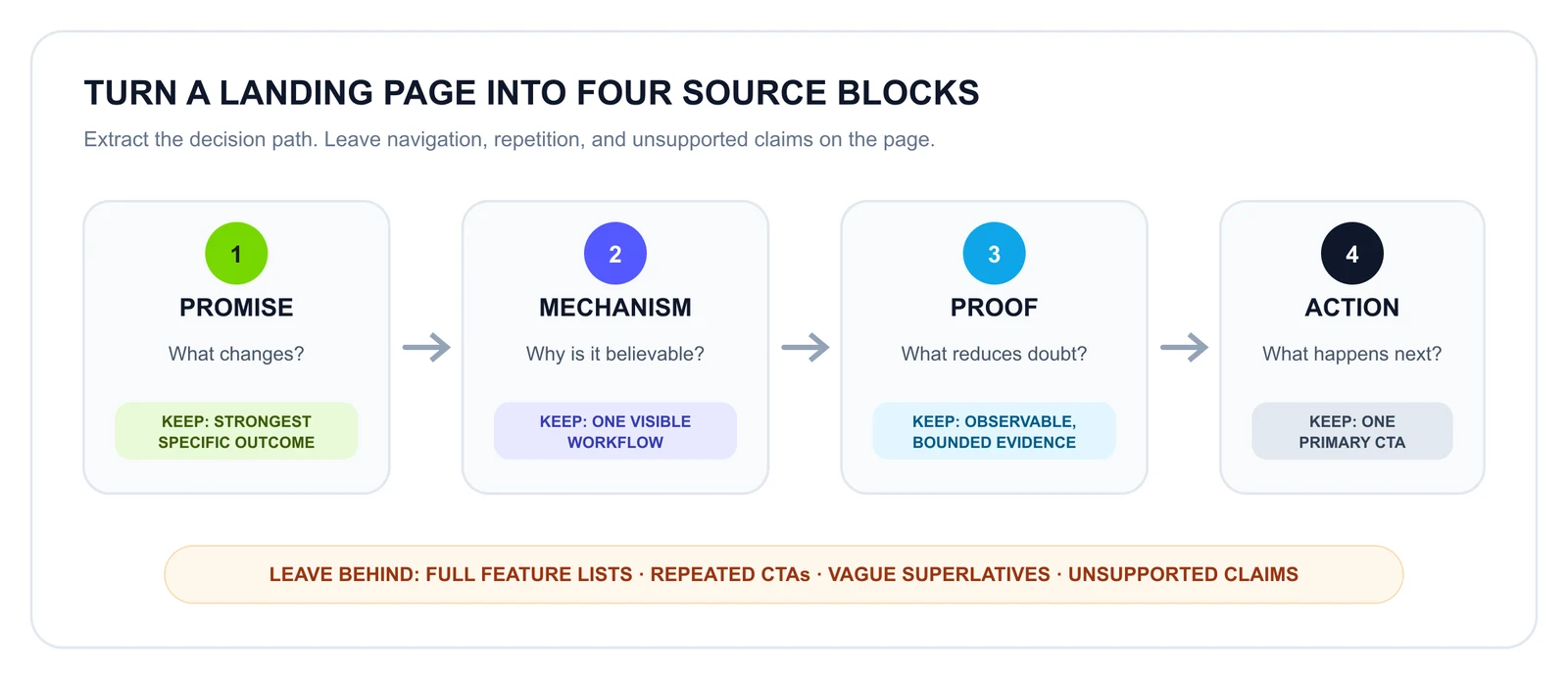
This audit also exposes when the page itself is not ready. If you cannot identify one promise or one primary action, a video will not repair the positioning. Fix the page contract first; then produce the video.
05
Turn the source into five visual beats
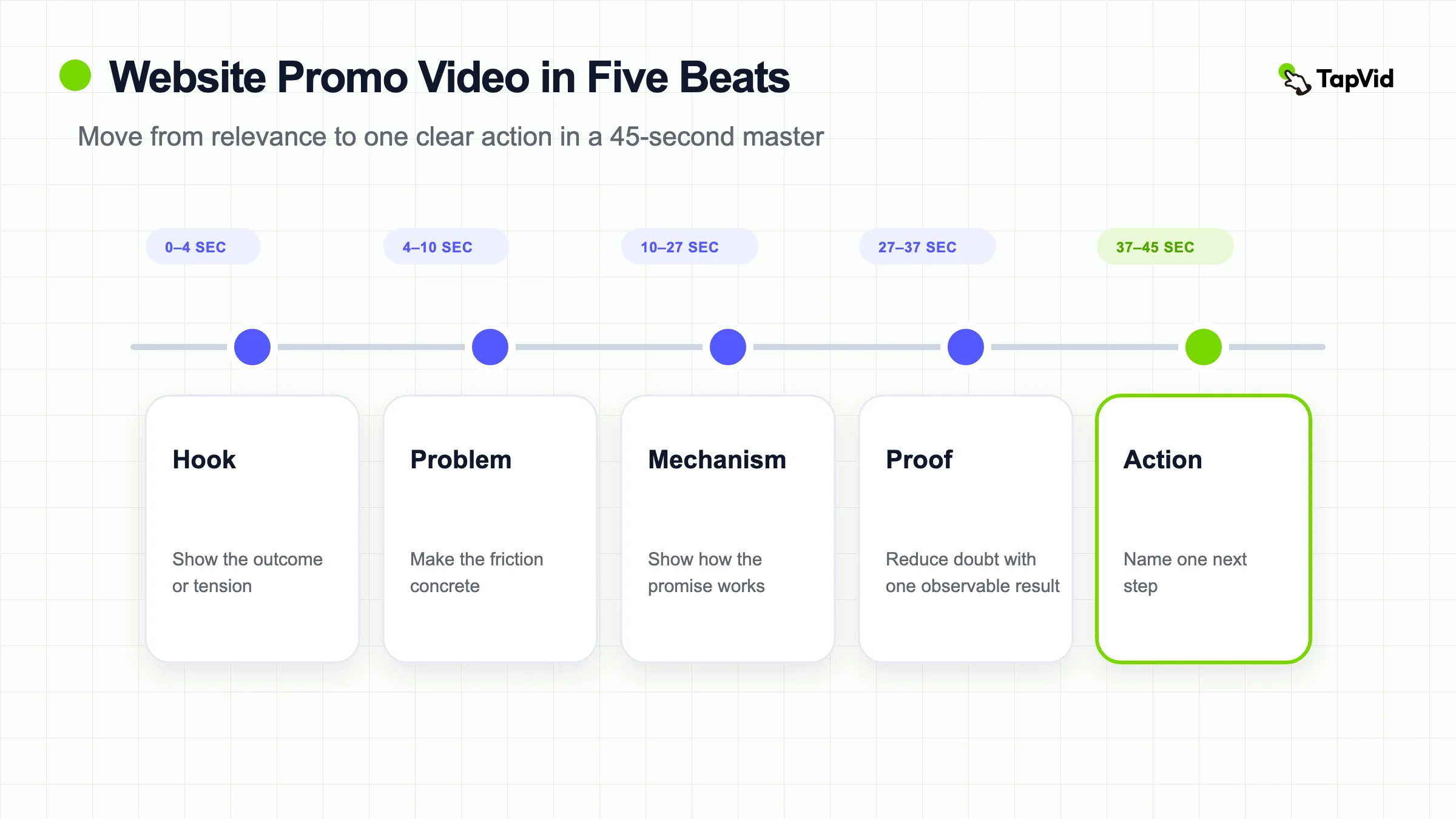
Once the four source blocks are clear, map them into five beats. The extra beat is the problem: it creates the contrast that makes the promise matter.
| Beat | Approximate window in a 45-second master | Viewer question | Visual job |
|---|---|---|---|
| Hook | 0–4 seconds | Is this for me? | Show the outcome, tension, or recognizable situation immediately |
| Problem | 4–10 seconds | Why should I care now? | Make the friction concrete without exaggerating it |
| Mechanism | 10–27 seconds | How does this work? | Show the smallest sequence that makes the promise credible |
| Proof | 27–37 seconds | Why should I believe it? | Present one observable result or properly sourced proof point |
| Action | 37–45 seconds | What do I do next? | Name one action and give the final frame enough time to register |
The windows are a planning device, not a universal timing law. A familiar product may need a two-second problem beat and more time on the interface. A new category may need a longer mechanism. What should remain stable is the decision order: relevance, tension, explanation, confidence, action.
Read the script aloud with the visuals hidden. If it sounds like a list of page headings, it is still a page summary. Then mute the narration and watch the storyboard. If the promise and action disappear, the visual plan depends too heavily on sound.
06
Design the first frame for silent and interrupted viewing
Website video does not live in a controlled screening room. It loads alongside copy, images, consent banners, navigation, and whatever else the visitor is doing. Autoplay behavior also varies. MDN’s video documentation notes that modern browsers generally block autoplay with audible audio, and its autoplay guide recommends a muted or no-audio path plus a poster fallback when autoplay is unavailable.
Treat the first frame as a complete unit:
- Show the product, outcome, or problem—not a long logo animation.
- Put the core promise in readable on-screen text if the visual alone is ambiguous.
- Design a poster that still makes sense when the video does not start.
- Keep critical text away from controls and responsive crop edges.
- Use captions for meaningful speech and audio. WCAG’s guidance for prerecorded captions explains that captions cover the speech and non-speech audio needed to understand synchronized media.
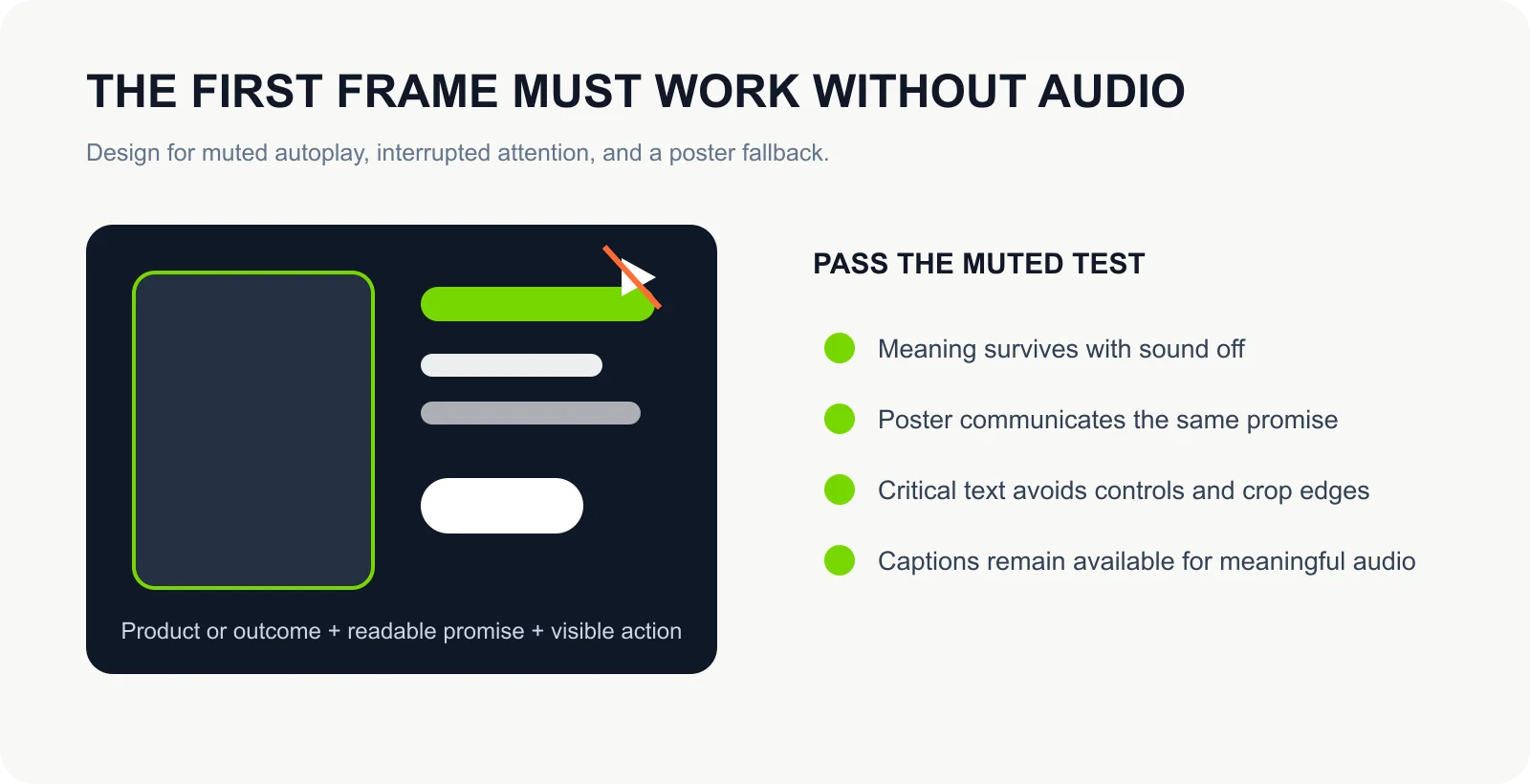
Silent-first does not mean “turn every spoken sentence into subtitles.” It means the meaning survives without audio. Use the voiceover for pacing and detail; use the frame for the promise, mechanism, and action.
Loading strategy is a separate decision. A hero video that must begin immediately has different performance trade-offs from a case-study video below the fold. MDN’s HTML performance guidance describes explicit preload choices and poster-based lazy loading. Test the page, not just the exported file: the most polished promo is a poor hero if it delays the content the visitor came to see.
07
Make one source produce three deliberate edits
Reusing a master does not mean exporting the identical timeline in three aspect ratios. Placement changes the viewer’s context, so the opening and CTA often need to change.
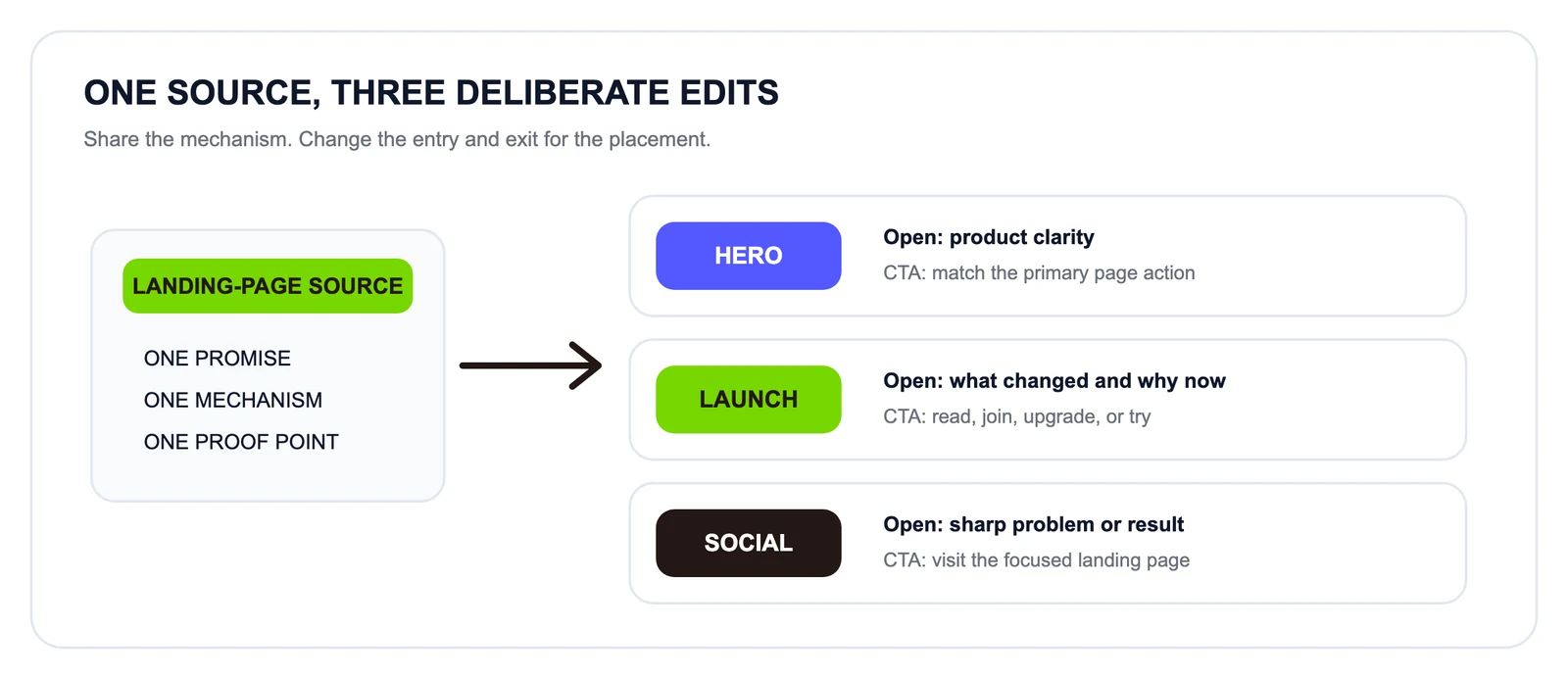
The middle of the video can remain substantially shared. The first few seconds, final frame, crop, and text density deserve separate decisions. This approach preserves production efficiency without pretending every channel has the same audience state.
Name the files and review notes by placement rather than by arbitrary version numbers: hero, launch, and social-traffic communicate more than final-v7, final-v8, and final-v8-real.
| Cut | Viewer context | Opening | What to keep | CTA |
|---|---|---|---|---|
| Website hero | Already on the page; may be muted | Lead with product/outcome clarity | Mechanism and a compact proof signal | Match the page’s primary CTA |
| Launch cut | Arrives through an announcement or community | Lead with what changed and why now | Reveal, new capability, and release-specific proof | Read release details, join, or try |
| Social traffic cut | Scrolling with little context | Lead with the sharpest problem or result | Fast problem-to-mechanism path | Visit the focused landing page |
08
Use TapVid as an Explainer Video Engine for source-accurate promos
TapVid is most relevant here when the source already exists. It is an Explainer Video Engine that turns supplied assets and approved copy into a structured video. The positioning is different from asking a general AI video generator to imagine the product from a prompt: the product image, UI capture, logo, or other factual asset should remain the source material, while the system organizes structure, scenes, motion, and pacing around it.
Its official Landing Page Video Maker starts from landing-page copy, a value proposition, or a product brief and structures a hero video around a hook, problem, solution, and CTA. The wider TapVid feature index separates landing-page, marketing, product-demo, and explainer use cases.
- The practical product promise is “Videos true to your assets. In minutes.” The order matters. “True to your assets” is the reason a professional team can consider the output deliverable; speed matters after that condition is met.
- That does not make TapVid a zero-error black box. A source-accurate workflow makes the important checkpoints visible: the brief, outline, timecoded screen-and-voiceover plan, scene generation, and completed output. Reviewers still need to inspect what the video will say, what it will show, and whether the two correspond.
09
What one hands-on TapVid run actually showed
On August 12, 2026, we ran one bounded TapVid test with a first-party TapVid landing-page image and six approved copy lines. The input required a 40-second, 16:9 video, mapped the supplied image only to the 10–24 second scene, and prohibited copy changes, stock footage, redrawing, cropping, or extra claims. This was one observed run, not a reliability or performance benchmark.
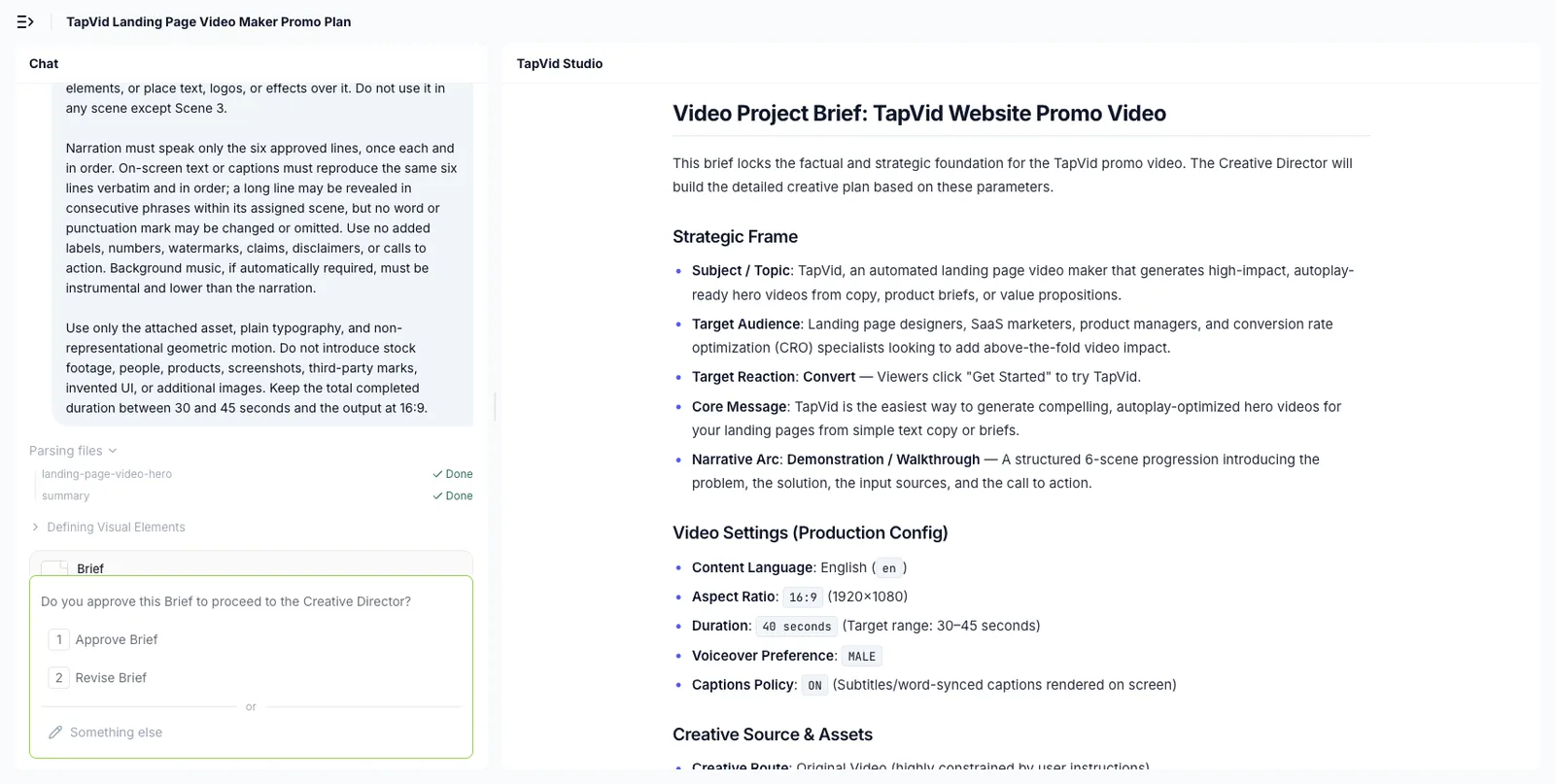
The first useful checkpoint was the project brief. TapVid exposed the language, aspect ratio, duration, caption setting, source-asset constraints, and six-scene mapping before generation. The first complete brief appeared 4 minutes 18 seconds after submission in this run.
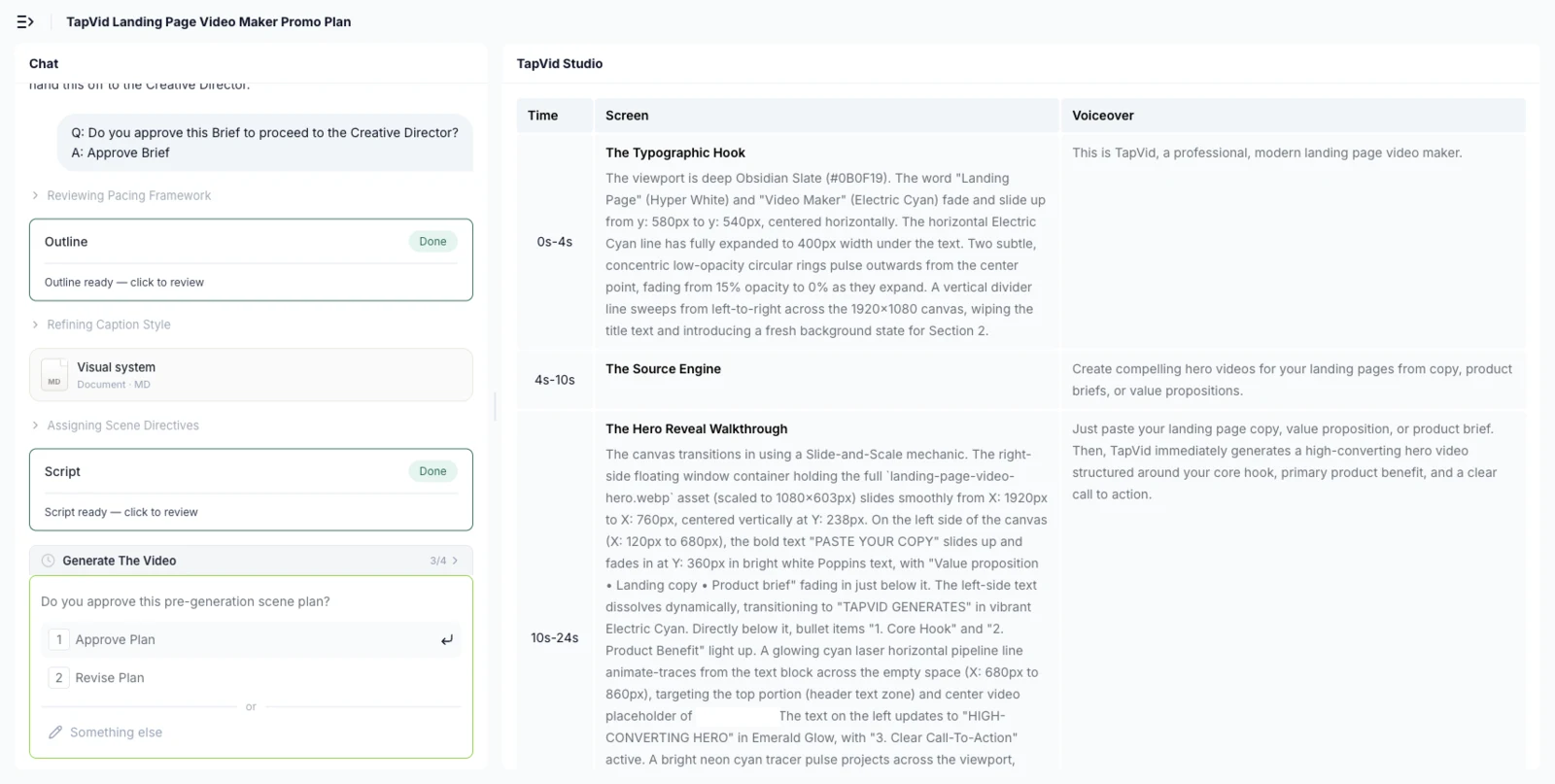
The later pre-generation plan connected time ranges to screen direction and voiceover, with the approval gate visible beside it. It also exposed a problem: although the brief preserved the approved lines, the script plan rewrote parts of the narration and introduced wording that was not in the source copy. We approved it without correction only to preserve the one-attempt test protocol; a real delivery workflow should stop and revise at this point.
The completed in-product player became available 10 minutes 57 seconds after plan approval and 26 minutes 37 seconds after the initial submission. It produced a 39-second timeline, eight visible segments, captions, and a Transcript panel. The Transcript panel displayed the six approved lines in the requested order. However, at 17 seconds—the scene assigned to the supplied image—the live player showed an empty mockup area with a broken-image indicator instead of the recognizable source asset.
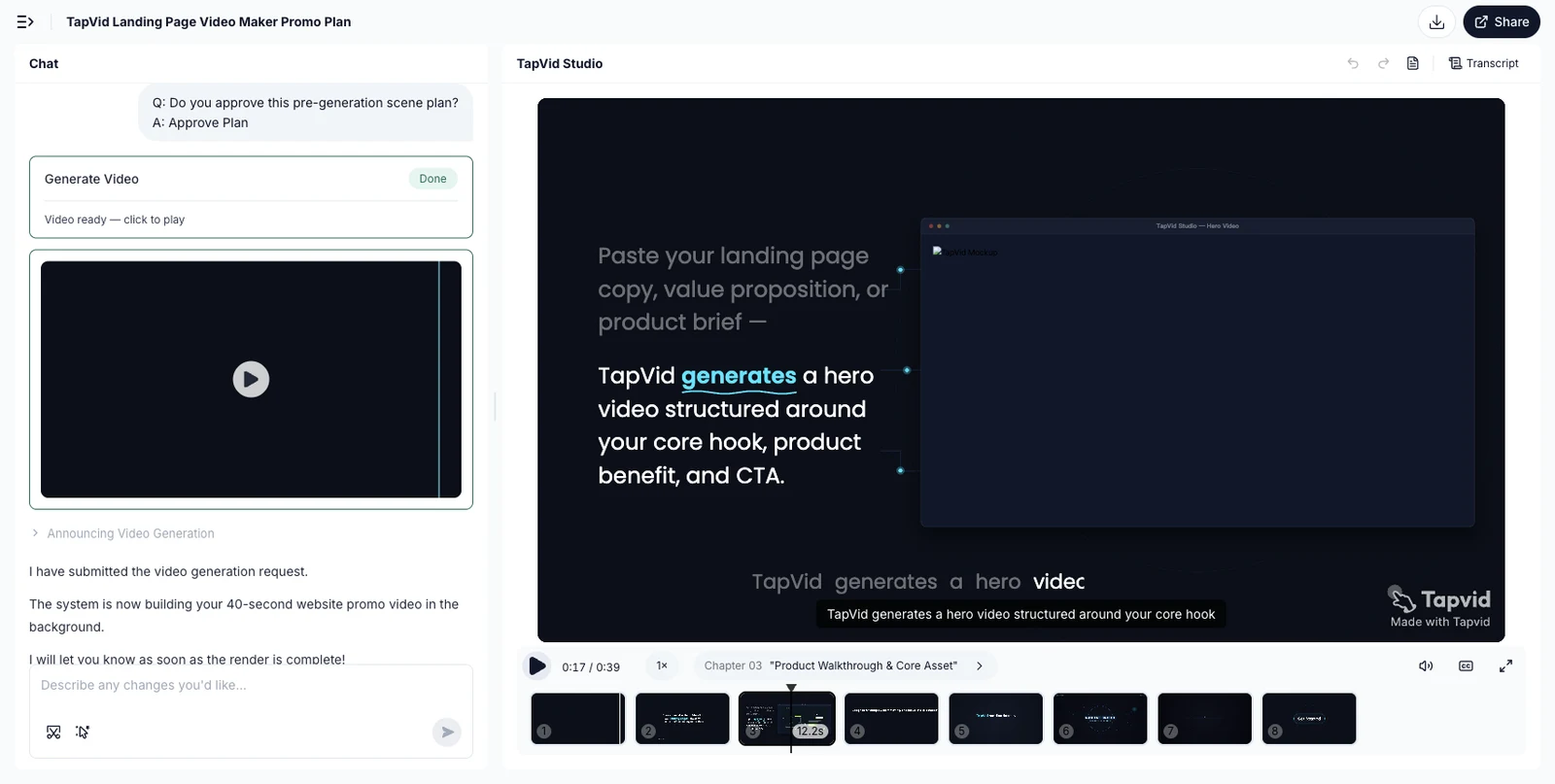
That result supports a narrow conclusion: TapVid made the planning and review checkpoints visible, but this run did not pass the asset-fidelity check, and the final script plan did not pass the verbatim-copy check. The downloadable file was not available to this evidence capture, so the asset observation is limited to the completed in-product player. Do not generalize one run into an “always works” or “never works” claim. A practical TapVid input for this workflow should contain:
- the one-line audience/action contract and four approved source blocks;
- the original product images, UI captures, logos, or footage that must not be redrawn;
- the exact wording, numbers, model names, or legal text that must stay verbatim;
- an explicit mapping between each mechanism or proof line and its required source asset;
- the five-beat order, target duration, placement, aspect ratio, captions, and final CTA;
- the claims that must not be added.
Review the generated outline and timecoded script against that brief before approving generation. Then compare the completed scenes with the original assets and copy. Treat the first render as review material rather than automatic delivery. The run above intentionally did not test correction or regeneration.
10
Run a website-specific QA pass before embedding
Review the video in the actual page layout, not only inside the editor. Use this checklist:
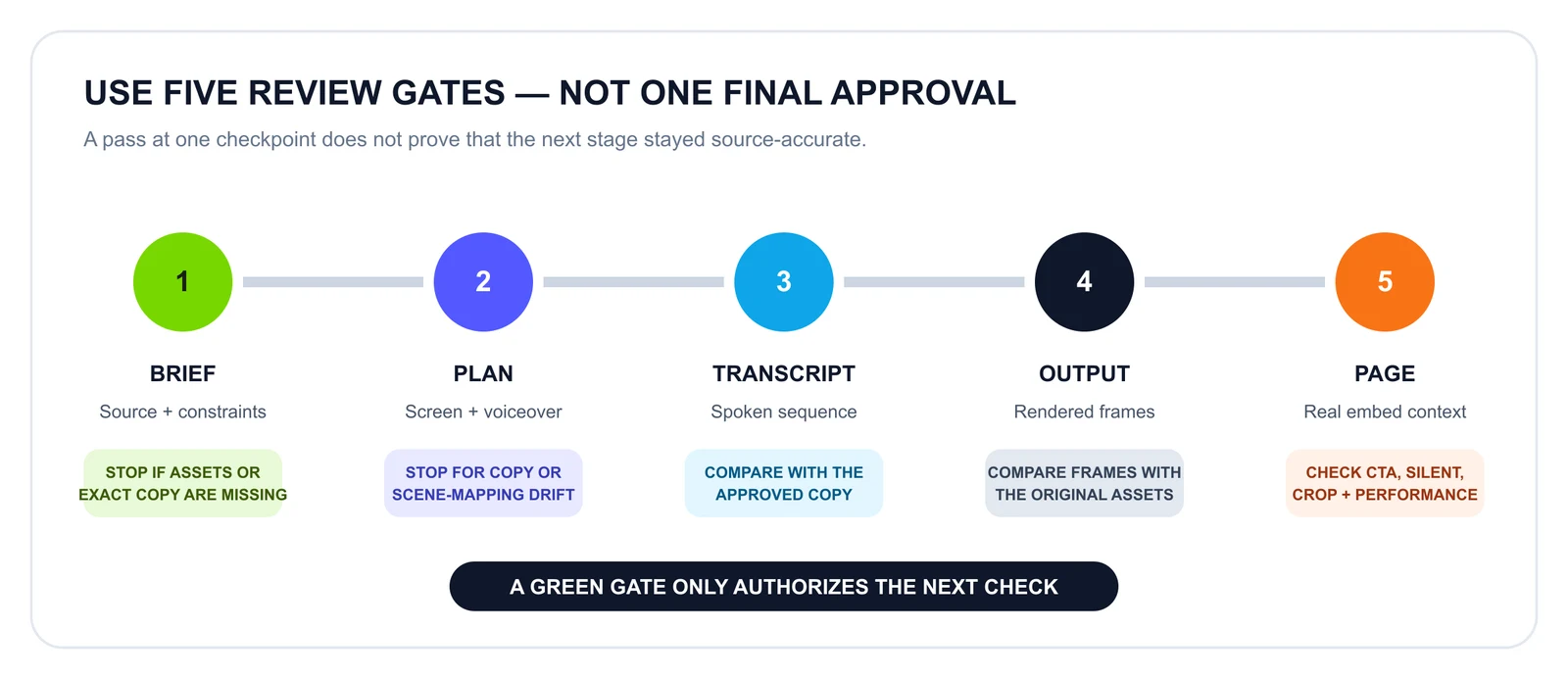
The gates are sequential. A clean brief allows you to inspect the plan; it does not certify the transcript or rendered frames. Likewise, a correct output file can still fail on the page because the CTA conflicts with the surrounding interface, the mobile crop hides essential detail, or loading behavior harms the experience.
- Asset fidelity: Are product images, logos, UI states, and supplied footage the approved source assets rather than redrawn approximations?
- Information fidelity: Do required words, numbers, model names, specifications, and legal phrases match the approved copy?
- Correspondence: When the script discusses a product or feature, does the frame show the correct product or feature?
- Message: Can a new visitor state the promise after one view?
- Audience: Does the first beat identify the intended viewer without listing every possible segment?
- Mechanism: Is there enough visible behavior to distinguish the product from a generic montage?
- Proof: Is every claim supported, bounded, and readable at the intended size?
- CTA: Does the final action match the page’s primary button and destination?
- Silent path: Do the promise, mechanism, and action survive with audio off?
- Accessibility: Are captions available for meaningful audio, and does essential visual information have an accessible alternative where required?
- Performance: Is there an intentional poster and loading strategy? Does the page remain responsive on a representative mobile connection?
- Responsive crop: Are faces, UI states, and text still visible at narrow widths?
- Controls: Can a visitor pause or avoid motion where the implementation and accessibility requirements call for it?
- Analytics: Are you measuring the action the video is supposed to earn, rather than celebrating autoplay starts alone?
Do not assume the video improves conversion merely because it is polished. Compare the page with and without the video, or test a specific messaging change. A failed test can mean the placement, opening, CTA, page performance, or underlying promise is wrong; it does not automatically mean “video does not work.”
11
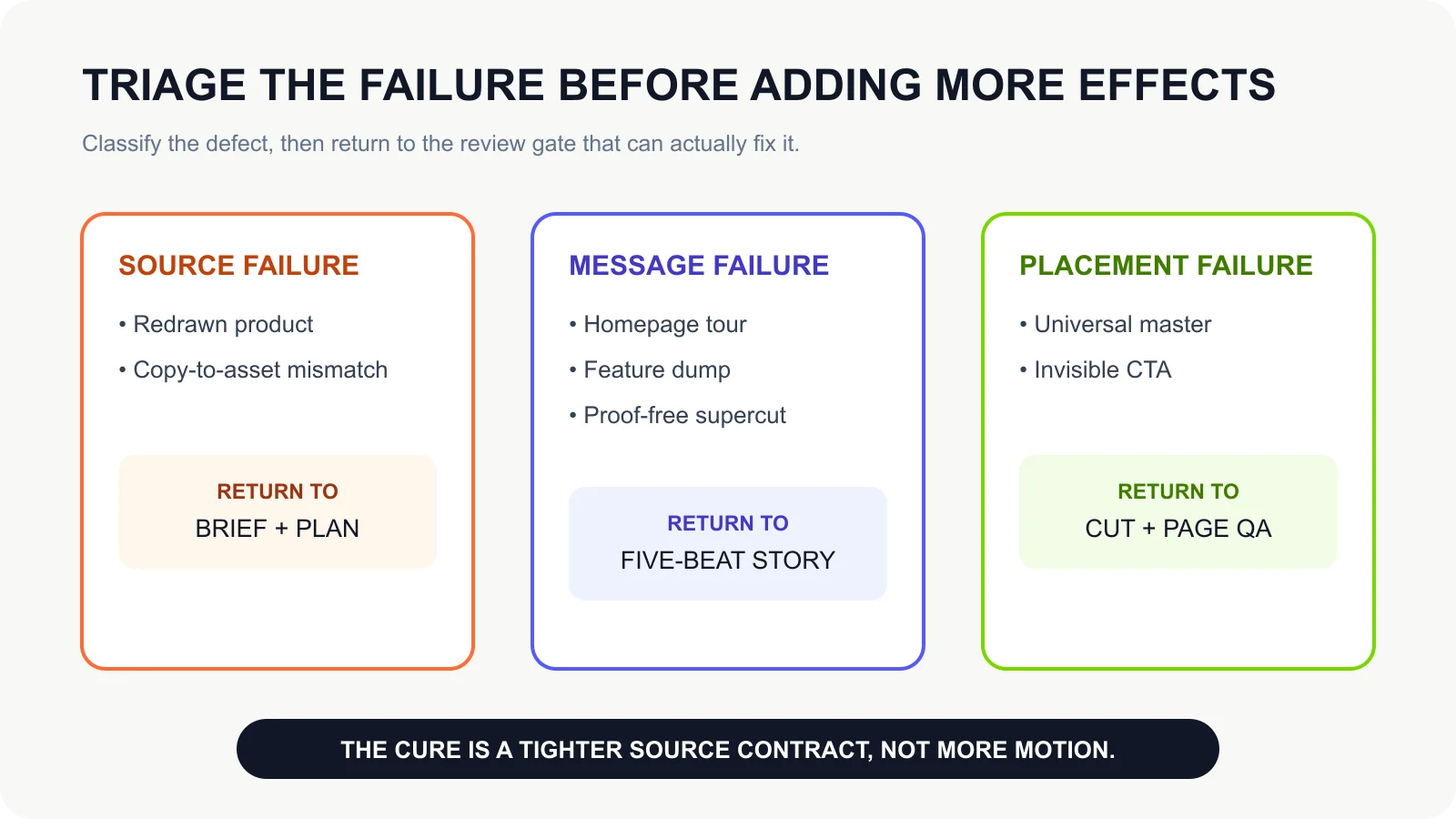
Avoid the seven failure modes that make website promos unsafe or generic
- The redrawn product. The generated frame looks plausible, but the packaging, logo, interface, or model detail is not the supplied asset. Use the original asset as the factual layer and compare the relevant output frame with the input before delivery.
- The copy-to-asset mismatch. The words are individually correct, but the wrong SKU, feature screen, or proof visual appears underneath them. Review the timecoded script and storyboard as a joined mapping, not as two independent approvals.
- The homepage tour. The edit scrolls through each section in order. It proves the page exists but does not create a reason to care. Replace the tour with the five-beat decision path.
- The feature dump. Every capability receives equal time. Select the one mechanism that makes the promise believable and let the page hold the detail.
- The proof-free supercut. Fast cuts, stock footage, and animated adjectives create energy but no confidence. Add one observable mechanism or one approved proof point; otherwise narrow the promise.
- The universal master. One horizontal video is cropped for the hero, a launch post, and a vertical feed without rewriting the opening or CTA. Share the middle, but design the entry and exit for the placement.
- The invisible CTA. The voiceover says what to do while the final frame shows only a logo. Put the action on screen and hold it long enough to read. If the page CTA says “Start free,” the video should not end with an unrelated “Learn more.”
These failures have a common cause: production started before the decision path and accuracy constraints were agreed. The cure is not more effects. It is a tighter source contract and a reviewable link between copy, assets, scenes, and output.
12
Frequently asked questions
How long should a website promo video be?
Use the shortest duration that can establish relevance, show a credible mechanism or proof point, and present one CTA. A focused 30–60 second master is a useful planning range for many promos, while a complex explainer or demo may need longer. Do not stretch a 20-second idea to match a benchmark.
Should a website promo video autoplay?
Treat autoplay as an implementation choice, not a content requirement. Browser policies can block audible autoplay, and visitors may prefer control. If you use autoplay, plan a muted or no-audio experience, playsinline behavior where appropriate, a meaningful poster, and a fallback that preserves access to the core message.
What is the difference between a website promo and a product demo?
A promo earns attention and a next action; it can show a selective mechanism. A demo answers “how does this product work?” and therefore needs recognizable workflow evidence, including relevant inputs, interface states, outputs, and limitations.
Can I make the video from my existing website copy?
Yes, but do not convert every page section. Extract one promise, one mechanism, one proof point, and one CTA, then pair them with the original assets that should appear on screen. TapVid’s landing-page workflow is designed around existing copy, value propositions, and product briefs.
Will an AI website promo tool redraw my product images?
That depends on the production route. A prompt-to-pixel generator may reinterpret the whole frame. For product-sensitive work, choose a workflow that keeps supplied product images, logos, and UI captures as source assets rather than asking a model to recreate them. TapVid is positioned around videos that remain true to the assets you provide.
Does source accuracy mean I can skip review?
No. Accuracy should be verifiable, not assumed. Check that exact copy remains exact, that each scene uses the correct asset, and that the completed output matches the approved brief. Do not describe any generative workflow as 100% error-free.
Should the hero and social versions be identical?
Usually not. A hero viewer is already on your page, while a social viewer may have no context. Reuse the core mechanism and proof, but rewrite the opening, crop, text density, and CTA for each placement.
Do I need captions if the video works without sound?
If the video includes meaningful speech or other audio needed for understanding, provide captions in line with the accessibility requirements that apply to your site. Silent-first visuals reduce dependence on audio; they do not automatically replace captions.
13
Make approved copy and assets the source of truth
The strongest website promo begins before the scene plan opens. Decide the audience, promise, proof, and action on the page. Then lock the exact copy, original assets, and asset-to-scene relationships that must survive production. Build the video as a short path through those decisions, not as a fresh interpretation of the product.
If the page already contains approved copy, product images, UI captures, or a product brief, you can use TapVid’s Landing Page Video Maker to turn that material into a structured explainer-style promo. Keep the content yours, keep the assets recognizable, review the copy-to-scene mapping, and create separate cuts when the viewer context changes.