TapVid
    API & MCPPricingBlogAbout

    Make an event promo video from your brief

    Turn approved event details into a clear invitation. Keep the date, time zone, and registration step tied to your source so the right audience knows why to attend.

    Continue in the TapVid workspace to review the source and generation quote. This page does not register attendees or publish the video.

    The workflow

    How it works

    01

    Supply the event source

    Paste the approved brief or a public event URL. Include exact logistics and the audience's reason to attend.

    02

    Review the message

    Check names, date, time zone, location, and registration link. Remove claims or speaker details that the source does not support.

    03

    Continue in your workspace

    Review the video plan and generation quote in TapVid. Check the resulting export before distributing it.

    Overview

    A focused invitation, built from your event facts

    Use this event promo video maker to prepare a webinar, workshop, or partner-event invitation from approved material. Start with one attendee benefit and one registration action.

    Review the script and final output against the source before sharing. A correct-looking date can still carry the wrong time zone; keep those facts together through revisions.
    Why TapVid

    Keep the invitation tied to approved details

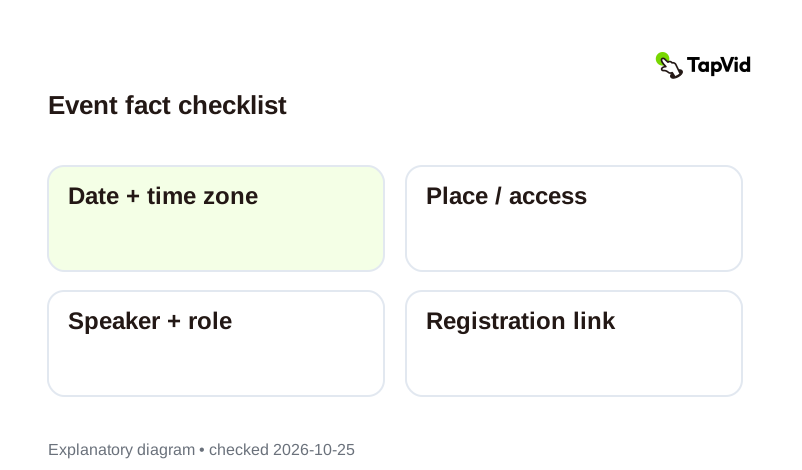
    Event fact checklist: Date + time zone → Place / access → Speaker + role → Registration link

    Keep logistics together

    Treat date, time zone, place, speaker, and registration action as one fact set. Recheck every affected scene when a detail changes.
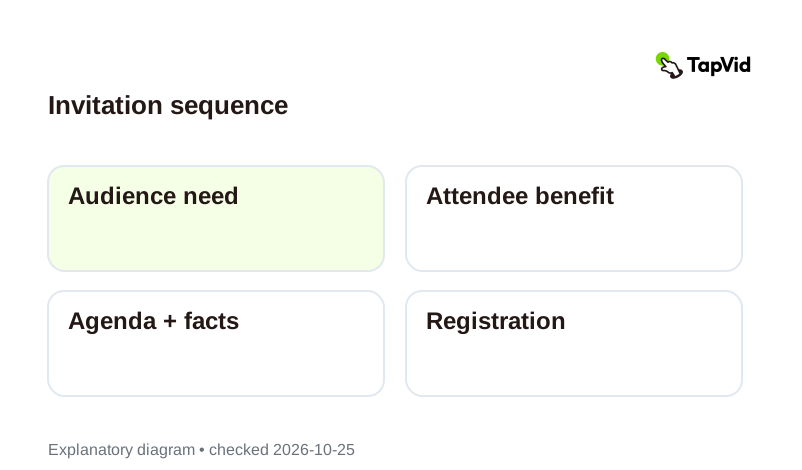
    Invitation sequence: Audience need → Attendee benefit → Agenda + facts → Registration

    Give the audience a reason to attend

    Build the invitation around the supplied attendee benefit, then agenda, logistics, and next action. The diagram shows a planning model, not a generated result.

    Use cases

    Invitations for specific business events

    Webinar registration

    Explain the topic and audience fit, then show the supplied registration step.

    Customer workshop

    Turn an approved agenda into a practical invitation with venue or access details.

    Partner event

    Use approved speaker and partner information without inventing endorsements.

    Questions & answers

    Frequently Asked Questions

    Provide the title, date, time zone, audience, agenda, approved speaker details, venue or access URL, and registration link. A public URL can supply context; check what the workspace actually retrieves.
    Use assets you have permission to use and confirm names and roles with the event owner. This page does not grant rights to third-party material.
    Update the source and recheck every affected scene and language version before sharing. Do not rely on an old export's date or link.
    No. It hands your brief to TapVid's workspace. Registration and distribution stay in your existing tools; review current pricing and the generation quote before proceeding.
    Explore more

    Related guides

    • Plans and pricing
    • Script to video
    • Article to video
    • Product launch videos
    • Webinar clips
    • Marketing videos
    • Promotional video examples
    • Marketing video script guide
    Plans & credits

    Simple, credit-based pricing

    Simple videos use about 4 credits per second: about 120 credits for 30 seconds or 240 for a minute. Cinematic scenes use more. These are display estimates; use the credit quote shown in the app before generation.

    Most Popular

    Pro

    $49/mo

    2,000 credits / mo

    Max

    $99/mo

    6,000 credits / mo

    Ultra

    $199/mo

    14,000 credits / mo

    See full plans & pricing

    Ready to create your first video?

    Join thousands of product teams using AI to create professional videos in minutes.

    Your first video in under 5 minutesBook a demo
    Tapvid

    TapVid turns the materials your business already has into an accurate video that explains the job clearly and is ready to publish.

    TikTokInstagramXDiscordYouTube

    Ask AI about TapVid.

    ✦G

    TapVid

    Motion Graphics

    Kinetic Typography GeneratorAI Motion Graphics GeneratorAnimated Chart MakerAnimated Collage MakerInfographic Video MakerLogo Animation Maker

    Explainer Videos

    Video Presentation MakerAI Explainer Video GeneratorWhiteboard Animation MakerAI Study Video Maker

    Product & Ad Videos

    Sales Enablement Video MakerEvent Promo Video MakerProduct Demo VideosEcommerce Product VideosProduct Launch VideosVideo Ads

    Creative Videos

    Free AI Video GeneratorDocumentary Video MakerAnimated Social Media Video MakerAI B-Roll GeneratorAnimated Video MakerIntro and Outro Video Maker

    Convert to video

    URL to VideoPDF to VideoImage / Assets to VideoPPT to VideoArticle to VideoScript to VideoSOP to VideoWord to Video
    More convert to video
    Google Slides to VideoText to Video AIAudio to VideoPodcast to VideoVideo to Video AI

    Industries

    SaaSEcommerceEducationManufacturingReal Estate Video Maker

    Prompt & Templates

    Gemini Omni 1.1 Flash Prompt LibraryMiniMax H3 Prompt LibrarySeedance 2.5 Prompt LibraryExplainer Video TemplatesVideo Production Plan TemplateVideo Creative Brief TemplateVideo Production Proposal Template

    Compare

    HeraMotion.soVEEDLeaddeCreatifySynthesia
    More comparisons
    HeyGenMotionvid AITapNowPictoryInVideoFlikiLumen5

    Company

    PricingAboutGet in TouchMCPBlog

    © 2026 TapVid. All rights reserved.

    Privacy
    Terms of Service