TapVid
    API & MCPPricingBlogAbout

    Create a sales enablement video from approved facts

    Turn your approved product material into a focused buyer answer or seller briefing. Keep evidence, limitations, and the next action attached to the message.

    Continue in the TapVid workspace to review the source and generation quote. This page does not connect a CRM or send messages to buyers.

    The workflow

    How it works

    01

    Choose the viewer and question

    State the sales-stage question and whether the video is buyer-facing or internal.

    02

    Supply approved facts

    Paste a brief or public source URL. Include the answer, support, limitations, and next action.

    03

    Review in your workspace

    Check the plan and generation quote in TapVid, then inspect the result before using it in a sales conversation.

    Overview

    One sales question, one source-based video

    Use this sales enablement video maker to explain one approved answer instead of repeating a full product pitch. Decide whether the viewer is a buyer or an internal seller first.

    Keep product labels, numbers, evidence, and limitations consistent with your source. Review the final output before sharing; a clear explanation is not a promise of higher win rates.
    Why TapVid

    Keep the answer useful and supportable

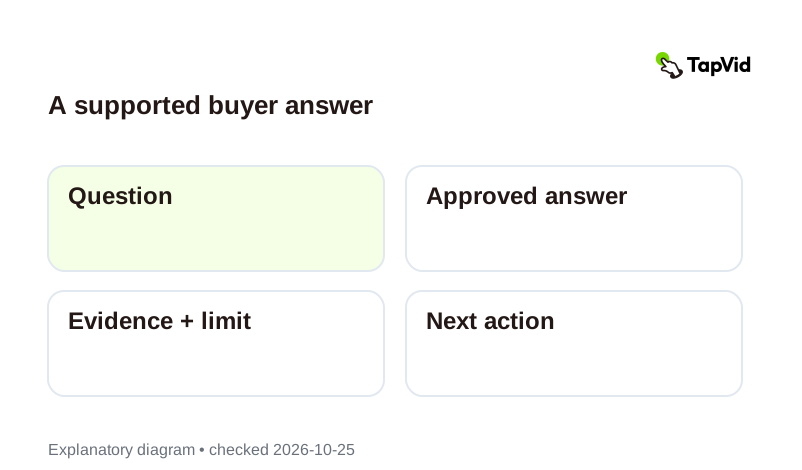
    A supported buyer answer: Question → Approved answer → Evidence + limit → Next action

    Connect the answer to evidence

    Move from question to approved answer, supporting source, limitation, and next step. The diagram is an editorial planning aid, not customer proof.
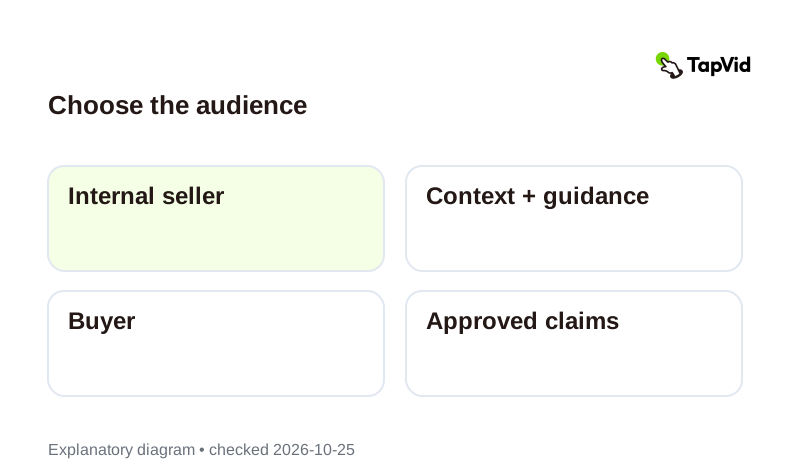
    Choose the audience: Internal seller → Context + guidance → Buyer → Approved claims

    Separate internal and buyer-facing copy

    A seller briefing can include internal context that does not belong in a buyer version. Review the intended audience before reuse.

    Use cases

    Support a specific sales moment

    Buyer objection

    Explain one approved answer and its limits without inventing performance claims.

    Technical handoff

    Clarify a documented process and the next discussion needed.

    Seller update

    Turn approved release notes into an internal briefing; separate shareable facts from internal guidance.

    Questions & answers

    Frequently Asked Questions

    Choose either a buyer or an internal seller in the brief. State the question and next action. Do not reuse internal guidance as public sales copy without review.
    Use current approved product pages, documentation, release notes, or a factual brief. Only provide material you are allowed to use; do not paste private prospect details unnecessarily.
    Yes, use its approved wording as source context and check that the claims still apply. This page does not establish support for every file type or an automatic library import.
    No CRM sync, lead scoring, viewer tracking, or outreach sending is offered by this page. Continue in TapVid to prepare the video, then use your approved distribution tools and review the generation quote.
    Explore more

    Related guides

    • Plans and pricing
    • Sales enablement video guide
    • Product demo videos
    • Competitive comparison videos
    • Case study videos
    • Customer onboarding videos
    • Script to video
    • B2B video marketing
    Plans & credits

    Simple, credit-based pricing

    Simple videos use about 4 credits per second: about 120 credits for 30 seconds or 240 for a minute. Cinematic scenes use more. These are display estimates; use the credit quote shown in the app before generation.

    Most Popular

    Pro

    $49/mo

    2,000 credits / mo

    Max

    $99/mo

    6,000 credits / mo

    Ultra

    $199/mo

    14,000 credits / mo

    See full plans & pricing

    Ready to create your first video?

    Join thousands of product teams using AI to create professional videos in minutes.

    Your first video in under 5 minutesBook a demo
    Tapvid

    TapVid turns the materials your business already has into an accurate video that explains the job clearly and is ready to publish.

    TikTokInstagramXDiscordYouTube

    Ask AI about TapVid.

    ✦G

    TapVid

    Motion Graphics

    Kinetic Typography GeneratorAI Motion Graphics GeneratorAnimated Chart MakerAnimated Collage MakerInfographic Video MakerLogo Animation Maker

    Explainer Videos

    Video Presentation MakerAI Explainer Video GeneratorWhiteboard Animation MakerAI Study Video Maker

    Product & Ad Videos

    Sales Enablement Video MakerEvent Promo Video MakerProduct Demo VideosEcommerce Product VideosProduct Launch VideosVideo Ads

    Creative Videos

    Free AI Video GeneratorDocumentary Video MakerAnimated Social Media Video MakerAI B-Roll GeneratorAnimated Video MakerIntro and Outro Video Maker

    Convert to video

    URL to VideoPDF to VideoImage / Assets to VideoPPT to VideoArticle to VideoScript to VideoSOP to VideoWord to Video
    More convert to video
    Google Slides to VideoText to Video AIAudio to VideoPodcast to VideoVideo to Video AI

    Industries

    SaaSEcommerceEducationManufacturingReal Estate Video Maker

    Prompt & Templates

    Gemini Omni 1.1 Flash Prompt LibraryMiniMax H3 Prompt LibrarySeedance 2.5 Prompt LibraryExplainer Video TemplatesVideo Production Plan TemplateVideo Creative Brief TemplateVideo Production Proposal Template

    Compare

    HeraMotion.soVEEDLeaddeCreatifySynthesia
    More comparisons
    HeyGenMotionvid AITapNowPictoryInVideoFlikiLumen5

    Company

    PricingAboutGet in TouchMCPBlog

    © 2026 TapVid. All rights reserved.

    Privacy
    Terms of Service