
A sales enablement video is a short, purpose-built asset that helps a sales representative or buyer complete a specific step in a deal. It might prepare a rep for a call, explain one product workflow, answer a recurring objection, show proof from a similar customer, or give a buying committee something accurate to share internally. The useful question is not, “Should we make more video?” It is, “Which conversation is repeatedly slowing down, and what source material would let a video move it forward?”
That distinction matters because a product launch clip, brand film, webinar recording, and personalized follow-up can all contain useful footage, but they do different jobs. A sales enablement library becomes valuable when every video has a named deal moment, audience, owner, source pack, approval status, and next action. Without those fields, teams produce attractive assets that sellers cannot find, trust, or use.
This guide explains the main types of sales enablement video, how to choose the right one, what source material each format needs, and how to keep the library accurate as products and claims change.
01
What is a sales enablement video?
Sales enablement broadly combines training, content, tools, and processes that help salespeople sell effectively. That framing is consistent with Salesforce Trailhead's sales enablement overview and HubSpot Academy's introduction to sales enablement. A sales enablement video is the video layer inside that system.
Some enablement videos are internal. They teach a representative how to position a product, run discovery, demonstrate a workflow, or respond to an objection. Others are buyer-facing. They help a prospect understand a feature, compare options, see a relevant customer result, or prepare colleagues for a decision. A few formats can serve both audiences, but the script and call to action should make the primary viewer clear.
A useful definition has three boundaries. First, the video must support a selling task rather than exist only for awareness. Second, the viewer should know what to do next. Third, the content must stay connected to an approved source. If a price, model name, screenshot, customer quote, or legal statement changes, the team needs to know which video is affected and who approves the update.
02
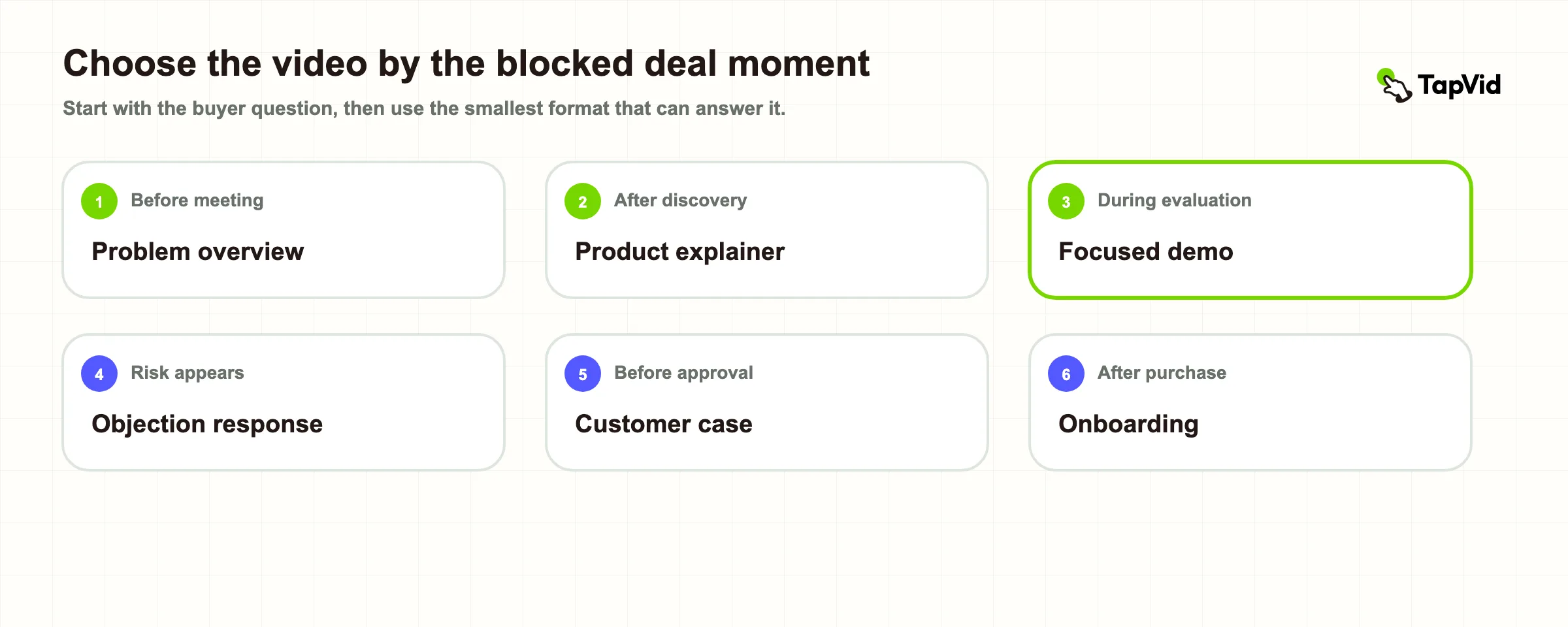
Choose the video by the blocked deal moment
Start with the point where a deal repeatedly loses time or clarity. Do not begin with a format list and ask sellers to invent a use for it. Map the blocked moment to a viewer question, then select the smallest video that can answer it.
| Blocked moment | Viewer question | Useful video | Source pack | Next action |
|---|---|---|---|---|
| Before first meeting | Is this relevant to my situation? | Short problem and outcome overview | Approved positioning, audience pain, product visuals | Book or accept discovery |
| After discovery | Can this handle our workflow? | Product explainer or focused demo | Current screens, approved script, workflow steps | Schedule technical evaluation |
| During evaluation | How does this work in practice? | Role-specific demo | Real UI, sample inputs, limits, setup notes | Start trial or proof of concept |
| During objection handling | What about this risk or alternative? | Objection response | Approved objection language, evidence, boundaries | Confirm open concern |
| Before internal approval | Has this worked in a similar context? | Customer case study | Consent, quotes, result evidence, product footage | Share with buying committee |
| After purchase | How do we get the first result? | Handoff or onboarding video | Approved setup steps, owner, support route | Complete first milestone |
This map prevents two common errors. One is sending a broad two-minute company overview when the buyer needs proof about one workflow. The other is asking a single video to answer every stakeholder. A finance reviewer, technical evaluator, end user, and executive sponsor do not need the same sequence or evidence.
03
Six types of sales enablement video
1. Problem and outcome overview
Use this early when a prospect needs to recognize the problem and understand the business result before learning product detail. Keep it narrow. Name one situation, one consequence, one mechanism, and one next step. The source pack should include current positioning, approved terminology, real product or service visuals, and claims that the company is permitted to publish.
This is not a brand film. A brand film may build familiarity or emotion, while an enablement overview should help a specific buyer decide whether to continue. Remove company history unless it changes that decision.
Video example: Three Forces Against Your Estate: A Strategic Advisory for David (TapVid Good Case). The video opens with a specific audience problem—three forces that can reduce an estate—then turns that risk into a structured advisory conversation. It fits this category because the viewer can recognize the situation and the value of continuing before seeing a detailed service workflow. Notice that the example does not try to teach every estate-planning option; it frames one consequential problem, names the forces involved, and creates a reason for the next conversation.
Evidence: public TapVid share page and full TapVid video.
2. Product explainer
A product explainer connects a buyer problem to one capability and outcome. Gong includes product explainer videos among the sales enablement content sellers use to educate prospects in its guide to sales enablement content. The strongest version shows what the product does with real screens, product images, diagrams, or approved footage instead of relying on abstract claims.
Use one explainer per major buyer job. A security workflow, reporting workflow, and team collaboration workflow may belong in separate videos even when they share the same platform. If the exact interface matters, gather current screenshots and label every one with the product version and capture date. For a controlled, asset-led workflow, see TapVid's product demo video maker.
Video example: What is Notion? (Notion). In roughly one minute, Notion explains the product around a broad buyer job: keeping thinking, writing, and planning in one workspace. It fits the explainer category because it connects the problem of scattered work to the product's organizing idea without turning into a button-by-button tutorial. Watch how the product screens support the central concept instead of competing with it.
3. Focused product demo
A focused demo shows a sequence: starting state, user action, system response, and finished outcome. It differs from a general explainer because the viewer needs to evaluate the workflow, not only understand the idea. Choose a realistic sample input and show the states that matter. Avoid skipping setup or hiding a limitation that the buyer will discover during evaluation.
The source pack should contain the current UI, approved sample data, exact field labels, supported workflow, and the expected result. If the UI changes often, record the owner and review date. A video that shows an obsolete menu can create more friction than no video.
Video example: Sales AI for Sales Cloud Demo (Salesforce Product Center). This demo shows a seller working through concrete Sales Cloud states and AI-assisted actions. It fits this category because the viewer is asked to evaluate a sequence inside the product, not simply accept a positioning statement. The useful pattern is the visible chain from context to action to system response; a buyer can inspect how the workflow behaves and decide what to verify next.
4. Objection response
An objection video answers one recurring concern such as implementation effort, data migration, control, integration fit, or maintenance. The goal is not to “win” the objection with louder persuasion. It is to define the concern accurately, show the relevant evidence, state the boundary, and tell the buyer what can be verified next.
Build these videos from actual questions recorded by sales, customer success, or solution engineers. Remove account-specific information before reuse. Have the owner of the underlying fact approve the script. Legal approves legal wording, security approves security claims, and product approves capability boundaries. If the answer depends on a plan, contract, region, or integration, say so.
Video example: 1Password's Zero Knowledge Architecture (1Password). The video addresses a concrete security concern: whether the vendor can read the contents of a customer's vault. It fits the objection-response category because it defines the concern, explains the architectural mechanism behind the answer, and points the viewer toward verification rather than asking for blind trust. The reusable lesson is to answer the underlying risk with observable design details and explicit boundaries, not with a generic “we take security seriously” claim.
5. Customer case study
A case study helps a buyer evaluate proof from a relevant customer context. It should explain the situation, decision, implementation, qualified result, and limitations. It should not turn a customer interview into invented praise. Every quote needs consent, and every measurable result needs a source and approver.
The most useful case study for sales is not always the most impressive story. Relevance often matters more. Tag the final video by audience, industry, company stage, problem, product area, and result so a representative can find the closest match. For the consent, interview, claim, and editing workflow, use TapVid's customer testimonial video guide.
Video example: Amazon Web Services Customer Success Story (Salesforce). The story combines an identifiable customer, the context of rapid growth, the role of the platform, and comments from the customer side. It fits this category because the proof comes from a named operating situation rather than a list of vendor claims. Pay attention to the structure: establish the customer's scale and challenge, show how the product enters the workflow, then let the customer describe the value in its own voice.
6. Rep training and certification
Internal enablement videos teach representatives how to run a call, explain a workflow, use a discovery question, or prepare for a release. Salesforce describes video as one content type inside enablement programs and emphasizes tying enablement to outcomes and existing workflows in its Trailhead overview.
Training video should not merely repeat a slide deck. Give the representative a concrete behavior to perform, show an example, name a common failure, and define how the manager will check understanding. Keep changing product facts in replaceable scenes so a release does not force the whole course back into production.
Video example: How to Create Enablement Programs in Sales Cloud (Salesforce Product Center). The video teaches an administrator a bounded internal task: create a program from a template, choose exercise types, and add content. It fits rep training and certification because the viewer can perform a defined behavior after watching, while a manager or program owner can verify completion in the product. The important pattern is a clear learning objective followed by the actual steps and a visible finished state.
04
Build a source pack before you write the script
A reusable sales enablement video starts with a source pack, not a blank prompt. At minimum, record:
- the primary viewer and deal moment;
- the question the video must answer;
- approved product wording and positioning;
- current screenshots, product images, footage, or diagrams;
- names, numbers, prices, model labels, and other literal facts;
- claim owners and approval status;
- known limitations or conditions;
- the call to action;
- where the video may be distributed;
- the date or event that should trigger a review.
Then check accuracy in three layers. Asset fidelity asks whether the supplied product image, logo, UI, or footage is the same material shown on screen. Information fidelity asks whether approved names, figures, parameters, prices, and legal wording remain literal. Correspondence asks whether each line, visual, and voiceover refer to the same product, feature, or customer. A correct screenshot paired with the wrong sentence is still an error.
TapVid turns supplied product assets and approved copy into a structured explainer video. The script and scene plan remain visible for review, and a changed line or asset can be handled at the affected scene rather than silently rewriting unrelated content. That control reduces rework, but it is not a promise that a final video never needs review. The accountable owner should still check the export before it reaches a buyer.
05
Write for one viewer action
Use a simple sequence: situation, friction, answer, evidence, boundary, next action. The order may change, but each part has a job.
The situation tells the viewer, “This is for someone like me.” The friction explains why the current method is costly or slow. The answer shows the relevant workflow or decision. Evidence lets the viewer judge the claim. The boundary states where the answer does not apply. The next action moves the deal without forcing a vague “contact us” ending.
Keep the spoken language direct. Define an internal term the first time it appears. Put exact numbers and labels on screen only when they have an approved source. If a chart needs three paragraphs of qualification, it probably belongs in a linked document rather than a short video.
06
Review the video in three passes
Do not ask one reviewer to answer every question with “looks good.” Separate the review.
First, run a factual pass. Check product names, UI labels, numbers, quotes, role names, dates, and the relationship between narration and visuals. Second, run a buyer pass. Ask whether the intended viewer can understand the question, answer, evidence, limitation, and next action without a sales representative narrating over the video. Third, run a delivery pass. Check captions, mobile readability, audio, aspect ratio, links, file naming, and the destination where sellers will find it.
For high-change content, approve the source packet and scene map before the final render. If one product screen or approved phrase changes later, update that scene and preserve the rest of the approved version. Keep a version note that records what changed, why, who approved it, and which channels received the update.
07
Organize the library around sales use, not production date
A folder named “Q3 videos” helps the production team but tells a seller almost nothing. Organize the library by buyer problem and deal stage. Add filters for audience, industry, product area, language, owner, approval status, and review date. Salesforce has described a sales video hub that includes walkthroughs, demos, case studies, testimonials, and webinar content, illustrating why findability and placement matter as much as production. See its video hub article.
Every library entry should show a short “use when” note. For example: “Send after discovery when an operations lead asks how approvals work.” Add a “do not use when” note if the content has a known boundary, such as a legacy UI, a regional policy, or a plan-specific feature.
Archive or flag stale videos rather than leaving sellers to guess. A published video can remain technically accessible while being commercially unsafe to send. Review triggers should include product releases, pricing changes, policy updates, rebranding, expired customer permissions, and repeated seller feedback that the asset no longer answers the question.
08
Measure whether the video moved the intended step
Avoid judging every video by views. Match the metric to the job. An internal training video might be evaluated through completion, assessment, and observed behavior. A buyer-facing demo might be evaluated through qualified replies, technical evaluation starts, or movement to the next meeting. A case study might be evaluated by use in late-stage opportunities and whether it reaches additional buying-committee members.
Separate distribution metrics from sales outcomes. Plays, completion, and clicks show engagement with the asset. Opportunity movement, objection resolution, time between stages, and conversion show business progress. Neither proves causation by itself. Use the evidence to compare versions and identify where a video helps, then combine it with seller feedback and deal context.
Track reuse as well. If a carefully made video is never sent, the problem may be discovery, ownership, or fit rather than production quality. Ask sellers which buyer question they were trying to answer and what was missing from the available asset.
09
Sales enablement video checklist
Before production, confirm that the video has one primary viewer, one blocked deal moment, one question, one source pack, one owner, and one next action. Before publication, confirm that every important claim has a source, every visual matches the spoken subject, customer material has the right permission, and the final export has been reviewed on the destination device.
After publication, give sellers a precise “use when” instruction, place the asset where they already work, record its review trigger, and collect feedback from real deals. The best sales enablement video is not the one with the most cinematic treatment. It is the smallest trustworthy asset that helps a specific person take the next step.
10
Frequently asked questions
How long should a sales enablement video be?
Use the shortest length that completes the viewer's job. An objection response may need less than a minute, while a focused product demo may need several minutes. Remove material that does not change the viewer's understanding or next action.
What is the difference between a sales video and a sales enablement video?
A sales video may be any video used by sales. A sales enablement video is designed for a defined sales task, audience, deal moment, and next action, with ownership and approved source material.
Which sales enablement video should a small team make first?
Choose the question that appears most often in qualified deals and currently requires repeated live explanation. Build one focused video, place it in the existing workflow, and review whether it moves the intended next step before expanding the library.
Can one video serve the whole buying committee?
Sometimes, but usually one master should lead to role-specific cuts. Preserve the same approved facts and evidence while changing the order, depth, and next action for each stakeholder.
How often should sales enablement videos be updated?
Use event-based review rather than an arbitrary calendar alone. Product releases, pricing changes, policy updates, rebranding, expired permissions, and repeated seller feedback should trigger a check.
Can AI create sales enablement videos from existing materials?
Yes, when the workflow keeps approved inputs visible and reviewable. Provide current screenshots, product assets, approved wording, evidence, limitations, and a clear CTA. Check the script, scene mapping, and final export before distribution.