
Visual Code is an AI-generated visual artifact whose structured source remains available after rendering. Instead of producing only a flat image or final video, the system keeps the objects, text, layout, timing, state, and rules that created the result. A person or model can then inspect a specific part, change it, render again, and compare the new output with the previous version.
01
Introduction
For a video team, that distinction is practical. If a product name, price, screenshot, or scene is wrong, the useful question is not simply, “Can the model try again?” It is, “Can we locate the wrong element, correct it, and keep everything else stable?” Visual Code is one way to make that possible.
The term is still emerging. It has also been used for visual programming, source-code visualization, and block-based coding. This guide uses the narrower AI-native definition introduced by SigmaZ AI Lab: code is the persistent visual source, a runtime turns it into pixels, and visual feedback guides targeted revision.
02
What makes Visual Code different?
A code-generated visual is not automatically Visual Code. A script can produce a screenshot and then disappear. The result may still be no easier to inspect or edit than any other flat image.
Visual Code keeps the representation that matters for the next decision. Depending on the medium, that representation might be HTML and CSS, React components, SVG paths, Lottie JSON, a Remotion composition, a Blender script, or another symbolic format.
Five properties separate the idea from a one-time render:
| Property | What remains available | Production value |
|---|---|---|
| Executable | A browser, player, renderer, or graphics engine can run the source | The team can render the same artifact again under known conditions |
| Structured | Text, objects, layers, motion, and constraints remain explicit | A change can target one element instead of replacing the whole result |
| Addressable | Important elements have identities or source locations | Feedback can point to a specific caption, asset, chart, or scene |
| Stateful | The artifact can represent what is true now and what changes next | The visual can support timelines, controls, data, and interaction |
| Refinable | The rendered result can be inspected and the source revised | Additional model work improves one artifact instead of sampling unrelated alternatives |
This is why the renderer matters. It is not only an export tool. It is also an environment where a model can see what its code actually produced. A browser can expose layout and accessibility state. An SVG renderer preserves paths and text. A video runtime preserves timing, composition, and reusable components. The source can be checked before the final pixels are shipped.
03
Visual Code is not visual programming or vibe coding
Several neighboring terms sound similar but describe different jobs.
Visual programming helps people build software through blocks, nodes, or diagrams. Its central question is how humans should author programs.
Low-code and no-code products reduce the amount of source code a person must touch, often through templates and visual editors.
Vibe coding describes a workflow in which a person asks an AI to build software. The result may be a conventional application created once.
Generative UI creates a purpose-built interface for a prompt or task. Google’s Generative UI research and Anthropic’s custom visuals show how an AI answer can become a chart, diagram, or interactive component instead of another prose block.
Visual Code is defined by the artifact that survives. The user may never see the source, but the system can still address and revise it. A generative interface can be Visual Code. So can an SVG illustration, a motion graphic, or a video composition. The key is that the structured source remains the working object after the first render.
04
Why Visual Code matters for video teams
The first generation is only one part of professional video work. Teams also review claims, swap assets, update prices, adjust pacing, create regional versions, and respond to legal or brand feedback. A flat output hides the relationships needed for those tasks.
Visual Code changes the unit of revision. Instead of treating a video as one indivisible sample, a system can retain scenes, captions, assets, timing, and composition as separate parts.
That creates three useful forms of control.
1. Information can stay literal
Text stored as text is easier to compare with an approved script than text baked into generated pixels. The same applies to numbers, product names, model numbers, prices, equations, and legal wording.
Code does not make a source true. If the approved brief contains an incorrect number, the video can preserve that incorrect number perfectly. Grounding and review still happen upstream. The benefit is narrower: once the correct wording is supplied, the rendering system does not need to reinterpret it as an image.
2. Real assets can keep their identity
A supplied product image, logo, UI screenshot, or recorded clip can remain a referenced asset rather than a subject for visual reinvention. The system can position, crop, scale, and animate that asset without asking a pixel model to redraw the product.
This matters most when similarity is not enough. A cinematic approximation may work for atmosphere. It does not work when the exact packaging, interface, logo, or model variant is the message.
3. Feedback can map to a specific scene
When a reviewer says, “The caption in scene four is outdated,” the useful response is a change to scene four. If the rest of the timeline is approved, there is no reason to resample every shot.
This is the commercial difference between an editable production asset and an impressive demo. The first output earns attention. The second revision determines whether a team can use the system in a real approval process.
05
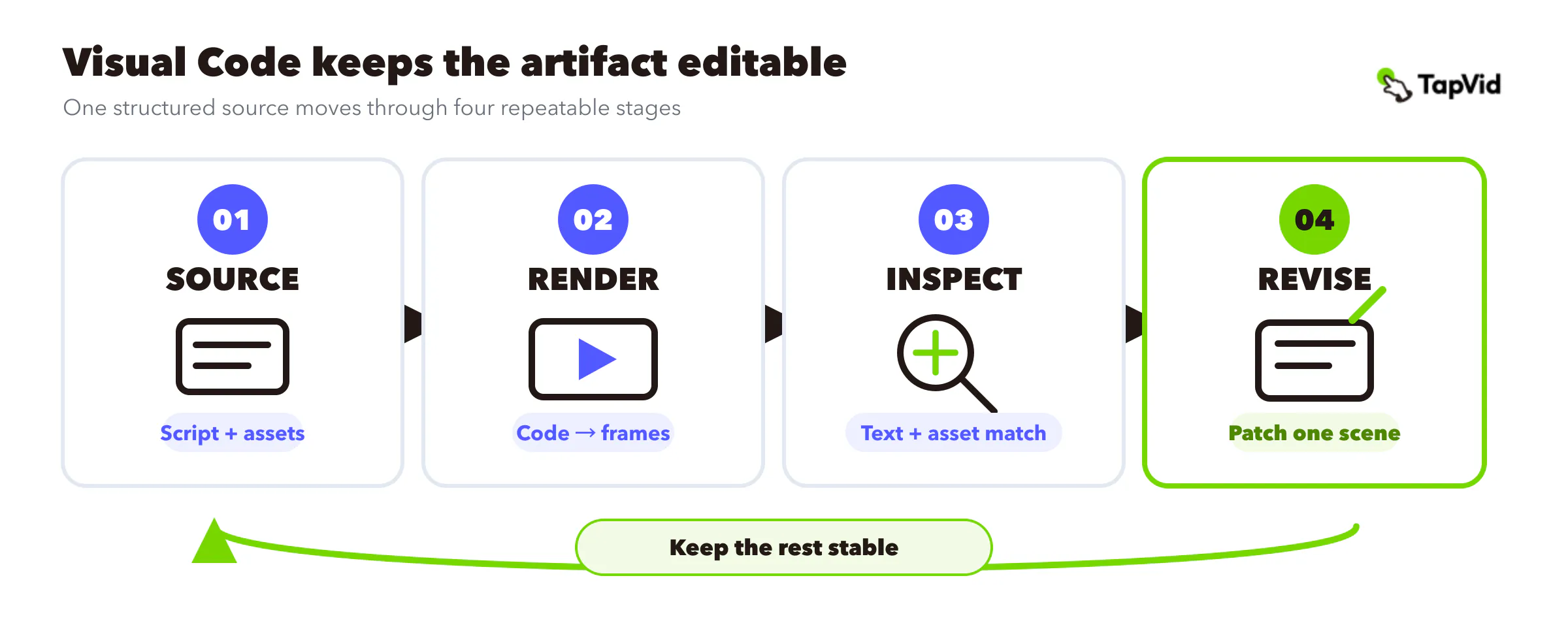
The practical loop: source, render, inspect, revise
The basic Visual Code stack contains a coding model, a symbolic representation, and a renderer. The operating loop is more useful for production teams:
- 1. Start with a source pack. Collect the approved script, product images, screenshots, logo files, claims, and brand constraints.
- 2. Create a structured plan. Map each script segment to a scene, asset, caption, narration beat, and visual purpose.
- 3. Render the artifact. A runtime turns the composition into the frames a viewer will see.
- 4. Inspect the result. Check wording, asset correspondence, legibility, pacing, cropping, and visual quality against the source pack.
- 5. Revise the smallest affected unit. Change the source for the caption, asset, timing, or scene, then render and compare again.
This loop turns rendering into a form of testing. Traditional tests can detect malformed code or a broken interaction. Visual inspection covers failures such as an obscured label, weak contrast, awkward composition, or timing that makes a claim unreadable.
The inspection is not infallible. A visual critic may notice that a scene feels crowded but recommend the wrong fix. It may reward polish while missing an omitted fact. Human review remains necessary wherever the consequence of an error is material.
06
Code and pixels should do different jobs
Visual Code is not a case against pixel generation. Pixel models are strong at realism, texture, lighting, atmosphere, and open-ended visual exploration. Code is stronger when identity, wording, structure, timing, and revision must persist.
The practical design is hybrid:
- Use structured layers for approved text, prices, product names, diagrams, charts, UI captures, and real product assets.
- Use pixel generation for illustrative backgrounds, atmospheric transitions, conceptual imagery, and details that do not carry literal facts.
- Keep the mapping between script, asset, and scene visible so a reviewer can check correspondence before export.
- When a requirement is ambiguous, route it toward the representation that makes the risk easier to inspect and correct.
This division of labor is especially useful for product explainers. A generated background can create mood, while the product screenshot and approved claim remain literal. The viewer gets a coherent video without forcing every part of the scene through the same generation method.
TapVid applies this principle as an Explainer Video Engine. Teams can provide an approved script, PDF, URL, screenshots, and brand assets, then review the brief, script, and scene plan before export. Supplied visuals and approved wording remain tied to the relevant scene, and a focused change can be made to the affected scene rather than rebuilding the entire video. Human review still matters, especially for claims, source quality, and the final cut.
07
Why this approach is becoming practical now
Programmatic graphics have existed for decades. Processing made software sketches accessible to artists and designers in the early 2000s. SVG kept shapes and text editable. Browsers turned HTML, CSS, and JavaScript into a widely available visual runtime. Motion and 3D teams have long used layers, keyframes, scene graphs, and scripts.
The old constraint was economics. A specialist had to build each structured artifact by hand. For a one-off visual, the source could cost more than the flat deliverable was worth.
Several capabilities have now improved together:
- Coding models can produce substantial frontend, graphics, motion, and 3D programs from natural-language intent.
- Mature runtimes can execute the work immediately and expose what happened.
- Vision-language models can inspect screenshots or rendered frames.
- Agents can retain state across attempts and patch the same source.
The result is the Code → Render → Inspect → Revise loop described in a16z’s essay, “The Next Frontier of Visual AI Is Code”. More inference no longer has to mean generating ten complete alternatives for a person to review. It can mean applying several focused repairs to one artifact.
Researcher Surya Narreddi demonstrated the same mechanism in a different medium. In his JavaScript painting experiment, a model produced complete p5.brush sketches, a browser rendered them, and a visual judge supplied a reward signal. Narreddi explicitly noted that the method was slower and was not necessarily a better way to make images. The useful result was editability: the code remained available for granular changes.
08
Visual feedback can improve the artifact and the system
An executable visual creates a trace between a visible defect and the source change that repairs it. That trace can improve one artifact during production, and it can also become training evidence for later runs.
The paper “Vision-Guided Iterative Refinement for Frontend Code Generation”, accepted at the ICLR 2026 Workshop on AI with Recursive Self-Improvement, studied a vision-language critic guiding a code model through repeated revisions. The authors reported improvements across three refinement cycles and found that training on successful revision traces retained part of the critic-guided gain.
The careful conclusion is not that an AI can optimize its own taste without oversight. Visual evaluation is noisy. A critic can favor familiar layouts, miss factual omissions, or become stale as communication norms change. A reliable system needs grounded sources, explicit quality checks, human audits, versioned evaluators, and rollback.
For a production team, the near-term value is simpler: every repair can leave a record. The team can see what changed, why it changed, and whether the next render fixed the original issue without causing a new one.
09
When Visual Code is the right fit
Visual Code is most useful when the cost of drift is higher than the value of surprise.
Choose a structured, code-backed workflow when:
- The exact product, logo, UI, price, number, or approved wording must survive rendering.
- Reviewers need to inspect how each scene maps to the script and source assets.
- A video will receive several rounds of targeted changes.
- The same structure will be reused across products, languages, formats, or campaigns.
- The output must connect to live data, controls, state, or a repeatable production system.
A pixel-first workflow may be the better choice when:
- The goal is cinematic exploration rather than literal product fidelity.
- The scene has no important text, data, brand asset, or state to preserve.
- The team values visual surprise more than deterministic revision.
- The output is disposable and unlikely to enter a formal approval process.
Many projects need both. A product launch video might use generated atmospheric footage for the opening, real product assets for the demonstration, structured text for the claims, and code-driven motion for transitions and charts. The right question is not “code or pixels?” It is “Which parts must remain exact, and which parts benefit from visual invention?”
If your job is broader than the technical mechanism, the guide to what an explainer video is covers formats, use cases, and production choices. Visual Code is one production approach inside that larger category.
10
What Visual Code does not solve
The direction is useful because its remaining problems are visible.
It does not guarantee truth. Code can preserve the information it receives, but it cannot repair a false source or weak reasoning chain.
It does not turn taste into a unit test. Legibility and required text can often be checked. Elegance, pacing, and emotional effect remain context dependent.
It increases the security surface. Executable artifacts may contain scripts, requests, data access, or state changes. Sandboxing, permissions, provenance, and content security policies belong in the runtime design.
It does not remove runtime fragmentation. Browser components, SVG, Lottie, React video, game engines, and 3D tools expose different abstractions. There is no universal Visual Code language.
It does not remove human approval. A structured pipeline makes review more focused and changes more traceable. It does not make the final decision automatic.
The strongest claim is therefore a controlled one: Visual Code can make AI-generated visuals more inspectable, editable, and reusable. For video teams working with real assets and approved language, that can be the difference between a promising sample and a production workflow.