
A SaaS product demo video should help a buyer answer a specific question with visible evidence. Start with the real input, show the relevant product action, and finish on a result the viewer can inspect. Attractive motion can make that evidence easier to understand, but it cannot supply a missing capability or turn a mockup into a working product.
For a small SaaS team, the useful first deliverable is usually one complete workflow rather than a tour of every menu. This guide explains how to choose a format, prepare evidence, write the sequence, and review the result. Our worked example is an Amazon Lens feature film made with TapVid: a consumer-software example whose object–action–result structure transfers well to SaaS, with clear limits on what an animated recreation can prove.
01
Choose your SaaS product demo video from the buyer’s question
“What does this product do?” and “Can it handle my case?” are different requests. The first needs context and a representative result. The second needs the real interface, relevant data, and enough of the workflow to expose prerequisites or manual work. If a viewer already understands the category, repeating the problem for half the video delays the evidence they came to see.
| Buyer question | Best starting format | Evidence it needs |
|---|---|---|
| What is this for? | Short explainer with a real example | Input and result, plus a clear use case |
| Can I perform this workflow? | Recorded product walkthrough | Before, action, after, and necessary setup |
| Can I explore a branch myself? | Interactive demo or sandbox | Usable branch and a stated difference from production |
| Will this work with my data and constraints? | Live or tailored demonstration | Representative dataset, limits, exceptions and questions |
An interactive demo is not automatically a better video, because it is not a video. It asks the viewer to participate. A prerecorded demonstration controls the sequence; an interactive experience lets a qualified buyer investigate. Use both when they answer different questions, rather than forcing one asset to do every job. Howdygo’s guide is useful for comparing those deployment choices across website, outbound, and sales follow-up.
02
Study the mechanism in examples, not just their visual style
Three choices in published examples are worth distinguishing. Vidico’s Square analysis shows why keeping hardware and software together can reduce the need to mentally connect separate shots. Its RemSense walkthrough follows a task sequence rather than a menu list. Its discussion of Grammarly’s stylized interface raises the opposite tradeoff: simplifying a screen can improve legibility, but the simplified version still has to represent what the product actually does.
Apply these as questions to your own footage: are two related objects visible together; does each step lead to the next; and has visual simplification changed the implied capability? We reviewed the publisher’s explanations, not those products in an independent hands-on test. We do not carry over its customer results, budgets, or conversion claims.
Vidico: product-demo examples and detailed breakdowns
Storylane’s demo-versus-explainer comparison is useful when a brief mixes category education with product proof. Separate those jobs in the script. A short explanation can introduce the problem, but once the video promises to demonstrate a capability, the picture must supply the evidence. Do not let a transition or metaphor occupy the very moment when the buyer expects to see the product work.
03
Prepare a proof packet before writing narration
Pick a workflow the current product can complete and run it once before scripting. Keep a starting-state capture, the necessary actions, the resulting state, and any prerequisites. Use a demonstration account with realistic sample data and no private customer information. If a hidden permission, integration, or manual action is necessary, include it in the brief even if it later belongs in a caption rather than the main narration.
Attach each proposed claim to a source. An output screenshot supports “this file was produced.” It does not support “every file will be correct,” “the workflow is instant,” or “this increases revenue.” A source-to-output pair supports a narrow transformation claim; proving speed additionally requires a timer and a defined start and stop. Keep those evidence jobs separate.
| Keep in the packet | Why it matters | Reject when |
|---|---|---|
| Versioned input and source wording | Makes the before/after comparison repeatable | The input has changed since capture |
| Actual workflow recording | Exposes the steps required to get the result | A mockup substitutes for a real control |
| Original exported result | Lets reviewers check the deliverable | Only an editor preview is available |
| Claim-to-frame notes | Explains exactly what each scene proves | A claim relies only on narration |
| Known boundaries | Prevents an implied guarantee | Required setup or an exception is hidden |
04
Our TapVid case: Amazon Lens makes a feature visible
In the Amazon Lens example, the product is a way to move from something a person sees to a shopping result. The film makes that task concrete with an outfit, a sofa, a cafe chandelier, and a backpack. Each example gives the viewer a recognizable object before showing scanning cues and result cards. The audience can infer the purpose of the feature from the sequence instead of first learning a technical description of visual search.
This is a TapVid-made animated recreation from our case library. We inspected the original project brief, public player, transcript, and library MP4; it is not an Amazon client case or a recording of the live Amazon app. The brief specifies product photos within typography and repeated scanning scenes. The project later confirms landscape framing. The downloaded example is 22.5 seconds at 1280 × 720, shorter than the requested 30 seconds.
| Visible beat | What the viewer learns | What a SaaS team can borrow |
|---|---|---|
| Product imagery inside the opening words | The task involves shopping for something seen in the world | Show the kind of input before naming the technology |
| Outfit image with surrounding result cards | One visual input can lead to a set of options | Keep the input and output visible together |
| Sofa, cafe and backpack scenes | The same action pattern applies to different objects | Repeat the same mechanism with a second relevant input |
| Simple final slogan and brand | The central task is easy to restate | End with one next action after the result is understood |
Observation basis: one TapVid case-library MP4 and its project/share pages, inspected September 7, 2026. Beat descriptions refer to visible output; duration and dimensions come from the file. This is not a comparison against an earlier release or a product-performance test.
The most useful beat is the outfit scene. A person in a blue fleece remains centered while result cards appear on both sides. This preserves the relationship between the thing being scanned and the proposed output. For a SaaS demo, the equivalent might be keeping an uploaded invoice visible next to extracted fields, or showing the selected customer record beside the generated report. The useful principle is spatial continuity: viewers should not have to remember an input that disappeared before its result arrived.
Repetition also does useful work. The sofa and cafe scenes carry the same search idea into a new setting. For a feature introduction this can establish range quickly. For a buyer evaluating one specific SaaS workflow, however, too many examples can crowd out the proof they need. Start with one complete case; add another only if it answers a real concern, such as whether the workflow handles a second input type.
There are limits worth carrying into the production brief. The result cards are simplified animation, not verified live results; some use generic icons rather than detailed product thumbnails. The voiceover makes broad recognition claims that this recreation does not test. Borrow its explanatory sequence, then replace the illustrative interface with your own genuine screen capture when the buyer needs evidence of a working feature. Neither the animation nor its visible prices establishes Amazon recognition accuracy, availability, or a TapVid customer relationship.
05
Write the full sequence, including the proof and the next step
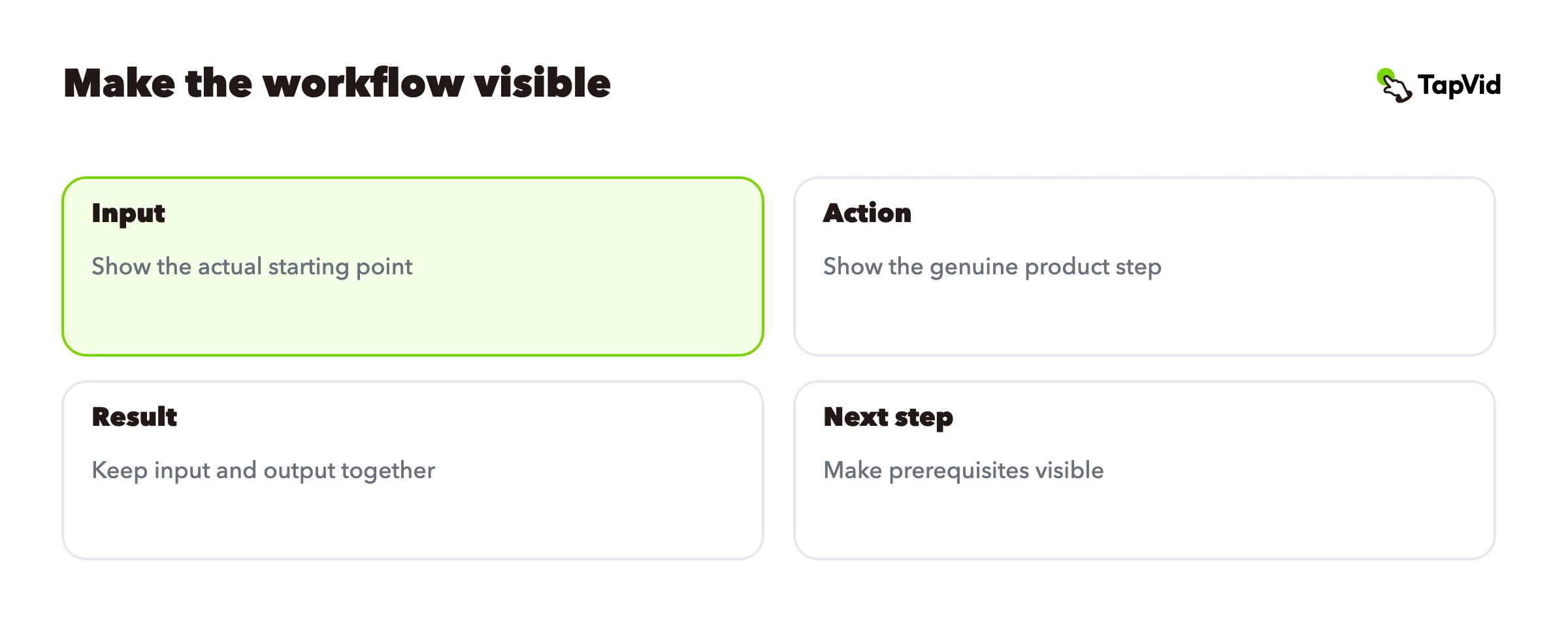
| Beat | Picture | Purpose |
|---|---|---|
| Input | The actual object, file or record the user starts with | Make the starting point recognizable |
| Action | The genuine selection, scan or processing step | Explain how the input becomes a result |
| Result | Keep the original input beside the actual output | Make the relationship inspectable |
| Next step | One relevant action, with prerequisites visible | Help the buyer try the same workflow |
For a screen-based SaaS workflow, replace the input example with the actual starting screen and record the action through to the result. Keep one stable identifier visible across the transition: a file name, project title, or record ID. If the identifier changes between shots, reviewers cannot tell whether they are looking at one completed workflow or unrelated states.
Write narration after the visual proof is available. Say what the viewer should notice rather than reading every menu label. If the result contains a specific change, keep it on screen long enough to inspect. If a feature is still a concept, call it a concept and remove it from a demo that promises current functionality.
06
Review the cut as a skeptical buyer
Watch once for factual continuity: same input, same record, genuine controls, correct labels, and no unexplained jump over manual work. Then watch for comprehension: readable UI, a clear pointer, captions that do not obscure the evidence, and an ending that resolves the original question. These are separate passes because beautiful pacing can distract from an inaccurate transition.
Ask a teammate who did not make the video to explain what the product did and what they would need to try it. If their answer adds a capability you did not mean to promise, change the shot or wording that caused the inference. If they cannot name the starting conditions, restore that context. A demo is finished when its meaning is clear, not when every transition is polished.
07
Place and measure the demo according to its job
On a homepage, help a new visitor recognize the use case and inspect a representative result. On a feature page, show the relevant workflow with fewer category explanations. In a sales follow-up, reference the question the prospect actually asked and link to the relevant point in the video. Keep a longer evidence version available even if a short cut introduces it.
Separate whether visitors start the video, whether they reach the proof, and whether they take the intended next action. A low start rate suggests examining placement and the invitation to watch. Drop-off before the result suggests inspecting the opening and pacing. Post-view conversion is descriptive: people who choose to watch may already be more interested. Use a controlled comparison before attributing a business lift to the video.
Keep a version owner and an asset ledger. When a workflow, interface label, or product claim changes, update the affected section and replay the full export to check continuity. Preserve the article or page URL where possible so existing links still lead buyers to the current evidence. For a broader acquisition plan, use the SaaS video marketing guide; this page focuses on producing one credible demo.
SaaS video marketing: the broader campaign context
The practical starting point is a workflow you can complete today, a source packet you can inspect, and one buyer question you can answer without exaggeration. Record that evidence first. The script and visual treatment then have a clear job.