
The strongest video marketing ideas begin with proof you already own: a product screen, customer question, release note, comparison, process, or result. Starting from proof gives the video a job and makes factual review possible. Starting from a visual effect often produces a polished clip with nothing specific to say.
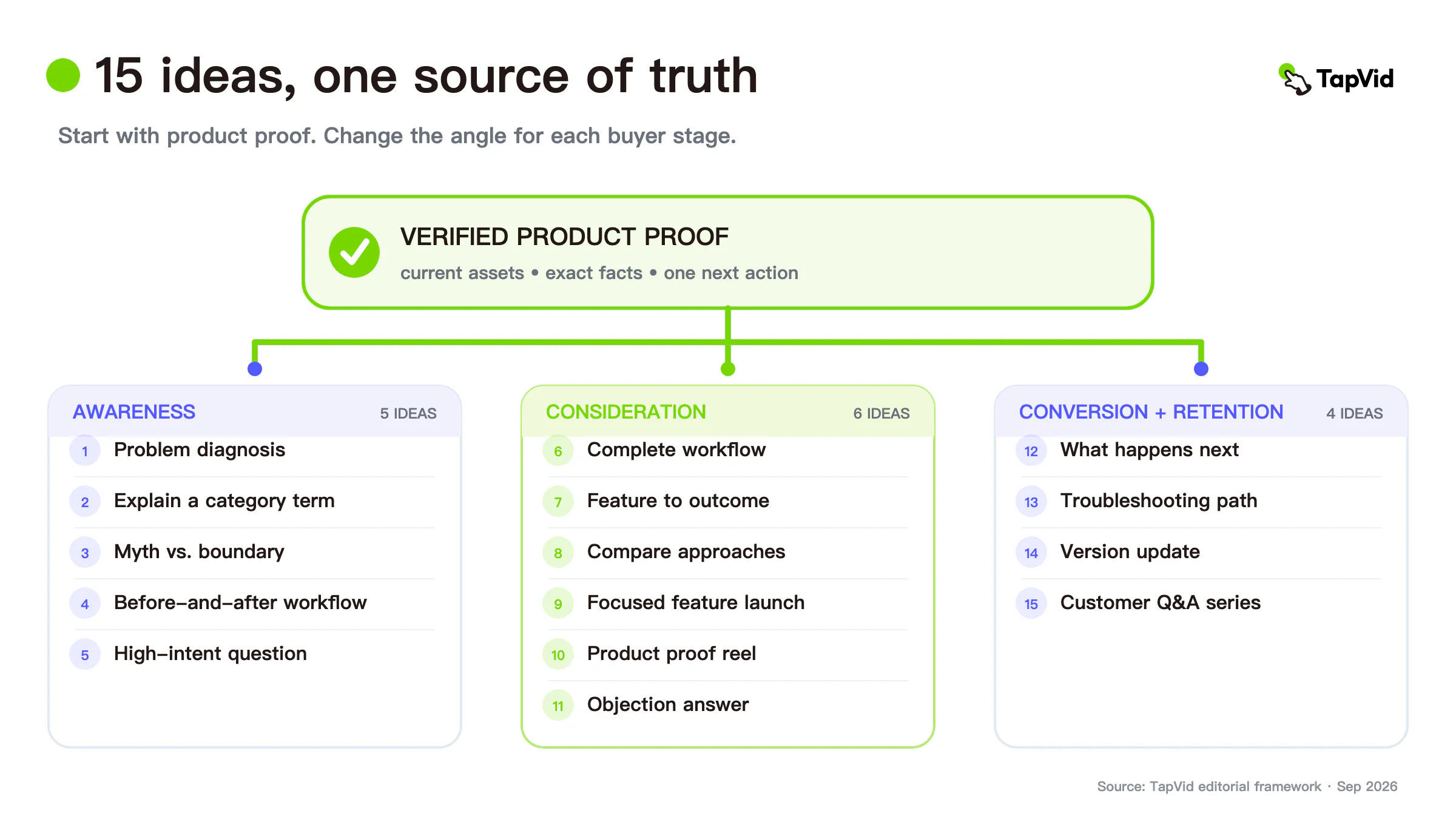
Below are 15 ideas organized by buyer stage. Each includes the source material, a practical structure, and the detail that must remain accurate. The examples are designed for small SaaS, ecommerce, and B2B teams that need a repeatable system rather than a one-off brand film.
01
Start with one audience, one claim, and one source package
Before choosing an idea, build a small source package:
- One audience and one situation.
- One approved claim the video should make.
- The product screenshot, image, clip, diagram, or document that proves it.
- Exact product names, numbers, prices, parameters, and legal wording.
- A single next action.
- Exclusions: stale UI, unsupported claims, private data, and visuals that must not be generated.
Review three layers separately. Asset fidelity asks whether supplied product material stays recognizable. Information fidelity asks whether approved copy and factual details stay unchanged. Correspondence asks whether the narration and visual refer to the same product, feature, or step.
This packet keeps ideation grounded. It also lets one approved input support several videos without asking the team to rediscover the truth each time.
02
Awareness video marketing ideas
1. Turn the customer's recurring problem into a 20-second diagnosis
Open with the situation in the customer's own language, show the cost or friction, and end with the change your product enables. Do not lead with your company history or a list of features.
Source material: support tickets, sales-call notes, search queries, and a product screen that shows the change.
Structure: recognizable problem → consequence → product mechanism → next step.
Accuracy check: label observations correctly. A repeated sales-call comment is not automatically a quantified market fact.
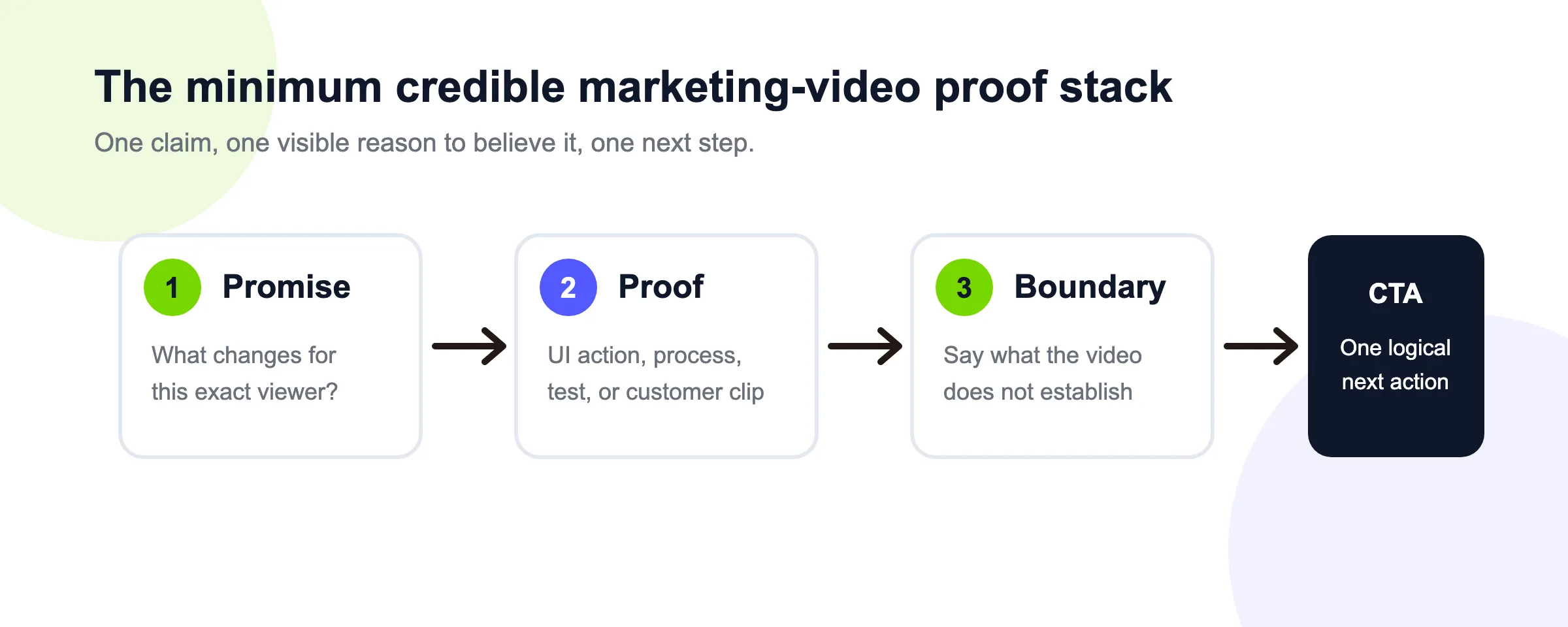
2. Explain one misunderstood category term
Choose a term that blocks evaluation: vector database, usage-based billing, attribution window, thermal bridge, or another concept your buyer must understand. Define it in one sentence, show one diagram or product state, then explain why it changes a decision.
Source material: approved documentation, diagrams, and terminology.
Structure: definition → visual relationship → practical consequence → related product path.
Accuracy check: have a subject-matter expert review the relationship shown in the visual, not only the written definition.
3. Make a myth-versus-boundary video
Instead of a dramatic “myth busted” clip, choose a real assumption and state the boundary precisely. For example: “Automation can remove repeated assembly; it does not remove product approval.”
Source material: a common objection plus the current product or policy boundary.
Structure: assumption → what is true → what is not → how to evaluate it.
Accuracy check: avoid absolute claims of error-free output unless the claim has a valid basis.
4. Visualize a before-and-after workflow
Show the same job before and after the product, using comparable steps. The “after” state should not quietly remove approvals, dependencies, or work that still exists.
Source material: verified current workflow, product screens, and owners for each step.
Structure: old sequence → bottleneck → new sequence → remaining human check.
Accuracy check: make both sides use the same start and end boundary. Otherwise the comparison is persuasive but false.
5. Answer one high-intent question from search or sales
Choose a question with a concrete decision behind it: “Can I update one scene without rebuilding the video?” or “What files does the integration require?” Answer directly, show the relevant proof, then link to the deeper guide or product path.
Source material: keyword research, sales questions, official product documentation, and a current screenshot.
Structure: direct answer → proof → limitation → next step.
Accuracy check: distinguish current product behavior from roadmap plans.
03
Consideration video marketing ideas
6. Show one complete product workflow
Pick a job that ends in a visible result. Show the starting state, important action, and final state without cutting away during the critical proof.
Source material: current product account, prepared sample data, and a verified click path.
Structure: input → action → review → output.
Accuracy check: remove private data and confirm the recorded UI and plan match what the audience can access.
7. Build a feature-to-outcome explanation
Translate one feature through a four-part chain: feature → mechanism → visible effect → buyer outcome. This prevents vague outcome claims from floating above an unrelated interface.
Source material: approved feature description, product screen, and evidence for the outcome boundary.
Structure: feature → how it works → what changes on screen → who benefits.
Accuracy check: the outcome must not outrun the mechanism. If evidence supports “reduces repeated scene assembly,” do not rewrite it as “cuts production costs by 80%.”
8. Compare two approaches, not two logos
Build a decision video around workflows: screen recording versus asset-led explainer, presenter-led training versus concept animation, or manual assembly versus a structured generation flow. Describe when each approach is the better fit.
Source material: one controlled brief, results from both paths, and explicit evaluation criteria.
Structure: decision → path A → path B → boundary → recommendation.
Accuracy check: keep inputs and acceptance criteria comparable. Do not use a weak setup for the option you want to reject.
9. Turn a release note into a focused feature launch
Select one user job changed by the release. Use the current interface and exact approved wording, then make the call to action match the feature's availability.
Source material: release note, current UI, availability or plan boundary, and approved launch copy.
Structure: old friction → new interaction → visible result → availability.
Accuracy check: record the release version and date so the team can identify when the video becomes stale.
10. Create a product proof reel
Combine three short pieces of evidence around one claim: a product action, a resulting state, and an approved supporting quote or metric. Keep each item on screen long enough to inspect.
Source material: product footage, verified result, and attributable evidence.
Structure: claim → proof one → proof two → proof three → next action.
Accuracy check: cite third-party evidence and do not turn a customer observation into a universal result.
11. Make an objection-handling video for sales follow-up
Choose one objection and answer it without pretending the tradeoff does not exist. A precise answer builds more trust than a montage of benefits.
Source material: objection, approved response, supporting product screen or document, and the owner of any contractual answer.
Structure: objection → direct answer → proof → boundary → who to contact.
Accuracy check: pricing, commercial rights, data handling, SLA, and custom development should point to current official terms or the applicable agreement.
04
Conversion and retention video marketing ideas
12. Create a “what happens next” onboarding video
Reduce uncertainty immediately after signup or purchase. Explain the first three actions, the expected state after each one, and where to get help.
Source material: current onboarding flow, exact button labels, help links, and support ownership.
Structure: current state → first action → confirmation → next action → support path.
Accuracy check: test with a new account. Existing team members often skip steps they no longer notice.
13. Turn a help article into a visual troubleshooting path
Select one symptom with a small number of verified causes. Show how to identify the state and what action belongs to each branch.
Source material: current help article, product screens, error messages, and escalation path.
Structure: symptom → check A → action A or check B → action B → escalation.
Accuracy check: keep error text exact and avoid exposing account data, keys, or internal-only controls.
14. Build a version-update video for existing customers
Show what changed, what did not change, and whether the customer needs to take action. This is more useful than presenting every release as a new product launch.
Source material: version diff, before-and-after screens, migration requirements, and support note.
Structure: change → preserved behavior → required action → deadline or support path.
Accuracy check: use stable dates and explicit version numbers. Do not imply urgency when no action is required.
15. Create a reusable customer-question series
Build a consistent 30- to 60-second format for real questions. Each episode should answer one job, use one proof asset, state one boundary, and link to one next step.
Source material: a prioritized question backlog, approved answers, and a repeatable scene template.
Structure: question → direct answer → visible proof → boundary → link.
Accuracy check: assign an owner and review date to every episode so stale pricing, UI, and policy answers do not remain in circulation.
05
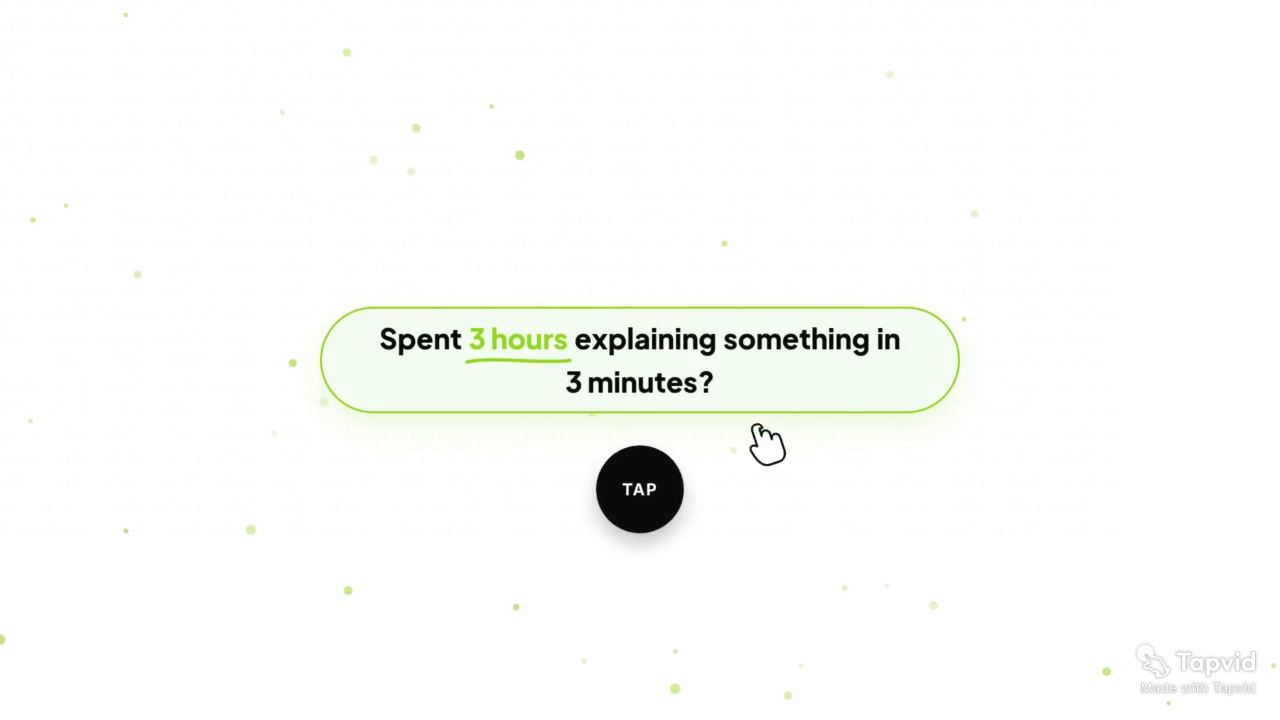
One verified case: a launch film built around a product problem
The approved TapVid Launch Film case shows how one awareness idea becomes a complete piece. The 68-second video opens with a concrete friction statement—spending hours explaining something that should take minutes—and then moves into the product frame. At five seconds, the problem line and TapVid interface are visible together.
The useful lesson is structural: a launch film does not need to begin with a feature grid. It can begin with a recognizable job, then move from problem to product mechanism and result. The supplied product frame keeps the claim tied to the actual tool.
This is a first-party case, not independent proof of performance. It supports the production pattern and asset-to-message correspondence. It does not establish a universal time saving or guarantee error-free output.
Case sources: share page and video page.
06
Turn one source package into a two-week content batch
A small team does not need 15 disconnected campaigns. Choose one product moment and build four assets from the same approved source package:
- Monday: a problem diagnosis for awareness.
- Wednesday: a complete workflow or feature-to-outcome explanation.
- Friday: an objection answer or product proof reel.
- Following week: an onboarding or troubleshooting video for existing users.
Keep the core product facts fixed. Change only the hook, proof order, format, and next action required by the audience stage. Record which source version each video uses.
For every variant, review:
- Is the product asset current and recognizable?
- Are names, numbers, claims, and legal phrases preserved?
- Does each line appear with the correct visual?
- Is the call to action appropriate for the viewer's stage?
- Is there a clear owner and refresh trigger?
This turns ideation into a maintainable system. It also makes performance comparisons more useful because the source truth remains stable while the angle changes.
07
Common mistakes when using video marketing ideas
Starting with a trend instead of a buyer job. A visual trend can shape execution, but it should not replace the reason the video exists.
Putting several scenes into one short video. One video should explain one situation or decision. Split unrelated use cases into separate pieces.
Rewriting product facts to sound smoother. Approved product names, numbers, parameters, prices, and legal wording should remain exact.
Showing decorative footage during the proof. When the narration makes a product claim, show the relevant product evidence.
Scaling before building a review loop. Prove one source package, one template, and one approval path before producing dozens of variants.
08
Final recommendation
Choose the first idea by the evidence already available. If you have a current product workflow, make a complete workflow video. If you have a repeated question, answer it directly. If you have a release, show the changed interaction. If you have a strong diagram, explain the relationship it proves.
Use the video marketing examples gallery when you need finished references after choosing an idea. For the wider operating model—channels, cadence, ownership, and measurement—continue with the SaaS video marketing guide.
Then reuse the same verified source package across awareness, consideration, and retention formats. The creative angle can change; the product truth should not.
09
Frequently asked questions
What are easy video marketing ideas for a small business?
Start with one repeated customer question, one current product workflow, one before-and-after process, or one onboarding step. These ideas use evidence the business already owns and are easier to review than a broad brand film.
How many ideas should one campaign use?
Use one core claim and create a small set of stage-specific videos. Change the hook, proof order, and call to action, but keep approved product facts and source assets fixed.
Can the same video work across every channel?
The source package can be reused, but the edit may need different pacing, aspect ratio, safe zones, captions, and calls to action. Review each placement rather than assuming one export works everywhere.
How do I know whether a video idea worked?
Define the intended action before production. Awareness content may be judged by qualified attention or deeper visits; consideration content by product-page or demo behavior; onboarding content by successful task completion. Keep small samples and channel differences visible.