
The most useful product videos for marketing answer the question stopping a buyer from moving forward, using the actual product and approved information. Before choosing animation, a camera, or an AI workflow, decide what the viewer needs to understand and what evidence will make the next step reasonable.
A product introduction, a usage demonstration, and a customer testimonial can all support marketing, but they require different inputs. A small team gains more from one well-chosen video and a few deliberate variants than from an unplanned list of formats. This guide works through that choice, a real TapVid production check, and a practical handoff from source material to campaign measurement.
01
Choose product videos for marketing from the buyer’s question
| Question | Video to consider | Minimum credible evidence |
|---|---|---|
| What is it and who is it for? | Product explainer | Correct product, clear use case, representative result |
| How does it work? | Usage demonstration | Actual steps and observable outcome |
| What is different about this version? | Feature or product update | Specific before/after and relevant conditions |
| Will it suit someone like me? | Customer example or testimonial | Real customer context, permission and attributable experience |
| What do I need before buying? | Focused objection or FAQ video | Verified specification, compatibility or process information |
Choose the question using support conversations, sales objections, or the page where the video will appear. If buyers already know what the product is but worry about setup, another aspirational introduction leaves the obstacle untouched. If they have never seen the category, a dense sequence of controls may be technically correct and still unhelpful.
Limit the first brief to one audience, one question, one proof, and one next action. You can produce other videos later from the same material, but they should each have a reason to exist. This is how a product-video library becomes useful rather than just large.
02
What good examples teach about message and format
Storykit demonstrates six treatments built from one product listing, including a problem-solution piece and a feature-focused version. The valuable lesson is that source material can stay consistent while the buyer question changes. Repurposing should change the emphasis and sequence, not invent new product facts.
Storykit: six product-video treatments from one source listing
Product Marketing Alliance’s analysis of monday.com, Pipe, and Apple Vision Pro is useful because it describes shortcomings as well as strengths. Fast UI movement can make following a process difficult; a polished introduction can leave practical questions unanswered. These are editorial observations, not evidence that any particular edit increased sales.
Product Marketing Alliance: three examples with strengths and weaknesses
Chameleon connects product videos to customer touchpoints, including feature announcements inside the product. That is a reminder to design distribution while briefing production. A prospect watching an introduction on a website and an existing user watching an update need different context and different endings.
03
Build a source packet that a producer can actually use
Give the producer the approved product image or interface capture, the exact wording, the intended placement, and the source for each claim. Keep product identity separate from visual direction. “Premium lighting” is a styling request; “keeps drinks cold longer” is a product-performance claim that needs evidence. An attractive generated scene cannot validate the claim it depicts.
For physical products, supply the exact SKU, approved views, packaging, and verified specifications. For software, include the relevant version and a representative result. Do not let a producer fill missing information from a similar product. When there is no source for a number or feature, omit it from the script until the owner supplies one.
| Brief item | Physical-product example |
|---|---|
| Audience | People considering an everyday insulated tumbler |
| Question | Where would this product fit into my day? |
| Visual subject | The exact item and approved product views; confirm the SKU |
| Story | Product first, then relevant benefits and everyday situations |
| Claims | Only approved specifications for that SKU |
| Destination | A mobile product-introduction placement with one product-detail CTA |
This is a recommended brief based on the Stanley example below. It does not imply that its pictured SKU, specifications, or sales results have been verified.
04
Our physical-product case: a Stanley tumbler launch film
The Stanley tumbler example in our TapVid case library keeps a physical product at the center of the film: a light-colored handled tumbler, with its lid and straw visible, photographed on a table. The same photograph returns through the benefit sections and the closing call to action. That makes it a useful example for a merchant starting with product images and a short launch message, rather than a software logo or an abstract brand animation.
We checked the original project, public player, transcript, and full library MP4. The actual file is 30.07 seconds at 1080 × 1920. This is a TapVid-made production example, not evidence that Stanley commissioned the film or achieved a sales result. The project shows a text brief for a tumbler launch; the visible record does not establish who supplied the photograph or the exact photographed SKU.
| Part of the film | Visible treatment | Marketing purpose |
|---|---|---|
| Opening | Tumbler photo with the brand and a temperature-related hook | Identify the product before introducing other ideas |
| Temperature | The same product with frost/steam styling and an animated hours dial | Turn an abstract benefit into a visible motif |
| Durability | Product photo with material and durability labels | Address an everyday buying concern |
| Daily routine | Commute, gym and desk labels around the same photo | Connect the item to recognizable occasions |
| Closing | Product, brand lockup and a purchase CTA | Leave one clear next step |
Observation basis: one case-library MP4 and its project/share pages checked September 7, 2026. Rows describe creative treatments, not verified product specifications. File duration is rounded from 30.066667 seconds; no prior-period or campaign comparison was performed.
The strength is product continuity. Viewers see the same cup rather than a stream of unrelated lifestyle stock footage. Color, handle, lid, and straw remain visible as the surrounding message changes. A merchant can borrow that hierarchy: keep the item large enough to inspect, then let a short label explain why the current shot matters. Before production, collect the approved front, side, detail, and in-use views for the same SKU so a change of angle does not silently become a change of product.
The everyday-use section also shows the difference between suggesting a use and demonstrating it. A gym label appears above the tabletop product photograph; the film does not show someone actually using the cup at a gym. That can work as an introduction, but it does not answer fit, grip, cleaning, or spill questions. If those stop customers from buying, replace a repeated still with the relevant real action: a hand holding the handle, the lid being removed, or the exact cup placed in a real holder. Match the footage to the claim.
The part we would revise before advertising is the specification language. The prompt says not to invent numeric claims, yet the output includes an hours dial marked 6H, 12H, and 24H. It also shows material and impact-resistance wording without a verified SKU sheet in the evidence packet. A graphic can accidentally make an unsupported claim look like a tested fact. Remove those numbers and labels unless the exact product documentation supports them; a disclaimer elsewhere cannot repair a misleading product frame.
For your own product, keep the useful structure and replace every factual input: your approved photos, your SKU-specific wording, and your destination. Lead with the product, demonstrate one relevant buying reason, and finish on a product-detail action. Do not reuse a brand example’s specifications or imply its results. The takeaway from this film is how the item, message, and occasion stay connected—not proof of insulation performance or campaign conversion.
05
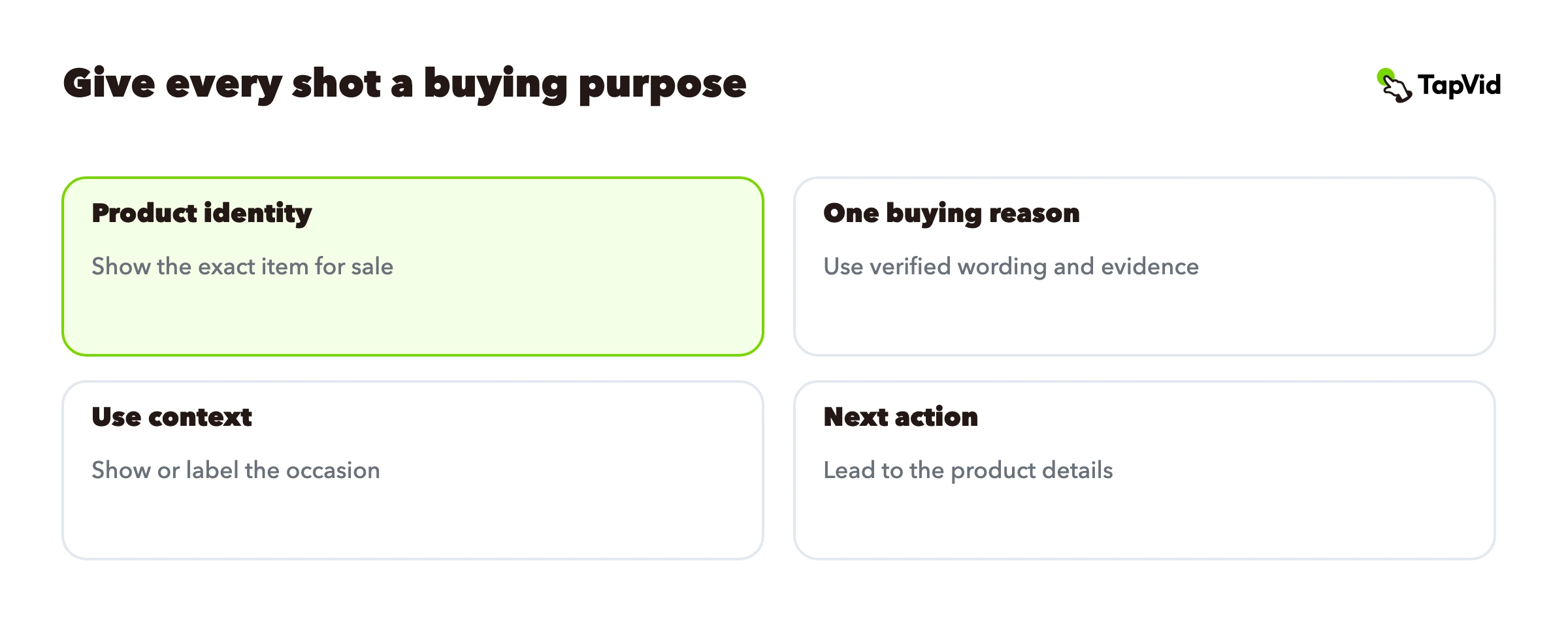
Write a shot treatment before adding production complexity
| Sequence | Message job | Visual decision |
|---|---|---|
| Product identity | Show which item is for sale | Use an approved view of the exact SKU |
| One buying reason | Answer a relevant question | Pair verified wording with the matching detail or real action |
| Use context | Make the occasion recognizable | Use an appropriate in-use image or clearly labeled illustration |
| Next action | Continue the evaluation | Show the same item and a product-detail CTA |
For a physical-product demonstration, the equivalent middle shot might show the real lid opening or connector attaching. Film that action if it is the proof. Do not substitute a rendering when the viewer is trying to verify a mechanical detail. Animation can explain a relationship, and real footage can show the mechanism; the brief should say which job each asset performs.
For software, a real screen sequence may be more valuable than a lifestyle scene. Keep the important control legible and the final state visible. If the marketing video is only introducing the category, use an explainer and link to a separate workflow demonstration. Do not label a concept film as a complete product walkthrough.
06
Make variants by changing the question or placement
Start from one verified source packet and choose a small set of deliberate adaptations. For a website, preserve enough context to explain the product. For a social introduction, lead with the relevant problem or result and keep the message understandable at a small size. For sales follow-up, answer the objection that came from the conversation. These are different editorial cuts, not merely resized copies.
A wide frame cannot always be cropped into a vertical one. The original product may be centered while the explanation sits at the edge. Recompose both together, then check that captions, logos, and the product are visible at the intended viewing size. If the platform overlays controls, leave room based on the actual placement preview rather than a guessed universal safe area.
Keep the facts fixed while changing the treatment. A shorter cut can omit a secondary point; it should not silently strengthen a claim. If “shown in this example” becomes “always works,” the variant has changed the meaning and requires another factual review.
07
Review and hand off the actual deliverables
Review in three passes. First check product identity: the correct item, image, logo, and version. Then compare wording and numbers against the approved source. Finally check the correspondence between narration and picture: when the sentence refers to one feature or product, the frame must show that item. Only after these checks should styling polish decide whether the cut is ready.
Open the exported file on a desktop and at a phone-sized view. Check the opening, each scene boundary, captions, and the ending. Confirm the final call to action leads to the intended page. Keep a filename that includes product, message, ratio, and version, plus a short ledger mapping it back to the approved source. This is especially important when several similar products share a visual template.
For a small team, one person can own the source and another can make the final factual check. The purpose is not to create a large approval process. It is to make sure the person accepting the deliverable knows which facts were approved and can spot a wrong product or an unsupported addition before distribution.
08
Measure the action the video was built to support
A website introduction might support a qualified product evaluation. A feature announcement might support trying that feature. A sales follow-up might support answering an open question and moving to a next meeting. Choose the action before launch so a high view count does not become a substitute for the original goal.
Keep the denominators visible: eligible page visitors, people who started playback, people who reached the key section, and people who completed the next action are different groups. Use them to locate friction. Do not add them together or interpret a viewer/non-viewer conversion difference as proof of causation; the viewers may have been more motivated at the start.
When traffic supports a comparison, change one meaningful element at a time, such as whether the introduction opens with the result or with the use case. Keep audience, destination, and conversion definition consistent. With low traffic, treat the numbers as directional and combine them with observed misunderstandings from real viewers. Do not claim a winner from a few conversions.
The next useful video is the one that removes a remaining buyer question with evidence you can actually supply. Keep that question, the source packet, and the intended action together. That makes every new production easier to brief and every later revision easier to judge.