
TL;DR
Ecommerce product videos earn their place when they answer one shopper question on one product page. Write that question first. Then choose inspection, demo, lifestyle-context, or proof, and put the clip where hesitation happens, usually the product gallery after the hero still. Do not start from a type list. A lifestyle loop that could sell any brand, a YouTube embed that recommends a competitor, and a redrawn product that is not the SKU for sale all fail even if the motion looks finished.
Shoppers search for ecommerce product videos when a still image is no longer enough and a brand film is too much. They need a short clip that shows the object, the use, the fit, or the reason to trust the listing. The phrase is specific on purpose. It is not "more video marketing." It is not "a campaign." It is the clip that sits next to Add to Cart.
This page owns that decision. It does not rebuild a SKU packet. That work already lives in the ecommerce video marketing guide. It does not choose film versus asset-led production. That work already lives in the ecommerce video production guide. It does not collect famous examples. That work already lives in product video examples. After you know the job, those pages stay useful. Before you know the job, they are the wrong first read.
Ecommerce video marketing guide
01
What counts as an ecommerce product video
An ecommerce product video is a short clip attached to a sellable record. The shopper is already looking at a SKU, a variant, or a small set of SKUs they must choose among. The clip has one job: remove the hesitation that still photos, bullets, and reviews have not closed.
That definition excludes several things stores still upload into the gallery.
| This is an ecommerce product video | This is not |
|---|---|
| A short clip on a sellable SKU | A homepage brand loop |
| A cut that opens on the selected product | A paid-social hook that opens on a problem |
| The object in the listing | A software demo of the store admin |
- A homepage brand loop is not an ecommerce product video. It may help a first visit. It does not tell a shopper whether the 750 ml bottle is the hiking size.
- A paid-social hook is not an ecommerce product video. AcquireConvert's 2026 guide is useful here for a negative reason: a TikTok cut and a product-page cut share source material, but they do not share the first three seconds. A feed cut can open on a problem or a surprise. A product-page cut should open on the product the shopper already selected. If you need the ad cut, use the AI TikTok ads guide after this page, not instead of it.
- A software demo of your store admin is not an ecommerce product video. The product on sale is the object in the listing, not the theme editor.
Videowise's 2026 ecommerce guide groups formats as demo, 360 or inspection, lifestyle, UGC, and AI-generated catalog clips. Treat that list as a production menu, not a brief. Two formats can serve the same question. A 360 spin and a customer unboxing can both answer "what arrives in the box." A lifestyle clip and a demo can both answer "will this work in my kitchen." If you cannot name the question, the format does not matter yet.
Two limits sit next to the definition.
- First, a clip can be useful and still be the wrong slot. A 90-second founder story can raise trust and still steal attention from the size chart the shopper needed. Put that story below the fold or on the About page. Do not let it occupy the gallery slot that should inspect the object.
- Second, a clip can look like the product and still not be the product. If the frame shows a generated lookalike, a last-season colorway, or a bundle that is no longer sold, the video is not helping the listing. It is teaching the shopper to distrust the stills.
02
At a glance: four jobs for one SKU
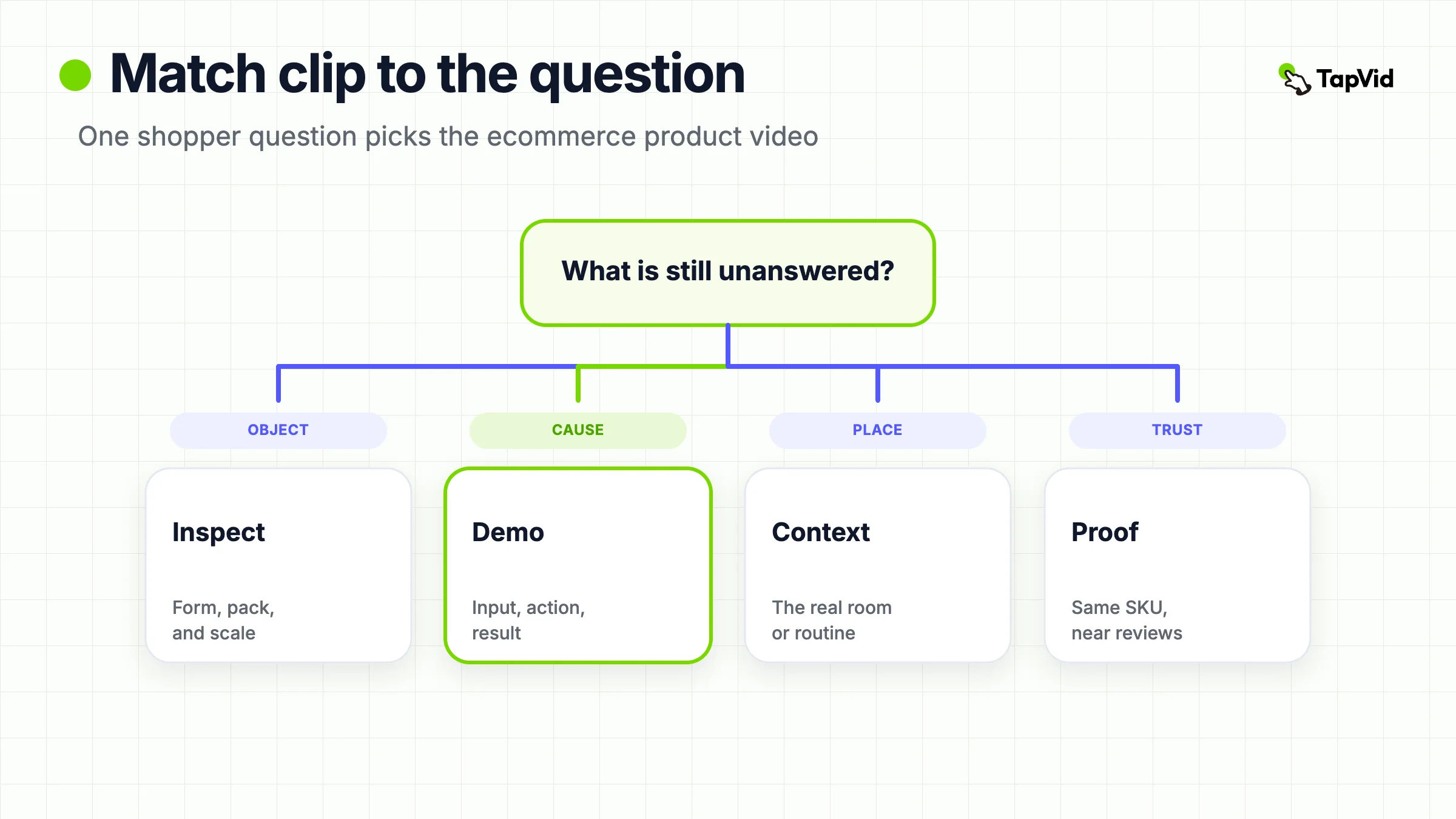
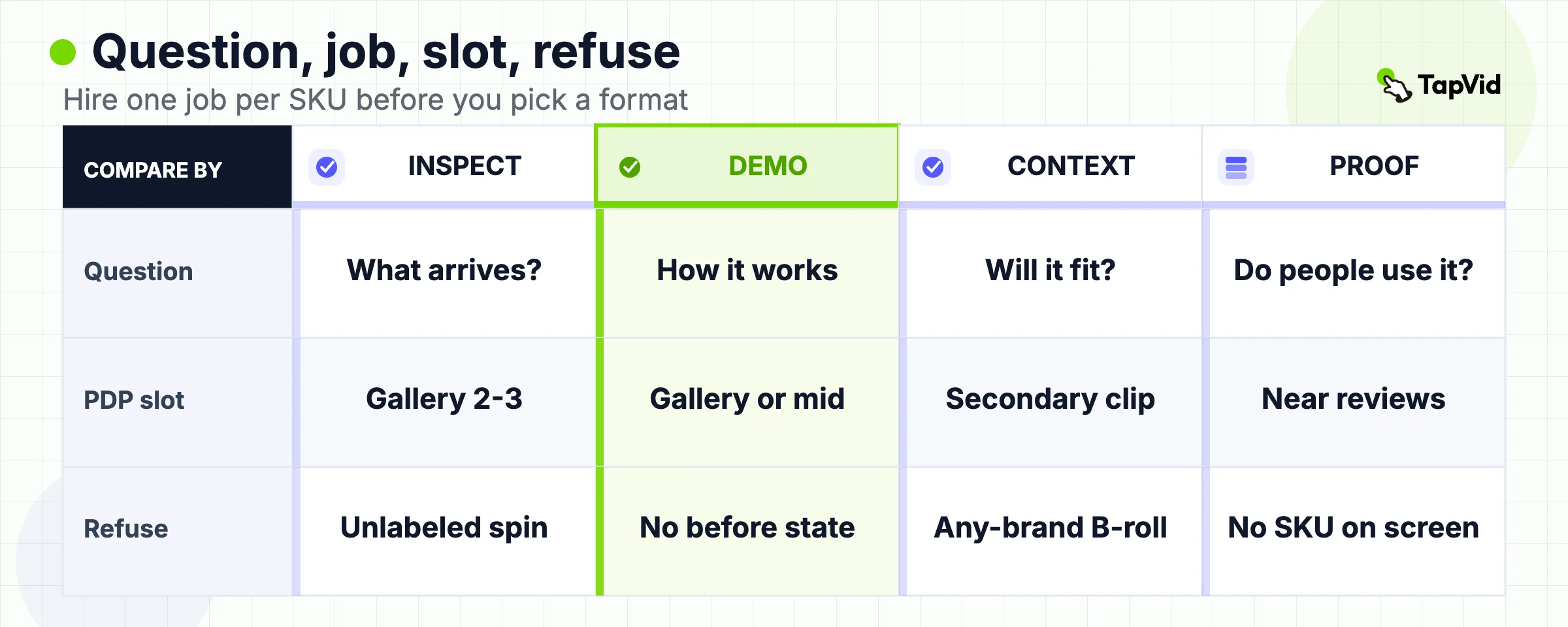
Use this table before you write a shot list or open a generator. The columns are the only dimensions that matter at this stage: the shopper question, the video job, the default product-page slot, a length that usually fits that slot, and the first thing you should refuse.
| Shopper question | Video job | Default PDP slot | Typical length | Refuse this |
|---|---|---|---|---|
| What will I actually receive? | Inspection | Gallery position 2 or 3, after the hero still | 8 to 20 seconds, muted, loopable | A white turntable that never labels size, contents, or scale |
| How does this work? | Demo | Gallery, or a mid-page block if the action needs more than one beat | 20 to 45 seconds | A feature montage that never shows input, action, and result |
| Will it work in my room, body, or routine? | Lifestyle-context | Secondary gallery clip or a lookbook block, not the only gallery video | 15 to 30 seconds | Footage that still makes sense after you remove the product |
| Can I trust people like me used this? | Proof | Near reviews, not in place of inspection | 15 to 45 seconds | A testimonial that never shows the SKU on screen |
Read the table left to right. If the shopper cannot see the object, do not start with proof. If they already understand the object and doubt the mechanism, do not start with a beauty pass. If they understand the object and the mechanism but cannot imagine the product in a real room, add context. Do not replace inspection with context.
WebMedic's 2026 type guide reports a different table: demo, 360, UGC, how-to, and lifestyle, each with a conversion-lift band from mixed Shopify samples in Malaysia and Singapore. Those bands are not reused here as industry constants. The useful transfer is narrower. Format follows the unanswered question, and lifestyle has the weakest claim on the primary gallery slot.
Shopify's own 2023 product-video article still lists introductory, how-to, explainer, and testimonial as types. That list mixes launch, education, and proof. It is a reminder that "product video" is a family, not a recipe. On a product detail page, the family collapses to the four jobs above.
03
Write the shopper question before you pick a format
Most weak ecommerce product videos fail before the first frame. The brief says "we need a product video" or "we need UGC." Neither sentence names the hesitation.
Write one sentence in this shape: After 15 seconds on a phone, a shopper looking at [SKU] should know [the unanswered fact], believe it because they can see [this proof], and take [this next step].
If that sentence contains two SKUs, two proofs, and two next steps, split the work. One gallery clip cannot inspect a jacket, demonstrate the zipper, show it in rain, and close with three reviews.
| Brief field | Fill this |
|---|---|
| SKU | The listing the shopper is already on |
| Unanswered fact | The hesitation still photos have not closed |
| Visible proof | What they can see in 15 seconds |
| Next step | Stay, choose a variant, or open the sibling SKU |
Swarmify's 2026 best-practice guide opens with the same rule: start with the buying question, not the brand intro. The adjacent limit is just as useful. Autoplay on a website should be muted, visually legible without narration, and short enough to loop. Swarmify's range for that loop is 8 to 15 seconds. Use it for inspection and muted gallery clips. Do not stretch it into a 90-second explainer and then blame the player when people tap away.
The question also decides what you are allowed to invent.
- If the question is scale, you need a known object in frame: a hand, a door, a table edge, a phone. You do not need a new slogan.
- If the question is mechanism, you need a before state and an after state from approved footage or approved stills. You do not need a voiceover that claims "works every time."
- If the question is trust, you need a real customer, a real order, and the same SKU that is on the page. You do not need a paid creator holding a different colorway.
- If you cannot fill the proof slot, stop. Missing proof is a production problem or a claim problem. It is not a reason to generate a prettier guess. The product video production guide exists for the case where the proof has to be filmed. This page exists for the case where you still have not named the proof.
A useful extra check: read the current reviews and the current support tickets for that SKU. The repeated question is the brief. "Does the lid leak?" is an inspection or demo job. "Is this the same pink as the photo?" is an inspection job with a color lock. "Will this fit a 13-inch laptop?" is a context job with a measured object in frame. Teams that skip this step produce a general product video that answers none of those tickets.
04
Put the clip where hesitation happens on the product page
| Placement rule | Meaning |
|---|---|
| The slot is part of the product | A correct clip in the wrong slot behaves like no clip |
| Highest-value default | Gallery after the hero still |
Placement is part of the product, not a theme decoration. A correct clip in the wrong slot behaves like no clip.
The highest-value slot for most physical SKUs is the product media gallery, after the hero still. Shopify's help docs, read 2026-09-03, treat images, videos, and 3D models as product media. You can upload `.mp4`, `.mov`, or `.webm` up to 10 minutes, 1 GB, and 4K, or embed a YouTube or Vimeo URL. Other hosts are not supported as embed URLs. Online Store 2.0 themes built by Shopify, and the Horizon family, can display video. Older or third-party themes may not. Check the live product page, not the admin upload success message.
Shopify also states a constraint that changes how you plan variants. Product variants do not support video or 3D models. Each variant can receive one assigned image. Extra images, including video, live on the shared product gallery. That is why a colorway switch cannot be trusted to swap the video. If Moss Green and Sand share one product, the clip must either stay valid for every variant or label the on-screen variant so clearly that a mismatched still cannot hijack it. The ecommerce video marketing guide owns the correspondence matrix for that case. This page only needs the placement rule: do not assume the storefront will fix an unlabeled clip.
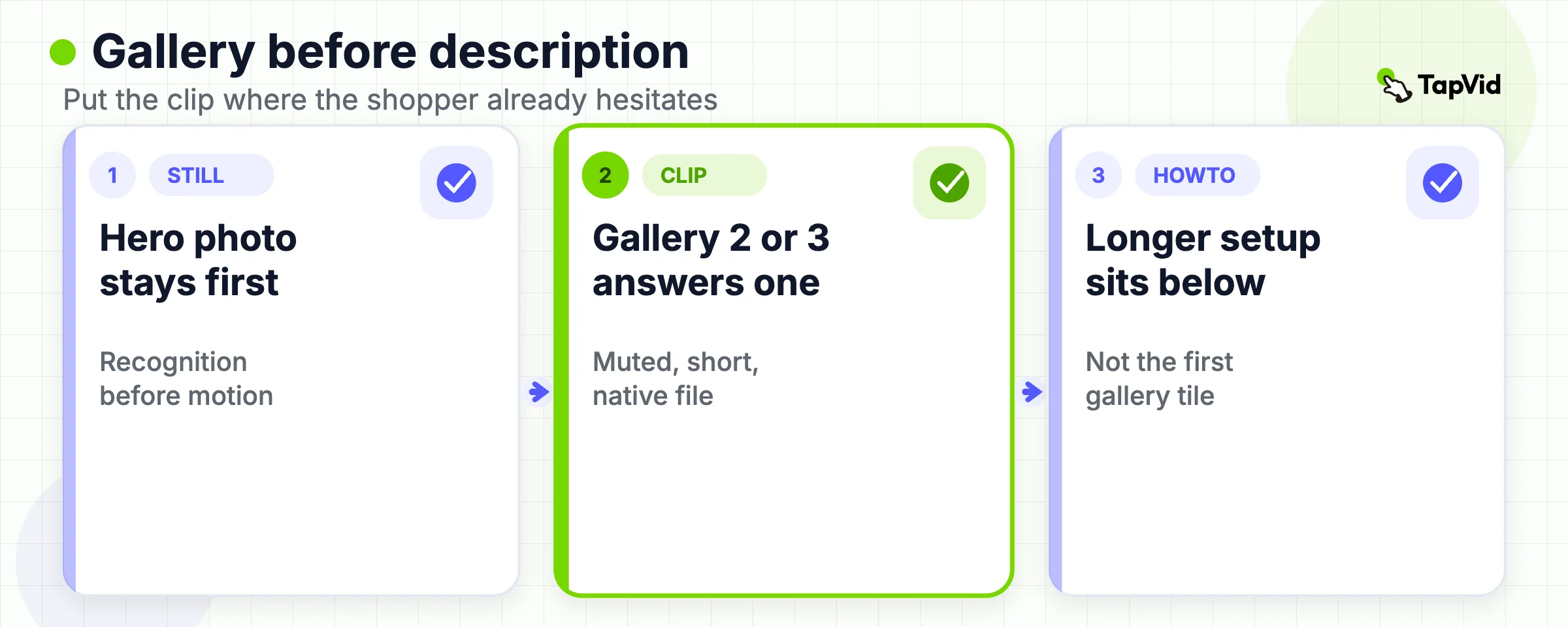
WebMedic cites Shopify Plus testing that gallery videos in position 2 or 3 get more plays than videos buried in the description. Treat the ranking as a directional report, not a universal multiplier. The mechanism is still sound. Shoppers already swipe the gallery. A clip placed there is in the path of hesitation. A clip placed after shipping details is in the path of people who were going to buy anyway.
Use the gallery for inspection and short demos. Use a mid-page block for a longer how-to that answers one support question. Use the review module for proof. Use the homepage for brand or lookbook context. Do not put all four jobs in the first gallery tile.
| Video job | Default slot |
|---|---|
| Inspection or short demo | Gallery after the hero still |
| Longer how-to | Mid-page block |
| Proof | Near reviews |
| Brand or lookbook | Homepage |
Three implementation checks belong next to that map.
- Theme support. If the theme cannot render product video, the upload is a file in the admin, not a shopper-facing asset. Shopify's media docs are explicit: the theme has to support the media type.
- File behavior. Native upload keeps the shopper on the product page. A YouTube embed can add suggested videos and competitor ads at the end of the clip. Swarmify treats that as a conversion problem, not a hosting preference. On a product page, prefer a native file unless you have a reason to send the shopper elsewhere.
- Variant images. When a shopper selects a color, Shopify can swap the assigned still. It will not swap your video. If the video shows only one color, say so on screen or keep the clip limited to form, scale, and mechanism that stay true across colors.
Collection pages and email are secondary. A 3 to 5 second muted loop on a collection card can help discovery. A post-purchase email can carry the how-to that would have been too long on the PDP. Neither placement replaces the gallery clip that answers the buying question.
05
Inspection, demo, lifestyle, and proof get mixed up
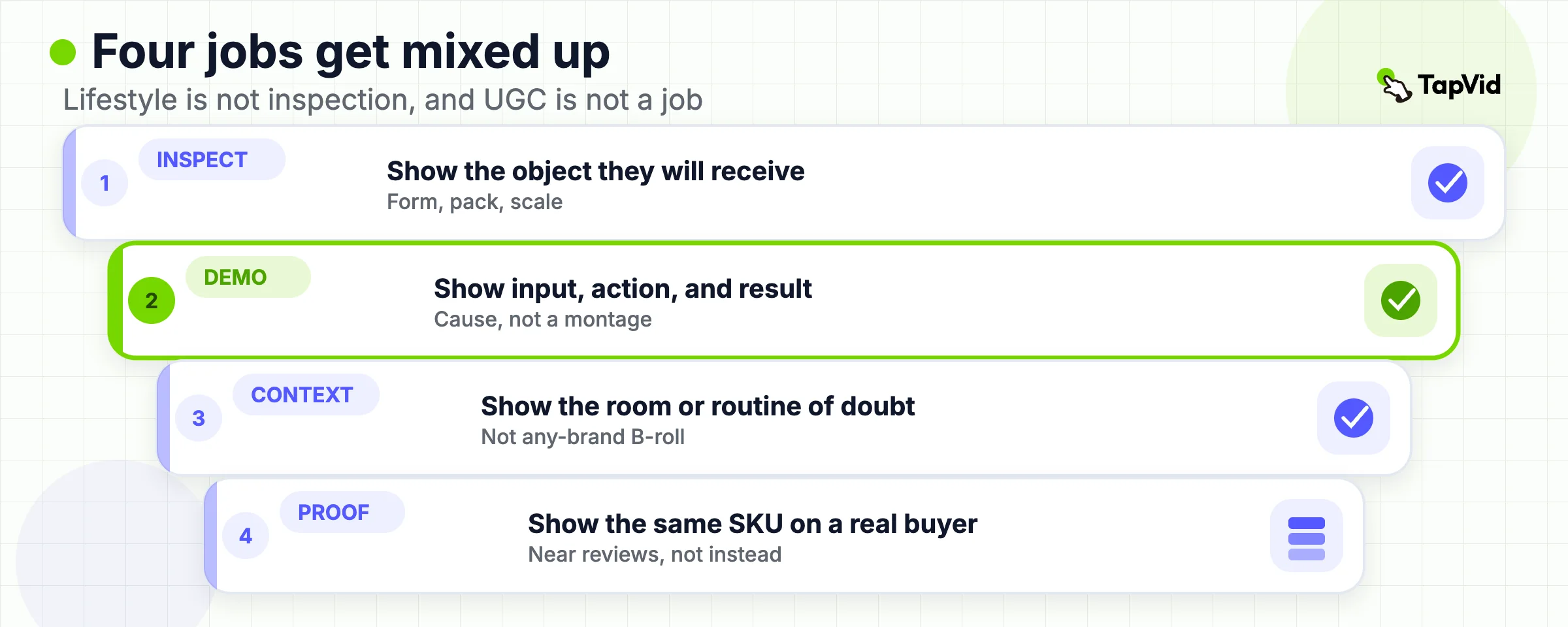
The four jobs share pixels and get treated as synonyms. They are not.
- Inspection answers "what will I receive." The shopper needs form, finish, pack contents, and scale. A 360 spin can do this if it holds a labeled hero angle long enough. A hand turning the object can do it better when size is the doubt. Inspection fails when the clip never chooses an angle, never shows the included parts, and never places the object next to something of known size. A silent turntable of a bottle with no capacity on screen is not inspection. It is motion for its own sake.
- Demo answers "how does this work." The shopper needs a cause. Ingredients in, blades working, puree out. Cap off, straw in, no leak. App open, filter applied, result visible. Demo fails when the edit jumps to the finished state. A stain remover that starts after the stain is gone is a commercial, not a demo. If you do not have the before state, you do not have a demo. Film it, or drop the claim.
- Lifestyle-context answers "will this work where I actually use it." The useful version is not a sunset walk. It is the product in the exact place the doubt lives: the backpack pocket, the carry-on handle, the bathroom shelf, the stroller mount. Remove the product from the frame. If the remaining footage could sell a bank or a beverage brand, you shot lifestyle, not context. Lifestyle can live on a lookbook or an ad. It is a weak primary gallery clip because it does not close a listing question.
- Proof answers "did people like me use the real SKU." A customer holding the same colorway, in their own room, saying what they checked before they kept it, is proof. A creator reading a script in a rented kitchen, holding a sample that is not on the page, is an ad. Proof fails when the SKU never appears, when the claim is a feeling, or when the clip replaces inspection. Reviews already exist as text. Video proof has to add a visible check the text cannot show.
Mixed-up briefs look like this.
- "Make a UGC demo." UGC is a source of footage, not a job. Decide whether you need inspection, demo, context, or proof. Then decide whether a customer, a founder, or an approved still is the honest source.
- "Make a lifestyle video for the PDP." If the shopper's question is fit or mechanism, lifestyle is the wrong job. If the question is context, keep the product in the hesitation frame and cut everything else.
- "Make one hero video that does everything." That sentence produces a 75-second clip with a logo, a lifestyle open, a rushed demo, and a review quote that names the wrong size. Split it.
Videowise treats AI-generated catalog clips as a fifth type. That is a production method, not a job. An asset-led clip can inspect, demo, or compare if the approved stills already contain the proof. It cannot invent drape, leak tests, or a customer's bathroom. Keep the method off the job list.
06
When one SKU needs a second clip
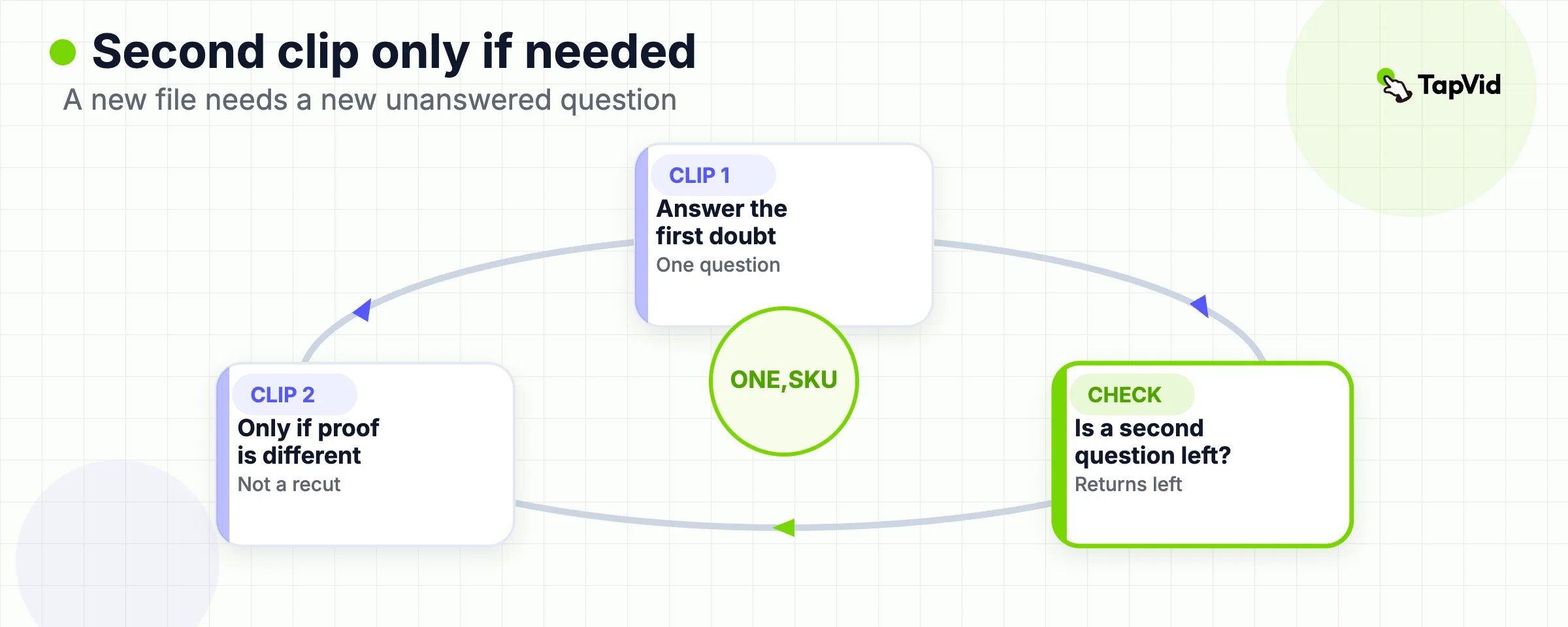
One gallery clip is the default. A second clip is justified when a second question survives the first clip, and that question has its own proof.
- Color and form. The first clip can inspect shape and pack contents on the hero color. A second clip is useful when a later colorway changes the buying question, for example a dark fabric that hides texture, or a print that only makes sense in motion. Do not shoot eight colorways because the catalog has eight colorways. Shoot the colorways whose stills lie.
- Size and scale. If returns cluster on "smaller than expected," the second clip should be scale, not another beauty pass. A hand, a door frame, a folded length next to a ruler that matches the spec sheet. If the spec sheet and the clip disagree, fix the packet before you export.
- Use and setup. A kettle can be inspected in 12 seconds and still need a 40-second setup clip for the filter. Put the setup clip near the description section that already talks about first use. Do not force setup into the muted gallery loop.
- Comparison inside one listing. Bundles, three-packs, and "choose your kit" pages need a comparison clip only when the shopper must pick among options on that same URL. If they must leave for sibling PDPs, send them there with labeled stills. A comparison clip that names SKU A while showing SKU B is worse than no clip. The marketing guide's correspondence matrix is the review tool for that case.
- Stale offers. A second clip is also justified when the first clip baked in a price, a launch date, or a gift-with-purchase that has expired. The cheaper fix is to keep volatile facts out of the first clip. If they are already baked in, replace the file. Do not leave a $49 overlay on a $62 product.
The refuse rule is simple. A second clip must answer a different question or protect a different variant truth. A second clip that repeats the first clip in a new aspect ratio is an export, not a new job. Cutdowns for email or ads can reuse the master. They do not earn a second gallery tile.
07
What not to put on the product page
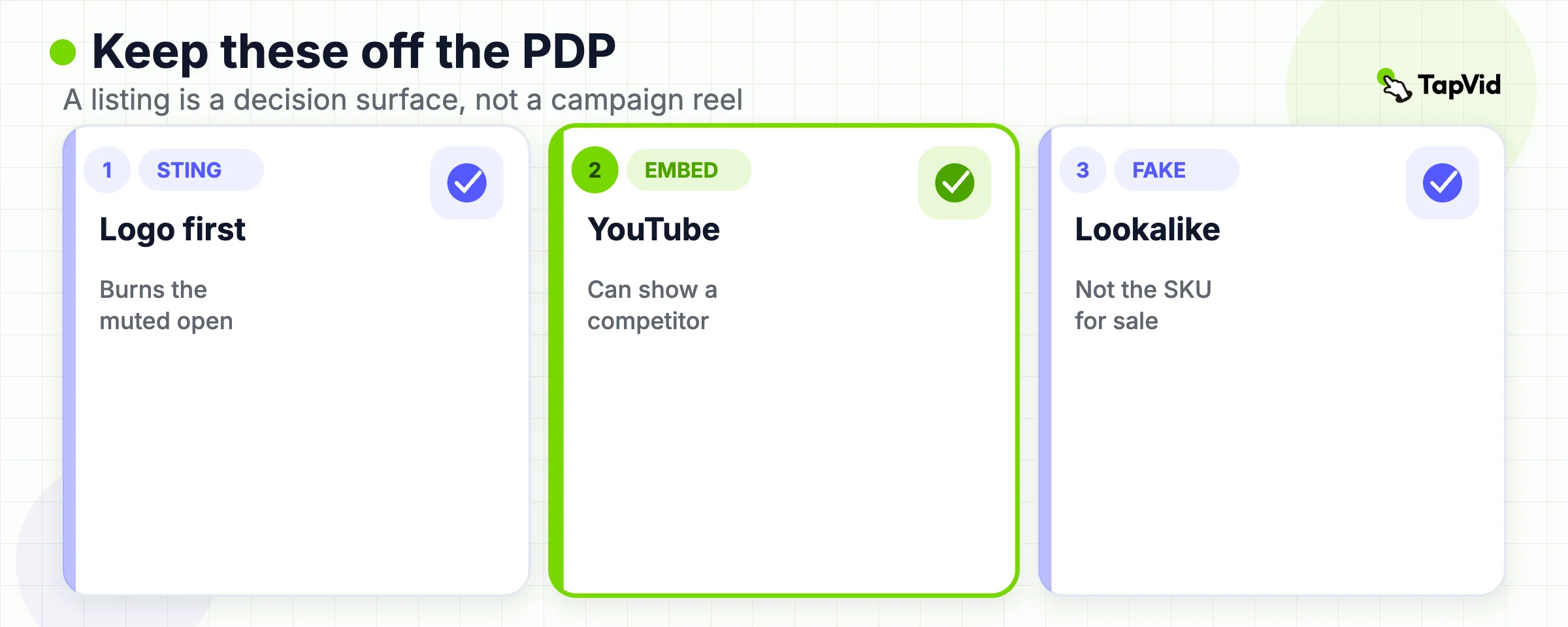
A product page is a decision surface. Several common uploads work against that surface.
- A logo sting or music-only open. Swarmify notes that the first seconds should answer the question that stops the sale. A three-second brand slate burns the only attention you have in a muted gallery. Start on the product.
- Autoplay with sound. Browsers often block it. Shoppers who do get sound did not ask for a voiceover on a listing. If the clip only makes sense with audio, it is the wrong gallery asset. Burn in the two or three words the shopper must read.
- A YouTube embed as the primary product video. Shopify allows YouTube or Vimeo URLs. That is a technical permission, not a merchandising recommendation. Suggested videos and ads can appear after your clip. On a high-intent page, upload a file the theme can play without sending the shopper into a competitor's recommendation.
- A clip longer than the question. Inspection rarely needs more than 20 seconds. A how-to can run longer, but it belongs below the gallery. Wistia engagement bands get repeated across vendor blogs as if they were laws. Ignore the exact percentages if you have not opened the current Wistia report for your own page type. Keep the operational rule: if the shopper can answer the question and leave, let them leave.
- A redrawn product. Generated bottles, shoes, and devices that are "close enough" are not the sellable SKU. If exact appearance matters, the approved pack shot stays on screen. Motion can crop, pan, and label. It cannot invent a new object and keep the listing honest.
- A price, discount, or "ships today" line inside an evergreen file. Catalogs change faster than video files. Keep volatile facts on the page, in the theme, or in a feed. If the clip must show a price, give that file an owner and a kill date.
- A claim the packet does not support. "Fits every carry-on," "never leaks," and "dermatologist tested" are product facts, not editorial flavor. If the approved copy does not contain the line, the video does not get to add it. Soft adjectives fail the same test. "Built for adventure" implies a use the listing may not prove.
- A talking-head that never shows the SKU. Founder trust can live on an About page. On the PDP, the face is optional. The product is not.
YouTube Shorts URLs are a smaller, official trap. Shopify's add-media help, read 2026-09-03, says Shorts URLs are not currently supported as embeds. Convert to the standard `watch` URL, or upload a file. Private or embed-blocked videos also fail. The admin will not save a listing if the remote video cannot be reached.
08
Brief a product video without a shoot day
| Need | Action |
|---|---|
| Missing physical proof | Book the capture or delete the claim |
| Proof already in approved stills | Write the five-line asset-led brief |
A shoot day is the right tool when the shopper must see a physical behavior you have never captured: drape, leak, one-handed fold, real scale next to a body. If that proof does not exist, do not brief an editor to imply it. Book the capture, or delete the claim. The production guide owns that fork.
Many listing questions do not need a new capture. They need the approved pack shot, the exact display name, the current variant, the locked claims, and a destination URL that matches the frame. That is an asset-led brief.
Write five lines before anyone opens a timeline.
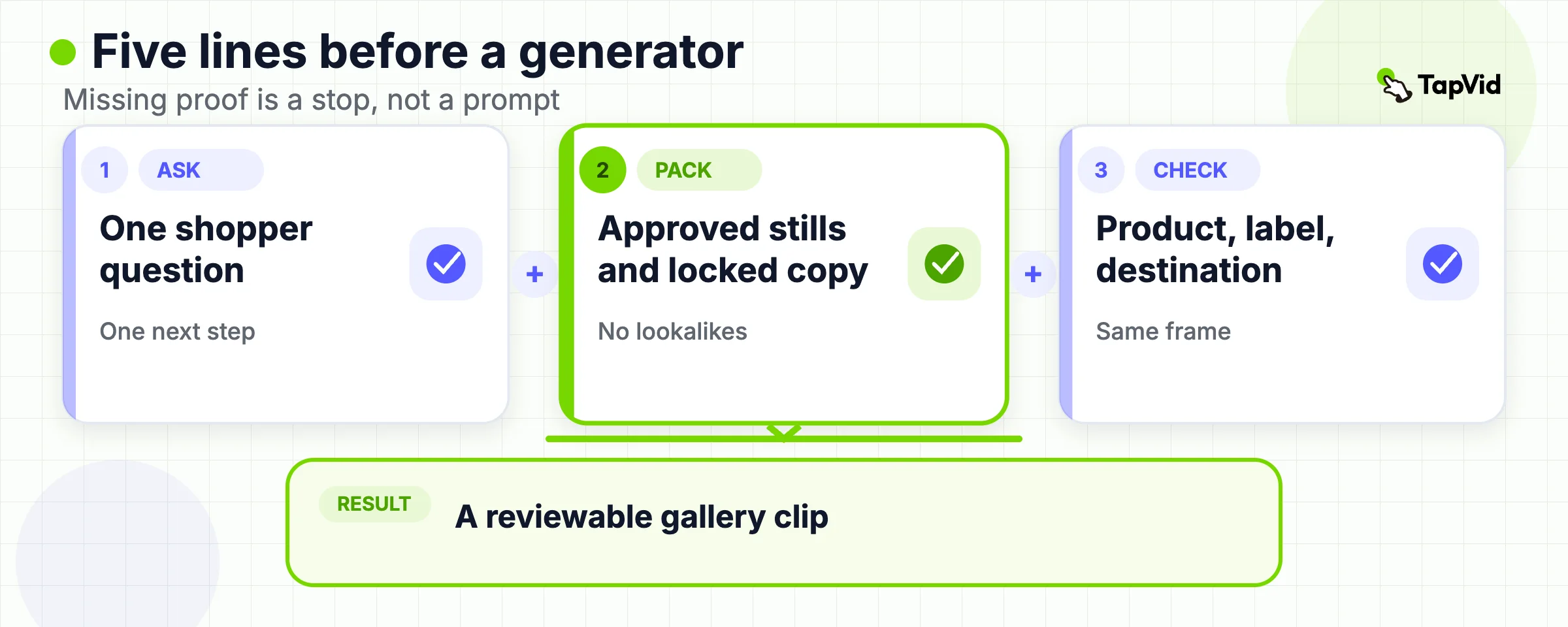
- Viewer and slot: mobile shopper, product gallery, muted.
- Question: one sentence from the table above.
- Source truth: the current approved image or clip that will stay on screen. Name the file. If the file is missing, stop.
- Limiter: the size, material, compatibility, or exclusion that must remain visible.
- Next action: stay on this PDP, choose a variant, or open the correct sibling SKU.
Then list the locked strings. SKU, display name, capacity, color, and any certification that will appear as text. If a string is not in the commerce record, it does not enter the video.
TapVid can enter only after that pack exists. The official AI product video generator page, read 2026-09-03, describes an asset-led path: product images, a product URL, and approved product copy become a structured product video with scenes, captions, and a review step before export. The same page is explicit about the boundary. This workflow is for physical or ecommerce product stories made from owned images and copy. It is not the software-demo path, which starts from screenshots and UI flows. It is not the ad-generator path, which starts from campaign hooks and offer tests. It does not film a live product. It does not approve claims for you. You still review product appearance, captions, and the call to action.
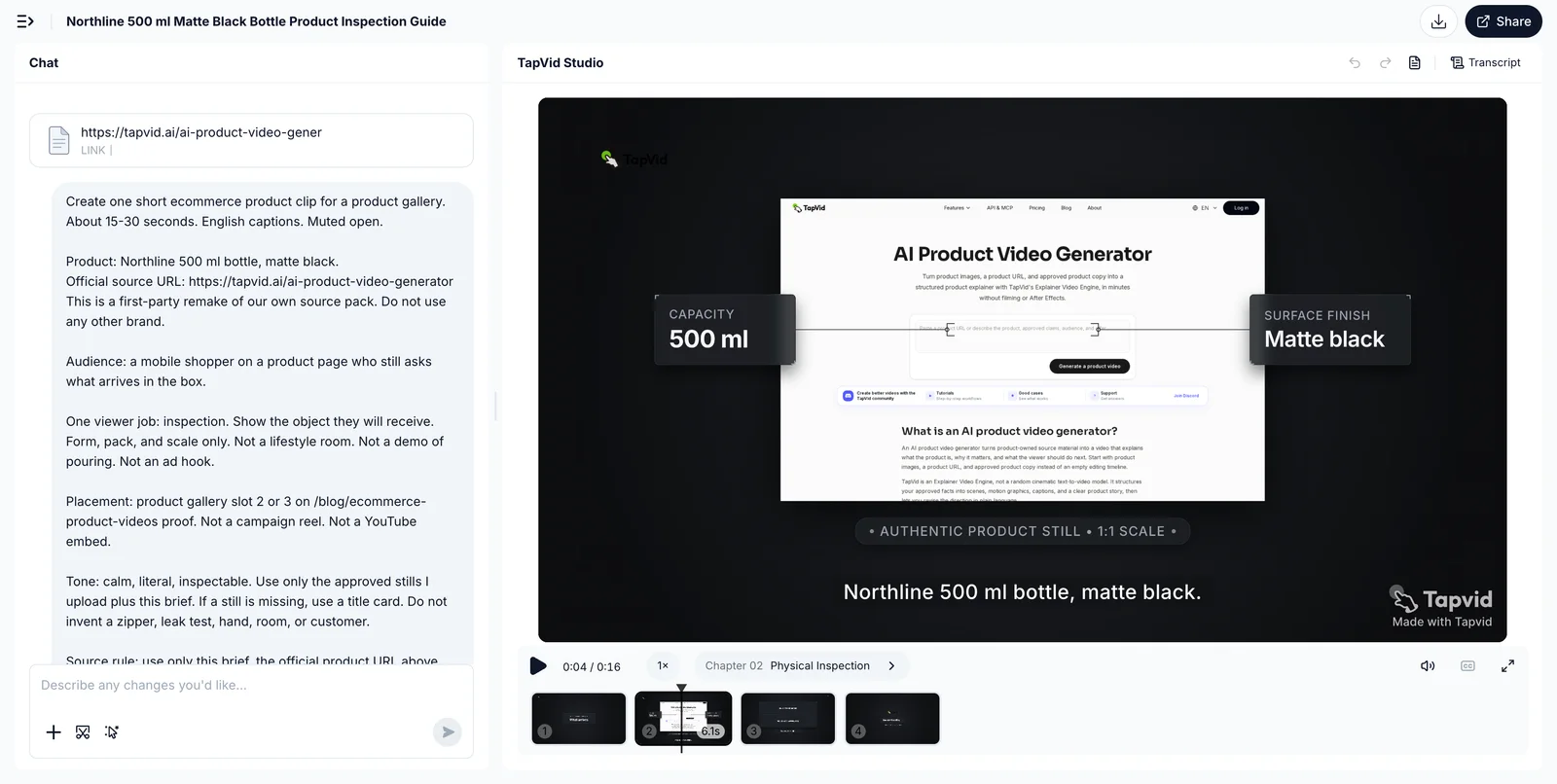
That limit is the point. An asset-led clip can inspect a bottle you already photographed. It can compare three approved stills if every label stays attached to the correct still. It cannot prove a zipper you have never recorded. If the job is the zipper, shoot the zipper.
Do not describe TapVid as a generic AI video generator or as a filming substitute. The useful sentence is narrower: it turns the source material you already approved into a reviewable product clip. If the source is wrong, the clip is wrong faster.
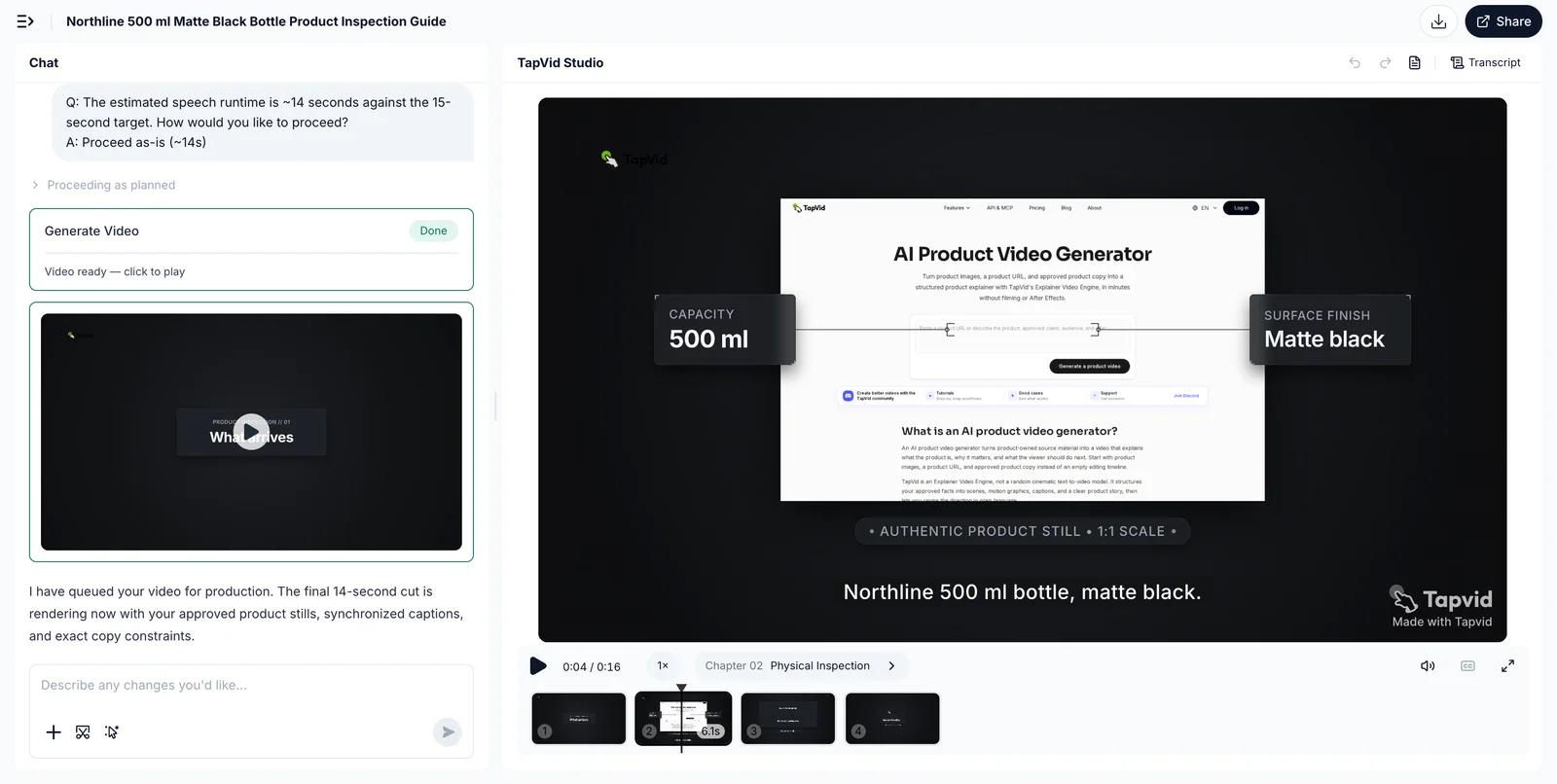
A first-party workflow check is enough to confirm that boundary. It is not a conversion study, and it is not a substitute for customer proof. Until a dated setup-and-result capture is attached in Evidence, treat any TapVid mention as an official-page capability, not as a measured lift on a store.
When the five-line brief is filled, you do not need another type list. You need a reviewer who watches the product, the label, and the destination on the same frame. If those three disagree, the file is not ready for the gallery.
09
Measure the decision the clip was hired to make
Playback is not the job. The job is the decision in the brief.
| Video job | Watch this |
|---|---|
| Inspection | Variant selection, zoom, and size, color, or missing-parts returns |
| Demo | Add-to-cart on that SKU and setup tickets |
| Lifestyle-context | Bounce to a size guide or fit FAQ |
| Proof | The review module and the people-also-bought path |
- For an inspection clip, watch variant selection, zoom behavior, and the return reasons that mention size, color, or missing parts. A high play rate with unchanged return reasons means people watched a decoration.
- For a demo clip, watch add-to-cart on that SKU and the support tickets that mention setup. If tickets stay flat and add-to-cart does not move, the clip may be entertaining the wrong question.
- For a context clip, watch whether shoppers who play it still bounce to a size guide or a fit FAQ. If they do, the clip did not show the room or the body well enough.
- For a proof clip, watch the review module and the "people also bought" path. Proof that never sits next to written reviews is easy to skip.
Swarmify's measurement section is useful when it stays modest: play rate, completion, and conversion lift on one page over a bounded window. Wistia's 2026 report, as quoted there, also says fewer than half of marketers connect video tools to CRM or email. That is a process gap, not a benchmark you should copy into a dashboard. Connect the clip to the listing event you already trust. Do not invent a new vanity metric.
Do not publish a universal lift number. Vendor pages repeat 80 percent, 1.8x, and similar figures from HubSpot, Wyzowl, or internal player data. Those figures are not this article's evidence. If you need a number, run one SKU, one clip, one primary metric, and a window you can defend. Change one variable. Write down the question the clip was hired to answer before you look at the graph.
A clip is working when the unanswered question gets cheaper to close. It is not working when it only adds time on page.
- If you later need catalog control across many SKUs, return to the marketing guide.
- If you later need a filming day, return to the production guide.
- If you later need a public example to steal a proof structure from, return to the examples guide.
- This page should leave you with a question, a job, a slot, and a refuse list. That is enough to brief the next file.
10
Frequently asked questions
What are ecommerce product videos?
They are short clips attached to a sellable SKU or a small set of SKUs. The useful unit is one shopper question plus the visible proof that answers it, placed where the shopper already hesitates.
Which ecommerce product video should I make first?
Make the clip that answers the question still photos fail to close. If shoppers cannot see the object, inspect it. If they cannot see the mechanism, demo it. If they cannot imagine the real context, show that context. If they do not trust the listing, add proof next to reviews. Do not start with lifestyle because it is fashionable.
Where should I put a product video on a Shopify page?
Put the primary clip in the product media gallery after the hero still, on a theme that supports video. Shopify, read 2026-09-03, allows a native upload or a YouTube or Vimeo embed. Prefer a native file on the product page. Variants can receive only one image, not a video, so do not expect a color swatch to swap the clip.
How long should an ecommerce product video be?
As short as the question allows. A muted gallery inspection can finish in 8 to 20 seconds. A demo can run 20 to 45 seconds. A how-to that answers one setup ticket can run longer below the gallery. Length is a result of the brief, not a target.
Do I need to film every SKU?
No. Film the behavior stills cannot prove. Reuse approved images and locked copy when the question is form, label, or comparison among already photographed SKUs. Do not generate a lookalike and call it the product.
Can I use AI to make ecommerce product videos from existing assets?
Yes, when the approved images and copy already contain the proof. TapVid's AI product video generator starts from product images, a product URL, and approved copy, then asks you to review appearance, claims, and the call to action before export. It does not replace a shoot when the missing proof is physical behavior.
How do I know the video is working?
Measure the decision in the brief, such as variant choice, add-to-cart, or return reasons tied to the question you tried to close. Do not treat plays as success, and do not copy a vendor conversion percentage onto your catalog.