
TL;DR
Start every ecommerce video from an approved SKU packet, assign one buying decision and one placement, then verify asset fidelity, information fidelity, and product-to-label correspondence. Use a short single-product structure to explain a few buying arguments, and a longer comparison structure when shoppers need to choose among several products.
Ecommerce video marketing becomes manageable when every video starts from a product record, serves one placement, and ends with a measurable next action. The hard part is not making one attractive clip. It is keeping product images, SKU labels, capacities, colors, prices, and claims correctly paired while producing enough variations for product pages, ads, email, and social feeds.
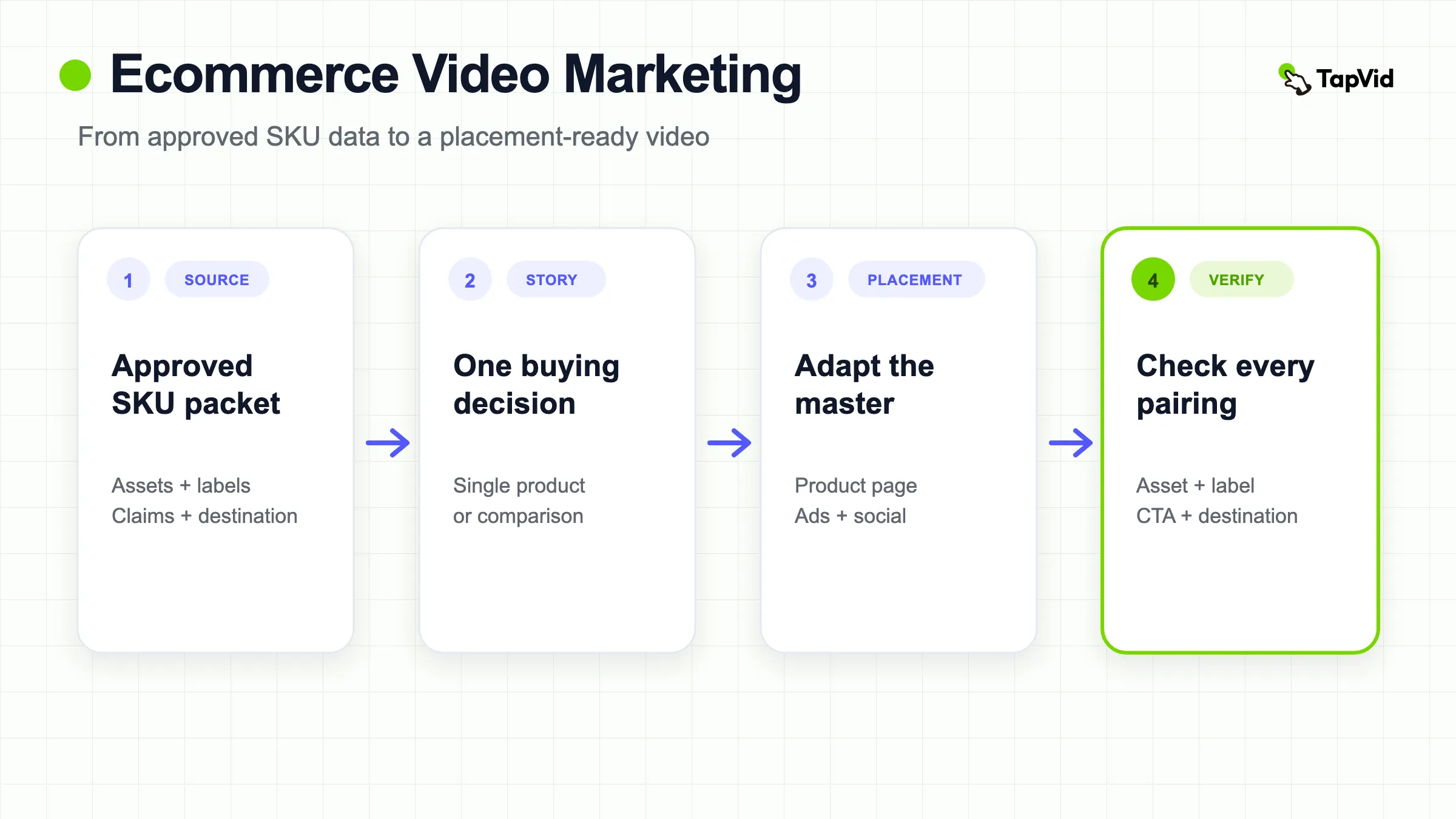
This guide turns that problem into a repeatable system. You will define the job of each video, build an approved SKU packet, create one master story, adapt it by placement, and review every output for asset fidelity, information fidelity, and product-to-label correspondence. Two real ecommerce videos show how the same system supports a focused single-product story and a longer multi-product buying guide.
Build product videos from the assets and copy you already approved
01
Give each ecommerce video one commercial job
Do not start with "we need more video." Start with the decision a shopper should make after watching.
Common jobs include:
- Understand what the product is and how it works.
- Compare sizes, colors, bundles, or models.
- See a product detail that still images do not explain well.
- Choose the right variant.
- Evaluate a use case before opening the product page.
- Return to a product or category after an email or retargeting touch.
One video can support more than one channel, but it should not try to perform every job at once. A product-page video can spend time clarifying fit, controls, or included items. A feed ad must establish relevance quickly and make the destination obvious. A three-SKU comparison needs clean correspondence more than dramatic storytelling.
Write a one-sentence brief:
> Help mobile-feed viewers distinguish three bottle sizes and choose which product page to inspect.
That sentence controls the products, labels, framing, duration, and CTA. It also creates a review standard. If the viewer cannot tell which capacity belongs to which SKU, the video failed even if the motion looks polished.
02
Build an approved SKU packet
Create one row per sellable product or variant. Use the same identifiers that appear in your commerce system. Do not let the video workflow invent friendly names that are not used on the product page.
| Field | Why it matters | Example |
|---|---|---|
| SKU | Stable internal and production identifier | TS-750 |
| Display name | Exact public-facing name | TrailSip 750 |
| Approved asset | Product image or video that must remain unchanged | `TS-750-moss-front.png` |
| Variant | Exact color, size, flavor, or bundle | Moss Green, 750 ml |
| Allowed claims | Verified features and wording | Leave blank when none are supplied |
| Price state | Current price, market, and effective date | Use only when verified for the destination |
| CTA destination | Page that matches the shown product | Product detail page or category page |
Add three types of guardrails:
- Locked strings: SKU, model, capacity, price, discount, certification, legal copy, and CTA.
- Locked assets: product photo, logo, packaging, UI, and any image where exact appearance matters.
- Forbidden inference: materials, durability, performance, fit, shipping, reviews, availability, and other claims that the packet does not prove.
Keep the packet versioned. Prices, promotional terms, packaging, and availability can change faster than evergreen video assets. A video should carry a source date when it includes time-sensitive commerce data. If the data expires, refresh the video or remove the claim.
Shopify supports images, videos, and 3D models as product media. It also notes that videos cannot be assigned as variant media in the same way as variant images. That platform constraint is one reason to preserve SKU labels and variant links in your production packet instead of assuming the storefront will correct an ambiguous video.
03
Separate asset fidelity, information fidelity, and correspondence
Treat accuracy as three review passes.
Asset fidelity
The product, logo, packaging, and interface should match the supplied source. A generated bottle that is merely blue is not proof of the Steel Blue SKU. A recreated label can change typography, regulatory copy, size, or placement.
Use supplied product photography whenever the item needs to be recognized or purchased. Motion can be added around the asset through crops, pans, highlights, captions, diagrams, and transitions without redrawing the product.
Information fidelity
Every visible and spoken detail should come from the approved packet. Check product names, capacities, colors, measurements, prices, discounts, stock claims, shipping promises, certifications, materials, and review language.
Avoid soft inventions. "Built for every adventure" sounds like campaign copy, but it may imply durability, outdoor suitability, or a target use that the packet never established. If the product data only proves size and color, speak about size and color.
Correspondence
Correct facts can still be arranged incorrectly. A frame might show the TS-750 image while displaying the TS-1000 capacity. A narration might say "Sand" while the visual remains Moss Green. A CTA might lead to a category page that does not include the shown variant.
Create a frame-level matrix:
| Scene | Product asset | Spoken label | On-screen label | Destination | Pass? |
|---|---|---|---|---|---|
| 1 | TS-500 Steel Blue | TS-500, 500 ml | TS-500, 500 ml, Steel Blue | TS-500 PDP | Yes or no |
| 2 | TS-750 Moss Green | TS-750, 750 ml | TS-750, 750 ml, Moss Green | TS-750 PDP | Yes or no |
| 3 | TS-1000 Sand | TS-1000, 1 litre | TS-1000, 1 litre, Sand | TS-1000 PDP | Yes or no |
This matrix is the minimum viable QA for multi-SKU production.
04
Match the master video to the placement
Choose the placement before you lock the composition. A single export is rarely ideal everywhere.
Product page
The viewer already has product intent. Lead with the product and clarify a buying question. Use enough time to show function, scale, fit, included items, or variant differences. Keep the CTA subtle because the viewer is already on the product page.
Shopify allows merchants to upload product videos or embed YouTube and Vimeo links, subject to current theme and file requirements. Check the current product video requirements before export rather than treating an ad master as a storefront-ready file.
Vertical social and performance ads
Show the relevant product state early and protect text from platform UI. TikTok's current creative guidance recommends vertical 9:16 video, at least 720p, with important content inside the safe zone. Its ad preview tool exists specifically so advertisers can inspect placements and devices before launch.
Meta also frames Reels creative around a vertical canvas, audio, and safe-zone-aware composition. Use the platform's current Reels ads guidance when you prepare the cut. Do not rely on automatic cropping to preserve a SKU label that sits near an edge.
Email and lifecycle
The video or thumbnail should connect to the email's one message. A replenishment email, launch email, and abandoned-browse email do not need the same opening. Keep the linked destination consistent with the product shown, and verify how the email client handles playback or fallback images.
Marketplace and catalog-driven ads
Treat the catalog as the source of truth. When a platform can insert price, product title, or image dynamically, decide which data belongs in the video and which should stay dynamic. Duplicating a price inside an evergreen video can create stale creative even when the catalog is current.
TikTok's video package specifications describe catalog-fed product fields, price stickers, text overlays, and templates. The operational lesson is to map each creative field to one owner and one update path. Do not maintain the same volatile price in both a rendered video and a live catalog unless you have a refresh process.
05
Create one master story, then derive variants
A useful 30-second three-SKU master can use five beats:
| Time | Beat | Content |
|---|---|---|
| 0 to 4s | Choice | Show the range and name the decision |
| 4 to 10s | SKU 1 | Asset, name, size, and color |
| 10 to 16s | SKU 2 | Asset, name, size, and color |
| 16 to 22s | SKU 3 | Asset, name, size, and color |
| 22 to 30s | Comparison and CTA | Show all three, then one next step |
The master establishes the approved sequence and relationship. From it, create placement variants:
- A 9:16 feed cut that moves the labels into the safe zone.
- A 1:1 catalog or feed cut with a shorter line length.
- A 16:9 landing-page cut with more horizontal comparison space.
- One single-SKU cut per product page.
- A muted-first version whose captions carry the choice logic.
Do not stretch or crop blindly. Reframe scenes so the product and its label remain together. A crop that keeps the bottle but removes the capacity turns a comparison video into ambiguous decoration.
For teams producing repeated product explainers, TapVid's AI product video generator is the relevant product workflow. The practical value is not merely speed. It is the ability to supply products and copy, review the brief and scenes, and keep approved information visible through the production process.
If you need to choose a narrative pattern before building the master, review these product demo video examples by the specific proof each example makes visible. Use the pattern, not unsupported claims or decorative effects, as the part worth adapting.
06
Two ecommerce video structures you can reuse
The same production system can serve very different buying decisions. The first example keeps one product family in focus for 45 seconds. The second uses 3 minutes 49 seconds to compare several 75-inch televisions. Both are vertical videos created with TapVid from supplied product material, but their editorial jobs are different.
Example A: explain one product through three buying arguments
The GERM children's bottle video opens with a simple promise: three points to check when choosing a bottle for a school-age child. It then organizes the product story around material, drop resistance, and visual design. The source product photography remains the visual anchor while captions, framing, and motion make each point easy to follow.

The useful pattern is not the category or the wording of the claims. It is the sequence: name the decision, group the evidence into three memorable points, attach each point to the supplied product image, and finish before the viewer loses the thread. This structure fits a product detail page, a launch post, or a short paid-social cut when one product has several differentiators that need explanation.
Before adapting the pattern, verify every product statement against approved source material. A title such as “three things to check” is editorial framing. Material, performance, licensing, and safety statements are product claims and need their own evidence. The video shows how to present those fields; it is not an independent verification of them.
Example B: turn a multi-product comparison into a buying guide
The 75-inch television video has a broader job. It compares products from Skyworth, Hisense, and TCL and presents differences across dimensions such as price, brightness, backlight zones, reflection handling, and sound. A longer running time is justified because the viewer is not learning one feature. The viewer is narrowing a shortlist.
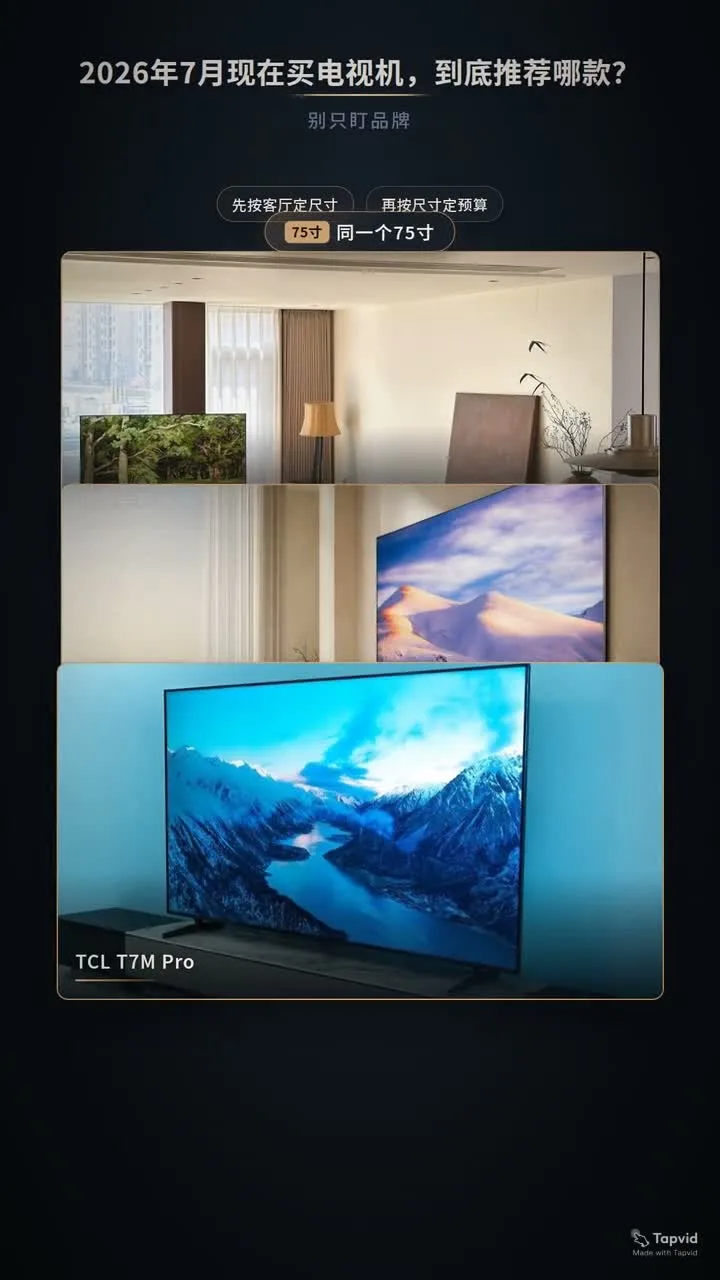
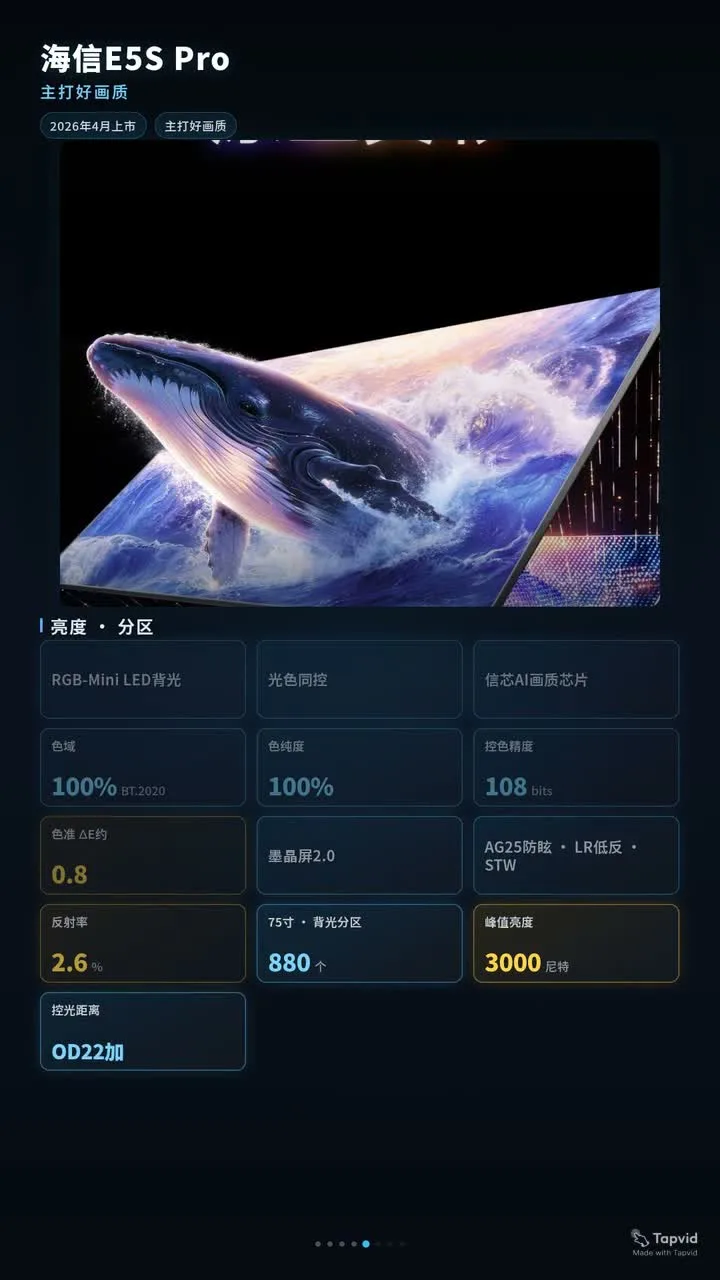
This pattern needs a stricter correspondence matrix than a single-product video. Each model name, product image, price, and specification must stay attached to the same record through the overview, model cards, and recommendation. If one value changes, reviewers should be able to find every scene that uses it.
The practical structure is:
- Define the shared comparison frame, such as one screen size or one budget range.
- State the criteria before presenting a recommendation.
- Give every product the same core evidence fields.
- Separate supplied facts from editorial judgment.
- End with a decision rule that points different buyers to different options.
Use the 45-second format when the job is to explain one product clearly. Use the longer comparison format when the job is to help a shopper choose among products. Do not force both jobs into one master. The more products and criteria you add, the more important the SKU packet, scene-level correspondence matrix, and final readback become.
07
Build a reusable review workflow
Use four approval stages.
1. Data validation
Compare the input packet with the commerce system. Confirm that each SKU is current, each variant exists, every displayed price or promotion is valid for the market, and every destination resolves to the correct page.
2. Script validation
Search the script for every locked string. Then inspect every adjective, outcome, and audience statement that the system added. Mark each line as supplied, supported, illustrative, or unsupported.
3. Scene validation
Use the correspondence matrix. Verify asset, narration, label, and destination scene by scene. Check crops and safe zones for each placement.
4. Render validation
Watch the final file with sound, without sound, and frame by frame around transitions. Confirm that revisions reached the artifact. Check small text on a real mobile screen and open every CTA destination.
Keep a revision receipt. For each issue, record the scene, current value, approved value, owner, and final readback status. This creates a small audit trail without turning a startup workflow into heavy bureaucracy.
08
Measure the decision, not vanity playback
Choose metrics that match the video's job.
For a product-page explanation, watch product interaction, add-to-cart rate, variant selection, and downstream conversion. For a comparison video, measure clicks or selections by SKU. For a feed ad, use the platform's delivery and attention metrics, but connect them to landing-page behavior and purchase outcomes. A high view count with low product-page engagement may indicate that the video entertained without clarifying the buying decision.
Document the experiment before launch:
- Audience and placement.
- Product or SKU set.
- Creative version and opening.
- CTA and destination.
- Primary decision metric.
- Guardrail metric, such as return rate or support contacts.
- Test window and minimum sample rule.
Do not invent universal conversion benchmarks. Store economics, traffic quality, price, category, and measurement setup vary. Use your own baseline and change one meaningful creative variable at a time.
09
Ecommerce video marketing checklist
Before production:
- One viewer decision and one primary placement are named.
- Every shown product has a stable SKU and approved asset.
- Locked strings and forbidden inferences are documented.
- Volatile price and promotion fields have an owner and date.
- Each scene maps to one product record.
- The CTA destination matches the product shown.
Before launch:
- Product assets were not redrawn or relabeled.
- SKU, capacity, color, price, and claim text match the packet.
- Narration and visuals refer to the same product in every scene.
- Key product and text stay inside the placement safe zone.
- Muted playback still communicates the decision.
- The final render was checked after the last revision.
- Each destination URL was opened and verified.
- Measurement events and the primary decision metric are ready.
10
Common ecommerce video mistakes
One video for every placement. A landscape product-page cut will not automatically become a legible vertical feed ad. Reframe the scene and recheck the labels.
Generated product lookalikes. A plausible bottle, shoe, or device is not the sellable product. Use the approved asset when exact appearance matters.
Correct facts with wrong pairing. The data table can be perfect while the TS-750 label sits beside TS-1000. Review correspondence at the frame level.
Baking volatile data into evergreen files. Prices, promotions, and availability expire. Keep them dynamic when possible or create a refresh owner and date.
Adding persuasive claims during scripting. "Ideal," "premium," "built to last," and "best for travel" need evidence. Product videos should not acquire new product strategy by accident.
Trusting a revision message. Inspect the final video. The rendered file, not the conversation, is the deliverable.
11
Frequently asked questions
How many products should one ecommerce video show?
Show only as many products as the viewer can distinguish. A three-SKU size comparison can work in 30 seconds when every product gets a clean asset-label beat. A larger catalog is better handled through templates, single-SKU variants, collections, or dynamic catalog tools.
Should product videos include prices?
Include a price only when it is verified for the market and campaign window, and when someone owns refresh or removal. If the price changes frequently, keep it in a live catalog or landing page instead of an evergreen render.
Can one master video support multiple channels?
Yes. Reuse the approved story and source assets, then adapt aspect ratio, opening, captions, duration, safe zones, and CTA for each placement. Recheck correspondence after every adaptation.
What is the most important QA step for multi-SKU video?
Use a scene-level correspondence matrix. Confirm that the asset, spoken label, visible label, and destination all point to the same SKU.
When is an ecommerce video ready to publish?
It is ready when the final artifact matches the approved product packet, every product-label pairing is correct, platform framing is legible, destinations work, and the measurement plan is active. A good script or successful generation status is not enough.