
TL;DR
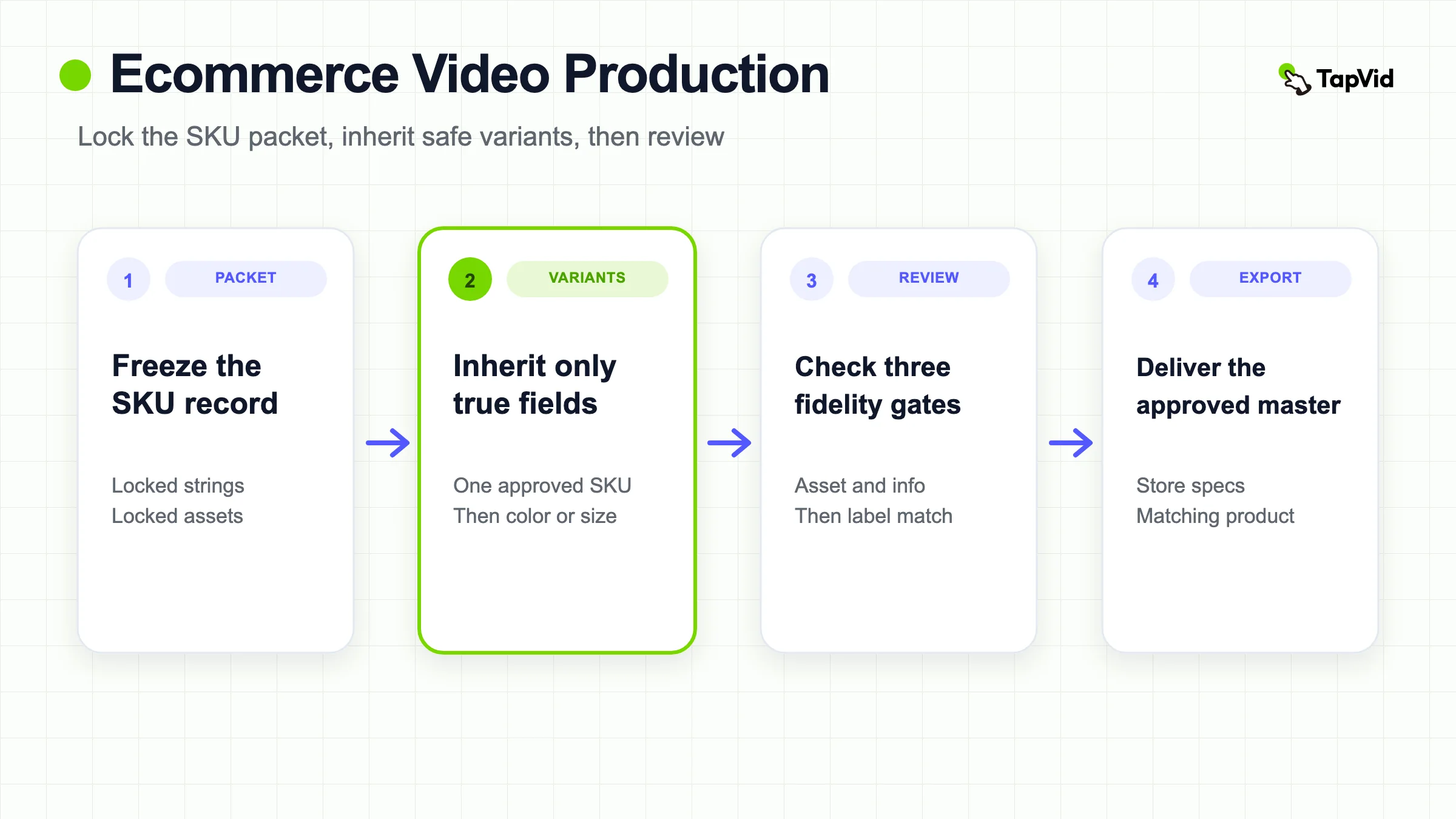
Ecommerce video production is the work of turning approved product records into videos a reviewer can check. Choose a method from the proof you already have, then choose a provider that can keep that proof honest. Freeze a versioned SKU packet first. Produce one approved SKU, inherit only the fields that stay true for color, size, or model variants, and treat any multi-SKU batch as a correspondence problem. Lock product images, prices, and model numbers, block missing evidence, and run asset, information, and label reviews before you export.
Ecommerce video production fails in a specific way. The clip can look finished while the frame shows the wrong colorway, the caption names a different capacity, or the call to action opens a sibling SKU. Shoppers do not experience that as a creative miss. They experience it as a product they cannot trust.
This page owns that production job: methods, provider alternatives, and the SKU packet that keeps both honest. It does not own channel strategy, placement mix, or measurement. Those decisions belong on the ecommerce video marketing guide. If you still need a generic film-versus-agency route for any product, start with product video production and come back here for catalog control.
The production unit is not "make more video." The unit is one sellable record: a SKU or variant with locked assets, locked facts, a destination, and a reviewer who can reject the output without guessing.
Create a product video from approved images and copy
01
What ecommerce video production actually covers
Ecommerce video production is the controlled path from a commerce record to a file you can attach to a product page, listing, or later cutdown. It includes intake, fact lock, scene assembly, review, export, and a stale-content trigger. It does not include deciding whether the video should run as a prospecting ad, an email module, or a homepage story. Those are marketing jobs.
The work is catalog-shaped. A store does not ship one hero film and stop. It adds colors, sizes, bundles, and replacements. Vidico's 2026 cost guide treats catalog coverage as a volume problem: an ecommerce brand onboarding many SKUs needs batch showcases, and per-video cost falls when several products share one setup (Vidico, 2026). That observation is useful as economics, not as permission to skip review. A cheaper batch that swaps two labels is more expensive than a slower correct packet.
Aicut's 2026 start-to-finish guide makes a second useful cut: video earns its place when the sale depends on behavior the still cannot show, such as fit, texture, setup, or scale (aicut, 2026). Production should start from that missing proof, not from a desire to decorate the gallery.
Keep three objects separate from the first day:
1. The commerce record. SKU, display name, variant, price state, and destination as they exist in the store.2. The source packet. The approved images, copy, and exclusions that the video may use.3. The output file. A reviewed master, then any derived cut. The file does not get to invent a fourth product.
If those three objects drift, the production system has already failed, even if the motion looks polished.
02
Choose the production method from the proof you already have
Choose the path from the proof the shopper must see, not from which method is fashionable. Aicut's planning filter is the right first question: one video should remove one dominant uncertainty, such as size, quality, complexity, context, or trust (aicut, 2026). Production then asks a harder follow-up: does that proof already exist in approved stills, specs, and copy, or must it be captured?
| Path | Use it when | Catalog implication | Review load |
|---|---|---|---|
| Film or studio capture | The shopper must see physical behavior the still cannot prove: drape, scale next to a hand, assembly, finish under real light | Expensive per SKU. Batch products that share a setup | Check the physical item against the packet. Color and scale errors become returns |
| Asset-led assembly | Approved product images, listing copy, and specs already contain the claim | Scales across a catalog if the packet is clean | Check that motion did not redraw the product or rewrite a locked string |
| Hybrid | One filmed master for the behavior that must be captured, then asset-led variants for colorways or copy-only changes | Lowest cost per extra variant after the first truthful capture | Re-review every inherited field. A new color is not a free resize |
This table is the early decision surface for the article. It is not a ranking of tools.
Click Play's ecommerce production page, written as a studio sales page, still records a practical constraint: filming a range in one production is usually the difference between video on ten pages and video on one (Click Play Films). Use that as a batching argument, not as a brief to hire them. The same page argues that a clip should resolve the objection photographs already failed to close. That matches Aicut's "do not repeat the still" rule.
Do not force one method across the catalog. A hero SKU with a mechanism may need a filmed setup. The next eight colorways may only need the approved pack shot, a locked name, and a caption that does not invent fabric performance. Mixing those jobs inside one unreviewed timeline is how labels swap.
03
Compare in-house, studio, freelance, and asset-led providers
A method is not a vendor. Film, asset-led, and hybrid describe the proof path. In-house, studio, freelance, and an assembly tool describe who does the work. Mixing those two questions is how catalogs hire a crew for colorways that already have approved stills, or ask a generation tool to invent drape that was never photographed.
Rev's ecommerce-video guide still lists hire-a-team, hire-a-freelancer, and do-it-yourself as labor and equipment choices (Rev). That is a staffing menu. It is not a catalog control system. Knowlify's 2026 agency, in-house, and AI-platform framework is useful for a narrower reason: the three options have different cost structures, speed envelopes, and failure modes, and they are not interchangeable prices for one film (Knowlify, 2026). Treat those published ranges as a vendor planning frame. Re-price your own quotes. Do not copy them into a TapVid budget.
| Provider | Use it when | Catalog implication | Fidelity risk you still own |
|---|---|---|---|
| In-house capture | You already have a repeatable set, lighting, and someone who can reject a wrong SKU | Makes sense when the same setup will run many times this quarter | Staff can still inherit an unsafe caption. A badge does not replace the packet |
| Studio or agency | The shopper must see physical behavior, talent, or a controlled set you cannot build | Strong for a hero SKU or a shared setup day. Weak as a per-colorway default | You still supply locked strings, locked assets, and a reviewer. A polished reel can swap two labels |
| Freelance editor or shooter | You need extra hands for one batch without a retainer | Flexible. Quality follows the brief | A loose brief becomes inferred materials and leftover prices |
| Asset-led assembly tool | Approved images, a product URL, and approved copy already hold the claim | Scales across a catalog if each row stays versioned | Motion can redraw a product or rewrite a model number. Review is the job, not a courtesy |
Vidico's 2026 cost guide is the better economics source on this page: white-background ecommerce showcases cost less than lifestyle or multi-setup work, and batch shooting is the lever that drops cost per product (Vidico, 2026). Click Play's studio page makes the same batching point from the service side: filming a range in one production is usually the difference between video on ten pages and video on one (Click Play Films). Use both as coverage arguments. Neither one authorizes a skipped review.
A hybrid provider mix is normal. Film the mechanism with a studio day or an in-house day. Assemble the next eight colorways from approved pack shots. Keep one packet format so the reviewer can reject either output the same way. Obclip's ecommerce pipeline page states the same split as vendor positioning: use an agency for hero products and a catalog pipeline for the rest (obclip). That is a capacity claim, not a fidelity system. A pipeline that injects the wrong price or model number is still a production failure.
Do not rank these providers. Rank the proof. If the still cannot show the claim, a cheaper assembly path is the wrong save. If the still already shows the claim, a cinematic reshoot is the wrong spend.
04
Freeze a commerce source packet before anyone renders
Build one row per sellable product or variant. Use the identifiers the commerce system already uses. Do not invent a friendlier name that never appears on the product page.
| Field | Why it is locked | Production rule |
|---|---|---|
| SKU | Stable internal and production ID | The filename, slate, and review log use this ID |
| Display name | Exact public name | On-screen type must match the store, including spacing and model marks |
| Variant | Color, size, flavor, bundle, or finish | One row per sellable option. Do not collapse "blue" and "navy" |
| Approved asset | The image or clip that must remain recognizable | Motion may crop, pan, or caption. It may not redraw the object |
| Allowed claims | Verified features and wording | Blank means none. Blank is not a license to infer |
| Price state | Current price, market, and date | Include only when the destination will still be true on publish day |
| CTA destination | The page that matches the shown product | A comparison frame needs a destination that can hold every shown SKU, or no destination |
Add three guardrails to every packet:
- Locked strings: SKU, model, capacity, price, discount, certification, legal copy, and the destination URL.- Locked assets: product photo, logo, packaging, and any image whose exact appearance is the proof.- Forbidden inference: materials, durability, performance, fit, shipping, reviews, and availability unless the packet proves them.
Keep the packet versioned. Prices, promotions, packaging, and availability change faster than evergreen footage. If a fact is time-sensitive, the video must carry a source date. When the date expires, refresh the claim or remove it.
TalkPix's 2026 Shopify reading is useful here for a platform reason, not a creative one. It reports that Shopify's product media documentation does not let videos attach to variants the way variant images can, so a storefront will not automatically correct an ambiguous clip (TalkPix, 2026). Confirm the live rule on Shopify's product media types for your theme and plan before you assume the gallery will rescue a mixed-SKU video. Until that page is re-read at export time, treat variant correspondence as a production responsibility.
05
Produce one SKU, then inherit safe variants
Do not start a catalog by rendering twenty near-copies. Approve one SKU end to end. That first master teaches the packet whether the asset crops cleanly, whether the locked strings fit a mobile caption, and whether the destination still matches the frame.
A variant inherits only the fields that remain true.
| Change | Inherit | Rebuild | Block |
|---|---|---|---|
| Color or finish | Shape, size, and unchanged claims | The approved color asset, display name, SKU, and any color-dependent caption | Any claim about a finish the new asset does not show |
| Size or capacity | Product family and shared mechanism | The numeric label, SKU, and any scale reference | A recycled close-up that hides the size difference |
| Bundle contents | Shared hero if it still shows every included item | The contents list and destination | A hero shot of only the parent SKU |
| Price or offer | Creative treatment | The price state and legal qualifier | Yesterday's discount |
The inheritance table is the production contract. If a field is not in the "inherit" column, the editor does not get to keep it because the timeline is convenient.
This is also where batch economics and accuracy part ways. Vidico notes that filming several products in one studio day splits setup cost (Vidico, 2026). That is true for capture. It is not a reason to reuse a voiceover that still says 750 ml on a 500 ml row. The cheap version is the one that inherits correctly, not the one that skips the packet.
When the variant is only a colorway and the approved stills already show that color, an asset-led pass is often enough. When the variant changes how the product sits on a body, in a room, or in a kit, you are back to a proof question. If the still cannot show the difference, film the difference or leave that claim out.
06
Keep a multi-SKU batch from swapping labels
A multi-SKU video is a correspondence problem before it is a storytelling problem. The frame, the caption, the voiceover, and the destination must point at the same records at the same time.
Use a correspondence matrix, not a mood board.
| Time or scene | On-screen asset | On-screen label | Spoken or captioned claim | Destination | Reviewer |
|---|---|---|---|---|---|
| 0:00 to 0:04 | SKU-A pack shot | Display name A | One allowed claim for A | Product A, or no CTA yet | Merchandising |
| 0:04 to 0:08 | SKU-B pack shot | Display name B | One allowed claim for B | Product B, or shared category | Merchandising |
| 0:08 to 0:12 | A and B together | Both names, both sizes | Only comparative facts both packets prove | Category or comparison page | Merchandising plus legal |
Three failure modes show up in the same matrix:
1. Asset lag. The label changes and the picture does not.2. Label lag. The picture changes and the caption still names the previous SKU.3. Destination drift. Both SKUs are shown, but the tap target opens only one of them.
A comparison is justified when the shopper must choose among records you actually sell. It is not justified because a longer video feels more complete. If you cannot fill every cell in the matrix from approved packets, the scene is blocked. Do not cover the hole with a generic "premium quality" line.
Hobo's broader ecommerce-video guide lists comparison videos as one format among many (Hobo.Video). That is a marketing taxonomy. Production only needs the narrower rule: every compared item must remain identifiable when the video is muted, cropped for mobile, and watched at the size of a product gallery.
07
Lock product facts and block missing evidence
Separate literal facts from creative treatment. Product names, numbers, UI labels, prices, parameters, and legal qualifiers may need to appear exactly as supplied. Pacing, transitions, music, framing, and visual metaphor can move more freely. This split keeps an editor or a generation tool from polishing a fact into a different promise.
Give every intended claim a status before assembly:
| Status | Meaning | Production action |
|---|---|---|
| Proven | The packet has an asset or official string that shows it | Eligible for the scene |
| Qualified | True only with a condition, market, or date | Show the condition in the same scene |
| Blocked | The team wants the claim and cannot prove it | Remove the line. Do not imply it with confident motion |
Aicut's photo-to-video caution is the right limit for generated or assembled motion: do not pretend to show texture, application, or a before-and-after result that was never captured (aicut, 2026). TalkPix makes the same boundary for photo-based Shopify clips: a generated presenter clip can explain a convenience claim that the photo supports, and it cannot prove a cream's texture (TalkPix, 2026). Use those pages as the fact-lock, not as a tool recommendation.
Blocked is a legal production state. It is cheaper than a return. If merchandising wants "waterproof" and the packet only has "water-resistant, 30 minutes, 1 meter," the video either uses the qualified string or drops the line. Motion graphics do not upgrade the claim.
Do not write first-person test language for a product you did not run. If a number comes from a listing, keep it attached to that listing date. If a number comes from a reviewer, it is not your product fact.
08
Run three review gates before you export
Review the master before you make vertical, square, silent, or localized cuts. A channel cut is not a free resize. It can hide a qualifier, crop out the capacity mark, or cover a SKU label with a caption.
Run three named gates. They are not synonyms for "looks good."
Asset fidelity. The product, logo, packaging, and any interface still match the supplied source. A generated bottle that is merely blue is not proof of the Steel Blue SKU. A recreated label can change typography, regulatory copy, size, or placement. Use the supplied product photography whenever the item must be recognized or purchased.
Information fidelity. Supplied wording, numbers, model names, parameters, prices, and legal copy were not silently rewritten. A shorter edit that drops "up to" or "compatible with" has changed the fact.
Product-to-label correspondence. The narration, the scene, and the asset refer to the same product and condition at the same time. This is the gate that catches a three-SKU comparison whose third label never appears.
Watch the master four ways: with sound, muted, at mobile size, and paused on every product or text frame. Keep a decision log so a rejected phrase does not return in a later cut. Click Play's production notes push the same silent-first habit for product-page and feed video, because most of that inventory is watched without audio (Click Play Films). The production implication is concrete: if the SKU cannot be identified muted, the video is not ready.
Do not derive ads, email cuts, or marketplace versions until the master passes all three gates. Placement adaptation is a later marketing job. The ecommerce video marketing guide picks up after this checkpoint.
09
Export to store specs only after the master is approved
Export is a delivery problem, not a second creative brief. The approved master already holds the facts. The export step only has to satisfy the destination without breaking those facts.
TalkPix's 2026 reading of Shopify's product media documentation lists uploaded-video maximums of MP4, MOV, or WebM, 1 GB, 10 minutes, and 4K, and treats those as platform ceilings rather than creative targets (TalkPix, 2026). Re-read Shopify's product media types on the day you upload. Theme support, plan upload limits, and admin labels change. A file can be legal on Shopify and still be a poor product-page asset if it is two minutes long, starts with a logo hold, or crops the product out of a square gallery.
Practical export checks that do not depend on a remembered number:
1. The first clear frame still shows the correct product after the theme's poster crop.2. Locked strings remain readable at the gallery size on a phone.3. Autoplay, if the theme uses it, still makes sense muted.4. The media sits on the product that the packet named, not on a nearby sibling.5. Alt text describes the visible product and the job of the clip, not a marketing slogan.
Amazon, TikTok Shop, and other marketplaces add their own length, ratio, and content rules. Do not copy a Shopify gallery master into a marketplace slot without reading that destination's current help page. The production rule is the same everywhere: the destination may change the container. It may not change the SKU.
If you need a cost frame for how many masters to produce, Vidico's ranges are a budgeting input, not a quality target. The guide prices simple white-background ecommerce showcases lower than lifestyle or multi-setup work, and it treats batch shooting as the lever that drops cost per product (Vidico, 2026). Budget from catalog size and proof need. Do not budget from a hope that one 90-second film will cover every variant.
10
Use an asset-led path when the packet already holds the proof
An asset-led path is valid when the shopper's question can be answered with approved product images, a product URL, and approved copy. It is invalid when the sale depends on physical behavior you never captured.
TapVid's current product-video page describes that input set and the review step in public language. As of 25 August 2026, TapVid's AI product video generator says the workflow starts with product images, a product URL, and approved product copy or claims, then asks you to check product appearance, claims, captions, offer, and the call to action before export. The same page states that TapVid structures those sources into scenes, motion, and captions, and that you can ask for a revision in plain language. It is not a filming studio and it does not create missing physical evidence.
As of the same date, TapVid Pricing states that 3 credits render 1 second, that a failed or timed-out render returns credits, and that Pro, Max, and Ultra exports are listed at 1080p without a watermark. Those commercial facts change. Read the live page before you plan a catalog budget around them. Subscription credits are described as expiring at the end of the billing cycle, so a large SKU batch should not assume unused credits will wait for next month.
Use TapVid on this page the way the packet already requires: as an assembly and review surface for approved commerce sources, not as a substitute for a shoot you still need. The natural next step, after the packet exists, is to create a product video from those approved assets. Review the output against the three gates above. If a scene invents a texture, a testimonial, or a size the packet does not prove, reject that scene.
This page also records one dated asset-led run from 25 August 2026 in the signed-in TapVid product-video workspace. The inputs were three generated demo pack shots for a sample SKU labeled AeroFlask 500 Steel Blue, plus a locked prompt that allowed only double-wall insulation and leak-resistant lid. AeroFlask is a demo packet for this page, not a live retail listing.
The setup frame shows the three uploaded pack-shot files and the locked prompt in Chat. The result frame is the same project after generation: Generate Video marked Done, and the studio end card with the display name, SKU AF-500-SB, and the two allowed claims. The rendered clip timed at 0:38, not the requested 30 seconds. One clean run does not prove that every catalog SKU will render cleanly.
11
Common ecommerce video production mistakes
These mistakes are production failures. They are not "the video needed more energy."
1. Starting from a channel instead of a packet. You cannot review correspondence if the SKU was never written down.2. Hiring a provider before you know the proof path. A studio day cannot fix a colorway that only needed a locked still. An assembly tool cannot invent a drape you never captured.3. Repeating the still. If the video only restates the pack shot, Aicut's test says it has not earned its place (aicut, 2026).4. Inheriting unsafe fields. A colorway that keeps the old capacity line, or a bundle that keeps a solo hero, is a new error, not a time saver.5. Treating a batch as one review. Twenty exports from one timeline are twenty correspondence checks.6. Letting motion upgrade a blocked claim. Confident animation is not evidence.7. Exporting before the master passes muted and mobile review. Store themes and marketplace players will not restore a cropped qualifier.8. Using remembered platform limits. Re-read Shopify, Amazon, or the current destination on upload day.9. Asking one film to own marketing and production. Job, placement, and measurement are a different page.
If the catalog is large, the scarce resource is the packet and the review log, not another style preset.
12
Frequently asked questions
What is ecommerce video production?
Ecommerce video production is the process of turning approved product records into videos a reviewer can check for the correct SKU, variant, facts, and destination. It covers the source packet, assembly, review, and export. It does not cover which channel should run the video.
How is it different from ecommerce video marketing?
Marketing assigns a commercial job, adapts the approved master to a placement, and measures the decision. Production creates the master that marketing is allowed to adapt. Use this page for the packet and the review gates. Use the ecommerce video marketing guide for placement and measurement.
Do I need to film every SKU?
No. Film when the shopper must see physical behavior that approved stills cannot prove. Use an asset-led path when images, specs, and copy already hold the claim. Hybrid work films the behavior once, then inherits only the variant fields that remain true.
How do I keep color and size variants from mixing up?
Approve one SKU first. Inherit only unchanged fields. Rebuild the asset, SKU, display name, and any numeric label for each variant. Block claims the new asset does not show. Review muted and at mobile size.
When is a multi-SKU video justified?
When the shopper must choose among records you sell, and you can fill a correspondence matrix for every scene. If a label, asset, or destination cell is empty, split the video or drop the comparison.
What should I check before uploading to Shopify?
Confirm the live Shopify product media rules for your plan and theme. Check that the poster frame shows the correct product, locked strings survive the gallery crop, and the file sits on the matching product record. TalkPix's 2026 reading is a planning aid, not a substitute for the official page.
Should I hire an agency or produce ecommerce videos in-house?
Hire a studio or agency when the shopper must see physical behavior you cannot capture internally. Keep the work in-house when you already have a repeatable set and a reviewer who can reject a wrong SKU. Use an asset-led tool when approved images and copy already hold the claim. The packet and the three review gates stay yours in every case.
Can I use an AI product video workflow for a catalog?
Yes, when each row has approved images or a product URL plus approved copy, and you still run the three review gates. TapVid's public product page describes that input and review path as of 25 August 2026. It cannot invent a physical demonstration you never captured.