
TL;DR
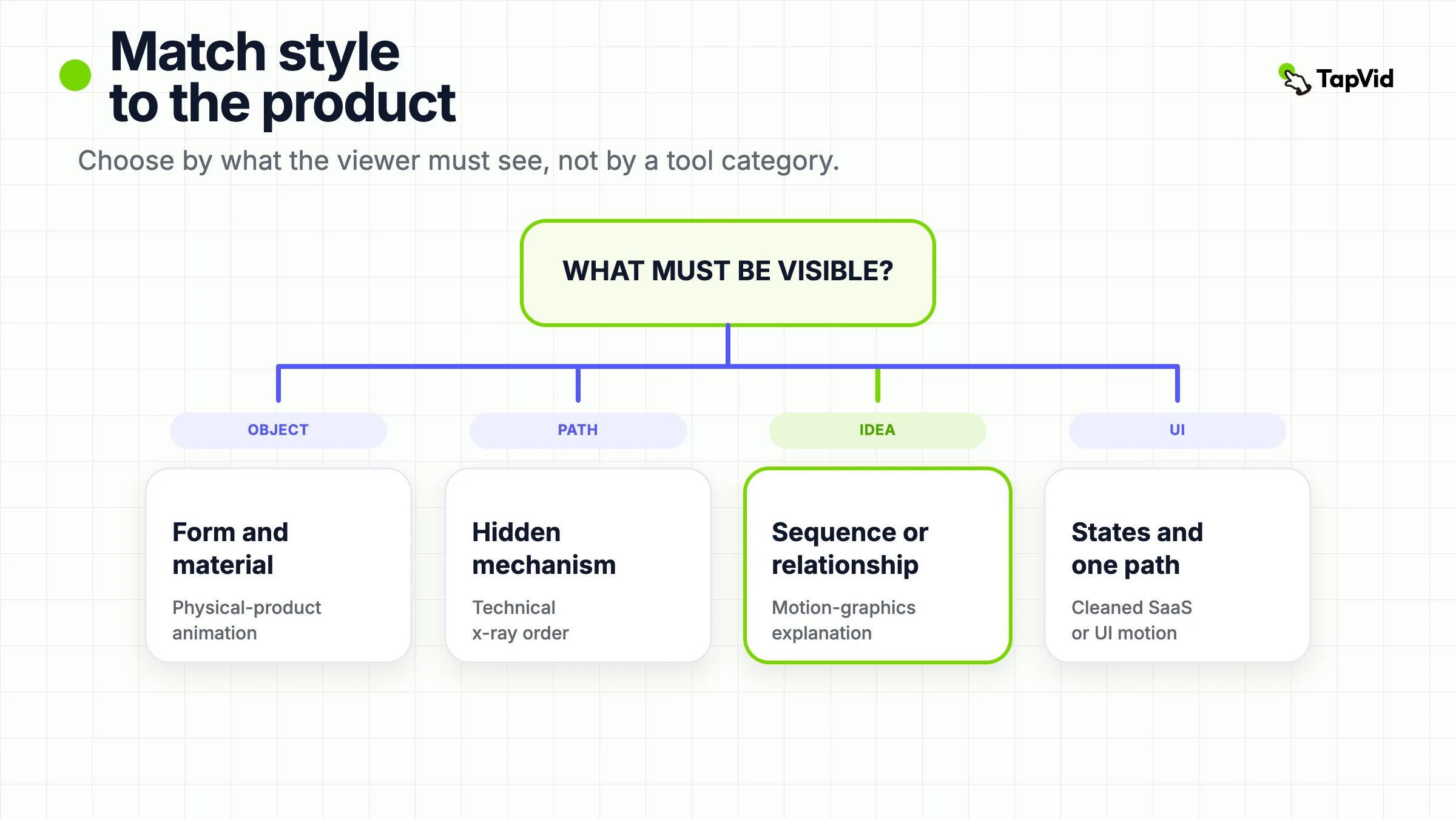
A useful product animation video is a style sample you can score against one job. First name what the viewer must see: a physical object, a hidden mechanism, an idea, or a software behavior. Then borrow one visible rule from a matching example. Do not borrow a 3D studio look for a SaaS flow, a catalog spin for an internal process, or a generated ad for a click path the viewer has to trust.
Most “product animation video” results send you to a generator. That answers “how do I make a clip from a photo.” It does not tell you which animation you are looking at. A photoreal orbit of a bottle, an x-ray of a print line, a kinetic-type explainer, and a cleaned UI sequence are four different objects. If you borrow the wrong object, you get motion and a weak decision.
This page is a comparison set, not a Cinema 4D class and not a tool ranking. The working definition is short: a product animation video uses constructed motion to show how a product looks, works, or should be understood, when a live camera would miss the proof or cost too much to get it. Levitate Media draws a related line between an animated product video and an explainer. The first demonstrates function, features, or physical properties. The second can stay at a problem-to-solution story and never show the product in detail (Levitate Media). Use the table first. Then use one example per style. If you already know the style and need a production route, that is a different article: Product Video Production.
01
Compare Product Animation Styles by What Must Be Visible
Use this table before you open a reference cut. The columns are the only dimensions that matter at this stage: product type, what must be visible, the style to study, and the first thing you should refuse to copy.
| Product type | What must be visible | Style to study | Do not borrow this |
|---|---|---|---|
| Physical SKU | Form, material, pack, or environment | Physical-product animation | A white turntable that never chooses a hero frame |
| Hidden mechanism | Path, cross-section, or cause and effect inside the object | Technical-product animation | An exterior beauty pass that never opens the housing |
| Abstract offer or process | Sequence, number, or relationship | Motion-graphics explanation | A fake 3D object that pretends to be the product |
| Software behavior | States, labels, and one path through the interface | SaaS or UI animation | A raw, uncleaned recording, or icons that invent clicks |
| Wrong job | Hand-feel, exact clicks, or a character story | Leave this library | Forcing animation onto a job the camera or a person already owns |
The table is the decision. The sections below only show how that decision looks in a real cut. If two columns already disagree, the job needs an internal path and the reference never leaves the shell, stop watching and pick another example.
Levitate’s 2026 guide is useful here for one idea only: style follows what you are showing, and budget is second (Levitate Media). This page keeps that matching rule and throws away the agency quote sheet. Those dollar ranges are vendor estimates. They are not facts you can reuse in your brief.
02
What a Useful Product Animation Video Makes Visible
A useful product animation video example makes three things visible in the first 20 to 40 seconds.
First, the product type. Physical object, hidden process, idea, or interface. If you cannot name that type, the example is decoration.
Second, the proof signal. Piero Perilli’s studio note is blunt about physical work: a catalog render shows the object, and a cinematic product animation makes a choice about environment, light, and camera so the object can carry a position (Piero Perilli). Technical work has a different signal. Mynd’s C.P. Bourg write-up says the story lived in the paper path, the barcode match, and the mill-glue-trim sequence, none of which a factory tour could show from the outside (Mynd). Motion graphics has a third signal. Genesis Motion Design puts it as information structure rather than character arc: headline, supporting points, conclusion, timed to how long a fact takes to read (Genesis Motion Design).
Third, the leave-this-style moment. The best examples decide when the chosen style is no longer the most informative picture. A physical hero should not keep orbiting after the material point is made. A technical x-ray should not keep peeling panels after the path is clear. A motion-graphics cut should not keep adding icons after the one idea is down. A UI cut should yield to a real recording when the next claim is “click this control.”
Ignore examples that only prove “the product can move.” Photo-to-ad tools and generic 3D how-to pages are the extreme version of that failure. They teach you that motion is available. They do not teach you which proof you still lack.
03
Physical-Product Animation: Show Form and Material, Not a Catalog Spin
The physical-product example you want is not a 360 spin on infinite white. It is a cut that treats the object as the protagonist: one hero frame, one material or silhouette decision, and a camera that reveals instead of wandering.
Apple’s official Introducing AirPods Pro 3 film is a public launch cut on the Apple YouTube channel. Watch the product as a constructed object, not as a lifestyle extra. The camera commits to scale, surface, and a small set of feature beats. That is the borrowable rule: pick the frame that must be remembered, then let motion serve that frame. Piero describes the same discipline from the studio side. The hero frame locks hierarchy, light direction, and crop before the animation is allowed to travel (Piero Perilli).
Do not copy Apple’s claims from the description. Active noise cancellation rankings, battery hours, and hearing-aid language are Apple’s current product copy. They are not this article’s facts, and they are not a reason to animate your own SKU that way.
What to borrow:
- One hero silhouette before the first camera move. If the still is weak, the motion will be a sequence of weak stills.
- A material close-up that has a job. Gloss, knit, metal edge, or label type should answer a buyer question, not fill time.
- A controlled environment. Luxury, industrial, or empty studio are all valid. Random lifestyle debris is not a substitute for a decision.
What not to borrow:
- A turntable that never stops. If every angle is equal, no angle is the proof.
- A generated “cinematic commercial” that drifts the logo, the label, or the shape. That is a photo-to-ad job, not a physical-product reference.
- Apple’s launch cadence. A known consumer brand can skip category setup. A new hardware SKU usually cannot.
Limitation, adjacent to the conclusion: physical-product animation is a poor proof of hand-feel, weight, or in-hand use. If the buyer must believe how the object sits in a hand, you still need a shoot or a real handling clip. Animation can prepare desire. It cannot replace that contact.
04
Technical-Product Animation: Open the Machine the Camera Cannot
Technical-product animation is the style people flatten into “3D.” It is narrower than that. Use it when the proof is a path, a cross-section, or a cause you cannot film: paper through a binder, fluid through a valve, heat through a chassis.
Mynd’s C.P. Bourg case is the written rule. Live video would have shown the outside of the finishing machines. The sales story was inside: electronic job intake, barcode matching, milling, gluing, and trimming in one continuous line. The studio built Cinema 4D models from CAD and brochures, then used a monochrome plant with the machines in color so attention stayed on the process (Mynd). I looked for one official C.P. Bourg 3D animation watch URL to embed as that exact cut. A search for “C.P. Bourg Book Factory 3D animation YouTube” and a second search restricted to `youtube.com/watch` did not return a stable official player I could open and classify. So the Bourg lesson stays as a credited studio case, not as a fake embed.
The playable technical example on this page is a different machine with the same job. On Demand Books’ official Espresso Book Machine film walks a hidden path: choose a file, print block and cover, accumulate, mill the spine, apply glue, clamp the cover, trim the edges. The camera exists to make the order legible. Borrow that order. Do not borrow the voiceover’s “penny per page” or “indistinguishable from a factory original.” Those are the manufacturer’s claims. This page did not verify cost or print quality.
What to borrow:
- One process sentence the picture can finish. “The sheet is milled, then glued, then trimmed” is a technical brief. “Our system is advanced” is not.
- A consistent visual language for inside versus outside. X-ray, exploded axis, or stripped housing. Pick one and keep it.
- Expert review on the path. Bourg’s team reviewed for technical accuracy, not only for look (Mynd). If no engineer will sign the sequence, do not animate it.
What not to borrow:
- An exterior hero that never enters the mechanism. That cut belongs in the physical section.
- Particle sparkle that hides a missing step. Motion is not a substitute for the next machine state.
- Medical or industrial accuracy you do not have sources for. Render Edge’s industry examples are useful as category names, industrial, medical, consumer, technology, and not as transferable clinical claims (Render Edge Studio).
Limitation: technical animation is expensive to keep true. If the next firmware or tool path changes the order, a beautiful x-ray becomes a liability. Keep the style for durable mechanics. Recut or leave a qualifier on anything that ships quarterly.
05
Motion-Graphics Explanation: Animate the Idea, Not a Fake Object
Motion-graphics explanation is the style teams reach for when the product is a workflow, a number, or a category the viewer does not have a picture for yet. Genesis’s distinction is the one that matters: animation makes you feel a character, motion graphics makes you understand a message (Genesis Motion Design). If you need four selling points remembered, you want information structure, not a mascot.
Slack’s official What is Slack? cut is a motion-led product film. Voiceover names a broken workday, then walks a set of jobs, search, recap, records in channel, automation, without asking a founder to sit in a bubble. That is the borrowable rule: one idea per beat, type and diagram carrying the argument, UI appearing as support rather than as a click lesson. It is not the same cut as Slack’s older “Work, simplified.” campaign, which already sits on TapVid’s motion graphics examples page. Do not treat the two as one case.
Do not copy Slack’s statistics or product promises from the voiceover. “One third of workers’ days” and the current AI feature list are Slack’s claims. This page did not audit those numbers or the 2026 product surface.
What to borrow:
- A problem state the viewer recognizes, then one behavior change. Crowded, then clearer, is a structure. A logo sting is not.
- Type that can be read muted. If the sentence only works in the voiceover, the graphic is incomplete.
- A hard stop after the idea lands. Extra icons after the point is made are noise.
What not to borrow:
- A photoreal “product” the company does not sell. If you do not have a physical SKU, do not invent one in 3D to look premium.
- Character acting unless the human story is the product. That is animation in Genesis’s sense, and it is a different brief.
- The nine communication jobs on the motion graphics examples page. That page owns launch reveal, education series, data, and process. This page only owns the product-type decision that sends you there.
If you already have approved copy, a URL, a PDF, or screenshots, and the job is this style, TapVid can turn that source pack into a reviewable motion-led explainer. You review the script and scene plan before rendering, and you can ask for one scene back (TapVid AI Motion Graphics Generator). That is a production path. It is not a public style example to copy, and it is not a claim that TapVid replaces a 3D studio.
Limitation, adjacent to the conclusion: motion graphics cannot prove a click that was never captured, and it cannot prove a material that was never photographed or modeled from source. If the next sentence needs either, change style.
06
SaaS and UI Animation: Clean the Interface, Do Not Replace the Clicks
SaaS or UI animation is the most commonly faked of the four. Teams either drop a raw screen recording into a launch film, or they redraw the product as icons and hope the buyer will trust the flow. The useful example is narrower. It keeps real states and labels, removes the junk a live capture always includes, and still refuses to invent a control that is not in the product.
I looked for one canonical public “cleaned UI animation, not a talking-head, not a raw Loom” watch URL that was not already a primary case on TapVid. Homebot’s official What is Homebot? Short explainer is a narrated value film. It argues engagement and lead flow. It is not a cleaned-interface lesson, and its on-screen statistics stay Homebot’s. A second official cut, Notion’s Introducing Notion 3.0: Agents, opened as an event and music piece in the accessible transcript. I could not classify it as a UI-animation reference. Project.co’s chaptered interface tour is already used on product demo video examples as a demo-breadth pattern, so it is not reused here as a new primary case.
The passing public cut is Airtable’s official Meet Airtable tour. It restages product states and one path through the interface, without asking a founder to hold the frame. Borrow that cleaned-UI format only. The chrome is from 2016, so this is not current Airtable product proof, and it is not a reason to invent a dashboard the live product does not have.
What the format still requires:
- Real product states, even if they are restaged. Labels, empty states, and errors must belong to the current product.
- One path. If the UI has four ways to invite a user, the animation should pick one and say so.
- A planned yield to recording. When the claim becomes “the cursor does this,” stop illustrating and capture.
What not to borrow:
- A face that never yields the frame. That is a talking-head demo, and it belongs on the demo examples page.
- Icons that complete a workflow the product cannot complete. Pretty motion does not create a feature.
- A pixel-accurate promise from a generative tool. TapVid’s own product-demo page is explicit that it does not record a live screen and does not build an interactive click-through (TapVid AI Product Demo Video Generator). If exact clicks are the lesson, use a screen-demo tool.
Limitation: UI animation ages with the sprint. If the settings page will change next month, do not lock a cinematic treatment on those pixels. Animate the durable “why,” and recapture the screen later.
07
When Product Animation Is the Wrong Reference
Leave this library when the proof is already in the world, or when the story is a person.
Choose a shoot when the buyer must believe hand-feel, food, fabric, or a real room. Animation can fake appetite and tactility. Reviewers can usually tell, and so can customers who later hold the object.
Choose a screen recorder when the lesson is an exact click path, a permission dialog, or an error the buyer will hit. Cleaned UI animation can introduce the product. It should not stand in for the procedure.
Choose character animation or a talking-head cut when the job is trust, testimony, or a teacher. Genesis’s test is still the fastest: if you need the audience to feel a character before they act, you are no longer in product animation (Genesis Motion Design).
Choose a written page or a still system when the claim is a table of specs the viewer must compare, not watch. A product animation video that turns a spreadsheet into sparkles is worse than the spreadsheet.
If the remaining job is “we have approved assets and we need a structured explainer,” you are still in this cluster, in the motion-graphics or stylized SaaS row. If the remaining job is “we need a demo proof pattern,” go to product demo video examples. If the remaining job is “we need to pick a production route,” go to product video production.
08
Product Animation Video FAQs
What is a product animation video?
A product animation video uses constructed motion to show how a product looks, works, or should be understood. It is not automatically 3D, and it is not automatically an explainer. If the picture never has to be the product, you are probably watching a story or a brand film.
How is a product animation video different from an explainer video?
An explainer leads with a problem and a solution. It may never show the product in detail. A product animation video has to demonstrate a look, a mechanism, or a behavior. Levitate treats the overlap as normal in B2B and still asks you to brief them as different jobs (Levitate Media).
How do I choose between 2D motion graphics and 3D product animation?
Start with product type. Software, platforms, and invisible workflows usually want 2D motion graphics or cleaned UI. Physical products and internal components usually want 3D. Hybrid work is for a human story plus a mechanism. Budget is the second filter, not the first.
Can I use a product photo-to-video tool as my product animation reference?
You can use it to make ads from stills. Do not use the output as proof of material, mechanism, or UI. If the logo or label drifted, the clip has already failed the physical-product test.
Does TapVid make photoreal 3D product animation?
No. The current official product-demo and motion-graphics pages describe an asset-led explainer workflow from a URL, PDF, script, or screenshots. They do not describe a CAD visualization studio, and they do not record a live screen (TapVid AI Product Demo Video Generator).
When should I skip product animation entirely?
Skip it when the buyer must feel an object, follow exact clicks, or trust a specific person. Those jobs need a shoot, a recorder, or a talking-head or testimonial cut.
09
Turn Approved Product Source into a Motion-Led Explainer
If the table sent you to motion-graphics explanation, or to a stylized SaaS cut built from approved screens, you already have the hard part: a source pack. TapVid’s job in that case is narrow. Add the URL, PDF, script, or screenshots. Review the brief and scene plan. Generate the explainer. Change one weak scene without rebuilding the rest (TapVid AI Motion Graphics Generator, TapVid AI Product Demo Video Generator).
One bounded Motion Graphics run on that path produced a 31-second SiteMark Field Notes 2.4 explainer. The same project shows the locked source pack beside Chapter 01, today’s jobs in one list, and later Chapter 04, the office board after a status change. That pair is proof of an approved-source path to a reviewable motion-led explainer. It is not photoreal 3D, CAD x-ray, or a pixel-accurate click recording.
That path does not replace a physical-product studio, a technical CAD film, or a pixel-accurate recorder. If your brief still needs one of those, stay with the matching example above and hire or shoot for that proof. If your brief is an approved explanation that has to stay literal, start from the source you already have.