
TL;DR
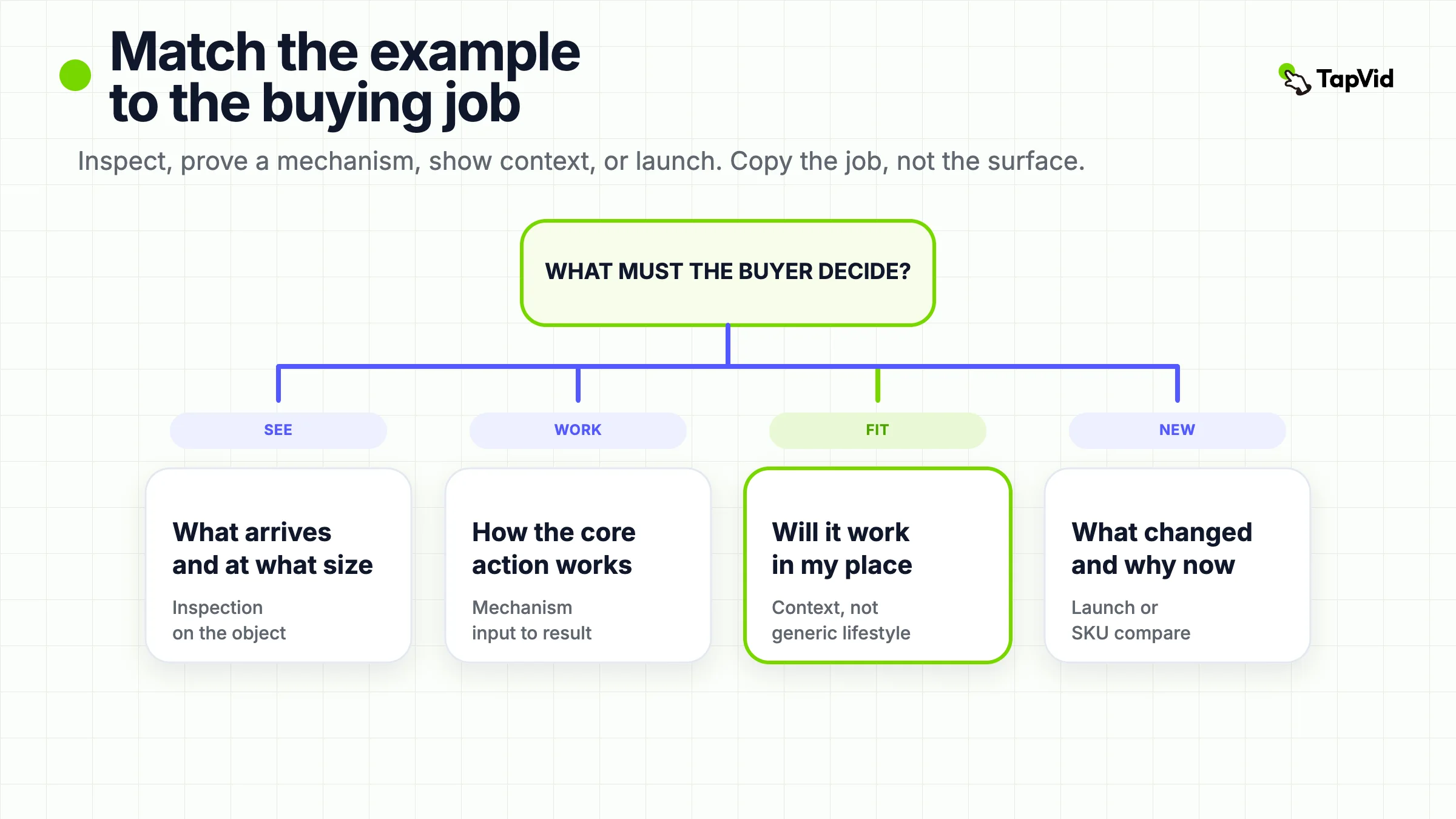
The useful product video examples are the ones that answer the same buying question you face. Use an inspection film when the shopper needs to see the object, a mechanism film when they need to believe how it works, a context film when the doubt lives in a real room or workflow, and a comparison or launch film when they need to choose or notice what is new. Copy the job and the visible proof. Do not copy the celebrity, the budget, or someone else's product shots.
People search for product video examples when they already know they need a video and do not yet know which kind. The phrase is broad on purpose. It covers a 12-second bottle spin on a product page, a two-minute blender performance film, a software walkthrough, a launch teaser, and a three-SKU comparison. Those assets do not share a style. They share a reader job: help someone decide whether this product is the right object, the right mechanism, or the right next step.
This page is a buying-job swipe file, not a production-company reel and not a software-demo pattern index. Each example below is useful only if you can name the question it answers. If you cannot write that question in one sentence, the film is decoration.
Choose a production route after the job is named
01
Current TapVid terms — October 14, 2026
The dated tests and price observations below are historical records, including any 3-credit-per-second or 180-credit quote. They do not establish today’s price. Simple videos are currently estimated at about 4 credits per second; scene complexity can increase usage. Use the credit quote shown in the app before generating.
The $4.99 trial includes one video generation for 3 days and renews as Pro at $49/month unless canceled before it ends. Subscription credits do not roll over; add-on packs are valid for 12 months. Pro, Max and Ultra include watermark-free 1080p MP4 export. A free account does not establish a free generation or export entitlement. Check current plans, prices and trial terms before purchase.
02
What counts as a useful product video example
A product video example is worth studying when three things are visible at the same time: the product, the buying question, and the proof that answers it. A cinematic brand film can still fail this test if the product never has to do any work. A talking-head testimonial can fail it if the product never appears. A feature montage can fail it if every claim sits on a generic background.
The buying question is usually one of five:
- What does this object actually look like, include, and feel like at the size I will receive?
- How does the core mechanism work, and what changes after I use it?
- Will it work in my room, kitchen, body, or workflow?
- Which SKU, size, or model should I open next?
- What is new, and why should I look now?
Videowise's 2026 ecommerce guide groups product videos as demo, 360 or inspection, lifestyle, UGC, and AI-generated catalog clips. That list is a production menu. It is not a decision. A lifestyle clip and a demo clip can serve the same "will this work in my kitchen" question. A 360 spin and a UGC unboxing can serve the same "what will arrive in the box" question. Start from the question. Then pick the format.
Two limits sit next to that definition. First, an official brand film is a public observation, not a conversion case study. This page does not treat view counts, Cannes awards, or "this video made the brand successful" as facts. Second, a first-party TapVid clip can show an asset-led workflow. It is not an independent customer result.
If the film you want to copy hides the product behind a joke, a celebrity, or a location you cannot license, it is the wrong example for a team that has to ship from approved photos, UI, and copy.
03
At a glance: match the example to the buying job
Use this table before you open a reference cut. The columns are the only dimensions that matter at this stage: the buying question, the proof the viewer must see, a public example to study, and the first thing you should refuse to copy.
| Buying job | What must be visible | Example to study | Do not borrow this |
|---|---|---|---|
| Inspect the object | Form, pack, scale, included parts | Official product-page or channel inspection films, such as Hydro Flask or Vitamix performance cuts on the brand channel | A white turntable that never chooses a hero angle or a size label |
| Prove the mechanism | Input, action, result | Therabody's official Smart Percussive Therapy film | An exterior beauty pass that never shows the working part |
| Remove context doubt | The product in the room, body, or workflow where hesitation happens | IKEA Place public demos, or a software film that stays inside one real task | Lifestyle footage that could advertise any brand |
| Compare SKUs | The same fields on every product, attached to the correct asset | A three-SKU size or spec card, not a sizzle reel | A voiceover that names SKU A while the frame shows SKU B |
| Announce what is new | The changed behavior, then the proof | Figma's official AI image-editor page and agent film | A logo sting plus every feature shipped this year |
| Wrong job | Feeling, prestige, or a story with no product work | Leave this library | Forcing a brand manifesto onto a product-page slot |
Read the table left to right. If your shopper is choosing a bottle size, do not study a keynote. If your buyer still does not understand the mechanism, do not study a 15-second lifestyle loop. If you already have a product-page slot and a pack shot, do not study a stadium launch.
The rest of this article walks through those jobs with public examples. The point is not to collect famous brands. The point is to leave with a one-sentence brief you can hand to an editor, an agency, or an asset-led workflow.
04
Inspection examples: let the shopper see the object
Inspection is the most common product-page job and the one most teams skip. The shopper is already on the SKU. They do not need a brand story. They need to see the object at the size, angle, and completeness that a still image hides.
Hydro Flask-style bottle films work when they stay on one object long enough to answer cap, mouth, insulation shell, and color. Videowise describes a short Hydro Flask stop-motion built around a single cap. The transferable rule is narrower than "do stop-motion." Pick one part that still images fail to explain, hold it in frame, and label it with the approved name. If the cap is the buying doubt, the rest of the bottle can wait.
Vitamix's official channel publishes blending-performance films rather than specification cards (Vitamix on YouTube). The useful lesson is not the tagline. It is the decision to let the mechanism do the selling: ingredients in, blades working, result visible. A price-premium product still has to show work. If your own blender, mixer, or tool cannot show a before state and an after state from approved footage, you do not have an inspection example. You have a mood clip.
Two checks keep inspection honest.
First, scale. A ring, a bottle, a laptop, and a sofa all fail in different ways when the frame has no hand, no table edge, no known object. If the shopper cannot estimate size, the video did not inspect anything.
Second, completeness. An inspection film should not hide the cable, the missing lid, the USB-C port, or the fact that the stand is sold separately. Those omissions become returns. If the approved pack shot does not include an accessory, do not imply it in motion.
Do not copy studio lighting you cannot recreate. Copy the rule: one object, one unanswered visual question, one labeled result.
05
Mechanism examples: prove how it works
Mechanism films answer "what happens when I use this." They are not the same as inspection. Inspection shows the object. Mechanism shows the cause.
Therabody's official 33-second Smart Percussive Therapy introduction (Therabody channel, published 2020-05-13) is a mechanism film, not a teardown. It names a new behavior, quieter percussive therapy, and keeps the device on screen while that claim is made. The film does not prove engineering internals. It also does not need to. The job is "this is a Theragun, and the new generation is meant to be used where noise used to block it." If your own hardware claim is quiet, fast, sealed, or one-handed, the viewer needs to see that behavior, not a cross-section you do not have permission to invent.
Software has the same job with a different object. Figma's AI image-editor page keeps the product inside the canvas: add an image, describe the edit, review the result on the same file, refine in the same thread. The official page also states the current access rule in plain language. The agent is on paid plans, and during the open beta it does not consume AI credits. That sentence is the kind of limiter a product video should not erase. A mechanism film that implies "anyone, any plan, any result" is no longer a product video. It is an ad for a different product.
Loom's AI page is useful for a different mechanism: work that used to happen after the recording. Auto titles, summaries, chapters, filler-word removal, and a generated doc sit next to the video. The official comparison table is the proof structure. Videos with Loom AI get those fields automatically. Videos without it do not. If you borrow this example, borrow the before-and-after of the follow-up work, not the claim that AI is "magical." Loom's own page uses that word. Your brief should not, unless your approved copy already does.
A mechanism example fails when the input is fake. A writing tool that starts from a perfect paragraph, a blender that starts from pre-pureed fruit, or a dashboard that starts from a demo account with no messy data is proving a commercial, not a product. Write the real input into the brief before you pick a reference.
06
Context examples: show the product where the doubt lives
Context is not lifestyle. Lifestyle says "people like us use this." Context says "here is the exact moment you currently hesitate."
IKEA Place is the clean physical case. The buying doubt is not whether a sofa is a sofa. The doubt is whether that sofa fits and looks right in a real room. The public demos put the product into rooms of different sizes and styles. The room is the evidence. If you sell furniture, appliances, or any object whose failure is spatial, a white-cyc beauty pass is the wrong example.
Software context is a sales call, a review comment, a publishing deadline, or a handoff between two tools. Loom AI again belongs here when the product is a recorded message plus the work around it: a Jira ticket, a pull-request description, a recap email. The official page shows those destinations. A generic office montage would not.
The test is simple. Remove the product from the scene. If the remaining footage could sell a bank, a car, or a coffee brand, you shot lifestyle. Put the product back only in the frame where the doubt happens. For a bottle, that may be a backpack pocket or a car cup holder. For a SaaS tool, that may be the moment a status changes from "waiting" to "done."
Do not copy IKEA's AR production. Copy the placement of proof. If you cannot put the product in the real context, say so in the brief and choose inspection or mechanism instead. Pretend context is worse than no context.
07
Comparison and launch examples: help someone choose or notice what is new
Comparison and launch are easy to confuse because both put several claims on screen. They serve different questions.
Comparison asks "which of these should I open." Every product in the film needs the same fields: name, image, the two or three attributes that actually differ, and a destination that matches the SKU on screen. Ecommerce teams already know this as a correspondence matrix. A 75-inch television guide that keeps model name, price band, and spec on the same card is doing comparison. A montage that cuts three logos over one piece of music is not.
Launch asks "what changed, and why look now." Figma's agent film and help pages work as a launch example because they isolate a new behavior inside a known product: edit on the canvas, keep layers editable, stay in the same file. The official FAQ also says AI can misjudge hair edges, reflections, and transparent objects, and that a human review still matters. A launch video that deletes those limits teaches the wrong lesson. Viewers who hit the limit will not blame the FAQ. They will blame the product.
If you are launching several features at once, do not force them into one 30-second product video example. Split the announcements or write a one-sentence bridge that makes them one story. A keynote can carry several launches. A product-page loop cannot.
Do not copy Figma's beta language onto a generally available product. Do not copy a keynote pace onto a first-touch product page. The borrowed object is the sequence: name what is new, show the new action, show what remains editable or limited, then point to one next step.
08
Borrow the job, not the production surface
Most weak product video examples fail at the copy step, not at the shoot. Teams copy the music, the typeface, the joke, or the celebrity, then wonder why the result does not transfer.
Borrow these four things.
- The question. Write it at the top of the brief. "After 20 seconds, a mobile shopper should know the 750 ml bottle is the hiking size."
- The visible proof. Name the asset that makes the answer true: the approved pack shot, the screen recording, the blending take, the room scan, the before-and-after document.
- The sequence. Inspection usually goes object, detail, completeness. Mechanism goes input, action, result. Context goes hesitation, product in that place, resolved state. Comparison goes shared frame, same fields, decision rule. Launch goes new behavior, proof, limit, next step.
- The limiter. If the official source names a plan, a beta, a compatibility rule, or an accessory sold separately, the video has to keep that limiter next to the claim.
Do not borrow these four things.
- Talent and locations you cannot license. A film that works because a recognizable person walks through a recognizable city is not a reusable product example.
- Unverified numbers. Time saved, conversion lift, "85% of buyers," and similar figures stay out of this article unless they sit on a primary source you have opened. Third-party listicles repeat those numbers. That does not make them yours.
- Someone else's product pixels. Recreating a competitor UI, a celebrity kitchen, or a patented bottle silhouette is not "inspiration." It is a rights and accuracy problem.
- A format that fights the slot. A 90-second story does not become a product-page loop by cropping. A 9:16 ad does not become a 16:9 hero by adding letterbox.
If you need a software-demo pattern library after you have chosen the job, use the existing product demo video examples. If you need animation style rather than buying job, use product animation video examples. If you need the production route after the brief exists, use product video production. This page owns the first choice: which job the example is allowed to do.
09
Turn a reference into your own source pack
A reference is finished when you can fill a one-page brief without looking at the original film.
Write five lines.
- Viewer and moment: who is watching, and what page or placement they are on.
- Buying job: inspect, mechanism, context, compare, or launch. One only.
- Source truth: the approved image, footage, UI state, or document that will appear on screen. If that asset does not exist, stop. Do not generate a lookalike and call it the product.
- Limiter: the plan, size, compatibility, or exclusion that must stay visible.
- Next action: the one destination that matches the product on screen.
Then collect the source pack before anyone opens an editor. For a physical SKU that means the current pack shot, the exact display name, the variant, and the product-page URL. For software that means the current UI, the approved claim list, and the screens that actually change. For a comparison that means one row per SKU with the same fields filled.
TapVid can enter only after that pack exists. The official AI product demo video generator page, read 2026-09-01, describes an asset-led path: product URL, PDF, script, screenshots, logo, and approved claims become a brief, outline, script, and animated scenes. Facts are supposed to stay literal. Scene-level edits rerun the affected scene. The same page is explicit about what the workflow is not. It does not record a live screen. It does not create an interactive click-through. It does not approve claims for you. Current plans and the 3-credits-per-second render rule sit on the pricing page. Those are official-page facts, not a promise that every render is correct.
If the buying job is exact clicks, use a screen recorder. If the buying job is a physical behavior you have never captured, shoot or omit the claim. An animated explainer can reuse a reference structure. It cannot invent the missing evidence.
A first-party check is enough to confirm the workflow boundary. It is not enough to rank TapVid against every product video on this page. The examples above remain independent public films. A TapVid output is a remake of your own source pack, not a substitute for Therabody, Figma, Loom, or Vitamix.
When the brief is filled, you do not need another swipe file. You need a review pass that watches the product, the label, and the destination on the same frame. If those three disagree, the video is not a product video example. It is a new problem.
10
Frequently asked questions
What are product video examples?
They are public videos you study to see how a product helps a buyer decide. The useful unit is the buying job plus the visible proof, not the production style.
How is a product video different from a product demo video?
A product demo usually proves a workflow or mechanism. A product video can also inspect an object, place it in context, compare SKUs, or announce a launch. Demo is one job inside a wider family.
How long should a product video be?
As short as the job allows. A product-page inspection can finish in 10 to 20 seconds. A mechanism film may need one complete input-to-result loop. A comparison needs enough time for every SKU to receive the same fields. Length is a result of the brief, not a target.
Do I need a studio to make a product video?
No. You need the approved object or interface, a way to keep labels attached to the correct SKU, and a placement that matches the cut. Studio lighting helps only when the object still answers the buying question.
Which product video example should I copy?
Copy the example that answers your shopper's current question. If they cannot see the object, study inspection. If they cannot believe the mechanism, study a cause-and-effect film. If they cannot imagine the product in their space or workflow, study context. If they must choose among SKUs, study comparison. If they must notice a change, study launch.
Can I use AI to make a product video from existing assets?
Yes, when the approved images, UI, copy, and claims already contain the proof. Official TapVid pages describe an asset-led explainer path from a URL, PDF, or screenshots. AI does not replace a missing pack shot, a missing screen recording, or an unapproved claim.