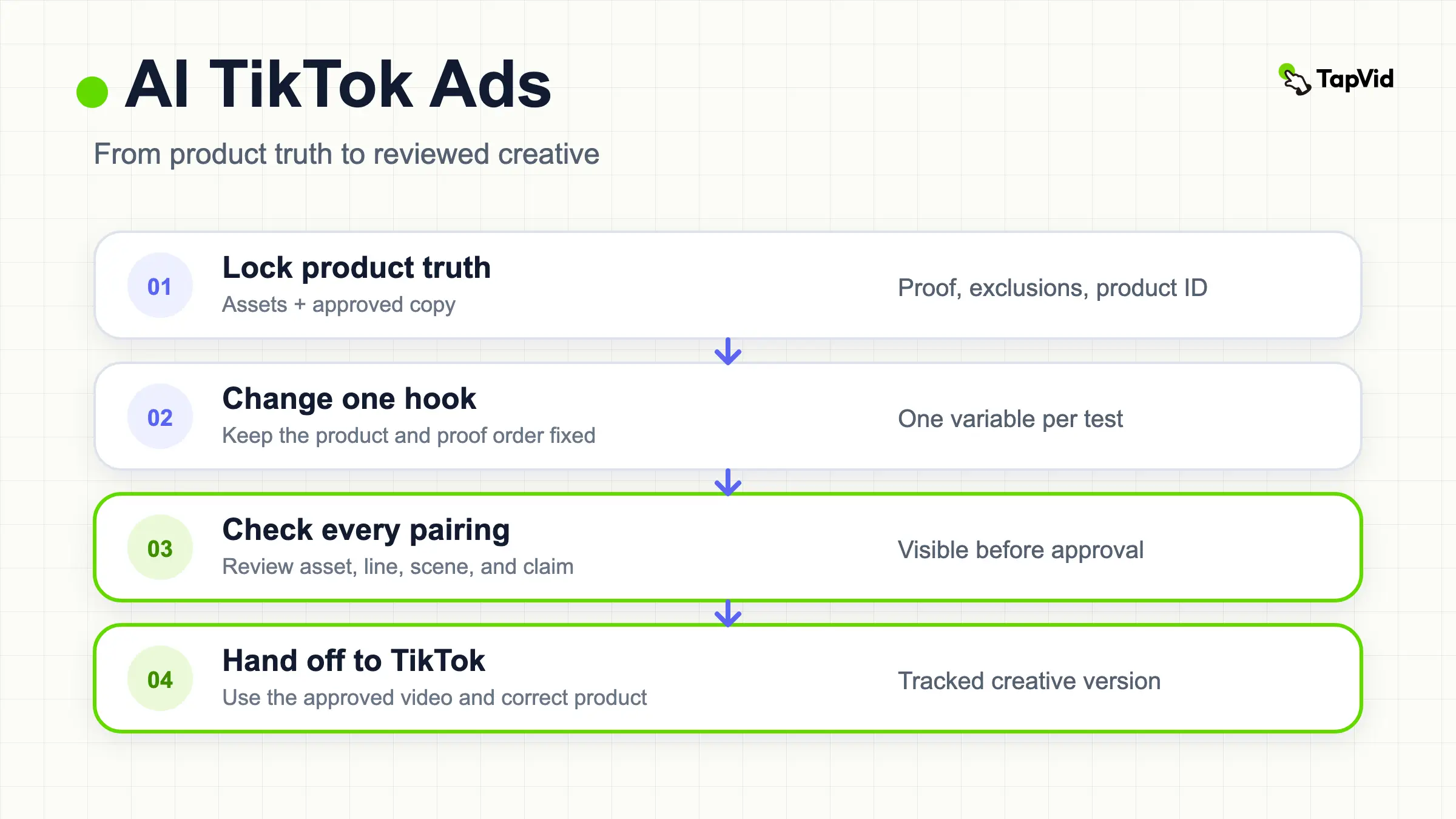

AI TikTok ads work best when AI is treated as a production assistant, not as the source of product truth. Start with approved product images, clips, wording, prices, and claims. Build a small set of creatives that changes one idea at a time. Then inspect every frame before any asset reaches TikTok Ads Manager or TikTok Shop.
That distinction matters because creative generation and campaign optimization are different jobs. An AI system can help draft a hook, assemble a vertical video, or produce variants. TikTok can then automate parts of delivery, targeting, and creative rotation. Neither step removes the operator's responsibility to verify what the ad shows and says.
This guide gives you a repeatable workflow for producing three controlled variants from one product source packet, choosing the right production path, checking the output, and handing reviewed assets into TikTok's current advertising system.
Create ecommerce video ads from your product assets
01
Watch: What TikTok Ads Are and How They Work
If you are new to the platform, watch TikTok's official Ad Creation Video Walkthrough below. It gives a short tour of creating an ad in TikTok Ads Manager. You can also open the walkthrough's source page or continue with TikTok's Creative Accelerator video course for guidance on hooks, product demonstrations, key messages, calls to action, captions, audio, and safe-zone choices.
These videos cover the platform and creative basics. The workflow below focuses on the production problem that comes before campaign setup: keeping the correct product assets, approved wording, and supporting proof together while you make and review each creative.
02
Start AI TikTok Ads With a Product Source Packet
A prompt is an instruction. A source packet is the evidence the instruction must obey. Before opening any creative tool, make one folder or document with these fields:
| Packet field | What to include | What to lock |
|---|---|---|
| Product identity | Product name, SKU, model, color, and variant | Exact spelling and the correct image for each variant |
| Visual assets | Product photos, interface captures, approved footage, and logo files | Which assets may be cropped and which must remain intact |
| Approved copy | Benefit statements, specifications, price, offer terms, and legal wording | Literal text that AI must not rewrite |
| Proof | Demonstration footage, measurements, reviews you have permission to use, and source URLs | What the proof actually establishes |
| Audience and job | One audience, one use case, and one action | The single problem this creative should address |
| Exclusions | Unsupported claims, expired offers, competitor references, and sensitive data | Content that must never appear |
If you manage several SKUs, assign every asset and statement to its product ID. The goal is to prevent a polished video from pairing Product A's narration with Product B's photo. Our ecommerce video marketing guide explains how to organize that packet across placements. For a deeper intake and review process, use the ecommerce video production guide.
The packet creates three review questions that stay useful throughout production:
- Asset fidelity: Are the product image, logo, interface, and footage still the supplied assets, without an unapproved redraw?
- Information fidelity: Are names, numbers, prices, specifications, and legal lines still the approved wording?
- Correct correspondence: Does every script line, voiceover segment, and scene point to the right product and proof?
These checks do not imply an absolute guarantee. They turn accuracy into a visible review process instead of a vague promise.
03
Choose One Creative Job Before You Generate
One source packet can support many ads, but one creative should have a clear job. Pick the job before you pick an AI tool.
For a cold audience, the job might be to make the problem recognizable in the first scene. For a product-aware audience, it might be to demonstrate one feature. For a retargeting audience, it might be to resolve one objection. For a TikTok Shop listing, it might be to connect a visible use case to the correct product anchor.
Write the job as a sentence:
> Show [audience] how [specific product] handles [one situation], using [approved proof], then ask them to [one action].
That sentence is more useful than asking a model to make something viral. It tells the production system what to include, gives the reviewer a pass or fail condition, and prevents a single video from becoming a stack of unrelated claims.
Next, choose a format that fits the available evidence. A demonstration requires footage that actually shows the action. A comparison requires substantiated and current comparison points. A product explanation can use source images and literal text, but it should not simulate a result that the packet does not prove.
04
Create Three Variants From One Product
Three variants are a manageable starting set without losing control of the source facts. Make this a true single-variable test: change the hook wording and its on-screen overlay, while holding the same first product visual, proof order, CTA, length, voice, and production settings fixed.
Here is a practical matrix for a software product whose approved proof is a recorded interface workflow:
| Variant | Hook wording and overlay | First product visual | Proof order | Other fixed elements |
|---|---|---|---|---|
| A | `Still rebuilding product videos by hand?` | Same approved product visual | Same workflow, proof, result sequence | Same CTA, length, voice, settings |
| B | `What changed between your product page and this ad?` | Same approved product visual | Same workflow, proof, result sequence | Same CTA, length, voice, settings |
| C | `Check the product, claim, and scene before launch.` | Same approved product visual | Same workflow, proof, result sequence | Same CTA, length, voice, settings |
Draft each hook in plain language, then bind every sentence to the packet. The opening overlay changes, but the underlying visual and every later scene remain byte-for-byte or edit-for-edit equivalent where the tool permits. If a hook needs proof that does not exist, replace the hook instead of changing the visual or proof sequence.
This method gives you a testable question: did different hook wording change the outcome while the underlying product evidence and production stayed constant? It is less informative to change the hook, voice, offer, footage, duration, and CTA at the same time because you will not know which change mattered.
05
Choose the Right AI Production Path
The right path depends on where your approved materials live and how much inspection you need before delivery. Tool availability and platform behavior can change, so the TikTok details below were checked against official pages on August 27, 2026.
Use TikTok Generate With AI for an Ads Manager Workflow
TikTok's Generate with AI documentation says advertisers can import information from a URL, app, or TikTok Shop, adjust imported information, generate creatives, preview them, and edit or request more options. The same page says the feature is rolling out over time, so the button may not appear for every account or campaign setup.
Use this path when your source is already compatible with Ads Manager and you want generation close to campaign setup. Still compare imported information against your packet. Importing a product page brings product-page information into the workflow; it does not certify that every selected claim is current or approved.
Use Symphony When TikTok-Native Ideation Is the Main Need
TikTok introduced Symphony Agent as a creative workflow spanning briefs, storyboards, generation, and refinement with TikTok trend inputs. That can be useful when the creative job depends on platform-native structures and the operator wants to revise the storyline, scenes, voiceover, tone, or CTA before export.
Treat trend input as creative direction, not product evidence. A popular hook structure may shape the opening, but product statements must still come from the approved packet.
Use TapVid for an Asset-Led Explainer Workflow
TapVid is an Explainer Video Engine. Its role in this workflow is to turn supplied product assets and an approved script into a reviewable explainer, with accuracy checked before speed, savings, or variant production. The relevant controls are asset fidelity, information fidelity, and correct correspondence.
This path fits a seller, SaaS team, or production operator who needs a product explanation to stay tied to real images and literal wording. The TapVid ecommerce video ads page is the commercial destination after you decide that an asset-led production path fits the job.
Use a Product-Link Workflow When the Listing Is the Intake
A product-link path can shorten intake when the listing already contains the intended images and product information. Oumomo documents a Link to Video workflow that accepts a TikTok or FastMoss product link, imports product details and images, lets the user choose a TikTok-oriented format, and asks the user to review assets and settings before generation.
The review step is the important part. Compare extracted selling points, images, and pricing with your approved packet. A link import is convenient, but the page itself may contain stale, variant-specific, or marketplace-formatted information that should not automatically become ad copy.
Keep Campaign Automation Separate From Creative Approval
TikTok describes Smart+ Campaigns as automating parts of campaign setup, targeting, optimization, and creative handling. Its optional creative AI features may add or remix elements such as music, hooks, formats, and scripts. TikTok's separate Automate Creative documentation describes changes such as music enhancement, resizing, audio effects, and other asset variations, with settings chosen during campaign creation.
These systems operate after or around creative production. Record which automation settings are enabled, preview the changed asset, and confirm that a new crop, hook, script, or music treatment has not weakened the three accuracy checks.
06
Build a Reviewable TapVid Workflow
For this product case, we gave TapVid one portable-blender reference image and an exact 30-second launch prompt. The prompt defined the intended hook, feature sequence, four lifestyle contexts, visual tone, and final call to action. Those requested feature lines are creative inputs, not independently verified product facts; an advertiser should trace each one to an approved product source before launch.
The review should answer three questions. Are the selected images and clips the intended product assets? Are names, specifications, prices, and required legal lines still literal? Does each planned scene support the line it accompanies? If any answer is unclear, revise the input or plan before rendering instead of trying to repair product truth after export.
Before generation, TapVid turned that input into a reviewable five-part outline: The Problem at 0:00–0:05, The Reveal at 0:05–0:11, Feature Demonstration at 0:11–0:20, Lifestyle Proof at 0:20–0:25, and Call to Action at 0:25–0:30. The project also preserved separate Brief, Outline, and Script checkpoints. Treat those ranges as a plan until you inspect the playable export; the final file establishes actual timing, crop, captions, voice, audio, and scene correspondence.
The generated TapVid video is embedded below. The downloaded file is a 720 × 1280 vertical MP4 with H.264 video, AAC audio, and a measured duration of 32.4 seconds. It opens on a chaotic morning, reveals the Mini Mix product, presents the requested feature lines, shows home, office, gym, and travel contexts, and closes with “Blend anywhere, anytime.” The result demonstrates the prompt-to-outline-to-video workflow; it does not independently prove product performance, advertising performance, or the factual accuracy of the supplied feature claims.
This separation is useful for teams producing multiple TikTok creatives. The source packet stays stable, the hook can change as a controlled variable, and the reviewer has a visible checkpoint before the creative moves into TikTok Ads Manager or TikTok Shop.
07
Verify Every Scene Before Launch
Review the export and the project state, not just the script. Use this sequence:
- Match assets: Compare each product frame with the approved source. Check logos, interface text, color, variant, packaging, and crop.
- Match information: Read narration, captions, overlays, price, units, model names, and CTA character by character where the wording is locked.
- Match correspondence: Confirm that each line refers to the product, feature, or proof visible in that scene.
- Check edit side effects: If a system revised one scene, inspect neighboring scenes and the full script for unintended changes.
- Check the destination: Make sure the CTA, landing page, Shop product, and product anchor all refer to the same offer and variant.
- Check presentation: Watch once with sound and once muted. Confirm legibility, safe placement, pacing, captions, voice pronunciation, and audio balance.
- Record approval: Save the version, approver, date, source packet, and known limitations. Do not rely on a filename such as `final-v7` as the approval record.
If no playable video exists, stop. A storyboard screenshot cannot prove the exported crop, audio, timing, or scene correspondence.
08
Connect Reviewed Creative to TikTok Shop and GMV Max
Creative approval happens upstream of campaign delivery. As of August 27, 2026, TikTok's official Sales objective documentation says GMV Max became the default supported campaign type for TikTok Shop Ads beginning in July 2025. Check the current page before setup because availability and platform rules can change.
For Product GMV Max, TikTok's creative asset guide says campaigns can draw videos from connected official, business, and authorized TikTok accounts, authorized Spark Ads posts, and affiliate creatives. It also documents adding posts with product anchor links, account access, Spark Ads posts, and custom posts.
That supply system makes provenance more important, not less. Before authorizing or adding a video, tie it to the correct product and record where it came from. TikTok's GMV Max guidelines also describe interactions with existing shopping campaigns, so confirm the current account and campaign impact before activation.
The handoff packet should contain the approved video ID, product ID, destination, product anchor, disclosure decision, source version, and creative variable. Keep that packet separate from performance reporting so a later edit does not silently replace the asset you thought you tested.
09
Run a Controlled Creative Test
Use the three-hook matrix above as the creative input. At the launch stage, add a second set of fixed variables: audience, optimization event, placement choice, landing destination, offer, and measurement window. Keep those variables constant as far as the platform permits so the launch still tests the hook rather than a bundle of campaign changes.
Name each asset with the variable, for example `sku-hookA-v1`. Record delivery and outcome metrics without declaring a winner too early. A variant that receives little delivery has not been tested to the same degree as one that receives meaningful exposure. A short-lived change may also reflect campaign learning, inventory, seasonality, or offer conditions rather than the hook itself.
Use the result to choose the next question. If one hook is promising, start a separate test that changes proof order while keeping that hook and every other listed element fixed. If every variant performs poorly, revisit the product job, offer, evidence, or destination before generating more cosmetic variations.
10
Common Failure Modes and Recovery
AI Adds a Stronger Claim Than the Source Supports
Stop at the review gate, remove the claim, and trace the replacement to approved wording. Do not approve stronger language merely because it sounds persuasive.
The Right Script Uses the Wrong Product Image
Rebind assets by SKU and inspect scene correspondence. Do not solve a variant mismatch with a vague prompt asking the system to be more accurate.
Automation Changes More Than the Test Variable
Disable or document creative automation settings that remix hooks, scripts, music, crops, or formats. Export a new version and review it as a new asset.
On-Screen Text Is Correct but Unreadable
Shorten non-literal supporting copy, change layout, or split the statement across scenes. Keep required legal and product wording intact, and review on a phone-sized display.
Every Variant Looks Different
Return to the matrix. Fix the product, proof, CTA, format, and body sequence. Change one creative angle, then label it clearly.
A Product Link Imports Stale Information
Compare the imported packet with the current approved source. Update the listing when appropriate or override the imported field before generation. Preserve a receipt of what the ad used.
11
Frequently asked questions
What Is the Best AI Tool for TikTok Ads?
Choose by workflow, not by a universal ranking. Use TikTok-native generation when you want close integration with Ads Manager, a trend-led system when TikTok-native ideation is the job, an asset-led Explainer Video Engine when product fidelity and reviewable structure lead, or a product-link workflow when a listing is the intake. In every path, approval depends on the source packet and final review.
Can I Use AI TikTok Ads for TikTok Shop?
Yes, if the resulting creative, product mapping, permissions, disclosures, and campaign setup meet TikTok's current requirements. TikTok's Product GMV Max creative asset guide documents the current source and permission paths. Verify that the account or post is authorized and that the video carries the correct product anchor before adding it to the creative supply.
Should I Let AI Rewrite Product Copy?
Do not let it rewrite locked facts, prices, model names, parameters, legal text, or approved offer terms. You can generate alternative hooks around those facts, but each hook still needs a source and review.
Do AI-Generated TikTok Ads Need a Disclosure?
TikTok's ad disclaimer documentation, last updated in September 2025 and checked here on August 27, 2026, says AI-generated, synthetic, or manipulated media require a disclaimer and describes an AI-generated content label in Ads Manager. Review the latest policy and the creative's actual production method before launch, since requirements and availability can change.
How Many Variants Should I Generate?
Start with three controlled variants when you have one clear hypothesis and enough budget and time to evaluate them responsibly. Generate fewer if evidence or review capacity is limited. Add more after the first test identifies the next variable worth isolating.
Can I Publish a Storyboard or Brief Without a Finished Video?
No. A brief can prove planned wording and settings, and a storyboard can support scene review, but neither proves the properties of an exported video. Require the playable file for final timing, crop, captions, voice, audio, and correspondence checks.