
TL;DR
SaaS video marketing uses different videos to move customers through launch, acquisition, evaluation, activation, adoption, and retention. Each asset needs one customer question, next action, distribution surface, and outcome metric. Official videos from Notion, Slack, Loom, and Canva illustrate different lifecycle jobs, not proven commercial results.
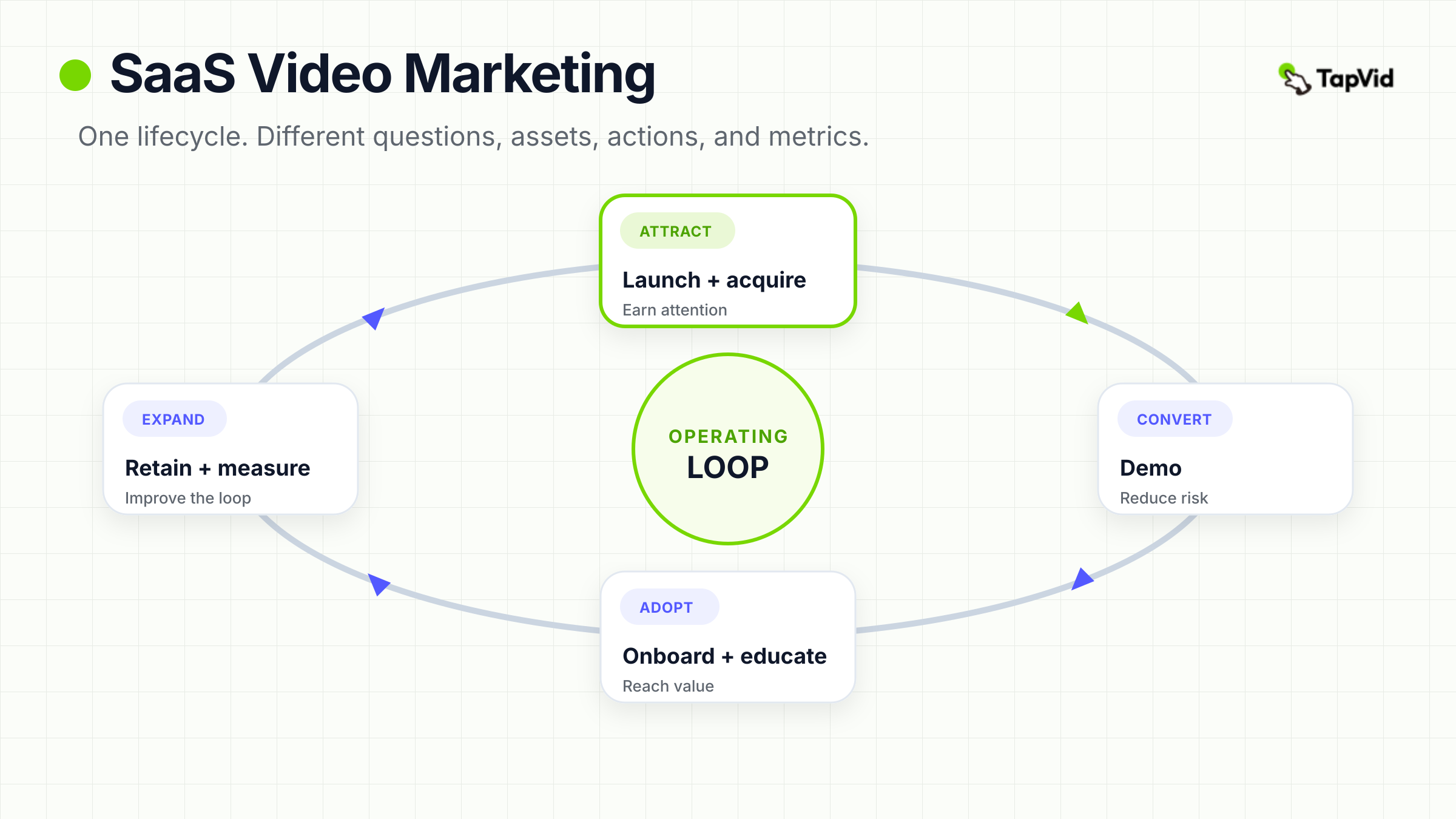
Most SaaS teams already have scattered launch clips, explainers, webinars, walkthroughs, and tutorials. A full-lifecycle approach turns that folder into a system. Launch introduces a change. Acquisition earns attention. A demo reduces evaluation risk. Onboarding reaches first value. Education deepens adoption. Retention makes updates useful. Repurposing extends approved sources. Measurement guides the next investment.
01
SaaS video marketing is a lifecycle system, not one explainer
An explainer can introduce the problem and product, but it cannot carry every customer conversation. A cold prospect needs a reason to care. An evaluator needs proof of one workflow. A new user needs the shortest path to a useful result. An experienced customer needs to understand what changed and whether it matters to their work.
| Lifecycle job | Customer question | Useful video | Next action |
|---|---|---|---|
| Launch | What changed, and why now? | Release story with visible product proof | Visit the release page or try the new capability |
| Acquire | Is this problem relevant to me? | Short problem-and-mechanism cut | Continue to the landing page or longer proof |
| Demo | Can this workflow handle my use case? | One complete input-to-result walkthrough | Start a trial, request a demo, or review deeper proof |
| Onboard | What gets me to first value? | Milestone-based getting-started lesson | Complete the activation event |
| Educate | How do I repeat or extend the job? | Task, exception, or advanced-capability lesson | Apply the workflow or continue to the next milestone |
| Retain | What changed for my existing work? | Dated product-update or customer-success video | Adopt the change or update the workflow |
| Repurpose | Which approved source fits this channel? | Lifecycle-specific derivative | Take the stage-specific CTA |
| Measure | Did the intended customer action happen? | Outcome and diagnostic review | Revise, redistribute, retire, or plan the next asset |
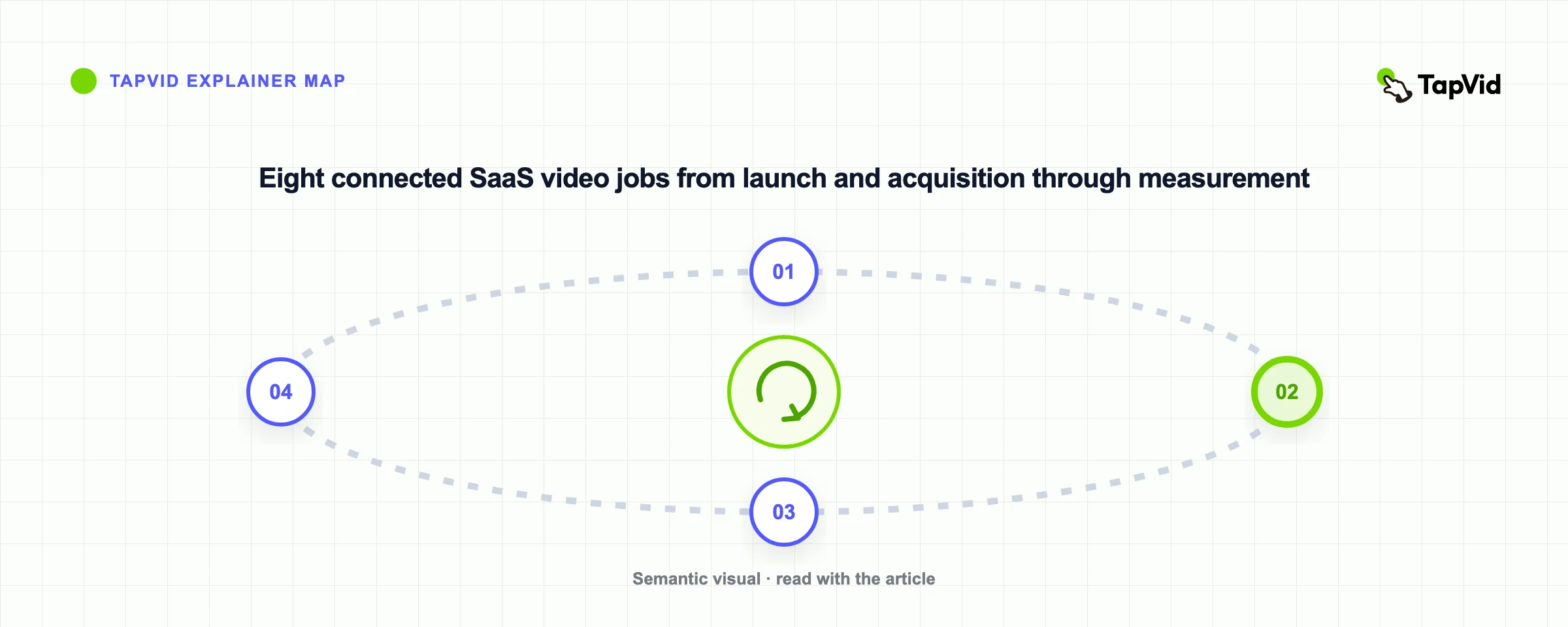
The lifecycle is a loop. Product releases create acquisition stories. Demo objections become education topics. Onboarding friction reveals missing help content. Retention questions identify the next update video. Measurement sends those observations back into planning. “Make a two-minute SaaS video” is therefore a weak brief. Start with the job, evidence, placement, and next action. Choose the format afterward. Treat the portfolio as a set of linked decision assets rather than a calendar of unrelated productions. Give every asset a stable name, owner, source packet, audience, destination, and refresh trigger. Map the handoff between stages: an acquisition cut should lead to evaluation proof; a demo should point to the activation path; an onboarding lesson should expose the next education milestone. This prevents a strong video from ending in a weak journey. It also makes gaps visible. If the next customer question has no answer, the portfolio is incomplete even when the asset library looks busy.
02
Start with the lifecycle gap that costs the most
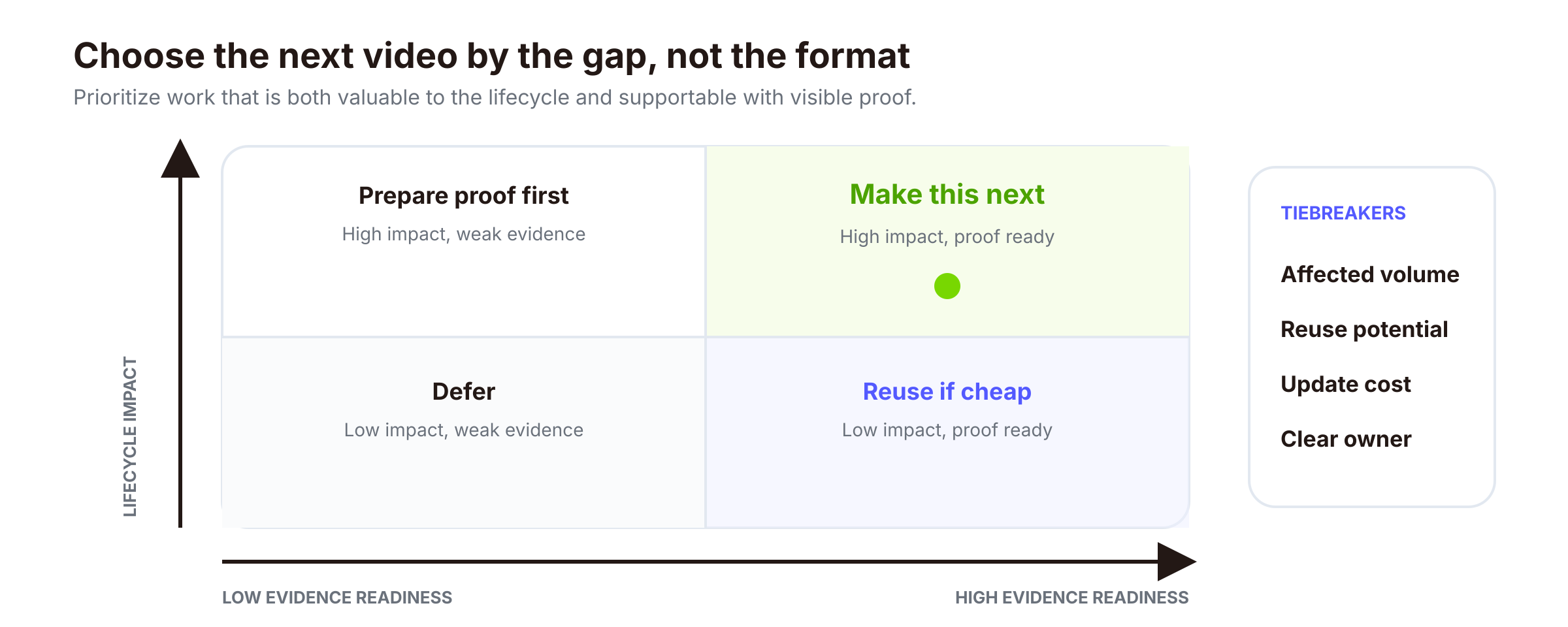
Do not begin with the most fashionable format. Begin where customers are blocked without a clear explanation. A team with strong traffic but weak trial activation may need onboarding before another awareness campaign. A sales team answering the same workflow question in every call may need a focused demo before a brand film. Score each gap by friction, affected customer volume, visible proof, reuse potential, and update cost. The first video should combine meaningful lifecycle impact with evidence the team can support now. High impact without approved proof is not production-ready; abundant footage does not make a low-impact idea urgent. Use a small scoring range, such as one to five, and require a sentence of evidence for each score. Then review the top candidates with sales, product, support, and customer success. The goal is not mathematical precision. It is to expose disagreements early, separate urgent customer friction from internal enthusiasm, and choose a gap the team can measure after publication.
03
Launch videos create a shared starting point
A launch video should explain what changed, why it matters, and where to see it in context. It does not need to explain the entire product. A useful launch package has one master narrative, one proof-bearing product view, and shorter channel cuts. Notion's official launch video for Agents uses a compact promise, shows the product performing recognizable work, and directs viewers toward the new capability. Study the relationship between promise and visible product action, not its view count. For more launch structures, see TapVid's product launch video examples. The launch source packet should preserve the approved audience, claim, interface state, release boundary, CTA, and date. Channel cutdowns may change the opening, duration, aspect ratio, and CTA placement, but not strengthen the claim. Plan distribution as a sequence instead of posting every cut at once. Put the master video where the release is explained, use shorter cuts to introduce one reason to care, and send interested viewers to the page that contains the complete context. Give sales and customer-success teams a version they can share without rewriting the launch promise. When the release changes, update the proof-bearing scene before recycling the surrounding promotional cuts.
04
Acquisition videos earn the next click
Acquisition video has one job: make the right viewer willing to take the next step. That usually means naming one problem, showing one useful change, and sending the viewer to a page or longer proof asset. Trying to compress every feature into an ad often produces fast-moving interface fragments with no decision value. Match the message to awareness. Cold audiences need problem recognition. Problem-aware prospects can handle a mechanism. Product-aware evaluators need proof, limitations, and a path to a demo or trial. The CTA should continue the same question.
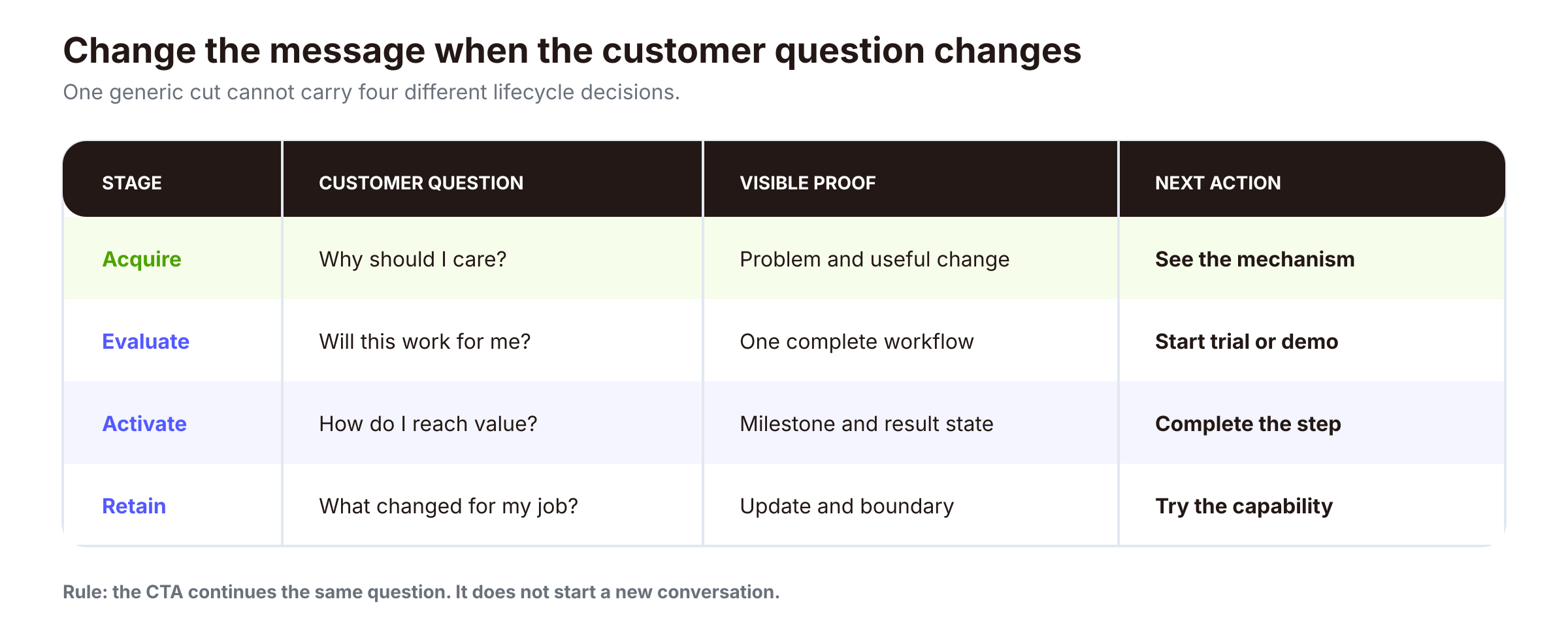
A silent social cut needs a readable first frame and captions. A landing-page video can assume surrounding copy. An email thumbnail must earn a click. Re-exporting one edit in three aspect ratios does not adapt it to three viewer contexts. Separate creative testing from message drift. The team can test the first frame, opening line, pace, thumbnail, or CTA wording while keeping the approved problem and product claim stable. Tag each variation with its audience, placement, and next action so results can be compared within the same job. A high-view social cut is not automatically the winner if it attracts viewers who never reach the intended page or workflow.
05
Demo videos reduce evaluation risk
A SaaS demo should prove one complete workflow: input, action, state change, result, and any boundary involving setup, permissions, integrations, or human review. Slack's official overview connects common work problems to visible product areas without turning the video into a menu tour. It works here as an example of demo structure. It is not independent evidence about Slack's performance. Once the team has selected a workflow and approved the evidence, use a dedicated production process. TapVid's existing guide explains how to create and review one SaaS explainer video, including scene planning, continuity checks, and artifact QA. This pillar guide intentionally does not repeat that production workflow. Choose demo scope from the evaluator's unresolved risk. A security-conscious buyer may need to see permissions and review boundaries. A workflow owner may need to see the handoff between tools. An end user may need only the shortest path from input to result. Keep overview demos broad enough for orientation, then link to narrower proof modules for the objections that repeatedly delay evaluation. This keeps one video from becoming an unsearchable product tour.
06
Onboarding and education move users toward value
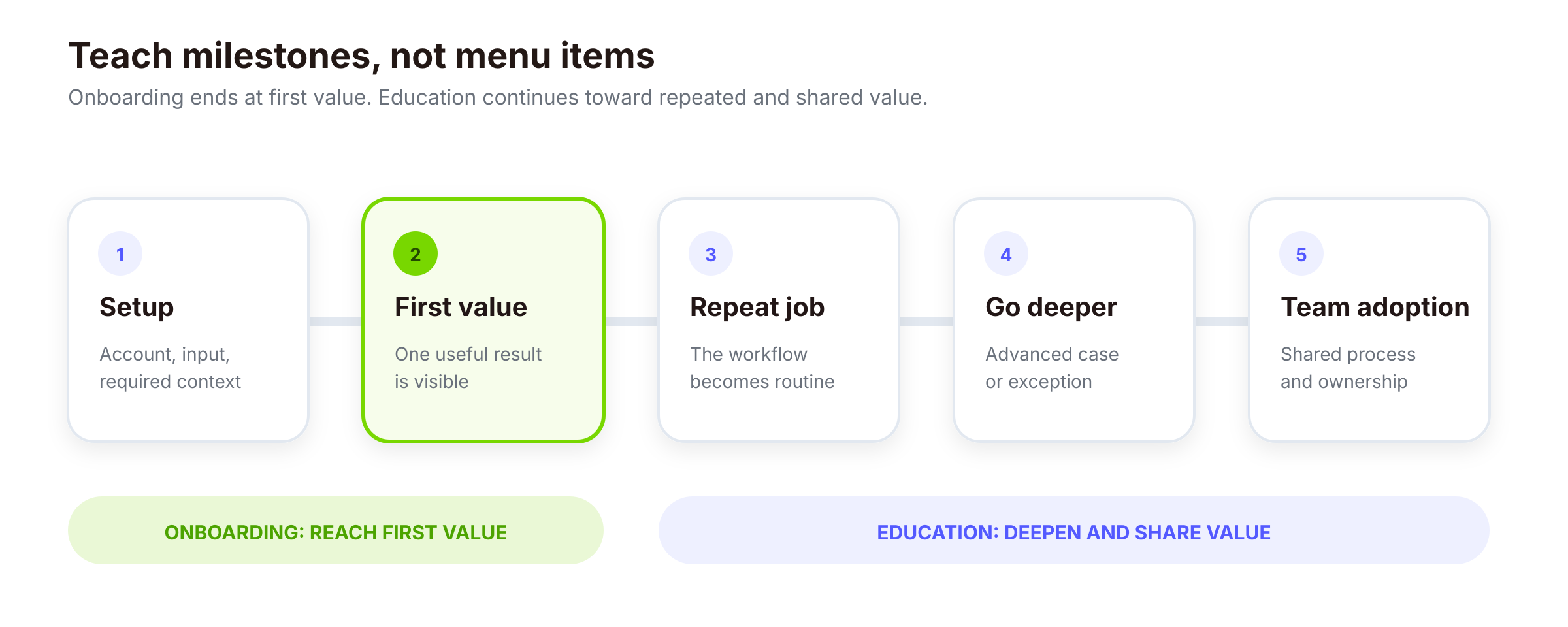
Onboarding and education are related, but they are not the same library. Onboarding helps a new user complete the few actions required to reach first value. Education helps active users repeat a job, adopt a deeper capability, solve an exception, or bring teammates into the workflow.
Organize onboarding around milestones, not navigation. Move from setup to first result, repeated job, and collaboration. End each video at an observable product state. Loom's official getting-started video demonstrates a guided progression from setup through recording, editing, and sharing. Its 2021 interface may differ from the current product, so use the video to study teaching order, not as current UI documentation. Education content needs an owner and refresh trigger. Product changes, support patterns, onboarding drop-offs, and repeated customer-success explanations reveal missing or stale lessons. Build the learning library as connected milestones. The first lesson should end at a useful product state, not at the end of a menu. Later lessons can cover repetition, exceptions, collaboration, and advanced capabilities without forcing a new user through them. Place each video beside the action it supports, then offer the next lesson only when it continues the same job. This makes the sequence useful in-product, in help content, and in customer-success follow-up.
07
Retention videos make product change usable
Retention videos make product change usable
- Segment by the customer job affected and the feature already used.
- Send the video to the role that must change behavior, not automatically to every user.
- Pair it with a dated written summary so viewers can scan what changed before watching.
- Reveal migration boundaries, archive superseded instructions, and redirect customers to the current lesson.
Product-update videos support retention when they connect a release to an existing customer job. A useful update explains who should care, what changes, what stays the same, and what to try next. Canva's official July 2026 update video groups new capabilities into a guided learning session with chapters. The example is time-bound. Feature availability can change after publication, which is exactly why update videos need dates and ownership. Separate announcement from adoption. The announcement can summarize the release for broad awareness, but the adoption version should address the affected workflow, role, migration step, and support path. Use product usage or account context to decide who receives which version. Give customer-facing teams a dated, shareable answer for late adopters, and define when the update leaves active distribution and becomes archived documentation. Retention content should reduce uncertainty around a change, not merely increase release reach. Use four audience rules for update distribution:
- Segment by the customer job affected and the feature already used.
- Send the video to the role that must change behavior, not automatically to every user.
- Pair it with a dated written summary so viewers can scan what changed before watching.
- Reveal migration boundaries, archive superseded instructions, and redirect customers to the current lesson.
08
Repurposing starts with an approved source packet
Repurposing should reuse truth before it reuses footage. Start with an approved packet containing the audience, claim, product proof, terminology, source media, limitations, and CTA options. Then create lifecycle-specific edits by changing the hook, depth, duration, aspect ratio, and next action. One launch recording can become an announcement, demo clip, onboarding lesson, education segment, and customer-success follow-up. Each derivative should select the source material that answers its stage-specific question. Separate stable material such as audience language and the core mechanism from volatile UI steps, plan details, dates, and feature availability. Track volatile elements so one scene can be updated without rebuilding the portfolio. Maintain a derivative ledger for every approved source. Record which claim, proof scene, CTA, and date each cut inherited, plus the channel and owner. When a product detail changes, the team can find every affected asset instead of relying on filenames or memory. Repurposing then becomes controlled adaptation: the source of truth stays fixed, while the hook and depth change to match the lifecycle question. Retire derivatives that no longer point to valid proof.
09
Measurement follows the customer action
Every video needs one outcome metric and one diagnostic metric. The outcome metric reflects the customer action the asset was designed to influence. The diagnostic metric helps explain why the outcome changed.
For acquisition, the outcome might be a qualified page visit while the diagnostic is first-frame hold. For a demo, the outcome might be trial start or demo completion while the diagnostic is engagement around the proof segment. For onboarding, the outcome should be the relevant activation event while completion and replay patterns diagnose clarity. Retention content should connect to feature adoption, support demand, renewal risk, or another defined customer-success signal rather than views alone.
Do not claim causation from one dashboard. Compare the relevant page, cohort, campaign, or customer-success baseline. If instrumentation cannot connect viewing to the intended action, report reach and engagement as diagnostics, not business impact. Define the measurement plan before distribution. Name the intended event, eligible audience, attribution window, comparison baseline, and owner for the follow-up decision. Keep the outcome metric close to the customer action and use video analytics to diagnose attention or clarity. Review results by asset job rather than combining awareness, onboarding, and retention videos in one average. Set decision thresholds before reading results. Define what would justify another distribution cycle, a creative revision, a workflow-specific follow-up, or retirement. Use the same eligible-audience denominator when comparing variants, because raw totals can favor the version that received more exposure. Short-cycle signals such as first-frame hold can guide creative changes quickly. Activation, adoption, renewal, and support effects may need longer observation windows. Record both the result and the decision taken so later portfolio reviews can distinguish learning from reporting. The decision is not simply whether a video performed well. It is whether to revise, redistribute, retire, or create the next missing asset.
10
Build a 90-day SaaS video portfolio
Build a 90-day SaaS video portfolio
- 1
Month 1
Map the lifecycle, identify the largest supported gap, and create one proof-bearing core asset.
- 2
Month 2
Address activation and adoption with a small onboarding or education sequence.
- 3
Month 3
Produce channel-specific derivatives, connect measurement, and review which customer questions remain unanswered.
- Month 1: map the lifecycle, identify the largest supported gap, and create one proof-bearing core asset.
- Month 2: address activation and adoption with a small onboarding or education sequence.
- Month 3: produce channel-specific derivatives, connect measurement, and review which customer questions remain unanswered.
Keep one portfolio register with each asset's lifecycle stage, customer question, owner, approved source, placement, CTA, metrics, and refresh trigger. Let observed friction choose the next video. If acquisition is healthy but activation is weak, move effort post-signup. If customers miss new capabilities, invest in education and update content.
Run a short portfolio review at the end of each month. Remove assets that point to outdated states, flag proof that needs renewal, and compare the planned customer action with what viewers actually did. Keep a small production queue rather than filling every stage at once. One core asset, two or three useful derivatives, and one measured learning cycle provide a stronger operating baseline than a large library with no owner. Assign operating roles before the first asset enters production. A lifecycle owner prioritizes the gap, a source owner approves claims and proof, a distribution owner places each version, and a measurement owner closes the learning loop. One person can hold several roles in a small team, but the responsibilities still need names and due dates. Use a lightweight intake form for new requests: customer question, lifecycle stage, approved evidence, destination, CTA, owner, and refresh trigger. Requests that cannot answer these fields stay in discovery instead of entering the production queue. Carry unresolved questions into the next 90-day plan. That is the practical advantage of full-lifecycle SaaS video marketing. It gives every asset a job before production starts and a review signal after publication.
11
Frequently asked questions
What is SaaS video marketing?
It is the planned use of video across launch, acquisition, demos, onboarding, education, retention, repurposing, and measurement.
Which SaaS marketing video should a small team create first?
Address the highest-impact customer friction the team can prove now. Do not default to a homepage explainer.
What is the difference between a SaaS explainer and a product demo?
An explainer frames the problem, mechanism, and value. A demo proves a specific workflow. A hybrid can do both when each part has a distinct job.
How should video support SaaS onboarding and retention?
Use onboarding video to reach first value, education video to deepen recurring use, and product-update video to make changes understandable and actionable.
How do you repurpose a SaaS video without repeating the same message?
Reuse an approved source packet, then select a different hook, depth, placement, and CTA for each lifecycle question. Keep claims and proof stable unless they are re-approved.
How do you measure SaaS video marketing ROI?
Assign each asset one stage-specific outcome metric and one diagnostic metric. Connect viewing to the intended action where instrumentation allows, compare an appropriate baseline, and avoid treating views as proof of revenue or retention.