
TL;DR
The best video marketing examples do three things in order: make one promise, show one visible reason to believe it, and give one logical next step. Use the 15 embedded examples below to choose a structure by business job, then copy the information sequence rather than the production budget. For a small team, the most reusable patterns are founder pitch, visual proof, tutorial, customer story, and document-to-explainer.
The useful lesson in the best video marketing examples is rarely the camera, celebrity, or production budget. It is the job the video does. A strong marketing video makes one promise, proves it quickly, and gives the viewer one sensible next step. That structure is available to a solo creator or a five-person marketing team even when the original campaign cost far more. Each example below includes the actual campaign video beside four practical observations: the opening, the proof, the call to action, and the cheapest credible way to rebuild the idea. The result is not a gallery of famous ads. It is a working swipe file for professional creators and small businesses that need useful videos every week.
01
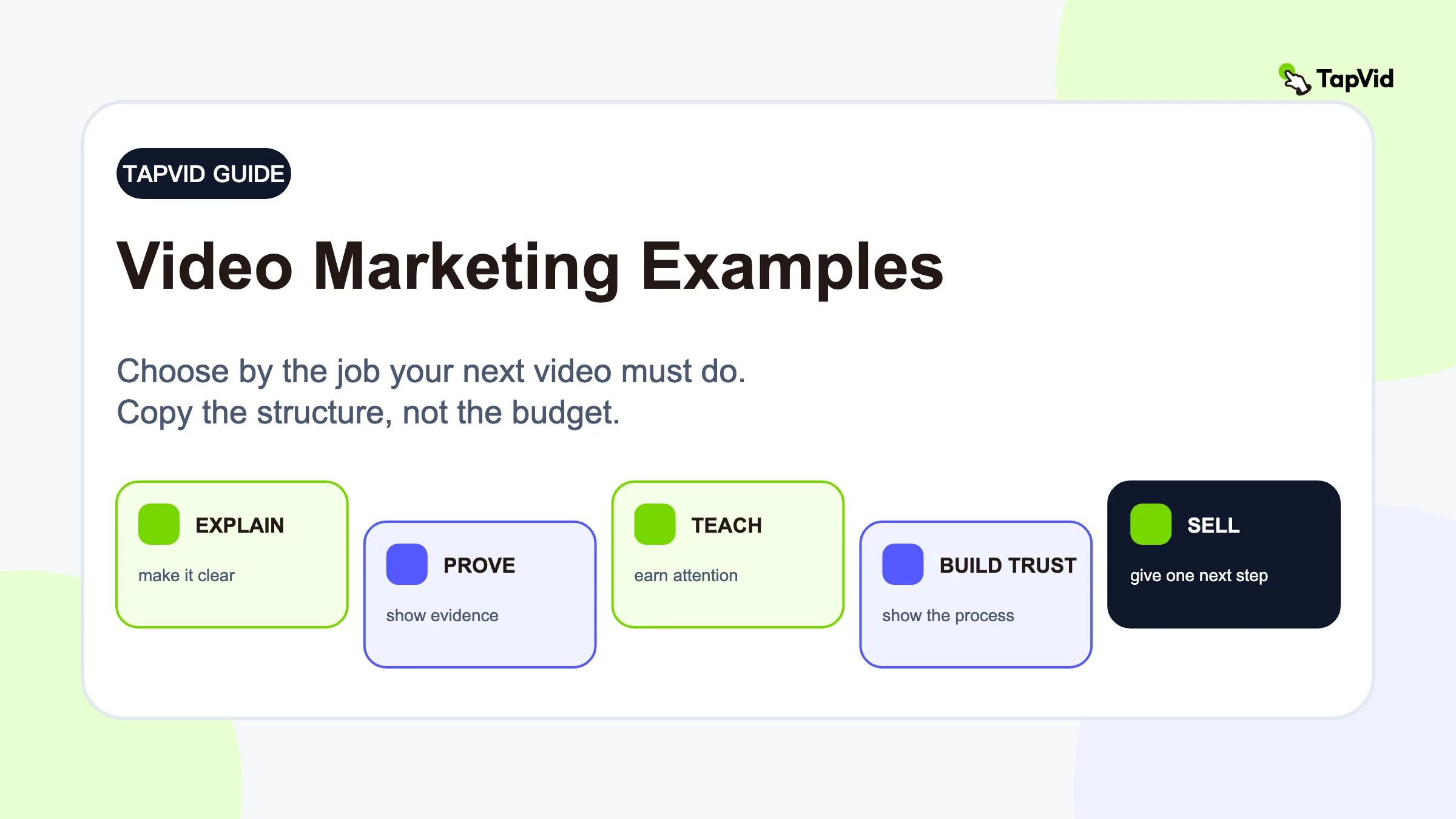
Choose the example by the job your video needs to do
Do not start with a format such as "we should make a Reel." Start with the business job. The format follows.
| Your job | Best pattern | Example to study | What you need |
|---|---|---|---|
| Launch a new offer | Founder-led pitch | Dollar Shave Club, The Honey Bed | Founder, product, one location |
| Explain a product | Problem to mechanism to outcome | Dropbox | Script, UI or diagrams, narration |
| Prove a claim | Visual stress test | Blendtec, Transformer Table | Product and a visible test |
| Build trust | Behind the scenes | Island Creek Oysters, Wild Brush | Phone footage and captions |
| Teach and sell | Useful tutorial | KM Tools, Ahrefs | Expertise, screen or process footage |
| Earn social reach | Native character or UGC | Duolingo, Dog Friendly Co. | Creator voice and platform-native edit |
| Create an emotional memory | Customer story | GoPro | A real moment and restrained branding |
| Make the brand a habit | Lifestyle integration | SURI, Fishwife | Repeatable routine or recipe |
| Turn constraints into a story | Process experiment | Wistia | A question, versions, and a conclusion |
02
1. Dollar Shave Club: say the offer before the viewer can scroll
The original DollarShaveClub.com launch video opens with founder Michael Dubin, a warehouse, and an unmissable value proposition. The humor is memorable, but the commercial logic is even better. Viewers immediately know what is being sold, why the old way is annoying, and what to do next.
- What to copy: Put the founder on screen and state the offer in one plain sentence. Walk through the place where the product is made or used. Let each visual answer an objection. End on the buying action, not a vague brand line.
- Small-team remake: Shoot a continuous walk-and-talk on a phone. Write five beats on cards: promise, pain, mechanism, proof, CTA. Record several short takes and cut on movement. The joke is optional. The clarity is not.
03
2. Dropbox: make an invisible product visible
Dropbox has always faced a classic software problem: file syncing matters but is visually dull. Its current What is Dropbox? explainer solves this by moving from a familiar problem to visible actions and outcomes. If this is your only format, compare more explainer video examples; here, Dropbox matters as one marketing job among several.
- What to copy: Start with the moment the user recognizes, such as losing track of versions. Show only the UI actions required to resolve it. Narrate the change in the user's world, not every control on the screen.
- Small-team remake: Turn your help article, product brief, or landing-page copy into a 60 to 90 second script. Use screen recordings only where the interface itself is the proof. Use simple motion graphics for the abstract parts. This is exactly where an AI explainer video generator is more useful than a stock-footage editor.
04
3. Wistia: turn the production process into the campaign
One, Ten, One Hundred asks one clean question: what changes when the same ad is made with $1,000, $10,000, and $100,000? Wistia gets three ads, a documentary, a debate about creative quality, and a reason for marketers to share the series.
- What to copy: Design a test your audience already argues about. Keep one variable fixed and change another. Show the process, not just the polished result. The comparison becomes the narrative.
- Small-team remake: Compare three hooks, three video lengths, or a founder edit against a customer edit. Publish the versions, then publish what the retention or conversion data taught you. The experiment creates more content than a single campaign.
05
4. GoPro: let the customer footage carry the emotion
The Fireman Saves Kitten video is product proof without a conventional product pitch. The camera survives a demanding situation and gives the audience a view they could not otherwise have. The rescue is the story. GoPro earns relevance by enabling it.
- What to copy: Find a customer moment where the product is naturally necessary. Keep the brand's role proportional. A short end card can be stronger than repeated logos when the footage already proves the value.
- Small-team remake: Ask customers for the raw clip behind a specific outcome. Build the edit around the sequence of events, add context with a few captions, and preserve the original texture. Over-polishing can remove the credibility you wanted.
06
5. The Honey Bed: use the founder's home as the set
Shopify's review of The Honey Bed launch video describes a 45-second founder introduction filmed with the product in a real home. The environment does three jobs at once: it shows fit, demonstrates daily use, and makes the founders credible.
- What to copy: Put the product in the place where customers will actually use it. Let the founder explain why it exists while the visuals quietly prove size, comfort, setup, or maintenance.
- Small-team remake: Record one direct-to-camera answer for each of three questions: Why did we make it? What did we fix? What will customers notice first? Cover the cuts with close-ups of the product being used.
07
6. KM Tools: teach a complete skill, then offer the tool
The KM Tools example is an in-depth woodworking tutorial rather than a thin ad. Founder Jonathan Katz-Moses demonstrates a real technique while his products appear as part of the process. The content earns attention before asking for anything.
- What to copy: Teach a task your buyer wants to finish whether or not they purchase today. Show enough detail for a real result. Make the product the easiest route through the method, not an interruption.
- Small-team remake: Choose one support question with commercial relevance. Record the full answer. Cut a searchable long-form tutorial, then extract three short clips: the mistake, the technique, and the result.
08
7. Fishwife: demonstrate the use case, not the package
In the Fishwife collaboration example, the product appears inside a simple recipe. The viewer can picture an achievable appetizer before deciding whether to buy.
- What to copy: Show the product inside an achievable outcome. Use a complementary creator or brand when the combination makes the result more useful and expands distribution naturally.
- Small-team remake: Build a repeatable series called "one product, three outcomes." Film top-down or over-the-shoulder footage, add a casual voiceover, and end with the finished result before the CTA.
09
8. Island Creek Oysters: use process footage as proof
The Island Creek Oysters example takes viewers into packing and production. Captions explain why the company controls more of its process. This is not decorative behind-the-scenes footage. Every shot supports a quality claim.
- What to copy: Pair each operational scene with the customer benefit it creates. "We weigh every tin" is a process. "So each order is consistent" is the reason to care.
- Small-team remake: Walk through your shop, dashboard, editorial board, or fulfillment area and capture ten five-second clips. Write the captions afterward. Most teams already have more proof in their process than on their landing page.
10
9. Wild Brush: show the hands behind the product
The Wild Brush workshop video moves from close-up crafting footage to the finished bag in use outdoors. The sequence makes craftsmanship tangible, then connects it to the customer's desired life.
- What to copy: Structure the edit as material, making, detail, use, reward. The last shot should show why the labor matters to the buyer.
- Small-team remake: Film vertical close-ups during normal work instead of staging a separate shoot. Save the best clips in a process library. One hour of capture can support months of launches, explainers, and proof posts.
11
10. Dog Friendly Co.: let a real user narrate the demonstration
The Dog Friendly Co. UGC example works because the creator demonstrates the leash and harness with her own dog. The product stays central without flattening her voice.
- What to copy: Give creators a specific scenario and claim to demonstrate, not a word-for-word script. Authenticity comes from personal language, but usefulness comes from a clear brief.
- Small-team remake: Ask one customer to record four clips: the problem, setup, first use, and result. Request natural speech plus clean product close-ups. Your editor can create variants without flattening the customer's voice.
12
11. Transformer Table: compress the proof with time-lapse
The Transformer Table example uses time-lapse to show modular furniture changing size and configuration. Like the strongest product demo video examples, it turns versatility and setup into visible proof.
- What to copy: When the product claim involves speed, scale, or transformation, show the entire change. A before-and-after image asks for trust. A compressed process earns it.
- Small-team remake: Lock a phone on a tripod, keep the framing fixed, and record the full workflow. Speed up the middle, but leave the start and finished state long enough to read. Add one caption with the concrete claim.
13
12. SURI: place the product inside an identity
The SURI morning-routine example makes the toothbrush one step in a calm, design-conscious routine. The product becomes part of the day the viewer wants.
- What to copy: If functional differentiation is hard to show in seconds, demonstrate the context and identity around the purchase. Keep the product moment clear enough that atmosphere does not swallow the offer.
- Small-team remake: Choose a routine your customer already performs. Film five moments around it, with your product as the turning point. Use consistent light and restrained captions. One line of copy can carry the positioning.
14
13. Blendtec: build a repeatable proof machine
The long-running Will It Blend? series turns one product claim, blender power, into an endlessly repeatable test. The audience knows the setup before clicking, but the object and result create curiosity each time.
- What to copy: Create a format with a stable question and a variable subject. The repetition builds brand memory while the changing test prevents fatigue.
- Small-team remake: Define the strongest claim your product can visibly prove. For software, it might be "Can it explain this?" using a new article, PDF, or technical concept each week. For services, it might be a recurring teardown with the same scorecard.
15
14. Ahrefs: turn customer questions into searchable lessons
The Ahrefs YouTube channel markets a technical product through detailed SEO lessons. The tool appears where it helps complete the task, but the title and opening lead with the viewer's problem. This creates an evergreen acquisition library rather than a stream of disposable ads.
- What to copy: Map tutorials to jobs customers search for. State the result in the title, show it early, and connect each concept to an on-screen action. The best tutorial is both an answer and a qualified product demo.
- Small-team remake: Start with five sales or support questions. Turn each answer into a script, then record the workflow. Add chapters, a transcript, and a relevant product link. One clear lesson per video is enough.
16
15. Duolingo: adapt the brand character to the platform
On Duolingo's TikTok account, the owl behaves less like a polished spokesperson and more like a recurring internet character. The loose, reactive format fits the feed, while the unmistakable mascot preserves brand recognition.
- What to copy: Identify one repeatable personality trait your brand can exaggerate. React to situations your audience already discusses. Consistency of character matters more than consistent production polish.
- Small-team remake: You do not need a mascot suit. A founder, employee, illustrated character, recurring caption voice, or even a recognizable screen-recording style can play the role. Write three rules for the character and two boundaries it will never cross.
17
Five video structures you can reuse this month
The 15 examples reduce to five structures. Pick one before you open an editor.
The plain-language founder pitch
- Use it for: A launch or repositioning. Open with the offer, name the broken alternative, show the product in context, answer one objection, and give one CTA. Aim for 30 to 60 seconds.
The visual proof test
- Use it for: A product claim that can be seen. State the claim, define the test, show the complete attempt, reveal the result, and explain what it means. Keep cuts honest enough that the viewer trusts the outcome.
The teach-and-transition tutorial
- Use it for: A sale driven by expertise. Teach a useful method, complete a meaningful step, and introduce the product only where it removes friction. Long-form search video can supply several short social cuts.
The customer-eye story
- Use it for: A trust bottleneck. Begin with the customer's situation, preserve their words and footage, show the moment of change, then add light brand context. The customer remains the protagonist.
The document-to-explainer
- Use it for: Knowledge that exists as an article, PDF, script, product brief, or research note. Extract one question, arrange the explanation as problem, mechanism, example, and next step, then visualize each claim with diagrams, text, charts, or selected UI.
- Where TapVid fits: TapVid is an Explainer Video Engine that turns creator-owned material into structured motion-graphics videos. It does not need to invent your expertise. It helps visualize and sequence what you already know. Start with the script-to-video workflow or use Anything to Explainer Video for a link, PDF, prompt, or existing copy.
18
A practical workflow from existing assets to a first video
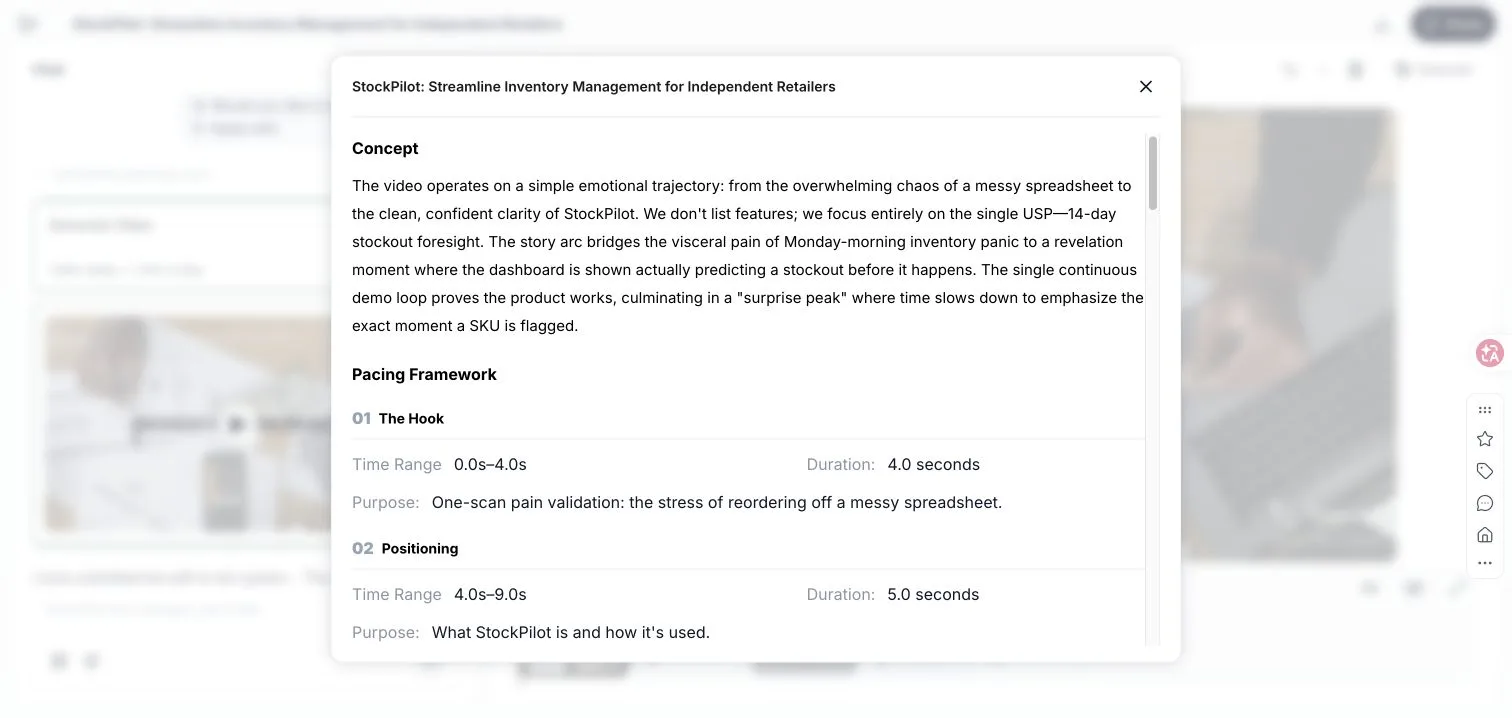
Hands-on result: On August 11, 2026, I used TapVid while signed in with a fictional inventory-SaaS brief for a five-person retail operations team. I selected 16:9, about 30 seconds, English, the Adam - Deep voice, subtitles, background music, and the Product Launch style. The prompt explicitly prohibited invented customer metrics or testimonials.
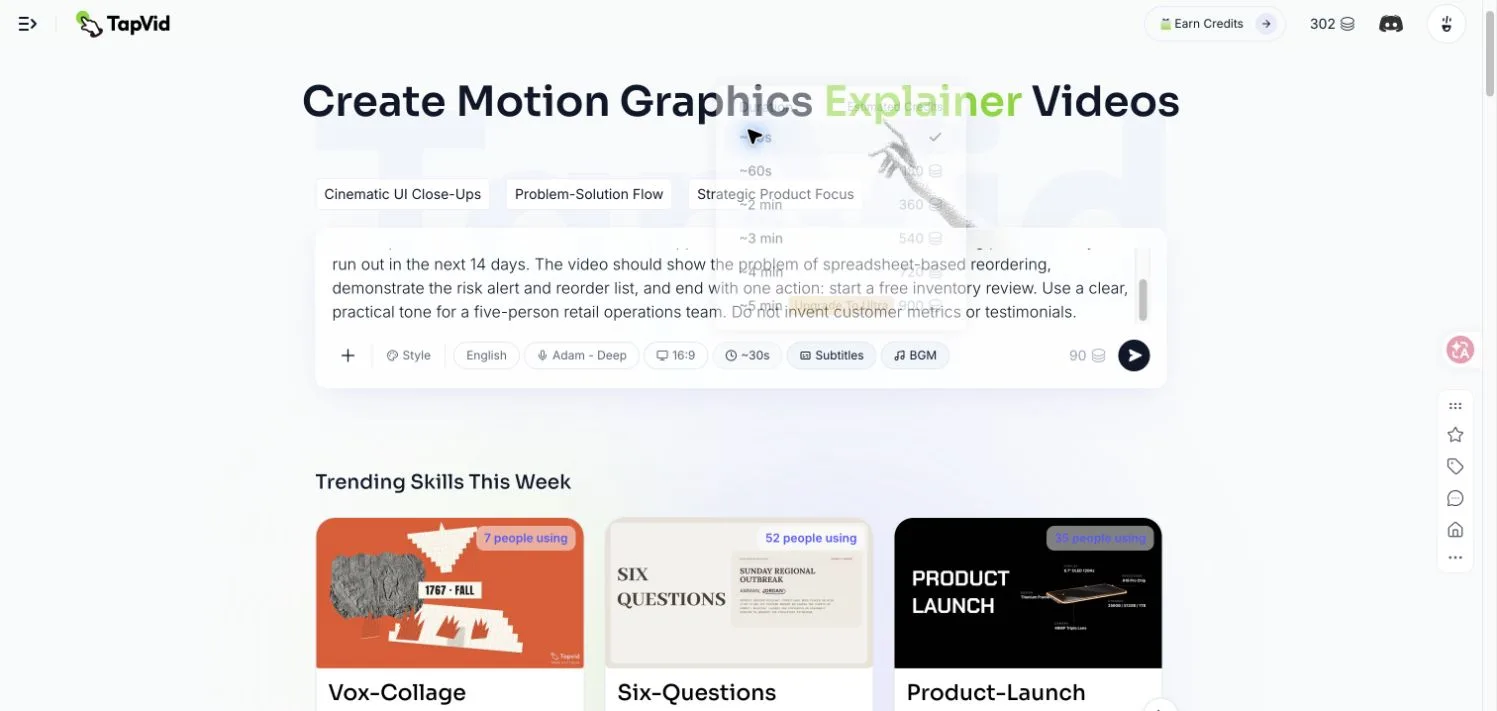
Before rendering, TapVid converted the brief into a concept and pacing framework. The visible script kept one commercial idea in focus, 14-day stockout foresight, and assigned a purpose and time range to each section instead of listing every feature.
TapVid then turned that script into a 30-second first cut with five editable scenes: spreadsheet chaos, brand reveal, dashboard demo, 14-day risk forecast, and CTA. The first generation attempt failed once before rendering; Retry resumed the same project. The completed run used 90 credits, moving the account from 302 to 212.
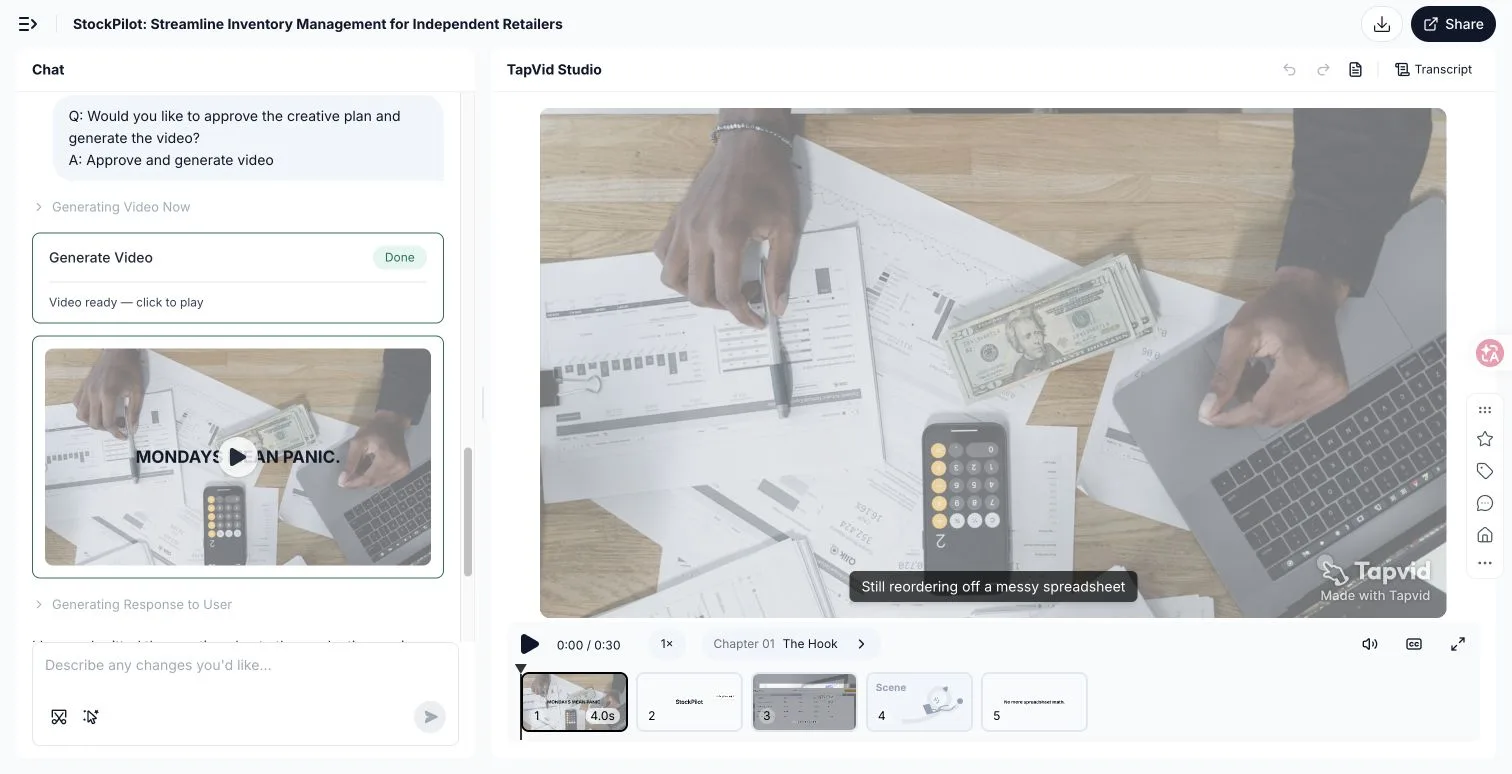
I then selected Scene 5 and asked TapVid to change only the closing on-screen CTA while keeping its visuals and timing.
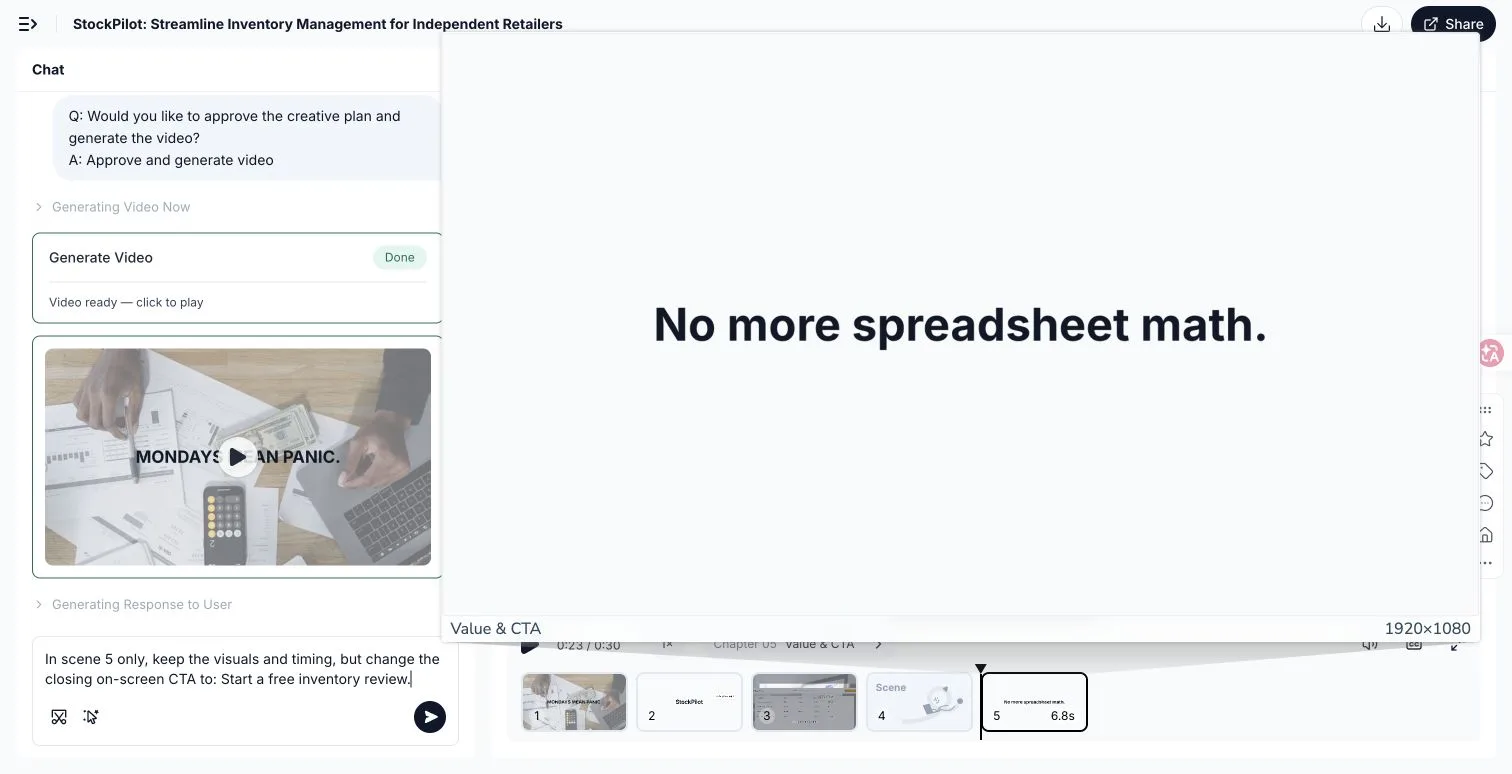
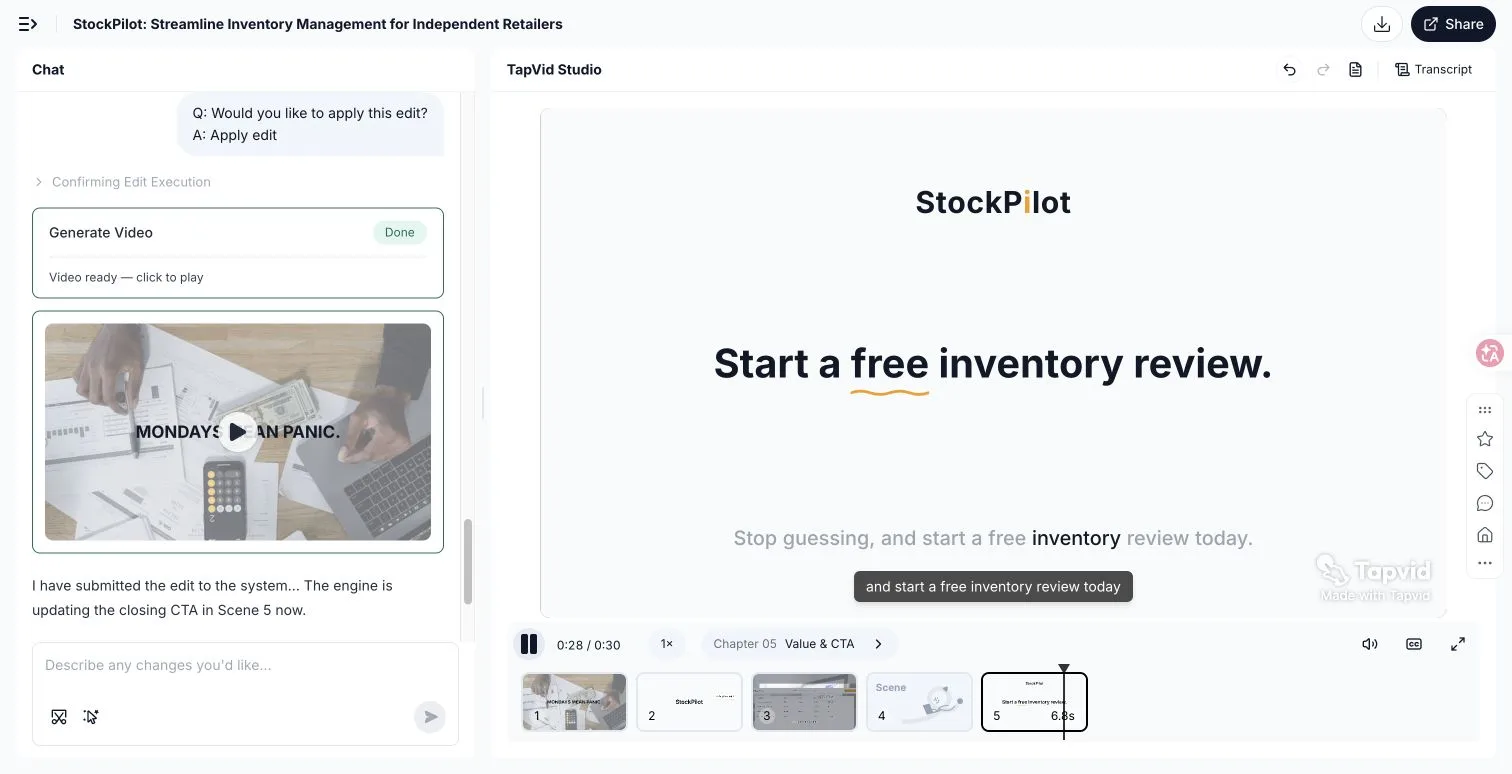
TapVid identified the target as `c5-s1`, showed the proposed edit, created a new version, and rendered the requested line at 0:28 without changing the 30-second total duration. That is the useful product proof for a small team: you can revise one segment without rebuilding the whole piece.
- Choose one business job. Pick launch, explain, prove, teach, or build trust. If you choose two, make two videos.
- Choose one source asset. Use a landing page, customer call, article, product brief, support answer, or customer clip. Do not begin from an empty timeline.
- Write the one-sentence promise. Complete: "After watching, this person will understand or believe ____."
- Collect three proof units. A demonstration, customer quote, process scene, number, comparison, or interface action can each serve as proof.
- Draft the first five seconds. State the tension or result. Remove greetings, logos, and scene-setting that delay it.
- Build the minimum credible visual plan. Decide which lines need footage, screens, diagrams, text, or a chart. Do not illustrate every noun.
- Add one next step. Match it to intent. A cold social viewer may need another lesson. A pricing-page visitor may be ready for a trial.
- Create two openings. Keep the body constant and test different hooks before rebuilding the entire video.
- Review for comprehension. Ask a person in the target audience what the video promised, proved, and asked them to do. If any answer is fuzzy, revise the structure before polishing transitions.
19
Common mistakes that make small-team videos expensive
- Copying surface style instead of strategy. A brand's color grade, joke density, or camera move may not fit your audience. Copy the information sequence first.
- Starting with the company. Viewers do not need your origin story before they know why the video matters. Lead with their task, tension, or desired outcome.
- Trying to explain the entire product. A video that answers one buying question can convert. A feature inventory is difficult to remember and harder to distribute.
- Using generic stock footage as proof. A person typing in a bright office proves nothing about your software. Use interface actions, diagrams, customer evidence, or the actual process.
- Hiding the CTA. A cinematic ending is not a next step. Tell viewers what to watch, try, download, or buy, and make sure it follows from the promise.
- Treating every channel the same. A website explainer can establish context. A TikTok must enter the conversation immediately. A YouTube tutorial needs searchable depth. Keep the core idea, then edit for the viewing situation.
20
Video marketing examples FAQ
What is a good example of video marketing?
A good example makes a specific promise, proves it visually, and gives the right viewer a clear next step. Dollar Shave Club does this with a founder pitch. Dropbox does it with an explainer. KM Tools does it with education. The best format depends on the business job.
What type of marketing video should a small business make first?
Make the video that removes the biggest sales obstacle. If people do not understand the offer, make an explainer. If they doubt a claim, make a proof test. If they do not trust the company, show the founder, customer, or process. Start from evidence you already own.
How long should a marketing video be?
Use the shortest length that completes the job. A social hook may need 15 to 30 seconds. A product explainer often needs 60 to 90 seconds. A searchable tutorial can justify several minutes when each section helps the viewer finish a task.
Can AI create a useful marketing video from a document?
Yes, when the source document contains a clear idea and the system preserves its meaning. The best workflow selects one audience question, structures the answer, and turns claims into appropriate visuals. The AI should help organize and visualize your material, not fabricate expertise or customer proof.
How do I measure whether the example worked for my business?
Measure the behavior tied to the video's job. For an explainer, track completion and movement to a product page or trial. For a tutorial, track qualified search traffic, saves, and assisted conversions. For a proof video, compare click-through or conversion against a claim-only version.
21
Copy the job, then make it yours
The best video marketing examples are useful because they reveal a decision, not because they give you a visual costume to borrow. Dollar Shave Club chooses directness. Dropbox chooses comprehension. GoPro chooses customer evidence. Wistia chooses an experiment. Each video is built around one reason to keep watching.
Pick the example whose job matches yours. Rebuild the promise, proof, and CTA with material only your business owns. If that material already lives in a script, article, PDF, product brief, or web page, turn it into an explainer video with TapVid and spend your effort on the idea instead of a blank timeline.