
TL;DR
B2B video marketing is a content system, not a production order. Assign every video one buying-committee job, one distribution surface, and one observable next action before anyone films, edits, or generates a cut. Measure influence with a stack you can defend. Views are a start. They are not proof that video created pipeline. Production model is an enabling choice. Use B2B video production after the job is named, not instead of naming it.
B2B video marketing is how a company uses video to help another company decide. The viewer is rarely one person. A champion, an evaluator, a finance owner, and a user can watch different cuts of the same story and still fail to agree. The useful output is not a sizzle reel on the homepage. It is a small set of videos that each move one role toward one next action without inventing proof.
That is a wider job than B2B video production. Marketing decides which committee question the video is allowed to answer, where it runs, and what counts as progress. Production decides whether that answer is filmed, screen-recorded, or built from an approved source pack. Mixing those jobs is how teams write a content calendar and still fail the first legal review.
It is also wider than SaaS video marketing. The SaaS page owns a software lifecycle: launch, acquisition, demo, onboarding, education, and retention. This page owns the cross-industry B2B problem: a buying committee, a long research path, and a measurement stack that usually cannot prove last-click revenue. If you sell software, read both. Do not collapse industrial, services, or hardware buying into a SaaS onboarding sequence.
HubSpot's B2B video marketing guide, updated 2024-11-21, defines the work as creating and sharing video to reach other businesses, educate them, and build professional relationships. Magier's 2026 complete guide, read on 2026-08-26, frames the same work as demand generation across a long buying cycle rather than a brand exercise. Both pages then spend most of their length on format menus, platform tips, and production cadence. Those lists are useful. They are not a strategy until each video has a job.
Start from an approved script and source pack
01
B2B video marketing jobs at a glance
Start with the decision the viewer must make, not with a format menu. The table is a marketing router. If two jobs sit in one brief, split the project before anyone writes a script or books a crew.
| Marketing job | Committee role | Next action the video should make easier | Default surface | Do not ask this cut to do |
|---|---|---|---|---|
| Name the costly current state | Champion or operator | Forward the clip and ask for a meeting | LinkedIn, problem page, outbound | Product configuration or pricing |
| Explain the category or mechanism | Mixed committee | Agree on one model of how the system works | YouTube, resource hub, sales deck | Customer outcomes you did not capture |
| Show one workflow the product can run | Evaluator or admin | Book a scoped demo or start a trial | Website, demo page, email | Every exception and integration |
| Transfer peer proof | Economic buyer or late evaluator | Put a named result into the internal thread | Website, proposal, late-stage email | Invented faces, quotes, or metrics |
| Enable the first successful use | New user or implementer | Complete one setup path without a call | Help center, onboarding email | Brand storytelling |
| Update a claim that went stale | Existing buyer or champion | Re-approve the current version | Changelog, email, enablement library | A new flagship film |
The pattern is consistent. One job, one role, one next action, one surface. A homepage hero that tries to name the problem, demo the product, prove a customer result, and close a deal is four briefs wearing one thumbnail.
For official explainer patterns by buying job, use 6 B2B explainer video examples. This page does not rebuild that listicle. It only asks which marketing job those patterns can carry.
02
Marketing assigns the job. Production only makes the proof
Most failed B2B video programs look busy. The team shipped a brand film, three social clips, and a webinar recap. Sales still sends a PDF. Legal still blocks the customer story. Finance still asks what video contributed. The missing object is not another editor. It is a written job.
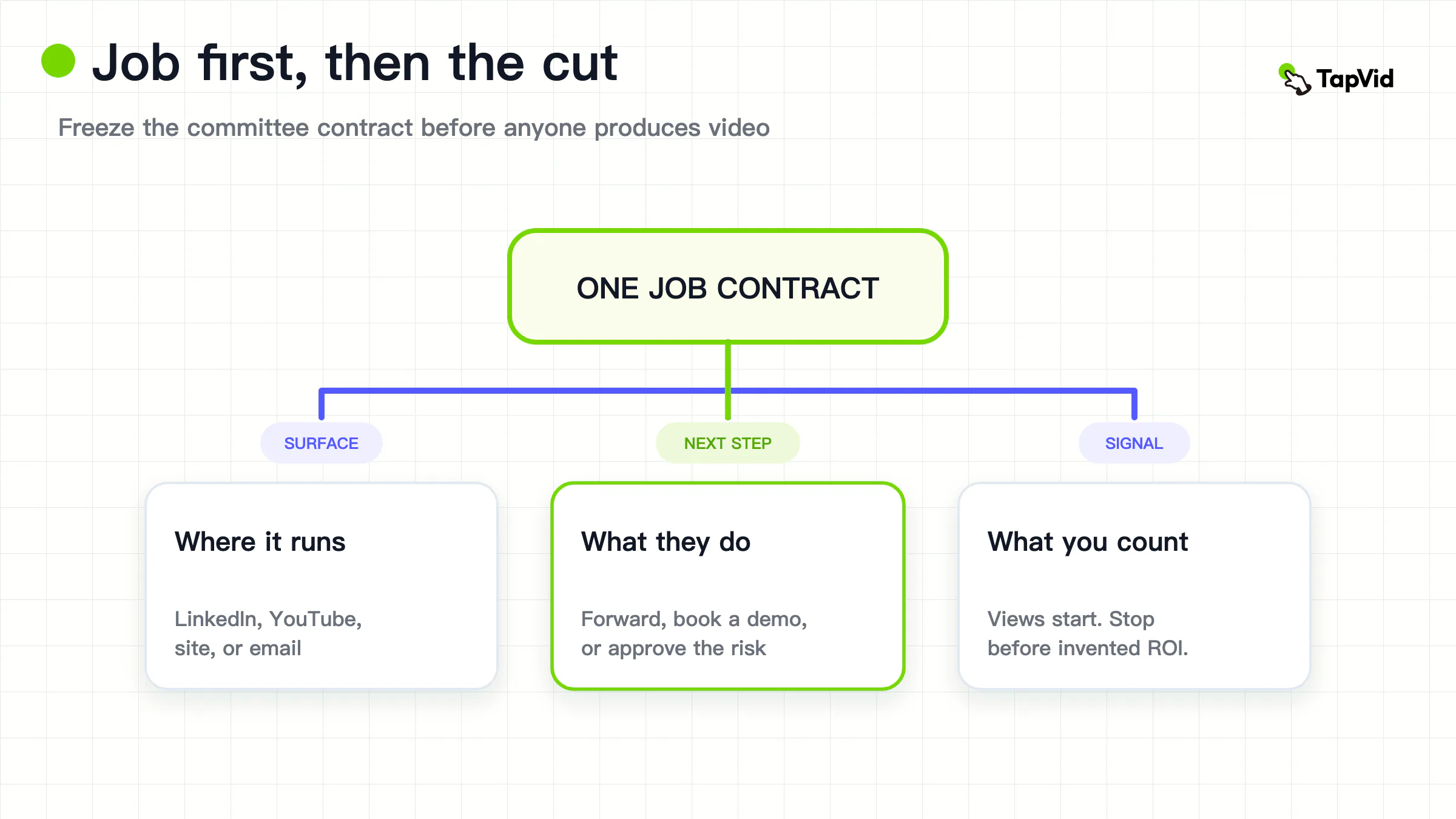
Write one marketing contract before production starts:
After watching, this [committee role] should be able to [repeatable next action] because the video made [this proof] inspectable, on [this surface], and it will not claim [this exclusion]. We will count progress as [this observable signal], and we will retire or revise the cut when [this stale trigger] happens.
That sentence does six things a content calendar cannot.
- It names one primary viewer. A champion forwarding a clip and a security reviewer inspecting a workflow are not the same audience.
- It names one next action. Book a demo, forward to finance, complete setup, or approve a requirement. Two actions belong in two videos.
- It names inspectable proof. A claim that cannot be pointed to on screen is not ready for marketing or production.
- It names a surface. LinkedIn discovery, YouTube research, a product page, and a sales email ask for different length, context, and calls to action.
- It names a signal you can observe without inventing attribution. Completion on a demo page is a signal. "This video closed the deal" is a story unless CRM and consent make the path inspectable.
- It names a stale trigger. A UI rename, a retracted metric, a lost permission, or a pricing change should retire the cut.
B2B video production already owns the production half of this split: agency capture, screen recording, or asset-to-video, chosen from the proof. This page stops at the marketing half. If you cannot finish the sentence above, do not open a rate card.
VID.co's B2B video strategy guide, dated 2026-07-01 and read on 2026-08-26, is right that most teams have a video intention rather than a documented system. The useful correction is narrower than a 90-day launch plan. Document the job first. Cadence is a later ops choice. Scalable video production owns queues and throughput once the jobs exist.
03
What B2B video marketing has to do that consumer video does not
Consumer video can succeed by making one shopper want the thing. B2B video has to survive a relay. The first viewer is often not the buyer. The buyer is often not the user. The user is often not the person who can sign.
HubSpot contrasts B2B and B2C on that point: B2B aims at business decision-makers through longer sales cycles, while B2C can chase faster, more emotional purchases. Treat that as an attributed distinction, not as a law of nature. Some B2B purchases are small and fast. Some consumer purchases have households that behave like committees. The operating difference that still holds is risk. B2B video is usually asked to reduce the cost of being wrong.
Sproutbox, read on 2026-08-26, states the same idea in vendor language: B2B buyers watch video to reduce risk, not to be entertained. Keep the mechanism. Drop the slogan. A useful B2B cut makes one risk inspectable. The product can run this workflow. A peer got this bounded result. The current state costs this visible failure. The implementation path looks like this. Entertainment can stay in the first five seconds. It cannot replace the risk the committee came to check.
That is why a consumer-style hook often dies in review. Humor that hides the claim, music that outruns the diagram, or a face that is not the named customer all increase entertainment and decrease inspectability. Professional does not mean glossy. It means a reviewer can pause the frame and repeat the claim.
B2B video also has to travel without the marketer in the room. The champion will drop the file into Slack, a proposal, or a buying-committee folder. If the cut only works with a salesperson talking over it, it is a leave-behind for a meeting, not a marketing asset. Design the video so the next viewer can understand the job from the first fifteen seconds and the last fifteen seconds, even if they skip the middle.
04
Give every video one buying-committee job
The most expensive B2B video is the one that tries to be the program. It opens on a skyline, names three personas, demos four modules, flashes two logos, and ends on "get a demo." Every stakeholder can find a sentence they like. Nobody can say what the video is for.
Use the at-a-glance jobs as a hard split.
Name the costly current state. The viewer should be able to repeat one failure they already have. If the clip needs the product logo to make sense, it is already a demo.
Explain the category or mechanism. The viewer should be able to draw the system on a whiteboard. If the clip depends on a customer quote you do not have permission to use, stop.
Show one workflow. The viewer should see one object move from a start state to a stored result. If you need five workflows to feel complete, you need five shorts or one guided demo, not one overloaded explainer.
Transfer peer proof. The viewer should leave with a named customer, a bounded before/after, and a permission path. If those three pieces are missing, do not animate a testimonial. Film the interview, or drop the claim. B2B video production is explicit on this boundary. Marketing does not get to override it with a style choice.
Enable the first successful use. The viewer should complete one path. If the cut is really a brand story, it belongs somewhere else.
Update a stale claim. The viewer should see what changed and what did not. If the update requires a new flagship film, the original asset was a sealed master, not a system.
Sproutbox's Content Ladder maps five video types to five buying stages. Magier maps types to awareness, consideration, and decision. Those ladders are compatible with this page only if you refuse to stack every rung on one hero. A ladder is a portfolio rule. It is not a shot list for a single edit.
When two roles must see the same story, change proof depth, not the job. The explainer examples page shows how official B2B cuts keep one core story and vary what a champion versus an expert can inspect. Copy that rule. Do not copy their diagrams or scripts.
05
Build a funnel portfolio, not a hero-video calendar
A calendar asks "what do we post this week." A portfolio asks "which committee job is empty, and which job is overserved." Those questions produce different briefs.
Audit the library against the at-a-glance table. Count approved, still-accurate cuts per job. Ignore files that legal will not let sales send. Ignore files whose UI, price, or claim has changed. The remaining count is the portfolio.
Most B2B teams are overweight on one of three things.
- A flagship brand film that nobody can update.
- Product demos that assume the viewer already agrees the category is real.
- Social clips cut from a webinar with no job label and no next action.
The missing piece is usually the current-state cut or the stale-claim update. Champions cannot forward a demo if the committee does not yet agree there is a problem. Sales cannot reuse last year's explainer if one number in it is now wrong.
Fill the empty job before you add a seventh demo. Vidyard's lead-generation guide, read on 2026-08-26, maps educational video to the top of the funnel, demos and case studies to the middle, and personalized one-to-one video to the bottom. Keep the mapping. Do not treat Vidyard's product workflow as the only way to run it. A small team can still refuse a hero-video calendar without buying a video CRM.
Webinars sit in the portfolio as a source, not as the strategy. Wistia's 2026 State of Video, based on a survey of 900-plus professionals and more than 13 million videos on its platform, says teams treat webinars as one of the four formats they are doubling down on, and that on-demand webinars keep getting plays for up to 12 months after the live event. That is a reuse argument. It is not a requirement to start with a monthly webinar. If you do run one, label the derived cuts by job before you publish them. A two-minute clip with no job is inventory, not marketing.
Software companies should still use the SaaS lifecycle playbook for launch, onboarding, and retention cuts. Those are customer-lifecycle jobs. They can sit beside this committee portfolio. They do not replace it. An onboarding video that helps a new user is not a substitute for a current-state video that helps a champion get a meeting.
06
Distribute by the question the buyer is asking
Platform fashion is a weak brief. "We need to be on LinkedIn" does not say which job the upload performs. Choose the surface from the question the buyer is asking at that moment.
LinkedIn is where many B2B teams now share first. Wistia's 2026 report says 8 in 10 teams name LinkedIn as their primary place to share videos, ahead of YouTube, where 76 percent of teams post. Wyzowl's 2026 Video Marketing Statistics, from a late-2025 survey of 266 respondents, says 70 percent of video marketers use LinkedIn and 82 percent upload to YouTube. Those two original reports do not measure the same thing. Wistia asked where teams primarily share. Wyzowl asked where they upload. Do not collapse them into "LinkedIn beats YouTube for B2B." Use both as a reason to staff LinkedIn as a discovery surface, and YouTube as a research surface, unless your own audience data says otherwise.
LinkedIn discovery. Use it when the job is to name a current-state failure or to transfer a bounded proof into a professional feed. Native upload, captions, and a first line that states the job beat a link-out that asks the viewer to leave. Magier calls LinkedIn the single most important B2B video platform in 2026. Treat that as Magier's operating advice, not as a ranking TapVid verified. Keep the cut short enough that a champion can watch it between meetings. Do not put a twenty-minute demo in the feed and hope the algorithm finds evaluators.
YouTube research. Use it when the job is category, mechanism, or a workflow the buyer will search for later. Titles and descriptions should repeat the question the video answers. This is search content that happens to be video. It is not a second LinkedIn. A mechanism explainer and a "how we handle X" walkthrough belong here. A teaser that only works as a social hook does not.
Website evaluation. Use it when the viewer is already on a problem, product, or proof page. The video should complete the page job, not restart the homepage story. Wistia reports that videos on homepages, video galleries, and product pages get the highest play rates in its hosting data, while other page types get fewer plays but often more engaged viewers. That is platform telemetry from Wistia's customer base, not a universal law. The decision rule still holds: match the cut to the page question.
Email and sales follow-up. Use it when the job is to advance a known thread. The subject and the first seconds should name the objection the last meeting left open. Vidyard emphasizes personalized one-to-one video at the bottom of the funnel. Personalized outreach is a sales motion. It is only B2B video marketing when the same job is reusable by more than one seller. If every send requires a new recording of the same explanation, you are missing an enablement cut.
Do not treat Instagram, TikTok, or paid social as the default B2B system. They can carry a current-state hook or a hiring story. They rarely carry inspectable workflow proof. If a paid video ad is in scope, give it the same job contract as organic. An ad without a next action is still an unsourced brand film, only more expensive.
07
Measure influence with a stack you can defend
The measurement failure in B2B video is not a lack of dashboards. It is a mismatch between the question leadership asked and the event the player recorded.
Wyzowl's 2026 survey says 82 percent of marketers report that video marketing has given them a good ROI, down from 93 percent in the prior year's survey. The same report says 67 percent quantify that ROI through views, 63 percent through engagement such as likes and shares, 52 percent through leads or clicks, and 32 percent through bottom-line sales. Those are self-reported marketer answers from 266 respondents. They are not TapVid results, and they are not a measurement design. They show the common error: most teams still call views a return.
Wistia found that less than half of marketers connect their video platform to a CRM or email tool. If that connection does not exist in your stack, you cannot honestly attribute closed revenue to a video. You can still run a useful program. You just have to say so.
Use a four-layer stack. Stop at the highest layer you can observe without inventing a path.
- Exposure. Impressions, unique viewers, or page play rate. This layer only answers "did anyone start it."
- Attention. Average percent viewed, or completion on a cut short enough that completion is meaningful. Sproutbox argues that completion rate by stage predicts pipeline better than raw views. Treat that as their operating claim. The transferable rule is simpler: a 12-second average view on a three-minute demo is not attention.
- Next action. Demo request, pricing-page view, forwarded internal link, help-article completion, or reply to the email that carried the video. The action must be the one named in the marketing contract. A like is not a next action.
- Influenced opportunity. A CRM field, UTM, or seller note that the named video was used in an open opportunity. This layer requires hygiene and consent. It still does not prove the video caused the deal. It only makes influence inspectable.
Do not skip from layer 1 to a revenue story. Video marketing analytics owns metric definitions, attribution methods, and the gaps in published benchmarks. Video marketing ROI owns the statistics page for reported ROI and lift. This page only decides which layer you are allowed to claim.
If finance asks for ROI and you only have views, the honest answer is "we can show attention and next actions on these jobs, and we cannot show closed-won attribution yet." That sentence is a strategy. A fabricated multi-touch model is not.
Paid video needs the same honesty. Platform-reported view-through conversions are adjacent evidence. They are not interchangeable with organic website completion. The analytics article already warns that paid and organic stacks are not the same denominator. Do not import a LinkedIn or YouTube ads number into an organic program review.
08
Run video as a brief, source pack, reuse, and retire loop
A B2B video marketing system is four repeating objects. If any one is missing, you have a queue of requests, not a system.
Brief. The marketing contract from earlier. No brief, no production. A ticket that says "need a video for the launch" is not a brief.
Source pack. The approved words, numbers, screens, diagrams, logos, and permissions the cut is allowed to use. Give every source a stable ID, owner, date, market, and permission note. Mark superseded screens. Write protected words separately from treatment. Protected words are facts. Treatment is pacing, motion, and metaphor. Product video production owns this loop for a single product claim. This page only needs the marketing rule: if the pack is not approved, the video is not a marketing asset yet. It is a draft that will fail review.
Reuse. One approved master should produce the cuts the job actually needs: a feed cut, a page embed, a sales clip, captions, and a still that can travel in a document. Magier describes a repurposing engine that turns one video into many assets. Keep the efficiency. Reject the vanity count. Twenty clips with no job label are not a system. Three cuts that share a source pack and differ by surface are.
Retire. Every cut needs a stale trigger and an owner. A UI rename, a retracted metric, a lost customer permission, or a pricing change should take the file out of sales' hands the same week. A library full of almost-right videos is a liability. Champions will send the wrong one.
Wyzowl reports that 63 percent of video marketers have used AI video tools to create or edit marketing videos, up from 51 percent in the prior survey. Wistia reports blended teams, with both in-house capability and outsourcing up year over year, and AI used mostly in pre-production in its 2026 findings. Use those original reports as context for capacity, not as permission to skip the brief or the pack. AI can draft a scene plan from a document. It cannot invent a customer, a factory floor, or a metric legal did not approve.
Do not turn this loop into a 90-day content calendar unless the jobs are already named. VID.co's launch plan and Magier's weekly cadence are downstream operating advice. They fail when the team still does not know which committee job is empty.
09
Production is an enabling choice, not the strategy
Once the job, surface, and signal exist, production has a narrower question: does the proof already live in files the company owns, or does it still have to be captured?
B2B video production is the page that answers that question. The short version for marketers is enough to keep this article from becoming a second production guide.
If the proof is an approved diagram, spec sheet, help doc, product image, or UI sequence, default to an asset-to-video workflow or a screen recording. If the proof is a named customer, a place, a physical behavior, or flagship craft, buy capture. If the cut will go stale when one claim or screen changes, refuse any model that can only deliver a sealed master.
Marketing still owns two production-adjacent decisions.
- Which jobs in the portfolio are allowed to wait for a crew, and which jobs must ship from the pack this month.
- Who approves facts versus who approves craft. Mixed review is how a current-state cut becomes a six-week brand film.
Agency pages in the `b2b video marketing` results often jump from strategy to "hire us." That is a service offer. It is not a reason to make every marketing job a shoot. Small business video production owns the provider-economy version of that choice for owner-operators. This page stays on the marketing system. When the bottleneck is the queue rather than the brief, use scalable video production.
Do not ask production to rescue a missing job. A beautiful demo cannot replace a current-state cut. A cinematic customer film cannot replace an enablement path. If the portfolio is empty at the top, filming the product more carefully will not fill it.
10
When an asset-led workflow can carry the marketing cut
TapVid is useful only after the marketing contract says the proof already lives in approved material. It is not a B2B video marketing platform, a filming crew, or a substitute for a customer interview. It does not create pipeline by itself.
The natural fit on this page is an industrial or other B2B explanation job: a parameter, a mechanism, or a workflow that already exists in a spec, a drawing, a product URL, and approved copy. That is the `INDUSTRIAL_B2B_EXPLANATION` case. The viewer needs to inspect the thing, not watch a mood film about the category.
The official AI explainer video generator page, read on 2026-08-26, describes the supported job this way. Start from an approved script, PDF, URL, screenshots, logo, and brand colors. Keep supplied visuals as supplied and approved wording literal. Review the brief, script, and scene plan before the final export. When one scene needs work, change the caption, visual, pacing, or CTA in plain language and rerun that scene while the rest stays fixed. Then export an MP4 or share a link. Narration and synced captions are generated with the video.
In this page's single, user-authorized run on 2026-08-26, TapVid produced a 30-second sample industrial explainer at https://tapvid.ai/video/izeLDfaj. The brief asked for a closed-loop cooling-valve mechanism cut, not a customer story. Chapter 02 at 0:11 kept FAIL CLOSED on the schematic, with Chat showing Generate Video as Done. This is one sample pack. It does not prove a named customer, a factory process, or pipeline.
That matches three marketing needs above: correspondence between claim and frame, local updates when a spec changes, and a pack you can reuse across surfaces. It does not match peer proof, physical installation, or a flagship launch.
Use it for a SMALL_B team that already owns the source and needs a reviewable current-state, mechanism, feature-update, or SOP cut. If the proof is the live interface, record the interface instead. The official AI product demo video generator page, also read on 2026-08-26, is the product-page route for demo-shaped explainers from a URL, PDF, screenshots, and approved claims. The same page states that TapVid does not record a live screen and does not create an interactive click-through demo. Use it when the job is a structured product story. Do not use it when the viewer must follow exact UI clicks.
Limitations sit next to the placement. Human review still owns exceptions. A reviewable plan is not a promise that every render is correct. Isolated scene reruns apply to changes the product can isolate. Input coverage is what the official page lists. The first-hand frame above is one sample industrial explainer run from the official source page, captured on 2026-08-26. It shows a generated reviewable cut in TapVid Studio. It does not claim attribution, win-rate, or watch-time results for TapVid. Homepage testimonials on tapvid.ai are vendor-published. They are not independent consensus.
Pricing is credit-based and mutable. The official pricing page, read on 2026-08-26, states that 3 credits equal 1 second and that a failed or timed-out render returns credits. Plan names and dollar amounts change. Read the live page before you budget. Credits are not a substitute for filming a customer or a factory floor.
11
Failures that look like a content problem
These failures get blamed on the editor, the tool, or "video quality." They are usually strategy errors.
The hero-video brief. One cut is asked to educate, demonstrate, prove, and close. Review never ends because every stakeholder is reviewing a different job.
The format-first brief. The request is "we need a testimonial" or "we need a reel" before anyone names the role, the next action, or the proof. Production then has to invent a job after the shoot.
The borrowed consumer hook. The first five seconds are entertaining and the claim is hidden. The champion cannot forward the clip because the next viewer will not know why it matters.
The sealed master. The file looks finished and cannot accept a one-line legal qualifier. Marketing then republishes a stale claim or waits a quarter for a rerelease.
The vanity score. The weekly review celebrates views. Nobody can say which committee job moved. Wyzowl's own mix, with views as the most common ROI proxy, is a warning label, not a target.
The missing retire date. Sales keeps a folder of last year's cuts. One of them still shows a price or a module you no longer sell. That is not a library. It is an uncontrolled claim surface.
The invented attribution story. A deal closed after someone watched a video, so the video gets the revenue. Without a documented influence path, that is a narrative. It will not survive the next finance review.
The production-as-strategy swap. The team debates agency versus in-house for a month and still has no current-state cut. Model choice cannot invent a job.
Fix the contract, the portfolio, and the retire rule before you buy another day of crew time. If the proof is missing, production can capture it. If the job is missing, only marketing can write it.
12
B2B video marketing FAQ
Use these answers as the marketing-system check. They do not replace a brief, a source pack, or a measurement stack you can defend.
What is B2B video marketing?
B2B video marketing is the system that decides which buying-committee job a video performs, where it runs, and what counts as progress. The output is a portfolio of inspectable cuts, not a single brand film. Production is how each cut gets made. It is not the strategy.
How is B2B video marketing different from B2B video production?
Marketing assigns the job, the surface, and the signal. Production chooses agency capture, a screen recording, or an asset-to-video workflow from the proof. Use this page for the first decision. Use B2B video production for the second.
What types of video work best for B2B marketing?
The useful types are jobs, not genres. Start with a current-state cut, a mechanism or category cut, one workflow demo, peer proof you did not invent, and an enablement cut. Add a flagship film only when the proof is craft, place, or people the team does not own. See the at-a-glance table rather than a format menu.
Should we publish B2B video on LinkedIn or YouTube?
Use LinkedIn when the job is discovery or a forwardable proof in a professional feed. Use YouTube when the job is research: a question a buyer will search later. Wistia's 2026 report says 8 in 10 teams primarily share on LinkedIn. Wyzowl's 2026 survey says 82 percent of video marketers upload to YouTube and 70 percent use LinkedIn. Staff both surfaces unless your own audience data says one is empty.
How do we measure B2B video marketing without full attribution?
Use the four-layer stack: exposure, attention, named next action, then influenced opportunity if CRM hygiene exists. Stop at the highest layer you can observe. Do not report views as ROI. For metric definitions and published benchmark gaps, use video marketing analytics.
Can one explainer cover the whole funnel?
No. One explainer can carry one job at one proof depth. If a champion and an evaluator need different inspectable details, change the cut or the ending, not the entire funnel. The B2B explainer examples page shows official patterns for that split.
When must we film a customer or a site instead of using existing assets?
Film when the proof is a named customer, a place, a physical behavior, or craft the files do not contain. Approved docs, UI, drawings, and copy can carry mechanism and update jobs. They cannot invent peer proof. That boundary is a legal and marketing rule, not a style preference.
Where does TapVid fit in B2B video marketing?
Only after the job is named and the proof already lives in approved material. TapVid can turn a script, PDF, URL, screenshots, and brand assets into a reviewable explainer and rerun an affected scene. It is not an agency, and this article does not claim pipeline or attribution results for it. Start from the explainer generator when the pack exists. Read live pricing before you treat credits as a budget line.