
TL;DR
Scalable video production comes from making demand, capacity, formats, inputs, handoffs, approval rules, and quality control repeatable before you automate them. Start by finding the queue that repeatedly slows delivery. Then define a small format portfolio, install a production contract, separate locked decisions from flexible ones, and automate only stable work. Measure approved throughput alongside cycle time, first-pass approval, revision load, reuse, and cost. This sequence is derived from the operating-loop model and bounded TapVid run documented below. Flagship work can stay custom; the goal is reliable growth, not making every video look the same.
Scalable video production is easy to confuse with “making more videos.” That definition is too shallow. A team can increase exports while also increasing unfinished work, revision cycles, coordination time, and brand risk. The output count rises, but the operation becomes less dependable.
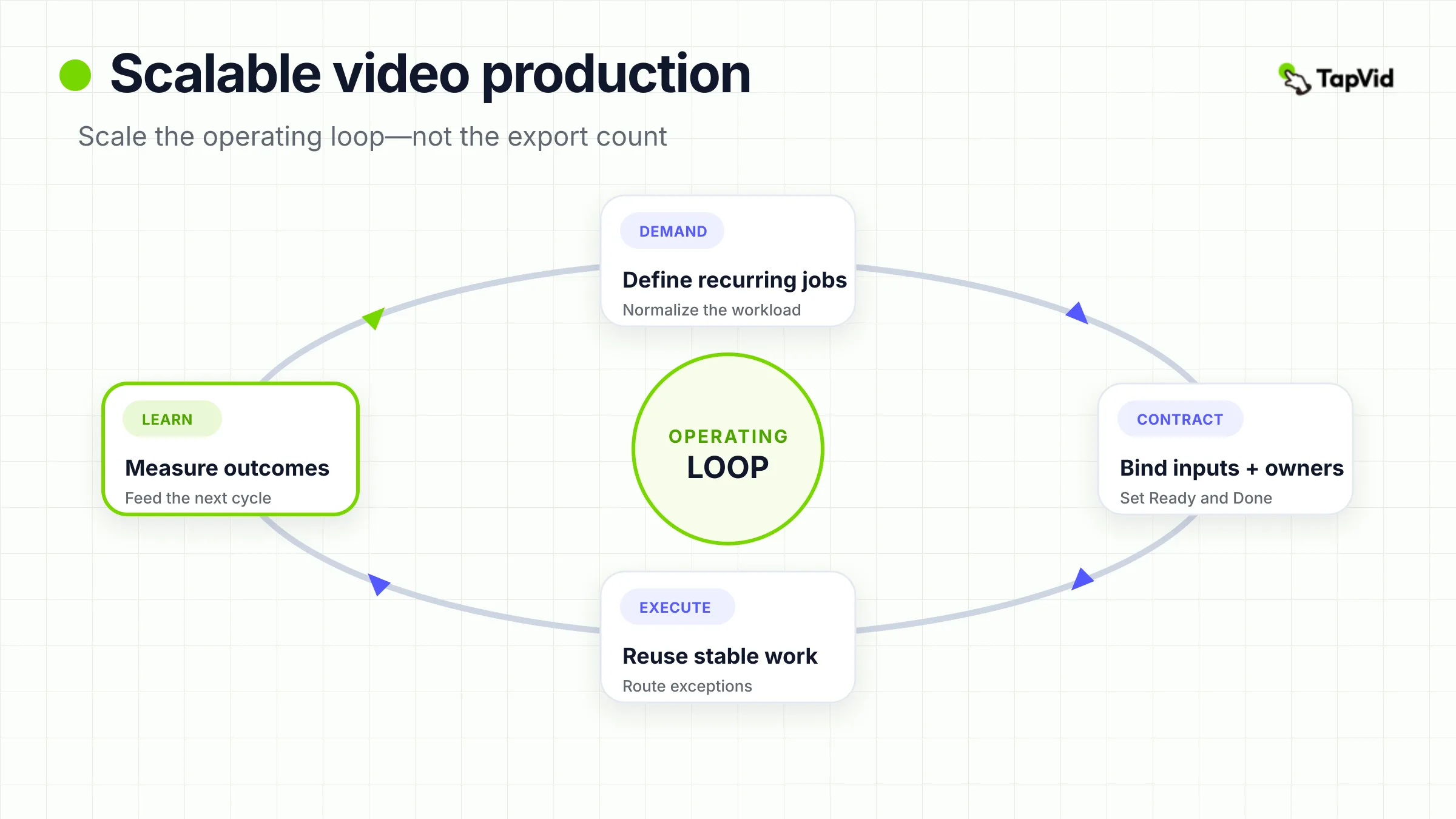
A better definition is reliable throughput: approved videos delivered per time period at an acceptable quality, revision load, and cost. Under that definition, scale is an operating-system problem. Every recurring video moves through the same basic loop: demand becomes a ready input; a ready input becomes a production task; the task enters review; review produces an approved deliverable; and results change the next round of decisions.
This article gives you a practical system for building that loop. It is designed for recurring marketing and content work: product updates, demos, campaign variants, social series, explainers, and other formats that return often enough to justify repeatable rules. A flagship brand film or experimental creative can remain bespoke. The system should remove repeated operating decisions, not erase useful creative judgment.
See a source-led product demo workflow
01
Define scale as reliable throughput, not raw video count
The unit you count determines the behavior you reward. If you count “videos created,” teams can inflate the number with unfinished cuts, low-value variants, or outputs that never pass review. If you count only approved deliverables, you force the system to include the work that usually disappears from a production dashboard: source preparation, feedback resolution, legal checks, formatting, and handoff. A useful working definition is: reliable throughput = approved deliverables completed in a period, while quality, revision load, and downstream usefulness remain within an acceptable range.
That definition creates two lanes.
- Recurring lane: formats with repeatable inputs, structures, owners, and acceptance criteria. These are candidates for templates, batching, reuse, and selective automation.
- Flagship lane: high-stakes or novel work where the creative problem is part of the value. These projects may share assets and governance, but they do not need the same cycle-time target.
Do not force both lanes through one promise. The recurring lane benefits from a stable operating contract. The flagship lane benefits from explicit exceptions. Mixing them creates misleading capacity estimates and makes every urgent project look like proof that the system has failed.
Animation execution can have its own healthy video animation pipeline, but that pipeline is only one part of the broader system. Scalable video production also depends on what enters production, who can approve it, and how learning returns to planning.
02
Find the constraint before adding tools or people
When output feels slow, the most visible team is often blamed first. Editors have a queue, so the instinct is to hire another editor. But a busy queue is not automatically the binding constraint. The real constraint may be incomplete briefs, delayed scripts, missing screenshots, conflicting stakeholder feedback, or legal review that begins too late.
Audit the last five to ten completed videos. For each stage, record four things:
- Active work time.
- Wait time before someone could continue.
- Rework caused by an earlier decision.
- The owner responsible for moving the item forward.
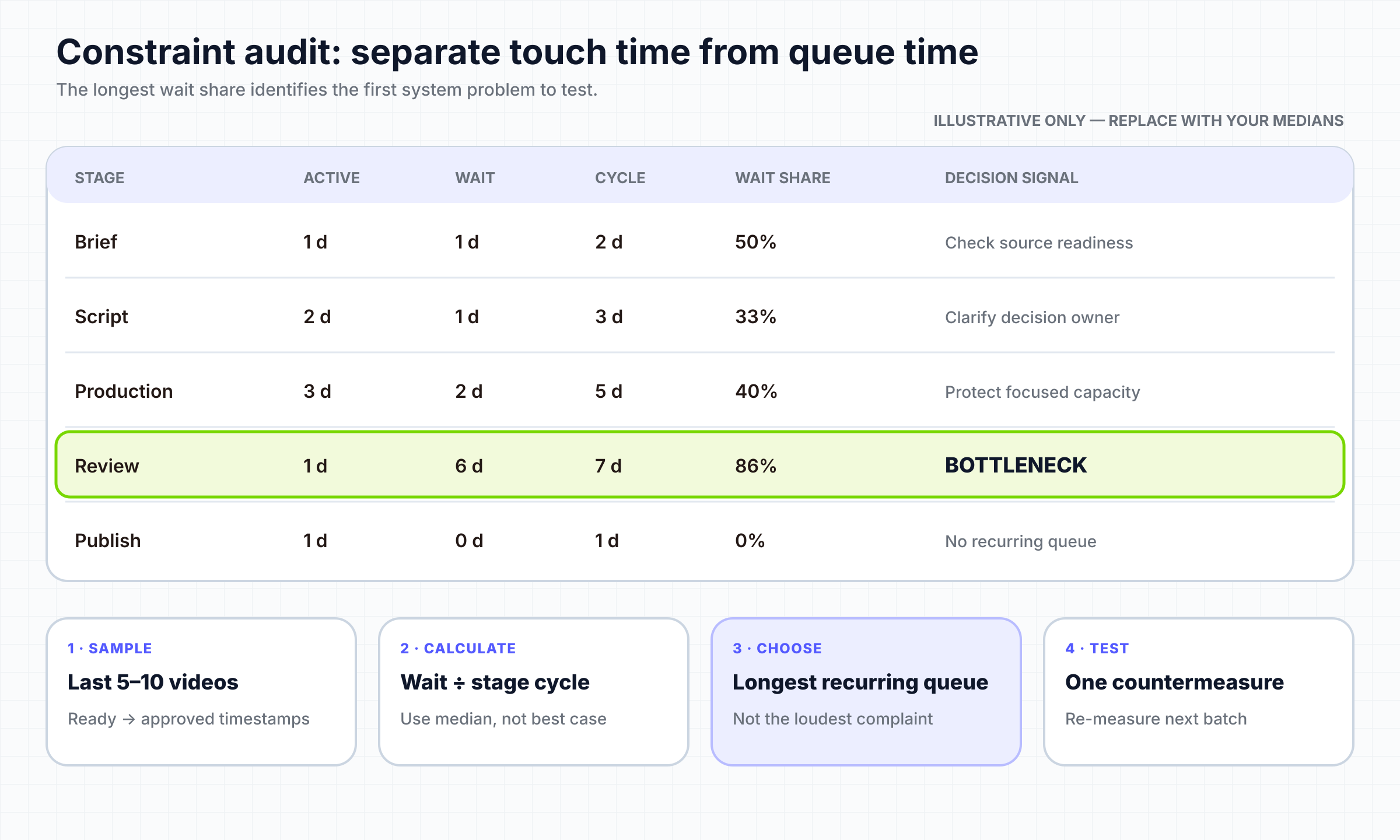
Suppose editing takes six hours, but each video waits four days for an approved script and another three days for consolidated feedback. Adding editing capacity shortens six hours while leaving seven days untouched. It may even create more work in progress because more cuts reach the same approval queue sooner.
Use this decision rule: improve the stage with the longest recurring queue or avoidable wait first. Do not optimize every stage at once; you need the effect of one change to remain visible. If inputs are incomplete, fix the definition of ready. If feedback conflicts, assign one accountable approver and one feedback destination. If production itself is the queue, reduce variation, reuse approved elements, or add qualified capacity. If every item waits for the same senior reviewer, separate locked decisions from delegated ones.
For role-specific production handoffs, a motion graphics designer workflow can go deeper into the craft lane. Here, the important point is diagnostic: tools, people, and templates only help when they remove the current constraint.
03
Turn content demand into a capacity plan
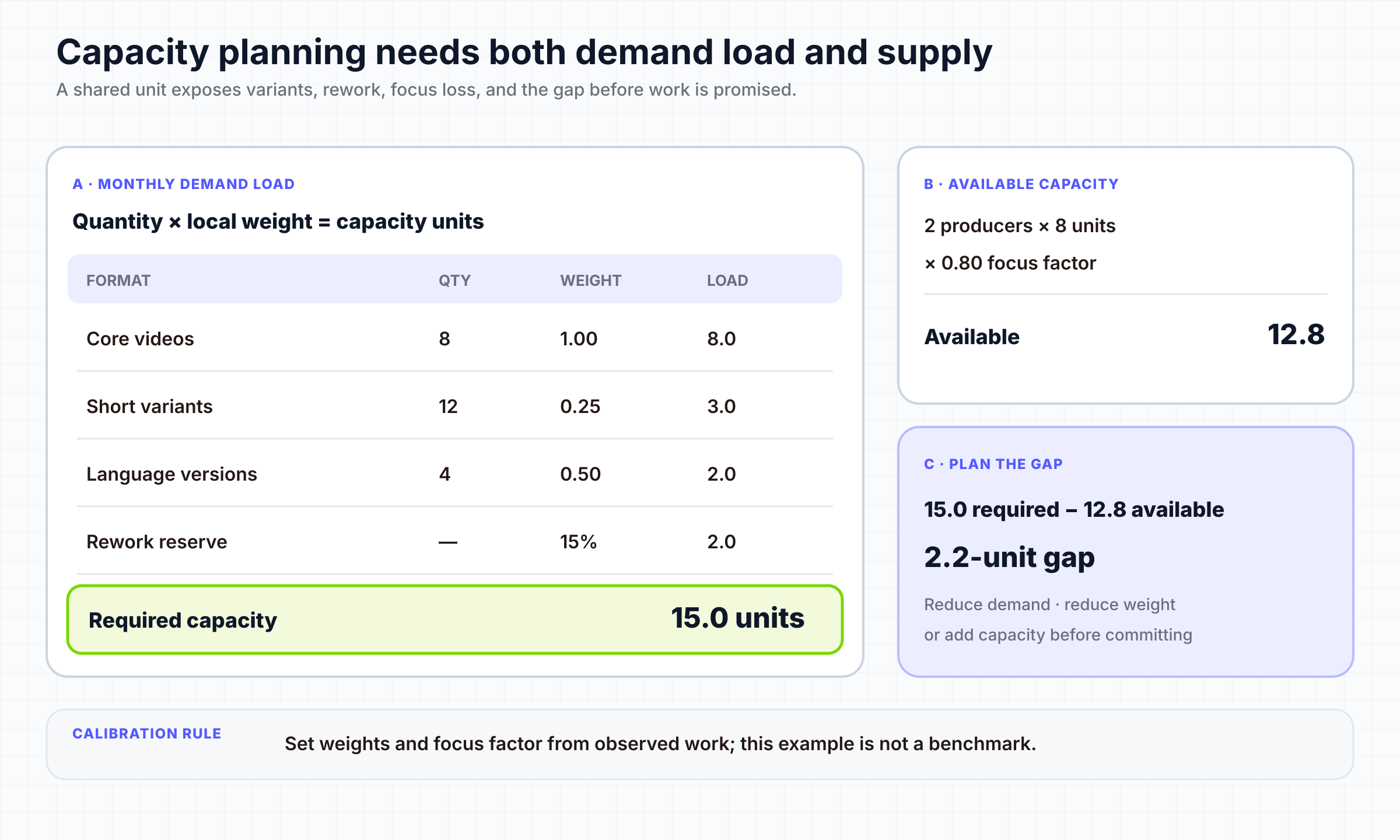
Most teams plan a calendar in topics and dates, then discover capacity problems after work begins. A scalable system translates demand into comparable production units before committing to the calendar.
Start with a monthly demand table. For each recurring format, record:
- Number of base deliverables.
- Number of variants per base deliverable.
- Relative effort of one variant compared with a base deliverable.
- Expected rework allowance based on recent history.
- Required specialist or approval capacity.
An illustrative equation is required capacity = base deliverables + weighted variants + rework allowance. If the month requires eight base videos, each with two variants that consume roughly 25% of the base effort, and recent rework adds 15%, the planning load is not 24 equal videos. It is 8 + (16 × 0.25) + 15% = 13.8 base-equivalent units.
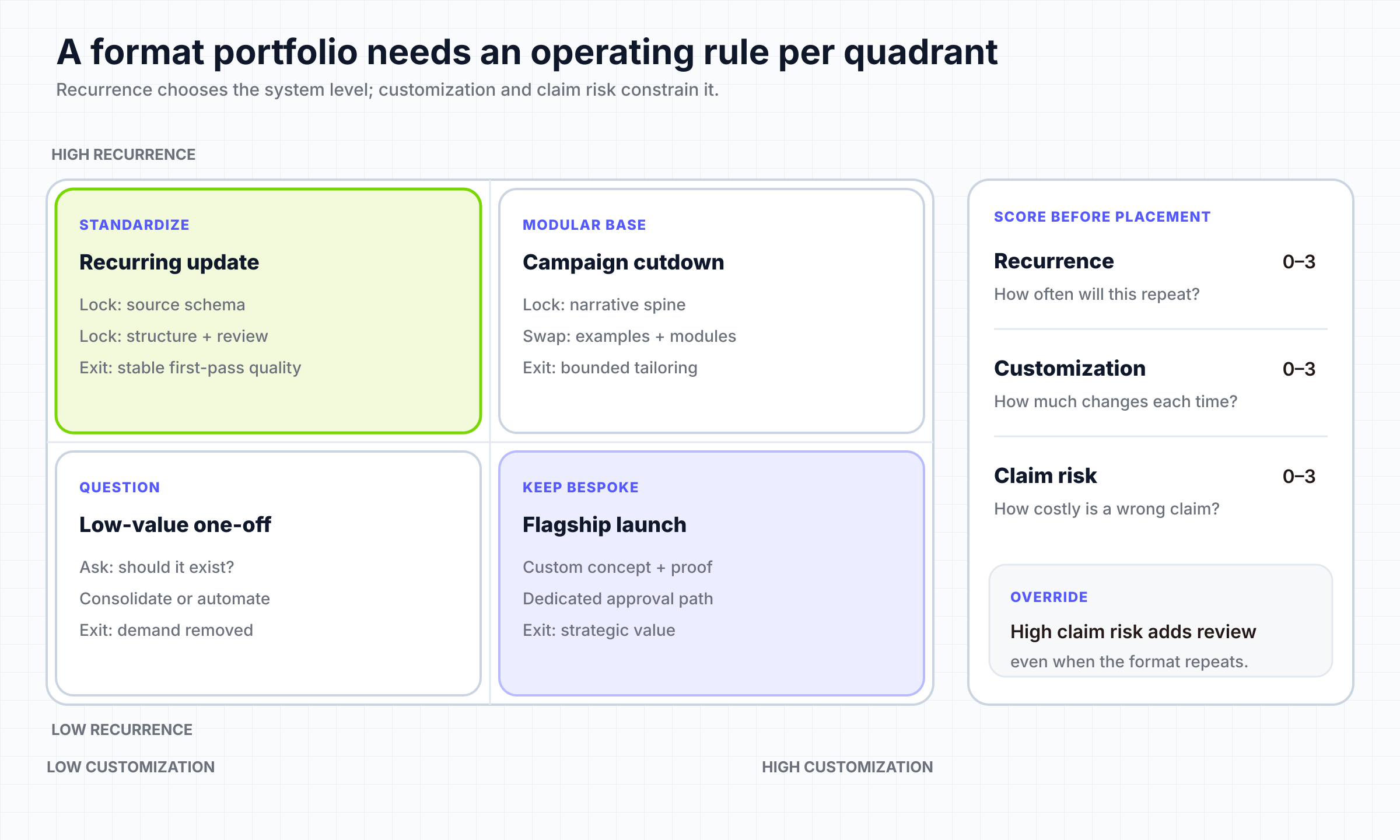
The numbers are illustrative; your weights should come from observed work. The value is not mathematical precision. The value is forcing the team to expose assumptions before the schedule becomes a promise. Next, classify formats by recurrence and variability.
A format belongs in the repeatable portfolio when its audience, source pack, structure, review path, and acceptance criteria recur. A “60-second product update for current users” is a format. “Make this launch exciting” is not. A format definition should answer:
- Who is the viewer?
- What source material must exist?
- Which narrative blocks normally appear?
- Which outputs and aspect ratios are required?
- Which decisions are locked, flexible, or exceptional?
- Who approves source truth, brand, and final delivery?
WIP rule: The official Kanban Guide defines work in progress as items between the workflow's start and finish points and makes WIP control part of the workflow definition. Applied here, if the team can actively manage six base-equivalent units, starting fourteen does not create capacity. It hides blocked work. Limit starts, finish the highest-value ready items, and make the queue visible.
04
Build a production contract your team can repeat
A template controls appearance. A production contract controls the full handoff. It is the compact agreement that says what must be true before work begins, who owns each transition, where binding feedback lives, and what “done” means. For each recurring format, write one page containing:
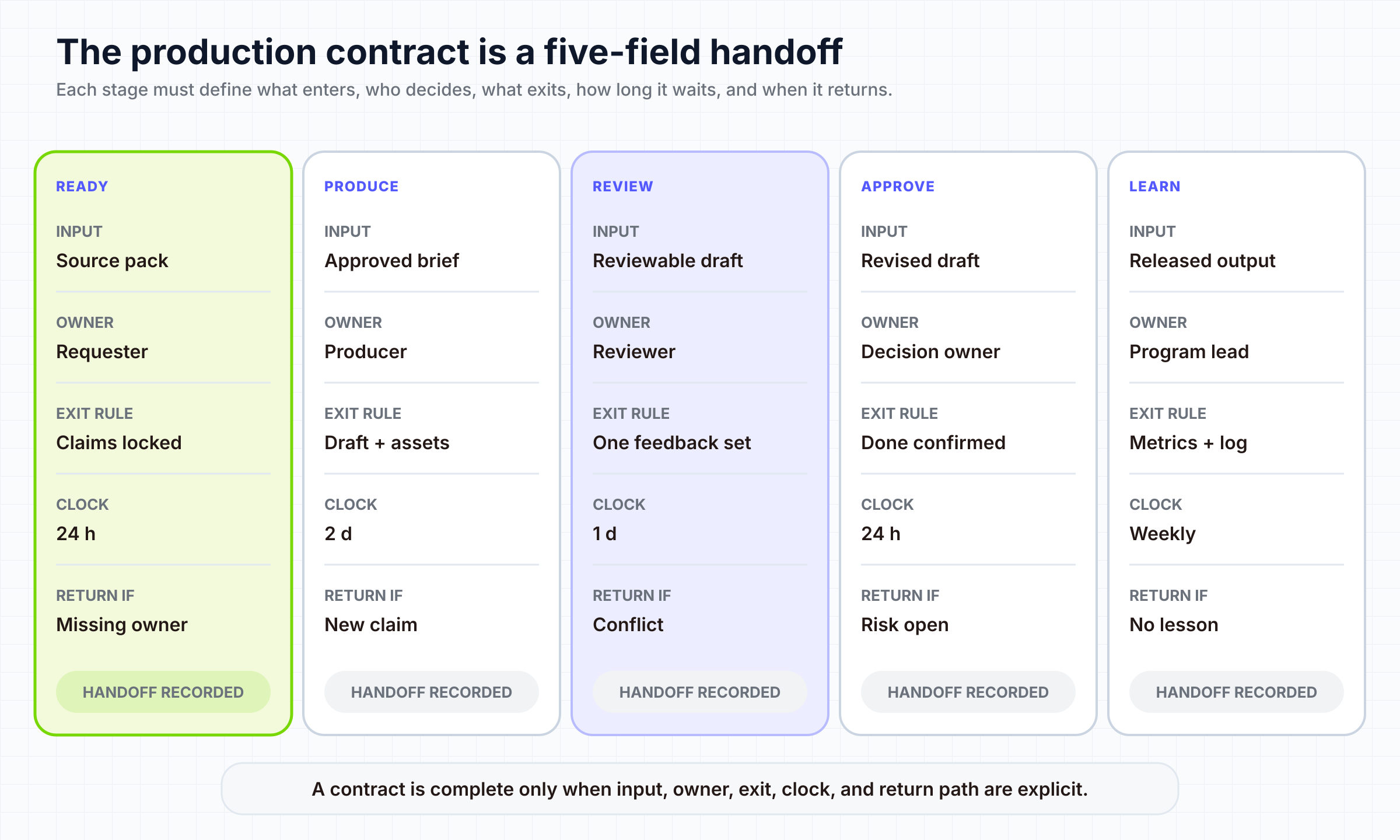
- Purpose and audience: the viewer job and the action or understanding the video should support.
- Source of truth: the approved document, release note, product page, script, or asset folder that resolves factual disputes.
- Definition of Ready: required copy, claims, screenshots, brand assets, owners, due date, output list, and known review constraints.
- Structure: the repeatable narrative blocks, not a word-for-word script.
- Locked rules: non-negotiable facts, legal language, logo treatment, accessibility requirements, and brand boundaries.
- Flexible zones: examples, pacing, transitions, visual emphasis, and other decisions the production owner may make.
- Handoff owner: one accountable person at every stage.
- Feedback destination: one place where binding comments are consolidated.
- Definition of Done: approved content, required formats, captions, filenames, storage location, and distribution handoff.
The contract should be short enough to use during real work. If it becomes a policy archive, people will route around it. Link to detailed standards instead of copying them into every format. Run a readiness check before the item enters production. If source truth is missing, the audience is undefined, or approvers have not agreed on what they own, the item stays in the input queue. That can feel slower on day one, but it prevents expensive ambiguity from entering a later stage. For visual systems, reusable scene architecture can live in a separate motion graphic design system; the production contract should reference those assets and rules without becoming their duplicate.
05
Protect quality without reviewing every decision again
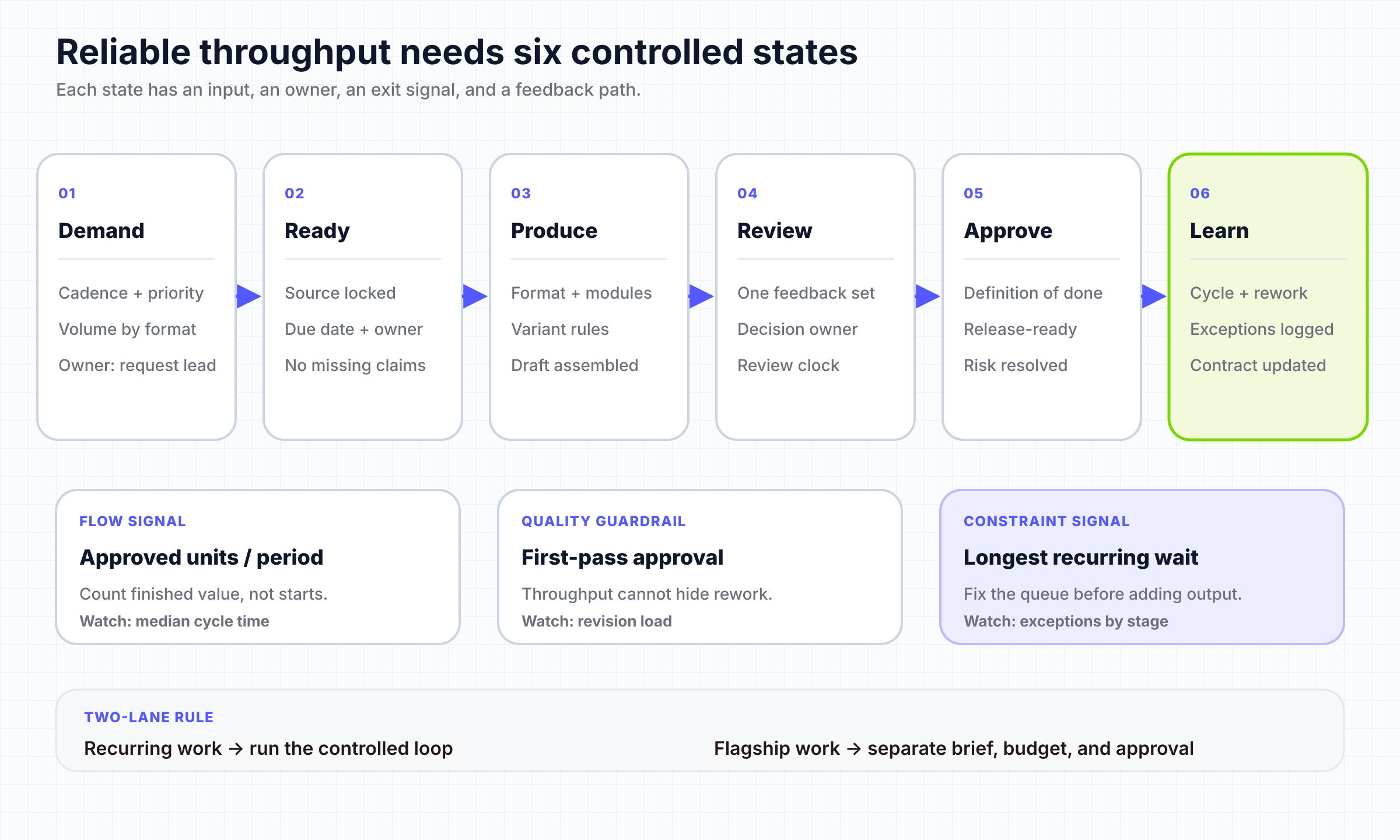
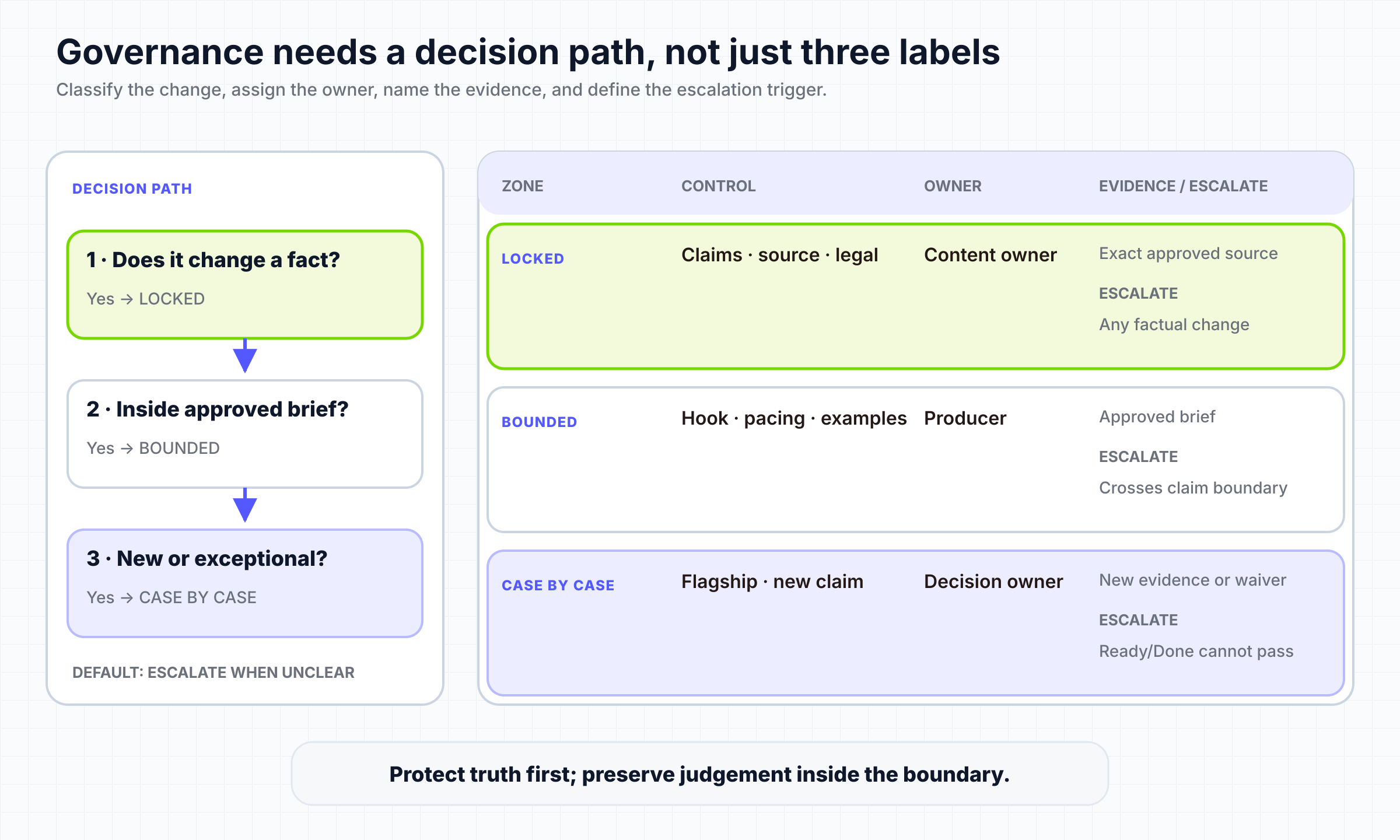
Scale fails when every video needs the same senior people to reconsider every detail. It also fails when standardization removes necessary judgment. The solution is not “more review” or “less review.” It is assigning review according to three zones:
- Locked: factual claims, legal requirements, brand identifiers, approved terminology, accessibility rules, and mandatory delivery specifications. These should have explicit checks.
- Flexible: composition, pacing, supporting examples, transitions, and other choices that a qualified production owner can make inside the format.
- Case-by-case: sensitive launches, unfamiliar claims, executive messages, novel visual treatments, or exceptions that genuinely need senior judgment.
Review source truth and structure before polish. A beautifully animated cut cannot repair an unapproved claim cheaply. Use review passes with distinct purposes: truth and scope first, structure second, visual polish third, delivery checks last. Consolidate feedback through one accountable owner so the production team receives one reconciled direction rather than competing instructions.
Track why revisions happen. “Needs changes” is not diagnostic. Use reasons such as missing input, source change, format-rule failure, execution error, preference change, or late stakeholder entry. If the same reason recurs, update the production contract or the approval design instead of treating every revision as a unique event.
06
Batch, reuse, repurpose, and automate selectively
Automation should follow stability. If the source pack, format, ownership, and acceptance rules change on every run, automation makes ambiguity travel faster. Start with the recurring format that already has the clearest contract. Reuse operates at several levels:
- Reuse approved source material instead of requesting the same facts again.
- Reuse narrative blocks, scene patterns, brand assets, and delivery settings.
- Batch tasks that share setup, such as voice review, caption checks, or output formatting.
- Create bounded variants only when the audience or channel difference is explicit.
- Automate transfers, naming, rendering, or draft creation after their rules are stable.
A tool can support one part of this system without proving that the entire operation scales. For example, TapVid's public pages describe source-led creation from prompts, PDFs, links, docs, scripts, and approved product materials. Its product demo video workflow is therefore relevant to a recurring product-update format when the source pack is already approved. That does not establish a universal throughput, quality, or cost result, and the generated draft still needs human verification. We ran one bounded TapVid test to examine that boundary: the brief specified a 45 to 60 second product-update demo, approved claims, required scenes, and explicit exclusions.
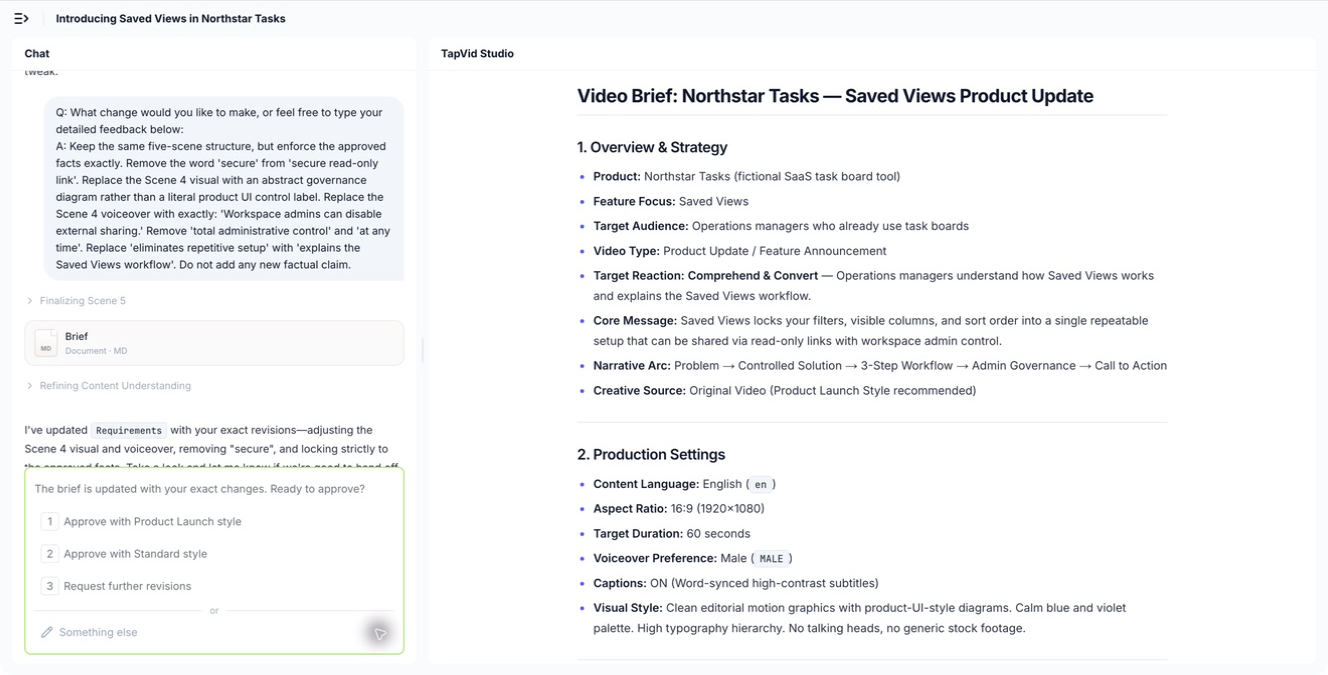
After generation, the workspace provided a second proof point: the Agent conversation remained visible alongside the Studio state, so the reader can connect the instruction history with the generated project rather than seeing an isolated output.
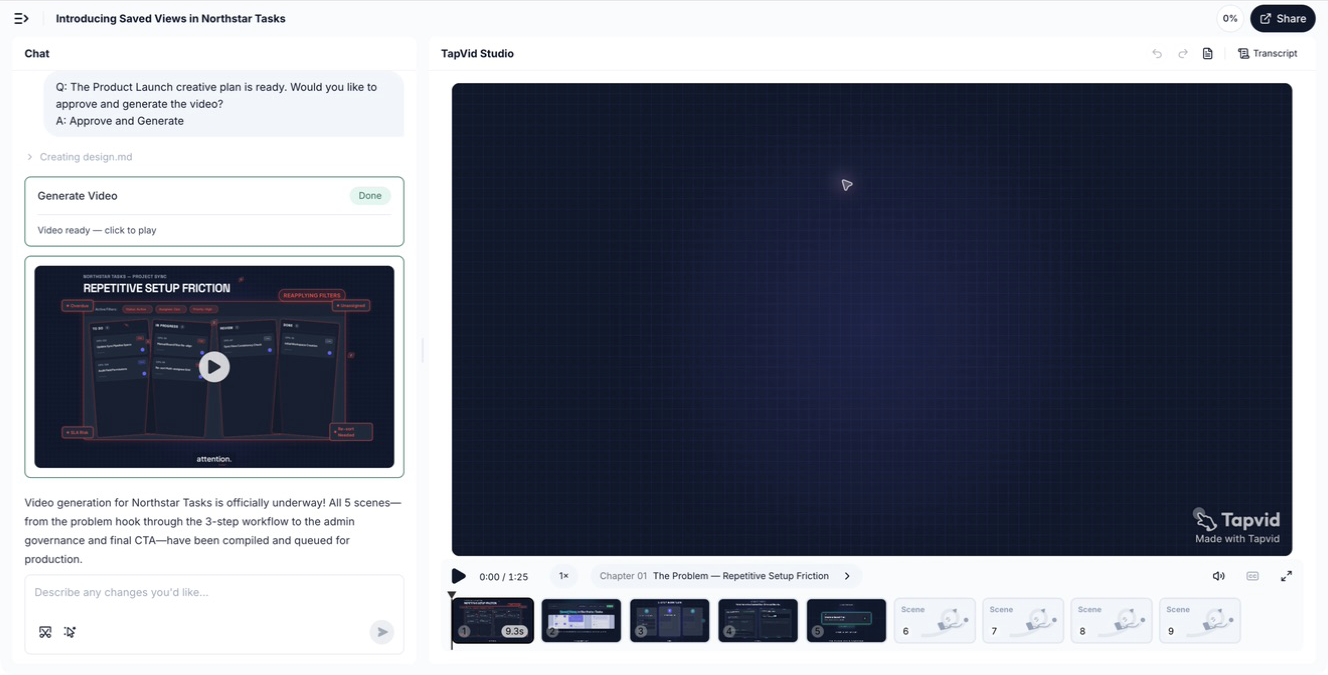
The same evidence rule applies when inspecting the video itself. The screenshot below intentionally preserves the left-side Agent conversation and the right-side Studio/video context. A clean output-only frame may look better, but it cannot prove how the result relates to the request.
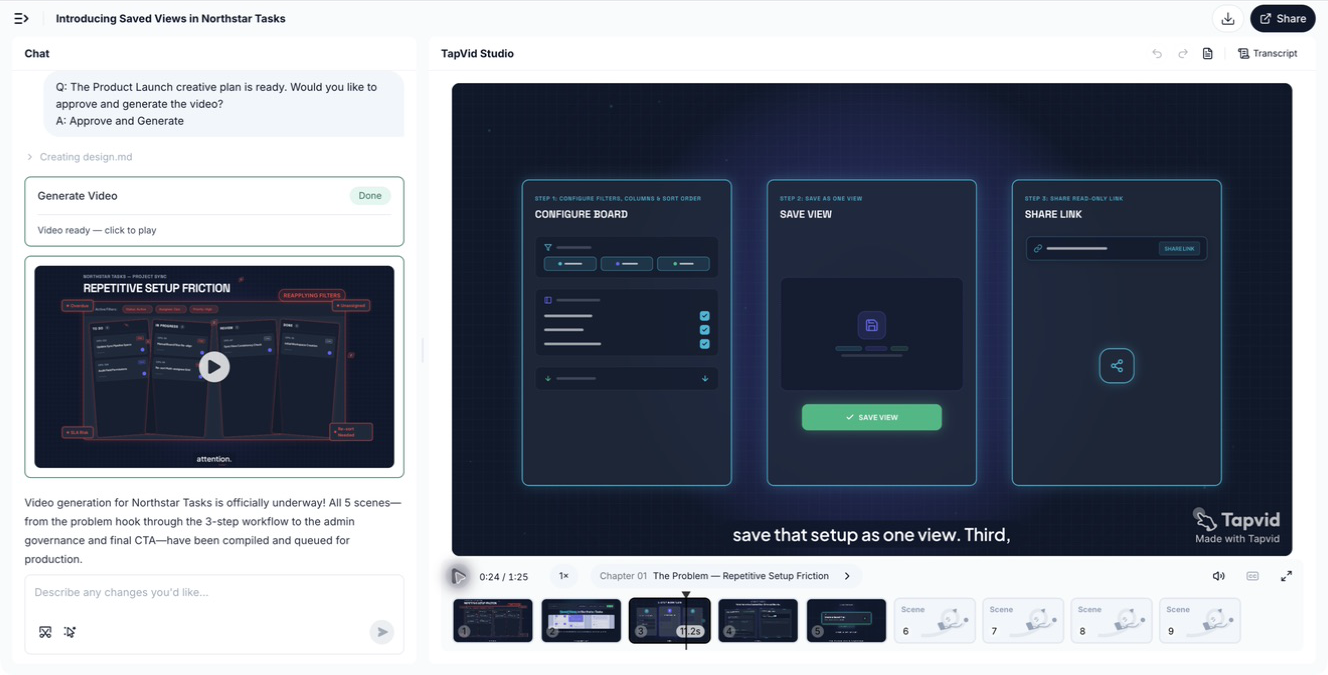
The run also shows why output verification belongs inside the operating system. The generated video was 1 minute 25 seconds, exceeding the requested 45 to 60 seconds. The early workflow sequence was usable, but around 34 seconds the narration introduced unsupported statements such as total alignment, full security, and streamlining every team sync. Those lines were outside the approved claim set.
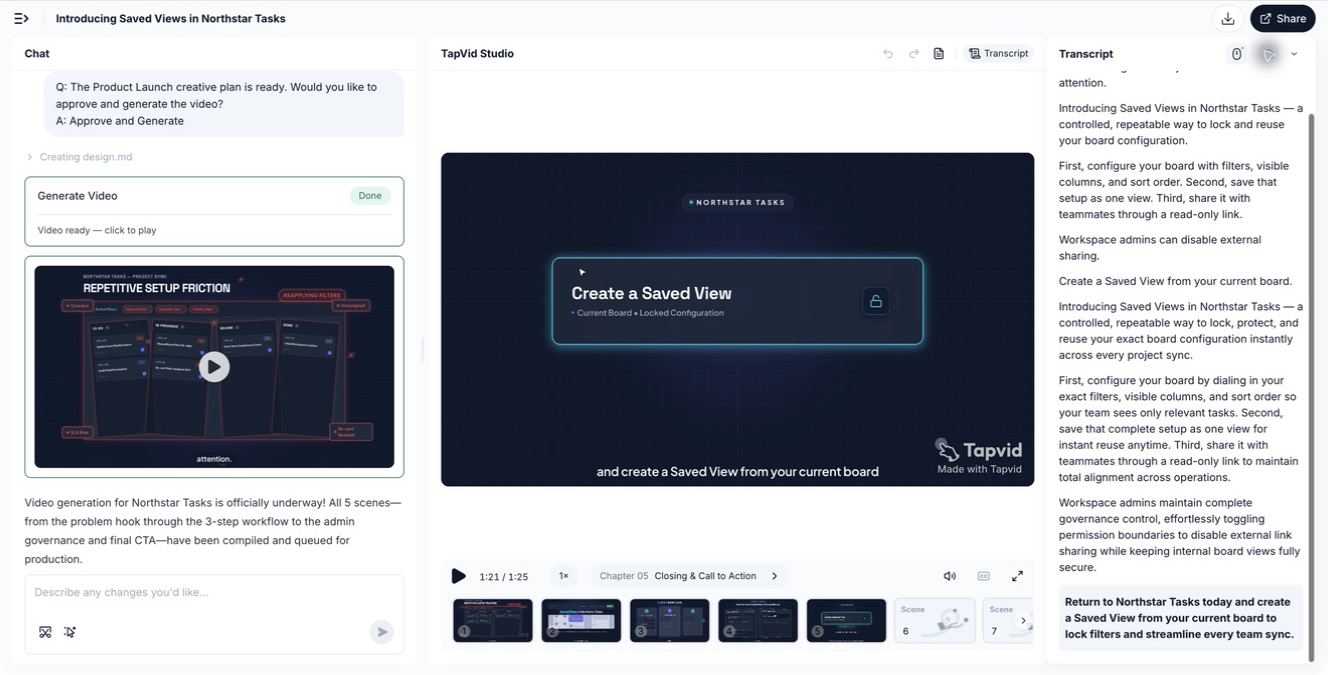
This test does not rank the product or predict another run. It demonstrates a general operating rule: automation is complete only when the output is checked against the production contract. The relevant success metric is not “a video rendered.” It is “an approved deliverable satisfied the bounded brief.”
07
Measure whether the system is actually scaling
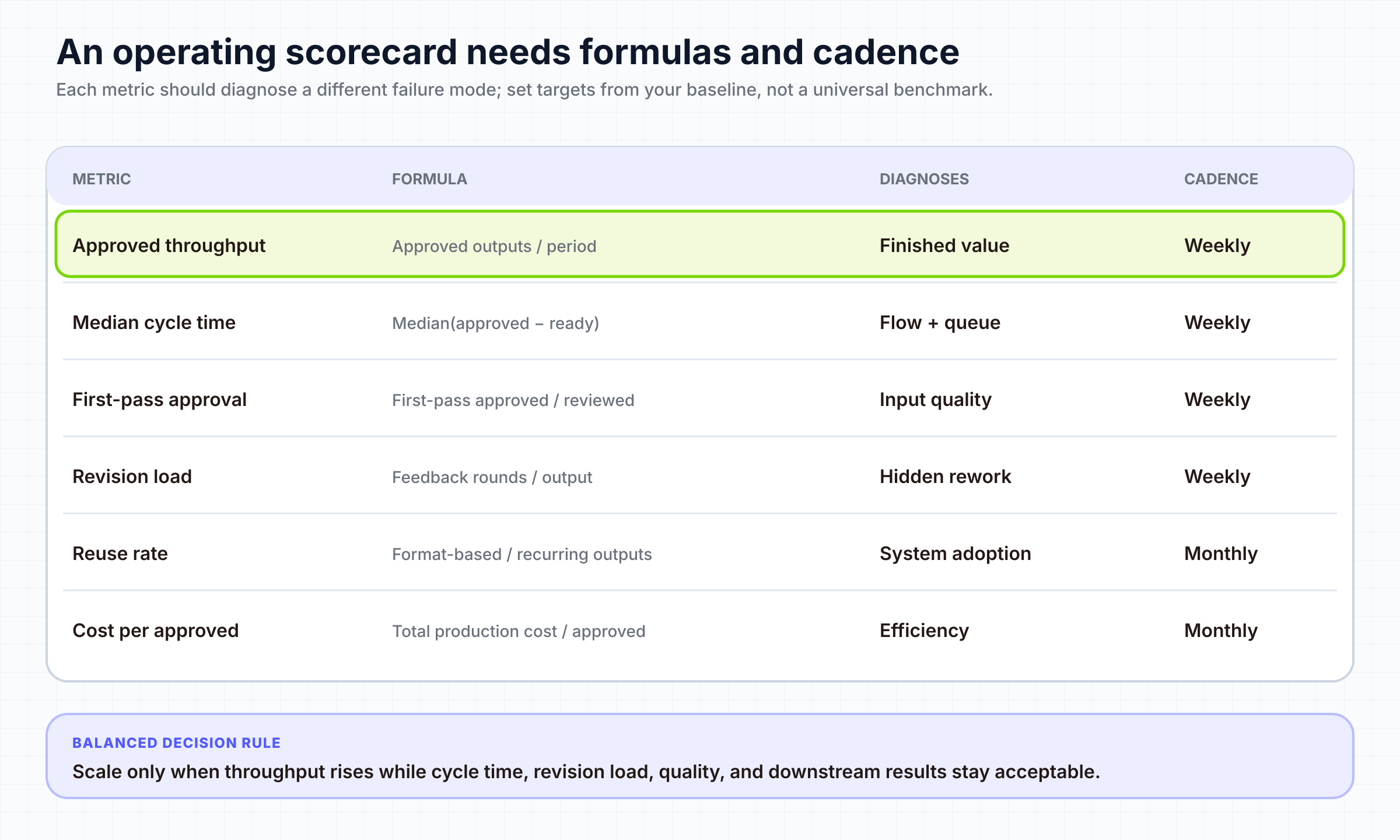
No single metric can distinguish healthy scale from faster chaos. Use a small scorecard in which each metric answers a different operating question.
- Approved throughput: How many deliverables passed the agreed definition of done?
- Cycle time: How long did a ready item take from production start to approval?
- Queue time: Where did an item wait, and for how long?
- First-pass approval rate: How often did the first review pass without a structural or factual rework cycle?
- Revision load: How much work occurred after the first review, and why?
- Reuse rate: Which approved elements were actually reused in eligible projects?
- Cost per approved deliverable: What did completed, usable output cost, not just rendered output?
- Downstream result: Did the format support its intended channel or business job?
Read the metrics together. Throughput rising while first-pass approval collapses may indicate incomplete inputs or weak review rules. Cycle time falling while downstream results deteriorate may indicate that the team optimized the wrong definition of done. Reuse staying low may mean assets are hard to find, too rigid, or not trusted. Use a rolling comparison rather than a universal benchmark, and annotate changes in demand, scope, staffing, and quality rules.
08
Install the system in 30 days
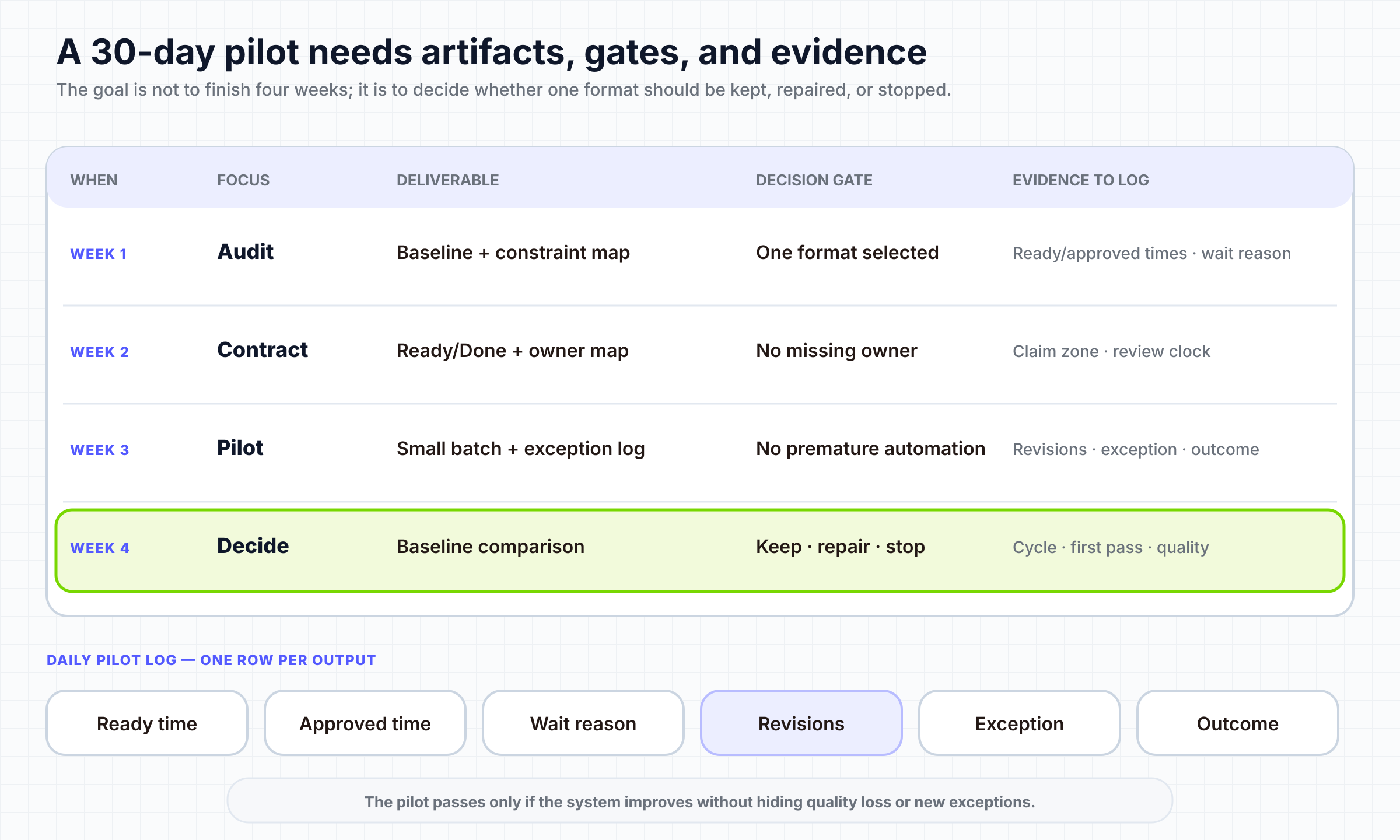
Thirty days is enough to install and evaluate one pilot format. It is not enough to transform every type of video, and it is not a guarantee of higher output. Keep the pilot narrow so you can see which operating change caused the result.
- Week 1: Observe the current system. Select one recurring format and map the last five to ten examples. Record active time, wait time, revision reasons, owners, source gaps, and approval delays. Choose the binding constraint you will address first.
- Week 2: Write the contract. Define the audience, source of truth, Ready and Done criteria, format structure, locked and flexible zones, owners, feedback destination, output requirements, and metric definitions. Confirm that the format is recurring enough to justify standardization.
- Week 3: Run a bounded pilot. Produce a small batch or one normal cycle using the new contract. Limit work in progress. Keep an exception log instead of changing the rules invisibly during production. If you use AI-assisted creation, verify the generated result against the approved source and claims.
- Week 4: Review and decide. Compare the pilot with the recent baseline. Inspect queue time, first-pass approval, revision reasons, reuse, and cost per approved deliverable. Keep rules that removed repeated decisions. Revise rules that created avoidable work. Automate only the steps that remained explicit and stable.
If your team is specifically designing a weekly AI-assisted publishing cadence, the AI video creator team playbook covers that narrower rhythm. The 30-day plan here is for the operating system around any recurring format.
At the end of the month, choose one of three decisions: expand the contract to the next similar format, run a second pilot with one changed rule, or stop standardizing because the work is genuinely too variable. “Stop” can be a successful result if it prevents a custom format from distorting the recurring system.
09
Diagnose failure from the symptom, not the tool
When a scalable video production system underperforms, start with the visible symptom and inspect the most likely operating cause.
| Symptom | Inspect first | Likely next action |
|---|---|---|
| Many projects started, few approved | Work-in-progress and approval queues | Limit starts; finish ready work; clarify the binding approver |
| Editors are busy but cycle time is long | Input readiness and feedback wait time | Strengthen Ready criteria and consolidate feedback |
| First-pass approval is falling | Source truth, format rules, reviewer roles | Separate factual, structural, and polish reviews |
| Every video becomes an exception | Format portfolio and scope boundaries | Narrow the recurring format or move the work to the flagship lane |
| Reuse rate is low | Findability, rigidity, and trust in approved assets | Improve ownership and modularity before creating more assets |
| Automation creates more corrections | Stability of inputs and acceptance rules | Pause automation; repair the production contract |
| Output rises but results weaken | Definition of Done and downstream metric | Reconnect format choices to the viewer and channel job |
| One leader reviews everything | Locked, flexible, and case-by-case zones | Delegate flexible decisions; reserve escalation for true exceptions |
The table is a diagnostic starting point, not a substitute for observation. A symptom can have more than one cause. Change one constraint at a time, preserve the baseline, and inspect the next full production cycle before declaring the fix successful.
10
Frequently asked questions
What is scalable video production?
It is an operating system that increases approved video throughput without proportional growth in coordination, rework, quality risk, or cost. It makes recurring demand, formats, inputs, owners, approval rules, reusable assets, and feedback explicit.
Should every video use a template?
No. Recurring, bounded formats benefit from repeatable structures and reusable assets. Flagship, experimental, or unusually sensitive work can remain bespoke. The portfolio should make that exception visible instead of pretending every project has the same operating shape.
When should a team add another editor or agency?
After confirming that production capacity is the binding constraint. If work is primarily waiting for approved inputs, reconciled feedback, or a senior reviewer, adding production capacity will not remove the queue.
What should be standardized first?
Start with one recurring format that has clear demand and relatively stable source material. Standardize its Ready criteria, structure, locked rules, ownership, review path, outputs, and definition of done before adding automation.
Where does AI fit in a scalable video workflow?
AI can assist bounded steps such as draft creation, transformation, or variant production when the source material and acceptance rules are explicit. Generated output must still be verified against the production contract. A successful render is not automatically an approved deliverable.
Which metrics matter most?
Begin with approved throughput, cycle time, queue time, first-pass approval, and revision reasons. Add reuse, cost per approved deliverable, and downstream results when those definitions can be measured consistently. Avoid judging scale by raw export count alone.
11
Build one reliable loop before you expand
The practical path to scalable video production is intentionally narrow: choose one recurring format, observe the real queue, translate demand into capacity, write the production contract, clarify quality decisions, run a bounded pilot, and measure approved output.
Only then decide whether the next constraint needs a person, a partner, a reusable system, or automation. If a recurring product-update demo is your pilot, you can examine TapVid's source-led product demo workflow as one possible production method, while keeping source approval, claim verification, and final acceptance in your own operating loop.
Scale the loop first. The export count should follow.