
TL;DR
Video marketing automation is not a button that turns every idea into a publish-ready campaign. It is a controlled operating system: freeze the campaign brief, generate a reviewable draft, stop at explicit human gates, rerun only the failed unit, package the approved message for each channel, release it with clear ownership, and measure both production efficiency and campaign performance. Automate repeatable transformations; keep claims, exceptions, approvals, and interpretation human-owned.
Most teams start with a tool, generate a video, and discover that the hard work has moved downstream. Someone still has to check claims, correct scenes, adapt channels, approve the release, and decide whether the campaign worked.
That is why video marketing automation is a workflow, not a single generation feature. The useful question is whether the team can move from an approved idea to measured channel outputs without losing control of the message.
This guide answers that question for small in-house teams. It deliberately does not repeat the vendor taxonomy and tool-by-tool comparison in our video automation software roundup. Instead, it focuses on the operating model around the tools: inputs, review gates, reruns, distribution, ownership, and measurement.
01
What Video Marketing Automation Actually Means
Video marketing automation is the use of repeatable rules, software, and connected handoffs to move a video campaign through production and distribution while preserving human control over consequential decisions.
The workflow begins with a marketing objective and source material, produces a campaign package rather than one isolated file, and stops at approval gates. If a team cannot identify the approved claim, channel version, or release owner, it has accelerated production without creating a reliable operation.
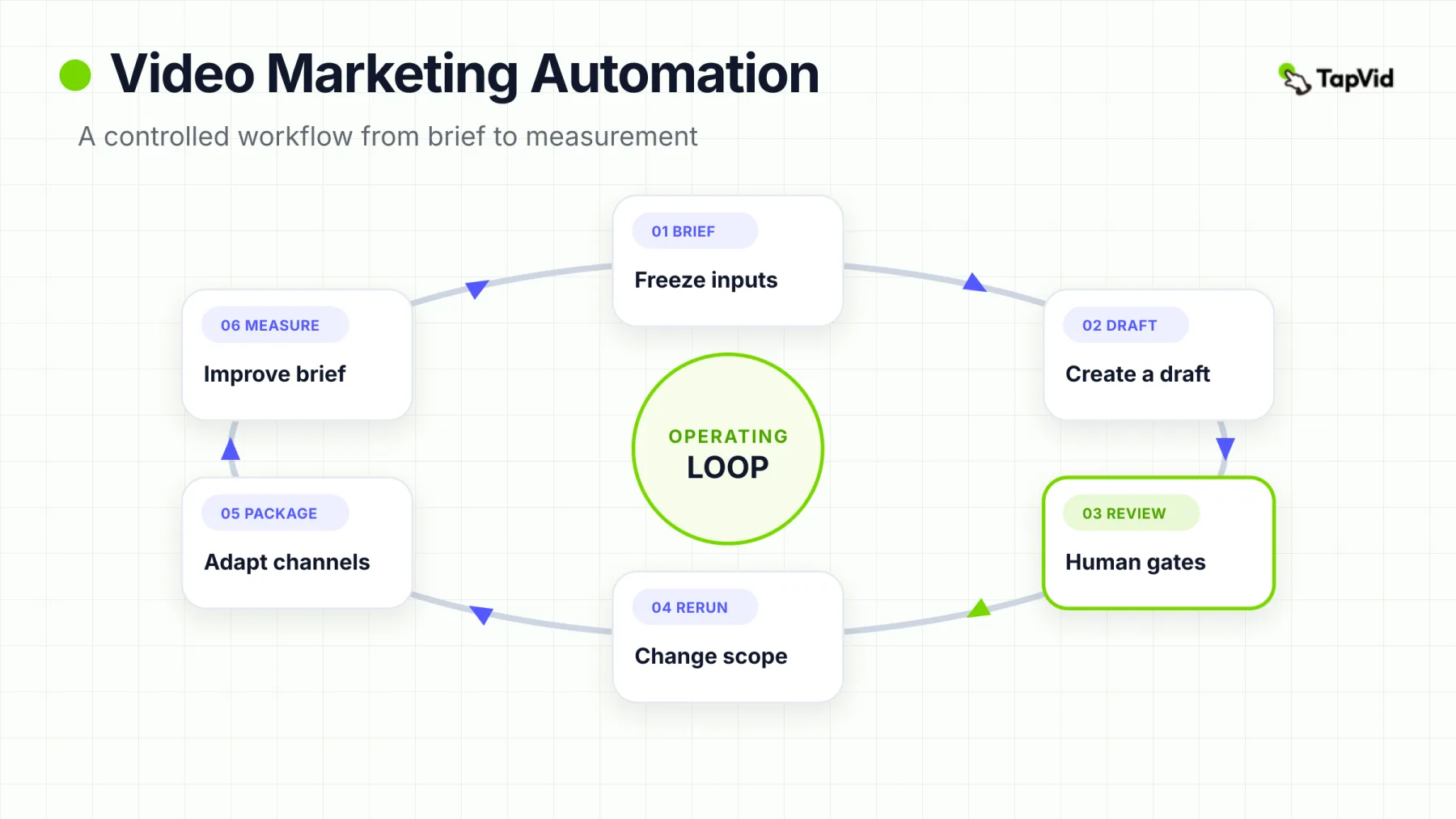
The simplest useful model is a loop:
The workflow is circular because campaign evidence should change the next brief. It should not silently rewrite an already approved asset.
Each stage has a different job. The brief defines the promise. Generation produces something reviewable. Human gates control risk. Controlled reruns protect approved work. Packaging adapts the message. Release establishes accountability. Measurement improves the next decision.
This is also the boundary between this guide and a software list. A roundup helps you choose products. An operating model tells you what the products must fit into.
02
Start With a Source-of-Truth Campaign Packet
Automation becomes unreliable when the source is ambiguous. A loose request such as “make a product video for social” forces the system—or the operator—to invent the audience, message, evidence, call to action, and channel rules. Every invented decision creates another correction later.
Before generation, freeze a compact source-of-truth packet with five elements:
The packet is small enough to reuse, but specific enough to expose missing decisions before generation begins.
- Audience: the role, situation, problem, and action the video is for.
- Approved claims: what the team is allowed to say, the proof behind it, and the limits that must remain visible.
- Source assets: approved documents, product media, brand references, and any required wording.
- Call to action: the next action and its destination.
- Channel rules: placements, formats, tone constraints, and any elements that must vary.
For the fresh TapVid run used in this guide, we preserved the exact prompt and its constraints beside the completed output. The prompt requested a 55–60 second, 16:9 English explainer; a six-step operating sequence; explicit human review gates; controlled reruns; multi-channel packaging; and measurement. It also prohibited unsupported claims and required a specific closing CTA.
Make the packet inspectable. Without an approved input to compare against, review becomes a matter of taste rather than a check against agreed constraints.
03
Generate a Reviewable First Draft, Not a Publish-Ready Asset
The first automated output should be optimized for review. That means the narrative order is visible, scenes are separable, on-screen claims can be checked, captions can be read, and the output has a stable version identifier.
Calling the first output “publish-ready” hides the distinction between generation quality and release readiness. A polished video can still contain an unsupported number, weak CTA, wrong format, or unapproved destination.
Our fresh run illustrates the distinction. The generated explainer was coherent and visually structured, but the player showed a duration of 1:05—five seconds beyond the requested upper bound. It also introduced illustrative numbers and business examples that were not present in the prompt. Those additions make the output useful for evaluating structure and visual direction, but not safe to publish without correction.
That is a successful review outcome. The workflow exposed specific failures: duration and source fidelity. It did not require a vague verdict that the whole video was “good” or “bad.”
A reviewable draft should make the central promise, source trace, failed unit, and version state obvious. If it does not, improve the review surface before increasing generation volume.
04
Put Human Review Gates Between Generation and Distribution
Human review works best as a series of named decisions, not one overloaded “approve” button. A marketer may be able to approve the hook but not the legal meaning of a claim. A brand owner may approve the visual system but not the landing-page destination. The gate design should mirror that reality.
Each gate has one accountable owner and one risk question. A contributor may comment; the owner decides whether the workflow advances.
Use four gates as a default:
- Factual accuracy: Are the claims supported, current, and within the approved limits?
- Brand consistency: Does the message sound and look like the brand without introducing an unapproved promise?
- Channel fit: Does the format work for the placement, audience context, and viewing behavior?
- Release approval: Are rights, timing, destination, tracking, and final ownership confirmed?
The fresh TapVid video included a strong visual representation of these four gates:
The strongest result frame from the fresh run. The four gates are content inside the generated explainer; this screenshot does not claim that TapVid executes those approvals.
The actual approval may live in a project tracker, content system, or release checklist. What matters is that the workflow cannot advance merely because a render exists.
05
Use Controlled Reruns Instead of Restarting the Workflow
The process is:
- 1
Record the failed gate
Record the failed gate and the exact unit affected: claim, line, scene, caption, visual, CTA, or format.
- 2
Lock approved units
Lock approved units so the rerun cannot rewrite them accidentally.
- 3
Change the smallest input
Change the smallest input that can resolve the failure.
- 4
Regenerate only the affected unit or version
Regenerate only the affected unit or version when the tooling permits it.
- 5
Re-review the changed unit
Re-review the changed unit and any dependent elements.
- 6
Attach the result
Attach the result to the same decision history.
When a review gate fails, many teams restart the entire generation process. That is fast in the moment and expensive over time. A new full render can change scenes that were already approved, which expands the review surface and creates version confusion.
A controlled rerun uses a smaller loop:
The failed unit changes; approved units stay locked. Review then covers the changed scope and any dependencies it affects.
Controlled reruns are a process principle, not a promise that every tool offers scene-level regeneration. If your software can only regenerate the full video, you can still control the workflow by freezing the approved script, specifying the failed scene, comparing revisions, and refusing unrelated changes.
Track rerun rate by failure category. Factual reruns point to the source packet; channel-fit reruns point to packaging rules; brand reruns point to weak style guidance. The category tells you which stage needs redesign.
06
Package One Approved Message for Each Channel
Multi-channel production should begin after the core message is approved. Otherwise the team multiplies an unstable draft across formats and creates several slightly different review problems.
The useful split is message invariant versus channel variables:
The promise, proof, and limits remain fixed. The hook, format, caption, CTA presentation, and destination context may change by channel.
For every channel package, define the approved master revision, hook, aspect ratio, length, caption, CTA, destination, tracking convention, owner, and release status.
The user-supplied screenshot below is the clearest frame from the same fresh run for explaining this packaging idea. It shows one approved master feeding example cards for LinkedIn, YouTube, Instagram Reels, and landing pages, with checks for hook, aspect ratio, caption, CTA, and destination.
Illustrative output inside the generated video. The channel cards and CTA labels are examples in the video—not evidence of TapVid publishing integrations, automatic distribution, or channel analytics.
This is the practical bridge between scalable production and distribution. If your team needs a broader production-capacity model, see our guide to scalable video production. If you need creative references by campaign type, use video marketing examples after the message and channel job are defined.
07
Distribute With Ownership, Permissions, and Release Rules
Distribution automation is where operational mistakes become public. The workflow therefore needs stricter controls as it approaches release, not looser ones.
Separate packaging, scheduling, and publishing even when one platform handles all three. A package can be ready while release remains blocked by rights, timing, campaign coordination, or destination review. Retain the asset and copy revisions, destination, tracking parameters, scheduled time, approver, and operator. Use least-privilege access, and define who can pause the queue and locate every live destination affected by a correction.
08
Measure Production Efficiency and Campaign Performance Separately
Teams often mix operational speed and marketing performance into one dashboard. That makes it difficult to diagnose failure. A video can be produced efficiently and perform poorly. A high-performing video can also be costly to reproduce.
Use two measurement layers:
Production metrics diagnose the workflow. Campaign metrics diagnose the message and distribution. Both inform the next brief.
Production metrics answer whether the team can deliver reliably:
- cycle time from approved brief to released package;
- review rounds by gate;
- rerun rate by failure category;
- time spent on manual corrections;
- cost per approved video or channel package.
Campaign metrics answer whether the released message created the intended action:
- attention or qualified viewing;
- click-through to the intended destination;
- conversion associated with the video touchpoint;
- qualified leads, sign-ups, or other business outcomes appropriate to the campaign;
- performance differences between channel packages.
Choose metrics that match the campaign job. Define the event and destination before release, then preserve enough version information to connect the outcome to the correct asset.
Measurement should change the next brief through an explicit decision: retain the promise but test a hook, clarify the CTA, or stop a costly format. Do not let a system rewrite approved claims merely because one variant produced more clicks.
09
Decide Where Automation Stops
The safest boundary is based on consequence, not convenience.
Automate reversible transformations. Escalate claims, exceptions, approvals, and interpretation to an accountable person.
Automation is well suited to repeatable transformations: assembling approved elements, resizing, reformatting, routing versions, creating review tasks, and tracking state. Human ownership is essential when the workflow must judge whether a claim is true, resolve an exception, accept legal or brand risk, approve a release, or interpret ambiguous performance.
A useful test is: If this decision is wrong, can the workflow reverse it without public, legal, financial, or reputational harm? The harder the reversal, the stronger the human gate should be.
A real human gate has a named owner, visible input, authority to stop the workflow, and a recorded decision. A glance after scheduling is not meaningful control.
10
A Practical Implementation Plan for a Small Team
Do not automate the entire operating model at once. Start with one repeatable campaign type and one accountable workflow owner.
Week 1: map one recent video from request to publication and record every handoff, wait, revision, and approval. Week 2: define the minimum source packet, four gates, owners, and stop conditions. Week 3: automate one reversible transformation while preserving a manual fallback. Week 4: tag failure categories, introduce controlled reruns, and establish separate production and campaign metrics.
After the pilot, ask whether ambiguity fell: reviewers can name the failed unit, approved work remains stable, and released packages trace back to one source packet.
For software selection, score products against this operating model: Can the tool preserve source fidelity? Does it produce inspectable drafts? Can the team control revisions? Does it export the formats you need? Can it fit your approval and release systems? Our video automation software guide covers the separate vendor-comparison job.
11
Where the Fresh TapVid Run Fits
The run was useful for producing and reviewing a visual first draft.
Input: The supplied workflow prompt
Setup
- In this guide's single, user-authorized run, TapVid produced a structured 1:05 motion-graphics explainer from the supplied workflow prompt.
Observed
- The output gave us useful frames for human gates and channel packaging, and it preserved the prompt in the run history.
- It also exceeded the requested duration and added unsupported illustrative numbers elsewhere in the video.
- It does not establish publishing integrations, automatic distribution, measurement, scene-level reruns, or performance outcomes; those require separate evidence.
The run was useful for producing and reviewing a visual first draft.
Hands-on setup receipt from the fresh run. Captured from the completed run history, it proves the requested input—not a pre-submit state.
That is exactly how first-hand product evidence should appear in a marketing workflow guide: specific input, observable output, visible limitations, and no expansion from one run into a universal claim.
12
Common Failure Modes
Common Failure Modes
- Automating before the brief is stable scales ambiguity and review rounds.
- Treating a render as approval ignores claims, rights, brand, destination, and timing.
- Regenerating everything after one failure changes approved work and expands review.
- Letting channels rewrite the promise creates message drift and weak comparisons.
- Publishing without a reversal plan turns corrections into a search across destinations.
- Mixing workflow and campaign metrics hides whether the problem is production, message, or both.
13
Frequently Asked Questions
The goal is not a fully automatic content machine. It is a dependable system in which the repeatable work moves quickly and human judgment appears exactly where it matters.
What is the difference between video automation and video marketing automation?
Video automation covers technologies that automate parts of video creation or handling. Video marketing automation covers the campaign workflow: approved inputs, generation, review, revisions, packaging, release, and measurement.
Should a small team automate video publishing?
Only after permissions, approvals, destinations, tracking, and a pause procedure are reliable. Start with reversible preparation and routing; add publishing when the team can identify the approved asset and stop the queue safely.
How many human review gates do we need?
Four is a useful default: factual accuracy, brand consistency, channel fit, and release approval. One person may own several gates, but the decisions should remain separate.
What should trigger a controlled rerun?
A specific failed claim, line, scene, caption, visual, CTA, format, or destination. Preserve approved units, change the smallest relevant input, and re-review the changed scope.
Which metric should we track first?
Start with one production metric and one campaign metric: for example, cycle time from approved brief to release and the conversion event at the intended destination.
Can AI remove human review from video marketing?
AI can reduce repeatable transformation work, but claims, exceptions, rights, release approval, and ambiguous results still need accountable human owners.