
TL;DR
A useful brand storytelling video is a bounded story, not a compressed company profile. Choose one audience and one belief shift, find a protagonist with something real at stake, document the change, connect the resolution to the brand through observable action, and map every beat to approved facts and owned assets. Protect names, dates, numbers, quotes, and product material from creative rewriting. Approve the master story before making channel cuts.
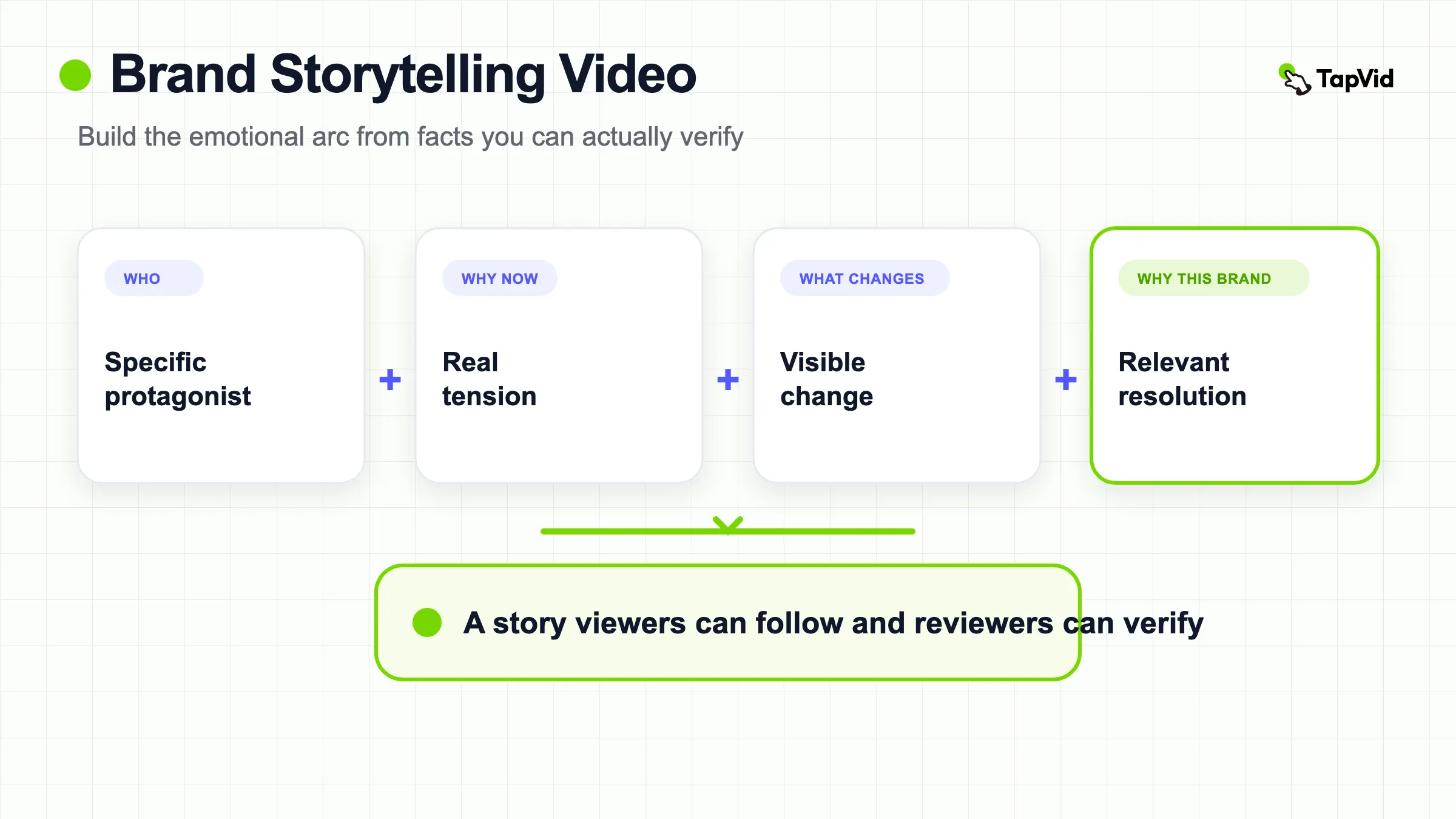
A brand storytelling video uses a specific protagonist, real tension, visible change, and a brand-relevant resolution to help viewers understand what a brand stands for through observable action. It is not a values list with music, and it should never invent a founder history, customer result, mission, or emotional claim that the source material cannot support.
Turn an approved brand script and owned assets into a reviewable video
01
What a brand storytelling video is
A brand storytelling video communicates meaning through events rather than only through claims. Someone wants or protects something, encounters a constraint, makes a choice, and reaches a changed state that connects naturally to the brand. The brand may be the enabler, the standard, the community, or the worldview around the action. It does not have to be the hero. In fact, putting the logo at the center of every beat often weakens the story because the viewer has no human perspective from which to experience the change.
The format can use a founder, employee, customer with permission, craftsperson, partner, community member, or even the life of an owned object as the protagonist. What matters is specificity and evidence. “We believe in quality” is a claim. A person repairing and continuing to use a product over years is an observable story about quality. The video earns emotion by showing an honest tension and consequence. Music, editing, and cinematography can amplify that experience, but they cannot create a truthful event where none exists.
02
Brand story versus company profile and product video
Adjacent formats can look similar while answering different viewer questions. A company profile answers: who are you, what do you do, and why should I trust your organization? It may use team footage, milestones, capabilities, leadership, and facilities. A product video answers: what does this product do, how does it help, and what should I do next? It relies on product behavior, features, use cases, or a demonstration. A brand story asks: why should this audience care about the way this brand acts, and what belief should change after watching?
Use the company profile video guide when organizational identity and credibility are the main decision. Use the promotional video examples when the job is campaign attention and a time-bound next step. Use a product video when the mechanism itself must be visible. A brand story may contain the company or product, but those elements serve the narrative. The comparison below prevents a common failure: calling a chronological list of achievements a story simply because it has a voiceover and emotional music.
03
Choose one audience and one belief shift
Start with the viewer, not the company timeline. Name one audience, what they currently believe, what evidence could change that belief, and what they should understand afterward. “Everyone should see that we care” is too vague. “Independent retailers should understand that our repair program is a working operating practice, not a sustainability slogan” creates a story boundary. The audience determines which protagonist, tension, proof, and channel make sense. A different audience may require a different story even when the brand facts remain the same.
Write a story contract: after watching, this audience should believe this bounded idea because they observed these actions and consequences. Then add exclusions. State which customer outcomes are not established, which markets differ, which founder memories are unverified, which partner names lack permission, and which policy wording must remain literal. This is not bureaucracy. It protects the creative team from filling evidence gaps with plausible but invented details, and it gives reviewers a precise standard beyond “it does not feel on brand.”
04
Find the protagonist, tension, change, and resolution
A protagonist gives the viewer a point of view. Choose someone or something that can be observed pursuing a goal. Tension is the real obstacle, tradeoff, or uncertainty that makes the outcome matter. Change is the visible difference between the beginning and end. Resolution shows what the change means and why it connects to the brand. These elements can be quiet. A small business owner adapting a workflow, a repair technician extending a product’s life, or a designer protecting a detail can carry a stronger story than a dramatic claim with no evidence.
Avoid manufactured conflict. Do not exaggerate a routine inconvenience into a crisis, turn a customer into a fictional composite without disclosure, or script vulnerability the participant did not offer. Ask non-leading questions about events: what happened, what made it difficult, what options existed, what changed, and what evidence remains? Let the source determine the arc. If there is no meaningful tension or change, choose a company profile, product explainer, or process film instead of forcing the material into a story shape.
05
Build an evidence map before the script
Create an evidence map with story beat, proposed line, fact type, source, owner, date, permission, protected wording, visual asset, and status. Literal facts include names, dates, numbers, prices, model names, quotes, legal text, policies, and measured outcomes. Owned evidence includes original interviews, archival images, product footage, locations, documents, UI, and approved customer material. Narrative framing can connect those facts, but it must not silently alter them. Mark any unresolved line as blocked rather than adding a confident voiceover.
Protect three layers of accuracy. Asset fidelity keeps logos, products, people, UI, and archival material recognizable rather than redrawing them into something else. Information fidelity keeps approved wording and factual detail from being rewritten for drama. Correct correspondence ensures the narration, image, and subject refer to the same event, person, product, and time. The layered model below leaves room for creative pacing, music, and motion while keeping the evidence-bearing parts literal. Reviewers can then separate a factual problem from a creative preference.
06
Write scenes from actions, not adjectives
Open on a concrete situation that contains the story question. Show the protagonist doing something, encountering the constraint, or making a choice. Move through action and consequence. Replace “we are committed to craftsmanship” with the behavior that demonstrates the standard. Replace “our customers are transformed” with a specific, permissioned event and the evidence that shows what changed. Use narration to connect what the camera cannot establish, but do not let narration outrun the source. If a line cannot be shown or sourced, narrow it.
Keep brand appearance proportional to the story. A product may enter when it changes the protagonist’s options. A founder may explain a decision if the memory is documented and relevant. A logo can close the meaning rather than interrupt every scene. The final call to action should match the viewer’s stage. A brand story may lead to learning more, reading the practice behind the film, or seeing a related product. Do not bolt on a hard sales promise that the story never established. The resolution should feel earned by the events already shown.
07
Learn from Patagonia Worn Wear as a bounded example
Patagonia’s official Worn Wear film follows people and the long-lived garments connected to their work and lives. The protagonists are specific, the tension comes from use, wear, repair, and a culture of replacement, and the resolution connects durability and continued use to the brand’s Worn Wear position. The film is not a TapVid output, and this article does not claim it caused a particular commercial result. It is useful because the brand meaning emerges from people, objects, and observable practices rather than a list of values.
Watch how patient scenes, interviews, archival context, and worn products carry evidence. The film does not need to announce a value in every sentence because viewers can infer it from repeated behavior. The transferable method is to find an owned practice that makes a brand belief visible. A smaller company can apply that method with a narrower scope: one person, one setting, one product or decision, and one documented change. Do not imitate Patagonia’s tone or subject if your brand has different evidence. Borrow the discipline, not the surface.
08
Create a reviewable story brief and scene plan
Turn the evidence map into a brief with audience, belief shift, protagonist, tension, change, resolution, brand role, protected facts, source assets, permissions, channel, owner, and exclusions. Then build a scene plan with beat ID, narration, on-screen text, source ID, intended action or motion, evidence role, timing, and reviewer. The scene plan should make correspondence visible before a costly shoot, edit, or render. Each reviewer should know whether they own facts, rights, narrative, product, brand, or channel delivery.
Approve the story in stages. Strategy approves the audience and belief shift. The fact or legal owner approves evidence, quotes, names, dates, and permission. Production maps each beat to the correct source. Channel owners approve captions, crops, context, and the final action. TapVid can support an asset-led version of this workflow when the story uses an approved script and owned product material, exposing the outline for review before output. It is an Explainer Video Engine, not a documentary crew, and it cannot capture an interview or event that does not exist.
09
Produce the master, then adapt it by channel
Review one master story before creating short cuts. Watch it once for narrative clarity, once for factual accuracy, once for source correspondence, once muted with captions, and once at the smallest intended display size. Check names, titles, dates, quotes, product identity, pronunciation, subtitles, releases, music and footage rights, CTA, and end-card context. Preserve the version that was approved and a decision log. If a factual correction changes the meaning of a scene, reopen the relevant story decision rather than hiding it with a faster edit.
A short channel cut must preserve the evidence that supports its emotional claim. Removing setup can make a participant’s quote misleading. Cropping can remove the action that explains the change. A localized voiceover can change tone or timing. A vertical edit may need a different opening, but it should not invent a stronger conclusion. Build a derivative map from the approved master, record which beats each cut uses, and review every new caption and CTA. Distribution is part of storytelling because context changes what the same scene appears to claim.
10
Brand storytelling video checklist
Before scripting, confirm one audience, one belief shift, a specific protagonist, real tension, observable change, a brand-relevant resolution, verified sources, permissions, protected wording, and exclusions. Before production, map every beat to an owned or authorized asset and assign reviewers. Before delivery, verify the story, facts, people, product, captions, crops, rights, CTA, and channel context. After release, preserve the master, source map, approvals, derivative map, and the conditions that would make the story outdated or misleading.
The aim is not maximum emotion. It is earned meaning. A truthful brand story lets viewers infer what the brand stands for from choices, consequences, people, products, and practices they can see. No format or tool can ensure attention, trust, or commercial performance. The practical standard is simpler: the story is specific, the evidence is traceable, the protected facts remain literal, the scenes correspond to the script, and the final video says no more than the source can support.
What makes a good brand storytelling video?
A specific protagonist, real tension, observable change, a brand-relevant resolution, evidence-bearing assets, and a clear audience belief shift. Craft should amplify the story without inventing facts.
How is a brand story video different from a company profile video?
A brand story uses events and change to express meaning. A company profile primarily explains who the organization is, what it does, and why it is credible.
Does the founder need to appear?
No. Use the protagonist whose real actions best carry the story. That may be a customer with permission, employee, partner, craftsperson, community member, product owner, or the life of an object.
Can AI create a brand story from a short prompt?
It can help structure approved material, but it cannot verify history, permission, quotes, outcomes, mission, or emotional truth. Human owners must supply and approve the evidence and the final output.