
TL;DR
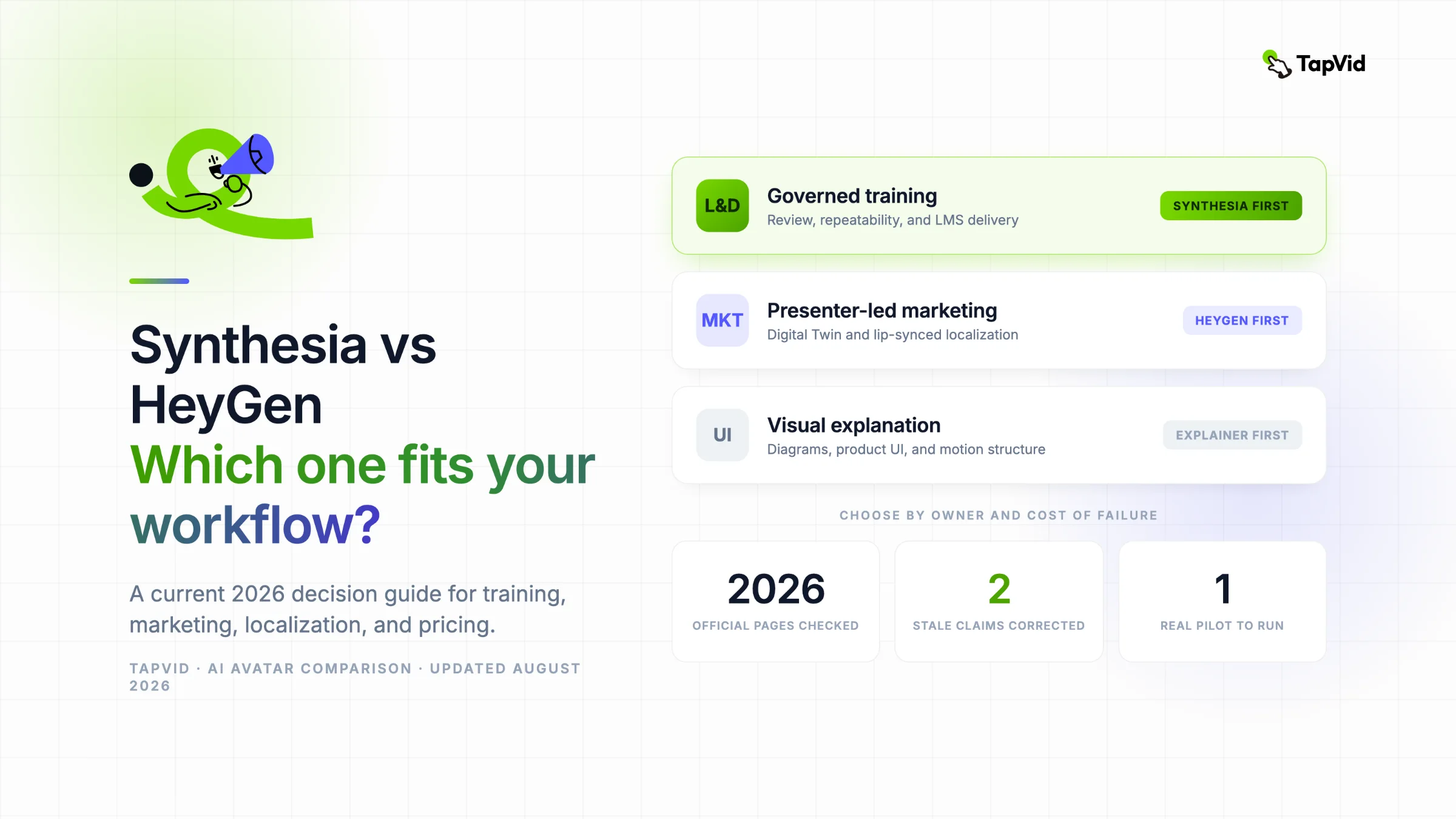
Choose Synthesia first for governed training, onboarding, and repeatable L&D production. Choose HeyGen first for expressive marketing, personal digital twins, and lip-synced localization. Choose neither if your source material needs diagrams, product UI, and motion graphics more than an on-screen presenter. Both vendors now use credits on self-serve plans, and both support SCORM on eligible plans, so many older comparisons are no longer reliable.
The best answer to Synthesia vs HeyGen is not a universal winner. It is a workflow decision. Synthesia is built around structured business video production, while HeyGen puts more weight on presenter performance, personal avatars, and translation. An L&D team usually worries about review, permissions, localization, and LMS delivery. A marketing team may care more about brand fit, a reusable founder Digital Twin, and multilingual campaign adaptation. This comparison uses official pricing and help documentation checked on August 7, 2026. Plan limits change often, so treat every dollar amount, credit allowance, and plan-gated feature as a dated fact. Before buying, run one real script through the exact plan you are considering.
Turn existing content into an explainer video with TapVid
01
Before You Compare, Decide Whether the Video Needs a Presenter
Start with one question: does a person on screen carry part of the message?
An avatar platform makes sense when a presenter helps deliver trust, consistency, identity, or instruction. That can include compliance training, executive updates, customer education, personalized sales outreach, or multilingual spokesperson content. In these jobs, the presenter is not decoration. The face, voice, framing, and delivery are part of the output.
An avatar-first workflow is a weaker fit when the information itself needs to do the explaining. A product walkthrough may need interface crops and cursor movement. A technical concept may need a diagram. A research summary may need charts, source labels, and visual comparisons. A finished PDF or article may need scene structure and motion graphics more than a face reading a script.
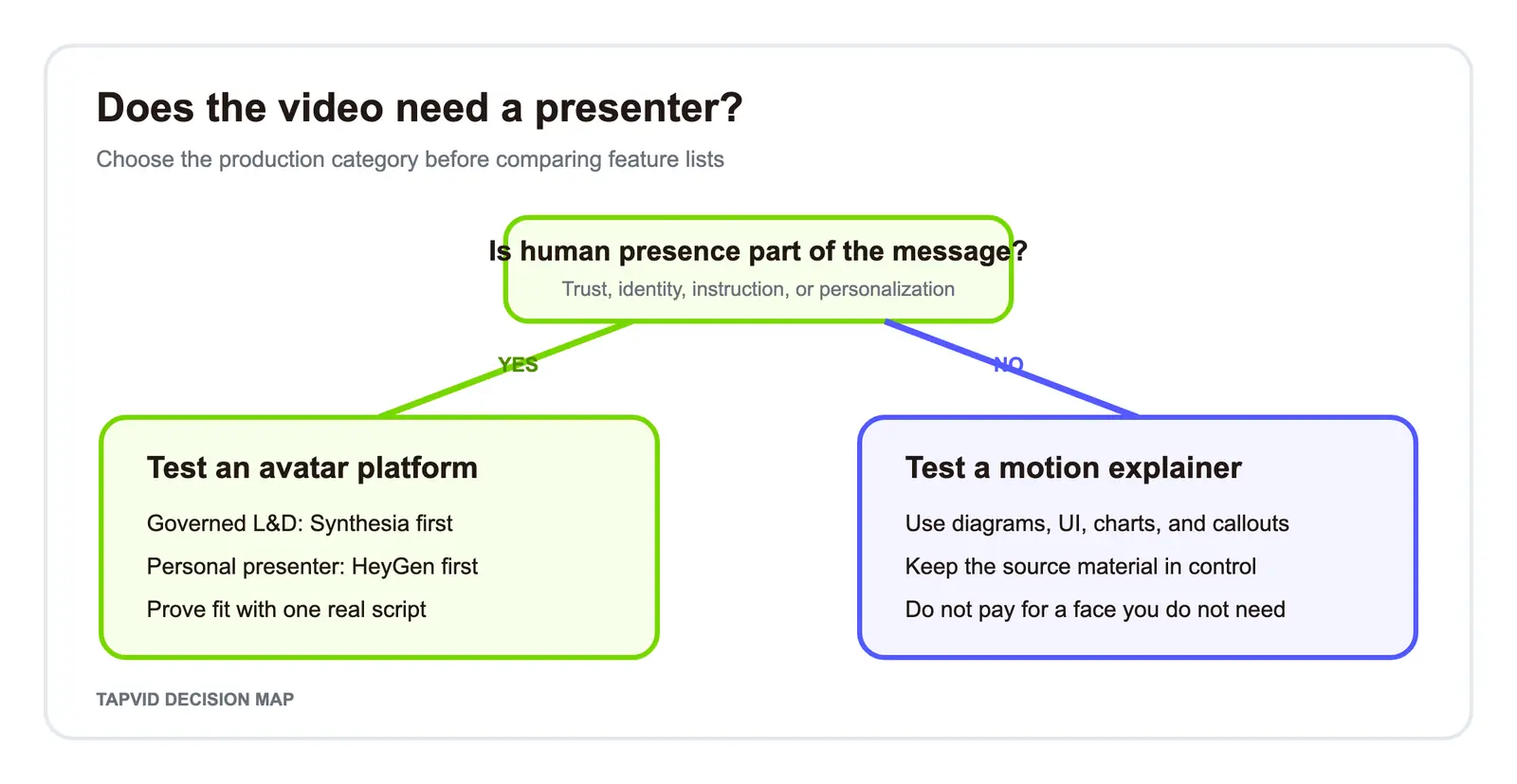
This category check prevents a common buying mistake. Teams compare avatar libraries, voice counts, and monthly prices before deciding whether an avatar belongs in the video at all. If the presenter is optional, the better comparison may be avatar video versus motion explainer, not Synthesia versus HeyGen.
02
The 60-Second Synthesia vs HeyGen Decision Map
Use the table below as a first-pass routing tool. It does not replace a pilot, but it tells you which platform should receive the first test.
| Owner | Required output | Main failure cost | First tool to test | Deciding proof |
|---|---|---|---|---|
| L&D | Repeatable training across teams and locales | Review or delivery failure | Synthesia | One approved module through the real review and LMS path |
| Compliance | Controlled instruction with clear ownership | Rights, access, or version drift | Synthesia | Permission review plus a dated export test |
| Marketing and social | Presenter-led campaign creative | Flat delivery or weak brand fit | HeyGen | One real campaign script with the intended presenter |
| Sales personalization | Reusable representative or founder presence | Low authenticity or slow personalization | HeyGen | A Digital Twin sample with approved consent and channel rights |
| Localization | Translated presenter video | Lip-sync, voice, or terminology errors | HeyGen first, then compare | One required language reviewed by a native speaker |
| Product education | UI, diagrams, and process explanation | Viewer cannot follow the mechanism | Neither avatar-first | A motion-led scene plan using the real product source |
The phrase "first tool to test" is intentional. HeyGen now lists business controls such as workspace collaboration, SAML/SSO, SCORM export, and LMS integrations on eligible plans. Synthesia also supports use cases beyond training. A department label alone does not settle the purchase. The table identifies the leading hypothesis, then the pilot must prove it.
03
What Changed in 2026 and Why Old Comparisons Can Mislead You
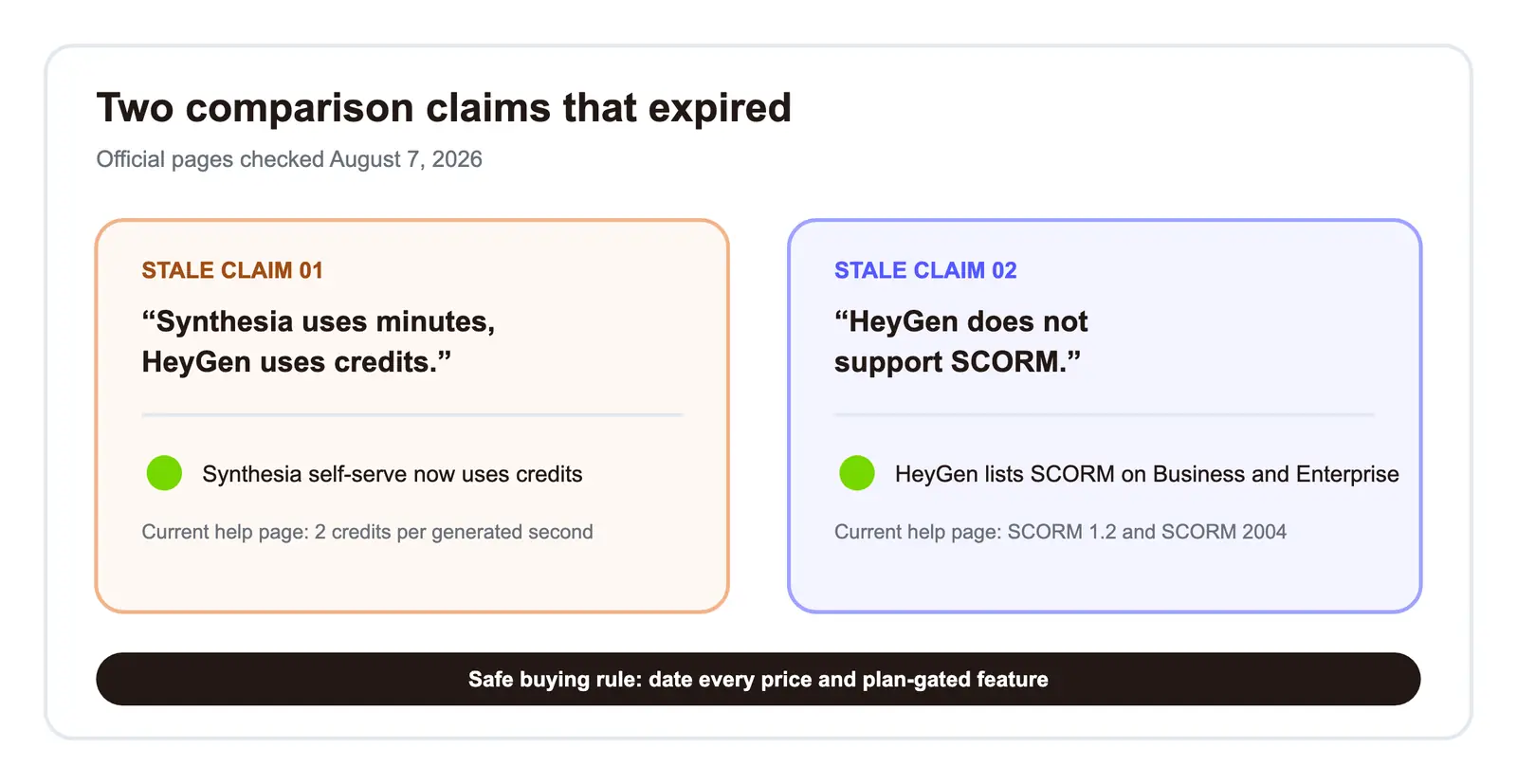
Several high-ranking comparisons still repeat claims that are no longer safe.
First, Synthesia's self-serve system is now documented in credits. The current Synthesia credits help page says Basic and Starter include 1,200 credits per month, Creator includes 3,600, and generated video uses two credits per second. That means the old shorthand "Synthesia uses minutes while HeyGen uses credits" is stale. Both products require a credit-aware cost calculation, even though their rules and included allowances differ.
Second, HeyGen now documents SCORM export for Business and Enterprise, including SCORM 1.2 and SCORM 2004. The claim "HeyGen has no SCORM" is also stale. Synthesia may still be the first platform to validate for a governed L&D workflow, but the case must rest on the whole production and review path rather than an exclusive checkbox.
Third, free and paid allowances have changed. Synthesia's pricing page currently lists Basic at $0, Starter at $29 per month, Creator at $89 per month, and Enterprise as custom pricing. HeyGen's pricing page currently lists Free, Creator, Pro, Business, and Enterprise. Its Free plan allows three videos per month up to one minute, while Creator displays $29 per month with 600 credits. HeyGen also lists Pro at $49, and Business starts at $149 plus a per-seat charge on the current page.
These figures are useful for screening, not for forecasting. Credits can be consumed by different features, and a plan may gate the export, collaboration, translation, or avatar type that your workflow needs. Put a verification date beside every plan number in your buying memo.
04
A Fair Same-Brief Pilot for Both Platforms
A useful comparison holds the content constant and lets product differences remain visible. Do not normalize away the controls that make each platform different.
Use one script, one aspect ratio, one language, one presenter brief, and one export target. For example:
Every customer request needs one owner and one next step. Start by opening the request dashboard. Assign the teammate responsible for the reply. Add a short resolution note, then set the next review date. Before closing the request, confirm that the customer can see what happens next. A clear owner, a clear note, and a clear date prevent work from disappearing between teams.
Set both projects to 16:9, US English, a neutral professional stock presenter, the closest available waist-up framing, a neutral stock voice, a minimal business scene, and captions when the tested plan permits them. Do not use a voice clone or upload brand assets. Export at the highest level available without buying an upgrade during the test.
Record seven things:
- Which requested controls are available on the tested plan.
- How many material decisions are required before generation.
- Whether the exact script is retained.
- Whether pauses, framing, and pronunciation survive generation.
- How many edits or regenerations are needed before acceptance.
- Which export and sharing options are actually visible.
- How many credits are consumed by the accepted result, including discarded attempts.
Do not turn one sample into a permanent realism ranking. Ask a narrower question: which tool produces an acceptable version of the team's real video with less risk and cleanup?
Score against acceptance thresholds: instruction fidelity 25 points, presenter delivery 20, editing and regeneration 15, rights and governance 15, export and delivery 15, and total cost 10. Set the minimum score and automatic failures before opening either editor. This keeps a polished demo from outweighing a hard requirement.
Use two reviewers. The workflow owner checks setup, revision, approval, and delivery; a representative viewer checks clarity, tone, pacing, and trust. Add a native-language reviewer for translated work. Score separately before discussing gaps, and use neutral file names when practical to reduce brand bias.
What the fresh Free-plan test showed
On August 7, 2026, both products received the exact 63-word script in the same controlled Chrome environment, using stock presenters and voices with no brand upload or paid upgrade.
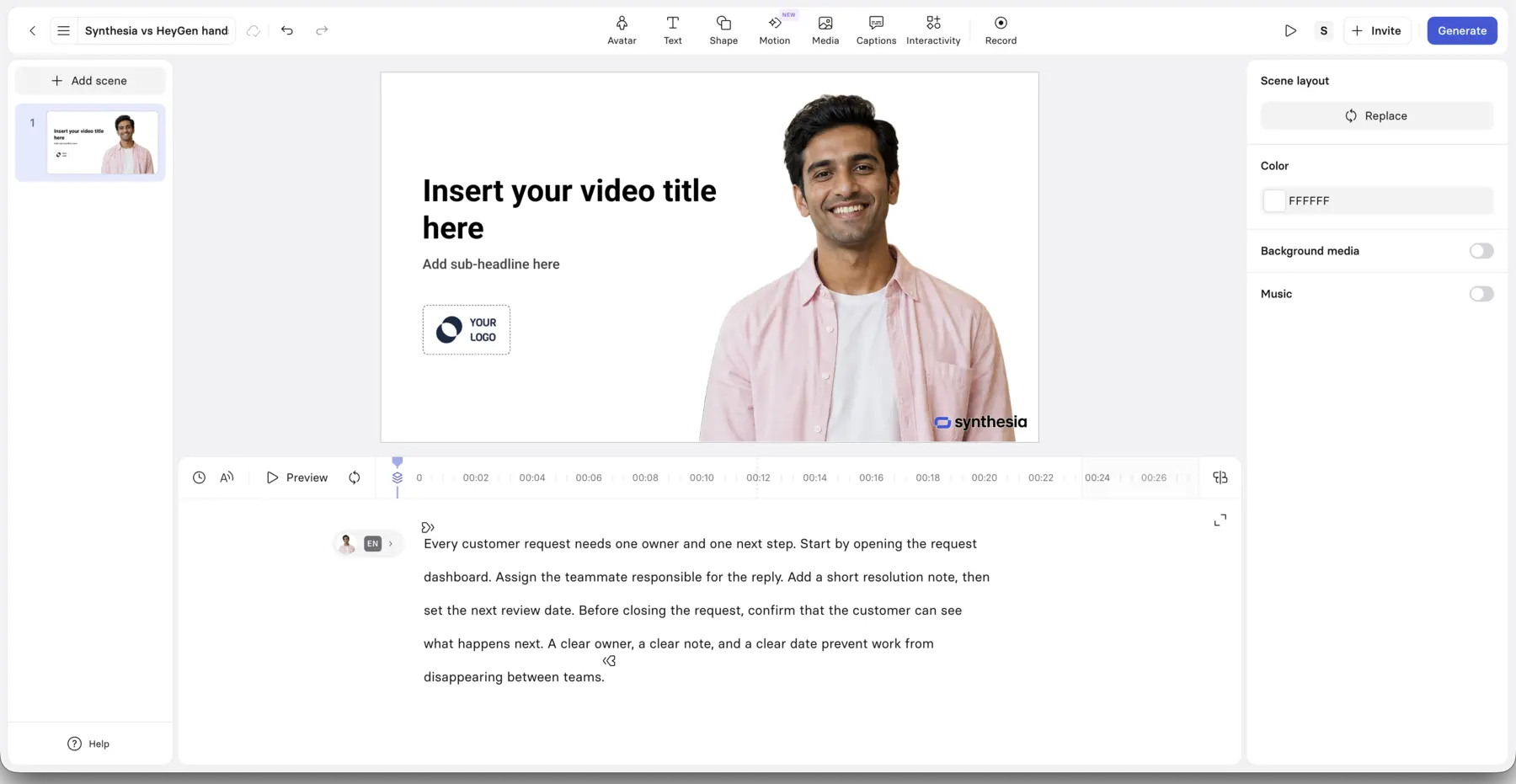
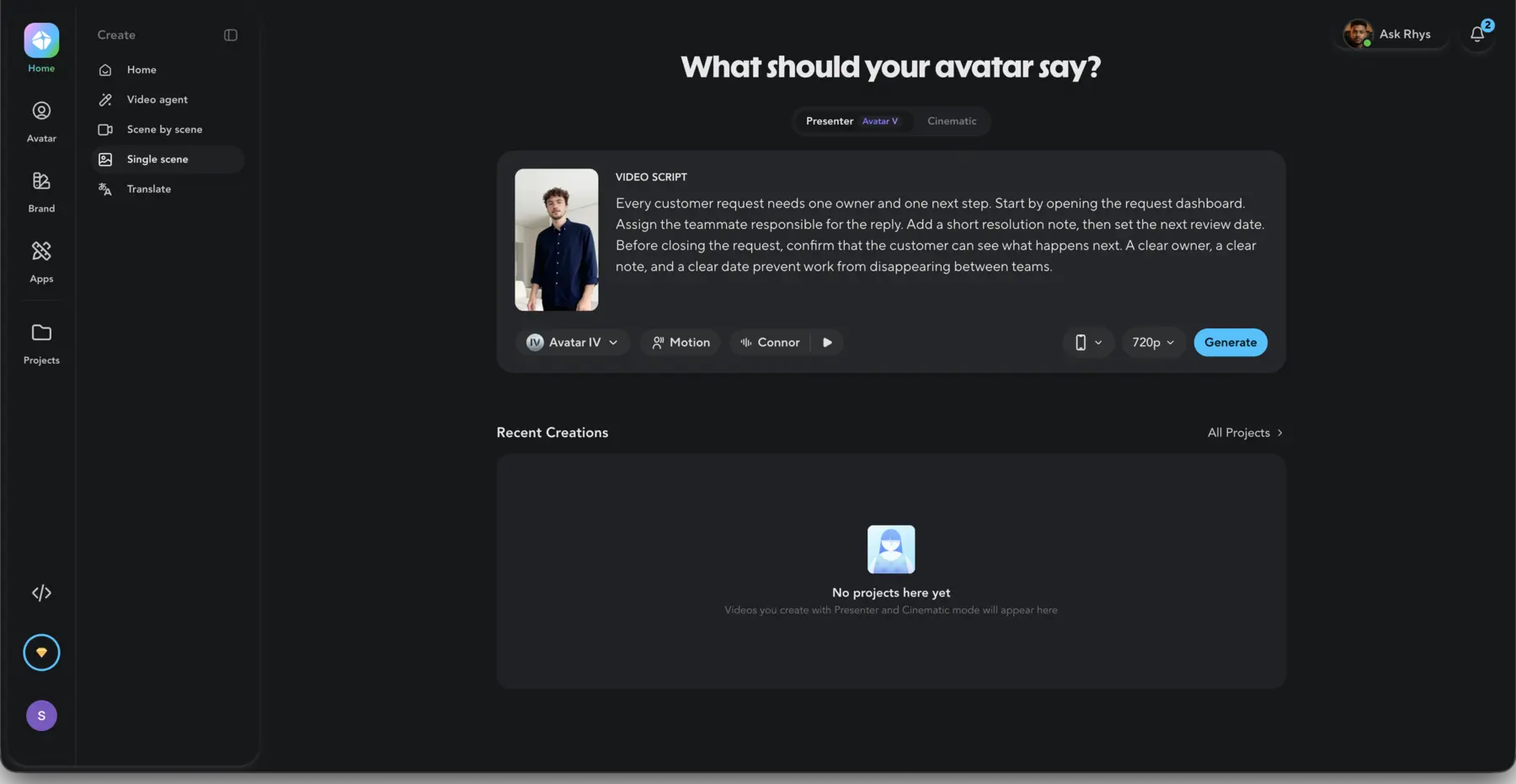
Synthesia's Free workspace exposed a 16:9 scene editor, stock presenter, US English voice, timeline, captions, and generation dialog. It retained the script, accepted burned-in captions, and reached a completed-video page. The tested state placed downloads and watermark removal behind an upgrade boundary; this is not a claim about every account.
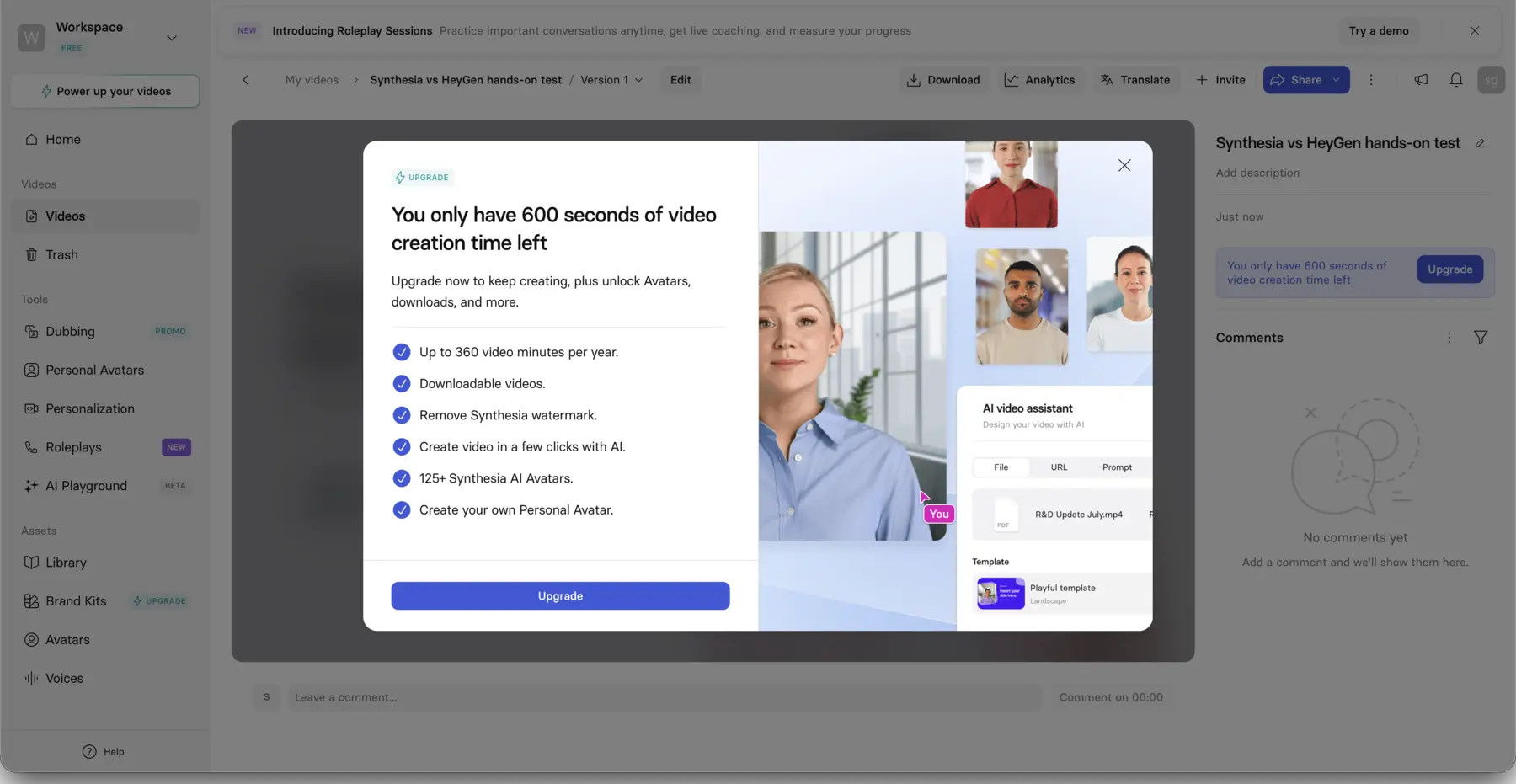
HeyGen's Free plan displayed three one-minute videos per month with standard processing. Its Single scene route put stock Connor, Avatar IV, a stock voice, the exact script, and 720p in one card. The accepted render completed at 24 seconds. Playback quality was not scored, so no lip-sync, realism, gesture, or pronunciation ranking follows.
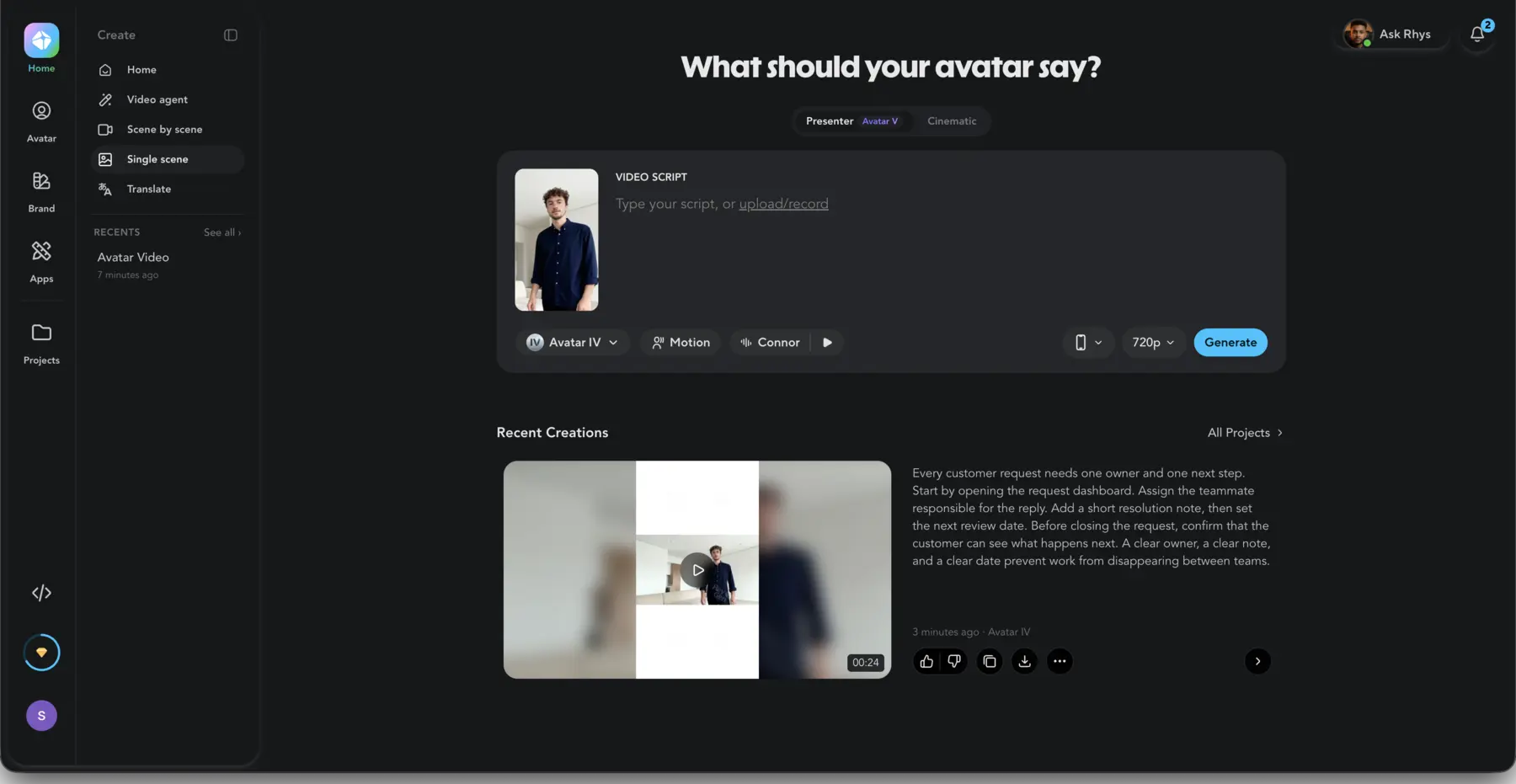
The useful difference was workflow shape: Synthesia exposed more scene and timeline surfaces, while HeyGen offered a compact presenter path. That identifies the first interface to pilot, not a quality winner.
05
Choose Synthesia When Governance Matters More Than Presenter Personality
Synthesia is the stronger first test for teams that treat video as a controlled business asset. Its official product material centers training, onboarding, internal communication, sales enablement, support, product or process explanation, and localization. The value is not simply access to an avatar. It is the ability to build a repeatable production system around many videos, reviewers, languages, and owners.
That fit is clearest in L&D. A training team often needs a stable template, predictable scene structure, controlled edits, and a clean handoff into an LMS. A manager may need to update one policy line without reshooting a person. A localization owner may need the same approved module in several languages. Procurement may ask who can edit, who can approve, and which plan includes the required controls.
Synthesia's current avatar page lists more than 240 stock avatars and more than 160 languages. Counts are not quality scores, but they matter when a team needs coverage across regions and roles. The buying test should still use the exact language and avatar type required for production.
There is also a rights detail that deserves attention. Synthesia's avatar-type guide says some stock avatar types cannot be used for promotional content because of legal restrictions. Do not assume that every avatar shown in the editor is suitable for every campaign. Check the rights attached to the chosen avatar and the intended channel.
Synthesia is probably your better first pilot when:
- The team owns a repeatable training or onboarding library.
- Review, access, and version control matter more than a highly personal presenter style.
- The same approved content must move across languages.
- The final video needs to fit an established L&D or internal communication process.
- Procurement wants a structured business workflow rather than a creator-first tool.
If the pilot fails on delivery style, pricing, or a required control, broaden the search with this guide to Synthesia alternatives. Keep that broader discovery separate from the binary decision on this page.
06
Choose HeyGen When Presenter Performance Is the Product
HeyGen is the stronger first test when the presenter is a brand asset. That includes founder-led marketing, creator communication, personalized outreach, localized campaign video, and workflows built around a reusable personal avatar.
HeyGen's Digital Twin workflow is the clearest dividing line. Its current Avatar IV documentation describes a personal avatar built from a short video and notes one Digital Twin slot for Free users. A personal avatar changes the production question. The team is no longer choosing only from a stock library. It is deciding whether a known person can become a repeatable, consented presenter across many scripts.
That can be valuable for sales and marketing, but it also creates a higher rights burden. The person must understand how the avatar will be used, where it may appear, who can generate with it, and how access is removed. A technical capability does not replace a consent process.
HeyGen also deserves the first translation test when lip-synced localization is central. Its video translation documentation describes audio-only dubbing and lip-synced video dubbing, accepts files or supported links, and allows up to ten target languages in one job. That is a strong workflow claim, but it is still vendor documentation. Run the required locale, then have a native speaker review terminology, timing, names, and tone.
HeyGen is probably your better first pilot when:
- A founder, creator, executive, or representative should remain visually recognizable.
- Marketing performance depends on presenter energy and brand fit.
- The team wants a personal Digital Twin rather than only stock avatars.
- Lip-synced localization is a central production step.
- Personalized outreach needs many versions of a presenter-led message.
If the pilot proves that an avatar is the wrong format, use the HeyGen alternatives for explainer videos guide to examine broader production categories.
07
Synthesia vs HeyGen Pricing: Calculate Cost per Usable Minute
Sticker price is a poor comparison because the accepted output may require several generations. Calculate cost per usable minute instead:
(subscription allocation used + paid top-ups + regeneration usage + external cleanup cost) / accepted final minutes
Consider a hypothetical 10-minute training module. Suppose the first draft consumes an allocation equivalent to 10 minutes, pronunciation fixes require two partial regenerations, and an editor spends 45 minutes cleaning captions and scene timing. The subscription price is only one input. The real cost includes consumed credits that never appear in the final module and the labor required to make the output usable.
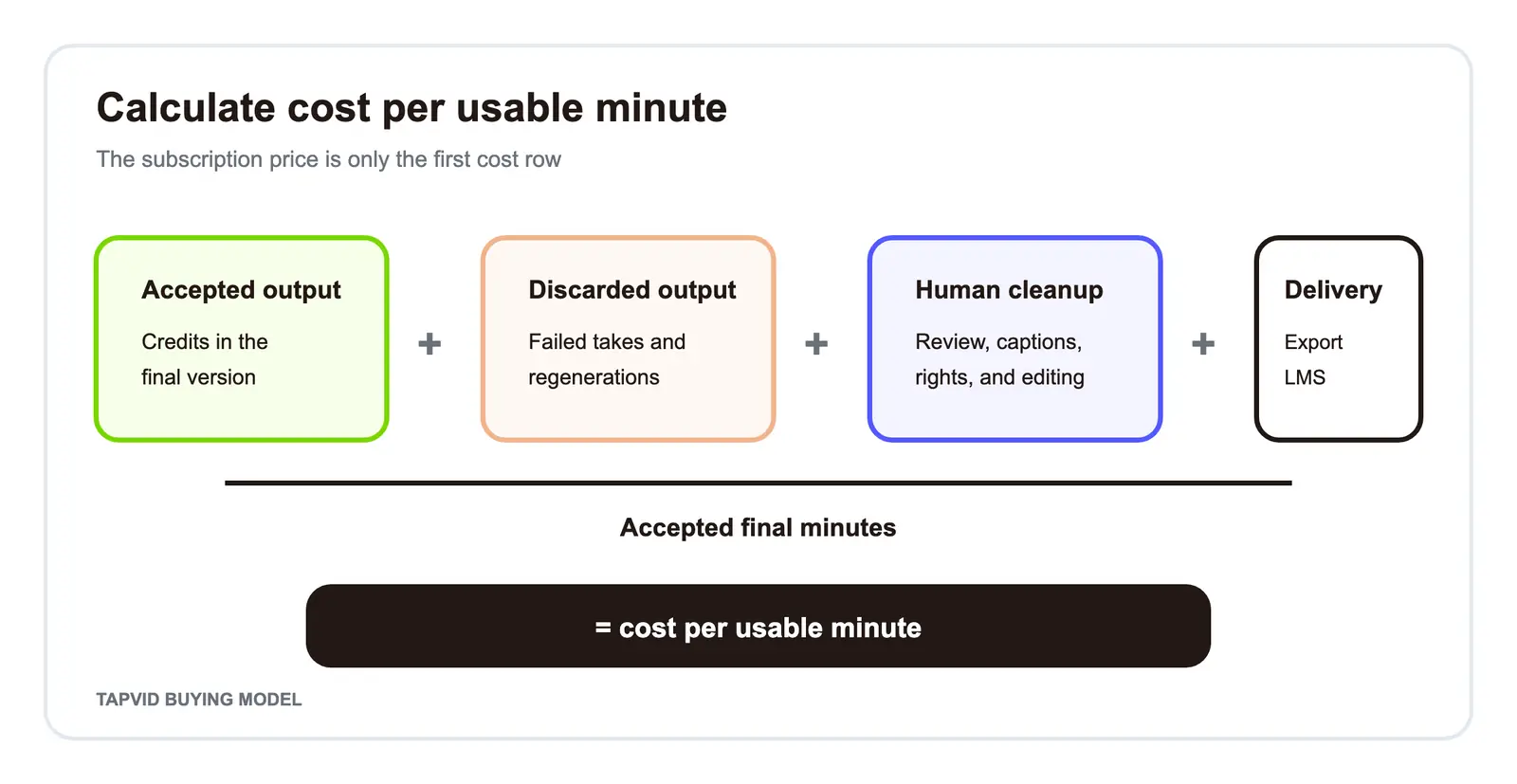
Use four rows in your cost sheet:
| Cost row | What to record | Why it matters |
|---|---|---|
| Accepted generation | Credits used by the final version | Establishes the base cost |
| Discarded generation | Credits used by rejected drafts or scenes | Reveals regeneration overhead |
| Human cleanup | Review, pronunciation, captions, rights, and editing time | Converts tool cost into production cost |
| Delivery | Export, SCORM, storage, approval, and LMS work | Captures plan and handoff costs |
Then add one risk row: the cost of a failed output. For internal training, a late approval may matter more than presenter expressiveness. For a campaign, a presenter who feels off-brand may make the asset unusable even when generation was fast. The best-value tool is the one that reduces the expensive failure for the owner.
08
Rights, Consent, and Procurement Questions to Ask Before You Buy
Avatar video combines software procurement with media rights. Check both.
Ask these questions before a pilot becomes a production system:
- Is the chosen avatar stock, personal, generated, or custom?
- Can that avatar be used in promotional content and paid advertising?
- Who supplied consent for a personal avatar, and how is that consent recorded?
- Can a cloned or stock voice be used in the intended market and channel?
- Who owns uploaded scripts, images, recordings, and brand assets?
- Which employees can create, review, export, and remove projects?
- Does the required plan include SSO, role controls, comments, or audit support?
- How long does the vendor retain uploaded and generated data?
- What moderation rules can block the planned topic or format?
- Does the LMS require SCORM 1.2, SCORM 2004, or another delivery path?
Do not compress this into a yes-or-no "commercial use" question. Rights can vary by avatar type, asset, plan, market, and channel. Document the exact presenter, voice, destination, and owner. This article is not legal advice, and a platform feature page is not a substitute for reviewing the applicable terms.
09
When Neither Tool Is the Right Category
Choose neither avatar platform when the source needs visual explanation more than presenter delivery.
Imagine that you already have a product article, policy PDF, process document, or finished script. The viewer needs to understand relationships, steps, interface states, or cause and effect. A face can narrate those ideas, but it may occupy the frame without helping the viewer see the mechanism.
That is the category where an Explainer Video Engine fits. TapVid turns a creator-owned prompt, PDF, link, or script into an explainer video with motion graphics. Its AI explainer video generator is designed for existing content that needs scene structure, motion graphics, and voiceover. It is not scored here as an avatar competitor because it solves a different job.
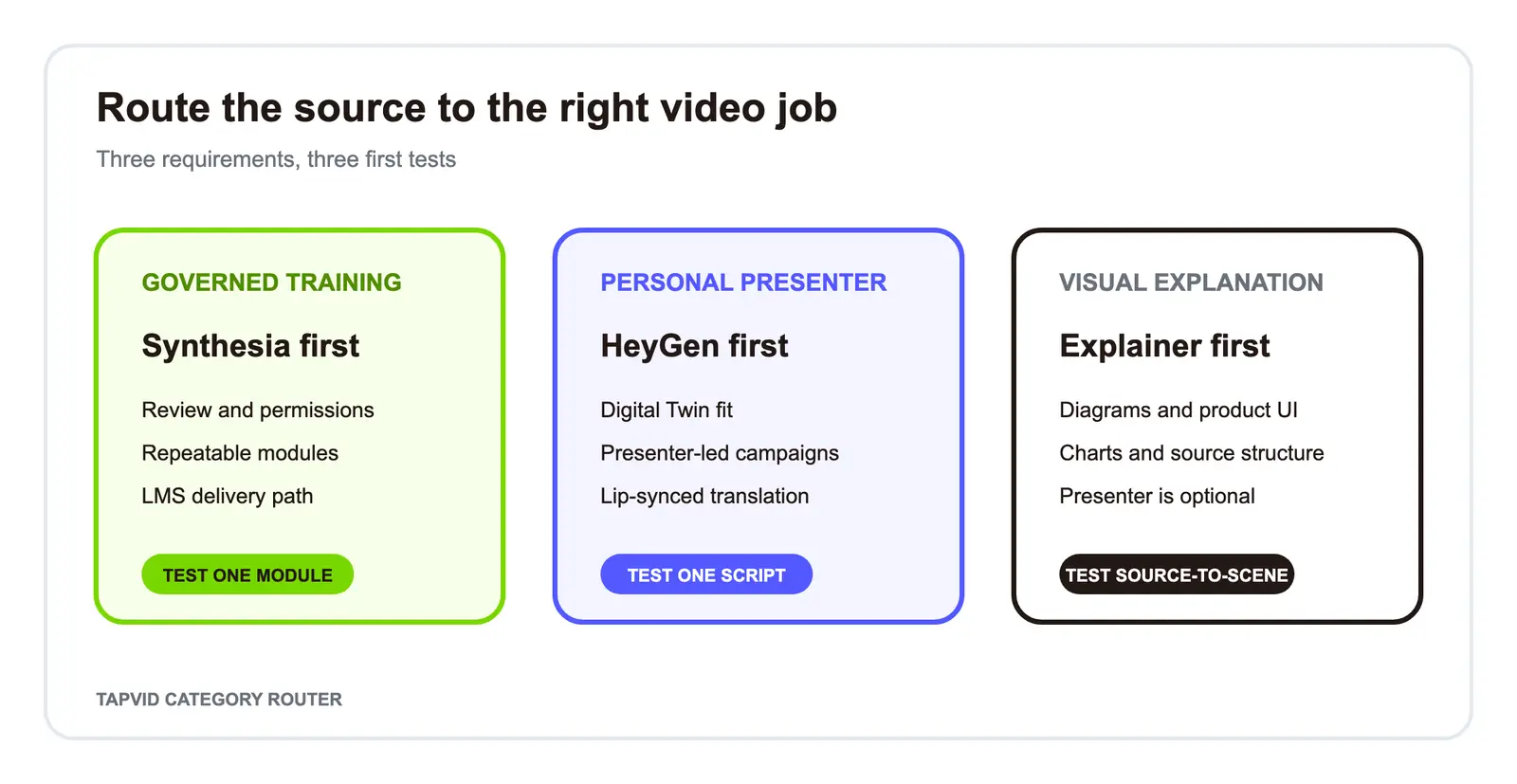
Use this routing rule:
- If human presence is required, compare Synthesia and HeyGen.
- If a known person's identity is required, validate HeyGen's Digital Twin workflow first.
- If governed training production is required, validate Synthesia first.
- If diagrams, product UI, charts, and source structure carry the explanation, test the source-to-explainer path.
If your source is ready but a presenter is optional, test the motion-explainer route before paying for an avatar plan. That decision can remove the wrong category from the shortlist before pricing becomes a distraction.
10
Final Decision: Match the Tool to the Owner and the Cost of Failure
Choose Synthesia first when the owner is L&D, compliance, or internal communications and the expensive failure is a broken review, permission, localization, or delivery process.
Choose HeyGen first when the owner is marketing, sales, or a creator team and the expensive failure is a presenter who lacks identity, expressiveness, or localization fit.
Choose neither when the audience needs to see how the idea works through diagrams, product UI, charts, or motion structure.
For the final purchase decision, run one real script, one required locale, one review cycle, and one export through the exact plan being considered. Record accepted output, discarded generations, cleanup time, rights checks, and delivery work. That pilot will tell you more than a large feature table because it measures the workflow you will actually own.
11
Frequently Asked Questions
Is Synthesia or HeyGen better in 2026?
Synthesia is the better first test for governed training, onboarding, and repeatable L&D production. HeyGen is the better first test for expressive marketing, personal digital twins, and lip-synced localization. The final answer should come from a same-script pilot on the exact plan you may buy.
Is Synthesia or HeyGen cheaper?
Both currently display entry paid plans at $29 per month, but the plans do not include the same credits, features, or output rights. Compare cost per accepted minute, including regenerations, cleanup, export, and delivery work, rather than comparing the starting price alone.
Which platform is better for training videos?
Synthesia is the leading first test for the whole governed L&D workflow. HeyGen now documents SCORM export on Business and Enterprise, so do not base the decision on the outdated claim that only Synthesia supports SCORM. Test review, permissions, localization, and LMS delivery together.
Which platform is better for marketing videos?
HeyGen is the leading first test when presenter identity, a personal Digital Twin, and expressive delivery are central to the campaign. Check consent, avatar rights, the intended channel, and output quality with a real script before scaling.
Do Synthesia and HeyGen both have free plans?
Yes. Synthesia currently lists a Basic plan at $0. HeyGen currently lists a Free plan with three videos per month, each up to one minute. Limits and credit rules change, so verify both pricing pages on the day you test.
What should I use if I do not need an AI avatar?
Choose a workflow based on the source and the visual job. If you already have an article, PDF, link, or script and need diagrams and motion graphics, test an Explainer Video Engine instead of forcing the content into a presenter-led format.