
TL;DR
MagicLight is strong at turning a story into consistent characters and storyboards. In my test, it produced 12 scenes and a coherent animated shot, but added three unsupported values, omitted one required criterion, limited free export to 720p with a watermark, and gated download behind submission. Treat it as a visual draft tool, not a factual autopilot.
For this MagicLight AI review, I tested MagicLight AI with a 60-second, information-dense explainer brief instead of another children’s story. The product produced two consistent characters, 12 storyboards, one animated shot, narration, captions, and a final 720p video. It also changed every required numeric token, invented three values, omitted one approval criterion, and exposed several pricing and export gates. This review separates the polished visual draft from the factual and commercial checks a creator still needs to make.
01
MagicLight AI review: quick verdict and test result
MagicLight AI is good at turning a plain story or script into a visually coherent, character-led draft. In my test, it created a synopsis, two characters, 12 storyboards, English narration, subtitles, one animated shot, and a final 720p video. The first frame looked polished, the characters stayed recognizable, and the visual metaphor made the price comparison easy to understand.
The problem was not visual quality. It was source fidelity. I required five exact numeric tokens and a four-part review checklist. MagicLight rewrote all five numbers as words, omitted one required criterion, and invented three values that were not in the source. The final preview also had a MagicLight watermark, 1080p was marked as a paid feature, and downloading required a successful submission to MagicLight.
My verdict is 3 out of 5 for story-first creators and 2 out of 5 for information-dense explainers. Use it when character continuity and a fast visual draft matter more than exact claims. Do not publish a factual explainer without checking every number, subtitle, and generated inference against the source.
02
What MagicLight AI is
MagicLight is a browser-based story-to-video system. You provide a story, script, or idea, then choose a visual style, story model, language, aspect ratio, and duration. The product expands the source into scenes, detects or generates characters, creates storyboard images, offers several image-to-video models, adds narration and subtitles, and assembles the result for export.
That makes it different from a single-shot text-to-video model. The useful unit is a project with characters and scenes, not one isolated clip. It is also different from an explainer engine that starts from an article, PDF, PRD, or product page and treats factual structure as the main constraint. MagicLight starts from story logic and visual continuity. That distinction explains both its strength and the failure I found.
The official MagicLight FAQ says credits are consumed by generation and generally are not refunded for completed jobs. Its terms place responsibility for uploaded material and output use on the user. Those conditions make a full workflow test more useful than judging the homepage demo.
03
How I tested MagicLight
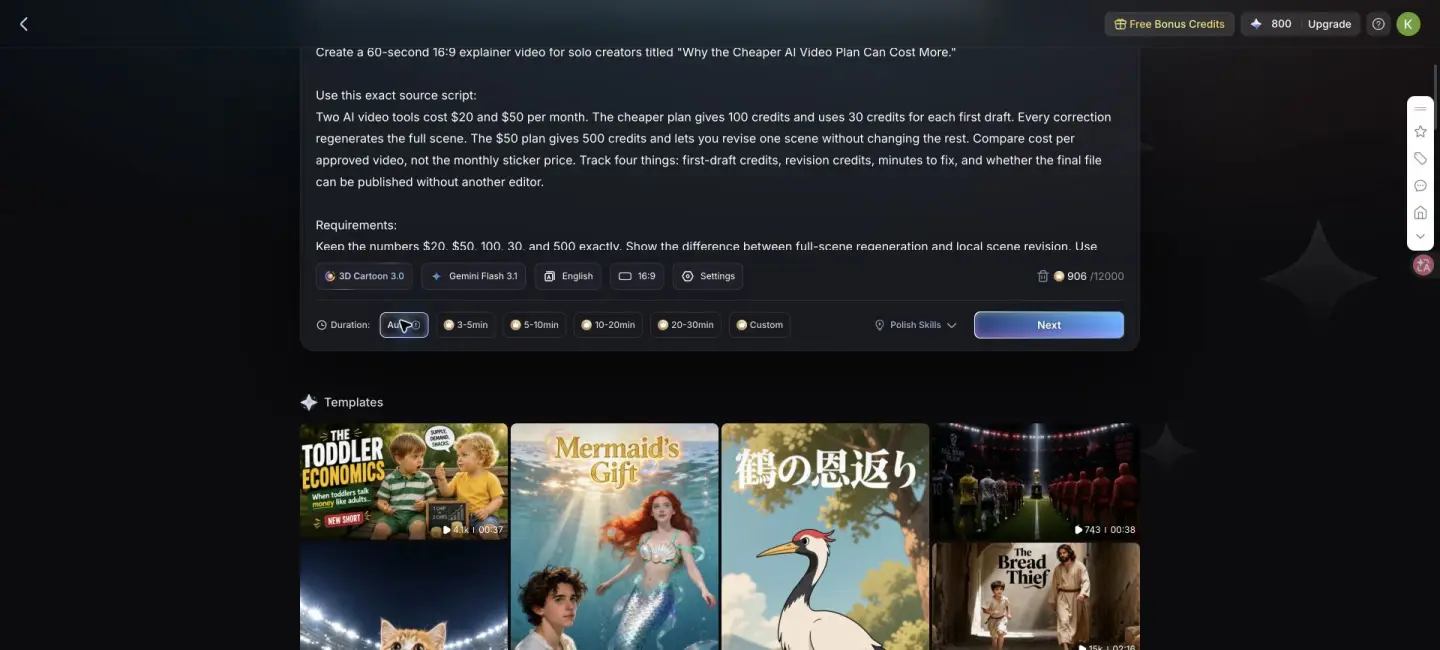
I used a logged-in account with no subscription and 800 bonus credits on July 28, 2026. The test asked for a 60-second, 16:9 explainer titled “Why the Cheaper AI Video Plan Can Cost More.” I chose 3D Cartoon 3.0, Gemini Flash 3.1, English, 16:9, and Auto duration. MagicLight did not expose a free 60-second duration preset. Clicking Custom opened the pricing screen, so I left the duration on Auto and kept the 60-second requirement inside the brief.
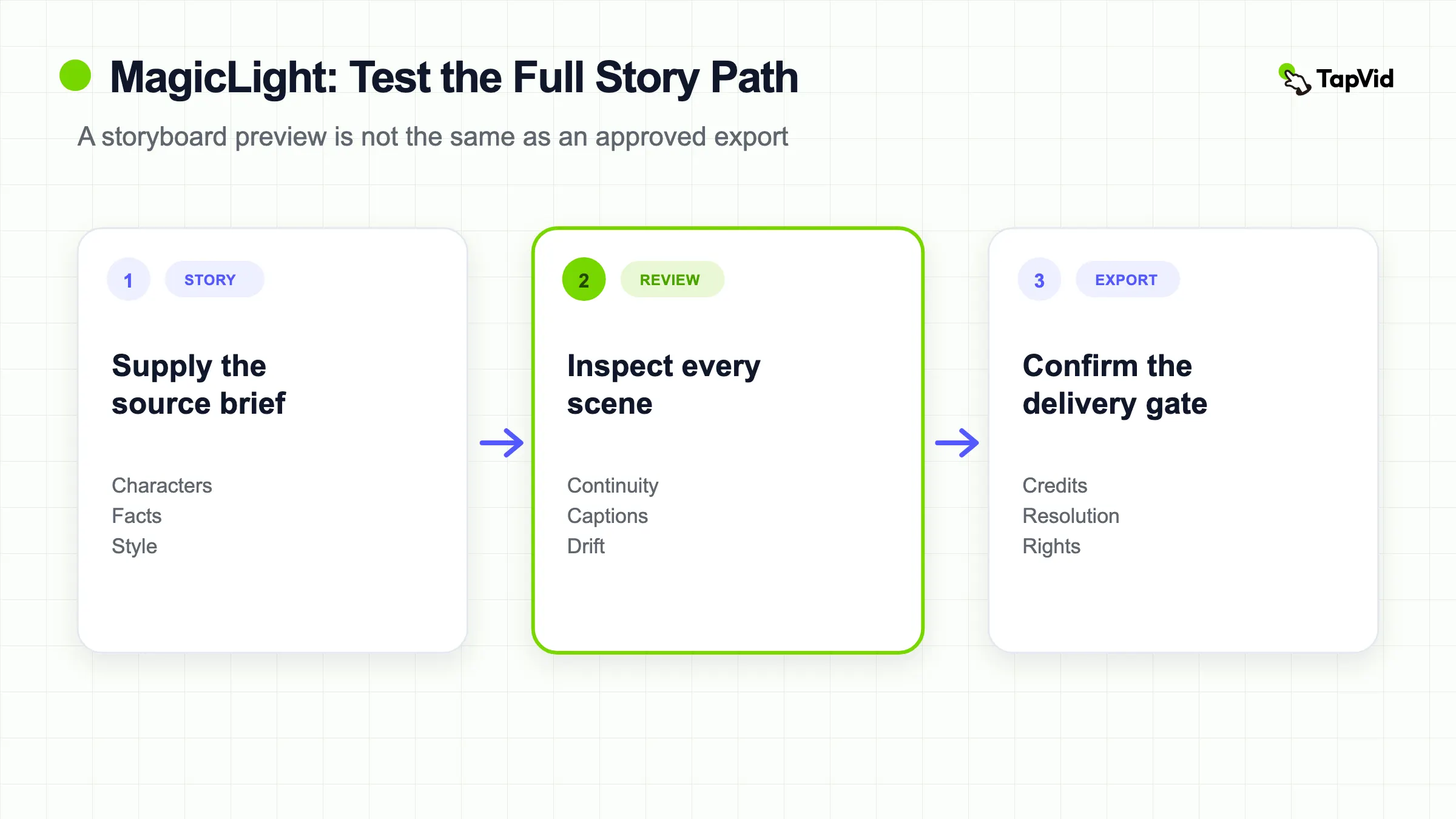
The source contained a $20 plan, a $50 plan, 100 credits, a 30-credit first draft, and 500 credits. It also required four evaluation fields: first-draft credits, revision credits, minutes to fix, and whether the result could be published without another editor. I told the system to keep all five numbers exactly, avoid a talking-head presenter, show full-scene regeneration versus local revision, use synchronized captions, and end with one exact sentence.
04
The workflow from script to storyboard
The first useful result arrived 37 seconds after submission. MagicLight renamed the project “The Hidden Cost of Cheap Plans,” wrote a synopsis, and expanded the short source into four scenes and 12 shots. That speed is genuinely helpful. A creator can inspect narrative shape before spending on animation.
The Cast step detected two roles, “The Strategic User” and “The Budget User,” and generated matching 3D cartoon characters. The next button showed a 240-credit badge before storyboard generation. The resulting images maintained the same two characters, office setting, and visual style. The first scene correctly placed glowing $20 and $50 tags into the composition.
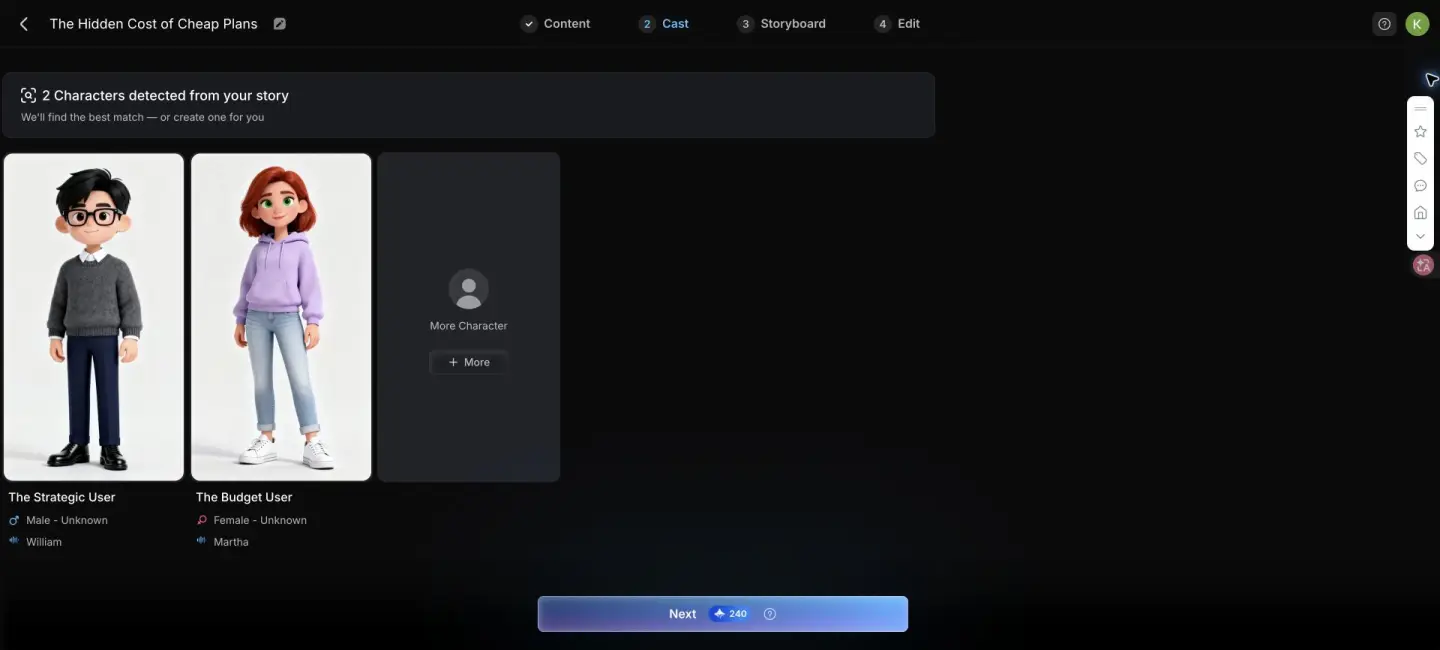
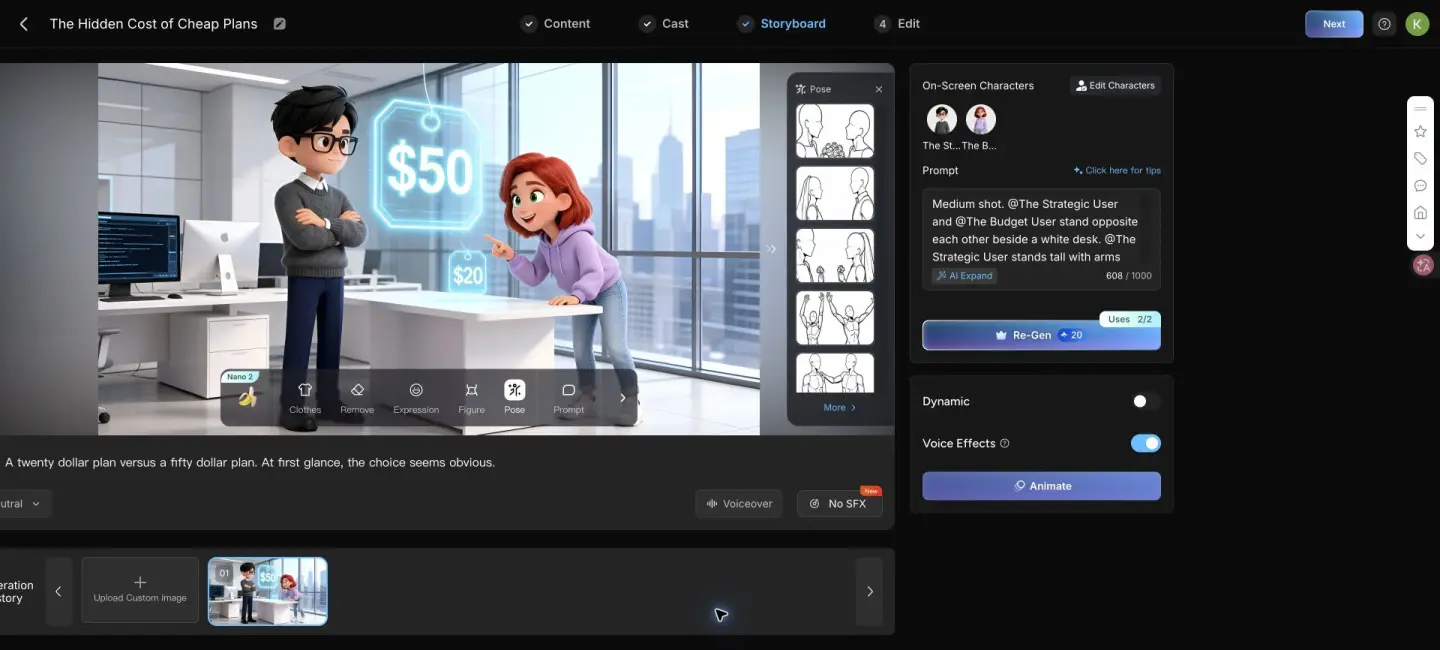
This is where MagicLight is strongest. It gives non-animators a concrete scene system instead of a blank timeline. The storyboard prompts are editable, characters can be changed, and each shot can be regenerated or animated separately. For a narrative short, that is a more practical workflow than generating disconnected clips and repairing continuity later.
05
Claim survival audit: the script sounded confident but changed the source
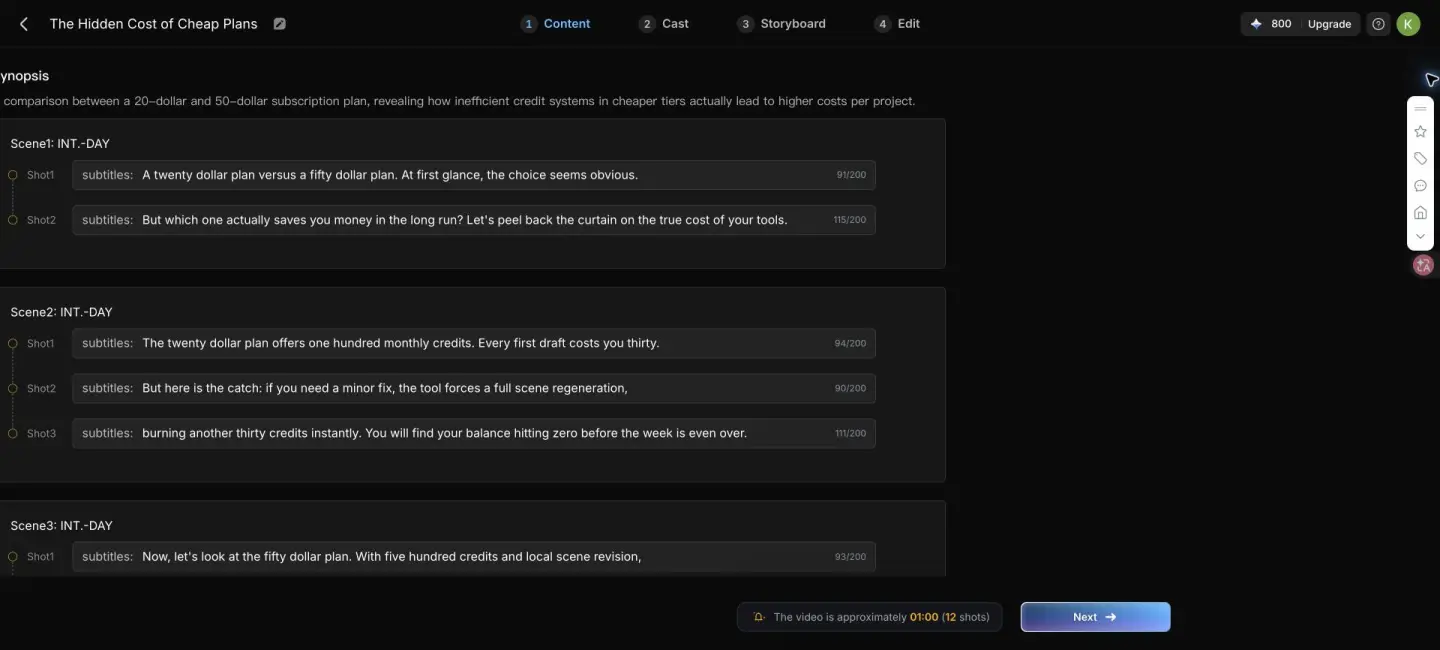
MagicLight preserved the overall argument but failed the exact-claim test. The generated narration changed $20 and $50 to “twenty dollar” and “fifty dollar,” and 100, 30, and 500 to words. Writing numbers as words is not always a problem for narration, but it violated the explicit requirement and made visual claim verification harder.
More importantly, the model invented a calculation. It said the cheaper plan required three full regenerations and therefore cost 120 credits for one project. It then said the premium plan used 30 credits for the draft plus five for a local fix. The source never supplied three regenerations, 120 credits, or a five-credit revision. Smooth narration turned an example into a fabricated fact.
The script also changed “revision credits” to “revision costs,” changed “whether the final file can be published without another editor” to “final quality,” and then dropped the publishability check. That missing field mattered because the final workflow later exposed a watermark and a submission gate. It was the exact criterion most likely to change a buying decision.
My practical rule is simple: compare the generated script against the source before animating anything. Mark every proper noun, number, causal claim, and promised outcome. If a sentence introduces a value that cannot be traced to the source, delete it or label it as a hypothetical example.
06
Visual quality, motion, voice, and captions
I evaluated the animated shot using dimensions similar to those separated by the VBench CVPR 2024 paper: subject consistency, background consistency, motion smoothness, and flicker. One shot cannot establish a model-wide score, but it can reveal whether the advertised workflow produces an obvious failure.
The five-second MagicLight 1.0 animation passed the basic continuity check. Both characters stayed recognizable, the office remained stable, the camera reframed smoothly, and the $20 and $50 tags remained legible. I did not see a dramatic identity swap or background collapse in the observed clip. The motion was simple, but it matched the prompt better than an arbitrary cinematic move would have.
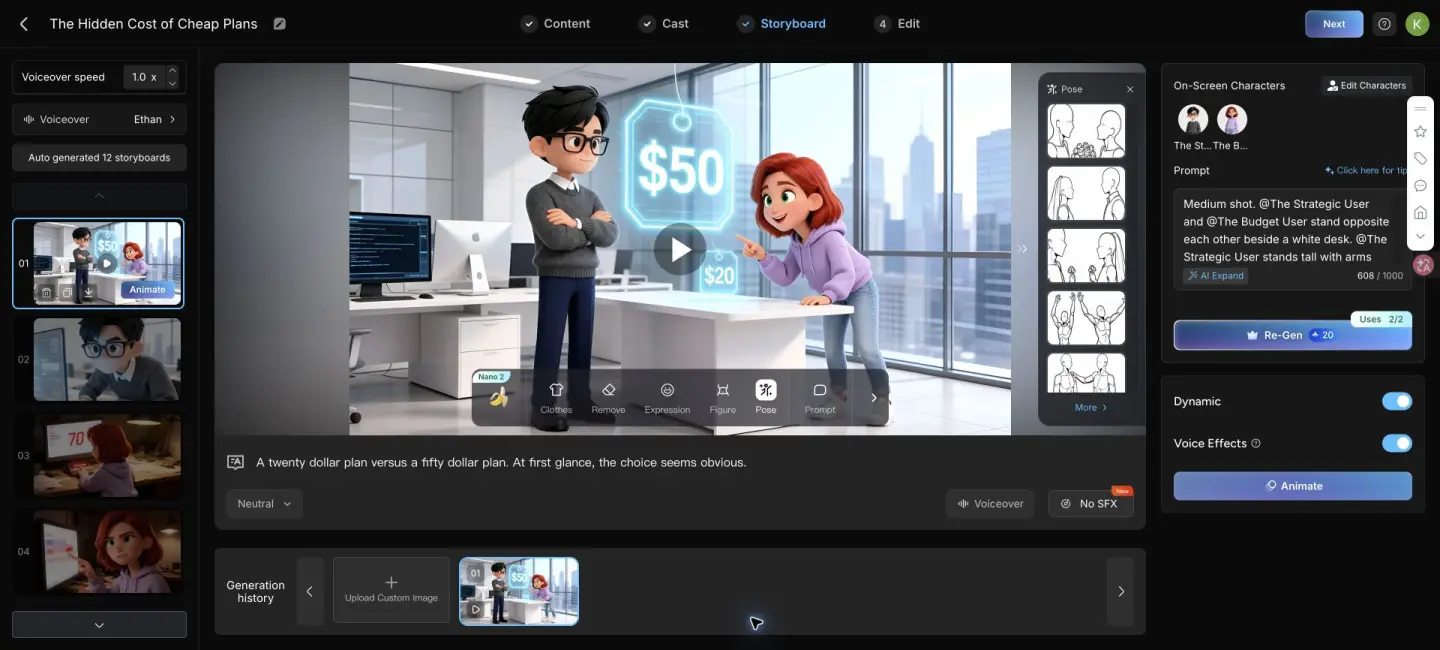
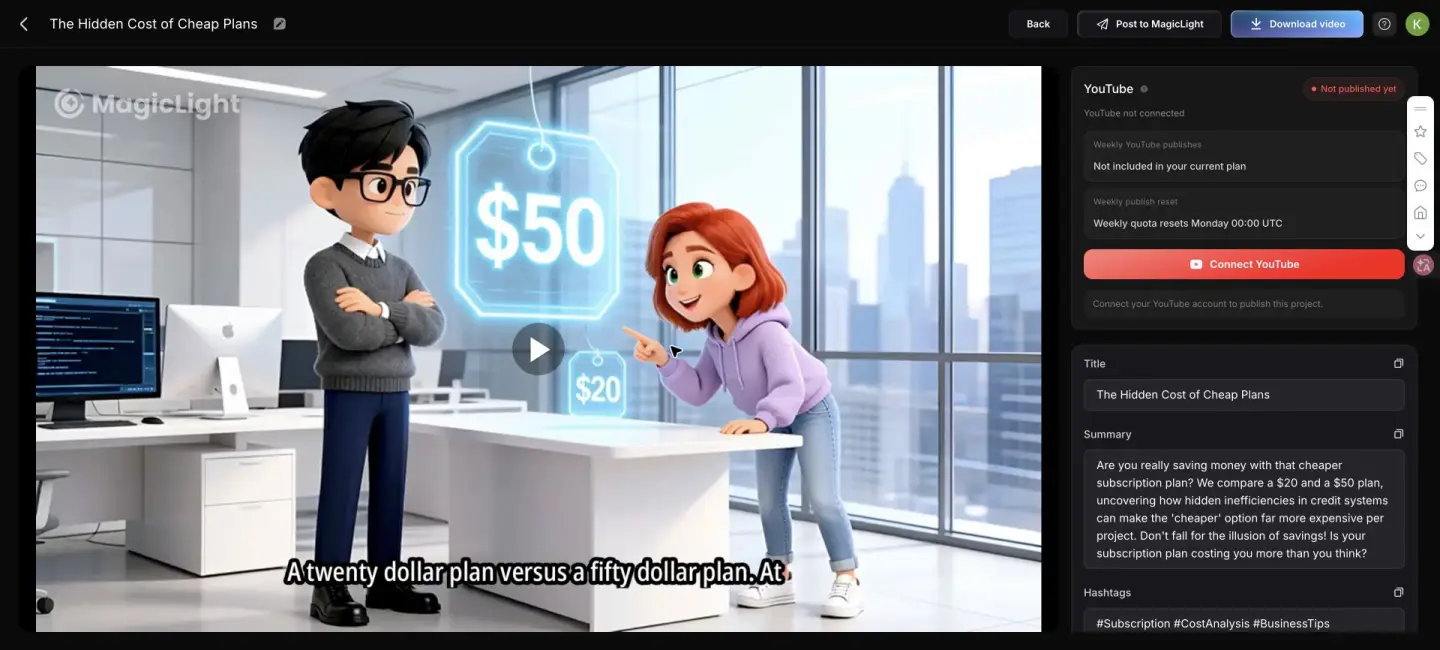
The final caption treatment was weaker. The first sentence appeared as one long bottom line and was visibly clipped near the right edge in the preview. The W3C guidance for prerecorded captions focuses on synchronized text alternatives, but synchronization alone is not enough for a publishable social video. Line breaks, safe areas, contrast, and reading speed still need a human pass.
07
Credits, revision costs, and the gates I found
The free test was enough to inspect the structure, but cost signals appeared at several different points. The account started with 800 bonus credits. The storyboard step displayed 240 credits. A selected storyboard could be regenerated for 20 credits and showed two uses. MagicLight 1.0 offered a one-time free five-second animation, while the normal confirmation displayed 100 credits per shot.
After I animated one shot and clicked Next, MagicLight reported that 11 storyboards were still static and promoted Animate All. That matters for budgeting. A finished storyboard is not the same as a fully animated video. Buyers should record image-generation cost, animation cost per shot, regeneration cost, and export rights separately.
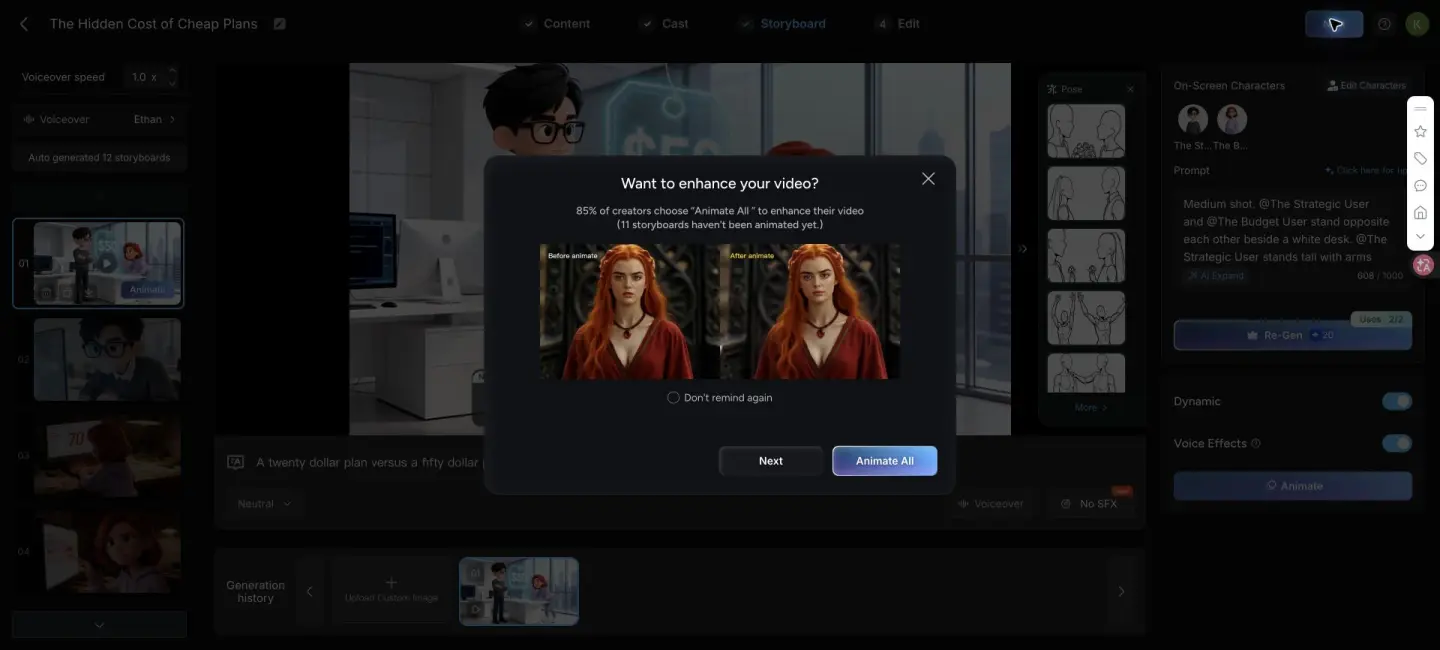
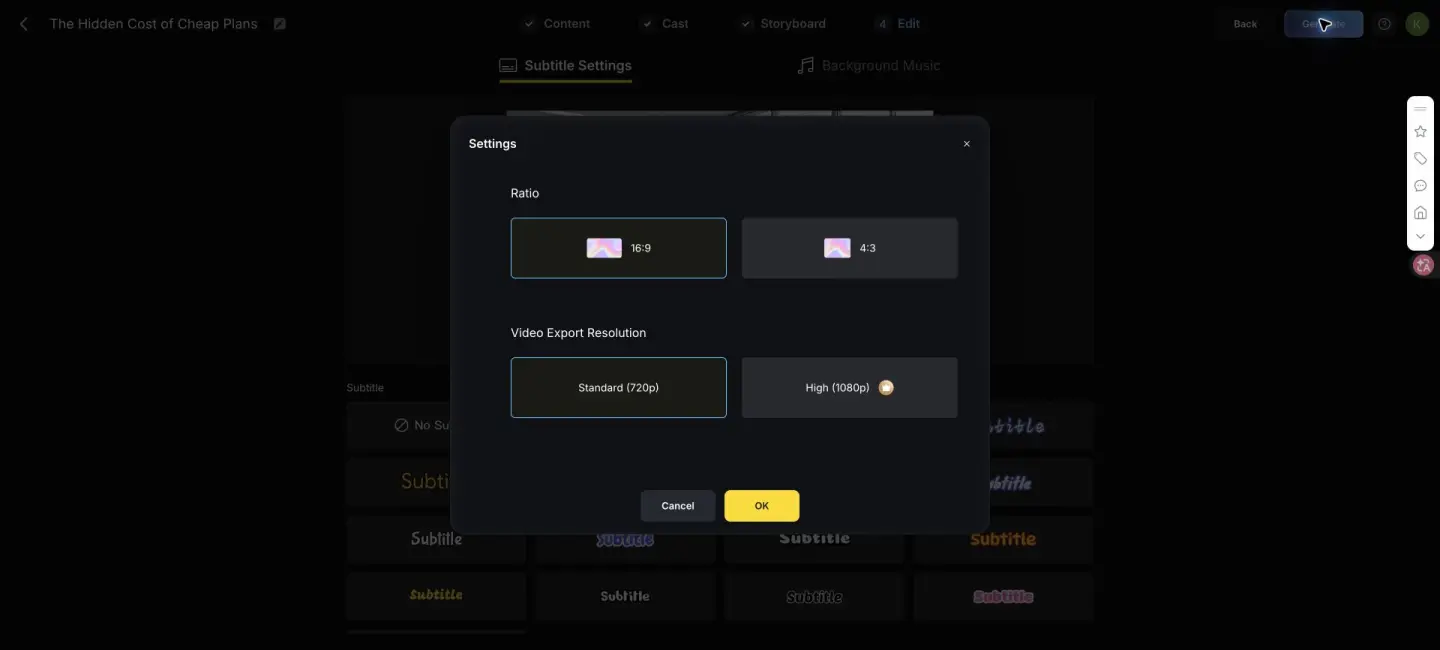
The edit screen offered subtitle styles and background music. Export defaulted to 720p, and High 1080p carried a membership crown. The generated preview had a MagicLight watermark. A Download video button appeared after rendering, but the modal said the work could be downloaded only after successful submission. I did not submit the test to MagicLight because that would publish it externally.
08
MagicLight pricing is not internally consistent
I checked the official MagicLight pricing page on July 28, 2026 and found different credit allowances on the top cards and the lower comparison table. Under annual billing, the top cards showed 7,000, 45,000, 150,000, and 280,000 credits for the visible tiers. The comparison table showed 8,000, 47,000, 150,000, and 220,000. The highest tier was also called Ultimate in one place and Max in another.
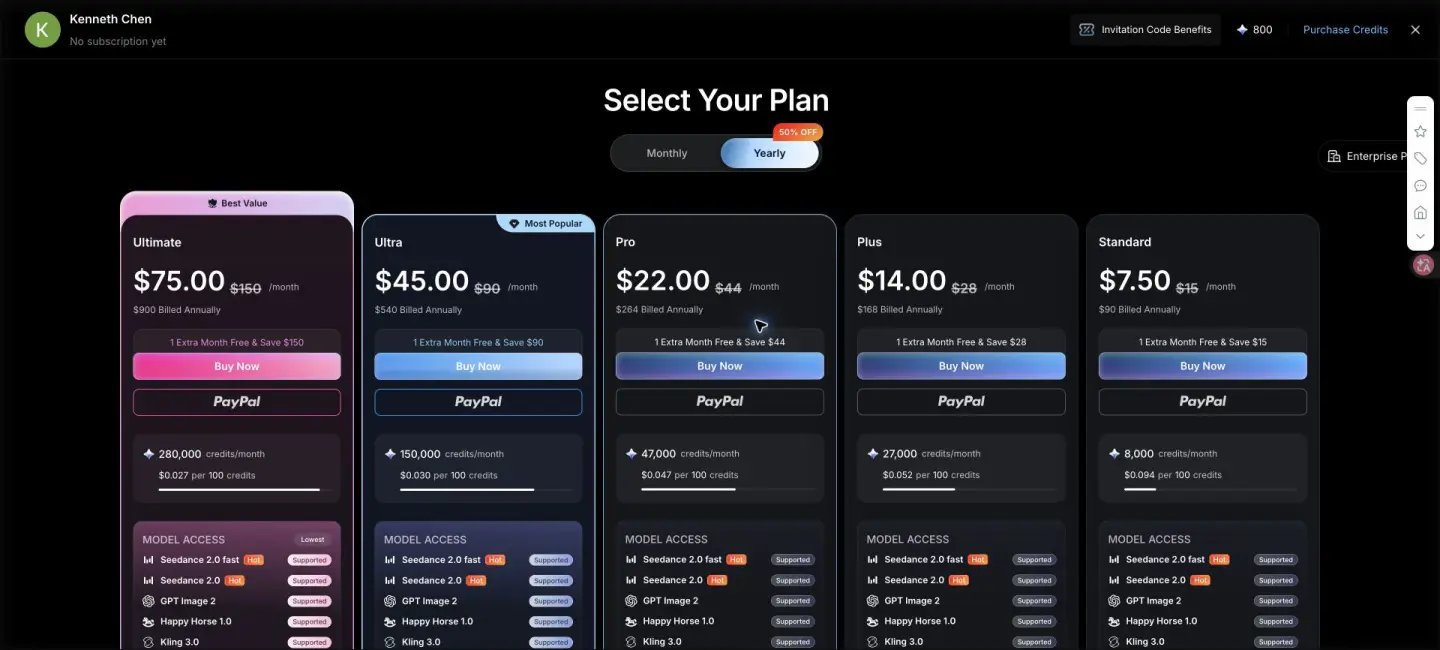
Monthly billing also differed: 6,000 versus 7,000 credits for Standard, and 35,000 versus 37,000 for Pro. The logged-in annual paywall showed yet another lineup: Standard at $7.50 for 8,000 credits, Plus at $14 for 27,000, Pro at $22 for 47,000, Ultra at $45 for 150,000, and Ultimate at $75 for 280,000.
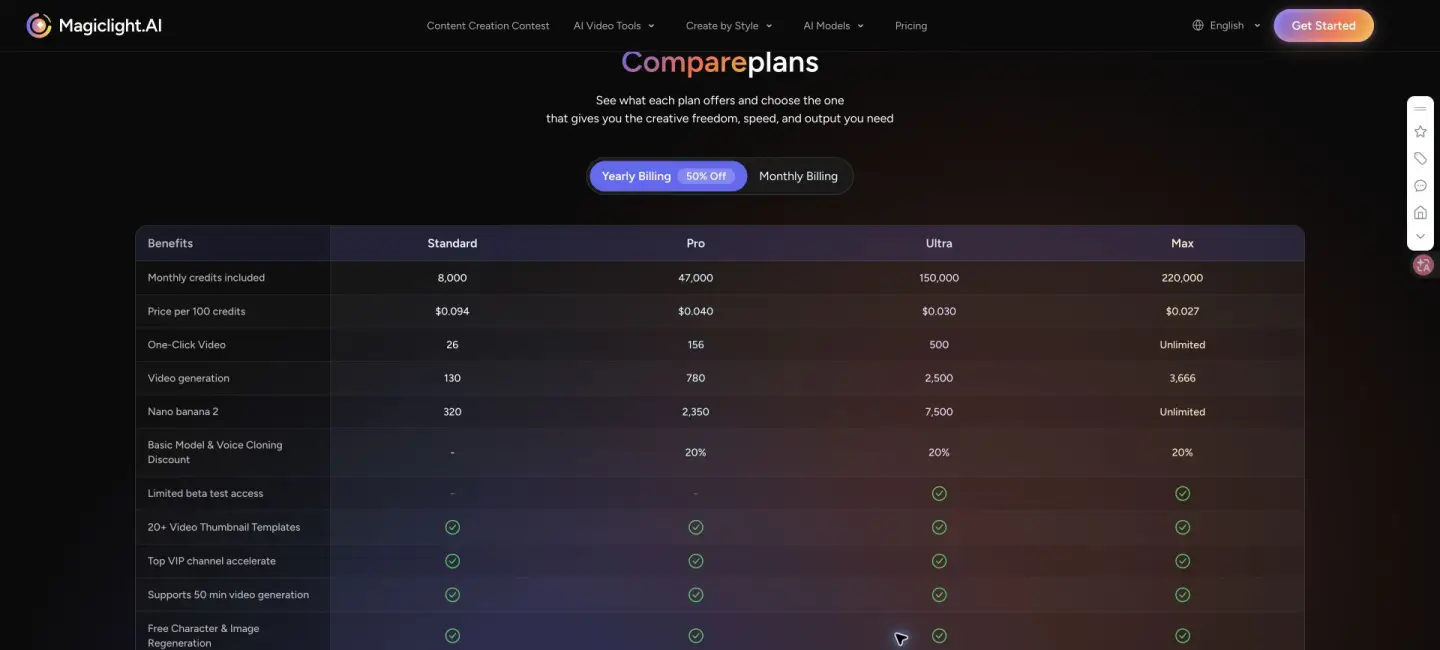
Do not calculate cost per finished minute from one public card. Open the logged-in checkout, confirm the exact credits and renewal period, then run a representative project. For my 12-shot structure, the difference between storyboard images and animation alone could materially change cost per approved video.
09
Ownership, watermarking, and provenance
MagicLight’s terms say users retain rights in their submitted content, while granting the service permissions needed to operate the platform. They also make the user responsible for having rights to inputs and for lawful use of outputs. Treat those clauses as operational constraints, not a substitute for legal advice.
For synthetic media, provenance is part of publishability. NIST AI 100-4 reviews approaches such as labeling, watermarking, detection, and provenance tracking. In this test, the visible MagicLight watermark was the only provenance signal I could verify. Because download required submission, I could not inspect the file container for embedded metadata.
Before commercial use, verify the exact plan’s commercial-license wording, remove or accept branding according to that plan, document the source script, save generation prompts, and keep a human approval record. If a number or person is shown, preserve the source that supports it.
10
MagicLight vs TapVid: choose by the source of truth
MagicLight and TapVid overlap at the phrase “AI video generator,” but they start from different jobs. MagicLight is strongest when a creator wants a story expanded into characters, scenes, and animated shots. TapVid is an Explainer Video Engine for creator-owned source material such as an article, PDF, script, PRD, or product copy. Its job is to turn that material into a structured explainer with review points before rendering.
| Decision | MagicLight | TapVid |
|---|---|---|
| Best starting input | Story, narrative script, character idea | Article, PDF, PRD, script, product copy |
| Primary output | Character-led storyboard and animated scenes | Structured motion-graphics explainer |
| Main strength | Character and scene continuity | Source-grounded explanation and review stages |
| Main risk | Confident additions beyond the source | Less suited to open-ended cinematic character stories |
| Editing cost driver | Storyboard and animation credits per shot | Explainer workflow and revision scope |
| Choose it when | The story and characters are the product | The information and argument are the product |
This is not a claim that TapVid should replace MagicLight for animated fiction. It should not. Choose MagicLight for a stylized story where visual continuity is the hard part. Choose TapVid when the audience must understand an existing source and unsupported additions would be expensive.
If you are still choosing the output category, compare the evidence standards in our AI explainer video maker guide.
For the source-grounded branch, start with what an explainer video is and decide whether exact supplied information matters more than open-ended character storytelling.
11
Who should use MagicLight AI
Checklist
- Use MagicLight for illustrated stories, educational narratives, character shorts, and visual drafts that benefit from recurring cast members.
- Use it when reviewing a storyboard is easier than assembling separate text-to-video clips.
- Avoid it as an unchecked source-to-video converter for pricing, policy, finance, medical, legal, or product-specification content.
- Budget separately for storyboard generation, animation per shot, revision, resolution, watermark removal, and download rights.
- Run one representative export before subscribing. A polished first frame does not prove that the final file fits your publishing workflow.
12
Frequently asked questions
Is MagicLight AI free?
You can test parts of the workflow with bonus credits and a one-time free MagicLight 1.0 animation. In my test, custom duration opened pricing, 1080p was marked as paid, the 720p preview had a watermark, and downloading required successful submission.
Is MagicLight AI good for long videos?
It is designed around multi-scene projects and offers long duration ranges, but cost grows across storyboard images and animated shots. Test a representative project before estimating cost per finished minute.
Does MagicLight preserve characters across scenes?
In this test, two generated 3D characters remained recognizable across 12 storyboards and the observed five-second animation. One project is not enough to prove universal consistency, so check difficult poses and close-ups in your own style.
Can MagicLight make factual explainer videos?
It can create the visual structure, but the generated script needs fact checking. My test added three unsupported values and omitted one required evaluation criterion.
Does MagicLight export without a watermark?
The free 720p preview I generated displayed a MagicLight watermark. The in-product plan screen presented 1080p and no watermark as subscription benefits. Verify the current checkout before paying.
What is the best MagicLight alternative for explainers?
If your source is an article, PDF, PRD, script, or product copy and factual structure matters more than character storytelling, use a source-grounded explainer workflow such as TapVid. If recurring characters are central, MagicLight may be the better fit.
13
Final verdict
MagicLight is more useful than a collection of disconnected generation models. The scene, cast, storyboard, animation, subtitle, and export stages form a real production workflow. The first draft looked coherent enough to review, and the single animated shot was visually stable.
The hands-on evidence also changed my recommendation. MagicLight is not a safe autopilot for information-dense video. Its most serious failure was not a distorted hand. It was a persuasive calculation that the source never contained. Combine that with inconsistent public pricing, gated duration and resolution, a watermark, and the submission-before-download message, and a buyer should test the full path before subscribing.
Use MagicLight as a fast story and storyboard partner. Keep a human responsible for facts, captions, credit math, export rights, and the final publish decision.