
Hypit is an open-source system that lets AI coding agents build video. You drop in a reference clip, and your agent rebuilds it as an editable project: footage, captions, B-roll and effects. The repository passed 12,500 stars in under eight weeks, and new issues arrive daily. Most articles about Hypit explain how to install it. This one answers a different question. You have a video to make. Should you start from a reference clip, or start from your own product assets? The answer depends on what has to survive the trip to the final file.
01
What is Hypit?
Hypit gives coding agents a language and a runtime for video. The official description is direct: it "gives AI agents (Claude Code, Codex...) a language and system to create video."
Two points matter before anything else.
First, Hypit is not a generation model. It does not paint frames. It plans, arranges and compiles them.
Second, the arrangement is written down. Your agent produces source code you can read and change, rather than a finished file you can only accept or reject.
You install it as a skill, and you do not clone the repository:
npx skills add hypit-ai/hypit -gYou need a coding agent that supports skills. Claude Code and Codex are the two named in the docs. If the wider pattern of letting an AI video agent drive production is new to you, that background helps before you read further.
All product details in this article were checked on 21 September 2026 against the official repository and documentation. Hypit ships fast, so verify anything you plan to depend on.
02
Three ways in, one anchor
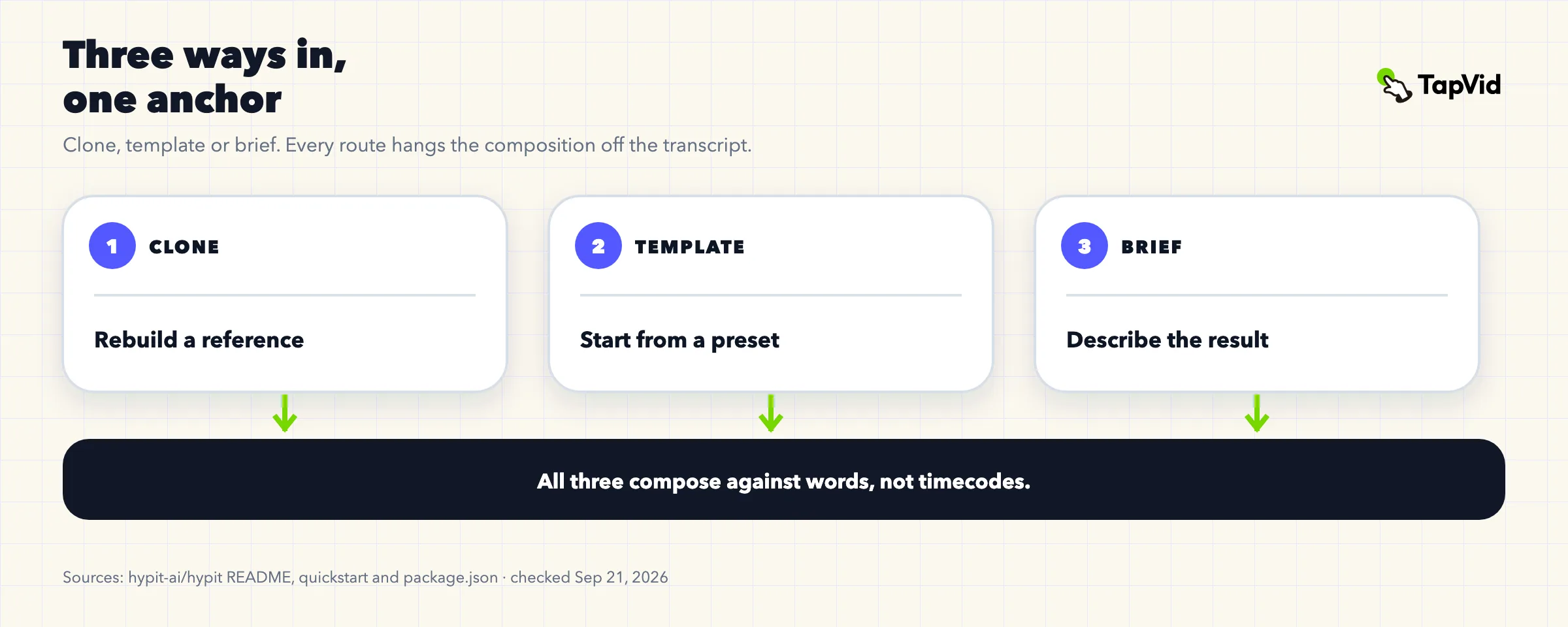
Cloning gets the headlines, but the README is careful to widen it: "To be clear: cloning a video is the fastest way in, not the only one. You can start from our templates, or just describe the video you want and your agent writes the workflow from scratch."
So there are three entry points: clone a reference, start from a template, or describe what you want.
The entry point is not the thing that shapes the output. The anchor is. In every route, the composition hangs off a transcript. Elements attach to words, not to timestamps.
That single design choice explains most of what follows.
03
What word-anchored composition guarantees, and what it does not
Here is the official wording: footage, captions, B-roll and effects are "all anchored to words instead of seconds."
The guarantee is real and useful. Rewrite a line and the caption timing re-flows on its own. You do not go back and nudge keyframes. For anyone who has re-timed thirty subtitle cues after a one-word script change, that alone justifies a look.
Now the limit. Anchoring to words governs when things appear. It does not govern whether the rendered result is free of defects, and it says nothing about whether your facts are correct.
Contributors in the issue tracker have run into the gap. One reported that consecutive caption cues claimed the same frame, which made Chinese subtitles overlap (#297). Another found that adding a picture track contaminated captions across cues (#330, still open). A third traced a final-mux problem where the -frames:v flag made ffmpeg drop the last audio packet (#315).
These are ordinary bugs in a young project, and two of the three were closed quickly. The point is narrower: word anchoring is a timing model, not a correctness guarantee.
04
SVML in practice
The agent writes SVML, short for Structured Video Markup Language. It is the composition source. The term is not marketing dressing; it appears in more than 300 places across the codebase.
The official screenshot shows the working shape: "SVML source on the left, with the corresponding video rendered live on the right."
This is the part experienced teams tend to like. A composition you can read is a composition you can review, diff and hand to someone else. When a video is wrong, you can point at the line that made it wrong.
Your agent can also open Studio for timeline editing, and Comments for feedback tied to specific moments.
05
Where generation actually happens
Hypit itself does not generate video, images or speech. It calls out to other services for that.
The cost model follows from the architecture. From the quickstart: "Hypit's framework is free to use; your Coding Agent and any model services use their own accounts and pricing." And plainly: "Installing the Skill or executable does not include generation credits."
So three separate bills can appear: your coding agent, your model services, and any hosted extras you opt into. Hypit's own framework is not one of them.
This split has a second consequence that is easy to miss. Where generation happens is also where image fidelity is decided. If a model redraws a product screenshot, that happened in the model, not in the composition layer.
One contributor described how fast the model bill can move. They chose to work from their own original footage rather than AI generation, and still reported that an allowance equivalent to ten million tokens drained while the tool was processing the source video, leaving them unable to finish a single video (#270, still open).
Treat that as one person's report, not as a typical result. It is a single account, and consumption depends on the models chosen, the source length and the route taken. It is worth knowing because it runs against a natural assumption: bringing your own footage does not automatically mean a small model bill, because analysing the reference is itself model work.
Agree on a budget before a production run. The docs say the agent explains the selected account, the planned work, and available rates or estimated cost before paid work begins.
06
The no-generation path
There is a route that avoids generation charges entirely. In the README's words: "Generation models are optional too: a workflow can compile captions, motion graphics and code-rendered visuals into a finished video without calling a generation model or incurring its service charges."
This is the most predictable way to use Hypit. No generation model is called, so there is no model output to vary between runs and no model bill to track.
Be clear about what this path produces, though. It gives you captions, motion graphics and visuals drawn by code. It is a way to build graphical content without a generation model. It is not a mechanism for ingesting your product screenshots and guaranteeing they land in frame untouched. Those are different jobs.
07
Reference-led or asset-led: a decision table
Most route arguments go wrong by comparing tools. Compare the job instead. Ask what has to survive into the final file.
| Question | Reference-led route | Asset-led route |
|---|---|---|
| What are you reproducing? | A proven form: pacing, hook, where captions land | A set of facts that must survive unchanged: UI, model names, prices, specs |
| Where does material come from? | Reference footage, generated material, or code-rendered visuals | Your own product assets and your own script |
| What does the system promise? | Caption timing re-flows when wording changes | Assets are not redrawn, wording is not rewritten, scenes do not drift to the wrong product |
| What does a failure cost? | One ad variant underperforms | One product video states the wrong price or spec |
| Where do costs land? | Coding agent plus model services, each billed separately | Inside the production tool |
| Typical work | Ad variants, AI UGC, viral remakes, localised cuts | Product explanation, feature introduction, multi-SKU product video |
Read the first row first. It settles most cases. If you need to reproduce a proven form, such as a hook, a pacing pattern or a caption rhythm, the reference-led route fits. If you need to keep a set of facts intact, such as a real interface, a price or approved legal wording, the asset-led route does.
08
When the format is the asset
Sometimes the valuable thing is the shape of the video, not the specific claims inside it.
A short ad has a hook that works. A creator format converts. A UGC cut lands because of its rhythm. You want twenty versions with a different presenter, a different product angle, or a different language. Here, copying the form is the entire point, and word anchoring pays off every time a line changes.
Hypit's stated use cases line up with this: paid social ad variants, viral clones with swappable hosts and hooks, AI UGC with automated captions and B-roll, and localised multi-language versions.
If that describes your work, the reference-led route fits, and the rest of this article is not an argument against it.
09
When your product facts are the binding constraint
Now the other case.
You are making a product explainer. It shows your real interface. It names a plan and a price. It states a spec. Legal reviewed one sentence and that sentence has to appear exactly as written.
The tolerance here is different. A slightly plain-looking frame is survivable. A frame that shows the wrong price is not. Nor is a scene that talks about product A while showing product B.
This is the job TapVid is built for. TapVid is an Explainer Video Engine: it takes your product assets and the script you wrote, and produces a video you can hand over.
Its accuracy claim breaks into three layers:
- Asset fidelity. Uploaded product images, logos, UI screenshots and footage are placed into the frame. They are not redrawn by a model.
- Information fidelity. Copy, numbers, model names, prices, specs and legal wording appear as supplied. They are not rewritten or polished.
- Correspondence. When the script covers product A, the frame shows product A. Scenes and assets do not drift.
The third layer is the strict one. Teams forgive an ordinary-looking frame. They do not forgive a mismatched asset.
Script, storyboard and voiceover stay readable before rendering, so you can check each shot against its copy while there is still time to fix it.
No tool should claim perfection, and this one does not. The commitment is narrower and more useful: your material is not rewritten, and checks catch obvious anomalies before delivery.
10
Cloning a reference is not producing from your assets
It is tempting to treat these as competing tools. They are not. They are answers to different questions, and both use code where precision matters.
Hypit's composition is organised around a transcript. Material arrives from a reference, from a generation service, or from code. Your product assets can be part of that material, but they are one input among several, and the fidelity promise concerns caption timing.
An asset-led engine is organised around your material from the start. The assets and the script are the spine, and keeping them intact through to the final frame is the product's job rather than a step you supervise.
Neither approach is superior. A viral remake built from your own screenshots would be awkward work. A compliance-reviewed feature explainer built by cloning someone else's ad would be worse.
11
Run both routes without collision
Plenty of teams need both, and the split is usually clean.
Sort by what must survive. If the form must survive, use the reference-led route. If the facts must survive, use the asset-led route. Route the work at the brief, before anyone opens a tool, because switching later costs more than deciding early.
If you are wiring either route into an agent setup, connecting video generation through MCP covers the plumbing side of that decision.
One practical note for mixed teams: keep the review step different for each. Reference-led work is reviewed on feel, because the question is whether it lands. Asset-led work is reviewed against source material, because the question is whether it is right.
12
Limits, costs and licence realities
Worth knowing before you commit:
Budget for more than one bill. The framework itself is free, but your coding agent and any model services bill you on their own accounts, and installing the skill includes no generation credits.
It is pre-1.0. The published version is 0.2.12. Expect change, and expect to re-check anything you build a process around.
Node.js 22.15 or newer is required. This comes from the repository manifest, which is the authority here, since the quickstart page does not state a version.
The first render is where people get stuck. One of the most discussed issues in the tracker described a fresh checkout that could not render: pnpm 10 blocks lifecycle scripts unless they are allowlisted, so Chrome never downloaded for Puppeteer, and the hypit doctor health check still reported no problems (#222). Other contributors hit related packaging gaps, including bundled fonts that were unreachable from the npm distribution (#206) and undeclared workspace dependencies (#268). Several accounts reported problems of this kind, so budget time for setup.
Non-English work has its own rough edges. Reports include Chinese font packages that never resolved alongside a local render worker crash (#211), a request to accept the languages WhisperX can already align (#221), and the overlapping Chinese subtitles noted earlier. If you publish in several languages, test that path before you plan around it.
Windows and WSL need extra care. Individual reports cover a failed credential replacement that deleted the existing value (#249), WSL opening OAuth with the wrong handler (#310), and an ffmpeg lookup that ignored Windows PATHEXT shims (#319). These came from a small number of accounts, so treat them as signals to test rather than as a general verdict.
The licence is its own. Hypit ships under the Hypit Open Source License, not a standard OSI licence, so read it rather than assuming MIT or Apache terms. Outputs belong to you, and third-party models and services carry their own terms.
13
Frequently asked questions
Does Hypit generate video?
No. It composes and compiles video. Generation is delegated to services you connect, and some workflows skip generation entirely.
Is Hypit free?
The framework is free. Your coding agent and model services bill you separately, and installing the skill does not include generation credits.
What is SVML?
Structured Video Markup Language, the composition source your agent writes. You can read it, edit it and re-run it.
Can I use my own footage instead of generated material?
Yes. Note that analysing a source video is itself model work, so this route is not automatically cheap. One contributor reported exhausting a large allowance during source processing alone.
Which coding agents work?
Claude Code and Codex are the documented examples. Any agent that can use skills is the general requirement.
Why did my first render fail when the health check reported no problems?
That matches one of the most-discussed issues in the tracker. In that report, the cause was pnpm blocking lifecycle scripts, which prevented Chrome from downloading for Puppeteer. Check that step directly rather than trusting the health check.
Should I use Hypit for a compliance-reviewed product video?
Check what has to survive first. If exact screenshots, prices and legal wording must appear unchanged, an asset-led route is the safer fit. If you are reproducing a proven format, the reference-led route is what Hypit is built for.