
This guest post was written by Dipali Bhojani (SEO & Partnerships, invideo) and edited by the TapVid team.
An AI video editing tool inside ChatGPT or Claude is a video editor that your chat assistant can control through a connector. You type what you want in plain words. The assistant then cuts, captions, or resizes the video for you.
This matters because video editing eats time. Cutting retakes, adding captions, and making short clips can take hours. A connected assistant can do the first pass in minutes. You review the result and fix what you do not like.
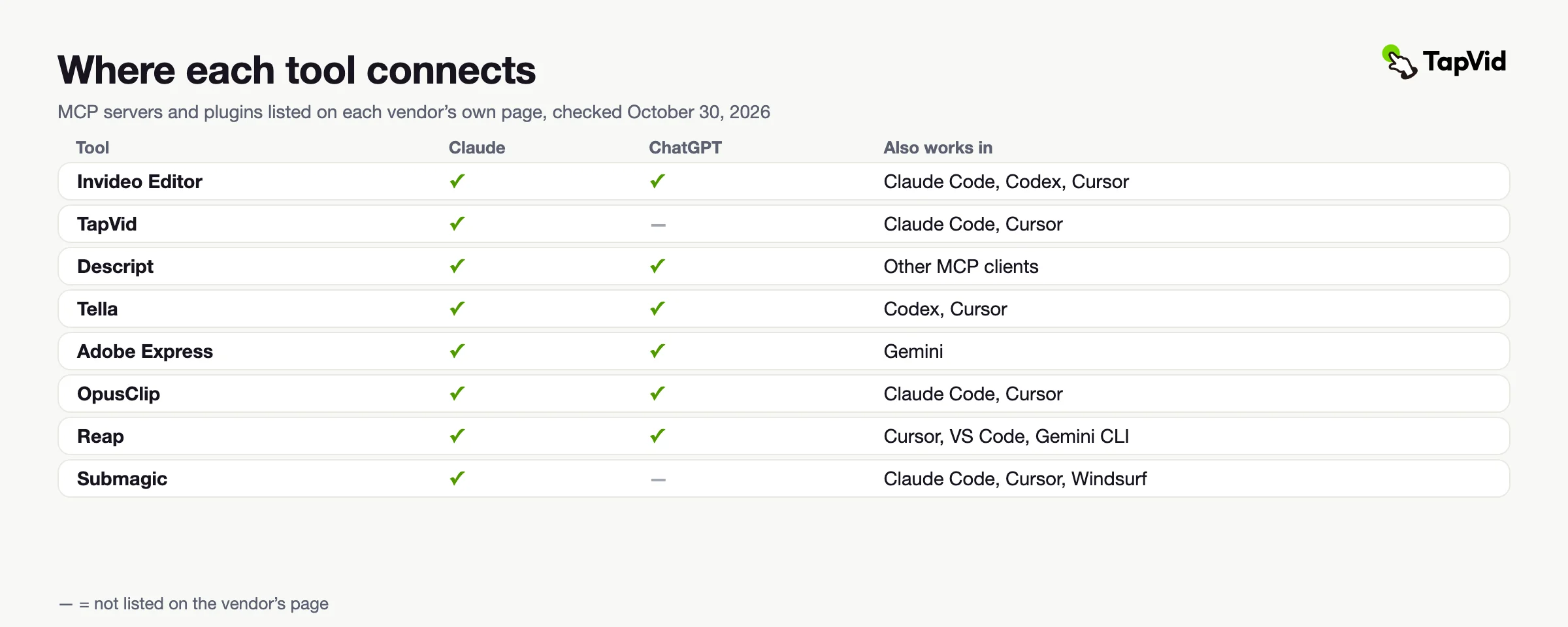
Most of these tools connect through MCP. MCP is a simple standard that lets an assistant use another app. Some tools connect in a few clicks. Others need a little setup. This list covers eight tools that work with ChatGPT, Claude, or both. Each entry shows what the tool does, who it suits, and what it costs.
01
The eight tools at a glance
Here is how the eight tools compare at a glance. Prices come from each vendor's own pricing page, checked on October 30, 2026. They can change by region, so check each site before you buy.
| Tool | Best for | Key output or feature | Starting price |
|---|---|---|---|
| Invideo Editor | Real timeline edits and multicam | Editable rough cut on a multitrack timeline | From $20/seat/month ($10 billed yearly) |
| TapVid | Explainer and product videos | Finished motion-graphics video from a script, doc, or link | Pro from $49/month (includes MCP) |
| Descript | Podcasts and talking-head videos | Underlord edits and filler word removal | Free; paid from $16/month billed yearly |
| Tella | Demos and tutorials | Cuts by transcript and adds zooms | From $13/user/month billed yearly |
| Adobe Express | Quick social cuts and resizes | Highlight cuts and platform formats | Free; Premium $9.99/month |
| OpusClip | Clips from long videos | Captioned vertical clips | Free; paid from $15/month |
| Reap | Clips, captions, and dubbing | Clips with dubbing in 80+ languages | Free; paid from $9.99/month billed yearly |
| Submagic | Captioned short videos | Animated captions and Magic Clips | From $19/month ($12 billed yearly) |
02
Invideo Editor
Invideo editor is a browser-based video editor with a professional multitrack timeline. It also has built-in AI editing agents. You give them your footage and your direction. They handle the repetitive work on the timeline.
The agents review the footage and build a rough cut from the strongest moments. What you get is an editable base cut, not a finished video. You keep editing from there. The editor also covers color grading and audio cleanup.
You can also bring Claude or ChatGPT into the workflow through invideo's remote video editing agent. It connects to your invideo account, so your assistant edits the same timeline under its own cursor while you make changes. This makes it easier to move between AI-assisted edits and hands-on control without leaving the editor.
Setup takes about a minute. A simple first request works well. Ask the assistant to build a rough cut from your recording, then adjust the timeline yourself.
Best for: Creators who work with raw footage and want to save time while keeping control of the editing timeline.
Pricing: Plans start at $20 per seat a month on Starter, or $10 a month billed annually. invideo's pricing page puts the full timeline on every plan and says timeline editing itself does not use credits.
03
TapVid
TapVid is an explainer video engine. It turns a prompt, script, PDF, or web link into a motion-graphics video. Unlike the editors above, it does not cut existing footage. It builds a new video from the material you give it.
Its MCP server works in Claude on the web, Claude Code, and Cursor. In Claude, you add a custom connector with TapVid's server address and your API key. Then you ask for a video in plain words. TapVid uploads your materials, builds the video, and returns a download link.
The same API key also works with TapVid's REST API, which reports each video's status and download link. TapVid keeps your logos, screenshots, and wording as you supplied them, so product details stay correct.
Best for: Marketers and product teams who need explainer and product videos from material they already have.
Pricing: MCP access is included from the Pro plan at $49/month, which comes with 2,000 credits. A first-time trial costs $4.99 for one video.
04
Descript
Descript lets you edit video the way you edit a document. Its official MCP server connects Claude or ChatGPT to your Descript account. Once connected, your assistant can bring recordings into Descript, and every edit lands in a project in your Descript drive.
It can then run edits through Underlord, Descript's built-in AI editor. Examples include Studio Sound, filler word removal, and captions. The assistant can also search your recordings and export transcripts.
When the edit is done, the assistant can publish the project and give you a share link. You can then open the project in Descript for finer changes.
Best for: Podcasters and talking-head creators who like editing by text.
Pricing: Starts at $16/month on the Hobbyist plan, billed yearly. It scales up to $50/month on the Business plan, billed yearly. A free plan is also available.
05
Tella
Tella is a screen recorder and video editor for Mac, Windows, and the web. Its MCP server gives an assistant more than 100 tools. It is listed in Claude's connector directory and in ChatGPT's app directory.
Your assistant can cut by transcript. It can remove filler words, trim silences, and add zooms. It can also blur private details, add captions, and set chapters.
When the edit is done, it can export the video, create a share link, or publish to YouTube, LinkedIn, X, Instagram, or Facebook.
Best for: Product teams and educators who make demos and tutorials from screen recordings.
Pricing: Starts at $13 per user per month on Pro, billed yearly. Premium costs $19 per user per month, billed yearly, and adds a custom domain and the option to remove Tella branding. There is no free plan, only a 7-day free trial.
06
Adobe Express
Adobe Express reaches both assistants through Adobe's own plugins. In ChatGPT, you open Plugins in the sidebar and install Adobe. In Claude, you add the Adobe for Claude plugin, which launched as the Adobe for creativity connector.
Once connected, you can upload a video and ask for a quick cut. Adobe says it can pull the best moments out of a longer tutorial or walkthrough. It can also resize a horizontal video for YouTube Shorts, Instagram Reels, and other platforms.
Behind the scenes, the plugin draws on Adobe apps such as Premiere, Express, and Firefly. You then download the finished videos and share them.
Best for: Creators who need fast social cuts and resizes without opening a full editor.
Pricing: Starts free on the Express Free plan. Premium costs $9.99/month on an annual plan. It scales up to $19.99/month on Firefly Pro, so check Adobe's pricing page for what the plugin includes on each plan.
07
OpusClip
OpusClip turns long videos into short, captioned, vertical clips. Its MCP server works in Claude on the web, in the desktop app, and in Claude Code. It also works in ChatGPT through the Apps SDK, and in Cursor.
You send a video and describe what you want. OpusClip finds the best moments, adds captions, and reframes the video. It then returns clips that are ready to post.
You connect by signing in with your existing OpusClip account. No API key is needed for the MCP connection.
Best for: Podcasters and webinar hosts who need many short clips from one long recording.
Pricing: Starts at $15/month on Starter, billed monthly. Pro costs $29/month, or $14.50/month billed yearly. A free plan includes 60 credits a month, with watermarked clips.
08
Reap
Reap turns long videos, webinars, and interviews into clips, captions, and dubbed versions. Its MCP server works with Claude, ChatGPT, Cursor, and other MCP clients.
A single request can find the strongest moments and add captions. Reap also has a scheduler that posts clips to your social accounts.
Captions cover more than 100 languages. Dubbing covers more than 80 languages.
Best for: Marketers who want clips, captions, and dubbing from one request.
Pricing: Starts at $9.99/month on Creator, billed yearly, or $24 month to month. Studio costs $29/month billed yearly, or $50 month to month. A free plan is also available.
09
Submagic
Submagic is a captions-first editor for short videos. Its MCP server lets Claude drive Submagic from your chat window. In Claude you add it as a connector. Claude Code, Cursor, and other clients connect with your Submagic API key.
Your assistant can create a project from a video link. It can turn a YouTube video into Magic Clips. It can also add background music, list caption templates, and check project status.
It can export a project and publish it to TikTok and Instagram. You can also ask it to list recent projects with their views.
Best for: Creators who work in Claude Desktop or Claude Code and make captioned short videos.
Pricing: Starts at $19/month on Starter, or $12/month billed yearly. It scales up to $69/month on Business + API, or $41/month billed yearly. API access is named on the Business + API plan, so confirm which plan you need for MCP before you subscribe.
10
Which one should you use?
- Real timeline edits with Claude or ChatGPT → Invideo Editor.
- Explainer and product videos from a script or doc → TapVid.
- Editing podcasts and interviews like a document → Descript.
- Demos and tutorials from screen recordings → Tella.
- Quick social cuts and resizes → Adobe Express.
- Many short clips from one long video → OpusClip.
- Clips, captions, and dubbing in one request → Reap.
- Captioned shorts from Claude Desktop → Submagic.
11
Conclusion
Connected assistants are changing how creators edit video. You no longer need to open five apps to finish one clip. Start with the tool that matches your job. Pick invideo Editor if you want real timeline control, or choose a clipping tool if you mostly make shorts. Connect it, run a small test, and watch how many credits it uses. Then keep the parts that save you the most time.