
This guest post was written by Dipali Bhojani (SEO & Partnerships, invideo) and edited by the TapVid team.
Video editing software is a program that lets you cut clips, add sound, and polish them into a finished video. For content creators, the right choice can save hours every week. The wrong one can slow you down for months.
Today there are more options than ever. Some tools are free and simple. Others are built for film studios. A newer group uses AI helpers to do the slow parts of editing for you.
This list covers ten video editing tools for content creators. Each entry explains what the tool does well, where it falls short, and what it costs.
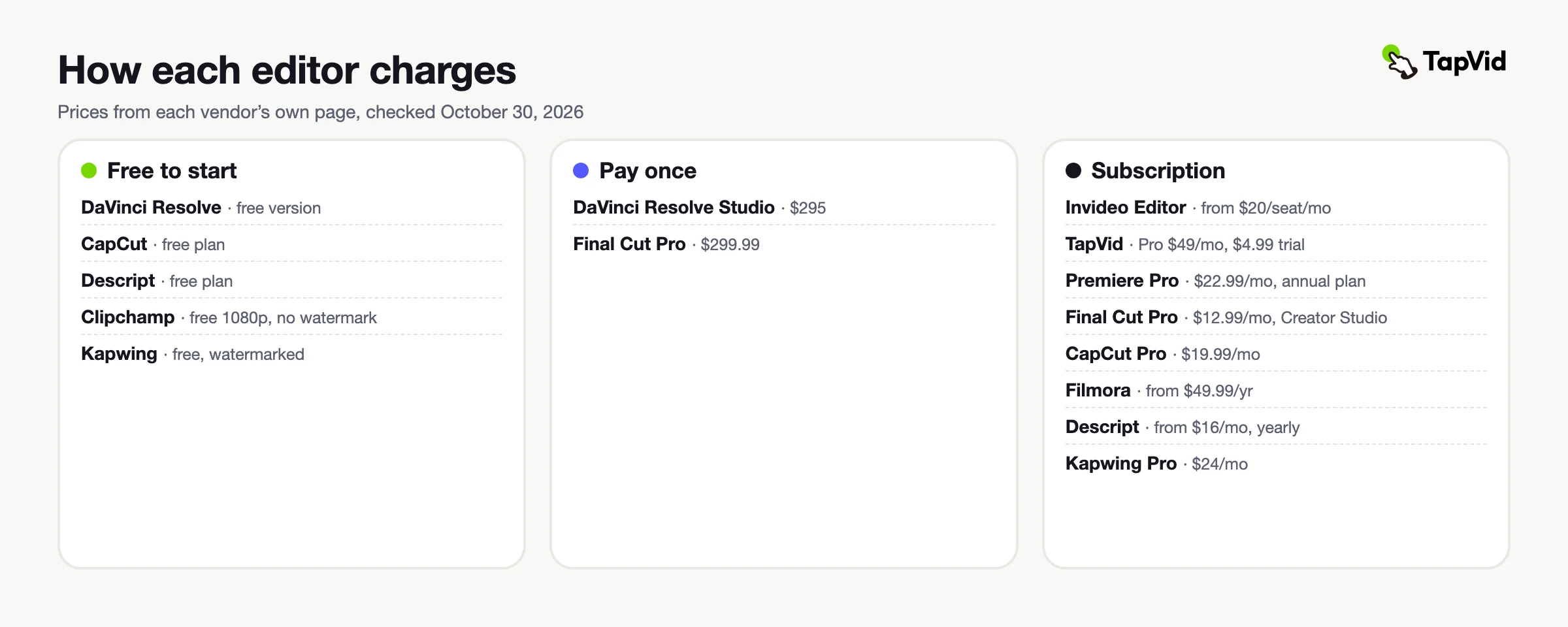
Prices come from each vendor's own pricing page, checked on October 30, 2026. They can change by region, so check each site before you buy.
01
The ten tools at a glance
Here is the quick view before the details.
| Tool | Best for | Key feature | Starting price |
|---|---|---|---|
| Invideo Editor | Saving time on long recordings | Agents that edit a real timeline | From $20/seat/month ($10 billed yearly) |
| TapVid | Explainer videos without a timeline | Turns scripts, docs, and links into motion-graphics videos | $4.99 trial; Pro from $49/month |
| Adobe Premiere Pro | Professional all-round editing | Text-Based Editing and the Adobe app family | $22.99/month on an annual plan |
| DaVinci Resolve | Pro color work for free | Full editing suite in the free version | Free; Studio $295 once |
| Final Cut Pro | Mac creators | Magnetic Timeline | $12.99/month or $299.99 once |
| CapCut | Quick social videos | Templates and auto captions | Free; Pro $19.99/month |
| Filmora | Beginners | Simple timeline with camera tracking | $49.99/year |
| Descript | Talking videos and podcasts | Editing by changing text | Free; paid from $16/month billed yearly |
| Clipchamp | Windows users | Free 1080p export without a watermark | Free; Premium with Microsoft 365 Personal or Family |
| Kapwing | Team work in a browser | Shared team workspace | Free; Pro $24/month ($16 billed yearly) |
02
Invideo Editor
Invideo editor gives you a professional timeline in your browser, plus AI agents that handle real editing work. You upload your footage and describe what you want. The agents build a first cut from your raw clips and can apply one direction to every shot, from cutting the pauses to matching the look. You can take over at any frame and edit by hand.
The agent logs every clip, so you can find a moment by describing it. Changes can be asked for in plain words, and they land on a real multitrack timeline.
Editors can correct and match colors, mix the audio, and work with teammates in real time through multiplayer editing.
Best for: Creators with long raw recordings who want to save editing time without losing control.
Pricing: Plans start at $20 per seat a month on Starter, which includes the full timeline and Lite access to the AI agents. Plus costs $60 and Max costs $250 per seat a month on monthly billing, with lower prices when billed annually.
03
TapVid
TapVid is an AI explainer video maker rather than a classic editor. You give it a script, PDF, web page, or product screenshots. It drafts a plan, lets you review the script and scene order, and then builds a motion-graphics video.
There is no timeline to learn. You change a scene by asking for the change in plain words. Your logos, screenshots, and wording stay as you supplied them, which matters for product and tutorial videos.
It suits creators who explain things, such as tutorials, product walkthroughs, and course content. It is not the right tool for cutting long raw footage.
Best for: Creators and small teams who make explainer, tutorial, or product videos from their own material.
Pricing: A first-time trial costs $4.99 for one video. Paid plans start at $49/month on Pro with 2,000 credits and scale up to $199/month on Ultra.
04
Adobe Premiere Pro
Adobe Premiere Pro is the editor many professionals use every day. It handles everything from short clips to full films. Its Text-Based Editing lets you refine, reorder, and trim clips the way you edit a text document.
It sits inside Adobe's Creative Cloud. The Creative Cloud Pro bundle adds Photoshop and more than 20 other Adobe apps, which makes it easy to grow into bigger projects.
Best for: Creators who want the industry standard and already use other Adobe apps.
Pricing: Premiere Pro costs $22.99 a month on an annual plan. It scales up through Adobe's all-apps bundle, which costs more. A seven-day free trial is available.
05
DaVinci Resolve
DaVinci Resolve is the strongest free editor on this list. The free version covers editing, color work, effects, and sound in one app.
Many editors rate its color tools above Premiere Pro's. The paid Studio version adds AI tools such as object removal and smart reframing. Version 21 also adds AI IntelliSearch, which finds people and content in your footage.
Best for: Creators who want pro color and sound tools without a monthly fee.
Pricing: The free version costs nothing. The Studio version lists at $295, paid once, and Blackmagic Design showed a sale price of $236 on October 30, 2026.
06
Final Cut Pro
Final Cut Pro is Apple's own video editor for Mac and iPad. Its Magnetic Timeline keeps clips in sync as you move and trim them. That makes rough cuts quick to build.
It also includes Magnetic Mask, which separates people and objects from the background without a green screen. It suits creators who edit often on a Mac or iPad.
Best for: Mac users who want fast editing and a one-time price.
Pricing: Starts at $12.99 a month through Apple's Creator Studio bundle. The one-time Mac App Store price is $299.99.
07
CapCut
CapCut is a fast, friendly editor made for short videos. Its free plan includes templates and the basic editing tools, and CapCut also offers auto captions. A casual creator can finish a post in minutes.
Templates help people who post every day. You rarely need to learn editing terms before you start.
Best for: Social creators who need quick, free short videos.
Pricing: A free plan covers the core editor. Pro costs $19.99 a month or $179.99 a year on CapCut's website. Prices vary by region and device.
08
Filmora
Filmora is a friendly step up from phone editing apps. It offers a real timeline with camera tracking and text animation. The look is simpler than Premiere Pro's.
Its AI tools, such as smart short clips and AI background music, run on AI credits. The Advanced and Premium plans include monthly AI credits, while the entry Basic plan has none.
It suits people who want more control than CapCut gives. It also asks for far less learning time than Premiere Pro.
Best for: Beginners who want a simple timeline at a low yearly price.
Pricing: Annual plans start at $49.99 a year on Basic. Premium lists at $99.99 a year.
09
Descript
Descript is a video and podcast editor where you edit by changing text. Delete a word in the transcript, and the matching video disappears. That feels natural for anyone who writes.
It removes filler words, adds captions, and cleans up sound. An AI helper called Underlord can handle bigger jobs from short instructions. It is far easier to learn than Premiere Pro.
Best for: Podcasters and creators who edit talking videos.
Pricing: The Free plan includes 60 media minutes a month. Paid plans start at $16/month on Hobbyist and scale up to $50/month on Business, billed annually.
10
Clipchamp
Clipchamp is Microsoft's simple video editor, and it runs in a web browser. Trimming, text, transitions, and basic captions are easy to find.
Its free plan exports 1080p video without a watermark. That is rare for a free editor. Many people never need to pay.
Compared with Premiere Pro, it is much simpler. It suits quick videos for work, school, or family.
Best for: Windows users who want a free, no-fuss editor.
Pricing: The free plan includes watermark-free 1080p export. Premium features, including 4K export, come with a Microsoft 365 Personal or Family subscription.
11
Kapwing
Kapwing is a browser-based editor built for teamwork. Your team works in one shared workspace, so nobody has to pass files back and forth.
Because it runs online, nothing needs installing. You open a link and start working. AI features sit inside the same browser window.
Compared with Premiere Pro, it is lighter and easier to share. It suits small teams that make social videos together.
Best for: Small teams editing together in a browser.
Pricing: A free plan is available, with watermarked exports. Pro costs $24 a month, or $16 a month billed yearly. Business costs $64 a month, or $50 a month billed yearly.
12
Which video editing software should you pick?
- Want to save time on long recordings without losing control? → Invideo Editor
- Turn a script or doc into an explainer video? → TapVid
- Want the industry standard? → Adobe Premiere Pro
- Want pro color tools for free? → DaVinci Resolve
- Edit on a Mac and want speed? → Final Cut Pro
- Make quick, free social videos? → CapCut
- Want a low-cost beginner timeline? → Filmora
- Edit podcasts and talking videos? → Descript
- Use Windows and want free, clean exports? → Clipchamp
- Edit with a team in the browser? → Kapwing
13
Conclusion
The best video editing software depends on how you work. Invideo editor leads this list because it saves time on long recordings while you keep full control of the timeline. DaVinci Resolve is the best free pro choice, and Premiere Pro remains the industry standard. Final Cut Pro suits Mac users, while CapCut, Filmora, and Clipchamp keep things simple. Descript fits talking videos, and Kapwing fits team work in a browser. Try a free plan on a short project first. Then keep the tool that makes your next video faster.