
TL;DR
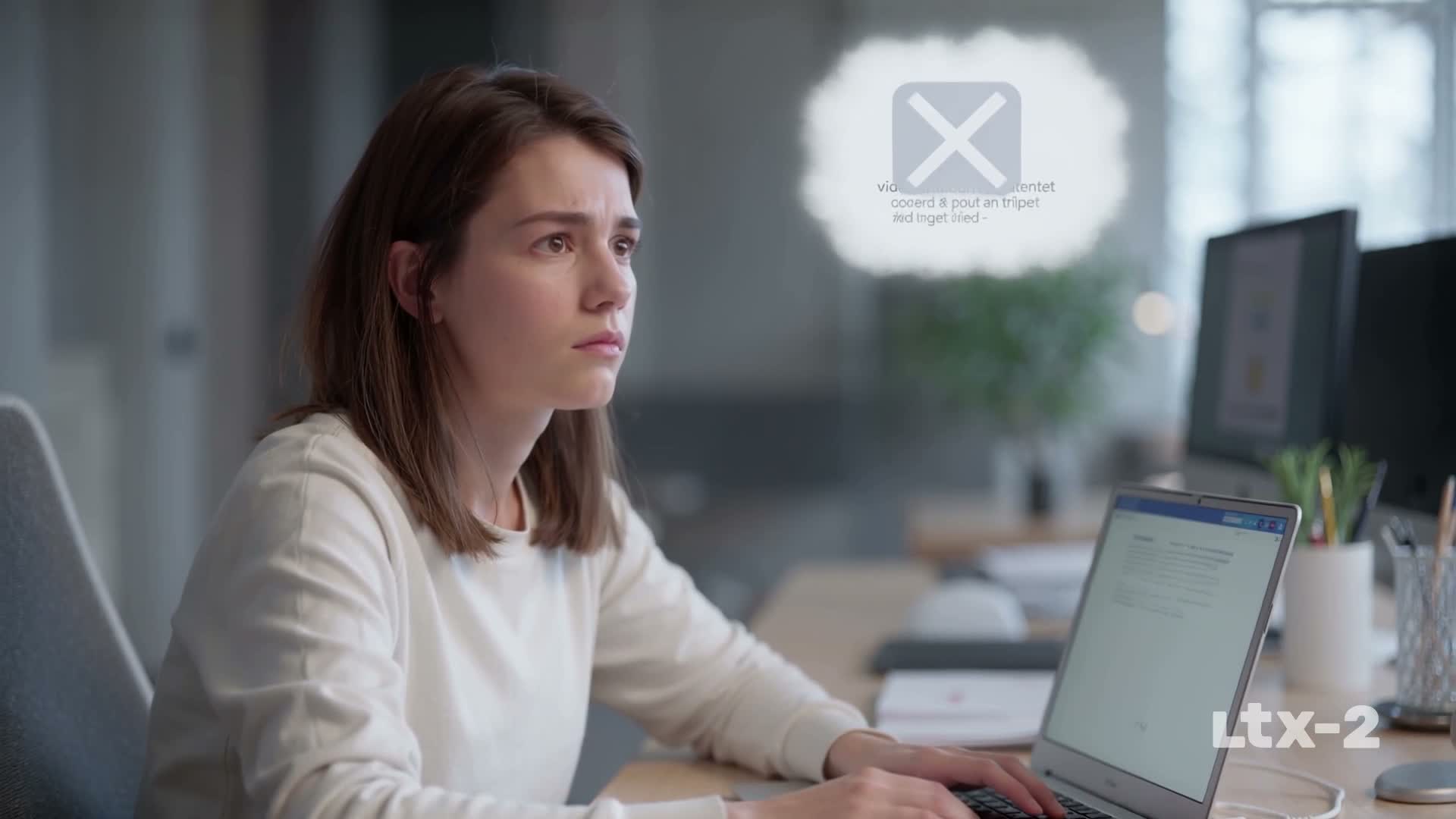
LTX-2.5 Fast produced a clean 1080p six-second clip, but it stayed in one office-and-laptop composition instead of delivering the requested three-scene explainer arc. The file was downloadable and included audio. Prompt structure and generated text were the weak points.
This LTX Studio review tests a six-second text-to-video task in the current workspace. LTX promises more than a single video model by combining generation, storyboards, editing, references, sound, and production planning.
Turn your existing content into an explainer video with TapVid
01
Quick verdict: strong workspace, incomplete story
LTX Studio looks like one of the more complete AI filmmaking environments, but our current LTX-2.5 Fast output did not follow the full brief. We asked for three visible beats: a finished article with no video, the article becoming a structured visual explanation, and a finished explainer ready to publish. The six-second result showed one creator at a laptop throughout. Floating symbols suggested progress, but the requested transformation and distinct final artifact never became clear. Small generated words were nonsensical, and an LTX-2 mark appeared at the lower right. Our verdict is 4 out of 5 for workspace ambition and 2.5 out of 5 for one-prompt explainer adherence in this run. LTX Studio deserves a deeper storyboard test, but buyers should not assume that a detailed paragraph automatically becomes a correctly structured sequence.
02
What LTX Studio is built to do
LTX Studio is a browser-based AI video production suite from Lightricks. The product spans text-to-video, image-to-video, video-to-video, references, camera controls, keyframes, Elements, storyboards, editing, sound design, and node-based Flows. That scope is important. LTX is not only a model endpoint and not only a template editor. It aims to support planning, generating, organizing, and revising a visual project. The official LTX Platform and API guide separates the browser suite, developer API, and self-hosted model, while the current app exposed LTX-2.5 Fast in Gen Space. Official capabilities are evidence of available controls, not proof that our text prompt used all of them effectively. The tested Gen Space workflow was narrower than the full Studio promise.
03
How we tested LTX-2.5 Fast
We used the official app at app.ltx.studio and signed in with the approved Google work account. In Gen Space, we selected LTX-2.5 Fast, 16:9, 1080p, six seconds, 25 frames per second, audio on, and one output. The shared brief described a three-scene article-to-explainer transformation and prohibited added performance claims. No private asset was uploaded. We generated once, did not purchase credits, and did not top up. The visible allowance indicator fell from 100 percent to 14 percent, so this single run consumed 86 percent of the displayed allowance. This test evaluates the direct text-to-video surface. It does not test storyboards, references, Elements, timeline revisions, camera controls, or a full multi-shot project.

Hands-on test surface: official product workspace
04
Measured result and observed output
The result was ready at the first 30-second follow-up check. We downloaded and inspected the file rather than judging only the browser preview. It was H.264 video with AAC audio, 1920 by 1080 pixels, 25 frames per second, 6.12 seconds long, and 1,018,654 bytes. The opening frame was clean and plausible, but the middle and final frames remained in nearly the same office composition. Floating icons conveyed change without showing a structured visual explanation, and generated small text was unusable. An LTX-2 mark was visible. One run supports these observations, but not average queue speed, repeat consistency, or Pro-model quality.
05
Prompt adherence versus image quality
The output demonstrates why prompt adherence and image quality must be scored separately. As a still composition, the creator, laptop, and office lighting were plausible. Motion stayed coherent across the six seconds. Yet the brief asked for three distinct scenes, not one composition with changing overlays. The missing transformation and final artifact were central to the job. A creator could use this as an opening shot, but would still need separate generations or storyboard work for the remaining beats. We also asked the model not to add performance claims. It avoided readable claims, but it generated letter-like text that could not be published. When testing LTX, write acceptance criteria for appearance, narrative coverage, and typography, then review them independently.
06
Storyboards, timeline, and editability
The strongest case for LTX Studio is not this single clip. It is the broader production environment. Dynamic Storyboard, references, Elements, camera and keyframe controls, Timeline Editor, sound tools, and Flows could let a filmmaker decompose a brief instead of trusting one long prompt. That is likely the better way to build the three-beat sequence we requested. A creator can plan scenes, define recurring visual elements, generate shots, and assemble them on a timeline. The tradeoff is time and skill. The user becomes the director and editor, responsible for breaking down the source, maintaining continuity, selecting outputs, and fixing pacing. We did not complete that full workflow, so we do not score its usability or export reliability. Buyers should test one short project from brief through timeline and final download. A powerful storyboard surface only creates value if revisions remain understandable and the finished file meets the publishing requirement.

07
Pricing, credits, and license limits
The current official LTX Studio pricing page lists a Free plan with a one-time credit allocation and a personal-use license. It says the Standard tier adds a commercial-use license, while higher plans provide more credits and capabilities. The page also explains that credit consumption varies by generation action and that the live balance appears in the app. Those terms matter more than a remembered monthly figure because prices, promotions, and included models change. Our logged-in account showed a dollar-denominated balance rather than the public page’s one-time credit wording, and the number did not visibly move after the run. We therefore avoid converting this test into an exact cost. Before client or marketing use, verify the plan’s commercial license, watermark rules, model access, and export conditions. The Free plan’s personal-use restriction means a successful free render is not automatically cleared for business publication.
08
LTX Studio review: hands-on evidence and current coverage
LTX Studio’s value proposition is credible: keep more of the AI video process inside one environment. Its Fast model made a clean result quickly, the generation settings were understandable, and the product exposes a path toward storyboards and editing. The unresolved questions are equally practical. We did not verify how well a storyboard preserves exact source claims, whether Elements hold identity across difficult shots, how local retakes affect cost, how the timeline handles audio and captions, or what the final download contains. We also could not confirm the exact deduction for our generation. Teams should run a small workflow audit before buying: import a real short brief, define three approved scenes, use one recurring element, revise one shot, add exact typography outside the generated image, export, and record total credits and human minutes. That test reveals whether the suite reduces handoffs or simply moves a complex filmmaking process into a new interface.
Hands-on observation: LTX-2.5 Fast returned a downloadable 6.12-second 1080p clip with audio, but the three requested scenes stayed inside one office-and-laptop composition and generated text was unusable. Advantage: LTX combines a fast generation surface with a broader browser workspace for storyboards, editing, reusable elements and more directed filmmaking. Limitation: The direct one-prompt run did not create three distinct story beats, so a buyer should expect to use storyboard and editing controls for structured delivery.
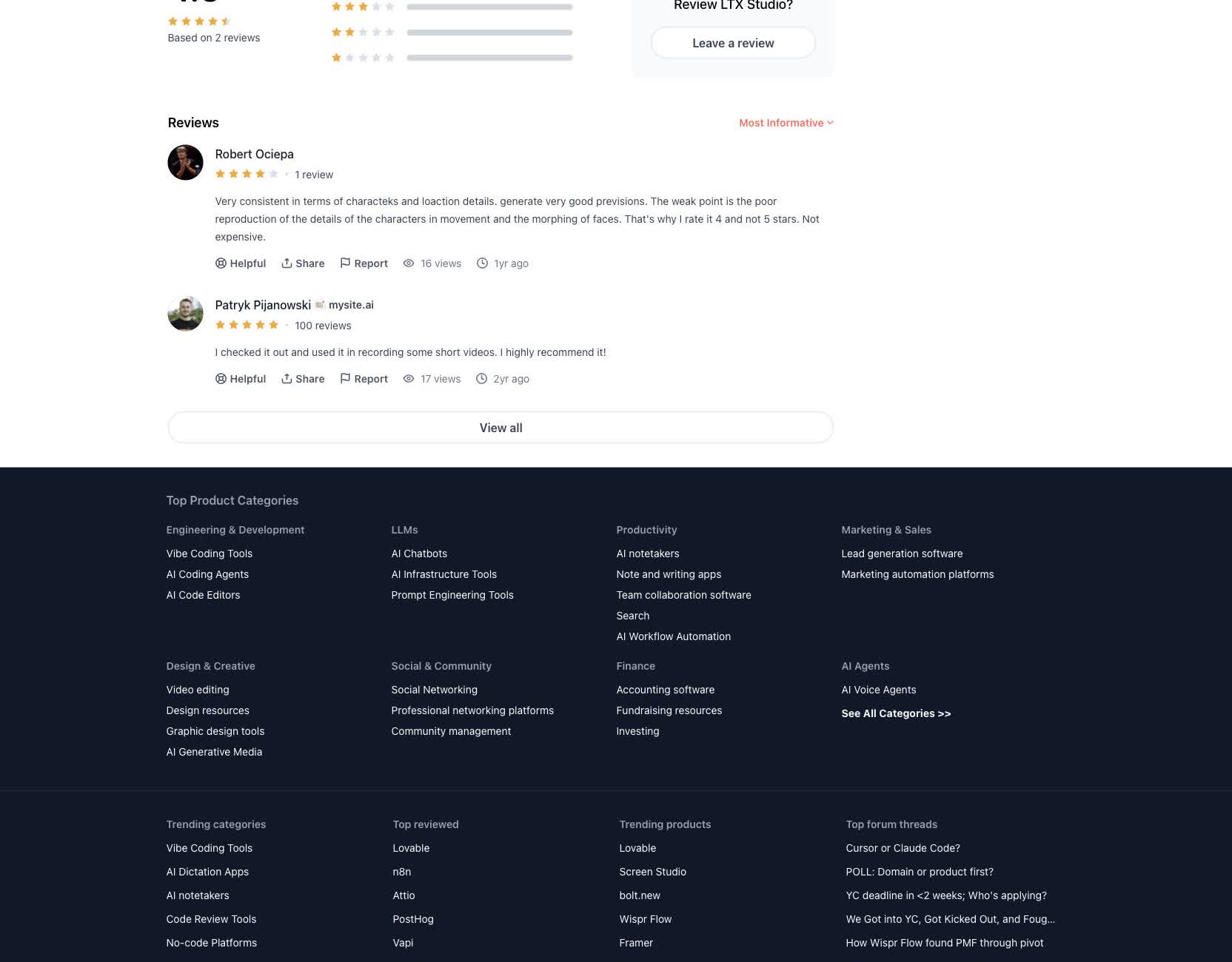
Independent user evidence: A four-star Product Hunt reviewer praised consistency in characters and locations but reported weak movement detail and face morphing. Read the original Product Hunt review.
| Current coverage | Finding | Official source |
|---|---|---|
| pricing | The current pricing page lists a $0 Free plan with 800 one-time credits and paid plans with monthly credit allowances. | Source |
| capability | LTX documents the browser platform as a creative suite distinct from the LTX-2 API and self-hosted model. | Source |
| integrations | LTX provides a separate LTX-2 API with its own access, keys, credits and billing documentation. | Source |
| trust | A four-star Product Hunt review praised consistency while reporting movement-detail weakness and face morphing. | Source |
| support | The official Help Center documents product workflows, plans, billing, API use and account support. | Source |
09
Who should use LTX Studio
LTX Studio is best suited to filmmakers, creative directors, storyboard artists, agencies, and marketing teams that want a flexible preproduction and generation workspace. Those users can take advantage of scene planning, reference management, camera choices, multiple models, and timeline control. It also fits teams that enjoy directing and are willing to refine shots rather than accepting the first result. It is less direct for a small business whose main asset is a finished product page or training document, or for an agency that must deliver many accurate client videos. Those teams may not want to become storyboard editors, continuity supervisors, and compositors. If your bottleneck is visual planning and shot iteration, LTX deserves a trial. If the hard part is publishing accurate videos from existing business material, start with a source-grounded workflow and add LTX only where custom cinematic shots improve the result.
10
LTX Studio versus TapVid
LTX Studio and TapVid begin at different levels of the production problem. LTX Studio is a creative suite for planning and generating visual scenes. TapVid turns existing product images, UI screenshots, specifications, documents, URLs, audio, and footage into clear videos that are ready to publish. LTX gives a director tools to shape a film. TapVid gives a small business or delivery partner a path from approved source material to more product, training, or client pages with video. Choose LTX when you need storyboard freedom, references, camera control, shot-by-shot generation, and a timeline. Choose TapVid when critical facts must remain unchanged and a revision should rerun only the affected scene, so output can grow without line-by-line review. A hybrid workflow is possible: establish the source-grounded message first, then generate selected B-roll or cinematic transitions in LTX.
| Decision | LTX Studio | TapVid |
|---|---|---|
| Starting point | Prompt, storyboard, or references | Existing creator content |
| Primary output | Directed shots and edited sequence | Structured explainer video |
| Best fit | Visual planning and filmmaking | Source-grounded explanation |
11
Final verdict
LTX Studio is one of the most interesting workspaces in this batch, and one of the easiest to overrate from a feature list. Our direct LTX-2.5 Fast run was quick, downloadable, and visually coherent. It also failed to turn the prompt into three distinct story beats, and its generated text was unusable. That result does not condemn the broader suite. It shows that one-prompt text-to-video should not be mistaken for automatic storyboarding. Use LTX when you want to direct, plan, and edit, and be prepared to use the storyboard and timeline tools that justify the product’s breadth. Check the live license before commercial work, measure real credit use, and export a representative project before subscribing. For a standalone six-second visual plate, the Fast model is promising. For a finished explainer from existing content, the creator still owns structure, claim fidelity, typography, narration, and final assembly.

12
Frequently asked questions
Is LTX Studio free?
The official pricing page lists a Free plan with one-time credits and a personal-use license. Commercial work requires a plan whose current terms allow it.
Did LTX Studio follow the three-scene prompt?
Not in our one LTX-2.5 Fast run. The clip stayed in one creator-and-laptop composition and did not make the final two requested beats distinct.
Is LTX Studio better than TapVid?
LTX is better suited to visual planning and shot-level filmmaking. TapVid is built to turn existing content into a structured explainer video.