
TL;DR
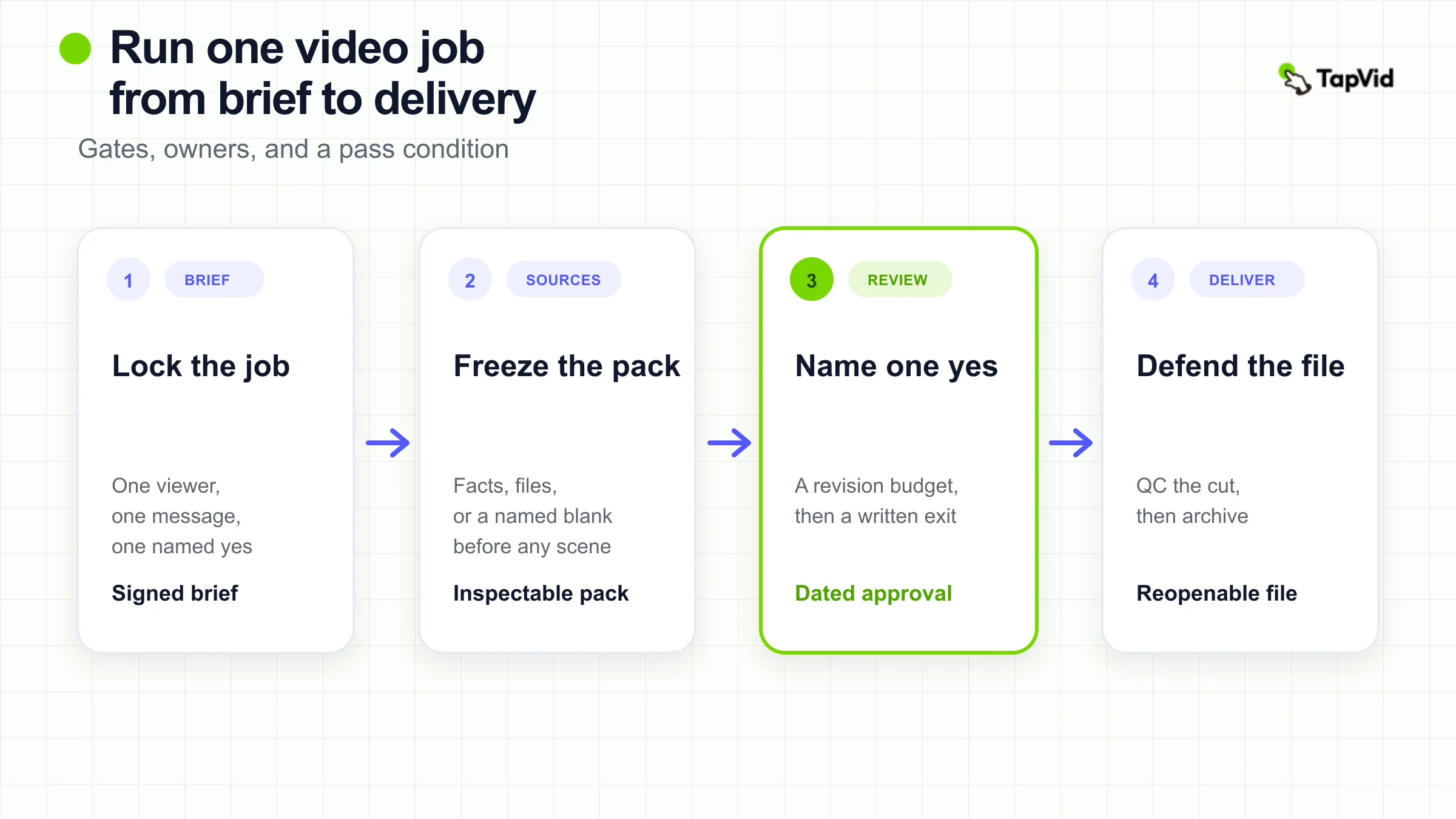
A video production workflow is the ordered gate map for one video job. Lock the brief and the source pack first. Turn the approved script into a scene map. Produce only on the path those sources allow, either a shoot or an asset-led draft. Review with one named approver and a closed revision budget. Deliver a file you can defend, then archive the job. A finished video is not proof that this sequence ran.
A video production workflow answers a narrow question: how does this one job move from an agreed brief to a file someone can publish without guessing what happened in between? The useful object is not a software stack. It is a sequence of stages, each with an owner, a deliverable, a pass condition, and a place to stop. VID's 2026 team-workflow guide is blunt about the usual failure. Teams build a board, skip it, and keep sending scripts in chat. Storyflow's start-to-finish system makes the same point from the other side: productions fail at handoffs more often than inside a single stage. This page keeps that diagnosis and then does a different job. It tells you how to run one video, including the jobs that never go to a shoot day. This is not a fill-in template, a commercial proposal, a dated production plan, or a campaign automation operating system. Those pages already exist on TapVid. Use them when the job is to fill a record, get a yes, assign dates, or run a multi-channel campaign. Stay here when you need the stage map itself.
Fill the reusable production record
01
A workflow is a gate map, not a nearby form
The phrase video production workflow gets used for four different objects. Mixing them is how a team ends up filling a checklist while the actual job has no approved brief.
A workflow says what must be true before the next stage can start. A template is a reusable production record: sources, script, scenes, revision state. A proposal is the scope someone still has to accept. A plan assigns owners, dates, and dependencies after that acceptance. Automation is a campaign loop with packaging, release permissions, and measurement.
Codepic's exact-match 2026 guide defines a workflow as a map of owners, deliverables, and approval gates rather than a task dump. That definition is the one this page uses.
- A diagram of ten boxes is still not a run.
- If a later stage cannot point back to an approved artifact, the map was decoration.
- Keep the nearby pages in their lanes.
| Object | Reader job | Do not use it for |
|---|---|---|
| This workflow page | Run one job from brief to delivery | Filling fields, quoting a fee, or dating a Gantt |
| Video production template | Fill a reusable production record | Learning the stage order |
| Proposal template | Get a stakeholder to accept scope | Running the job after the yes |
| Plan template | Assign owners and dates | Deciding what the video must say |
| Video marketing automation | Run a campaign loop with human gates | A single delivery |
If you need a form, leave this page. If you need the order of work, stay.
02
Six stages for one video job
Most public guides collapse production into three phases: pre-production, production, and post-production. Lemonlight's 2026 Video Production 101 page is the clearest encyclopedia of that model.
The three-phase map is true and too coarse when you must know whether the script is allowed to move. This page splits one job into six stages. Filming is optional. Source lock is not.
| Stage | Owner | Deliverable | Pass condition | Typical stall |
|---|---|---|---|---|
| 1. Brief lock | Producer or marketer who can name the job | One-page brief with audience, length, channel, and one message | A named approver signs the brief | Production starts from a Slack thread |
| 2. Source lock | Source owner | Inspectable pack: approved facts, files, and missing-input list | Every later claim has a source or is marked blank | Editors invent a number to finish a scene |
| 3. Script and scenes | Creative lead | Script plus a scene map that points each beat to a source | Script and map are approved together | A pretty storyboard with no source row |
| 4. Produce | Production or asset-led operator | Reviewable cut at the target length | Only locked sources appear on screen | A shoot starts, or a generate starts, before the map is approved |
| 5. Review | Named approver, not a group inbox | Decision: approve, or return to one stage with a budget | The loop has an exit | Notes arrive from five people with no owner |
| 6. Delivery and archive | Publish owner | Channel files, a QC record, and an archive of masters plus sources | Someone can reopen the job later | The "final" file lives only in a chat upload |
Those six rows are the whole workflow. The rest of this page is how to run each row. A filmed customer story still needs a brief, a source pack, a scene map, a review budget, and an archive. An asset-led product update needs the same gates. The produce stage is the only place the methods diverge. iconik's December 2025 note is right that comments split across email, Slack, and a drive turn approval into folklore.
Centralize comments on the cut. Do not let a media-asset platform replace script lock or source lock.
Walk one 60-second changelog job through the same six rows. The facts below are a planning example, not a product test.
- Brief lock: viewer is a current customer reading the product page. Job is to find the new export default. Length is 60 seconds. Channel is the product page. Message is "export default is now 1080p." Approver is the product manager. Out of scope: sales demo and recruiting cut.
- Source lock: changelog entry with a date, current settings UI, approved 1080p wording, and a blank for any performance claim you do not have. Missing input: legal review of the sentence if a competitor is named.
- Script and scenes: four rows. Name the change. Show the setting. State the limit. Ask for one next step. Each claim-bearing row points at the pack.
- Produce, asset-led: assemble a reviewable draft from the UI capture and the approved lines. Do not invent a "faster export" claim to fill a pause.
- Review: the product manager watches once. One craft note is allowed. A request to add a second audience is a new brief.
- Delivery: 16:9, 60 seconds, captions that repeat only approved wording, destination on the product page, archive of brief, pack, map, decision, and master.
A filmed 90-second customer story uses the same six rows with different produce work.
- Brief lock still names one viewer, one message, one length, and one approver.
- Source lock adds the release, the location permission, the product version on camera, and the quote that may be subtitled.
- Script and scenes still need a source column. "B-roll of the office" is not a row until it carries no claim or has a permission.
- Produce logs takes against the map. Extra coverage without a row cannot introduce a number later.
- Review still has one approver and a budget. The customer success lead who confirmed the quote is a commenter unless the brief named them as approver.
- Delivery still archives the release with the master. Losing the release is losing the right to rerun the cut.
03
Lock the brief before anyone gathers a source
A brief is the first artifact, not a conversation about a future artifact. VID's brief section asks four questions that still work: who is this for, what should they do, what length and format, and where does it live. Write the answers down. Do not treat a kickoff call as the brief.
A one-job brief can stay on one page.
Viewer: one role in one situation, not "everyone on the website." Job: one action after the video, such as complete a step, inquire, or understand a change. Length and channel: a number and a place. "About a minute for social" is not a brief. One message: the sentence later stages check against. Approver: the one person who can say the brief is done. Out of scope: the second audience, the second offer, and the extra cut you will not make this time.
- The pass condition is boring on purpose. The named approver writes yes on that page.
- If two departments still disagree about the message, you have a stalled negotiation wearing a filename.
- A brief that names no length leaks into every later argument. The editor cuts to taste. The stakeholder asks for more context. The publish owner finds the file too long for the slot.
- Treat a request for a second length as a second deliverable.
Worked briefs you can copy as structure, not as your facts:
- Asset-led product update: 60 seconds, changelog audience, product page. Message: the export default is now 1080p. Approver: the product manager who owns that sentence. Out of scope: brand film, sales demo, recruiting cut.
- Filmed customer story: 90 seconds, landing page. Message: this team replaced a weekly status meeting with a recorded walkthrough. Approver: the customer success lead who can confirm the quote. Out of scope: company-history montage.
- If those two jobs share a folder titled "Q3 video," split them before anyone collects a file.
- A competitor reel may inform tone. It cannot supply length, claim, or approver. Steal structure only after the brief exists.
- Refuse a brief that lists three audiences and one file. That is three jobs sharing a costume.
- Refuse a brief that says "make it feel premium" and names no message. Tone is not a pass condition.
- Refuse a brief whose approver is "the leadership team." A group cannot write yes on one page.
- Write the out-of-scope list even when it feels rude. The second cut will arrive as a friendly suggestion during review if you do not.
04
Freeze a source pack the later stages can inspect
Source collection is a stage, not a scavenger hunt during the edit. Teams that skip it do not save time. They move the invention into the cut, where it is harder to see and more expensive to undo.
Build a pack that a stranger on the team could audit.
Approved wording: names, numbers, legal lines, and the one message from the brief. Original files: screenshots, product UI, documents, logos, footage, or stills you are allowed to use. Proof for every claim that will appear on screen or in voiceover. A missing-input list with an owner, not a hope. Version or date on each source that can go stale.
- The pass condition is correspondence. Every later scene points to a pack row or is marked as visual support with no claim.
- A scene that "just looks more premium" is allowed only when it introduces no fact.
- A polished export can hide a missing source. A source pack cannot. If the only artifact is the final file, you have a result, not a workflow.
- Asset-led jobs feel this first. A changelog mention of a price, date, or count needs a row. If the owner has not approved it, the field stays blank.
- Filmed jobs feel it as releases and locations. A customer on camera is a source. So is the office, the product version on the laptop, and the subtitled quote.
- If the release is missing, produce is blocked even if the crew is booked.
- iconik is useful later for ingest, proxies, and archive search. It does not decide whether a claim is approved.
- When a source changes after lock, mark the pack stale and name the affected scene. That is an isolated rerun, not a new video from zero.
- Record that revision state on the production template if you need a form. This page only requires that the state exist.
- Keep a stale-source rule that a non-specialist can apply. If the UI capture is older than the changelog date, recapture before produce.
- Keep a blank-field rule. A missing price is not a reason to screenshot a competitor page and guess.
- Keep a permission rule for faces, offices, and customer names. "They said it was fine on the call" is not a row.
- Keep a version rule for logos and color. An older green, or an old wordmark, is a source defect, not a style choice.
05
Write the script as a scene map
A script that is only spoken copy is half a deliverable. The other half is the scene map: which visual job carries each beat, and which source that visual is allowed to use.
Write both before anyone opens a camera or a generator.
One spoken beat per scene. One visual job per scene, stated as a verb: show the setting, show the UI state, show the object, show the face. One source pointer per claim-bearing scene. On-screen text that matches approved wording, or no on-screen text. A timing guess that adds up to the brief length.
- Codepic puts storyboard before the shoot so pacing problems appear on paper. Keep that habit.
- Drop the assumption that a storyboard implies a call sheet. An asset-led scene map can be a table.
| Scene | Spoken beat | Visual job | Source | Claim risk |
|---|---|---|---|---|
| 1 | Name the change in one sentence | Title plus product UI | Approved changelog + current UI capture | High if the UI has drifted |
| 2 | Show where the viewer finds it | Cursor path through the setting | Same capture, no extra screens | Medium |
| 3 | State the limit | On-screen line from the brief | Brief out-of-scope sentence | High if someone "improves" the line |
| 4 | Ask for one next step | End card | Approved URL only | High if the destination is guessed |
Approve the script and the map together. A creative lead who loves the copy and a producer who has not seen the map are not done. If the table needs nine scenes to say one message, the brief is overloaded or the script is repeating itself. Cut scenes before you cut on a timeline. A 60-second job that needs a two-minute explanation is a brief problem. Do not promote a storyboard that cannot fill the source column. Empty source cells are how unsupported metrics arrive in a first cut.
This article does not treat a generated picture of a workflow as evidence that a workflow ran. Apply the same rule to your job. For an explainer-specific five-field method, use How to create an explainer video. For a product claim map across SKUs, use Product video production. Whatever format you chose still needs a scene-to-source row.
06
Produce on the path the sources allow
Production is the stage people picture first and should start last. The method follows the proof you already locked.
Film when a person, place, or physical action is the evidence the brief needs. Asset-led when the evidence already lives in documents, UI, stills, or approved clips. Hybrid when a short filmed open or close sits on an asset-led middle.
Lemonlight's encyclopedia is the right depth for a filmed job and the wrong default for a changelog. VID warns that a studio-shaped workflow will be ignored by a four-person team. Pick the thinner method that can still show the locked sources. Filmed deliverable: logged footage plus a first assembly that follows the scene map. The shot list schedules the map. A shot not on the map is B-roll with no claim rights until a source row exists.
- Asset-led deliverable: a reviewable draft with visible scenes, readable captions, and checkable claims. The draft is for review, not publication.
- TapVid belongs only on that second path, as an optional execution surface.
- The public video production template currently owns this much: turn approved materials into a reviewable script and scene plan, keep protected wording tied to its source, and rerun an affected scene when one approved field changes.
- It is not a built-in template library, shot-list software, a Gantt calendar, or a production agency.
- This article does not claim a fresh TapVid brief-to-final pack. There is no first-hand run attached to these sentences.
- A library clip of a finished video would not close that gap. A product-performance claim needs the same job twice: one setup or process state and one result or boundary state.
- Until that pack exists, treat TapVid as a possible draft surface, not as proof that your workflow works.
Common produce failures are method mistakes, not taste mistakes.
- Starting a shoot to discover the message. That work belonged in the brief.
- Generating a draft from a loose prompt, then calling the output a source. The prompt is not the pack.
- Adding a statistic because the scene felt empty. Empty is better than false.
- Changing the end-card URL during render because "the homepage converts better." That is a brief change. Reopen the brief.
- Picture lock is the produce pass condition: the cut matches the map and the length. Review can still send it back.
- If the remaining work is a 13-stage edit from ingest to archive, hand off to Video editing workflow.
- This page stops at a reviewable cut plus the gates around it.
07
Review with one approver and a closed loop
Review is a gate, not a group chat. Codepic draws two branches after the cut: approved, or returned to the stage that needs work, with a revision budget so the loop can end. Use that shape.
Name four things before anyone watches.
The approver, one person who can say publish. The commenters, people who may add notes the approver can accept or discard. The budget, usually one or two rounds inside the agreed scope. The clock, a window such as 48 hours, so trickle notes do not reopen the job forever.
- Put comments on the cut, as iconik advises, not across email, Slack, and a drive.
- Time-stamped notes beat "the middle part feels off."
- A review tool cannot invent an approver. If the watcher cannot say yes, you are collecting opinions.
Sort notes before the editor touches the timeline.
- Brief notes change the job, the audience, or the message. That is a new brief, not a tweak.
- Source notes change a fact or an asset. Mark the pack stale and rerun the affected scene.
- Craft notes change pacing, sound, or a visual that carries no claim. These use the revision budget.
- Taste notes with no artifact. Discard them or convert them into one of the three types above.
- A revision budget without this sort will be spent on taste. A sort without a budget will loop.
- Do not treat a finished-looking cut as approval. Video marketing automation separates a reviewable draft from a release decision. Borrow that split even when you are not automating a campaign.
- Ask factual accuracy, brand wording, channel fit, and publish permission in order. One person may own more than one question.
- Write a decision record: date, approver, round number, and the branch taken. Without it, the next person restarts from "final_v7."
- If the team cannot agree who makes videos, use Small business video production first. Come back after that choice.
08
Deliver a file you can defend, then close the job
Delivery is not "someone uploaded something." It is the last inspectable state of this job.
Run a short QC against the brief and the pack.
Length matches the brief, or the change was approved as a new deliverable. On-screen text matches approved wording. Captions are readable and do not introduce a new claim. The destination URL is the one on the brief. Aspect ratio matches the channel named in the brief. Audio is intelligible. This is a check, not a mixing course. No leftover placeholder, older logo, or stale UI. File name and version are written down.
Then archive enough that the next person can reopen the job.
- The approved brief.
- The source pack and its dates.
- The scene map.
- The review decision record.
- The master and the delivered encodes.
- The note of what would force a rerun.
- Storyflow treats delivery as a handoff, not a disappearing act. Keep that. Skip the software-stack recommendation that follows it.
- You do not need a new app to put five files in one folder with a date.
- Channel packaging, UTM rules, and dashboards belong to the automation guide.
- A 30-day capacity model belongs to Scalable video production.
- This page ends when the named publish owner can point to a file and the artifacts that justify it.
- A finished video still does not prove the workflow. An empty archive means you delivered a file and lost the job.
09
Leave this page when the job is a form, a calendar, or a later edit
Some searches that look like video production workflow are asking for a different object. Send them away on purpose.
You need a reusable worksheet for sources, scenes, and revision state. Use the video production template. You need a stakeholder to accept scope and placeholders. Use the proposal template. You need dates, owners, and dependencies. Use the plan template. You need ingest-to-archive editing craft. Use Video editing workflow. You need throughput, queues, and a format portfolio. Use Scalable video production. You need a campaign loop with release permissions. Use Video marketing automation.
You need an explainer-specific five-field method. Use How to create an explainer video.
- Those links are the boundary, not a sitemap dump.
- If you copy a template schema into this article, you have started a second competing page. Do not.
- TapVid is not the hero of every stage. The useful placement is the asset-led produce stage after sources are approved.
- Draft a reviewable script and scene plan from those materials, then keep the same review budget you would use on a filmed cut.
- If that sentence ever needs a product screenshot, capture the job. Do not paste a finished video and call it the route.
10
Frequently asked questions
What is a video production workflow?
It is the ordered set of stages for one video job, from brief and source lock through script, scenes, production, review, and delivery. Each stage has an owner, a deliverable, and a pass condition. It is not a project-management template and not a campaign automation system.
What are the stages of a video production workflow?
This page uses six: brief lock, source lock, script and scene map, produce, review, and delivery plus archive. Classic guides use three phases, pre-production, production, and post-production. The six-stage map makes the gates visible when there is no shoot day.
Do I need a shoot day to run this workflow?
No. Film only when a person, place, or physical action is the proof the brief requires. If the proof already lives in approved documents, UI, or stills, run an asset-led produce stage on the same gates.
Who should approve the video?
One named person who can say the file may publish. Other people may comment. If the watcher cannot say yes, the review stage has the wrong audience.
How many revision rounds should we allow?
Set the number on the brief, usually one or two inside the agreed scope. A new audience, offer, or length is a new job. An endless loop is a missing budget, not high standards.
Is a finished video enough to prove the workflow?
No. A finished file proves a file exists. Workflow proof is the chain: approved brief, source pack, scene map, review decision, and the delivered file. This article does not use a completed video as a substitute for that chain.
When should we use a video production template instead?
Use the template when you need to fill a reusable record. Use this page when you need the order of work and the gates. Link them. Do not merge them.
Where does TapVid fit?
Only on the asset-led produce path, and only after the brief and sources are approved. The public template page is the current description of that optional step. This article does not report a first-hand brief-to-final TapVid run.
What should I archive after delivery?
Keep the approved brief, the source pack and its dates, the scene map, the review decision, the master, the delivered encodes, and a note of what would force a rerun. If you cannot reopen the job from that folder, you delivered a file and lost the workflow.
How is this different from pre-production, production, and post-production?
Those three labels still describe when work happens. They hide whether the brief is locked, whether sources exist, and whether review has an exit. The six-stage map makes those gates visible, including on jobs with no shoot.
Can one person wear every role?
Yes. The roles still have to be distinct on the page. The same person can write the brief and cut the draft. They cannot pretend a group inbox approved the file if no name is on the decision record.