
TL;DR
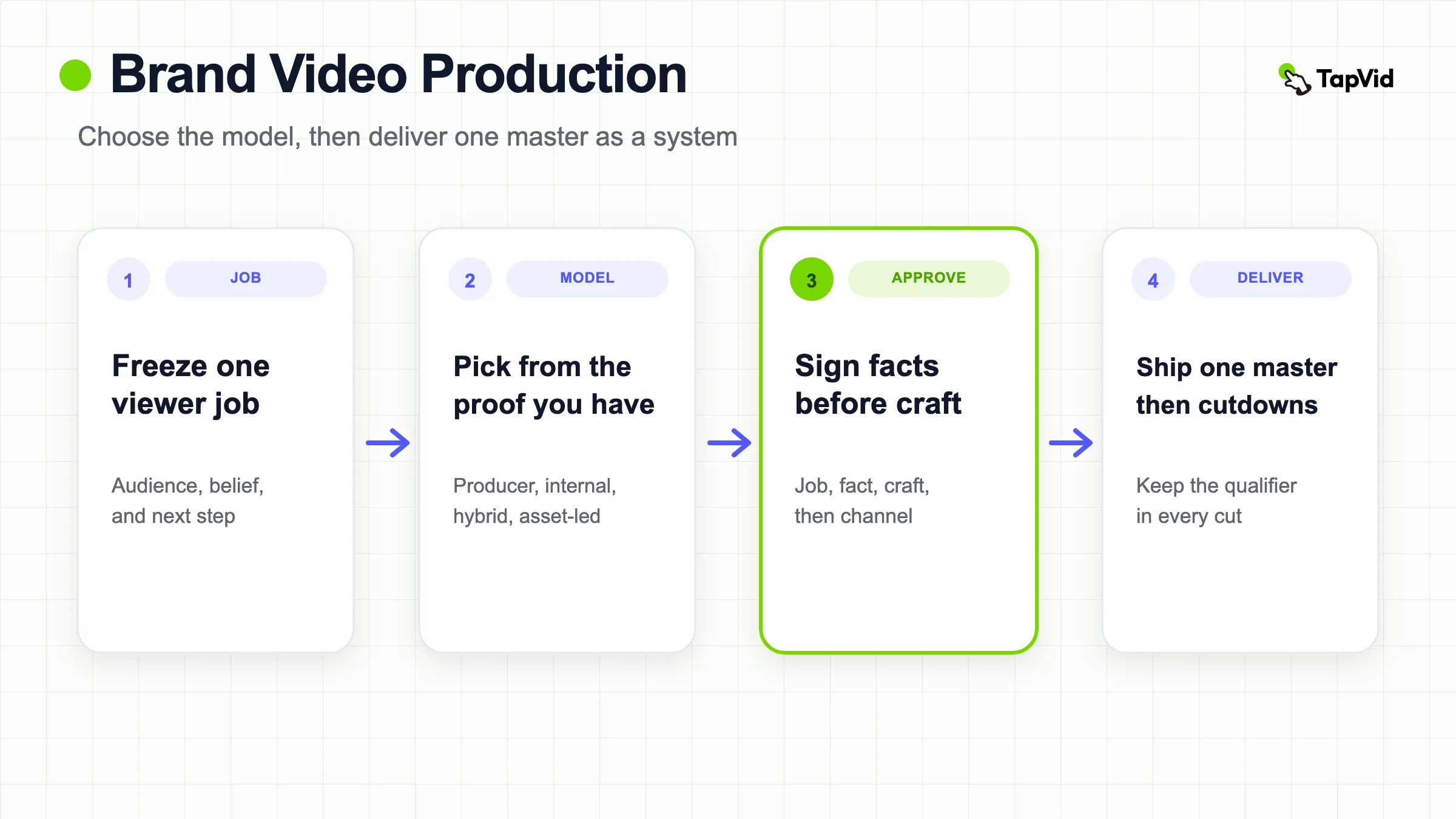
Brand video production is the operating system that turns one viewer job, approved source assets, and named reviewers into a master cut and reusable deliveries. Compare a brand-film producer, an internal workflow, a hybrid split, and an asset-led path against the proof you already have. Freeze the job and the source pack before anyone prices a shoot. Then pay for revision risk, not only day rates, and derive channel cutdowns from an approved master.
A search for brand video production often looks like a hiring problem. Agency directories, local studios, and "best production companies" lists fill the first screen. Those results answer who you might pay. They do not tell a small brand team how to decide what to make, which owned assets can carry the meaning, who must sign which line, or how one master becomes a set of cuts that stay true after the first publish.
This guide owns that production decision. It is not a gallery of cinematic brand films. If you need a truthful story spine, use the brand storytelling video guide. If the viewer is asking why this company is credible now, use the company profile video guide. If you want official campaign examples to steal a brief from, use promotional video examples. Stay here when the job is to produce, approve, and repeat brand video without inventing facts in the edit.
01
Brand video production is a delivery system, not a mood film
Levitate Media's 2026 guide defines brand video production as the deliberate process of creating professional video assets that express identity, value proposition, and personality to a defined audience. Mongoose Films draws a similar line: a brand video asks the viewer to believe something about the company, not only to buy a SKU today. Those definitions are useful. They are also incomplete if they stop at "tell your story" and skip the files, rights, and signatures that make the video publishable.
Brand video production, in this article, is the chain of inspectable decisions that sits under that film: viewer job, source pack, protected wording, production model, scene ownership, staged approval, master lock, and derivative delivery. A polished export can still fail if it uses an unreleased claim, a logo the brand retired, a customer quote without permission, or a call to action that belongs to a different campaign.
The adjacent formats look similar on a homepage reel and answer different questions. A brand story needs a protagonist, tension, and observable change. A company profile answers organizational trust. A promotional cut carries a time-bound offer or campaign CTA. A product video must show the thing working. Brand video production is the system that chooses among those jobs, then ships the chosen job without mixing all four into one muddy hero file.
Do not force one master to recruit, sell, explain a feature, and announce a sale. Write a one-sentence contract: after watching, this audience should believe or do this bounded thing because they saw this proof, and they should take this next step. If the sentence contains three audiences and two offers, split the project before production starts.
02
At a glance: pick the production model
Use this table before you hire a crew, staff an internal bench, or paste a brief into software. The path follows the proof you already have, not the reference film you liked last week.
| Production model | Use when the proof is | Cost shape | Revision risk | Do not use when |
|---|---|---|---|---|
| Brand-film producer | Place, people, physical work, or craft the internal team cannot run safely | Variable project or retainer fee | High if the brief is still moving | The job and facts are still under debate |
| Internal workflow | Recurring output, deep brand knowledge, and enough volume to keep specialists busy | Fixed salaries, gear, and overhead | High if one person owns strategy, shoot, edit, and approval | Demand arrives in bursts a few times a year |
| Hybrid split | Internal owners can brief and approve, but capture or finish needs outside depth | Mixed fixed plus project fees | Medium when one internal owner consolidates notes | Nobody inside owns the brief or the sign-off |
| Asset-led | Approved copy, stills, diagrams, UI, or existing footage already contain the meaning | Tool or vendor cost against a frozen source pack | Lower on capture, still high if facts are unsigned | The claim needs an unfilmed event, factory, or person |
If the viewer question is "why should I care how this brand acts," leave this page for the storytelling guide. If the question is "why trust this company now," use the company profile guide. If you are collecting campaign references, use the examples page. If the video must prove a product mechanism, use the product video production guide. The table above is for the remaining job: choosing how to produce the brand cut you already decided to make.
03
Compare a producer, an internal team, a hybrid split, and an asset-led path
The useful question is not "agency or AI." It is which parts require capture, which require exact layout, which require craft, and who reviews each handoff. Prose treats this as an operating-model decision: strategy, creative, production, post, and distribution can sit in different places. A cheap day rate that leaves three of those jobs unnamed is not cheap.
A brand-film producer, meaning a production company or studio you hire for a scoped film, fits when logistics or craft exceed the internal team. Multi-location days, casting, specialist cinematography, or a large coordinated crew belong here. Hire after the brief is stable. A producer cannot invent a clear job, and it should not be asked to. Mongoose is right that agencies tend to win on high-stakes hero films. The missing rule is that you still own facts, rights, and the one viewer job.
An internal workflow fits when video is an always-on capability. Prose starts with volume, not ego: if demand is uneven, a full bench is usually overkill. Internal teams are fast when the same people already know the brand, the reviewers, and the channel. They stall when one editor is also the producer, the legal chase, and the person who has to say no to a late founder note. Fixed cost looks cheaper until the team sits idle, or until a hero film arrives that the bench cannot light, permit, or finish.
A hybrid split is the common mid-market answer, and it only works with a named internal owner. Keep strategy, source pack, and approval inside. Send capture, specialist finish, or overflow cutdowns outside. Do not send a mood board and hope the vendor invents the job. Do not keep two Slack threads that both believe they have final cut.
An asset-led path fits when the meaning already lives in approved copy, stills, diagrams, UI, or existing footage. This is the route for teams that already wrote the About page, the campaign brief, or the brand narrative and now need a reviewable video. It is not a film crew. It cannot travel back in time and film the day you skipped. Use it when the claim does not depend on an unfilmed physical event.
These models combine. A launch week may need one controlled shoot, one asset-led explainer, and a set of social cutdowns. Write which model owns which deliverable so the project does not silently become four unrelated films.
04
Freeze one viewer job before anyone prices a shoot
Most expensive brand films fail in the first meeting, not on set. The room agrees that the video should "feel premium" and "show who we are." Nobody names the viewer, the belief that should change, or the action after the last frame. Viralix is blunt about this: a vague brief, too many stakeholders, and an undecided job (sell, explain, or look good) ruin the project before anyone presses record.
Name four things in writing.
1. One audience, described by the decision they are making, not by a demographic slogan. 2. One belief or understanding that should be different after the cut. 3. The proof that can actually support that change. 4. One next step that fits the placement: a homepage, a sales deck, a careers page, or a paid slot.
Then write exclusions. List the claims that are not approved, markets where the offer differs, founder memories that are unverified, partner names that lack permission, and customer results that cannot be shown. Exclusions are production tools. They stop a well-meaning editor from filling a gap with a plausible line.
Channel is part of the job, not a later export setting. A 90-second homepage film and a 15-second paid cut can share footage and still need different openings, caption density, and CTAs. Decide the primary placement first. Secondary cuts come from that master. They do not get to rewrite the job.
Do not send a producer an open brief and ask for three concepts so the room can "see what feels right." That is how you pay for discovery twice: once in the pitch, and again in revision. Price the frozen job. If the job is still a negotiation, you are not ready to compare quotes.
05
Collect the source-asset pack first
A brand video is only as honest as the folder behind it. Collect the current positioning, approved claims, brand colors, logo files, type rules, pronunciation notes, owned photos, licensed footage, interview releases, product stills, UI captures, and the exact end-card destination. Give every file a stable ID, owner, date, market, and permission state. Mark superseded files instead of leaving five near-identical logos in a shared drive.
Separate three layers in that pack.
- Literal facts: names, dates, numbers, titles, legal phrases, prices, and quotes that must remain exact.
- Owned evidence: original interviews, archival images, facilities, products, documents, and approved customer material.
- Creative treatment: pacing, metaphor, music, motion, and framing that can move without changing the facts.
If a line has no file and no named owner, it is blocked. Do not leave it for "the edit to make it work." Motion cannot create a permission that does not exist. Generated imagery cannot prove a factory, a repair program, or a customer outcome that was never captured.
Check the assets at the size the channel will use. A logo that looks fine on a desktop still can fail in a 9:16 crop. A quote card can become illegible under captions. A "team photo" can include a contractor who never signed a release. Fix the source before anyone designs a scene around it.
Producers and internal editors both fail here for the same reason. They start shooting or designing because the calendar is full, then discover in week five that the hero claim has no source. The source pack is the cheapest place to kill a bad film.
06
Write a brief legal and brand can both sign
A production brief is not a mood board. Viralix lists the boring fields that actually save money: audience, surviving message, placement, action, and what cannot appear. Add the fields legal and brand will ask for anyway: mandatory brand elements, blocked claims, usage window, territories, talent and music rights, deliverable list, and the name of the person who can stop the project.
Keep the brief short enough that a reviewer will read it. One to two pages is enough when each line is specific. "Make it premium" is not a brief. "A 60-second homepage film for independent retailers, proving that our repair desk is an operating practice, using only approved shop footage and the current lemon-and-ink palette, with no customer revenue claims" is a brief.
Split sign-off by domain.
- Strategy signs the audience and the one job.
- Fact or legal owners sign names, numbers, quotes, and permissions.
- Brand signs colors, logo treatment, and tone boundaries.
- Channel owners sign captions, crops, and the final action.
If those four sit in one Slack thread, the loudest preference wins. If they sit in a staged path, a factual error cannot hide behind a taste comment about the music.
Do not start production while the brief is still a negotiation. Changing the job after the shoot, or after a first render, is how teams pay twice for the same uncertainty. A producer who asks you to lock this document is not being difficult. They are trying to keep your revision budget from becoming the real invoice.
07
Price revision risk before you compare day rates
Vendor cost bands are wide because the word "brand video" is wide. Levitate publishes 2025 to 2026 studio bands from a lean single-location film to a multi-day cinematic package. Mongoose publishes DIY, mid-market agency, and premium house ranges. Treat those as vendor-published planning bands, not as a quote for your brief. The honest number is a scoped price against a frozen job, a frozen source pack, and a named deliverable list.
What those pages under-specify is revision. Prose includes review time and revision cycles in a real budget. Viralix treats feedback as the usual bottleneck. Price that bottleneck on purpose.
Define a revision round in writing before anyone starts. A round is one consolidated list, with timestamps, from one owner, inside a stated window. It is not two emails and a hallway comment. Two rounds are enough when the brief is stable: round one for job and facts, round two for craft and placement. A third round that changes the audience or adds a new claim is new work. Call it a change order, with a new date and a new price, or refuse it.
Compare models on revision risk, not on the first invoice.
- A producer looks expensive until you count the crew you are not paying between projects. It becomes ruinous when the brief is still moving and every late note is "included."
- An internal team looks cheap until you amortize salary, gear, software, and the months a new hire needs to reach speed. Prose also counts the cost of delay: the campaign that waits while you hire.
- A hybrid looks balanced until two vendors and one internal editor each believe the other owns the next cut.
- An asset-led path looks inexpensive on capture. It is still expensive if unsigned facts force you to rebuild scenes after the first review.
Ask every quote the same four questions. How many consolidated rounds are included? What counts as a new brief? Who is the single approval owner on your side? What happens if legal rejects a line after the fine cut? If the answers are verbal, they are not in the price.
Do not use a public "average brand video cost" as a KPI. Use the cost of one frozen package: one master, the cutdowns you actually need, the rights window, and the revision rule. Anything else is a different product.
08
Give every claim a scene owner
Build a claim-to-scene table before anyone designs a pretty sequence. Each row needs a claim ID, the exact wording, the source file, the on-screen asset, the required qualifier, the scene purpose, the reviewer, and a status of approved, blocked, or needs source.
A line about a repair program needs footage or documents from that program, not generic workshop stock. A line about a founding year needs a source, not a confident voiceover. A customer result needs permission and a date. If the evidence is missing, the row stays blocked. A beautiful render does not upgrade an unsupported claim.
Protect three kinds of accuracy.
- Asset fidelity: logos, products, people, and UI stay recognizable. They are not redrawn into a different object.
- Information fidelity: supplied wording, numbers, titles, and legal copy are not silently rewritten for drama.
- Correspondence: the narration, the frame, and the file refer to the same event, person, product, and time.
Assign a human owner to each row. "The team" is not an owner. Brand can reject a color. Legal can reject a quote. The channel owner can reject a crop that hides a qualifier. Nobody should be asked to approve a domain they do not own.
Review the scene plan twice: once muted, once without picture. Muted, the viewer should still recognize the brand and the job. Without picture, the narration should stay factual when read aloud. Together, they should not describe one program while showing another.
This table is also how you brief a producer without handing them your entire brand history. They need the rows that will appear, the rows that are blocked, and the owner who can answer a factual question on the day.
09
Approve in stages, not in a comment thread
Viralix treats feedback as the usual bottleneck and recommends one owner, one round per stakeholder group, timecoded notes, and a reason tied to the goal. That rule is the difference between a production path and an open mic.
Use four gates, in order.
1. Job gate: the audience, belief, and next step still match the brief. 2. Fact gate: every name, number, quote, and logo is sourced and permitted. 3. Craft gate: pacing, picture, sound, and motion support the job without changing the facts. 4. Channel gate: captions, crops, silent playback, and the end card work in the real placement.
Do not open gate 3 while gate 2 is still red. Teams that skip this order argue about music while a wrong title is still in the lower third.
Require useful comments. "Make it pop" is not a note. "The first eight seconds still hide the retailer job, so a cold homepage viewer cannot tell why this cut exists" is a note. Silence after the stated deadline can count as approval only if that rule was written into the brief before the first review.
Keep a decision log. Record what changed, who asked, which gate it belonged to, and whether a blocked claim was removed or replaced with a narrower line. An old phrase will try to return in a later cut. The log is how you stop it.
If you later need the file-level vocabulary for versions, revisions, and variants, use the video version control guide. This page only needs the brand-project rule: do not mix a factual reject with a taste note, and do not let a late taste note reopen a signed fact.
10
Ship one master, then a cutdown system
Approve one master argument before making vertical, square, silent, teaser, sales, or localized versions. Watch it once for the job, once for facts, once muted with captions, and once at the smallest intended size. Check names, titles, dates, quotes, product identity, pronunciation, releases, music rights, CTA, and end-card context.
A cutdown is not a resize. Removing setup can make a quote misleading. Cropping can hide the action that proved the claim. A faster hook can delete the qualifier that made the hook legal. A localized voiceover can change timing and expose a scene mismatch. Build a derivative map: which beats each cut uses, which captions change, and which CTA belongs to which placement.
Plan the package in the brief, not after the hero file is loved internally. Levitate and Viralix both treat one production day, or one source pack, as a system: a hero cut plus shorter and vertical versions. That only works if the claim-to-scene table already marks which beats are safe to lift.
Do not publish a cut that the master never established. If the short version needs a harder CTA or a stronger result, write a new brief. Do not smuggle a new promise into a crop.
Recurring always-on volume is a different operating problem. If you are trying to raise approved throughput across many formats, use the scalable video production guide. This page stays with the brand-film decision: one job, one master, then a delivery system that does not invent a second film.
11
Where an asset-led workflow fits, and where it fails
An asset-led workflow is the right default when a small team already has the meaning in writing and in owned files. The work is to keep those files literal while scenes, voice, captions, and motion make the job easy to follow. TapVid is relevant here as a way to turn an approved brief, copy, or document into a reviewable structured video. It is not a film crew, and it is not a substitute for evidence that does not exist.
Use it when all of the following are true.
- The job is explanation or brand meaning that approved copy can carry.
- The visual proof already exists as owned assets, or the video does not claim a physical event it cannot show.
- Someone on the team will review the outline, protected lines, colors, and CTA before export.
Do not use it as product proof for a factory tour, a live customer, or a product behavior that was never captured. Do not treat the first render as approved. The company still owns titles, numbers, legal phrases, and brand colors. If a scene introduces a metric that was not in the source pack, delete the scene. A plausible sentence is not an approved fact.
As of 2026-08-25, the official marketing video page describes turning campaign briefs, product copy, landing-page text, or product docs into structured scenes, voiceover, and motion graphics, and applying brand colors, type, and tone across the output. The same page lists channel-specific cuts (16:9, 9:16, and 1:1) from one brief, and localization by changing narration language rather than rebuilding every visual. That remains a vendor-page capability statement. It does not replace a live interview or an event that was never filmed.
This article also includes one first-hand Sample Repair Co homepage brief run in TapVid Studio on 2026-08-25. The brief matches the example used earlier: a 60-second homepage film for independent retailers, proving that the repair desk is an operating practice, using a lemon-and-ink palette, with no customer revenue claims. Sample Repair Co is a sample brand for this article, not a live customer. The two frames below are the same completed render, paused at two beats. They show that an approved brief can become a reviewable structured video with chapters, captions, and a visible Generate Video Done state. They do not prove film-crew quality, a factory tour, a rights outcome, or a price.
Look at the first frame for the workspace, not for cinematic proof. The project is still inside Chat and Studio. The playhead sits at 0:02 in Chapter 01, The Floor Breakdown. The on-screen line is Independent retailers, and the caption underneath stays inside the brief. Generate Video is marked Done. That is the useful signal: the output is a structured scene you can pause, read, and reject before anyone treats it as a master.
Look at the second frame for a later beat of the same run. The playhead is at 0:42 in Chapter 03, The Repeatable Path. The title reads Fix fault, and the caption says Component replacement verified. Review still happens in the same product workspace. A later chapter does not upgrade an unsupported claim. If that line was not in the source pack, a reviewer would still need to delete or rewrite it. A finished render is not an approved brand film.
Current commercial limits belong on the official pricing page. As of 2026-08-25, that page bills by credits (about 3 credits per rendered second), returns credits when a render fails or times out, and lists paid Pro, Max, and Ultra exports as 1080p and watermark-free. Subscription credits do not roll over. Those details change. Check the page before you promise a volume, length, price, or rights outcome in a client brief. This article does not invent commercial-rights, scale, or fidelity guarantees.
If the brand job truly requires people, places, or events, budget the shoot and the releases. An asset-led tool can still help later, when the approved footage and copy need explainers, cutdowns, or updates. It cannot invent a permission, and it cannot stand in for a producer when the proof is a room you never entered.
12
Keep rights, versions, and update triggers with the file
A brand video ages when positioning changes, a leader leaves, a color system updates, a claim is narrowed, a campaign ends, or a release expires. Record the source version, approval date, market, channel, language, aspect ratio, rights window, and owner with every export. Do not overwrite the only approved master.
Define the trigger that makes the file stale. A legal review, a brand refresh, a pricing change, a new logo, or the end of a talent contract can all require a check. Put those triggers in the same folder as the master. Future you will not remember why a smile in scene four was allowed.
Structure scenes so a local change can stay local. If only the end card changes, you should not have to rebuild the proof scenes. That depends on stable scene IDs and a derivative map, not on hoping someone still has the project file.
Rights are part of version control. Music, footage, faces, facilities, and customer marks each have a use window and a territory. A cut that was legal on the homepage can be illegal as a paid ad. Write the allowed placements next to the file name.
No production path guarantees attention, trust, or revenue. A crew cannot rescue an unclear job. A producer cannot validate an unsourced claim. A software workflow cannot invent a permission. The practical advantage is narrower and more useful: the team can see why this cut exists, what it is allowed to say, who signed it, and how the next one will be made without starting from a blank mood board.
That is brand video production when it is working. Not a prettier file. A repeatable decision you can defend.
13
Frequently asked questions
How is brand video production different from a brand storytelling video?
Brand video production is the system for deciding, sourcing, approving, and delivering a brand cut. A brand storytelling video is one possible output of that system, and only when the source can support a protagonist, tension, and visible change.
Do we need to hire a production company?
Hire a producer when the proof requires capture, craft, or logistics the internal team cannot run safely. Do not hire to invent the job. Freeze the brief, source pack, and approval owners first, then ask partners to price that scope.
Can we make a brand video without filming?
Yes, when approved copy and owned assets already contain the meaning. Do not use generated pictures as proof of people, places, or results that were never captured.
How long should a brand video be?
Use the shortest length that completes one job. A homepage master is often 45 to 90 seconds. Paid and social cuts are shorter because they must land the job with less setup. Duration follows the brief, not a fashionable number.
How much does brand video production cost?
Cost follows shoot days, locations, talent, rights, revision rounds, and how many cuts you need. Public vendor guides publish wide ranges. The only honest number is a scoped quote against a frozen brief, a named revision rule, and a deliverable list.
Can software finish the whole brand video?
It can structure approved material into scenes, narration, captions, and motion. People still have to supply evidence, protect wording, and reject invented claims. Review the outline before you treat any export as final.
What should be in the approval path?
One strategy owner, one fact or legal owner, one brand owner, and one channel owner. Review job, facts, craft, and placement in that order. Collect comments through one person, with timestamps and reasons tied to the brief.