
TL;DR
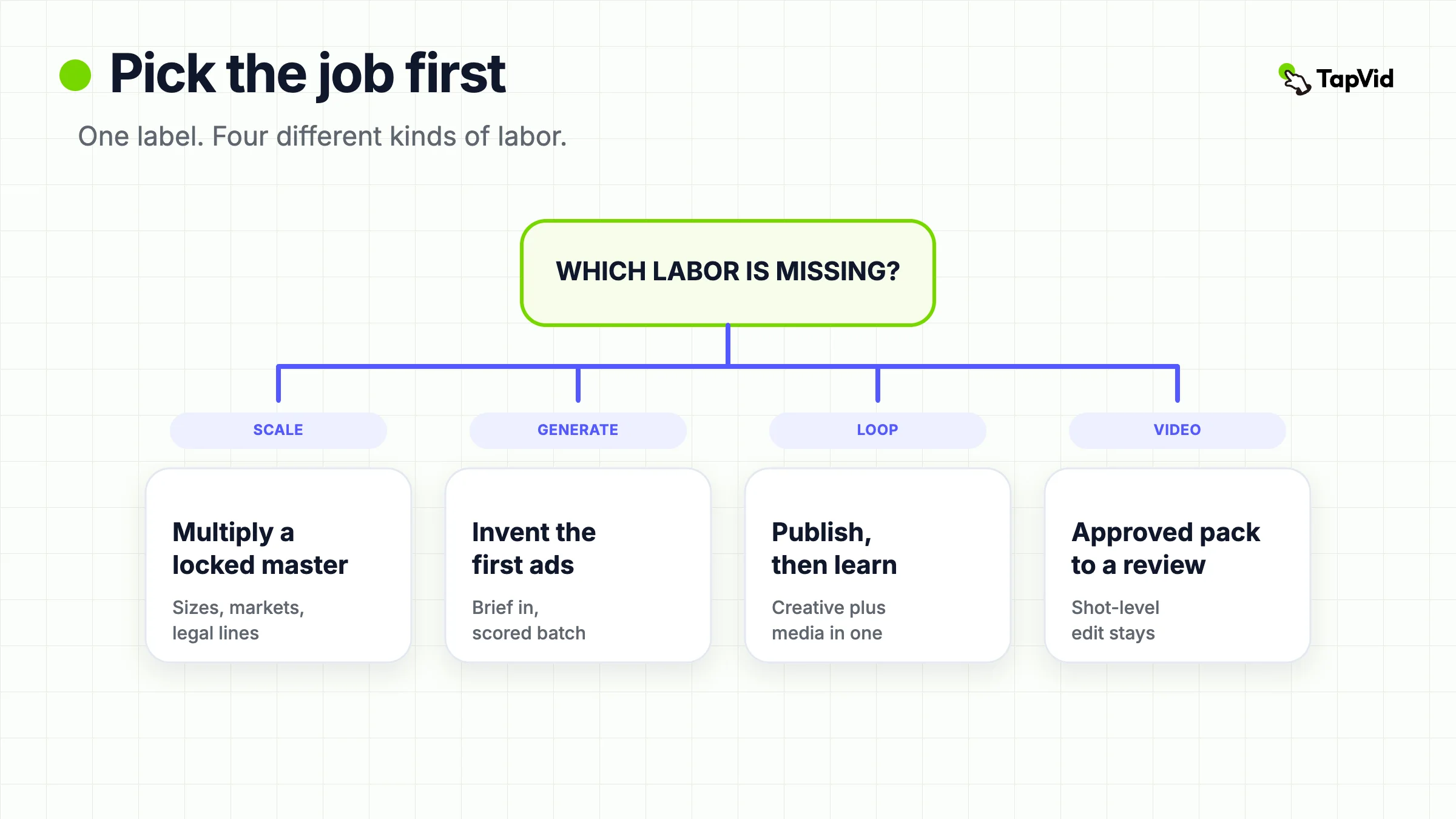
Creative automation software is not one product. It is four different jobs sold under one label: scale a master you already designed, generate ads that do not exist yet, close a generate-publish-learn loop, or turn approved assets into reviewable video for paid tests. Read Celtra's pricing page and Bannerflow's homepage if your bottleneck is industrializing display and social versions. Read AdCreative.ai if you still need the first batch of ads. Read Smartly if creative and media buying must live in one system. Use TapVid only when the scarce input is an approved product pack and the output must stay editable shot by shot. Buying a resizer and calling it a performance loop is the expensive mistake.
Editorial scope: this is a sourced buying guide, not a tested ranking. We did not run hands-on tests of the competing tools. Capabilities and historical prices below come from vendor pages read on 3 September 2026; they are not independently measured performance results. Only the TapVid CAS-R01 observation was run directly, and it does not establish superiority over another product. Confirm current prices, rights, plan limits, and your own workflow with each vendor before buying.
The search phrase *creative automation software* hides a buying error. Teams shortlist Celtra next to AdCreative.ai next to Smartly, then wonder why a six-month contract did not raise click-through rate. Those products do not own the same step. One multiplies a finished design. One invents a first asset. One tries to connect production to spend. None of that is the same as turning a locked product screenshot into a video a reviewer can reject scene by scene.
This guide keeps the jobs apart. It does not publish a fake overall score. It does not treat vendor case-study percentages as independent tests. Prices below come from pages opened on 3 September 2026. Where a vendor publishes no number, the article says so.
Video automation software comparison
01
Current TapVid terms — October 14, 2026
The dated tests and price observations below are historical records, including any 3-credit-per-second or 180-credit quote. They do not establish today’s price. Simple videos are currently estimated at about 4 credits per second; scene complexity can increase usage. Use the credit quote shown in the app before generating.
The $4.99 trial includes one video generation for 3 days and renews as Pro at $49/month unless canceled before it ends. Subscription credits do not roll over; add-on packs are valid for 12 months. Pro, Max and Ultra include watermark-free 1080p MP4 export. A free account does not establish a free generation or export entitlement. Check current plans, prices and trial terms before purchase.
02
What creative automation software actually does
Editorial scope: this is a sourced buying guide, not a tested ranking. We did not run hands-on tests of the competing tools. Capabilities and historical prices below come from vendor pages read on 3 September 2026; they are not independently measured performance results. Only the TapVid CAS-R01 observation was run directly, and it does not establish superiority over another product. Confirm current prices, rights, plan limits, and your own workflow with each vendor before buying.
Creative automation software removes repeatable labor from marketing creative. The useful question is which labor. Ad-stack's 2026 field guide puts this on a ladder: templating, versioning, net-new generation, then a loop that reads performance and makes the next batch. That ladder is the right diagnosis. Most storefronts still sell the first two rungs as if they were the fourth.
Three checks keep the category honest.
Input. Do you already have a master design, a product photo, a feed, a URL, or a reviewed document? A creative management platform expects a designed master or a structured feed. An AI ad generator expects a brief or a product shot. A video workflow that protects product truth expects approved screens, copy, and numbers.
Control after the first output. Can a designer lock brand rules while media still swaps size and language? Can a marketer reject one scene without rerendering the whole file? If a typo forces a full rebuild, you bought speed on day one and review cost on day thirty.
What happens after export. Some tools stop at a ZIP of HTML5 or MP4 files. Some publish into Meta, Google, or a DSP. Some claim to read results back. Bannerflow's own product page is unusually clear on one boundary: it can build and host variations, while the ad server or DSP still decides who sees which version. That is not the same as an agent that writes the next brief.
Media-buying automation is a different layer. Meta Advantage+, Performance Max, and a rules engine change bids and audiences. They starve if you feed them three stale creatives. They also will not fix an unapproved price on screen. Automate buying after the asset can survive review.
If your real object is a video production system rather than an ad factory, stop here and use the video automation software comparison. That page owns source-led, template, code, avatar, and editor models. This page owns the broader creative-ops buy.
03
Shortlist the software by the bottleneck you have
Use this source-based table to prepare questions for a demo. Rows group different production jobs; their order does not indicate performance or quality. The TapVid observation is a separate first-party example, not a controlled comparison.
| Tool | Role described by the vendor | Public price on 3 Sep 2026 | Hard limit |
|---|---|---|---|
| TapVid | Reviewable motion video from approved assets for tests and explainers | Pro $49 / mo for 2,000 credits. 3 credits = 1 second. Failed renders return credits. Subscription credits do not roll over. | Not a CMP. No display DCO. No ad serving. |
| Celtra | Enterprise creative automation and serving | Custom quote. Official page lists platform, scale, serving, and add-ons. No rate card. | Sales-led. Total cost depends on impressions and add-ons. |
| Bannerflow | In-house display, social, and DOOH production plus publishing | No public pricing URL. Homepage is demo-led. | Not a self-serve checkout. DCO decisioning still sits in the ad server or DSP. |
| The Brief (formerly Creatopy) | Self-serve ad studio, resize, export, optional serving | Pro $29 / mo billed annually ($348). Ultra $79 / mo billed annually. Team $49 / seat / mo billed annually. 7-day trial, no card. | Collaboration, SSO, DAM, and feed-scale work sit on Team or Enterprise. |
| AdCreative.ai | Net-new scored ad banners, copy, photos, and video | Homepage Starter $39 / mo for 10 credits. Professional $249 / mo for 50. Ultimate $999 / mo for 100. `/pricing` returned 404. | Credits meter downloads, not previews. Full commercial terms need the live checkout and contract. |
| Smartly | Creative plus media buying in one advertising platform | No public rate card. Site is a sales conversation. | Wrong buy if you only need production and already have a media stack. |
Celtra, Bannerflow, and Smartly are quote-only. Third-party blogs publish unofficial monthly ranges. Those ranges are not used here. Ask the vendor for a written package that names seats, serving volume, add-ons, and who owns the live ad file.
04
Tools that scale a master you already have
This lane is the older meaning of creative automation software. You already have art direction. The pain is forty sizes, eight markets, a price change on Tuesday, and a legal line that must match the live offer. The software's job is to keep one master and emit the rest.
Celtra
Celtra sells Creative Automation as a cloud platform for marketing, creative, and media teams that need to produce, distribute, and measure digital ads. Its pricing page, read on 3 September 2026, refuses a public rate card. Price depends on which platform you buy, how large the team and creative volume are, whether Celtra also serves impressions or video starts, and add-ons such as Dynamic Product Ads, predictive AI, custom APIs, or Creative Services.
That packaging is the product signal. Celtra is built for an enterprise creative-ops team that will sit through onboarding, keep a customer-success owner, and accept a contract that moves when volume moves. The same page says 24/5 technical support is included and that mid-year volume changes go through a success manager.
Use it when you already run high-volume display or social production across markets and need governance, serving, and catalog-scale variants in one vendor conversation.
Do not use it when you want a credit card checkout this afternoon, or when the missing asset is the first concept rather than the 200th size.
Bannerflow
Bannerflow's homepage, read the same day, positions the product as AI-powered creative automation for performance campaigns. It claims 2,000-plus brands, a Creative Studio for HTML5 and video, automatic scaling and versioning from one master, feed-driven dynamic ads, translation, collaboration, publishing and scheduling, and connections to 100-plus advertising platforms across display, social, affiliate, and DOOH.
One sentence on that page should be in every brief: Bannerflow builds and hosts creative variations, and the ad server or DSP handles audience decisioning and optimization. If your RFP says "we need a DCO brain," ask which object Bannerflow owns and which object DV360 or The Trade Desk still owns.
The `/pricing` path returned 404 on 3 September 2026. Bannerflow's own August 2026 comparison says pricing is Grow / Pro / Enterprise by use case and is not a public self-serve grid. Treat a demo as the start of procurement, not as a failed website.
Use it when an in-house team needs to build, localize, publish, and update live display or social ads without re-exporting every file.
Do not use it when the job is broadcast or CTV production, or when you need a published per-seat price before legal will open a call.
The Brief, formerly Creatopy
Creatopy completed its rebrand to The Brief. The official pricing page on 3 September 2026 is the rare CMP-adjacent page that publishes numbers. Every plan includes Ad Studio, AI generation, and export. The vendor's line is "no credits, no counters, just plans," with a fair-use note that they will contact you before a hard stop.
On annual billing the page showed Create / Pro at $29 per month ($348 per year), Amplify / Ultra at $79 per month ($948 per year), and Collaborate / Team at $49 per seat per month ($588 per seat per year). Each of those rows offered a 7-day trial with no card. Scale / Enterprise is usage-based and quote-only. Ultra and Team add ad serving on 25-plus networks plus publish to Meta and Google Ads. Enterprise adds feeds, API, DAM connectors, SSO, and contractual capacity.
That is the self-serve edge of the scale-and-serve lane. You can start without a sales engineer. You also hit collaboration, SSO, and feed-scale walls unless you move up.
Use it when a small team needs templates, resize, HTML5 or MP4 export, and optional publishing without an enterprise contract.
Do not use it when you need named DSP and DOOH partners, live DCO after the file is serving, or a dedicated ops function already running Celtra-scale volume.
05
Tools that generate the creative itself
This lane starts one step earlier. There is no master to resize. The bottleneck is "we have a product URL and a tired angle." Generation software answers that. It does not automatically give you brand lock, serving, or a learning loop.
AdCreative.ai
AdCreative.ai's homepage, read on 3 September 2026, sells generation of ad banners, texts, product photoshoots, and videos, plus a Creative Performance Score and competitor insights. The page claims more than 4.2 million businesses and more than $35 billion in ad-spend patterns behind its scoring. Those figures are vendor marketing. They are not an independent lift study, and this article does not treat "up to 14x more conversions" as a measured result.
The dedicated `/pricing` URL returned 404. Prices still appeared on the homepage: Starter $39 per month with 10 credits, one brand, and one user; Professional $249 per month with 50 credits, three brands, and ten users; Ultimate $999 per month with 100 credits and 25 brands. Each row advertised unlimited generations. The meter that matters is therefore the credit, which third-party pricing writeups describe as a download, not a preview. Confirm that rule on the live checkout before you model cost per usable ad.
Use it when a performance marketer needs many first-pass statics and copy variants and will still run a human pass before spend.
Do not use it when the product UI must appear exactly as supplied, when you need HTML5 serving into a DSP, or when you expect the tool to buy media for you.
06
Tools that close a generate-publish-learn loop
A loop is not a prettier export button. The system has to produce creative, accept an approval, reach a live account, read a result, and change the next batch. Most products in this article stop before that last verb.
Smartly
Smartly's homepage calls the company an AI advertising platform. The pitch is explicit: creative and media should launch in sync. The page talks about building and personalizing creative across platforms, launching and updating campaigns, and reading performance in one view. Customer metrics on the same page, such as a 28 percent lower CPA, are vendor-reported. They are not reused here as a ranking score.
There is no public rate card. If you cannot describe monthly paid-social spend, the number of markets, and who will own the Smartly workspace, you are not ready for the sales call.
Use it when creative production and media buying are the same team's weekly operating system, usually at serious paid-social volume.
Do not use it when you already have a media agency or an in-platform Advantage+ setup and only need a production tool. Buying a combined stack to solve a resize problem is how this category wastes a year.
If you need the operating model around any of these tools, briefs, gates, reruns, and measurement, use video marketing automation. That page is the workflow. This page is the buy.
07
When the job is video from approved assets
Paid tests now ask for video as often as they ask for a 1:1 static. That does not make every CMP a video tool, and it does not make every AI video generator creative automation software. The job here is narrower: take an approved source pack, make a reviewable motion piece, change one claim or one shot, and keep the product looking like the product.
TapVid is included here as an example of an asset-led video workflow, rather than as a ranked winner or a banner-serving platform. On the TapVid homepage, read on 3 September 2026, the product asks for existing material, keeps images, logos, numbers, specs, and source copy on screen unchanged, and lets a reviewer edit outline, script, scenes, and the final frame. Remix and batch routes are described for series work. Enterprise copy on the same site and on pricing names SSO/SAML plus batch API and MCP.
The pricing page, not the marketing FAQ, is the meter. Pro is $49 per month for 2,000 credits. Max is $99 for 6,000. Ultra is $199 for 14,000. Team and Enterprise are "contact us." Credits are 3 per second of successful video. A failed or timed-out render returns credits. Subscription credits expire at the end of the billing cycle. Add-on packs last 12 months. Paid plans export 1080p without a watermark. Clip length is 3 minutes on Pro and Max, 5 minutes on Ultra. The homepage FAQ still says unused credits roll over. The pricing FAQ says they do not. This article follows the pricing page.
Limitation, adjacent to the claim: TapVid does not resize a display master into IAB sizes, does not run live DCO, does not serve impressions, and does not replace Smartly as a media buyer. If your Tuesday problem is 80 HTML5 banners and a feed, you are in the Celtra / Bannerflow / The Brief lane. If your Tuesday problem is a SKU film or a feature explainer that must survive legal, TapVid is the lane. For TikTok-specific hook tests from one product pack, use the AI TikTok ads workflow after the source pack is frozen.
In CAS-R01, on 3 September 2026 we ran one TapVid Assets to Video brief with three approved unbranded lip-balm stills. The same run produced a setup state, with the bound stills and the frozen 30-second 9:16 brief still visible, and a result state: Chapter 03 of a 34-second 9:16 cut, with shot-level chapter controls. On-screen text in that result restated adjectives, not only the visible category. This is one observational run. It is not a quality score against Celtra or AdCreative.ai.
Use it when a small in-house team already has screenshots, product footage, a logo, and approved lines, and needs several test videos without rebuilding the timeline.
Do not use it when the hero is a photoreal presenter, a UGC selfie, or a catalog of HTML5 sizes that must update after launch.
For the wider video-marketing stack, presenter tools, recorders, and hosting, see video marketing software. Those layers are easy to mix into this category by accident.
08
Buying mistakes that look like automation
You bought versioning and named it a loop. A master that is already tired becomes tired in fourteen sizes. Ad-stack's guide is right on this point: versioning multiplies whatever you feed it. If the constraint is "not enough distinct concepts," a CMP demo will look busy and still leave the account hungry.
You automated volume and moved the bottleneck to review. Fifty generated ads with no owner, no rejected-claim list, and no "do not invent numbers" rule create a queue, not a campaign. Score-the-creative features can help triage. They do not replace a person who can say a price is wrong.
You automated buying and left creative manual. Platforms already optimize bids better than a tired media assistant. The scarce input is fresh, approvable creative. Pointing budget at another bidding layer while designers still rebuild each size by hand is the inverted stack.
You graded tools on feature count. Avatars, 100-plus integrations, and "agentic" on a homepage do not answer the three checks: input, control after first output, life after export. A Feature grid is how Celtra and AdCreative.ai end up in the same RFP.
You treated vendor math as a test. Bannerflow's homepage quotes customer speed. Smartly's homepage quotes CPA movement. AdCreative.ai quotes conversion multiples. Celtra quotes a tailored ROI conversation. Keep those lines inside the vendor's page. A buying decision needs your brief, your brand kit, and one controlled output you can reject.
09
How to choose in one working session
Do this on a single campaign, not on an abstract scorecard.
- Write the bottleneck in one sentence: "We have a master and no versions," "We have no testable ads," "We cannot learn weekly," or "We cannot make a reviewable product video."
- Freeze a source pack: approved claims, the one visual that must not be redrawn, the duration or size set, and one exclusion such as "no invented discount."
- Shortlist two tools from the same job row in the table. Do not shortlist one CMP and one generator unless you already know you will run both.
- Run the same pack. Time-to-first-reviewable-output matters more than time-to-first-pretty-frame.
- Change one fact, a price or a legal line, and watch the blast radius. If every approved scene moves, the recovery cost is the real price.
- Ask where the file goes next: manual upload, Meta/Google publish, DSP serving, or a human editor. Buy the handoff you actually have.
- Confirm commercial rights, training-data terms, and whether unused credits or seats expire. TapVid's pricing page is explicit that subscription credits do not roll over. The Brief meters plans, not credits. AdCreative.ai meters credits on a homepage grid. Celtra, Bannerflow, and Smartly will only answer this in a quote.
If two tools from different jobs both "win" the demo, you do not have a winner. You have two jobs. Many teams generate a first batch, then industrialize winners in a CMP. That stack is honest. A single logo that claims to do both is usually selling the slide, not the Tuesday.
10
Frequently asked questions
What is creative automation software?
Creative automation software produces or adapts marketing creative at scale with templates, rules, feeds, or models, instead of rebuilding every size and version by hand. In 2026 the label covers creative management platforms that scale a master, AI-native generators that create the first asset, advertising platforms that try to close a performance loop, and source-led video tools that keep approved assets reviewable.
What is the best creative automation software?
There is no single best product. The best fit is the tool whose job matches the bottleneck. Celtra and Bannerflow fit enterprise scale-and-serve work. The Brief fits self-serve ad production with published prices. AdCreative.ai fits first-pass performance ads. Smartly fits teams that want creative and media in one system. TapVid fits reviewable video from approved assets, not display DCO.
How much does creative automation software cost?
It depends on the meter. On 3 September 2026, The Brief published annual Pro pricing at $29 per month, AdCreative.ai showed a $39 Starter plan on its homepage, and TapVid Pro was $49 per month for 2,000 credits. Celtra, Bannerflow, and Smartly published no rate card. Enterprise serving volume and add-ons can dominate the invoice. Compare cost per approved, usable asset, not the headline seat price.
What is the difference between creative automation and a creative management platform?
A creative management platform is one type of creative automation software. It is built to version, localize, and often serve creative you already designed. Creative automation is the wider umbrella. It also includes generators and loops. Every CMP is creative automation. Not every creative automation product is a CMP.
Is creative automation the same as media-buying automation?
No. Media-buying automation changes bids, budgets, and audiences. Creative automation changes the assets those systems spend against. Platforms already automate much of the buying layer. Under-automating creative while over-automating buying leaves the algorithm with too little fresh input.
Can creative automation software replace designers?
No. It removes repeatable production, resizing, and some first-draft generation. A person still owns the offer, the brand lock, the claim that must stay true, and the decision to spend. Tools that skip that owner produce more files, not more campaigns.
Can AI creative automation hurt performance?
Yes. Versioning a stale concept scales fatigue. Generating volume with no review floods the account with off-brand or untrue claims. Buying a loop you cannot approve weekly adds software cost without adding learning. The failure is usually a wrong job, not a missing feature.
How should a small team start?
Pick one campaign and one job sentence. Run two tools from that row against the same source pack. Keep the first human gate on claims and the locked visual. Only then discuss publishing integrations. If the job is a product video from assets you already have, start a TapVid draft from that pack rather than a CMP demo.