
TapVid
    API & MCPPricingBlogAbout
    Blog›AI Graphic Generator for Motion Design: What Studios Actually Use
    Back to Blog

    AI Graphic Generator for Motion Design: What Studios Actually Use

    A working studio director's breakdown of which AI graphic generators are actually used in professional motion design production and why.

    AI Tools
    Yibo WangYibo WangApril 12, 2026 · 8 min readApr 12, 2026 · 8 min readDiscord
    Yibo WangYibo WangCPO & Head of Product Design, TapVid | Formerly at ByteDance

    Connect with the author, meet other video creators, and watch hands-on tutorials.

    Join our Discord
    April 12, 20268 min read
    AI graphic generators for motion design
    Summarize with6 assistants
    ChatGPTPerplexityTapVidvideoClaudeGeminiGrok
    Create videos from your AI agentConnect TapVid API & MCP→

    In this article

    1. 01The AI graphic generators studios actually use
    2. 02Use cases by production phase
    3. 03Why commercial licensing clarity matters more than you might think
    4. 04What studios don't use and why
    Summarize withAPI & MCP →
    ChatGPTPerplexityTapVidClaudeGeminiGrok

    I talk to a lot of other studio directors about their toolsets, and there's a real gap between what the internet says studios are using and what's actually running in production pipelines. The tools that get coverage are often the newest or the most visually impressive in a demo. The tools studios actually depend on are sometimes neither.

    01

    The AI graphic generators studios actually use

    The tools that appear in real professional motion design pipelines tend to be the ones that integrate well with existing software rather than requiring a complete workflow switch. Photoshop's Generative Fill, Illustrator's text-to-vector features, and Firefly-powered tools get more daily use in working studios than standalone AI image apps that require a separate browser tab.

    Midjourney remains the dominant tool for style frame and concept graphic generation at the initial concepting stage. The quality ceiling is high, the prompt responsiveness is well-understood by experienced designers, and the community of professional users means there's extensive shared knowledge about prompting for motion design contexts specifically.

    02

    Use cases by production phase

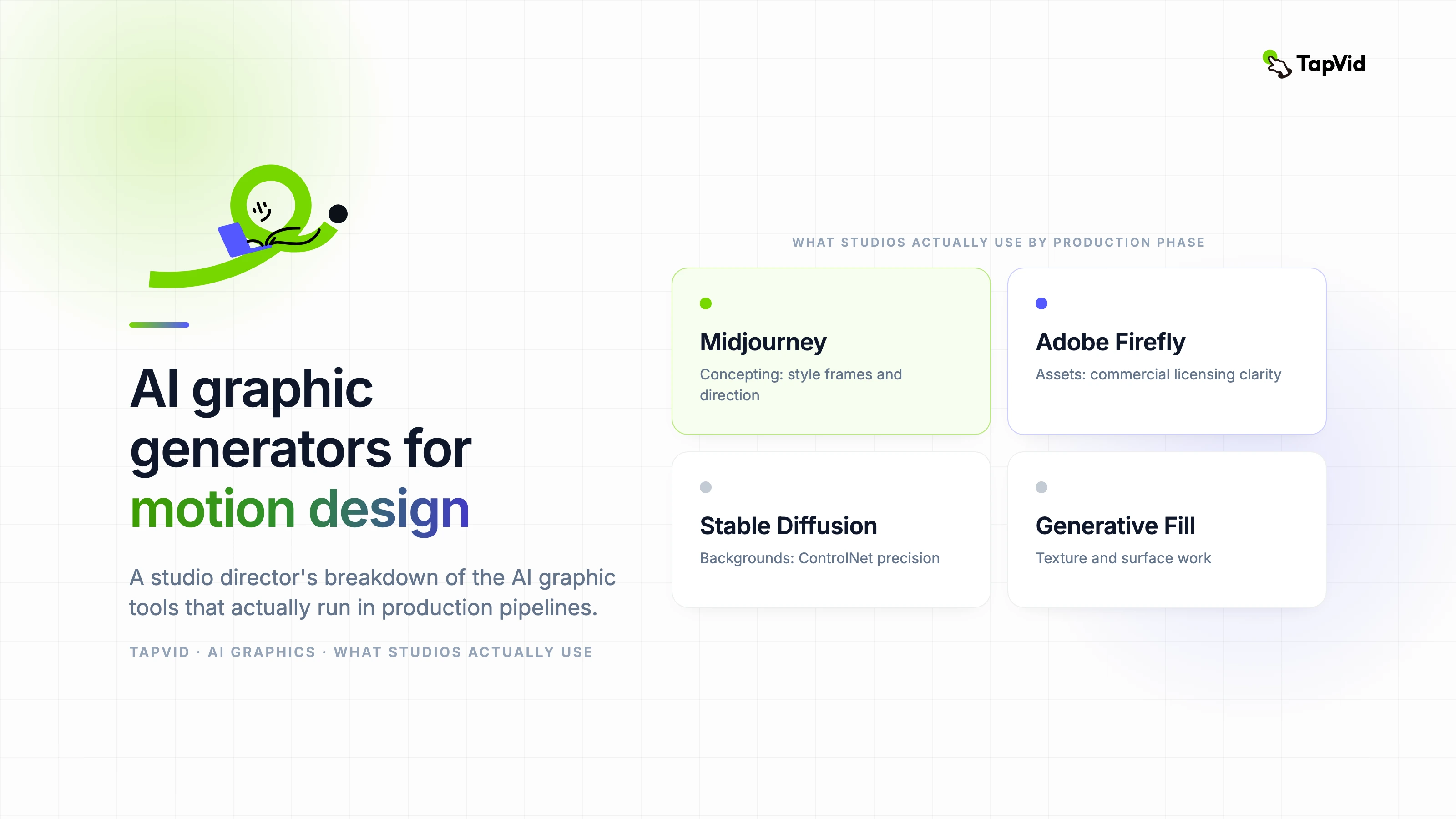
    • Concepting: Midjourney for style frames and visual direction. High output quality, well-suited to aesthetic exploration.
    • Asset generation: Adobe Firefly for production assets because of commercial licensing clarity — this matters for client work.
    • Background environments: Stable Diffusion with ControlNet for precise compositional control over generated environments.
    • Texture and surface work: Generative Fill in Photoshop is now the standard tool for texture extension and surface variation.
    • Vector and icon work: Illustrator's AI features for generating and adapting icon sets and graphic elements at scale.
    • Motion reference: Runway for converting static graphic concepts into rough motion references before full production.

    03

    Why commercial licensing clarity matters more than you might think

    For client work, the question 'can we legally use this in a commercial deliverable' is the first question, not an afterthought. Several AI graphic generators produce beautiful output but have licensing terms that are ambiguous for commercial use or that require attribution in ways that don't work for client deliverables.

    Adobe Firefly's commercial licensing clarity is the main reason it's become the default AI graphics tool in agency environments, even when designers prefer the aesthetic output of other tools. Legal and procurement teams at large clients are increasingly asking about AI tool provenance. Having a clear answer matters.

    04

    What studios don't use and why

    I hear a lot of interest in DALL-E and GPT-image generation from people outside the industry, but it gets very limited use in professional motion design production. The prompt interface isn't optimized for the kind of iterative, systematic graphic generation that a production pipeline requires, and the output lacks the aesthetic precision that working designers need.

    Most single-purpose AI graphic apps that launched in 2023 and 2024 haven't maintained their early position in studio workflows. The tools that consolidated are the ones that solved integration problems — they fit into existing software, they respect commercial use requirements, and they got fast enough to use in a real production context.
    How this article was verified

    Basis: TapVid's editorial publishing record for this articleEvidence: Author attribution, publication history, and the sources linked in the article

    Article versionApril 12, 2026

    About the authorYibo Wang

    CPO & Head of Product Design, TapVid | Formerly at ByteDance

    CPO @TapVid | Building the AI video tools creators deserve | Product strategy · Design systems · Creator economy

    View all 51 articles →

    Yibo Wang invites you to join the conversation with fellow video creators on Discord.

    Join Yibo on Discord →

    Use the materials you already have

    From yourfilesfilesto a ready-to-publish video

    WEB→ VIDEOPPT→ VIDEOPDF→ VIDEOASSETS→ VIDEOAUDIO→ VIDEOVIDEO→ VIDEOTALKING HEAD→ VIDEOWEB→ VIDEOPPT→ VIDEOPDF→ VIDEOASSETS→ VIDEOAUDIO→ VIDEOVIDEO→ VIDEOTALKING HEAD→ VIDEO

    Keep reading

    Related stories

    Best Motion Graphics Software 2026 Tested & Honest
    Compare·12 min read

    Best Motion Graphics Software in 2026: An Honest, Tested Comparison

    A hands-on, tested comparison of motion graphics software in 2026, from After Effects and Blender to AI-native tools, with honest guidance on which to use and when.

    Apr 3, 2026

    AI Motion Graphics Generator
    Motion Graphics·10 min read

    AI Motion Graphics Generator: A Complete Practical Guide

    A practical breakdown of how AI motion graphics generators work, when to use them, and how to get professional results without a dedicated motion team.

    Apr 3, 2026

    Motion Design for Brand Videos
    Motion Graphics·12 min read

    Motion Design for Brand Videos: How Top Studios Build a Visual System

    How professional studios approach motion design for commercial brand videos — from visual system design to AI-assisted production at scale.

    Apr 3, 2026

    Ready to create your first video?

    Join thousands of product teams using AI to create professional videos in minutes.

    Your first video in under 5 minutes →Book a demo →
    Tapvid

    TapVid turns the materials your business already has into an accurate video that explains the job clearly and is ready to publish.

    TikTokInstagramXDiscordYouTube

    TapVid

    Features

    AI Explainer Video GeneratorAI Motion Graphics GeneratorAI Product Demo Video GeneratorProduct Demo Video MakerExplainer Video TemplatesVideo Production Plan TemplateVideo Creative Brief TemplateCorporate Video TemplateVideo Sales Letter TemplateVideo Production Proposal TemplatePromo Video TemplateVideo Production TemplateAI Product Video GeneratorAI B-Roll GeneratorTalking Head EditingClone VideoPrompt to VideoText to Video AIText to Motion GraphicsAnimated Video MakerAnimated Explainer Video MakerKinetic Typography GeneratorAnimated Chart MakerAnimated Collage MakerFree AI Video Generator

    Convert to Video

    Screenshot to VideoImage to VideoAssets to VideoAudio to VideoVideo to Video AIPDF to VideoPPT to VideoArticle to VideoBlog to VideoURL to VideoScript to VideoGoogle Slides to VideoWord to Video

    Use Cases

    AI Study Video MakerSaaS Explainer VideoAI Video AutomationSaaS Video ProductionIndustrial Video ProductionProduct Launch Video MakerAI Ad Video GeneratorDocumentary Video MakerAnimated Social Media Video MakerInfographic Video MakerPodcast to VideoWhiteboard Animation MakerWhiteboard Explainer VideoEcommerce Video AdsStartup Explainer VideoEducational VideoTutorial VideoCustomer OnboardingHelp Center VideoAPI Docs Video

    Solutions

    Explainer VideoProduct Demo VideoMeeting Recap VideoWebinar ClipsMarketing VideoFeature AnnouncementCompetitive ComparisonNewsletter VideoLanding Page VideoInvestor Pitch Video

    Featured Guides

    Video Prompt LibraryGemini Omni 1.1 Flash Prompt LibraryMiniMax H3 Prompt LibraryBest Faceless YouTube NichesCollage Animation Guide

    Company

    All FeaturesAboutBlogPricingGet in Touch

    © 2026 TapVid. All rights reserved.

    Privacy
    Terms of Service