
Six months ago a product team asked me to build ten motion graphics assets in three days for a launch campaign. My answer was yes, and the only reason I could say yes was an AI motion graphics generator that had become a genuine part of my workflow — not a novelty I demo'd once and moved on from. This guide is what I've learned about using these tools for real deliverables, not experiments.
01
What an AI motion graphics generator actually does
An AI motion graphics generator takes a text prompt, an uploaded asset, or a combination of both and produces animated visual output — transitions, kinetic typography, scene compositions, or full motion sequences. What it does not do is replace the judgment call behind every creative decision.
Understanding that boundary is the difference between using these tools well and being disappointed by them. AI handles the time-consuming middle layer: keyframe interpolation, timing curves, asset placement. You still define the message and the intent.
The best results come when you treat AI motion graphics as a fast draft engine, not a one-click solution. Input quality determines output quality, and a specific prompt produces a usable result where a vague one produces something generic.
02
When AI motion graphics tools outperform traditional workflows
There are three scenarios where AI motion graphics generators deliver outsized value compared to manual production in tools like After Effects or Cinema 4D.
First, rapid ideation: you need five concept variants in two hours, not two days. AI can produce rough motion sequences for stakeholder review before any human animator touches a timeline. This compresses feedback cycles dramatically.
Second, scalable localization: if you produce videos in multiple languages or for multiple markets, AI can regenerate motion text sequences and lower-third animations without re-animating the entire scene. Third, small teams without dedicated motion specialists — a two-person marketing team can produce motion content that previously required an agency budget.
- Rapid concept generation: 5 visual variants in hours, not days.
- Text-based localization: regenerate motion text without full re-animation.
- Small-team production: motion output without a dedicated animator.
- Volume content: consistent style across 20+ short clips from one brief.
03
How to write prompts that produce usable motion output
The prompt is everything. Vague inputs like "make something dynamic" produce generic results that require heavy editing. Specific inputs produce first drafts you can actually use.
A reliable prompt structure is: motion style + subject + color palette + pacing + output intent. For example: "Smooth kinetic typography reveal, white text on navy background, 2-second entrance with ease-out, for a product launch announcement." That gives the model enough constraints to work within your creative direction.
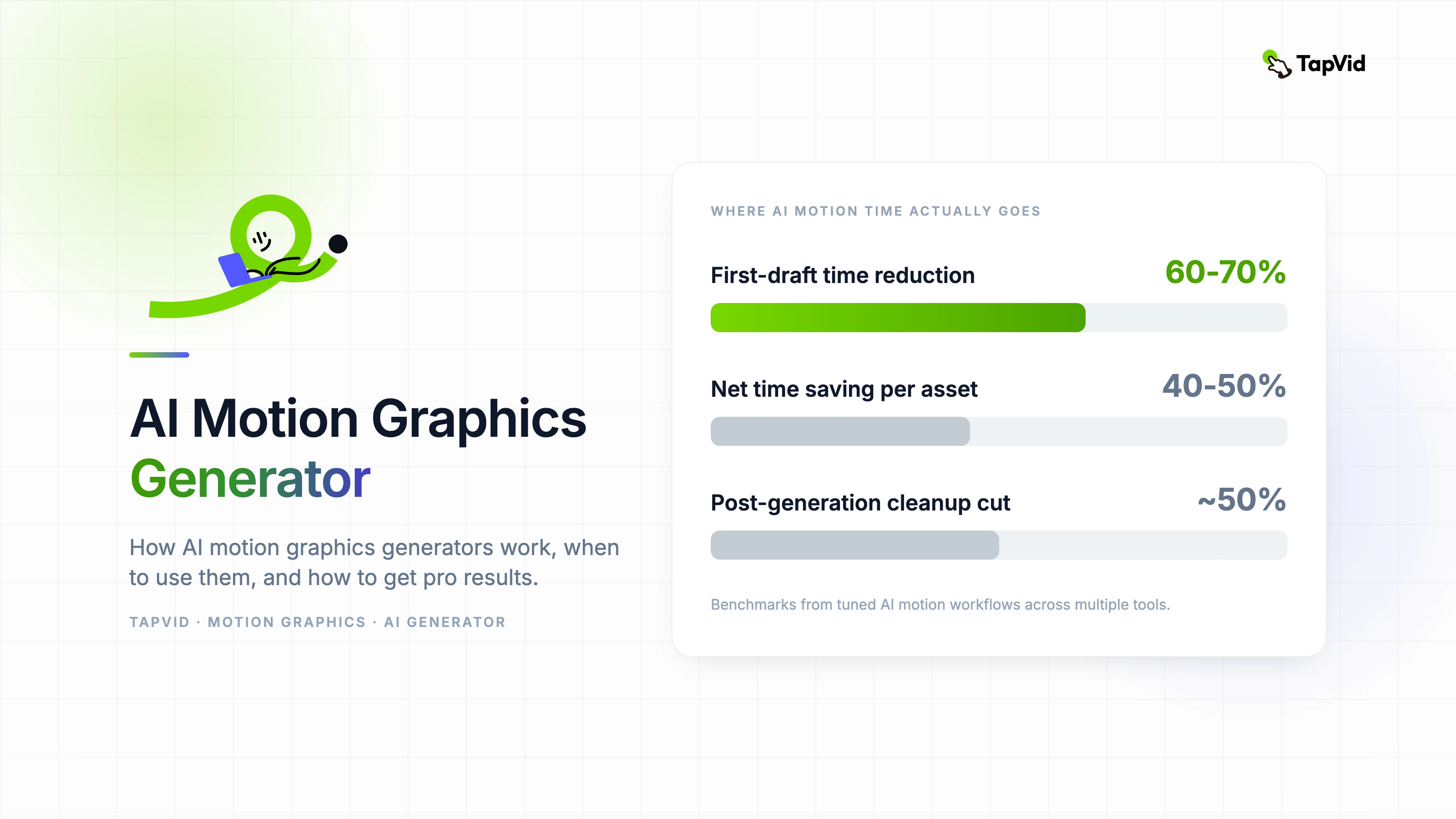
Always specify aspect ratio, duration intent if supported, and the emotional register — energetic, calm, authoritative. These constraints reduce post-generation cleanup by roughly half based on consistent testing across multiple AI motion tools.
04
Integrating AI motion into a real production pipeline
The biggest mistake teams make is treating AI motion output as final. It is almost never final. The professional approach is to use AI output as a production-ready rough cut that your motion lead refines in 30 to 60 minutes rather than builds from scratch in four hours.
Map your pipeline as: brief → AI draft → human refinement → brand QA → export. Keep the AI step tightly scoped to what it is good at: generating the motion skeleton. Your motion lead handles nuance, brand alignment, and final timing.
Store your approved prompt templates in a shared document. When a prompt produces good results, save it with the output sample. Over time this becomes a prompt library that maintains visual consistency across your motion content.
05
Common mistakes and how to avoid them
- Over-prompting: too many instructions confuse the model. Pick the three most important constraints.
- Skipping human review: AI timing is often mechanical. Always adjust pacing before delivery.
- Ignoring brand guidelines: AI does not know your brand colors unless you specify them exactly (use hex codes).
- Using AI output for hero content: reserve AI motion for supporting content; flagship pieces still benefit from full human production.
- Not versioning prompts: if you find a prompt that works, document it immediately.
06
Measuring the ROI of AI motion graphics in your workflow
Track two numbers: time-to-first-draft and revision cycles. If AI motion reduces your first draft from eight hours to ninety minutes but triples your revision cycles, the net gain is small. The goal is faster drafts with fewer revisions, which requires better upfront prompting.
A realistic benchmark for a well-tuned AI motion workflow: 60 to 70 percent reduction in first-draft time, with roughly equivalent revision time to traditional production. The net time saving is usually 40 to 50 percent per asset.
For teams producing high volumes of motion content — social series, product update videos, onboarding modules — that time saving compounds into a meaningful capacity increase without additional headcount.