
TapVid
    API & MCPPricingBlogAbout
    Blog›Motion Design for Brand Videos: How Top Studios Build a Visual System
    Back to Blog

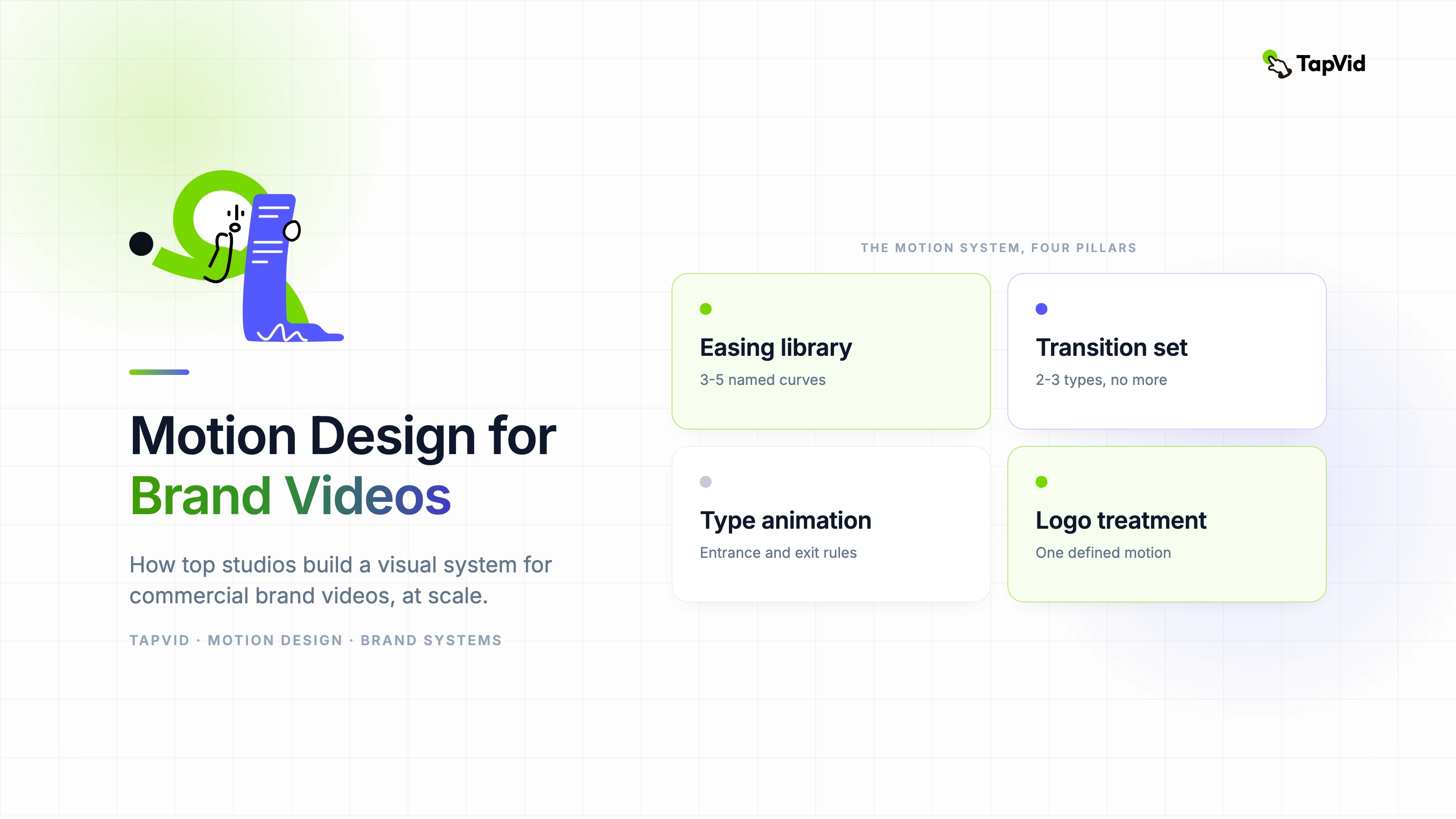
    Motion Design for Brand Videos: How Top Studios Build a Visual System

    How professional studios approach motion design for commercial brand videos — from visual system design to AI-assisted production at scale.

    Motion Graphics
    Yibo WangYibo WangApril 3, 2026 · 12 min readApr 3, 2026 · 12 min readDiscord
    Yibo WangYibo WangCPO & Head of Product Design, TapVid

    Connect with the author, meet other video creators, and watch hands-on tutorials.

    Join our Discord
    April 3, 202612 min read
    Motion Design for Brand Videos
    Summarize with6 assistants
    ChatGPTPerplexityTapVidvideoClaudeGeminiGrok
    Create videos from your AI agentConnect TapVid API & MCP→

    In this article

    1. 01Why motion design is a brand asset, not just a production step
    2. 02The five components of a professional motion design system
    3. 03How AI is changing motion design production without changing design thinking
    4. 04Choosing motion graphics software for commercial production
    5. 05Building a repeatable brief-to-delivery system for brand motion
    6. 06Practical timeline for a brand motion design project
    Summarize withAPI & MCP →
    ChatGPTPerplexityTapVidClaudeGeminiGrok

    The most recognizable motion design in the world doesn't look accidental — and it isn't. Behind every brand campaign with a distinctive visual rhythm is a system that someone built deliberately: a set of decisions about timing, color sequencing, and typographic behavior that get applied consistently across every asset. In this post I want to show you exactly how those systems are constructed, because building one is a skill, not an accident.

    01

    Why motion design is a brand asset, not just a production step

    The studios that produce consistently excellent brand video work treat motion design as a brand asset — something that gets documented, versioned, and protected — not as a production decision made fresh on every project.

    A motion design system includes defined transitions, easing curves, typographic animation behavior, color sequencing, and logo treatment standards. When these are documented, any animator on the team can produce work that feels like it came from the same visual identity. Without documentation, every video reinvents the wheel and the brand accumulates visual inconsistency over time.

    The brands with the most recognizable motion identities — think major tech product launches or global sportswear campaigns — have these systems. The motion language is as deliberate as the static brand guidelines.

    02

    The five components of a professional motion design system

    • Easing library: define 3-5 named easing curves (brand-ease-in, brand-bounce, brand-settle) used consistently across all scenes.
    • Transition vocabulary: establish 2-3 transition types maximum — wipe, fade, cut — and apply them consistently. Variety creates chaos.
    • Type animation rules: specify entrance and exit behavior for every typographic element. Headlines, subheads, and body copy each behave differently but predictably.
    • Color sequence logic: define which brand colors appear in which order and under which scene conditions.
    • Logo motion treatment: a single defined animation for the logo mark, used identically across all brand video.

    03

    How AI is changing motion design production without changing design thinking

    The most important thing to understand about AI in professional motion design is what it does not change: the design thinking. Brand strategy, visual hierarchy, storytelling structure — these remain human decisions. What AI changes is the speed at which those decisions get translated into moving assets.

    In our studio, AI motion tools have shortened the time between storyboard approval and first animated draft from two to three days to four to six hours. That change is significant for client feedback cycles. It also means more creative iterations happen before the budget runs out.

    The practical integration is to use AI for blocking and timing — getting the structural animation right — and use human animators for refinement, brand nuance, and transitions that require emotional sensitivity.

    04

    Choosing motion graphics software for commercial production

    For commercial brand video production, software choice is a combination of output quality requirement, team skill set, and pipeline compatibility. After Effects remains the industry standard for frame-by-frame control, but the learning curve is steep and the cost is significant at team scale.

    AI-native motion tools are increasingly viable for high-volume brand content — social series, product updates, localized variants. They are not yet viable for hero campaign content where every frame must be pixel-perfect to the brand guidelines.

    The practical approach for most brand teams is a hybrid pipeline: AI tools for social-scale volume, traditional software for flagship content. This maximizes creative capacity without sacrificing quality on the work that matters most.

    05

    Building a repeatable brief-to-delivery system for brand motion

    Consistency in brand motion output comes from consistency in the input process. A standard brief template for every motion project — specifying message, audience, placement, duration, and brand constraints — eliminates the ambiguity that causes revision cycles.

    Review checkpoints matter as much as the brief. Structural review at storyboard stage, style review after first animation pass, and brand QA before final delivery. Teams that skip structural review pay for it in expensive late-stage revisions.

    Document the outcome of every project. What worked, what required extra revision, and what the client approved without changes. Over twelve months this becomes a pattern map that makes your next project faster and your proposals more accurate.

    06

    Practical timeline for a brand motion design project

    • Day 1-2: creative brief, message hierarchy, visual direction alignment.
    • Day 3-4: storyboard or animatic with motion language defined.
    • Day 5-7: first animation pass (AI-assisted for blocking, human for refinement).
    • Day 8-9: client review and revision round.
    • Day 10: brand QA, final export, delivery in required formats.
    Yibo Wang

    Written and edited by

    Yibo Wang

    CPO @TapVid | Building the AI video tools creators deserve | Product strategy · Design systems · Creator economy

    Yibo Wang invites you to join the conversation with fellow video creators on Discord.

    Join Yibo on Discord →

    Use the materials you already have

    From yourfilesfilesto a ready-to-publish video

    WEB→ VIDEOPPT→ VIDEOPDF→ VIDEOASSETS→ VIDEOAUDIO→ VIDEOVIDEO→ VIDEOTALKING HEAD→ VIDEOWEB→ VIDEOPPT→ VIDEOPDF→ VIDEOASSETS→ VIDEOAUDIO→ VIDEOVIDEO→ VIDEOTALKING HEAD→ VIDEO

    Keep reading

    Related stories

    AI Motion Graphics Generator
    Motion Graphics·10 min read

    AI Motion Graphics Generator: A Complete Practical Guide

    A practical breakdown of how AI motion graphics generators work, when to use them, and how to get professional results without a dedicated motion team.

    Apr 3, 2026

    Motion Graphics Animation Brief to Delivery
    Motion Graphics·13 min read

    Motion Graphics Animation: A Professional Workflow from Brief to Delivery

    How professional motion graphics animators approach commercial projects — from initial brief to final delivery — and where AI fits into a real production system.

    Apr 3, 2026

    Build a reusable motion-graphic design system that scales, with TapVid
    Motion Graphics·11 min read

    Motion Graphic Design System: Build Reusable Scenes That Scale

    How to build a motion graphic design system with reusable modules, cleaner revisions, and stronger output consistency.

    Apr 16, 2026

    Ready to create your first video?

    Join thousands of product teams using AI to create professional videos in minutes.

    Your first video in under 5 minutes →Book a demo →
    Tapvid

    TapVid turns the materials your business already has into an accurate video that explains the job clearly and is ready to publish.

    TikTokInstagramXDiscordYouTube

    TapVid

    Features

    AI Explainer Video GeneratorAI Motion Graphics GeneratorAI Product Demo Video GeneratorProduct Demo Video MakerExplainer Video TemplatesVideo Production Plan TemplateVideo Creative Brief TemplateCorporate Video TemplateVideo Sales Letter TemplateVideo Production Proposal TemplatePromo Video TemplateVideo Production TemplateAI Product Video GeneratorAI B-Roll GeneratorTalking Head EditingClone VideoPrompt to VideoText to Video AIText to Motion GraphicsAnimated Video MakerAnimated Explainer Video MakerKinetic Typography GeneratorAnimated Chart MakerAnimated Collage MakerFree AI Video Generator

    Convert to Video

    Screenshot to VideoImage to VideoAssets to VideoAudio to VideoVideo to Video AIPDF to VideoPPT to VideoArticle to VideoBlog to VideoURL to VideoScript to VideoGoogle Slides to VideoWord to Video

    Use Cases

    AI Study Video MakerSaaS Explainer VideoAI Video AutomationSaaS Video ProductionIndustrial Video ProductionProduct Launch Video MakerAI Ad Video GeneratorDocumentary Video MakerAnimated Social Media Video MakerInfographic Video MakerPodcast to VideoWhiteboard Animation MakerWhiteboard Explainer VideoEcommerce Video AdsStartup Explainer VideoEducational VideoTutorial VideoCustomer OnboardingHelp Center VideoAPI Docs Video

    Solutions

    Explainer VideoProduct Demo VideoMeeting Recap VideoWebinar ClipsMarketing VideoFeature AnnouncementCompetitive ComparisonNewsletter VideoLanding Page VideoInvestor Pitch Video

    Featured Guides

    Video Prompt LibraryMiniMax H3 Prompt LibraryBest Faceless YouTube NichesCollage Animation Guide

    Company

    All FeaturesAboutBlogPricingGet in Touch

    © 2026 TapVid. All rights reserved.

    Privacy
    Terms of Service