
TapVid
    API & MCPPricingBlogAbout
    Blog›Motion Graphics with AI in 2026: How the Production Pipeline Has Changed
    Back to Blog

    Motion Graphics with AI in 2026: How the Production Pipeline Has Changed

    A studio director's view of how AI has genuinely changed the motion graphics production pipeline in 2026, from concepting to delivery.

    Workflow
    Yibo WangYibo WangApril 13, 2026 · 9 min readApr 13, 2026 · 9 min readDiscord
    Yibo WangYibo WangCPO & Head of Product Design, TapVid

    Connect with the author, meet other video creators, and watch hands-on tutorials.

    Join our Discord
    April 13, 20269 min read
    Motion Graphics with AI The 2026 Production Pipeline
    Summarize with6 assistants
    ChatGPTPerplexityTapVidvideoClaudeGeminiGrok
    Create videos from your AI agentConnect TapVid API & MCP→

    In this article

    1. 01The pre-production phase: dramatically faster, differently structured
    2. 02Asset production: what changed and what didn't
    3. 03How team structure has adapted
    4. 04Client expectations have changed too
    5. 05What I think the pipeline looks like in two more years
    Summarize withAPI & MCP →
    ChatGPTPerplexityTapVidClaudeGeminiGrok

    Running a motion graphics studio means I feel every shift in production tools immediately — in project timelines, in team conversations, in client expectations. The AI transition in motion design hasn't been gradual. In the past eighteen months it's been a step change, and the production pipeline my studio runs today looks fundamentally different from what we were doing in 2024.

    01

    The pre-production phase: dramatically faster, differently structured

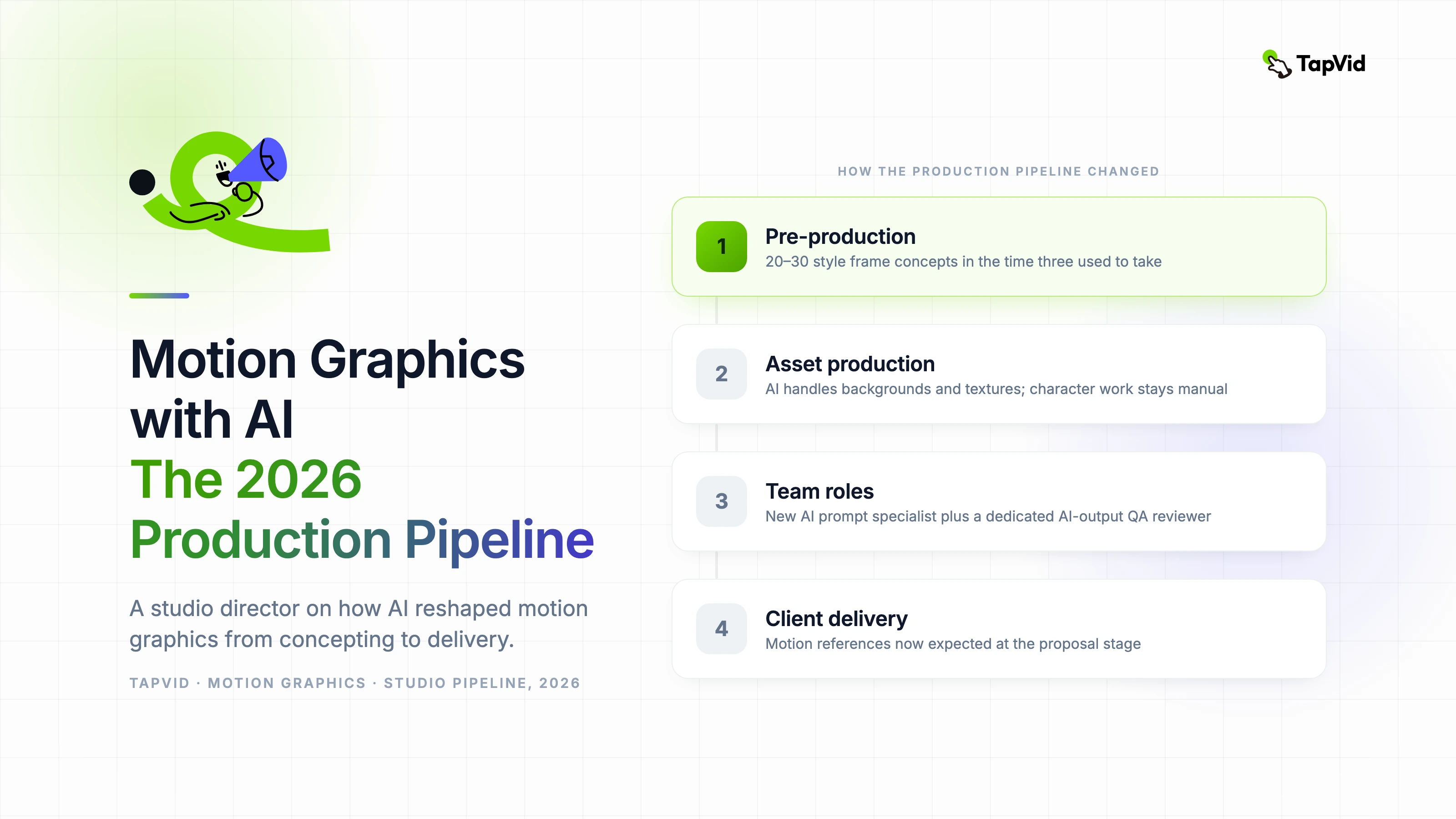
    Pre-production used to be where we spent the most time. Concept development, style frame creation, animatic production — each of these was a significant labor investment before a single final frame was produced. AI tools have compressed this phase substantially, but not by eliminating the work. By changing its character.

    We now generate 20 to 30 style frame concepts in the time it previously took to produce three or four. That sounds like pure efficiency gain, but it creates a new problem: clients get more options, which means more decisions, which means longer approval cycles if you don't manage the process carefully. More choices isn't always faster.

    The animatic phase has changed the most. AI video generation lets us produce rough motion tests from style frames quickly enough that the animatic and first-pass production now overlap in ways they never did before. The boundary between pre-production and production has blurred.

    02

    Asset production: what changed and what didn't

    Illustration and background asset production is where AI integration has created the most concrete time savings in our pipeline. Environments, textures, decorative elements, supporting graphics — these categories of assets used to require significant illustration hours. AI tools now handle a substantial portion of this work.

    Character animation hasn't changed as much as the hype suggests. Consistent character design across a long-form piece still requires human illustration and rigging. AI tools produce interesting single-character shots but struggle with maintaining visual consistency across a sequence — same character, same proportions, same details across 40 scenes. That continuity work is still manual.

    What's genuinely new in 2026 is AI-assisted compositing. Tools that can intelligently rotoscope, match lighting, and suggest blend modes are reducing post-production time in ways that weren't possible two years ago. This is where I see the most continued potential for pipeline efficiency.

    03

    How team structure has adapted

    We've restructured our team around two roles that didn't exist at our studio three years ago: an AI prompt specialist who knows the generation tools deeply enough to consistently produce production-ready outputs, and a quality review role specifically focused on AI output — someone who can quickly identify temporal artifacts, consistency errors, and off-brand elements before they reach client review.

    The traditional illustrator and animator roles still exist, but their focus has shifted. Illustrators spend more time on creative direction and quality control of AI outputs, less time on ground-up asset production. Animators focus on complex character work and timing precision — the areas where AI is still unreliable.

    04

    Client expectations have changed too

    Clients in 2026 have seen AI video and they have opinions about it. Some actively request AI-generated aesthetic elements. Others specifically ask that character work be hand-illustrated because they want to differentiate from AI-generated content. Neither position is wrong — they're just different creative and brand decisions.

    What's changed in our client conversations is the baseline of what's expected in a pitch. Clients now expect to see motion references, not just static style frames, at the proposal stage. That expectation would have been unreasonable to meet two years ago. Today it's a standard part of the pitch process, made possible by fast AI video generation.

    05

    What I think the pipeline looks like in two more years

    The direction is clearer than the timeline. The human role in motion design is moving from production execution toward creative direction and quality control. This isn't a reduction in creative value — it's actually a reallocation toward the highest-value parts of the craft. The parts that require taste, brand understanding, and storytelling judgment.

    The studios that adapt well will be the ones that build AI tools into their workflows without losing the design thinking that makes motion graphics effective. The tools are changing fast. The principles of visual communication aren't.
    Yibo Wang

    Written and edited by

    Yibo Wang

    CPO @TapVid | Building the AI video tools creators deserve | Product strategy · Design systems · Creator economy

    Yibo Wang invites you to join the conversation with fellow video creators on Discord.

    Join Yibo on Discord →
    Prefer to skip the manual work? Generate motion graphics with TapVid AI

    Use the materials you already have

    From yourfilesfilesto a ready-to-publish video

    WEB→ VIDEOPPT→ VIDEOPDF→ VIDEOASSETS→ VIDEOAUDIO→ VIDEOVIDEO→ VIDEOTALKING HEAD→ VIDEOWEB→ VIDEOPPT→ VIDEOPDF→ VIDEOASSETS→ VIDEOAUDIO→ VIDEOVIDEO→ VIDEOTALKING HEAD→ VIDEO

    Keep reading

    Related stories

    Motion Graphics Designer Workflow
    Workflow·12 min read

    Motion Graphics Designer Workflow: How Small Teams Ship Faster with AI

    A practical, SEO-focused guide for teams that want a repeatable motion graphics designer workflow using TapVid.

    Apr 15, 2026

    AI graphic generators for motion design
    AI Tools·8 min read

    AI Graphic Generator for Motion Design: What Studios Actually Use

    A working studio director's breakdown of which AI graphic generators are actually used in professional motion design production and why.

    Apr 12, 2026

    Motion Design Principles
    Motion Graphics·11 min read

    Motion Design Principles: How to Apply Them to AI-Generated Video

    A practical guide to applying core motion design principles — timing, easing, hierarchy, and spatial continuity — to AI-generated video to close the gap between generated and directed output.

    Apr 9, 2026

    Ready to create your first video?

    Join thousands of product teams using AI to create professional videos in minutes.

    Your first video in under 5 minutes →Book a demo →
    Tapvid

    TapVid turns the materials your business already has into an accurate video that explains the job clearly and is ready to publish.

    TikTokInstagramXDiscordYouTube

    TapVid

    Features

    AI Explainer Video GeneratorAI Motion Graphics GeneratorAI Product Demo Video GeneratorProduct Demo Video MakerExplainer Video TemplatesVideo Production Plan TemplateVideo Creative Brief TemplateCorporate Video TemplateVideo Sales Letter TemplateVideo Production Proposal TemplatePromo Video TemplateVideo Production TemplateAI Product Video GeneratorAI B-Roll GeneratorTalking Head EditingClone VideoPrompt to VideoText to Video AIText to Motion GraphicsAnimated Video MakerAnimated Explainer Video MakerKinetic Typography GeneratorAnimated Chart MakerAnimated Collage MakerFree AI Video Generator

    Convert to Video

    Screenshot to VideoImage to VideoAssets to VideoAudio to VideoVideo to Video AIPDF to VideoPPT to VideoArticle to VideoBlog to VideoURL to VideoScript to VideoGoogle Slides to VideoWord to Video

    Use Cases

    AI Study Video MakerSaaS Explainer VideoAI Video AutomationSaaS Video ProductionIndustrial Video ProductionProduct Launch Video MakerAI Ad Video GeneratorDocumentary Video MakerAnimated Social Media Video MakerInfographic Video MakerPodcast to VideoWhiteboard Animation MakerWhiteboard Explainer VideoEcommerce Video AdsStartup Explainer VideoEducational VideoTutorial VideoCustomer OnboardingHelp Center VideoAPI Docs Video

    Solutions

    Explainer VideoProduct Demo VideoMeeting Recap VideoWebinar ClipsMarketing VideoFeature AnnouncementCompetitive ComparisonNewsletter VideoLanding Page VideoInvestor Pitch Video

    Featured Guides

    Video Prompt LibraryMiniMax H3 Prompt LibraryBest Faceless YouTube NichesCollage Animation Guide

    Company

    All FeaturesAboutBlogPricingGet in Touch

    © 2026 TapVid. All rights reserved.

    Privacy
    Terms of Service