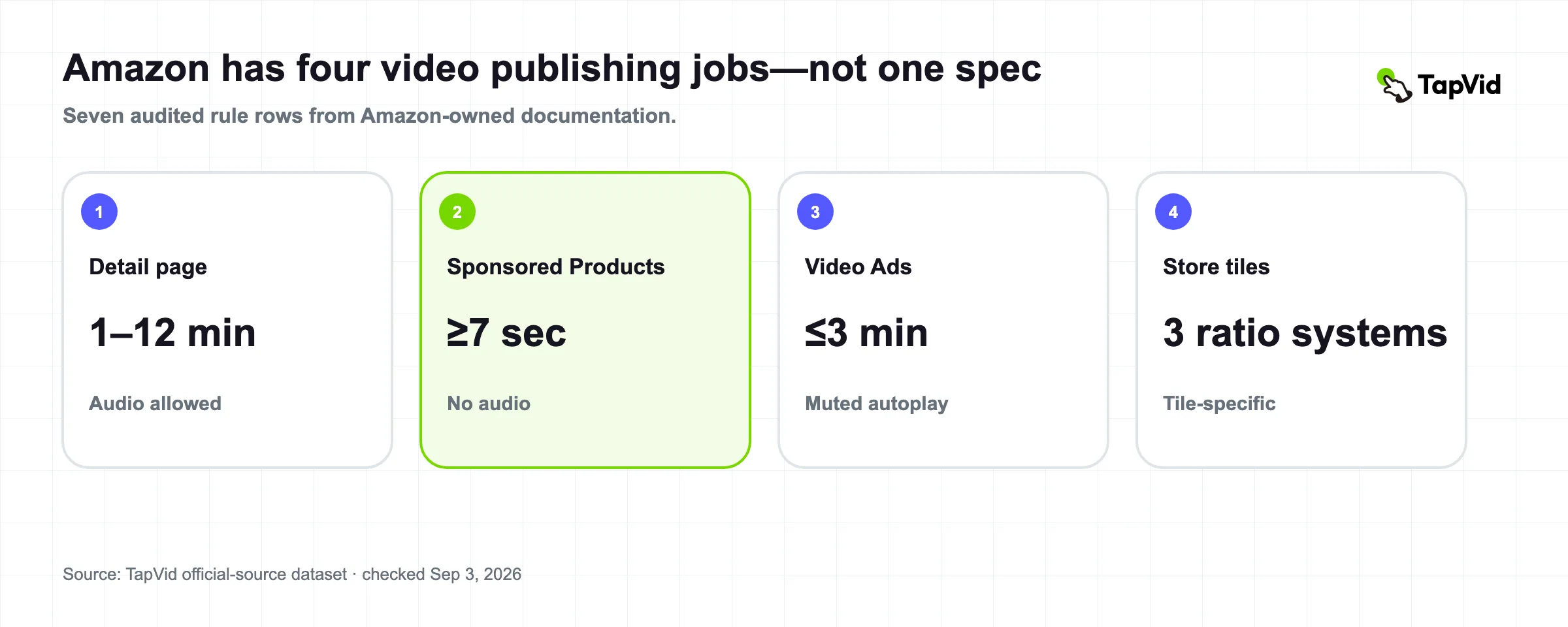

Amazon product video requirements are not one specification. They change with the surface: a shoppable video on a detail page, a Sponsored Products feature video, an Amazon Video Ad, and an Amazon Store tile are four different publishing jobs. We audited seven placement rows across Amazon's first-party documentation on September 3, 2026. The allowed duration spans from a seven-second minimum for a Sponsored Products feature video to a 12-minute maximum for a shoppable detail-page video. Audio is allowed on one surface, muted by default on another, and prohibited on Sponsored Products feature videos. Store tiles add three more aspect-ratio systems. The practical conclusion is simple: choose the Amazon surface before you write, animate, or export the video.
01
Key findings from the Amazon product video requirements audit
Amazon requirements at a glance
7
placement-rule rows
Four Amazon surfaces represented in the public dataset.
TapVid official-source datasetChecked 2026-09-03
3
Store tile ratio systems
Full-width, large, and medium tiles do not share one frame.
Amazon Store video tilesChecked 2026-09-03
1–12 min
detail-page duration
The shoppable-video range cannot be reused as an ad rule.
Amazon shoppable video guideChecked 2026-09-03
We treated each placement rule as its own record and left undocumented fields blank. That matters because a missing specification is not permission to copy a number from another Amazon product.
| Value | Finding | Scope | Source |
|---|---|---|---|
| 7 | placement-rule rows audited | One detail-page rule, one Sponsored Products rule, two Amazon Video Ads rules, and three Store tile rules. | Download the TapVid dataset |
| 3 | Store tile ratio systems | Full-width and medium tiles allow 6:4–8:3; large tiles allow 3:4–4:3. | Amazon Store video tiles |
| 1–12 min | shoppable detail-page duration range | This range does not apply to Sponsored Products or Amazon Video Ads. | Amazon shoppable video guide |
Source: TapVid Amazon product video requirements dataset, compiled only from Amazon-owned pages and checked September 3, 2026.
02
“Amazon product video” hides four publishing jobs
The most expensive mistake is choosing an export preset before choosing the destination. Amazon's own pages describe separate technical and content requirements for four surfaces.
| Surface | What the viewer is doing | Distinct rule that changes production | Official source |
|---|---|---|---|
| Product detail page | Evaluating a product or learning how to use it | MOV or MP4, up to 1080p, 5 GB, 1–12 minutes | Sell on Amazon |
| Sponsored Products | Scanning an ad attached to a product result | At least seven seconds, no audio, product occupies at least 50% of the frame | Amazon Ads help |
| Amazon Video Ads | Encountering an autoplay display ad | 1920×1080 and 16:9 recommended; autoplay starts muted | Amazon Video Ads specifications |
| Amazon Store tiles | Browsing a brand-owned Store layout | Ratio and minimum resolution depend on tile size | Amazon Store video tiles |
03
Detail-page shoppable videos have the widest duration window
Amazon's May 2025 seller guide allows MOV or MP4 files, resolution up to 1080p, a maximum file size of 5 GB, and a duration from one to 12 minutes. It also says a seller can add up to four shoppable videos to an ASIN. For the video to appear in the main media block, the product must have fewer than six images.
Those are acceptance and display rules, not an instruction to make a 12-minute sales film. The same Amazon guide says successful examples are often 30–90 seconds and recommends showing the most important feature within the first 5–10 seconds. We preserve both statements because “allowed maximum” and “editorial recommendation” answer different questions.
The guide lists product overview, unboxing, how-to, setup, troubleshooting, and brand story as video types. That creates a useful production rule: one video should answer one shopper question, while several videos can cover different jobs on the same ASIN.
04
Sponsored Products reverses the audio assumption
Amazon's Sponsored Products product-feature video guidance requires MP4 or MOV, a minimum duration of seven seconds, and says the product should occupy at least half of the frame. It allows up to five feature videos per product.
The striking difference is audio: this format prohibits it. A shoppable detail-page video can use audio, and Amazon's broader display video ads include an audio specification even though autoplay begins muted. Reusing one master without checking the destination can therefore create a rejection even when the visual is correct.
Source: TapVid public research dataset; verified 2026-09-03.
Source: Amazon Sponsored Products video guidelines, Amazon Video Ads specifications, and Amazon shoppable video guide; checked September 3, 2026.
05
Amazon Video Ads and Store tiles need separate masters
For Amazon Video Ads on desktop and mobile, Amazon recommends 1920×1080 at 16:9, requires a file under 500 MB, and supports up to three minutes while highly recommending 15 seconds or less. Fire tablet video is capped at 15 seconds. The ad automatically plays when at least half visible, but starts muted.
Store tiles use layout-specific geometry instead. Full-width and medium video tiles allow ratios from 6:4 to 8:3, with minimum video resolutions of 1280×640 and 450×320 respectively. Large tiles allow 3:4 to 4:3 with a minimum of 640×640. These shapes are not interchangeable with a default 16:9 display-ad master.
Source: TapVid public research dataset; verified 2026-09-03.
The defensible reuse strategy is to preserve the same approved product assets and literal claims, then create placement-specific compositions. Do not stretch or crop a product until its labels, proportions, or usage context become inaccurate.
06
A preflight rule for choosing the right Amazon specification
Choose the surface before the export preset
Product detail page
Use the shoppable-video file and display rules.
Sponsored Products
Build a silent feature-led video and keep the product dominant.
Amazon Video Ads
Design for 16:9 and muted autoplay; verify the Fire tablet cap separately.
Amazon Store
Match the chosen tile size before composing the frame.
Before production, write the target surface into the brief. Then apply the matching acceptance rules and only afterward choose duration, storyboard, and export settings.
| If the destination is… | Start with… | Do not inherit… |
|---|---|---|
| Product detail page | MOV/MP4, up to 1080p, 1–12 minutes, 5 GB ceiling | The no-audio rule from Sponsored Products |
| Sponsored Products | Seven seconds or longer, silent, product at least 50% of frame | The 1–12 minute detail-page range |
| Amazon Video Ads | 16:9 1920×1080 master, muted-autoplay comprehension | Store tile ratios |
| Amazon Store tile | The exact tile size and ratio band | A generic 16:9 ad export |
07
Methodology
We audited Amazon-owned documentation that exposed numeric or categorical video requirements in accessible page text on September 3, 2026. The dataset records one row per distinct placement rule: one shoppable detail-page rule, one Sponsored Products rule, two Amazon Video Ads rules, and three Store tile rules.
We copied stated values into fixed fields for ratio, resolution, file type, file size, duration, audio policy, and other placement-specific rules. When an official page did not state a field, we recorded “Not stated.” We did not fill gaps from third-party guides, search snippets, old forum replies, or requirements for another Amazon surface.
Source: TapVid public research dataset; verified 2026-09-03.
A row counts a distinct placement rule, not a seller, upload, generated video, or claim of market-wide compliance.
The row-level dataset is available as CSV. This study involved no new TapVid video generations and no seller-account upload tests.
08
Limitations
Amazon changes products, eligibility, regional availability, and review policies. Some Seller Central help content is visible only after login, so this dataset is a reproducible public-page snapshot rather than a complete copy of every account-specific rule. “Not stated” means absent from the cited public source, not that the platform has no requirement.
We did not submit files to each placement. The report can support planning and preflight checks, but the current upload interface and rejection message remain the final operational authority. Commercial rights, product claims, and category-specific policies must be checked separately.
09
References and citation
Cite this research
Recommended citation (APA)
Chen, K. (2026, September 3). Amazon product video requirements 2026: 7 placement rules audited (Version 1.0). TapVid Research. https://tapvid.ai/blog/amazon-product-video-requirements
BibTeX
@techreport{chen2026amazonProductVideoRequirements,
  author = {Kenneth Chen},
  title = {Amazon Product Video Requirements 2026: 7 Placement Rules Audited},
  institution = {TapVid Research},
  year = {2026},
  month = {September},
  url = {https://tapvid.ai/blog/amazon-product-video-requirements},
  note = {Version 1.0}
}
Data and source register
- TapVid Amazon product video requirements dataset (CSV)Checked 2026-09-03
Version 1.0
This report keeps source links beside the claims they support. The methodology and limitations sections define the sample, measurement window, calculation rules, and boundaries. Use the canonical URL and version below when quoting the findings; use the linked public data files to reproduce or audit the calculations.
10
Frequently asked questions
What format should an Amazon product video use?
For shoppable detail-page videos, Amazon recommends MOV or MP4. Sponsored Products feature videos also use MP4 or MOV. Other Amazon advertising and Store surfaces have separate rules, so confirm the placement before export.
What is the Amazon product video aspect ratio?
There is no single Amazon product video aspect ratio. Amazon Video Ads recommend 16:9, while Store video tiles use ratio bands that vary by tile size. The public shoppable-video guide cited in this study does not state one required ratio.
How long can an Amazon listing video be?
Amazon's public shoppable-video guide states one to 12 minutes. That does not apply to Sponsored Products feature videos or Fire tablet ads, which have different rules.
Can I reuse one Amazon video everywhere?
Reuse the approved product assets, facts, and claims, but create placement-specific compositions when ratio, duration, audio, or framing rules differ.