
TL;DR
TapVid ranks first for product and explainer videos built from approved assets and copy. Descript was closest to a strict 15-second target. Synthesia works when an avatar is intentional, CapCut fits social editing, and Canva is better as a manual design workspace than as a trusted first-pass generator. Run one real brief through export before paying.
The best AI video generator is not the one with the longest feature list. It is the one that turns your actual source into an approved file with the least hidden repair work. We inspected five completed outputs, recorded duration and instruction drift, checked export boundaries, and separated hands-on observations from official claims and user reviews. The result is a workflow ranking for product explainers, transcript-first video, avatar training, social editing, and design assembly.
Test TapVid with your own product assets and copy
01
Best AI video generators: the short answer
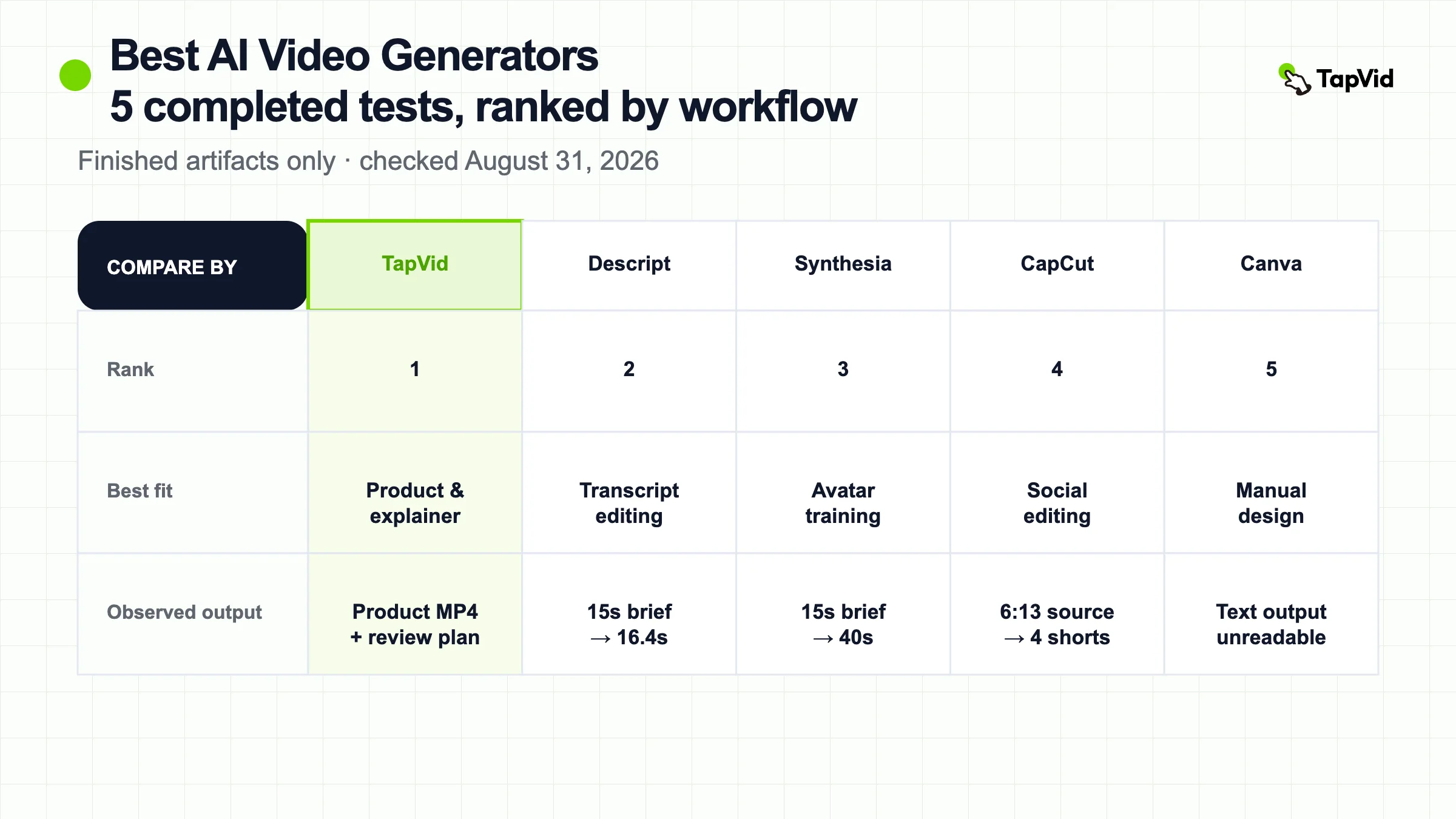
After inspecting five completed outputs, there is still no honest universal winner. TapVid is the strongest fit for product and explainer videos built from approved assets and copy. Descript is the most controllable transcript-first option. Synthesia is the clearest choice when an avatar presenter is intentional. CapCut gives social teams the broadest hands-on editing surface. Canva is the easiest design workspace to enter, but its AI-generated text failed our test.
This ranking is based on finished artifacts, not homepage demos. Four tools received a strict 15-second product-explainer brief. CapCut received a 6:13 original source video because its relevant job is turning long footage into shorts. We recorded what each interface produced, the duration shown in the final editor or player, the export boundary, and the repair work still required.
| Rank | Tool | Best for | Hands-on result | Main limitation |
|---|---|---|---|---|
| 1 | TapVid | Product and explainer videos from approved assets and copy | Completed product-launch MP4 plus reviewable plan | No mature independent review corpus found |
| 2 | Descript | Transcript-first narrated video and precise text edits | 16.4s output from a 15s brief | Free export was 720p with a watermark |
| 3 | Synthesia | Avatar-led training and localization | 40s, three-scene rendered output | Inserted an avatar despite the no-avatar instruction |
| 4 | CapCut | Social editing and long-video-to-shorts workflows | Four shorts from one 6:13 source | Data-processing terms and Pro gates need account-level review |
| 5 | Canva | Manual design assembly and brand templates | Generated artifact, but text was unreadable | The tested AI output was not publishable |
02
How we tested and ranked the tools
The ranking uses two real production fixtures. The first was a 15-second, 16:9 product explainer brief with a clean light background, lemon green #78D701, indigo #5359FF, bold kinetic type, no avatar, and the exact closing line “Turn your content into an explainer video.” Descript, Synthesia, Canva, and an earlier TapVid workflow received that brief wherever the interface allowed it. We did not quietly rewrite the prompt to make a tool look better.
The second fixture was an original 6:13, 1920 by 1080 MP4 used to test CapCut’s Long Video to Shorts route. The task was to generate one complete 30-to-60-second vertical clip with captions. We froze the source, automatic settings, one-attempt rule, and free-only boundary before upload. The tool returned four shorts and reduced the visible allowance from 60 to 54 minutes. A run counted as complete only when we could inspect a finished editor, rendered player, or completed project card. A generated script alone did not count. A loading screen that never resolved did not count. We also separated observed facts from vendor documentation and third-party opinion. Pricing, capabilities, integrations, support, and review links were rechecked on August 31, 2026.

03
1. TapVid: best for accurate product and explainer videos
TapVid is an Explainer Video Engine, not a general cinematic shot generator. Its relevant job is to turn product images, UI screenshots, footage, documents, and approved copy into a structured video. The accuracy standard has three parts: the supplied assets should remain recognizable, literal information should not be casually rewritten, and the script-to-scene correspondence should stay reviewable. That makes it a stronger fit for product launches, SaaS feature explainers, ecommerce videos, and repeat production where the wrong logo, price, model, or screen is a delivery failure.
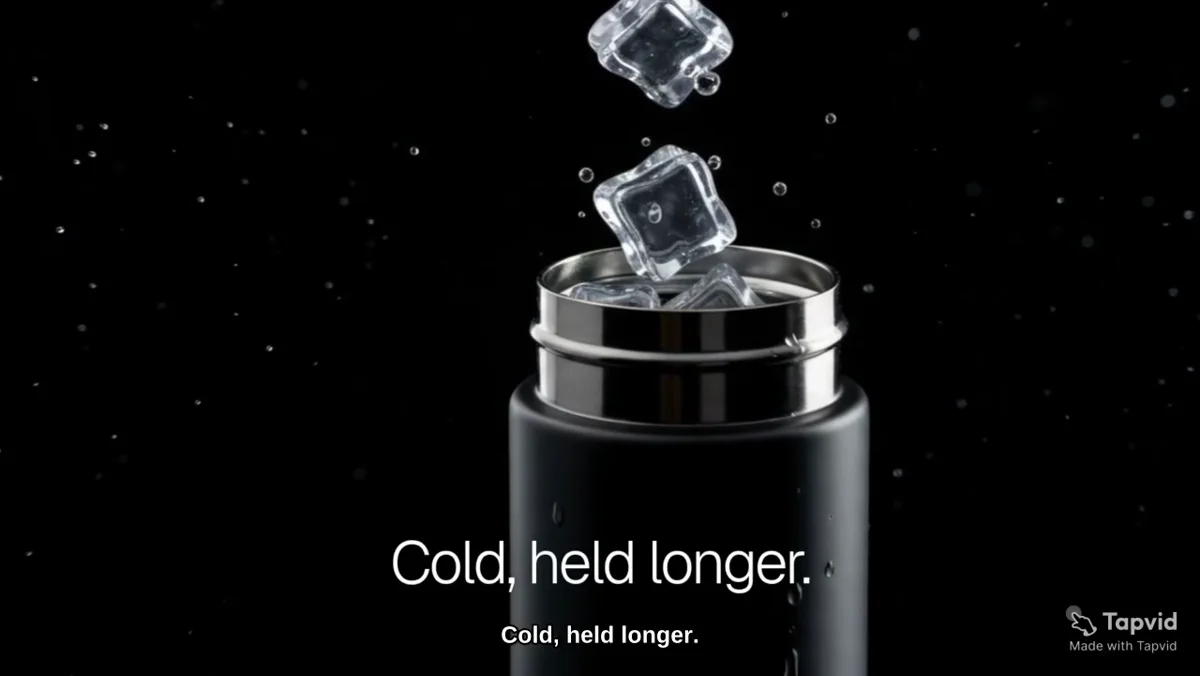
For the article’s primary artifact, we inspected the Good Case record `recvqaZHk6TNVq`, titled “Smart Insulated Water Bottle Premium Launch Teaser,” on August 31, 2026. The source record identifies it as an Assets-to-Video ecommerce and product-launch case. We downloaded the original 4,153,694-byte MP4, opened the file, checked the 16:9 sequence, and matched it to the public TapVid share page. The finished video moves from a product-led opening to an ice demonstration and lifestyle close. The supplied bottle remains the visual anchor instead of being replaced by a generic stock product.
A separate first-hand TapVid run on July 22, 2026 used a 275KB article PDF. The workflow exposed the target reaction, core message, narrative arc, audience, 60-second duration, and 16:9 format before rendering. It then organized the story into four 15-second beats and showed shot-level voiceover and timing. Upload to finished video took 6 minutes 21 seconds. That run supports a narrow workflow claim: a reviewer can inspect the brief and timed plan before committing to the final video. It does not prove that every future output will be correct.
The main advantage is source control. The real input remains visible while the system builds the explanation, and the current product messaging supports local scene revision instead of treating every correction as a full restart. The limitation is equally important: TapVid is not the right tool for an open-ended cinematic scene, a recurring fictional character, or a manually composited timeline. Human review still owns factual exceptions, asset selection, captions, and the final export. Independent-review boundary: we checked the Capterra TapVid listing and Product Hunt search on August 31, 2026, but found no attributable original user review that met this article’s evidence standard. We therefore do not quote a customer, publish a rating, or turn vendor testimonials into independent consensus. This is the one unresolved Blog Forge evidence gate for the ranked comparison. Current buying evidence, verified August 31, 2026: Official pricing lists the current trial and credit-based subscription options; verify the live checkout before budgeting. Official product page describes prompt, document, link, voiceover, subtitle, and explainer workflows; the two runs above show actual planning and output artifacts. API and MCP overview is the public route for programmatic and agent-connected creation. Contact TapVid is the public contact route; response times and SLA are not inferred.
| Evidence cell | Verified finding and source |
|---|---|
| Pricing | Official pricing lists the current trial and credit-based subscription options; verify the live checkout before budgeting. |
| Capability | Official product page describes prompt, document, link, voiceover, subtitle, and explainer workflows; the two runs above show actual planning and output artifacts. |
| Integrations | API and MCP overview is the public route for programmatic and agent-connected creation. |
| Trust | No qualifying original user review found after Capterra and Product Hunt checks; no rating or consensus claim is made. |
| Support | Contact TapVid is the public contact route; response times and SLA are not inferred. |
04
2. Descript: best for transcript-first control
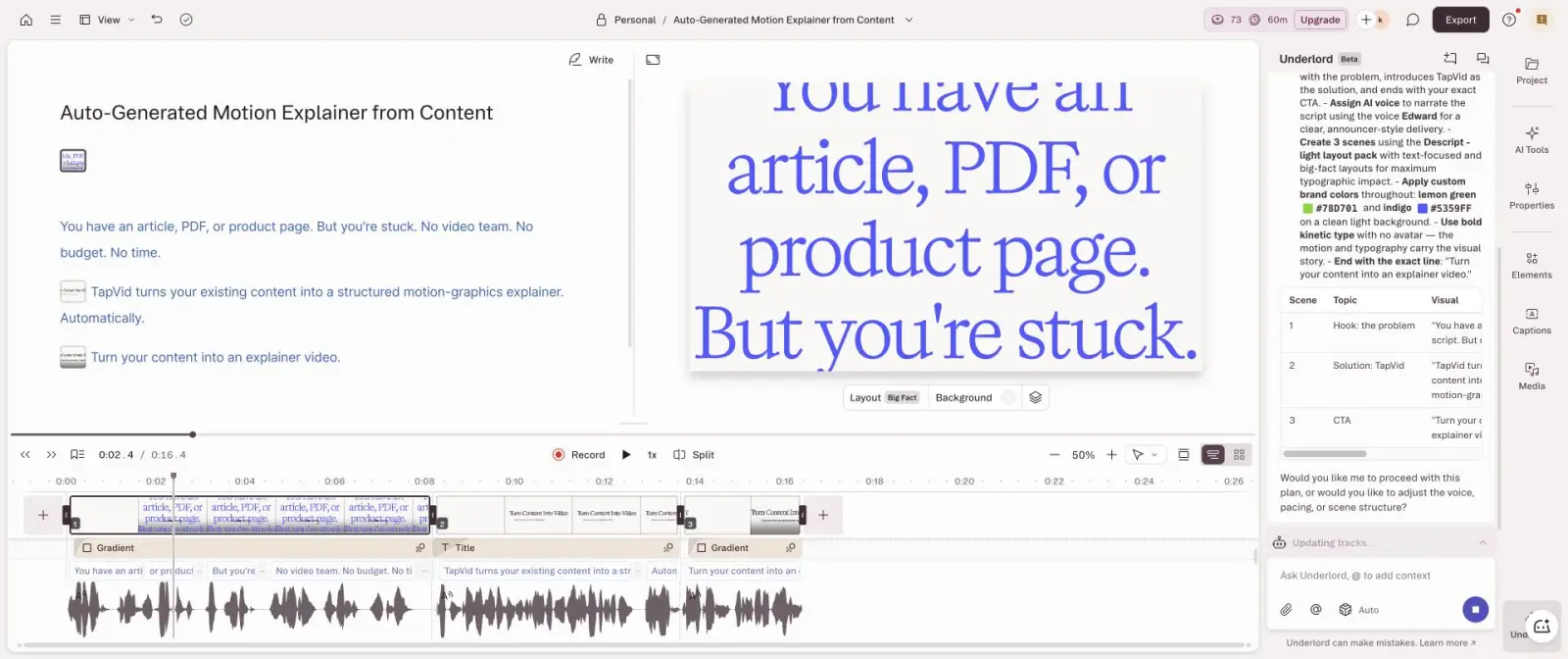
Descript was the closest to the requested duration in the completed 15-second tests. Run `descript-15s-2026-07-22` started with the fixed brief and used Underlord to propose three scenes. Before generation, the assistant restated the voice, structure, exact colors, no-avatar rule, and closing line. The finished editor showed a 16.4-second composition, only 1.4 seconds over target.
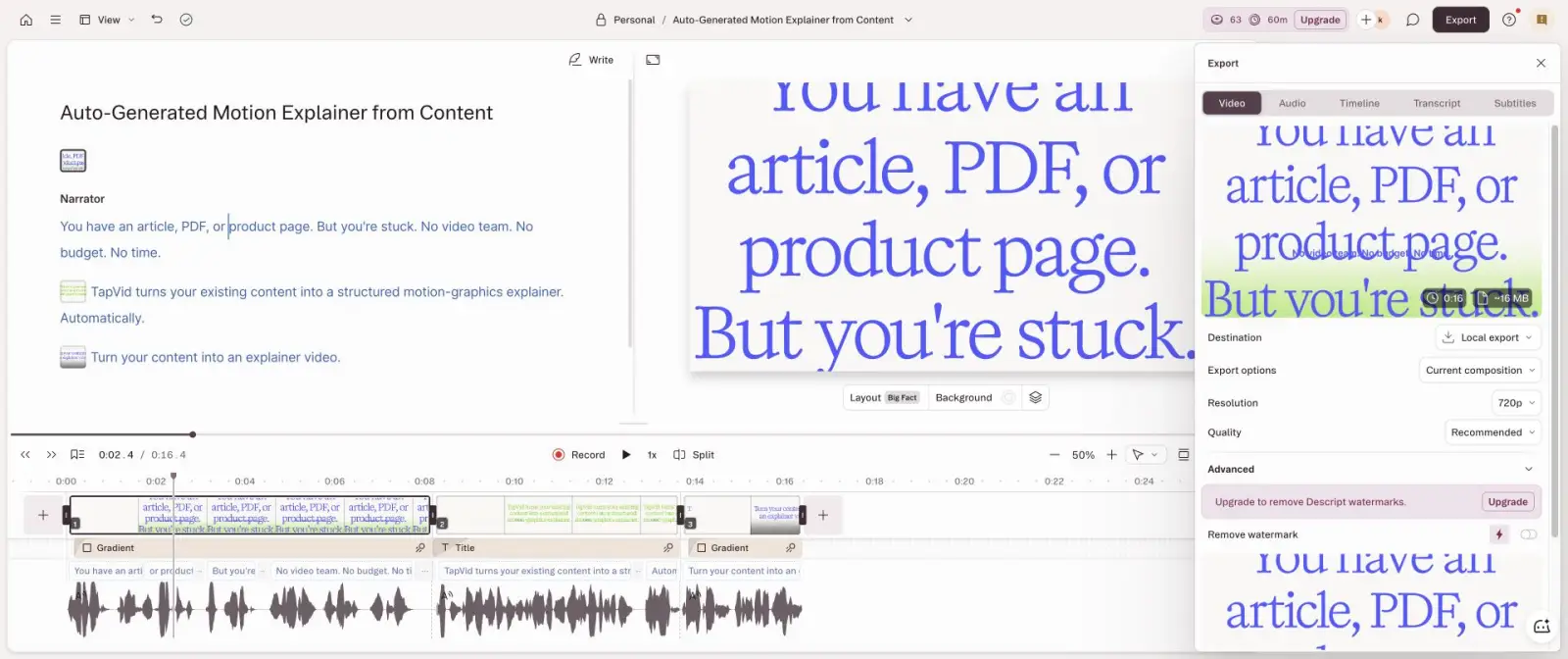
The account began with 100 signup AI credits and ended with 73 after planning and generation, so the observed run consumed 27 credits. The output preserved the short explanatory structure and kept the transcript available as the editing surface. The local export dialog offered 720p with a watermark and estimated a file of roughly 16MB. Those are observations from the tested free account, not permanent plan promises.
The practical workflow starts with a script or recording, then treats the transcript as the control layer for narration, captions, scene timing, and visual changes. In our run, the brief became three editable scenes rather than one opaque generated clip. A marketer can correct a sentence in context, but should still open the corresponding scene and verify that its product image, interface screenshot, and on-screen facts match the revised words.
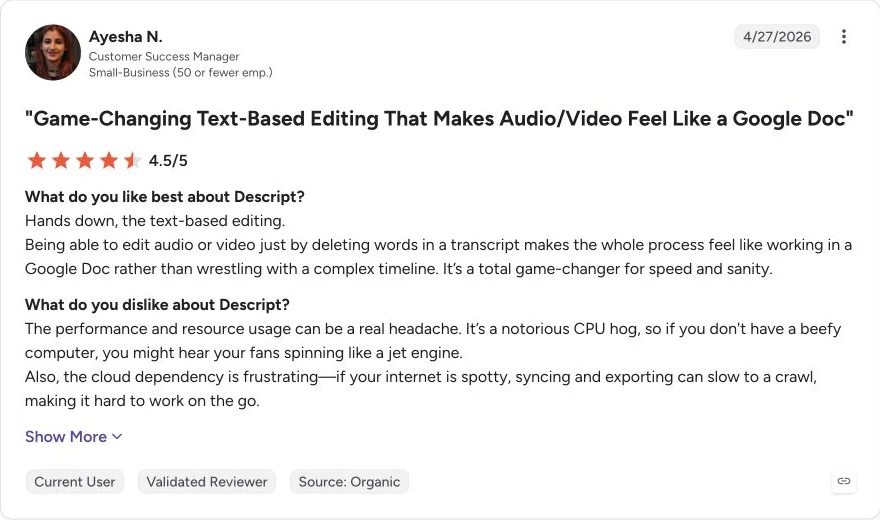
Descript’s concrete advantage is correction precision. When the words, voice, captions, and timing are the master layer, changing a sentence is easier than rebuilding a stock montage or regenerating a cinematic clip. It is a strong fit for podcasts, talking-head edits, narrated product explainers, and repurposed recordings. Its limitation is that a transcript-first workspace does not automatically provide asset-grounded product correspondence. A reviewer still needs to check every logo, screenshot, number, and generated visual. The free export boundary also matters if 1080p and watermark-free delivery are required. A current G2 reviewer described transcript-based editing as fast and intuitive, while flagging CPU use and cloud dependency that could slow syncing and export. Read the original Descript review. That is one attributable experience, not an average performance claim, but it matches the operational tradeoff visible in the product: deeper text control lives inside a heavier editing environment. Current buying evidence, verified August 31, 2026: Descript pricing separates media hours and AI credits and lists the current Free and paid-plan boundaries. AI video maker documentation describes script, generated visuals, voice, and editing; our run reached a completed editor and export dialog. Descript API documents direct API, CLI, Zapier, and MCP routes for paying users. Pricing and support table lists a knowledge base, email support, in-app chat on paid plans, and priority support for Business.
| Evidence cell | Verified finding and source |
|---|---|
| Pricing | Descript pricing separates media hours and AI credits and lists the current Free and paid-plan boundaries. |
| Capability | AI video maker documentation describes script, generated visuals, voice, and editing; our run reached a completed editor and export dialog. |
| Integrations | Descript API documents direct API, CLI, Zapier, and MCP routes for paying users. |
| Trust | Original G2 review supports the transcript-control advantage and performance caveat. |
| Support | Pricing and support table lists a knowledge base, email support, in-app chat on paid plans, and priority support for Business. |
05
3. Synthesia: best when an avatar is the format
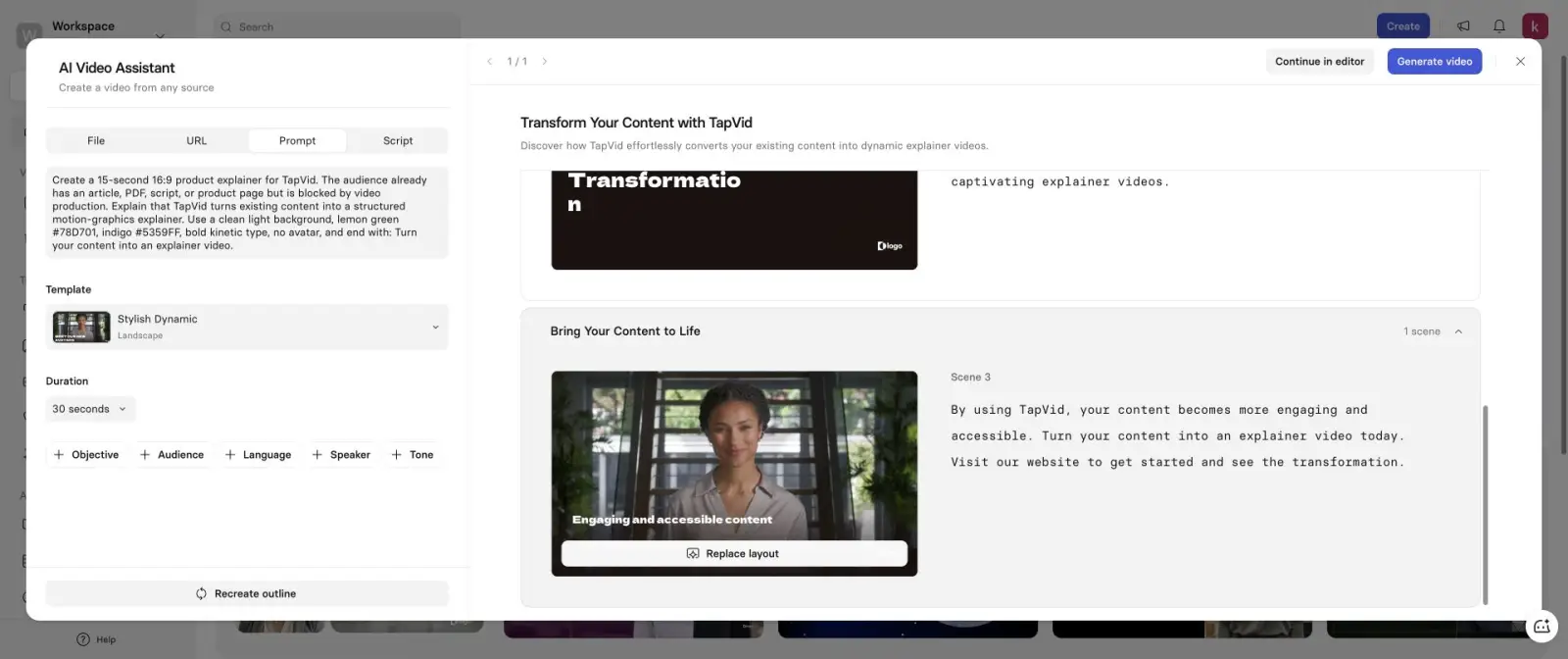
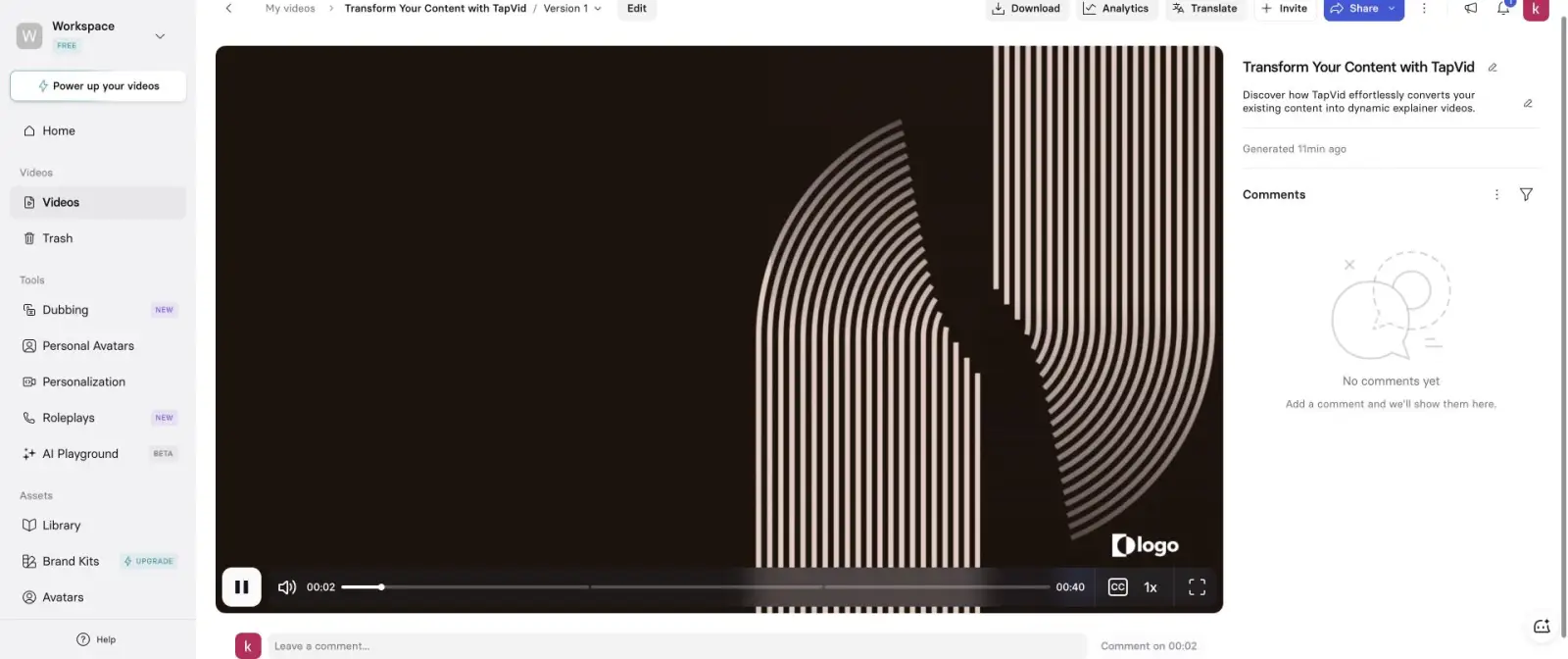
Synthesia is a category-fit decision. Run `synthesia-15s-2026-07-22` used the same 15-second product brief, but the AI Video Assistant would not accept a 15-second project duration. The shortest selector was 30 seconds. It produced a three-scene outline and inserted an Actor even though the prompt explicitly said no avatar. The completed player measured 40 seconds and one visual block still displayed a placeholder “logo.”
The observed failure is useful because it reveals the product’s strongest constraint. Synthesia is designed around presenter-led communication. That is an advantage for training, onboarding, internal communications, and localization when an on-screen speaker is intentional. The same format is a limitation when the brief calls for kinetic type, source-bound product assets, or no presenter. A polished avatar can still be the wrong deliverable.
Its normal production unit is a sequence of presenter scenes: choose or generate an avatar, assign narration, select layouts and supporting visuals, then render the assembled video. That structure can make repeatable training modules easier to standardize across languages. It also means buyers should test avatar choice, pronunciation, pacing, logo replacement, scene duration, and subtitle timing as separate approval points instead of judging only the presenter’s realism.
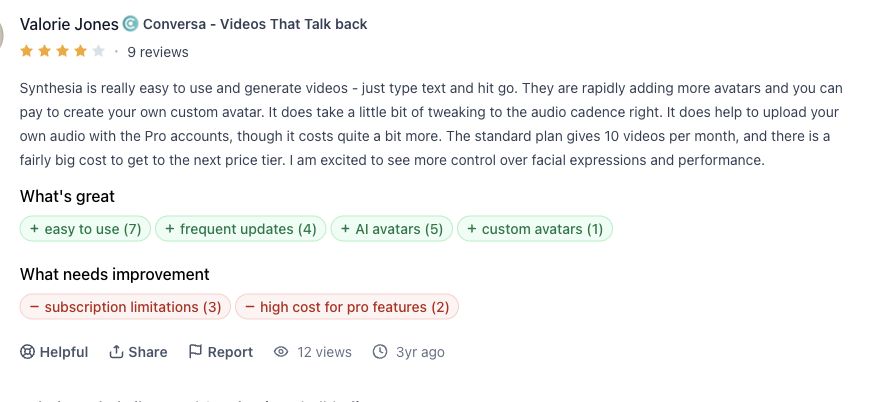
The visual system also drifted from the prompt. The render used a dark stock template rather than the requested light background with lemon green and indigo. The run therefore missed duration, no-avatar, brand-color, and logo-readiness checks. It did reach a completed render, so the result is stronger evidence than a homepage judgment, but it should not be generalized to every Synthesia template or paid plan. Product Hunt reviewer Valorie Jones found text-to-video creation easy while noting work on audio cadence and plan constraints. The original Synthesia review supports a balanced buyer rule: choose Synthesia because a repeatable presenter format solves the communication job, not because it is a universal text-to-video engine. Current buying evidence, verified August 31, 2026: Synthesia pricing lists current Free, Starter, Creator, and Enterprise access and should be rechecked before purchase. AI video generator describes presenter-led creation; our run documents the avatar and duration behavior for one brief. Synthesia API documentation lists API access on Creator and Enterprise plus a Zapier guide. Official contact guide lists 24/7 live chat and email support.
| Evidence cell | Verified finding and source |
|---|---|
| Pricing | Synthesia pricing lists current Free, Starter, Creator, and Enterprise access and should be rechecked before purchase. |
| Capability | AI video generator describes presenter-led creation; our run documents the avatar and duration behavior for one brief. |
| Integrations | Synthesia API documentation lists API access on Creator and Enterprise plus a Zapier guide. |
| Trust | Original Product Hunt review reports easy creation with cadence and plan caveats. |
| Support | Official contact guide lists 24/7 live chat and email support. |
06
4. CapCut: best for social editing and fast variants
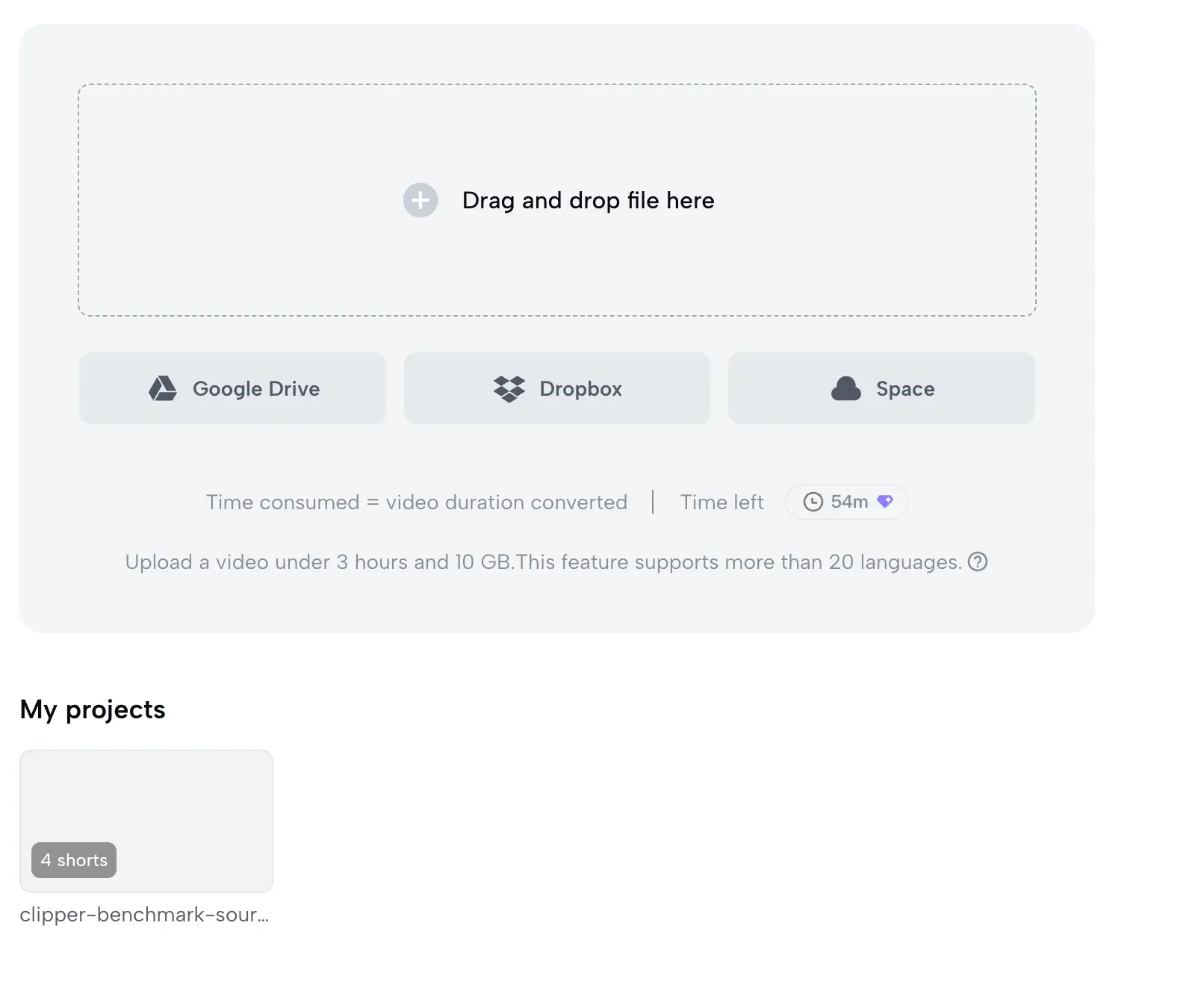
CapCut belongs in this ranking because many buyers use “AI video generator” to mean a tool that can find, reframe, caption, and finish social video, not only invent pixels from a prompt. Run `capcut-long-video-to-shorts-2026-08-10` used an original 6:13, 1920 by 1080 MP4. The signed-in workspace showed 60 free minutes, accepted the source, and completed a project card with four shorts. The remaining allowance then showed 54 minutes.
Before processing, CapCut displayed a disclosure that conversion would upload the video to CapCut servers, transcribe it, and process it with a third-party AI model. That boundary was accepted for this owned test fixture. It would require a separate policy decision for confidential client footage, unreleased products, employee faces, or regulated material. “Free minutes available” is not the same as “approved for every source.”
The completed project card is the beginning of editorial work, not the final deliverable. Each suggested short needs to be opened and checked for a complete idea, an intelligible first second, correct speaker framing, readable captions, clean start and end points, and the target vertical crop. If the source contains several topics, highlight detection can produce more candidates without guaranteeing that any one candidate has enough context to publish.
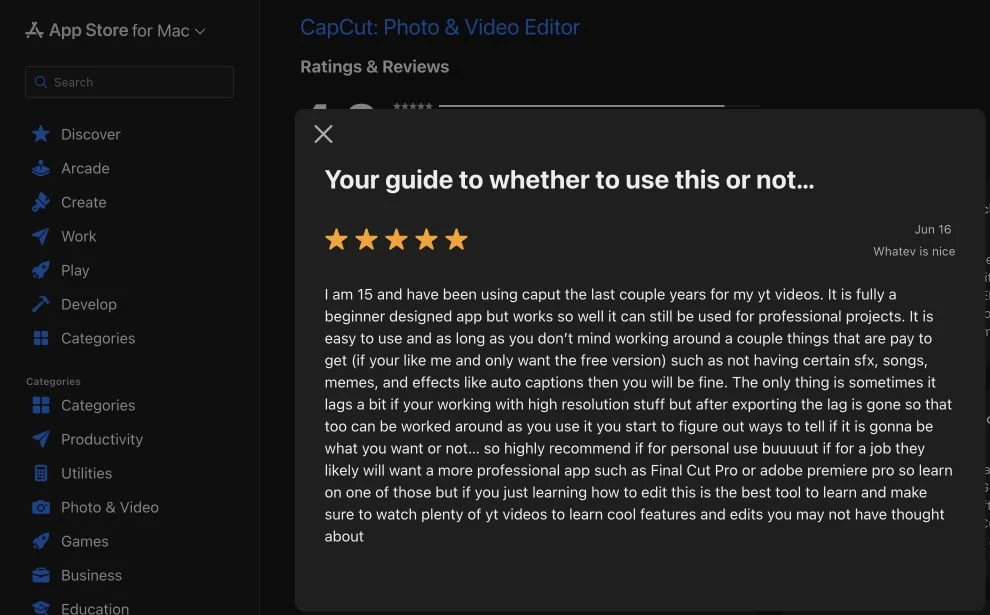
CapCut’s advantage is the handoff from automation into a broad manual editor. Social teams can adjust framing, captions, pacing, effects, ratios, and hooks without moving to a different tool. The limitation is operational variability: Pro gates, AI models, features, and data prompts can differ by region, device, and account. A four-short project card also does not prove that all four clips contain a complete idea. Each output still needs a boundary, caption, framing, and rights review. One Mac App Store reviewer described CapCut as beginner-friendly and capable of more serious projects, while noting paid sound effects, media, and auto captions plus lag on high-resolution work. Read the original CapCut review. That review supports testing the exact device and paid-feature boundary rather than assuming the same performance everywhere. Current buying evidence, verified August 31, 2026: CapCut Pro is the official plan route; exact prices and entitlements can vary by account and region. Long Video to Shorts documents upload, highlight detection, reframing, captions, editing, and export. CapCut collaboration guide documents review links and direct social sharing; no general public creation API is claimed here. CapCut Help Center is the public troubleshooting route; no response-time promise is inferred.
| Evidence cell | Verified finding and source |
|---|---|
| Pricing | CapCut Pro is the official plan route; exact prices and entitlements can vary by account and region. |
| Capability | Long Video to Shorts documents upload, highlight detection, reframing, captions, editing, and export. |
| Integrations | CapCut collaboration guide documents review links and direct social sharing; no general public creation API is claimed here. |
| Trust | Original Mac App Store review provides a device-specific strength and limitation. |
| Support | CapCut Help Center is the public troubleshooting route; no response-time promise is inferred. |
07
5. Canva: best manual design workspace, not the best tested generator
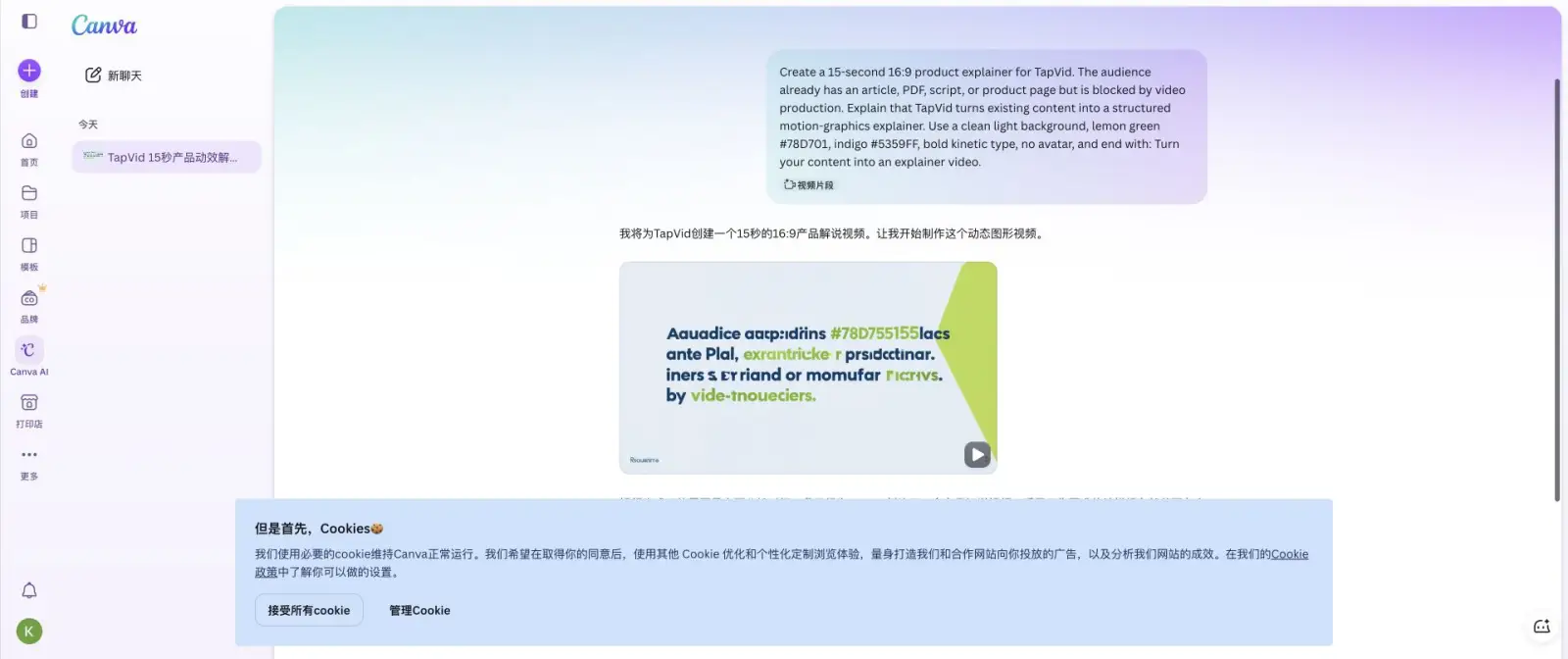
Canva is easy to recommend as a manual design and assembly environment. It is much harder to recommend its AI-generated video without inspecting the output. In run `canva-video-clip-2026-07-22`, the signed-in account used video-clip mode, 16:9, high quality, and no audio. Canva stated that it had created the requested 15-second explainer with the specified colors, no avatar, and closing line.
The visible artifact failed the most basic information-fidelity check. The main on-screen copy was unreadable gibberish, including fragments that resembled “Aauadice aacp:idrins,” broken color codes, and invented text. Playback remained at 0.0 seconds during inspection, so we could not independently confirm the claimed 15-second duration or reach a trustworthy export result. It returned an artifact, but not a publishable one.
A safer Canva workflow is to use generation for visual ideation, then rebuild factual text, prices, product names, calls to action, and legal wording as normal editable text layers. Teams should also replace generated product approximations with their uploaded assets and inspect every page or scene at delivery size. This keeps Canva’s template and collaboration strengths while avoiding the assumption that text embedded inside an AI-generated visual is accurate.
Canva’s advantage is what happens after generation. Teams can combine uploads, templates, stock, text, audio, brand kits, layouts, and manual edits in one familiar workspace. Its official help also distinguishes 4-second silent Magic Media clips from longer Canva AI video clips and from Magic Design, which arranges content but does not generate video itself. That product clarity is useful. The limitation is that text-critical AI outputs need frame-by-frame review and may require manual rebuilding. Product Hunt reviewer Naumaan Zahid said Canva makes it easy to reach good enough quickly but becomes frustrating when precise control is needed. The original Canva review matches our buyer rule: use Canva for accessible design assembly, but do not assume the first AI-generated clip is ready for a product page or paid campaign. Current buying evidence, verified August 31, 2026: Canva pricing lists Free, Pro, Business, Enterprise, storage, and current AI allowances. Magic Media help documents 4-second silent generated clips; Magic Design and Canva AI Video are separate workflows. Canva Apps is the official integration marketplace, while current pricing documents app and API availability by plan. Canva Help Center documents self-service help and account recovery; plan-specific support is listed on pricing.

| Evidence cell | Verified finding and source |
|---|---|
| Pricing | Canva pricing lists Free, Pro, Business, Enterprise, storage, and current AI allowances. |
| Capability | Magic Media help documents 4-second silent generated clips; Magic Design and Canva AI Video are separate workflows. |
| Integrations | Canva Apps is the official integration marketplace, while current pricing documents app and API availability by plan. |
| Trust | Original Product Hunt review supports the speed-versus-precision tradeoff. |
| Support | Canva Help Center documents self-service help and account recovery; plan-specific support is listed on pricing. |
08
Tools we tested but did not rank
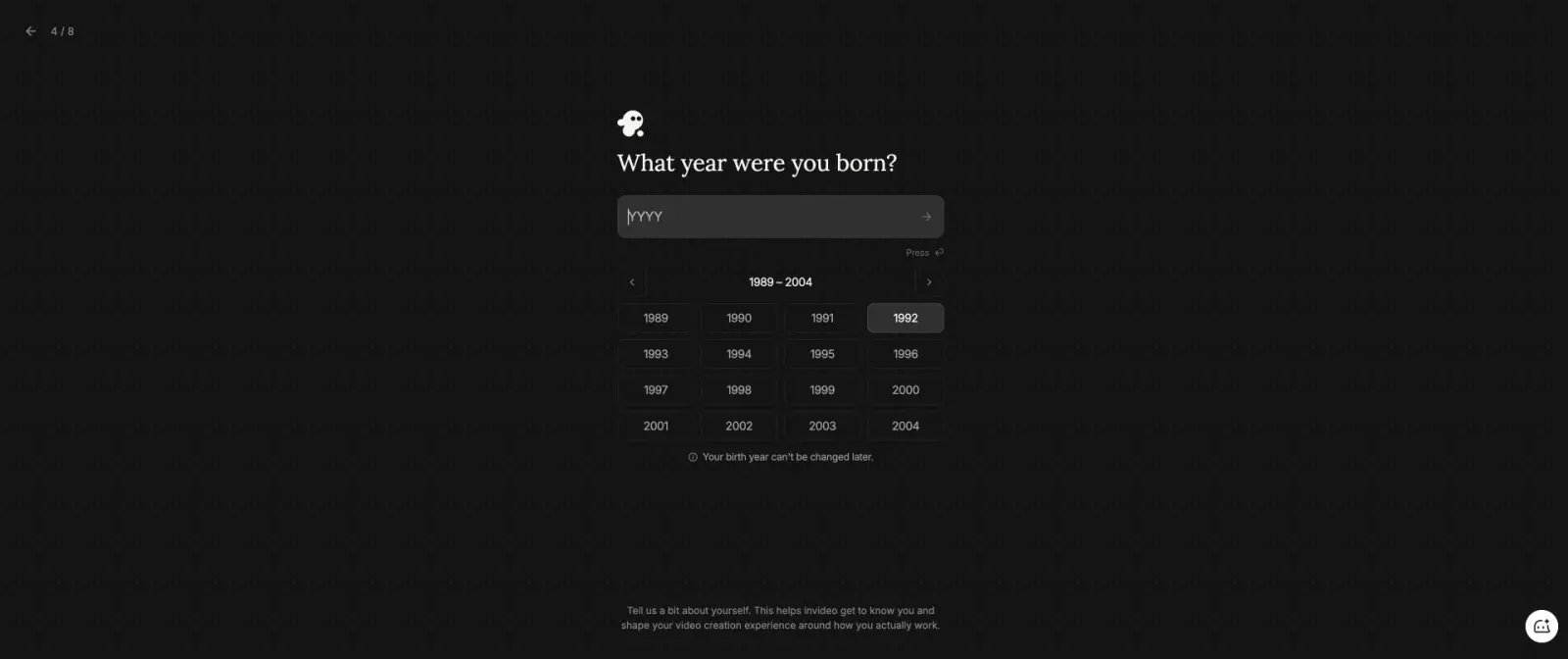
A famous product does not earn a ranking merely because its homepage looks strong. Three additional tools entered the test and did not reach a finished artifact. VEED created a five-scene script, defaulted to portrait 9:16 despite the 16:9 request, showed a 29-second preview estimate, and then remained on “We are generating your video” for hours. InVideo completed Google OAuth but required an immutable birth year during onboarding; we did not invent personal data on the account. Runway completed the Google popup but returned “OIDC interaction not found or expired.”
Those are real access results, not product-quality verdicts. VEED is recorded as a generation failure, InVideo as an onboarding blocker, and Runway as an authentication failure. None produced a reviewable output in the bounded attempt, so none is scored from marketing claims. A future rerun could change the shortlist, but only after the tool completes the task and exposes the export surface. We also excluded products that only provided a script, outline, or plan without a finished editor or player. This rule prevents a common ranking problem: treating successful signup as successful video generation.

09
What the completed tests actually changed
The tests changed the ranking in ways a feature table could not. Descript moved up because its 16.4-second result stayed closest to a strict 15-second brief and remained editable through text. Synthesia stayed in the shortlist but only for avatar-led work because the product inserted an Actor against the prompt. Canva stayed as a design workspace but fell to fifth as a generator because unreadable text is a release blocker. CapCut ranked for social transformation, not prompt-to-video invention. TapVid ranked first for the product-explainer reader job because the selected case preserved a real product asset across a multi-scene result and the separate run exposed the plan before render.
Duration also proved unreliable as a prompt-only instruction. The 15-second request became 16.4 seconds in Descript and 40 seconds in Synthesia. Canva claimed 15 seconds but did not provide measurable playback during inspection. That means a buyer should record final-file duration, not the duration selected in setup or estimated by a generated script. The most important negative result was not visual quality. It was instruction drift. The no-avatar instruction, exact text, brand colors, aspect ratio, and duration each failed somewhere. A procurement pilot should include one literal sentence, one exact number, one asset that cannot be redrawn, one disallowed creative choice, and one local correction. A generic “make a good video” prompt cannot reveal these boundaries.
10
How to run your own one-brief AI video pilot
Start with one representative project, not a demo prompt designed to flatter every tool. Use the real source types your team handles: product images, UI screenshots, a script, a document, or owned footage. Define the final channel and aspect ratio before opening an account. Then freeze the brief so later tools do not benefit from lessons learned in earlier attempts.
Inspect the workflow in three passes. First, check literal truth: names, prices, model numbers, feature labels, legal wording, and the exact product shown. Second, check correspondence: does the visual beside each line prove or at least support that line? Third, check delivery: duration, crop, captions, audio, watermark, resolution, rights, and the final downloadable file. Request one small revision after the first result. Change one sentence or replace one asset, then record whether the rest of the video moves. This reveals whether “editing” means a local correction, a timeline repair, or a full regeneration. For a small team, revision behavior often matters more than the first preview because campaigns change after legal review, product updates, and channel feedback.
- Input pack: two real assets, one exact sentence, one exact number, and one prohibited creative choice.
- Output target: channel, aspect ratio, target duration, caption requirement, and export format.
- Attempt rule: one first pass before manual repair, with timestamps and screenshots. Review log: factual errors, visual mismatches, correction steps, export limits, and support questions. Decision rule: choose the tool with the lowest path-to-approved-file cost for your recurring job, not the prettiest isolated frame.
11
Final verdict: choose the production unit you need
Choose TapVid when approved product assets and copy must become a reviewable multi-scene explainer. Choose Descript when the transcript is the master editing surface. Choose Synthesia when an avatar presenter is intentional. Choose CapCut when the source is existing footage and the job is social reframing and finishing. Choose Canva when a manual design workspace matters more than trusting the first generated clip.
Do not use this list as permission to skip a pilot. The completed runs show why: a 15-second request can become 40 seconds, a no-avatar instruction can produce an avatar, and a tool can claim success while rendering unreadable text. The best AI video generator is the one that survives your actual input, correction, and export requirements with the least hidden repair work.
What is the best AI video generator in 2026?
There is no universal winner. In our completed tests, TapVid fit source-grounded product explainers, Descript fit transcript-first editing, Synthesia fit avatar training, CapCut fit social editing, and Canva fit manual design assembly.
Which AI video generator stayed closest to the requested duration?
Descript finished at 16.4 seconds from a 15-second request. Synthesia finished at 40 seconds. Canva claimed 15 seconds, but playback did not advance during inspection, so the duration could not be verified.
Which AI video generator is best for product videos?
Use a workflow that keeps approved product assets, literal copy, and scene correspondence reviewable. TapVid is the relevant starting point in this ranking, but every SKU still needs a human factual and export review.
Can I use a free AI video generator for commercial work?
Use free access for evaluation only until you verify the current watermark, resolution, export, usage rights, data terms, and plan limits on the official pages and checkout for your account.
Why are Runway, VEED, and InVideo not ranked?
They did not reach a reviewable finished artifact in the bounded test. Runway hit an authentication error, VEED remained generating for hours, and InVideo required immutable personal data during onboarding. These are access results, not universal quality verdicts.