
The best onboarding video program is not one polished welcome film. It is a small, searchable library that helps a new employee complete the next important action. For a small company, onboarding videos for new employees work best when each module appears close to the moment it becomes useful.
01
The seven-video blueprint
When the source already exists as text, an article, PDF, or script, TapVid's Explainer Video Engine can turn it into a structured explainer video in minutes without After Effects.
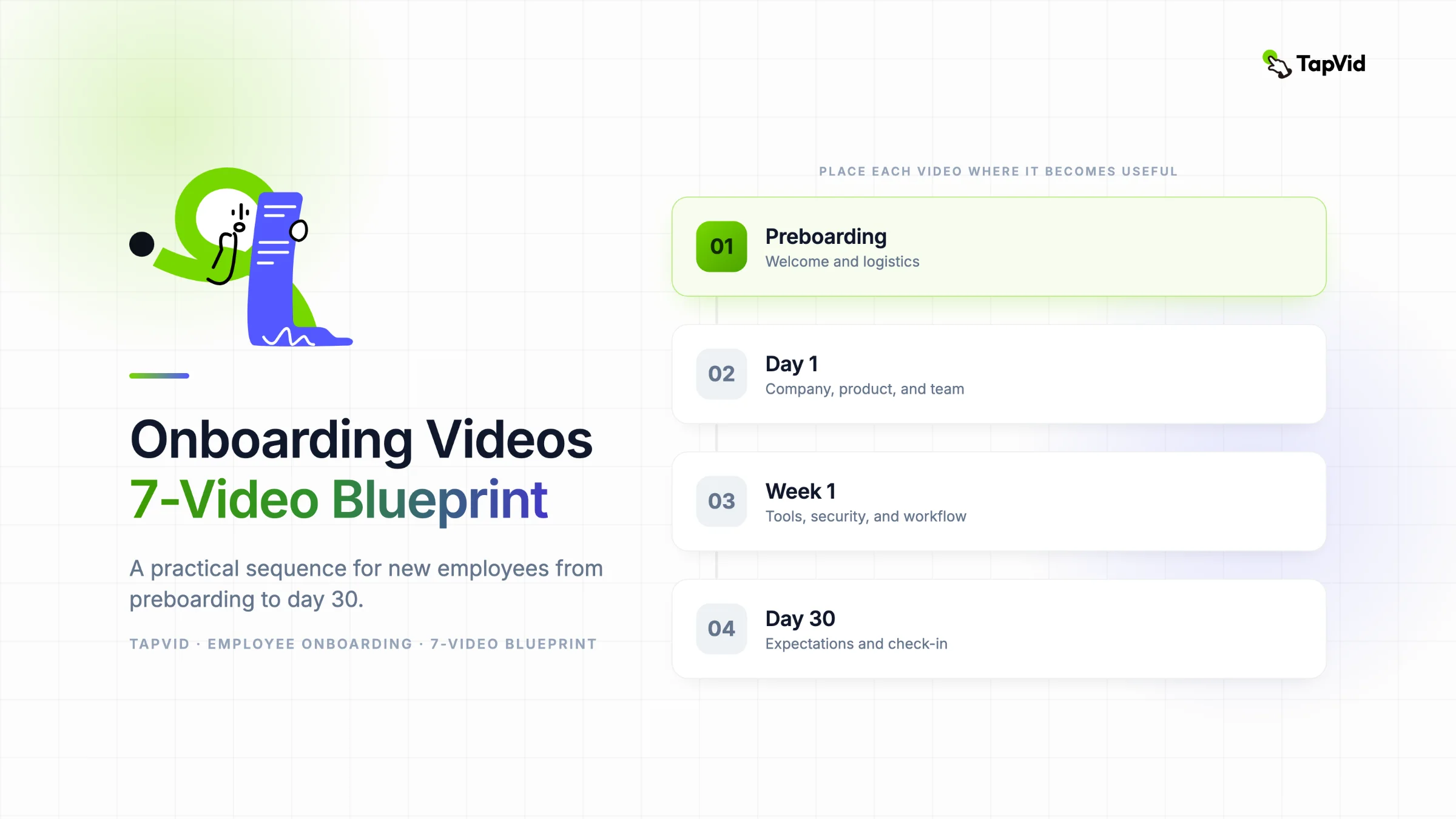
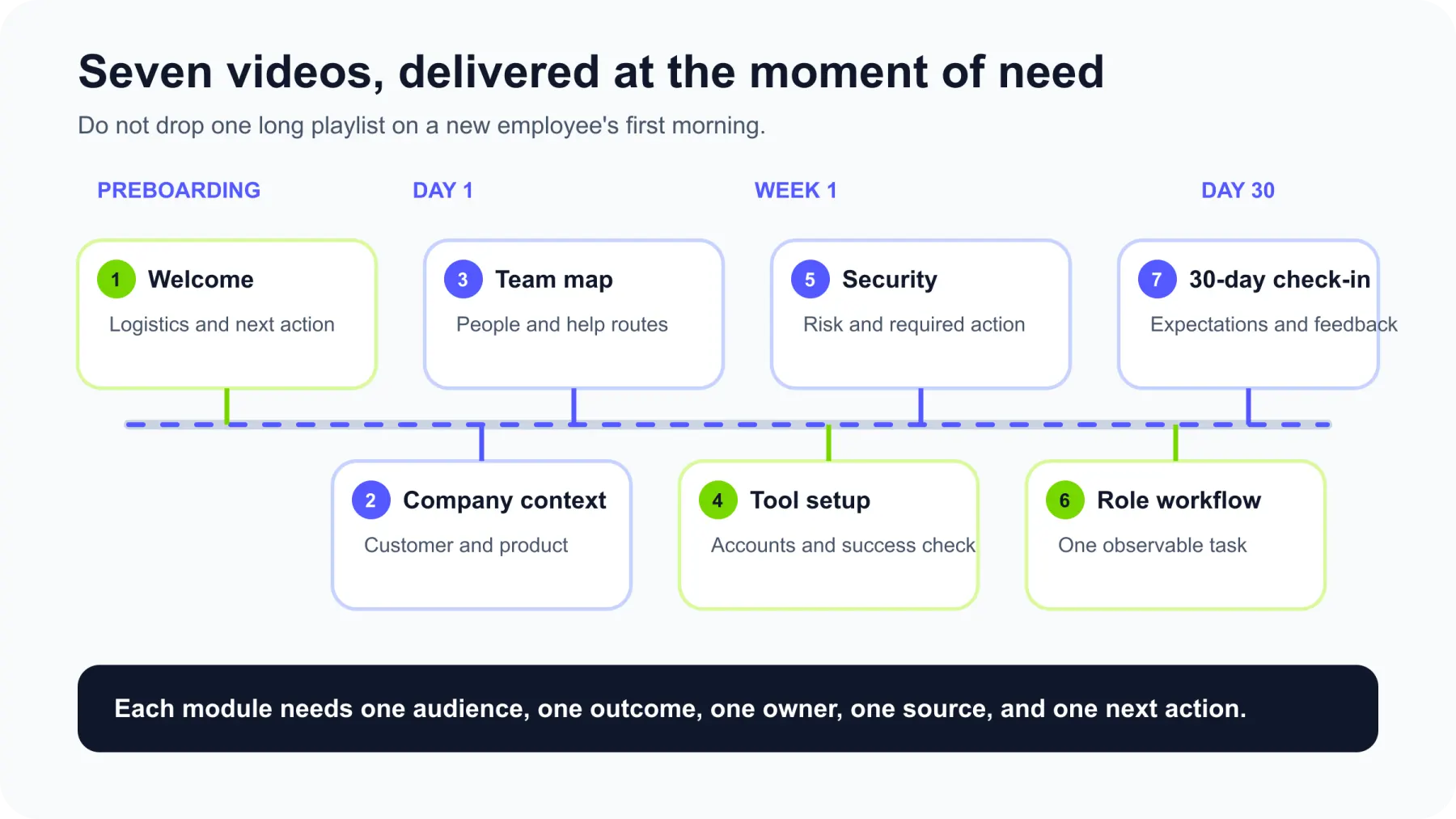
If I were building that library for a small company, I would start with seven videos:
- Welcome and preboarding logistics
- Company, customer, and product context
- Team map and where to get help
- Account and tool setup
- Policy and security essentials
- One role-specific core workflow
- First-30-day expectations and check-in
Each video should have one audience, one observable outcome, one owner, one authoritative source, and one next action. That structure matters more than expensive production.
It also keeps video in the right role. Video can explain context, demonstrate a workflow, and make information easier to revisit. It cannot replace a manager, an accessible written source, a signed policy acknowledgment, or a live conversation about a sensitive issue.
I compared five current guides ranking around this topic. Most offer useful examples and production tips. Far fewer explain what deserves a video, when each video should appear, who keeps it accurate, and how to tell whether it changed employee behavior. This guide fills those operational gaps.
Quick answer: Build the minimum useful sequence first. Place it across the employee journey, connect every video to its source of truth, and measure whether people can perform the task afterward.
02
First, decide whether the answer should be a video
Not every piece of onboarding information deserves a video.
Video is strong when a process is easier to understand by seeing it, when the explanation will be repeated, or when tone and context matter. It is weak when the information changes every week, must be quoted exactly, or requires a private two-way conversation.
I use four questions before approving a video:
- Will several people need the same explanation?
- Is seeing or hearing the explanation materially better than reading it?
- Will the content remain accurate long enough to repay the production effort?
- Can the employee prove completion through an action, not just a play button?
This matrix turns those questions into a format decision.
| Format | Best for | Weak for | Example |
|---|---|---|---|
| Video | Repeated demonstrations, context, tone, visual sequences | Exact language that changes often | How to prepare and publish a customer webinar |
| Document | Searchable reference, exact steps, policy text, links | Showing motion or conveying personality | Security policy, expense limits, benefits details |
| Live conversation | Nuance, relationships, feedback, sensitive topics | Information that must be repeated identically | Role expectations, team norms, first-week questions |
| In-product walkthrough | Actions completed inside a specific tool | Company context or cross-tool workflows | Creating the first project in an internal platform |
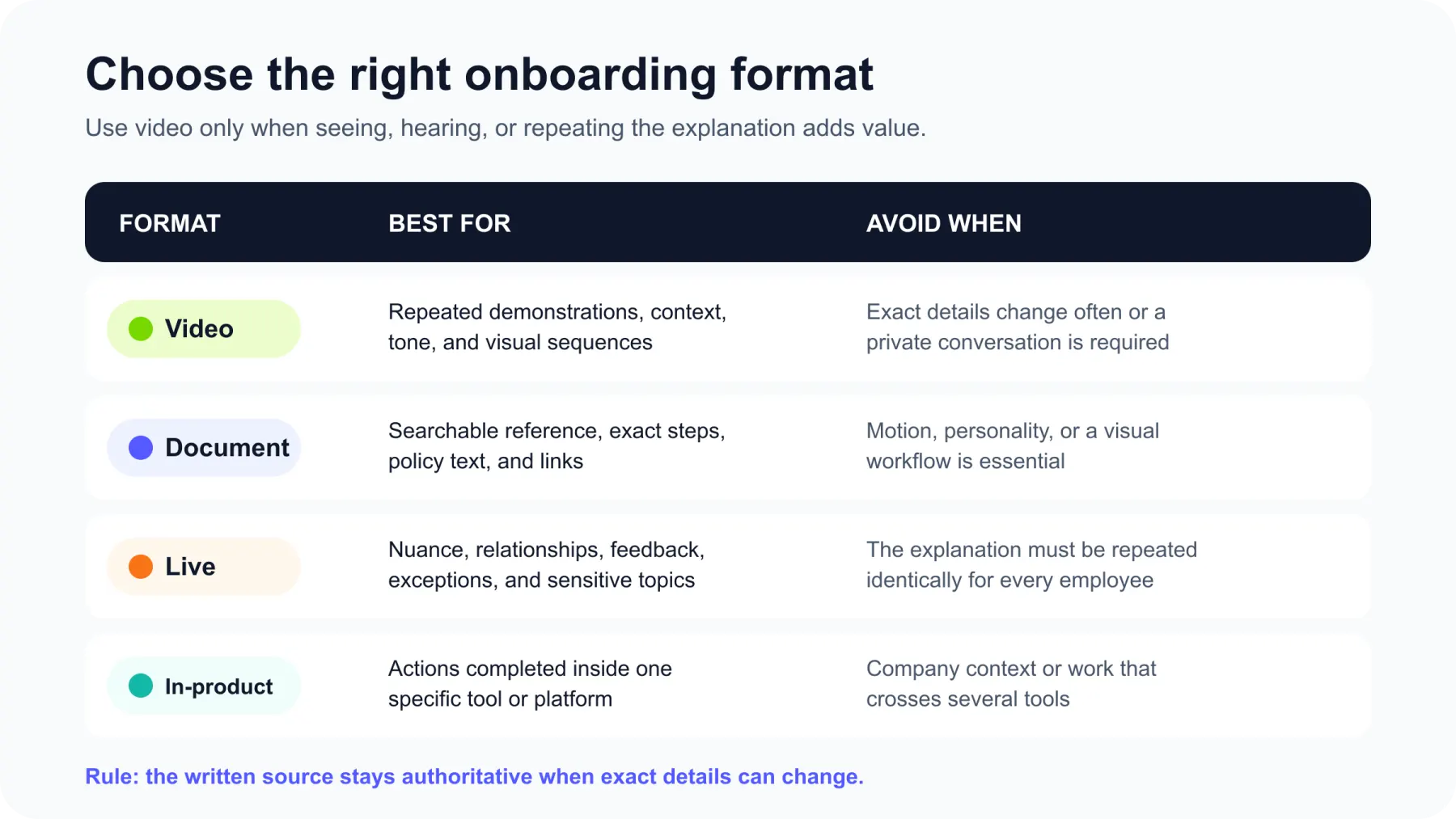
The formats can work together. A two-minute video can explain why a workflow matters, a document can hold the exact current steps, and a manager can answer exceptions.
This distinction is especially important for compliance and policy content. The video should summarize context and show the required action. The linked policy remains authoritative. If the policy and the video ever disagree, the policy wins.
03
Map onboarding videos for new employees to the journey
SHRM describes onboarding as a process that can extend for months and includes more than orientation. Gallup also warns against treating onboarding as one class or only the first 30 days.
That is why I would not send all seven videos in one playlist on the first morning. Place each one near the moment when the employee can use it.
1. Welcome and preboarding logistics
When: After the offer is accepted and before day one Length: 2 to 3 minutes Outcome: The employee can describe what will happen on day one and complete the remaining setup steps.
Include:
- A direct welcome from the manager, founder, or team lead
- Day-one time, location, or video-call link
- What equipment and accounts should arrive
- The name of the person to contact if something is missing
- One simple next action
Do not turn this into a company documentary. The new hire is usually asking practical questions: Where do I go? Who will meet me? What do I need to finish?
Script opening:
Welcome to the team. Your first day starts at 9:30 a.m. Pacific time with a call from your manager. Before then, please activate your email account using the link in your inbox. If the link does not arrive, message Jordan in People Operations.
The action is concrete, and the fallback is visible.
2. Company, customer, and product context
When: Day one Length: 4 to 6 minutes Outcome: The employee can explain who the company serves, the problem it solves, and how their role contributes.
Include:
- The customer problem
- The main customer or user groups
- The product or service in plain language
- How the company makes money
- The current strategy, stated at a level likely to remain stable
- One example of the employee's role affecting a customer outcome
Mission and history are useful only when they help the employee make better decisions. Replace a long chronology with a short causal story: customers had this problem, existing options failed in this way, and the company chose this approach.
3. Team map and where to get help
When: Day one or day two Length: 3 to 5 minutes Outcome: The employee can identify the right person or channel for five common needs.
An organization chart shows reporting lines. A useful team-map video shows how work actually moves.
Include:
- The employee's manager and onboarding buddy
- Closest collaborators
- Owners for product, customer, security, people, and finance questions
- Which channel to use for urgent versus non-urgent help
- Response-time expectations
- How to escalate a blocked task
Use real names and current roles, but keep the footage modular. A separate 20-second card for each person is easier to replace than a single tightly edited sequence.
4. Account and tool setup
When: Day one through day three Length: 3 to 8 minutes per workflow Outcome: The employee can sign in securely and complete a defined setup checklist without support.
This is usually a screen recording. Show only the relevant browser tab or application window. Hide customer information, personal messages, credentials, API keys, and unrelated notifications before recording.
Include:
- Where the invitation arrives
- How to sign in
- Required security settings
- Which workspace, project, or channel to join
- A quick success check
- Where the current written setup guide lives
Do not narrate clicks without explaining the decision behind them. “Click Settings” becomes stale quickly. “Turn on two-factor authentication because this account can access customer data” gives the step meaning.
If a setup requires six unrelated tools, split it into smaller modules. A new hire who needs help with the password manager should not scrub through a 25-minute software tour.
5. Policy and security essentials
When: During the first week, before relevant access is granted Length: 3 to 6 minutes per topic Outcome: The employee can recognize the risk, locate the current policy, and complete the required acknowledgment or action.
Useful topics can include:
- Handling customer or personal data
- Passwords and device security
- Phishing and incident reporting
- Expenses and purchasing
- Confidentiality and acceptable use
- Workplace conduct and reporting routes
This category needs a strict source rule. Keep exact legal wording, thresholds, dates, and jurisdiction-specific requirements in the controlled policy. Use the video to explain the situation, the risk, and what the employee should do next.
The video is not the acknowledgment system. If the company needs a record that an employee accepted a policy, capture that record in the appropriate HR, compliance, or learning system.
6. One role-specific core workflow
When: During the first week, close to the first real assignment Length: 5 to 10 minutes Outcome: The employee can complete one frequent, high-value task to the expected standard.
Choose a workflow that is common enough to repeat and specific enough to observe.
Weak topic:
How marketing works here
Stronger topic:
Turn an approved campaign brief into a scheduled email, run the pre-send checks, and request final approval
Show:
- The input and where it comes from
- The finished output
- The normal sequence
- Decision points
- Common mistakes
- Quality checks
- Where to ask for approval
Finish with a small practice task. The manager can then review the output, not ask whether the employee watched the video.
7. First-30-day expectations and check-in
When: Near the end of week one, then revisit before the 30-day conversation Length: 3 to 5 minutes Outcome: The employee can describe the expected milestones, evidence of progress, and how feedback will work.
Include:
- What “good” looks like by the end of week one and day 30
- Which outcomes matter most
- Which early mistakes are normal
- How often the manager and employee will meet
- How the employee should surface confusion or risk
- What will be discussed in the first formal check-in
This video creates consistency, but the manager still owns the conversation. A personal discussion is where expectations become specific to the employee's role and context.
04
Use a core-plus-delta structure instead of duplicating everything
Teams often begin with one universal playlist, then copy it for every role and location. Six months later, they have five slightly different security videos and no one knows which one is current.
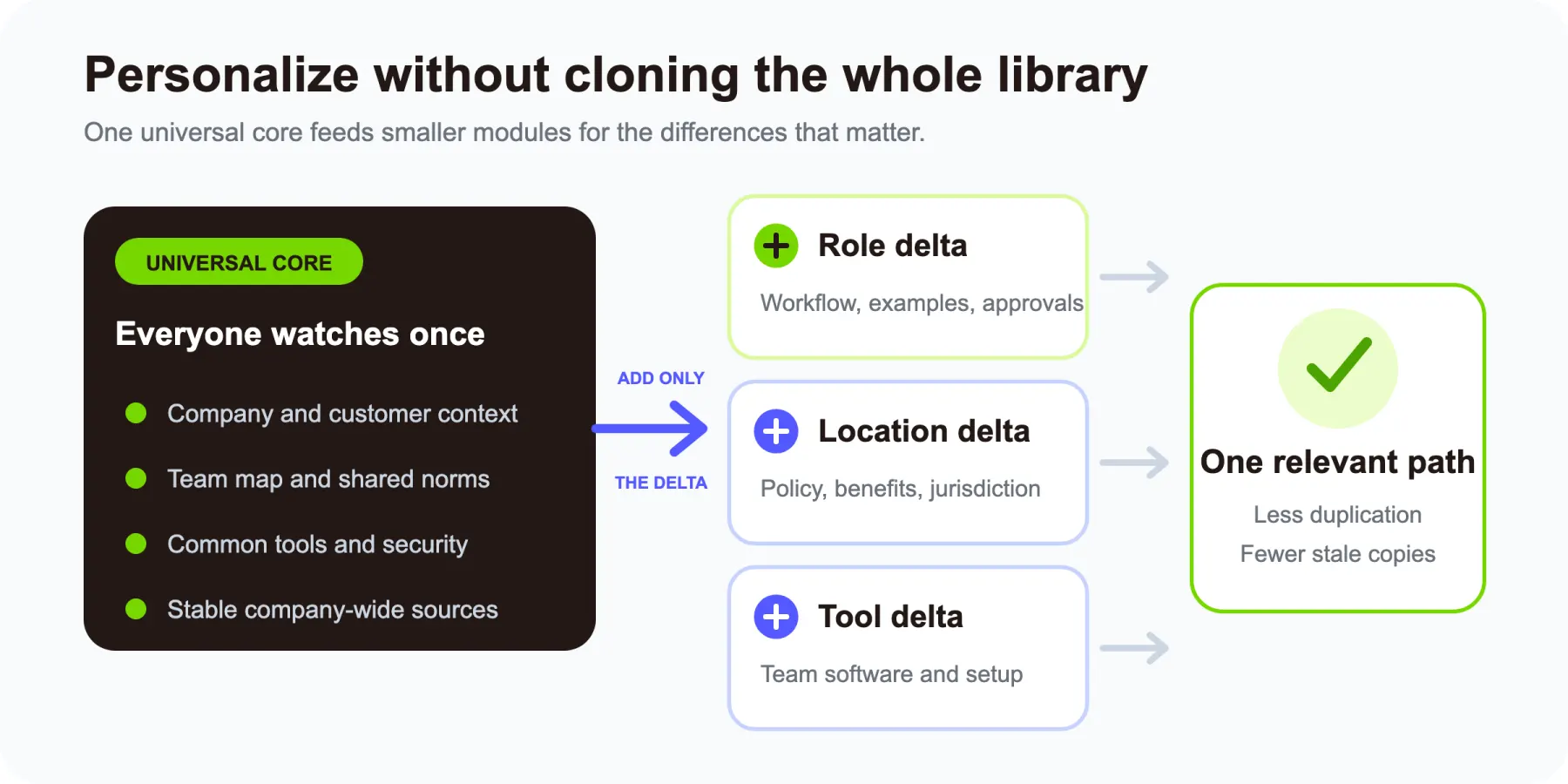
A cleaner architecture has two layers:
Universal core
- Company and customer context
- Team map
- Shared tool and security basics
- Company-wide working norms
Delta modules
- Role-specific workflows
- Location-specific policies
- Department tools
- Manager or team expectations
For example, every employee can watch the same three-minute data-handling overview. A US employee then opens the US policy module, while a contractor opens the contractor-access module. A customer-success hire gets a CRM workflow; an engineer gets a development-environment workflow.
This approach personalizes the experience without cloning the whole library.
05
Build a source-of-truth map before you write
Most onboarding videos age because the script was assembled from memory, not because the editor made a mistake.
Before scripting, create a source map:
| Video | Authoritative source | Content owner | If they conflict |
|---|---|---|---|
| Welcome logistics | Current onboarding checklist | People Operations | Checklist wins |
| Company context | Approved company narrative | CEO or Communications | Approved narrative wins |
| Tool setup | IT setup guide | IT or Operations | Setup guide wins |
| Security essentials | Controlled security policy | Security owner | Policy wins |
| Role workflow | Current SOP and approved example | Functional lead | SOP wins |
| 30-day expectations | Role scorecard and manager plan | Hiring manager | Manager updates both |
Then annotate the script. A claim about an expense threshold should point to the expense policy. A CRM step should point to the current SOP. A statement about the customer should point to the approved company narrative.
The source map does three jobs:
- It reduces disagreement during review.
- It makes future updates faster.
- It gives the employee a searchable written reference after the video ends.
For a worked example, imagine a 20-person SaaS company preparing onboarding for a new content marketer. The company has a handbook, a product overview deck, a campaign brief template, and a publishing checklist. I would not merge all four into one video. I would map them like this:
- The product deck supplies company and customer context.
- The handbook supplies links for security and expense policies.
- The campaign brief supplies the input for the core workflow.
- The publishing checklist remains open beside the workflow video as the current step-by-step reference.
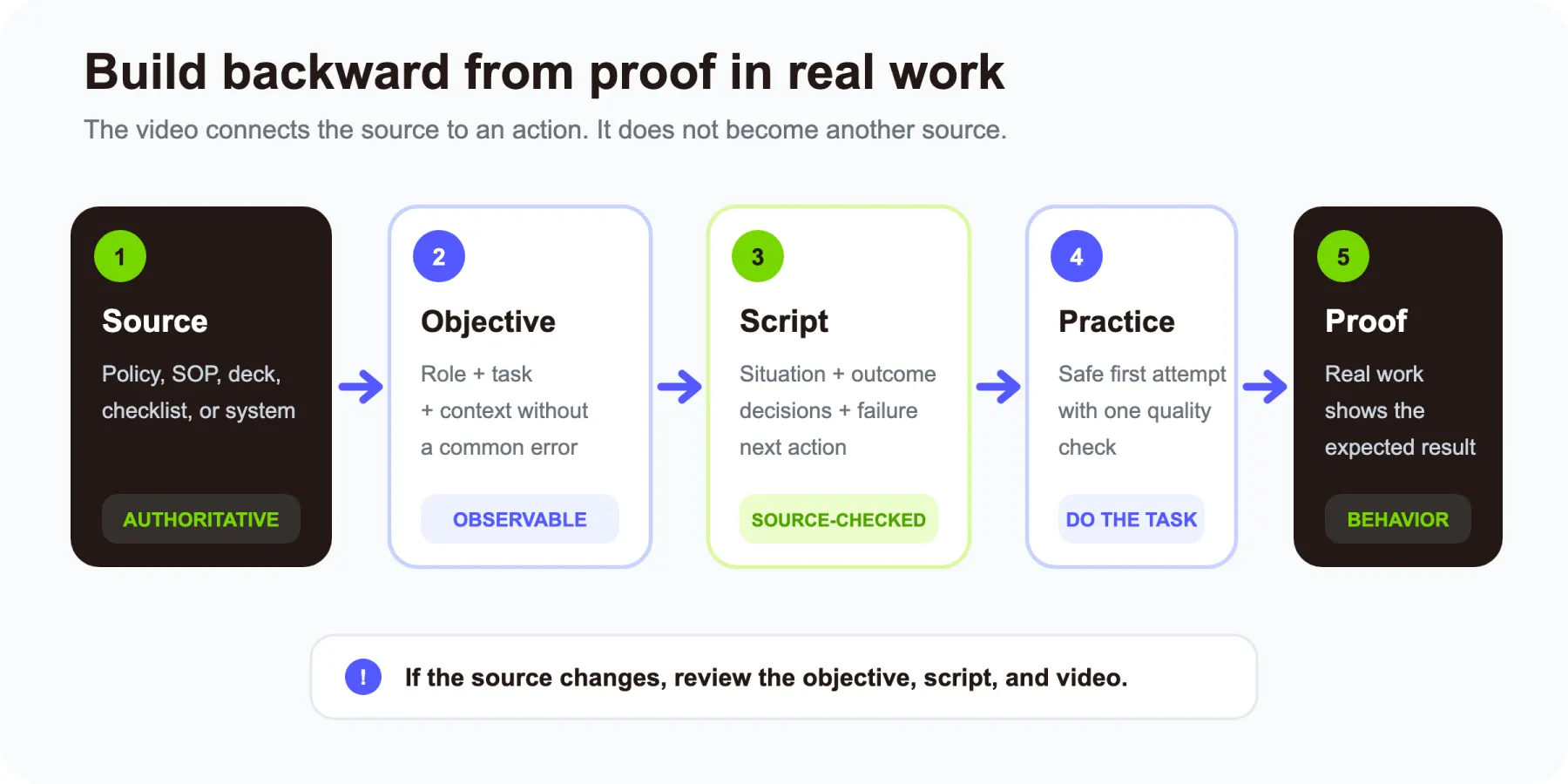
The video connects the sources. It does not silently become a fifth source.
06
Write for an observable outcome
“Understand the company” is difficult to verify. “Explain the customer problem in two sentences” is observable.
Before writing a script, complete this sentence:
After watching this video, [role] should be able to [complete a specific task] in [context], without [common error or unnecessary support].
Examples:
- After watching, a new customer-success manager can log a customer risk in the CRM and notify the account owner without exposing private data.
- After watching, a new marketer can prepare an approved article brief without skipping search intent or the evidence checklist.
- After watching, any new employee can report a suspected phishing message without forwarding the dangerous attachment.
Now script backward from the action.
A practical five-part script
1. Situation
Name the moment when the employee needs this lesson.
You have received your first approved campaign brief and need to schedule the email.
2. Outcome
Show or describe the finished result.
By the end, the email will be scheduled, tagged, tested, and ready for approval.
3. Steps and decisions
Demonstrate the normal path. Explain the choices that are not obvious.
4. Common failure
Show one or two costly mistakes and how to catch them.
5. Next action
Give the employee something to do and a place to get help.
Duplicate the practice campaign, schedule it for the test audience, and post the preview link in the review channel.
This format keeps the script useful even when the production style changes.
07
Choose the production method by the job
There is no single best format for all seven videos.
Use screen recording for exact software workflows
Screen recording is the clearest choice when the employee must perform an action in a tool.
Before recording:
- Close irrelevant tabs and applications.
- Disable notifications.
- Use a safe demo account and fictional data.
- Increase the interface zoom if labels are small.
- Record the shortest complete path.
- Prepare a separate source link for changing details.
During the recording, pause after important actions and use callouts sparingly. The goal is comprehension, not constant motion.
Use real employee footage when trust and personality matter
A manager welcome, team introduction, or employee story benefits from a real face and voice. A phone or webcam is often enough if the audio is clear and the framing is stable.
Avoid over-scripting personal sections. Give the speaker three prompts:
- What does your team own?
- When should a new hire contact you?
- What is one thing you wish you knew in your first week?
Those answers are more useful than a generic “we are excited to have you.”
Use a motion explainer when the source is written but the idea needs structure
Some topics are not screen demonstrations and do not need a presenter. A company story, customer journey, process overview, or security scenario may be clearer as a motion-led explainer with text, diagrams, screenshots, and voiceover.
This is where TapVid's AI Explainer Video Generator fits. You can start from existing text, an article, a PDF, or a script, then turn the source into a structured explainer without building every scene in After Effects.
Use it when:
- The source material already exists.
- The concept needs visual sequencing.
- Brand consistency matters.
- The team expects to revise the source later.
TapVid is strongest when an approved source needs clear visual sequencing, branded motion, narration, captions, and a final action recap. Pair the explainer with a manager-recorded welcome when a personal greeting matters and with a live screen capture when exact software clicks matter. Before publishing, verify the generated script against the source map.
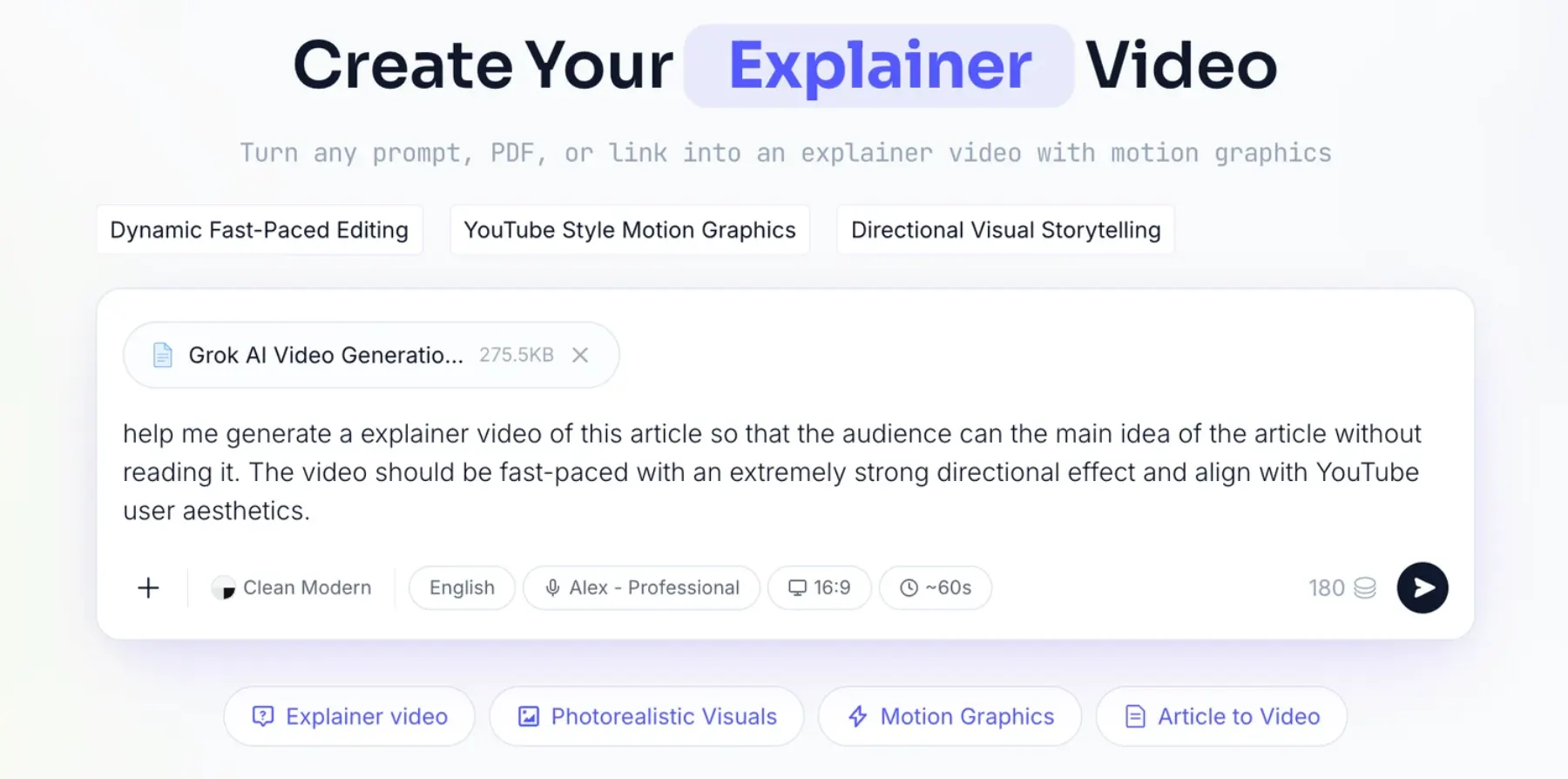
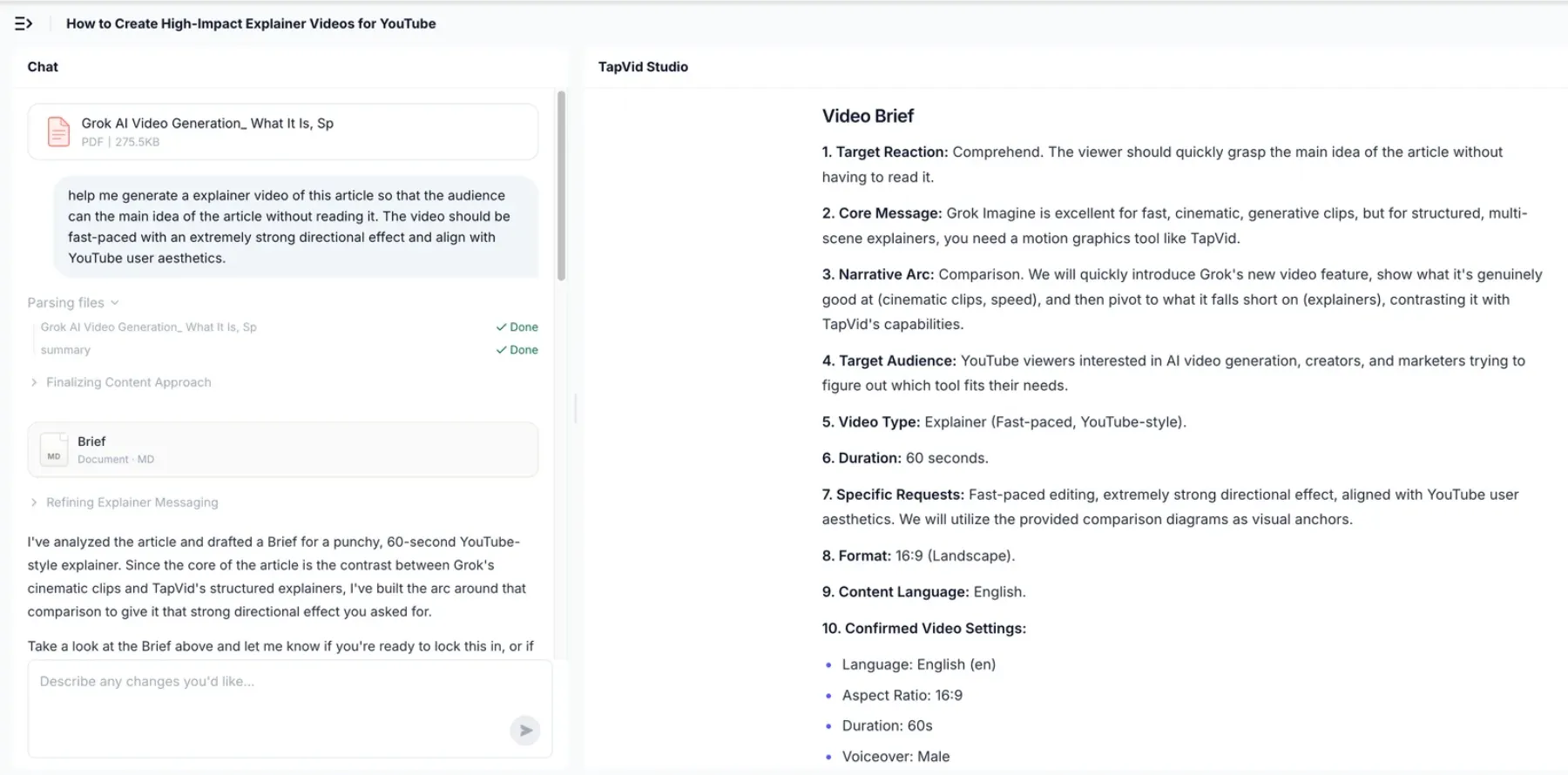
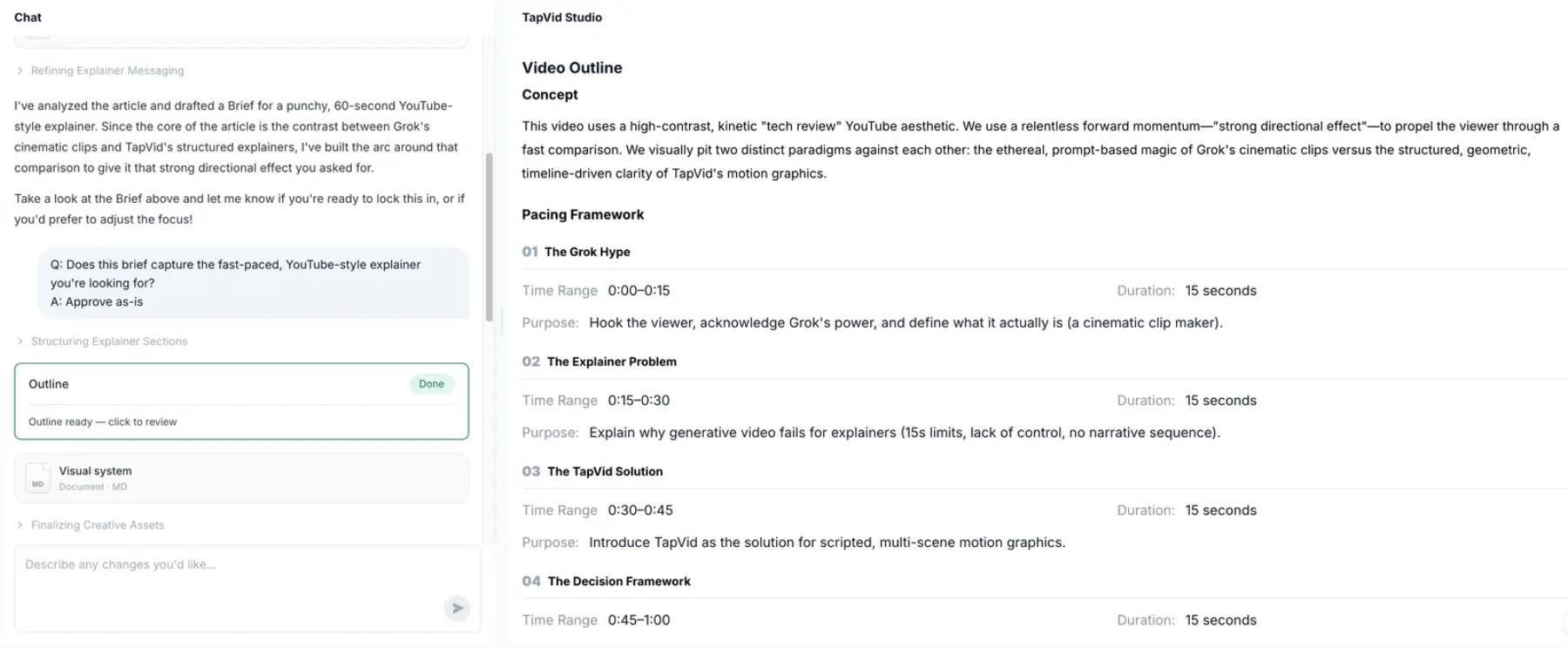
To make that workflow concrete, I reused a documented TapVid run from our HeyGen alternatives article. It was an article-to-explainer test, not an employee-onboarding test, so I am using it to show the production checkpoints only.
Step 1: provide the source and direction. I uploaded a 275 KB article PDF and wrote one sentence asking for a fast-paced, YouTube-style explainer. The source and desired outcome were visible before generation.
Step 2: review the brief before scenes exist. TapVid returned a target reaction, core message, narrative arc, audience, 60-second duration, 16:9 aspect ratio, and voice setting. This is where an onboarding owner should catch a wrong audience or policy claim.
Step 3: review the outline. The tool split the planned minute into four 15-second beats, each with a stated purpose. For onboarding, the same checkpoint is where I would verify that one module still serves one observable outcome.
Step 4: review the shot-level script, then render. The final checkpoint paired timecode, on-screen action, and voiceover. The documented run reached a finished video in 6 minutes 21 seconds with no revision round, but that timing belongs to the article test, not to an onboarding workflow.
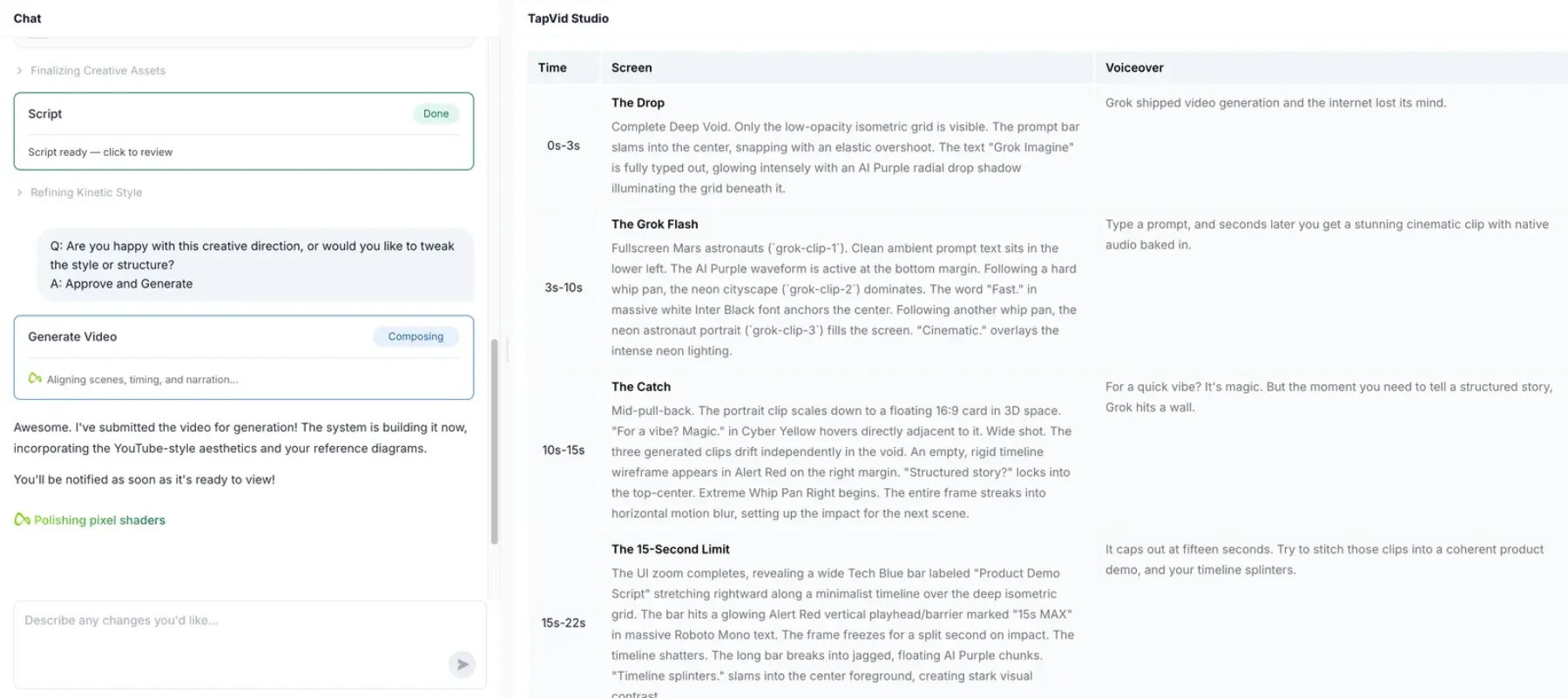
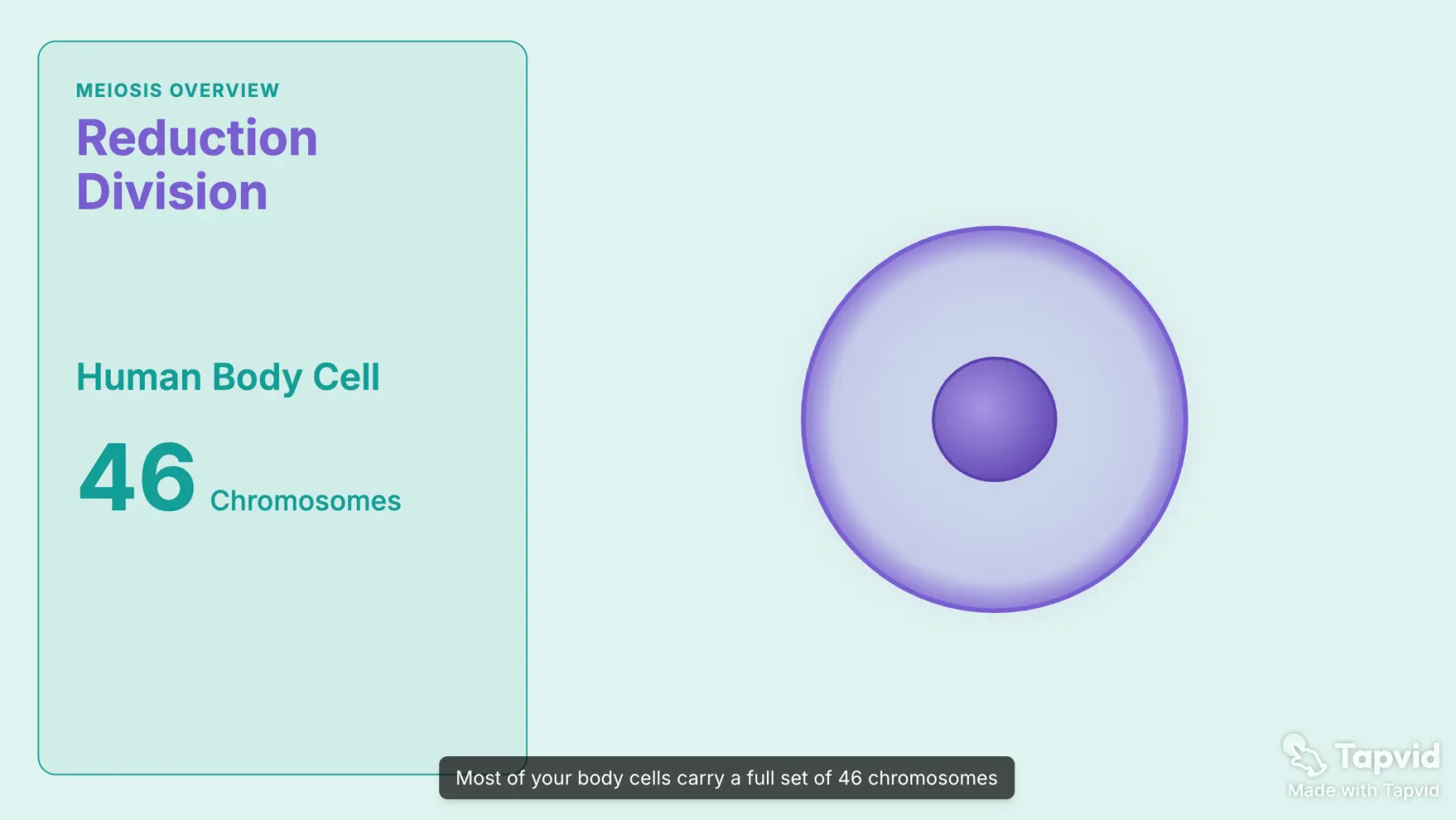
The existing TapVid output above is an educational explainer. It shows three details I would preserve for an onboarding module: one concept on the screen, a caption synchronized to the narration, and enough visual contrast to scan the core fact. I then ran a separate privacy-safe onboarding test on July 20, 2026, rather than assuming the article workflow would transfer unchanged.
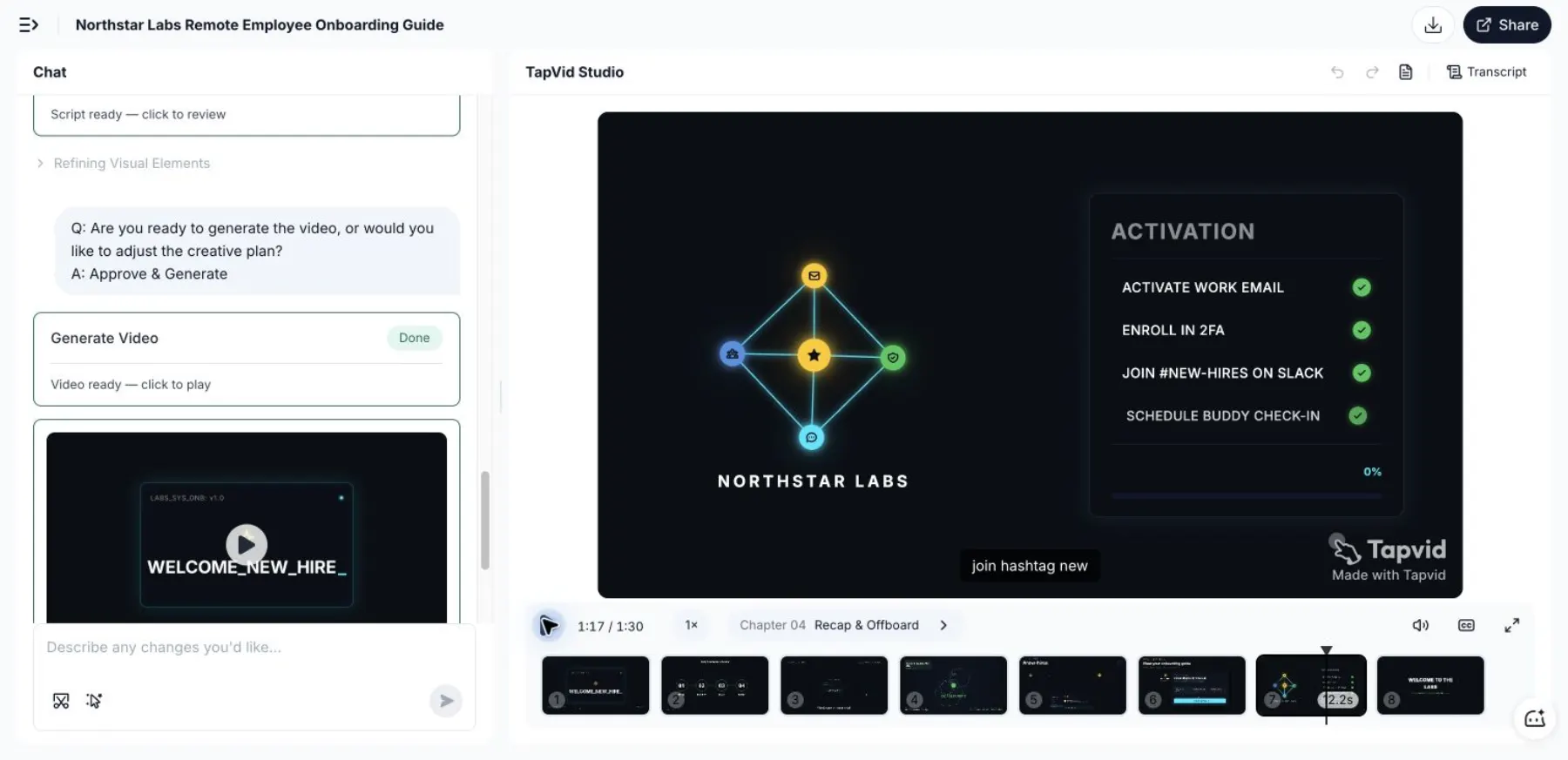
The fictional source described Northstar Labs, a remote SaaS company, and asked new employees to complete four day-one actions without support: activate work email, enroll in two-factor authentication, join the #new-hires Slack channel, and schedule a 15-minute buddy check-in. No real employee, customer, or confidential company data was used.
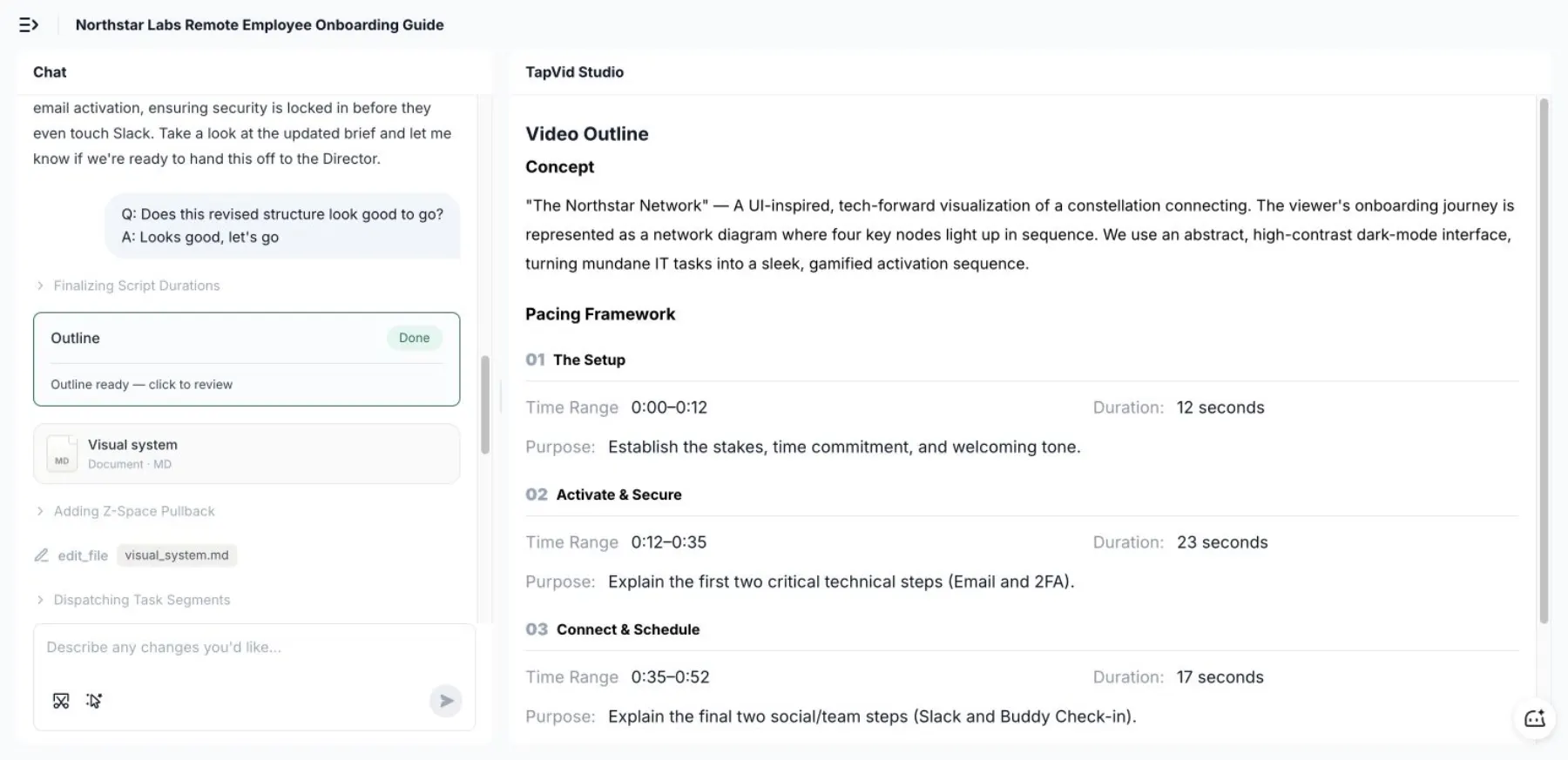
Before generation, I asked TapVid to move 2FA before Slack so account security came before communication-channel setup. It updated the pacing plan to four sections: setup, activate and secure, connect and schedule, and recap. This made it easy to improve the learning sequence before rendering.
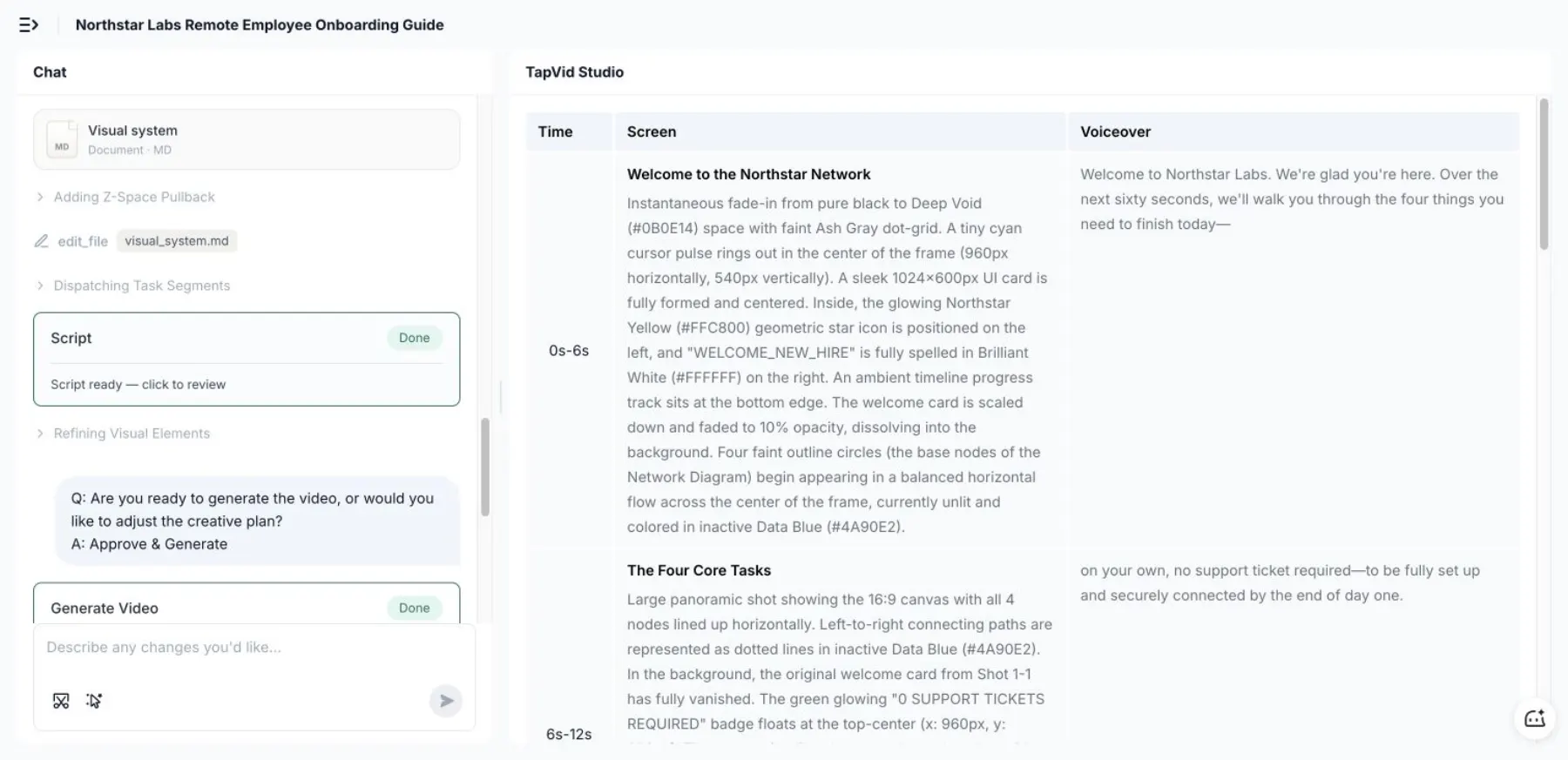
The generated script paired timecodes, screen direction, and voiceover across eight scenes. It kept all four actions and the final fictional intranet link visible, turning a short operational brief into a complete visual narrative without manual storyboarding.
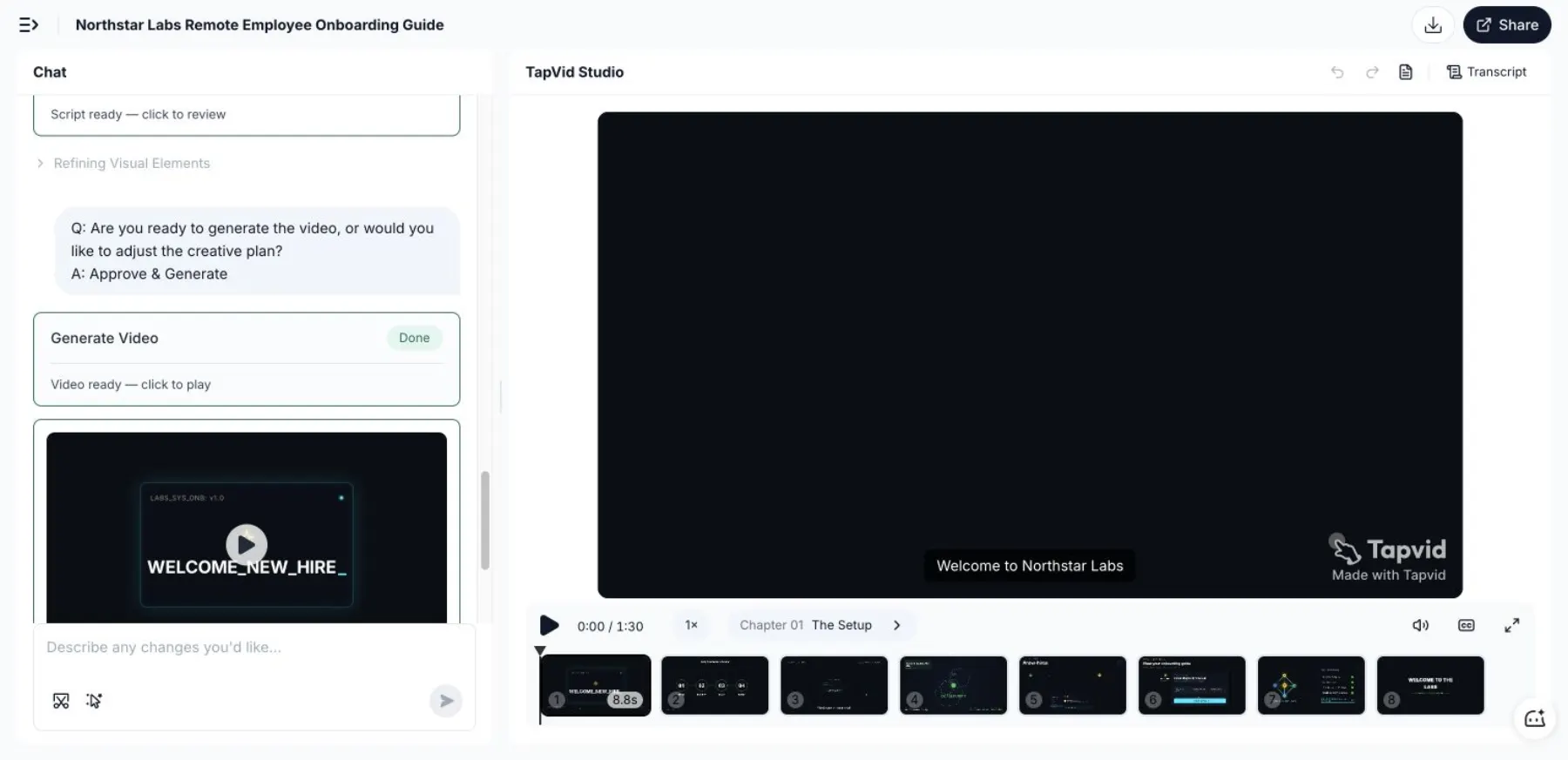
From submitting the prompt to a ready-to-play video took 18 minutes 38 seconds. The formal render after approval took 11 minutes 38 seconds. TapVid delivered a 1 minute 30 second video with eight distinct scenes, synchronized narration, motion graphics, and a final action checklist in one working session.
The final recap translated the source into a scannable four-item activation checklist, including email, 2FA, Slack, and the buddy check-in. That is a useful pattern for onboarding: explain the sequence visually, then end on the exact actions a new employee needs to complete.
08
Give every video a maintenance contract
“Update when needed” is not a maintenance plan.
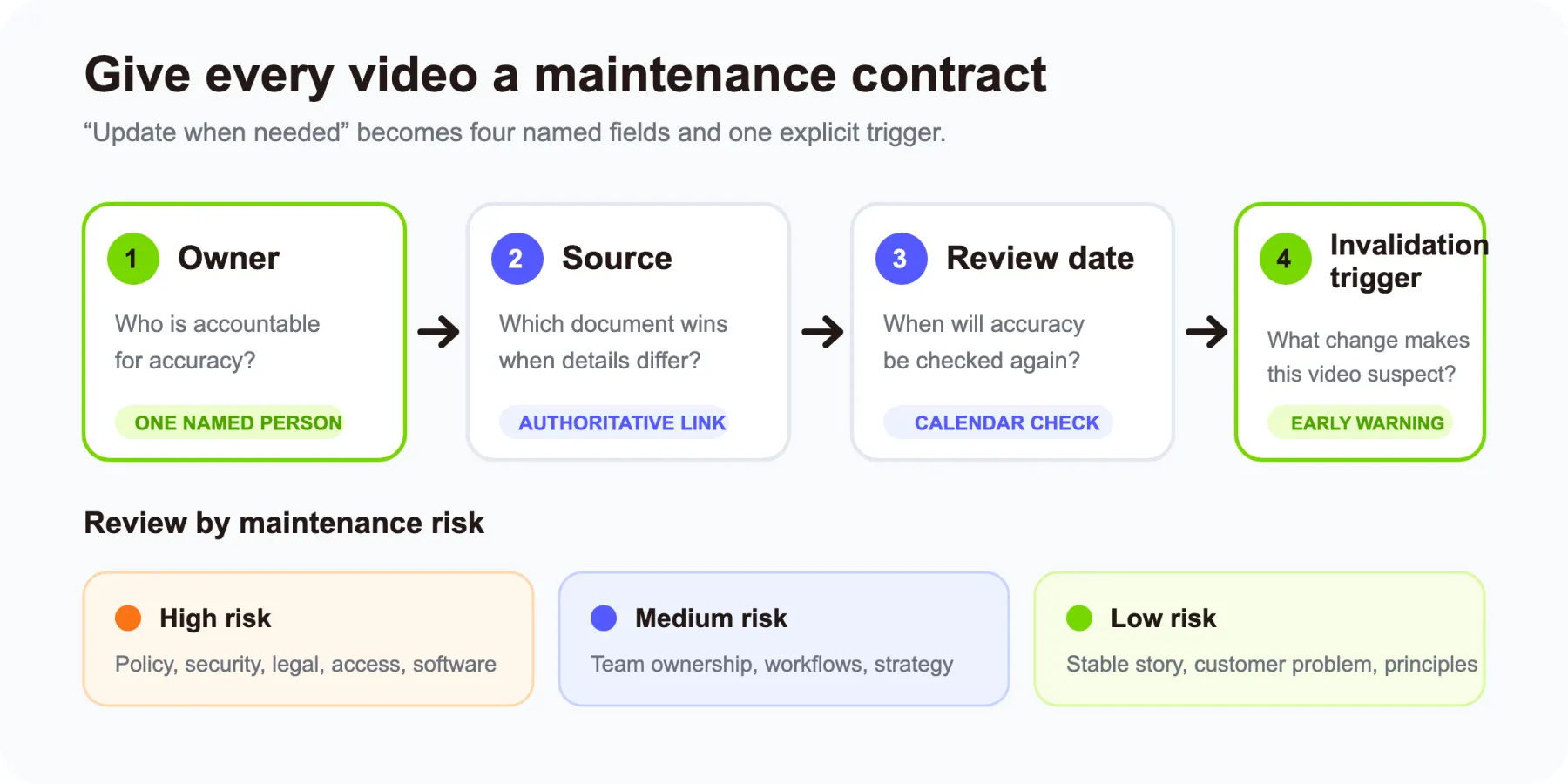
Add four fields to every published module:
- Owner: The person accountable for accuracy
- Source: The authoritative document or system
- Review date: The next scheduled accuracy check
- Invalidation trigger: The change that requires an immediate review
Example:
| Field | Value |
|---|---|
| Video | Publish an approved customer email |
| Owner | Lifecycle Marketing Lead |
| Source | Email publishing SOP |
| Review date | October 1 |
| Invalidation trigger | Approval workflow, sending platform, or legal footer changes |
The invalidation trigger is the most valuable field. A quarterly review can miss a tool change that happened yesterday. A named trigger tells the owner when the video may already be wrong.
You can also rank videos by maintenance risk:
- High risk: Policy, security, legal, prices, access, and frequently changing software
- Medium risk: Team ownership, recurring workflows, current strategy
- Low risk: Stable company story, enduring customer problem, general working principles
Review high-risk modules more frequently and keep their exact details in linked text.
09
Make the videos accessible and safe to use
Captions are not an optional polish item. W3C explains that captions help deaf and hard-of-hearing people and also support people watching in quiet or noisy environments, people learning the language, and people who process written information more easily.
For each video:
- Add synchronized captions.
- Review automatic captions for names, acronyms, and technical terms.
- Provide a transcript.
- Describe important visual information that is not present in the narration.
- Use readable contrast and text size.
- Do not rely on color alone to signal status.
- Avoid rapid flashing.
- Give employees keyboard-accessible playback controls where the hosting platform supports them.
W3C's transcript guidance distinguishes a basic transcript from a descriptive transcript that also communicates important visual information. A screen-recorded setup video often needs the descriptive version.
Privacy needs the same attention. Use demo accounts, fictional records, and approved footage. Get permission before featuring an employee. Remove customer names, private channels, browser history, credentials, and personal calendar details from the recording.
Finally, host videos where employees can actually find them. A searchable onboarding hub should show the title, audience, outcome, duration, owner, last-reviewed date, transcript, and source link.
10
Measure behavior, not only completion
A 100% completion rate proves that a player reached the end. It does not prove that the employee can perform the task.
Use a four-level measurement ladder:
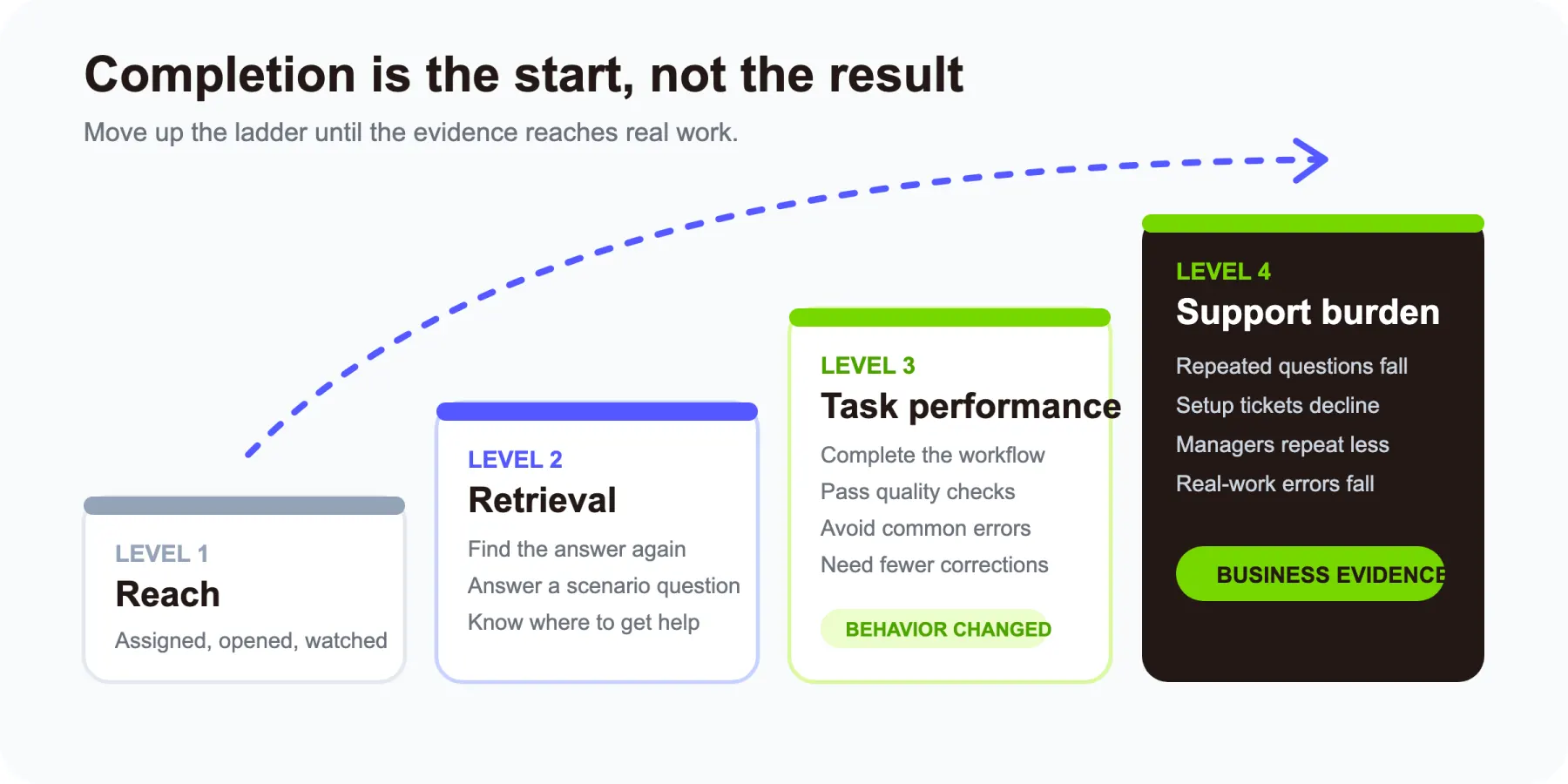
Level 1: Reach
- Was the correct module assigned?
- Could the employee open it?
- Did they watch enough to reach the action?
Level 2: Retrieval
- Can the employee find the video and its source again?
- Can they answer a short scenario question?
- Can they identify where to ask for help?
Level 3: Task performance
- Can they complete the setup or workflow?
- How many corrections are needed?
- Are security and quality checks followed?
- How long does the first independent attempt take?
Level 4: Support burden
- Which questions still reach the manager or operations team?
- Which modules generate repeated clarification?
- Did avoidable setup tickets decline?
- Which mistake still appears in real work?
This ladder connects the video to onboarding outcomes without pretending that one metric tells the whole story.
Gallup reports that only 12% of employees strongly agree their organization does a great job of onboarding. Its broader framework emphasizes expectations, relationships, purpose, and the employee's future. A video library should support those dimensions, not reduce onboarding to content consumption.
11
Turn new-hire questions into the update backlog
The best evidence of a weak onboarding module is often a repeated question.
Create a simple log with four fields:
| Question | Moment asked | Related module | Required response |
|---|---|---|---|
| Which workspace should I use for customer notes? | First customer shadow | Tool setup | Add a 15-second workspace check |
| Who approves a discount? | First proposal | Team map | Link the approval owner and current threshold source |
| Is this data safe to paste into the AI tool? | First content task | Security essentials | Add a scenario and link the data policy |
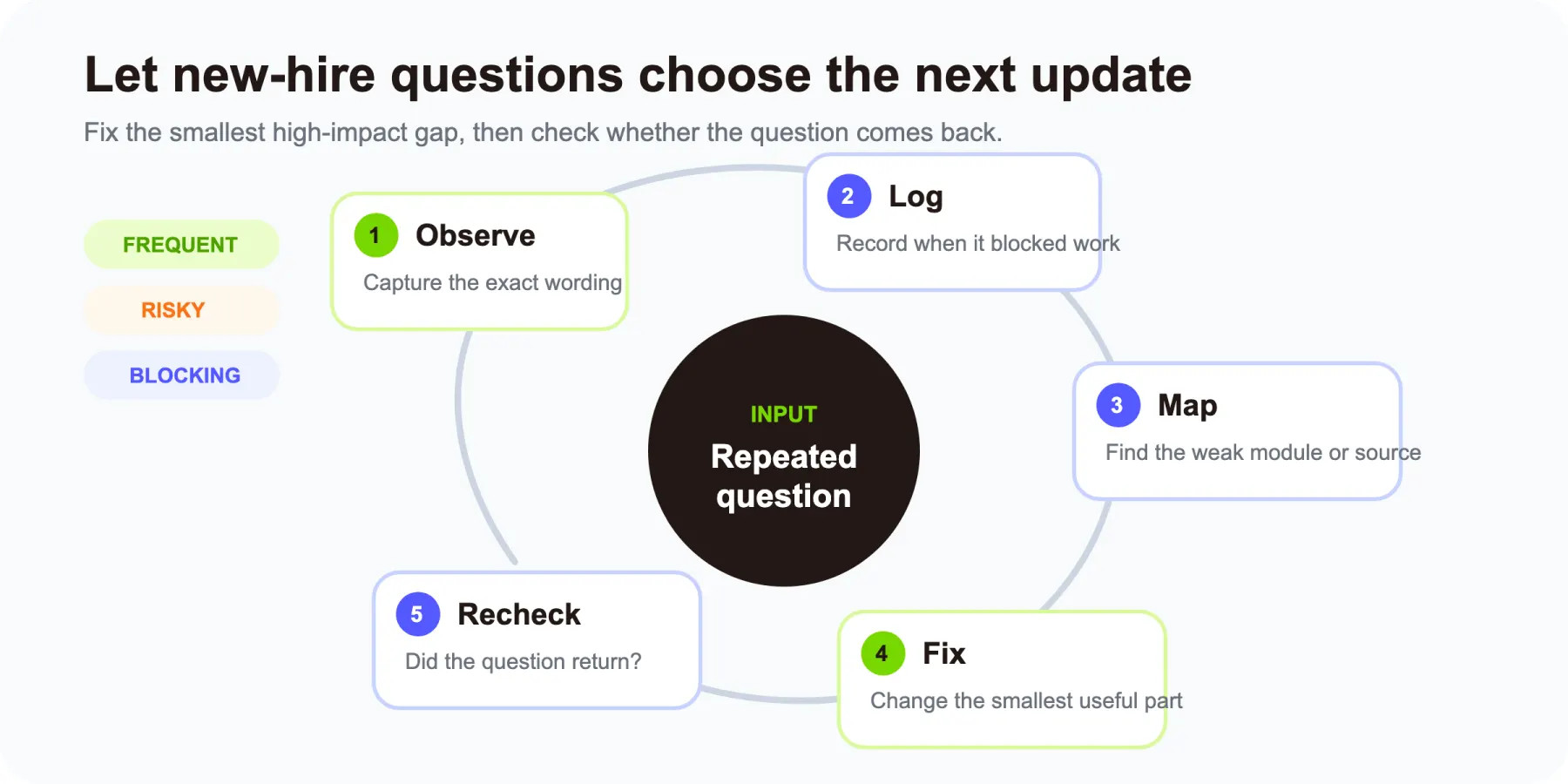
Review the log after each onboarding cohort. Prioritize questions that are frequent, risky, or blocking. Update the weakest module, not every module.
This creates a closed loop:
- Publish the minimum useful library.
- Observe where new hires become confused.
- Map each repeated question to a module or missing source.
- Fix the smallest high-impact gap.
- Check whether the question recurs.
The library becomes better because of real employee behavior, not because the production team guessed what looked incomplete.
12
A practical production checklist
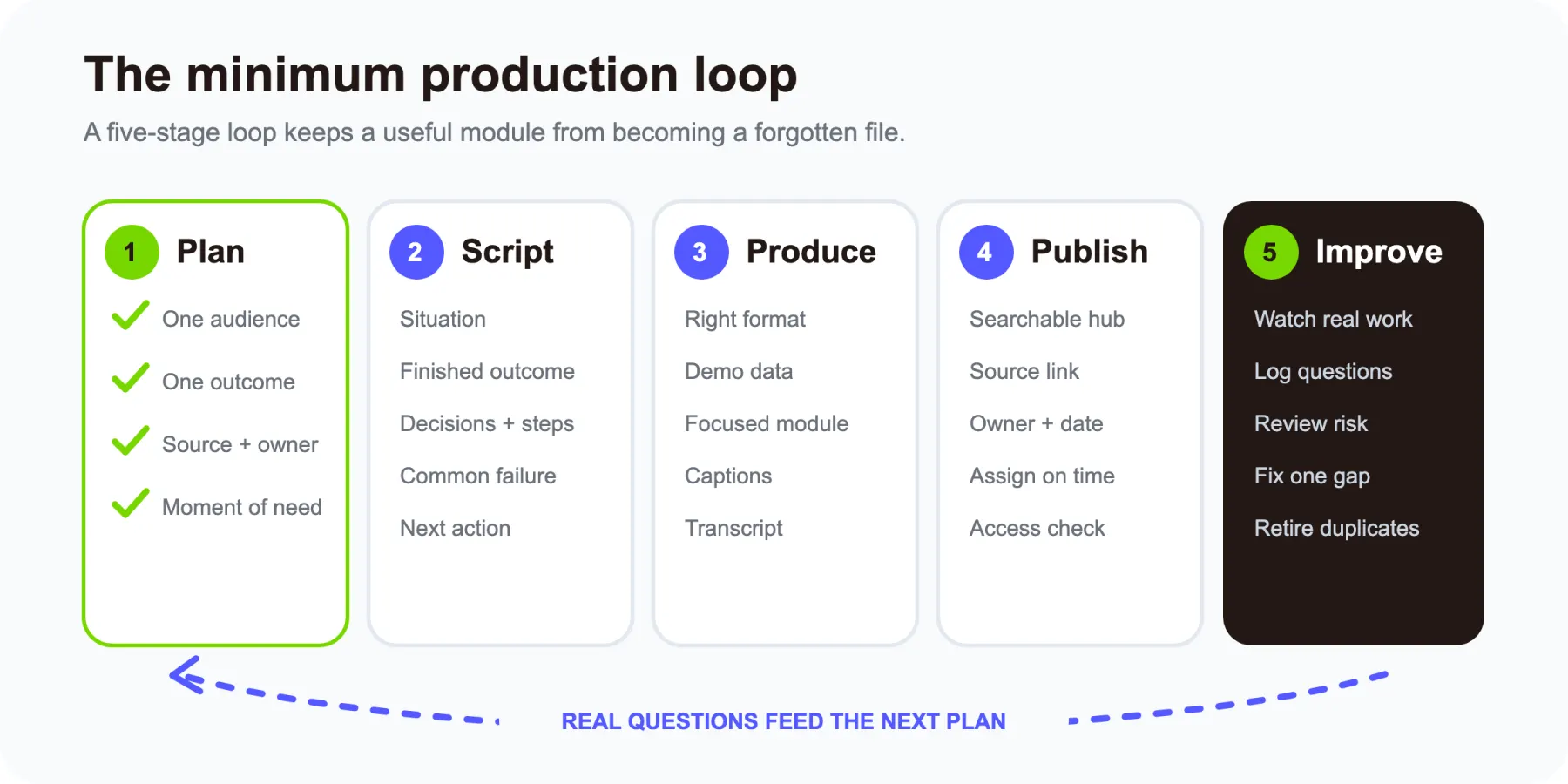
Plan
- Define one audience and one observable outcome.
- Confirm that video is the right medium.
- Choose the journey moment when the employee needs it.
- Link the authoritative source.
- Name the content owner.
- Decide the required next action.
Script
- Start with the employee's situation.
- Show the finished outcome.
- Explain decisions, not just clicks.
- Include one or two common failures.
- End with a practice task or clear next action.
- Keep exact changing details in the linked source.
Produce
- Choose screen recording, real footage, or a motion explainer based on the job.
- Use demo data and remove private information.
- Keep each module focused.
- Add captions and a transcript.
- Review names, acronyms, links, and policy references.
Publish
- Put the module in a searchable onboarding hub.
- Display the audience, outcome, duration, owner, and review date.
- Link the authoritative source beside the video.
- Assign the module at the moment of need.
- Confirm that the employee can open it.
Improve
- Check retrieval and task performance.
- Log repeated questions.
- Review high-risk videos more often.
- Trigger an immediate review when a named source or workflow changes.
- Retire duplicate or outdated modules.
13
Frequently asked questions
How long should an employee onboarding video be?
Make it only as long as the employee needs to reach one outcome. A welcome can take two minutes. A role workflow may take eight. Split a longer lesson when it covers unrelated actions or when an employee would need to scrub through it to find one answer.
What should an onboarding video include?
At minimum, include the situation, the intended outcome, the steps or context, common mistakes, the next action, and a link to the authoritative written source. Also show the owner and last-reviewed date.
Should onboarding videos replace live training?
No. Use video for repeatable explanations and demonstrations. Keep live time for questions, feedback, relationships, exceptions, and sensitive discussions. Managers still own role clarity and human connection.
How many onboarding videos should a small company make first?
Start with the seven-video blueprint, but do not force all seven if a document or live conversation is the better format. If production capacity is limited, prioritize tool setup, one high-frequency role workflow, and any high-risk security scenario that repeatedly creates support requests.
How do you keep onboarding videos up to date?
Give every video an owner, authoritative source, review date, and invalidation trigger. Keep fast-changing exact details in the source document. When the source, tool, approval flow, or policy changes, review the linked video immediately.
How do you know whether an onboarding video works?
Do not stop at views or completion. Check whether the employee can find the information again, complete the task, avoid common mistakes, and ask fewer repeated support questions.
Can AI create onboarding videos from existing documents?
Yes, AI tools can help turn a script, article, PDF, or other written source into a video. The content owner still needs to verify the script against the authoritative source, protect private data, review accessibility, and keep the final module current.
14
Research note
For this guide, I compared current onboarding-video resources from Synthesia, Clipchamp, Leadde, Recorded, and PlayPlay. I treated their common recommendations as the baseline, then added the format matrix, seven-video journey, source map, risk rule, maintenance contract, measurement ladder, core-plus-delta architecture, and new-hire question loop used in this article.
15
Start with the next employee action
You do not need a studio or a 40-video academy to improve onboarding.
Choose one moment where every new employee receives the same explanation or makes the same avoidable mistake. Define the action they should complete. Link the source of truth. Produce the smallest useful module. Then watch what happens in real work.
If the topic is a process, customer journey, or company concept already documented in text, slides, or a PDF, TapVid's AI Explainer Video Generator can help turn that source into a structured motion explainer. Keep the manager in the loop, keep the written source authoritative, and let the video do the job it is best at: making the next action easier to understand.