
TapVid
    API & MCPPricingBlogAbout
    Blog›How to Create Animated Videos: Beginner-to-Publish Framework
    Back to Blog

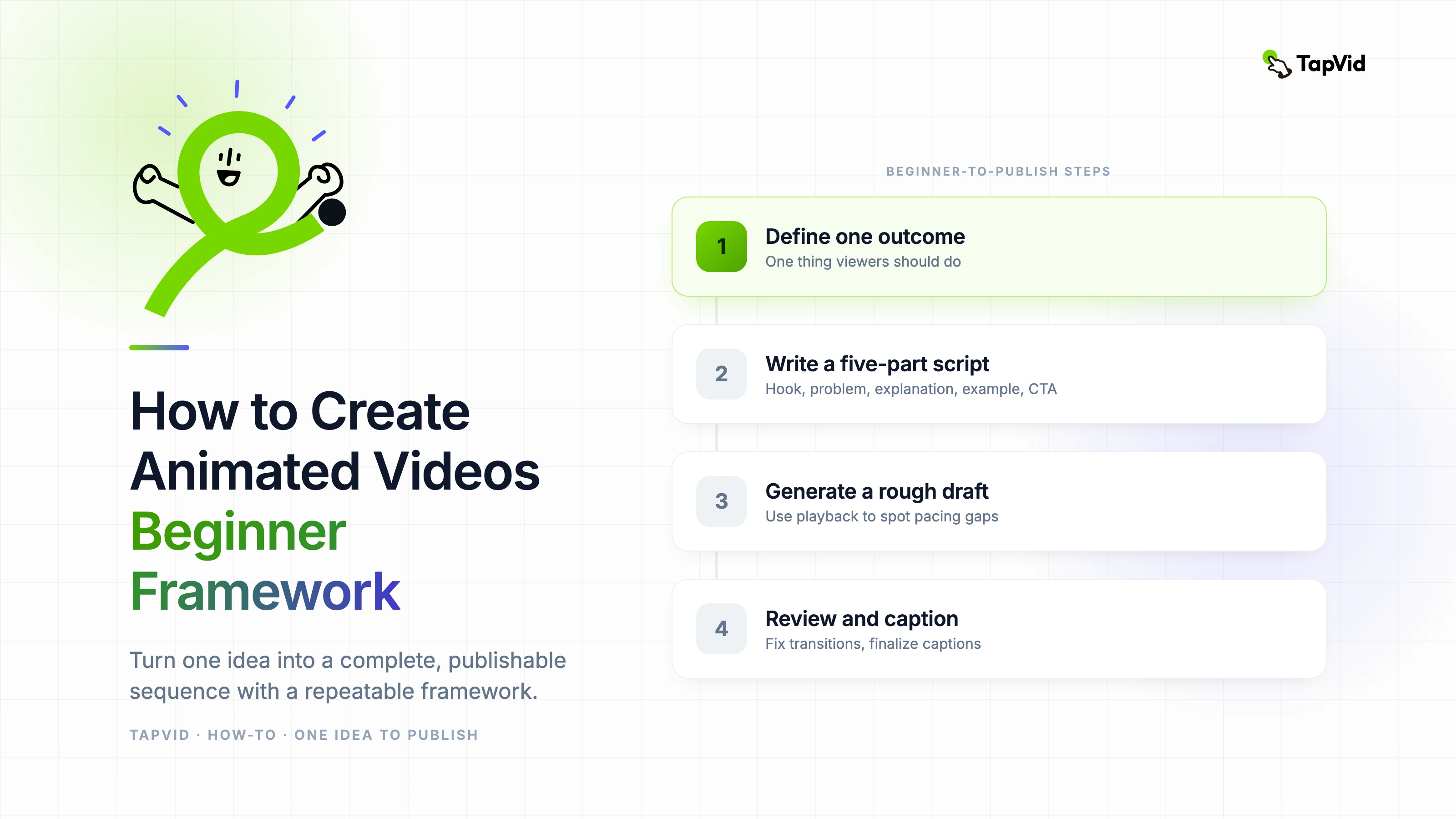
    How to Create Animated Videos: Beginner-to-Publish Framework

    A beginner-friendly but production-ready framework for anyone learning how to create animated videos.

    How-to
    Demi TanDemi TanApril 15, 2026 · 10 min readApr 15, 2026 · 10 min readDiscord
    Demi TanDemi TanGTM Lead, TapVid

    Connect with the author, meet other video creators, and watch hands-on tutorials.

    Join our Discord
    April 15, 202610 min read
    How to Create Animated Videos Beginner Framework
    Summarize with6 assistants
    ChatGPTPerplexityTapVidvideoClaudeGeminiGrok
    Create videos from your AI agentConnect TapVid API & MCP→

    In this article

    1. 01Start with one clear outcome
    2. 02Simple workflow for first-time creators
    3. 03Mistakes beginners should avoid
    4. 04Feature path for beginner production
    Summarize withAPI & MCP →
    ChatGPTPerplexityTapVidClaudeGeminiGrok

    If you are searching "how to create animated videos," the fastest route is not mastering every tool. It is following a clear framework that turns one idea into a complete, publishable sequence. This guide is designed for creators who want repeatable results.

    01

    Start with one clear outcome

    Before animation, define the single thing viewers should understand or do after watching. This keeps your script focused and prevents scene overload.

    For beginners, clarity beats complexity. A short, direct video with clean structure usually performs better than a long, visually busy one.

    02

    Simple workflow for first-time creators

    Write a five-part script: hook, problem, explanation, example, CTA. Then map one visual concept to each part. This removes guesswork during production.

    In TapVid, generate a rough draft quickly and use playback to spot pacing gaps. Improve scene transitions before adding decorative effects.

    • Keep first projects between 45 and 90 seconds.
    • Use high-contrast text and large visual anchors.
    • Avoid more than one key message per scene.
    • Finalize captions before export for accessibility and retention.

    03

    Mistakes beginners should avoid

    Do not start with effects libraries. Start with narrative sequence. Effects only help when structure is already clear.

    Do not rely on one generation pass. Even strong drafts need quick human review for timing, clarity, and brand fit.

    04

    Feature path for beginner production

    If your audience learns through short lessons, use https://tapvid.ai/feature/tutorial-video to produce step-based educational content quickly.

    When you want to extend one source into recurring communication, add https://tapvid.ai/feature/newsletter-video to repurpose weekly insights into short video updates.

    05

    Frequently asked questions

    How long does one beginner video take? With a structured template, many creators can complete a first publishable piece in one day.

    Do I need voiceover for every animated video? No. Text-led and subtitle-first formats can perform very well on feed-based channels.

    What is the most important editing step? Tightening the opening 10 seconds has the biggest impact on retention.
    Demi Tan

    Written and edited by

    Demi Tan

    GTM @TapVid | Found by humans & machines | SEO · GEO · Creators

    Demi Tan invites you to join the conversation with fellow video creators on Discord.

    Join Demi on Discord →

    Use the materials you already have

    From yourfilesfilesto a ready-to-publish video

    WEB→ VIDEOPPT→ VIDEOPDF→ VIDEOASSETS→ VIDEOAUDIO→ VIDEOVIDEO→ VIDEOTALKING HEAD→ VIDEOWEB→ VIDEOPPT→ VIDEOPDF→ VIDEOASSETS→ VIDEOAUDIO→ VIDEOVIDEO→ VIDEOTALKING HEAD→ VIDEO

    Keep reading

    Related stories

    Whiteboard explainer video examples organized by explanation job
    Motion Graphics·15 min read

    Whiteboard Explainer Video Examples: 12 Formats That Work

    Twelve real whiteboard explainer video examples, analyzed by explanation job, reusable strength, and practical limitation.

    Jul 28, 2026

    A free, no-cost stack to make and publish animated video, with TapVid
    Compare·11 min read

    Free Animated Video Maker Stack: How to Publish Without a Large Budget

    A practical free animated video maker strategy for creators and small teams that need consistent quality on a tight budget.

    Apr 16, 2026

    Explainer videos that convert
    How-to·12 min read

    Explainer Videos That Convert: A Practical Framework for Modern Teams

    A practical framework for creating explainer videos that satisfy user intent and drive measurable outcomes.

    Apr 16, 2026

    Ready to create your first video?

    Join thousands of product teams using AI to create professional videos in minutes.

    Your first video in under 5 minutes →Book a demo →
    Tapvid

    TapVid turns the materials your business already has into an accurate video that explains the job clearly and is ready to publish.

    TikTokInstagramXDiscordYouTube

    TapVid

    Features

    AI Explainer Video GeneratorAI Motion Graphics GeneratorAI Product Demo Video GeneratorProduct Demo Video MakerExplainer Video TemplatesVideo Production Plan TemplateVideo Creative Brief TemplateCorporate Video TemplateVideo Sales Letter TemplateVideo Production Proposal TemplatePromo Video TemplateVideo Production TemplateAI Product Video GeneratorAI B-Roll GeneratorTalking Head EditingClone VideoPrompt to VideoText to Video AIText to Motion GraphicsAnimated Video MakerAnimated Explainer Video MakerKinetic Typography GeneratorAnimated Chart MakerAnimated Collage MakerFree AI Video Generator

    Convert to Video

    Screenshot to VideoImage to VideoAssets to VideoAudio to VideoVideo to Video AIPDF to VideoPPT to VideoArticle to VideoBlog to VideoURL to VideoScript to VideoGoogle Slides to VideoWord to Video

    Use Cases

    AI Study Video MakerSaaS Explainer VideoAI Video AutomationSaaS Video ProductionIndustrial Video ProductionProduct Launch Video MakerAI Ad Video GeneratorDocumentary Video MakerAnimated Social Media Video MakerInfographic Video MakerPodcast to VideoWhiteboard Animation MakerWhiteboard Explainer VideoEcommerce Video AdsStartup Explainer VideoEducational VideoTutorial VideoCustomer OnboardingHelp Center VideoAPI Docs Video

    Solutions

    Explainer VideoProduct Demo VideoMeeting Recap VideoWebinar ClipsMarketing VideoFeature AnnouncementCompetitive ComparisonNewsletter VideoLanding Page VideoInvestor Pitch Video

    Featured Guides

    Video Prompt LibraryMiniMax H3 Prompt LibraryBest Faceless YouTube NichesCollage Animation Guide

    Company

    All FeaturesAboutBlogPricingGet in Touch

    © 2026 TapVid. All rights reserved.

    Privacy
    Terms of Service