
Gemini 3.7 video understanding analyzes an existing video. It does not generate a new one. Agentic mode lets Gemini plan which intervals and evidence channels deserve closer inspection, which is useful for long recordings and exact-moment questions. This guide explains when to use it, how to ask for auditable findings, and where a separate generation workflow begins.
01
What is Gemini 3.7 video understanding?
Gemini 3.7 video understanding lets a Gemini model reason over video, audio, and transcript information in one request. Google's video understanding documentation describes a default visual sampling rate of one frame per second for standard processing. That works for many stable clips, but a fixed sample can miss a brief UI state or fast action.
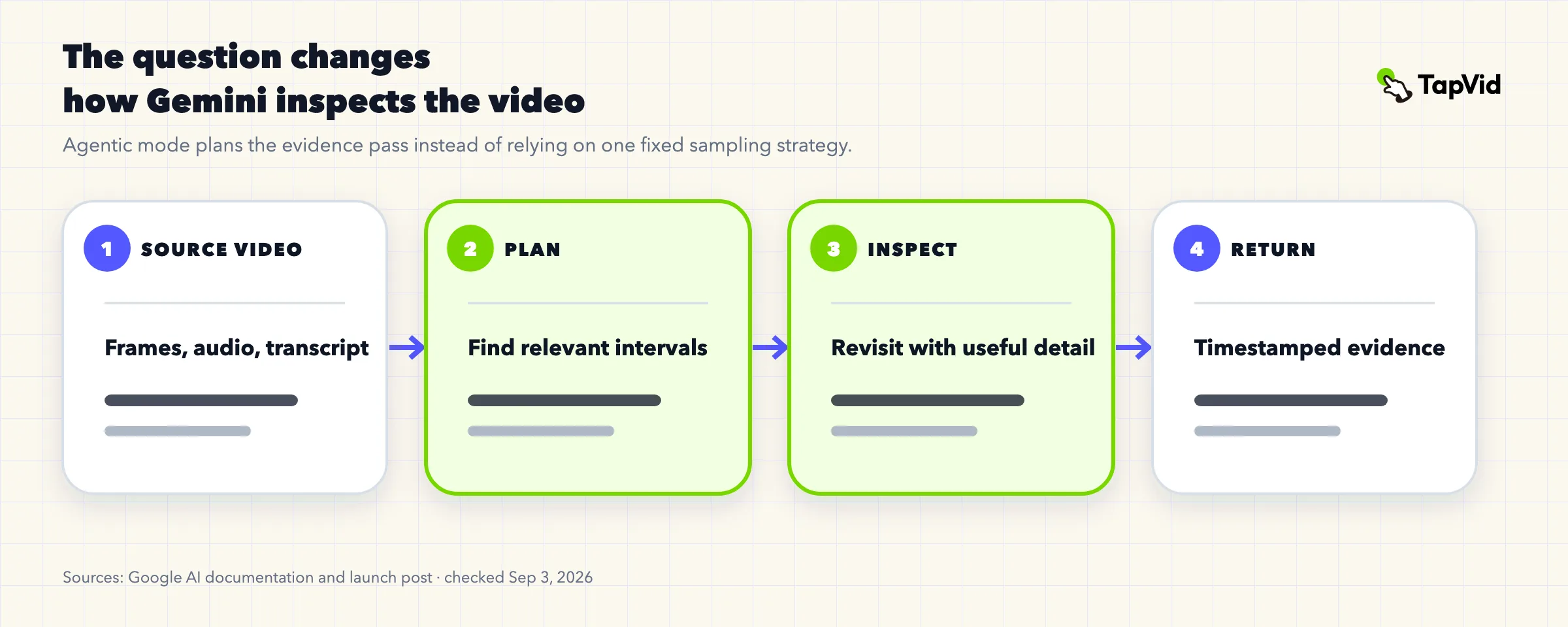
Google's official launch announcement says agentic processing can plan how to inspect the source, choose relevant moments, and revisit them with a suitable mix of transcript, audio, frame rate, and resolution. It still works from selected evidence, so it does not remove ambiguity or guarantee a correct answer.
02
What agentic mode changes
Static sampling asks what can be inferred from a consistent pass. Agentic inspection asks what evidence should be gathered next for this question. The second job adds a planning loop that can narrow a long source to a useful interval and inspect that interval more closely.
Research systems such as LensWalk explore the same general direction: plan how to observe a video instead of relying on one uniform representation. "Agentic" should not be read as automatic correctness. The safer goal is a narrow question, explicit proof requirements, and a refusal rule for missing evidence.
03
Choose agentic mode or static sampling
Choose the mode by the source and the consequence of missing an event. Google's docs favor agentic processing for long-form video and specific-moment questions. They keep static processing as a useful option for latency-sensitive clips under five minutes and work that needs predictable precision across the whole clip.
| Situation | Start with | Reason |
|---|---|---|
| Short, stable clip and broad summary | Static | Consistent throughput is more valuable than adaptive inspection. |
| Long meeting and one sparse decision | Agentic | Relevant evidence may combine speech with a brief on-screen document. |
| Product demo with a flashing error | Agentic | The answer depends on a short visual state. |
| Every frame of a fast action matters | Static at an explicit higher rate or a specialist pipeline | Global frame precision is the job. |
| Batch of short clips with coarse labels | Static | Predictable cost and schema matter most. |
Treat the comparison as a starting rule. Test both modes on your own easy cases, fleeting visual events, audio-only evidence, and deliberately unanswerable questions. Score timestamp accuracy, unsupported claims, latency, and output-schema consistency instead of assuming the newer label wins.
04
Build the input contract before writing the prompt
A reliable request starts with an input contract: source location, processing mode, exact question, output schema, and validation rule. Put the video before the text prompt, use the documented agentic processing value on supported API surfaces, and prefer MM:SS timestamps over phrases such as "near the middle."
{
  "input": [
    {
      "type": "video",
      "uri": "YOUR_VIDEO_URI",
      "processing": "agentic"
    },
    {
      "type": "text",
      "text": "Find the first checkout failure. Return the MM:SS timestamp, visible error text, preceding user action, and uncertainty."
    }
  ]
}
The example below is an abbreviated request shape adapted from Google documentation, not an executed TapVid benchmark. Confirm current model and SDK syntax before production use. Suitable inputs include the File API, Cloud Storage, supported YouTube URLs, or inline data for short files under the documented 100 MB request limit.
05
Use an evidence contract for grounded answers
Weak prompts ask only for an answer. Strong prompts define an evidence contract: the exact question, allowed evidence channels, a timestamped output, an uncertainty rule, and conclusions the model must not infer. This separates an observation such as "the button stayed disabled" from an unsupported claim about why a person acted.
- Question: state the exact decision or event.
- Evidence channels: transcript, audio, on-screen text, UI state, or visible action.
- Output schema: require timestamps and concise findings.
- Uncertainty: say when the source is insufficient.
- Exclusions: name conclusions that cannot be inferred.
For every finding, require a timestamp, a concise observation, its evidence channel, exact visible or spoken support when available, and a confidence level. When the source cannot establish the answer, the valid response is "not established" plus the missing evidence, not a plausible guess.
Analyze this video for {{DECISION}}. For every finding return the MM:SS interval, one-sentence observation, evidence channel, exact support, and confidence. Do not infer facts not supported by the video. If evidence is absent, return "not established" and explain what is missing.06
Copy-ready prompts for common analysis jobs
The following templates are analysis prompts. They locate or classify evidence in an existing video; they do not ask a model to generate or edit footage. Replace the placeholders, keep the timestamp and uncertainty requirements, and review consequential findings against the source.
Find a product-demo failure
Inspect the product demo and find every failed or incomplete workflow step. Return the MM:SS timestamp, preceding action, exact UI evidence, and whether the presenter acknowledges it. Do not label a pause as a failure without support.Extract decisions from a long meeting
Find decisions that change price, launch timing, feature scope, or ownership. Return the MM:SS range, decision text, owner, due date, and spoken evidence. Separate decisions from proposals; write "not stated" for missing fields.Audit a tutorial against approved steps
Compare the tutorial with {{CHECKLIST}}. Mark each item shown correctly, shown incorrectly, not shown, or unclear. Include MM:SS and the visible UI label. Narration alone does not prove an on-screen step occurred.Locate a short physical event
Find the first moment when {{EVENT}} is visibly complete. Inspect the surrounding interval. Return the earliest defensible MM:SS, the completion cue, and ambiguity caused by occlusion, blur, or cuts.A good template defines the event, the proof, and the refusal condition. That is more useful than vague adjectives such as "deep" or "expert," because a reviewer can decide whether the returned answer satisfied the contract.
07
Preserve context in multi-turn analysis
Video analysis often continues across turns. One question locates an event, the next asks for related examples, and a third turns approved findings into a summary. This works only when the application preserves the source video and the model's processing state.
Google's Interactions API supports stateful continuation with a previous interaction identifier. In a stateless implementation, replay the relevant processing calls and results, not only the last prose answer. Store the source ID, processing mode, interaction ID, prompt version, and output schema together so disputed findings can be reproduced.
08
Limits and failure modes
Agentic inspection can reduce evidence loss, but it cannot repair an unreadable label or guarantee attribution. The Gemini 3.7 Flash model card lists hallucinations, slowness, and timeouts among known limitations. Production workflows need timeouts, retries, explicit review states, and permission to process the source.
- Hallucinated detail: require timestamps and uncertainty.
- Near-miss timestamps: verify boundary-sensitive findings.
- Tiny or transient UI: use a higher-quality source.
- Speaker attribution: verify overlapping or off-camera speech.
- Slow or timed-out requests: add retries and a review state.
- Rights and privacy: process only authorized sources.
Include negative cases in evaluation: an absent event, deliberately unreadable text, an ambiguous speaker, and a motive the video cannot establish. A system that answers them confidently has failed even if its positive demos look polished.
09
Video understanding is not video generation
Video understanding converts an existing video into findings, timestamps, descriptions, or decisions. Generation creates new visual and audio content; editing transforms existing content. An analysis prompt asks to find the first pricing objection. A generation prompt asks to turn a product photo into a launch sequence.
For creation and editing examples, use the Gemini Omni video prompt library. Keeping that library separate from this guide protects search intent and gives each workflow its own acceptance test. Analysis must point back to the source; generation must be reviewed against supplied assets, approved copy, and the creative brief.
One template cannot replace both jobs. An analysis answer may be useful even when no new video is produced. A visually attractive generated video can still fail if it changes a product label or pairs the wrong asset with a claim.
10
Turn verified findings into an explainer
Design the analysis output for a controlled handoff. Extract timestamped observations, let a person approve them, convert only approved findings into script copy, attach the right product assets, then review the correspondence between copy and visuals.
Turn verified findings into an explainer
- 1
Analyze and return timestamped observations.
- 2
Approve accurate and useful observations.
- 3
Convert approved findings into script copy.
- 4
Attach the correct asset to each script section.
- 5
Generate and review copy-to-asset correspondence.
TapVid is an Explainer Video Engine for that final asset-and-copy workflow. The AI explainer video generator turns supplied assets and approved copy into a reviewable deliverable; it does not make an upstream analysis claim true. Human approval remains the bridge between model output and publishable content.
11
A practical evaluation checklist
Build a small evaluation set from real sources and score observable behavior. The winning mode is the one that meets your acceptance criteria, not the one with the newer name. Keep the source open so a reviewer can verify each answer quickly.
- Correct interval
- Named evidence channel
- Faithful on-screen or spoken text
- Clear distinction between not shown and not true
- Refusal when the source is insufficient
- Fast reviewer verification
- Evidence continuity across turns
- Acceptable latency
Repeat the evaluation after model or API changes. Preserve prompts and expected outputs as versioned fixtures, because an apparently small model update can change timestamp behavior, refusal patterns, latency, or the structure of returned findings.
12
Frequently asked questions
Does Gemini 3.7 generate videos?
Gemini 3.7 Flash can analyze multimodal inputs, including video, but understanding is not generation. Use a generation or editing workflow when the output must be a new video.
How do I enable agentic video understanding?
On a supported model and API surface, set the video input processing mode to agentic. Confirm current syntax and availability in Google documentation.
Should I use agentic mode for every video?
No. Start with agentic mode for long videos, sparse evidence, and exact-moment questions. Static sampling often fits short, latency-sensitive, or globally frame-precise tasks.
Can agentic mode guarantee accurate timestamps?
No. It can inspect relevant intervals deliberately, but timestamps and claims still need validation when errors have consequences.
What is the best prompt for video understanding?
Define a narrow question, acceptable evidence channels, a timestamped output schema, an uncertainty rule, and explicit exclusions.
Is this a good prompt-library topic?
Reusable analysis templates help, but the main reader job is understanding and implementing the capability. Keep analysis prompts in a guide and generation prompts in a separate library.