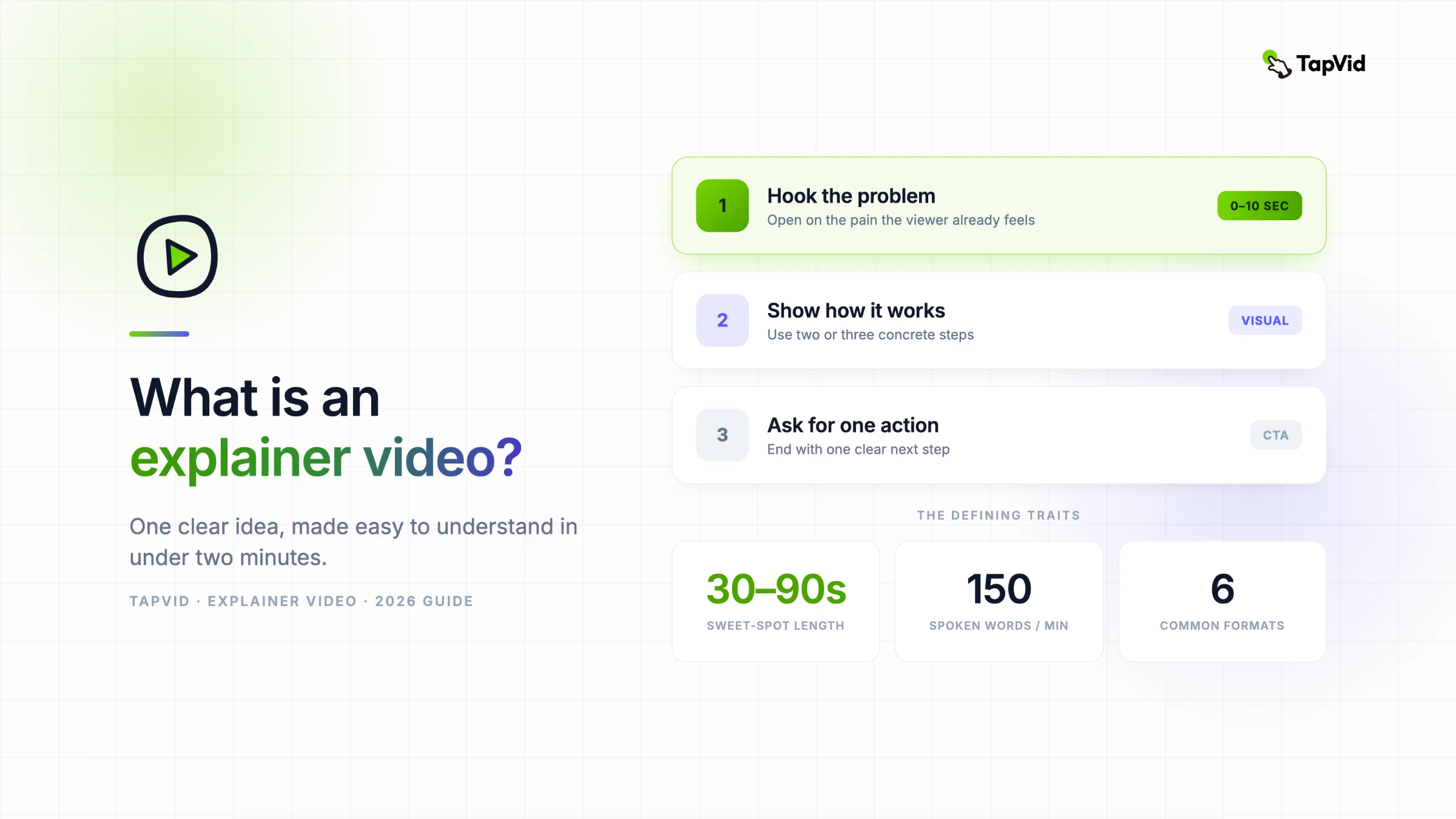

Was ist ein Erklärvideo? Ein Erklärvideo, auch Erklärfilm genannt, ist ein kurzes Video, meist 30 bis 90 Sekunden, das ein Produkt, eine Dienstleistung oder eine Idee schnell verständlich macht. Es kombiniert einfache Visuals mit Voiceover oder Untertiteln und führt durch eine klare Botschaft. Anders als ein Tutorial zeigt es nicht zwingend jeden Bedienungsschritt, sondern erklärt zuerst das Warum, Was oder Wie eines Themas.
Du hast schon ein Skript oder PDF? Verwandle es in ein Erklärvideo
01
Was ein Erklärvideo eigentlich ist
Wenn du schon einmal auf einer Homepage gelandet bist, einen 60-Sekunden-Clip angesehen und gedacht hast „ah, jetzt verstehe ich es“, bist du einem Erklärvideo bereits begegnet. Dieser Leitfaden behandelt, was Erklärvideos sind, die wichtigsten Typen, wann welcher passt und wie sie heute entstehen, wo man kein Studio und keine sechswöchige Timeline mehr braucht, um eins zu produzieren.
Im Kern beantwortet ein Erklärvideo zwei Fragen in unter zwei Minuten: Welches Problem löst das, und warum sollte es mich interessieren? Genau diese Beschränkung ist der Punkt. Ein gutes Erklärvideo streicht alles weg außer der einen Idee, die ein Zuschauer braucht, um den nächsten Schritt zu gehen.
Für ein Marketing- oder Produktteam beginnt der praktische Workflow mit Inhalten, die bereits vorhanden sind: einem Artikel, PDF, freigegebenen Skript, PRD, Produkttext, Screenshots oder einer Webseite. TapVid verwandelt diese Ausgangsmaterialien in ein Erklärvideo und führt dabei vom Briefing und Skript über Szenen, Animationen, Untertitel und Musik bis zum Export. Produktnamen, Zahlen, freigegebene Formulierungen und bereitgestellte Bilder bleiben an die Quelle gebunden. Das ersetzt nicht Ihr eigenes Urteilsvermögen. Beim praktischen Test unten musste ich weiterhin Briefing und Skript freigeben und anschließend die endgültige Fassung prüfen.
Die meisten Erklärvideos teilen ein paar Merkmale:
- Kurz. Die Umfrage von Wyzowl aus dem Jahr 2026 ergab, dass die meisten Befragten 30 Sekunden bis zwei Minuten für den effektivsten Bereich hielten. Wenn Sie länger brauchen, stellen Sie sicher, dass das Thema wirklich eine Tiefe auf Tutorial-Ebene benötigt.
- Eine Botschaft. Ein Landingpage-Erklärvideo verkauft den Kernnutzen. Es versucht nicht, Preisstufen, Sonderfälle und die Gründungsgeschichte auf einmal abzudecken.
- Visuell zuerst. Das Bild trägt die Last. Voiceover und Untertitel unterstützen es, aber ein starkes Erklärvideo funktioniert auch ohne Ton - was zählt, weil ein großer Teil der Social-Videos stumm geschaut wird.
- Auf Conversion gebaut. Jedes Erklärvideo zeigt irgendwohin: registrieren, Demo buchen, weiterlesen. Tut es das nicht, ist es nur eine hübsche Animation.
Menschen greifen zu Erklärvideos, weil Aufmerksamkeit knapp ist und Lesen langsam. Zuzusehen, wie jemand zeigt, wie ein Tool funktioniert, kostet einen Bruchteil der Mühe, drei Absätze Text zu entschlüsseln. Deshalb tauchen Erklärvideos immer wieder in der Recherchephase eines Kaufs auf, wenn ein Käufer noch entscheidet, ob dein Produkt überhaupt einen genaueren Blick wert ist.
02
Wo Erklärvideos eingesetzt werden
Das Format ist flexibel, weshalb man Erklärvideos fast überall findet, wo ein Unternehmen etwas schnell verständlich machen muss:
- Homepages und Landingpages, wo ein Hero-Video die Schwerarbeit übernimmt, sobald ein Besucher ankommt.
- Paid Ads auf YouTube, Meta und TikTok, wo die ersten drei Sekunden entscheiden, ob überhaupt jemand weiterschaut.
- Produkt-Onboarding, das einem neuen Nutzer den einen Workflow beibringt, der dein Tool unverzichtbar macht.
- Vertrieb und E-Mail, eingebettet in ein Follow-up, damit ein Interessent den Pitch in Ruhe erfassen kann.
- Interne Schulung und Weiterbildung, die ein dichtes Prozessdokument in etwas verwandeln, das Leute tatsächlich zu Ende schauen.
In der Wyzowl-Umfrage zum Videomarketing 2026 gaben 96 % der Befragten an, ein Erklärvideo angesehen zu haben, um mehr über ein Produkt oder eine Dienstleistung zu erfahren; 85 % sagten, ein Video habe sie zum Kauf überzeugt. Eine Mini-Review in Frontiers in Communication stellte in mehreren Studien positive Lerneffekte fest, weist jedoch auch darauf hin, dass die Ergebnisse unterschiedlich ausfallen und Video nicht durchgängig besser ist als Text mit Visualisierungen. Ihr eigenes Ergebnis hängt von Botschaft, Zielgruppe, Platzierung und Produktionsqualität ab.
03
Die wichtigsten Typen von Erklärvideos
Nicht jedes Erklärvideo sieht gleich aus. Der gewählte Stil prägt die Kosten, die Produktionszeit und das Gefühl, mit dem ein Zuschauer geht. Hier sind die sechs Formate, die fast jeden realen Fall abdecken.
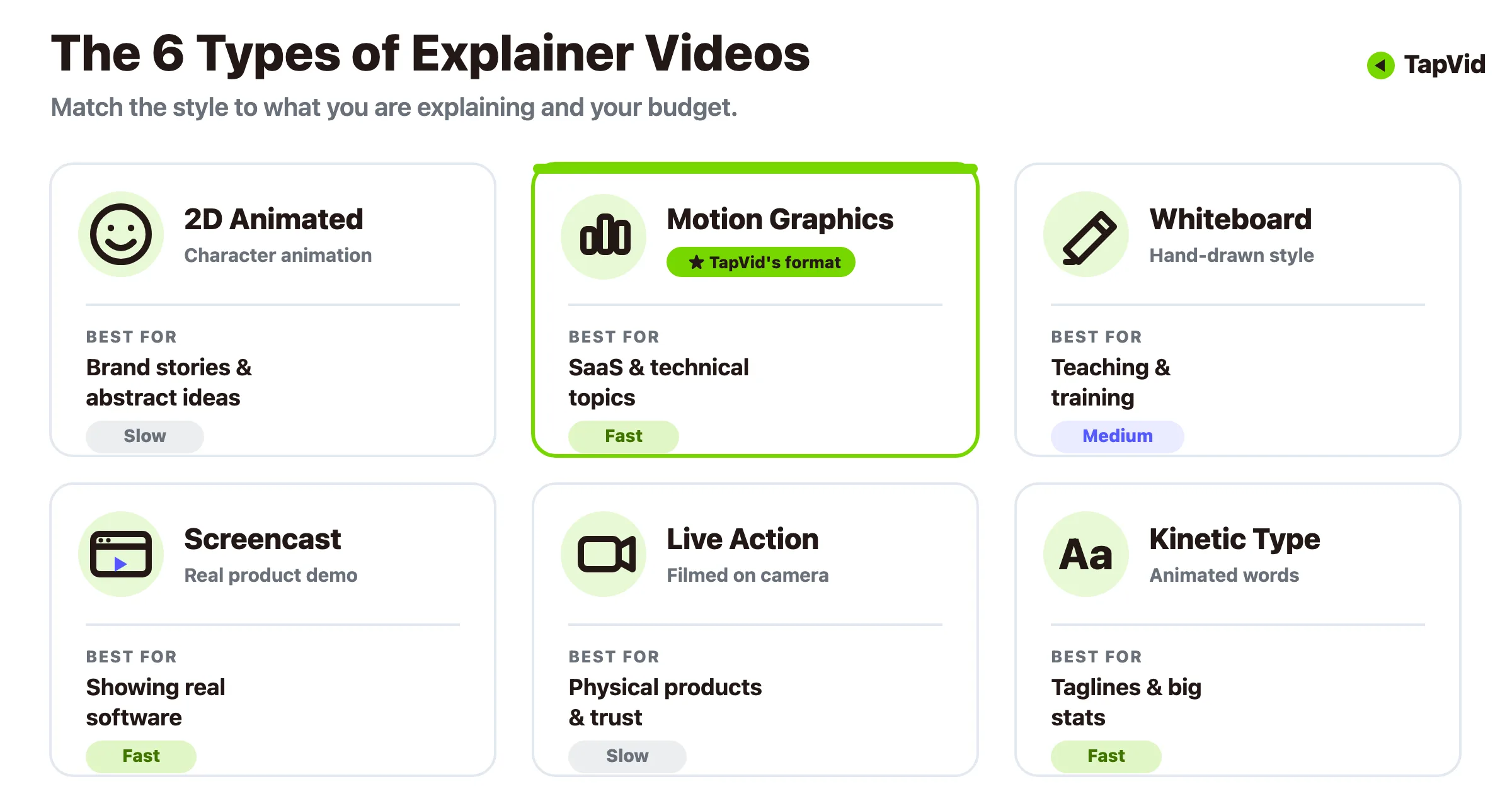
Animiert (2D-Charakter). Das beliebteste Format, und das aus gutem Grund. Charaktere und Szenen lassen dich eine abstrakte Idee dramatisieren, etwa einen Abo-Service oder ein Fintech-Konzept, die sich schlecht filmen ließe. Es eignet sich für Storytelling und Markenpersönlichkeit, allerdings ist vollständige Custom-Animation auf dem traditionellen Weg am teuersten und langsamsten zu produzieren.
Motion Graphics. Icons, Text, Diagramme und Formen, die sich synchron bewegen, ohne Figuren oder Handlung. Motion Graphics glänzen, wenn du etwas Technisches oder Datenlastiges sauber und professionell erklären musst. Das ist das Arbeitspferd-Format für SaaS und B2B, und zugleich der Stil, den KI-Tools heute am besten aus einem geschriebenen Skript generieren.
Whiteboard-Animation. Handgezeichnete Illustrationen, die erscheinen, als würde sie jemand live skizzieren. Sie wirkt lehrreich und vertrauenswürdig und passt daher zu Richtlinien-Erklärungen, Schulungen und jedem Thema, bei dem du wie ein geduldiger Lehrer statt wie ein Marketer wirken willst.
Screencast und Produktdemo. Echte Aufnahmen deiner Software in Aktion, oft mit Voiceover oder Untertiteln, die auf das Wesentliche zeigen. Nichts schafft so viel Vertrauen in ein digitales Produkt wie zuzusehen, wie die echte UI die Sache erledigt. Für eine Schritt-für-Schritt-Anleitung zu diesem Stil schlüsselt unser Leitfaden zu Produktdemo-Videos den Workflow auf.
Live-Action. Echte Menschen, echte Umgebungen, mit der Kamera gefilmt. Es baut menschliches Vertrauen auf und funktioniert gut für physische Produkte, Dienstleistungen und gründergeführte Marken. Es ist zugleich das Format, das am ehesten einen Dreh, eine Crew und ein größeres Budget braucht.
Kinetische Typografie. Text als Star, animiert im Rhythmus. Am besten für kurze, prägnante Momente, in denen die Worte die gesamte Botschaft tragen, etwa ein Tagline-Reveal oder eine markante Statistik.
Die meisten realen Projekte mischen zwei oder drei davon. Ein SaaS-Erklärvideo könnte mit Motion Graphics öffnen, um das Problem zu rahmen, zu einem Screencast schneiden, um das Produkt zu zeigen, und mit kinetischer Typografie für den Call-to-Action schließen.
04
Welchen Typ solltest du machen?
Der richtige Stil hängt davon ab, was du erklärst und wie viel du ausgeben kannst. Hier ist ein schneller Weg zur Entscheidung, ohne es zu zerdenken.
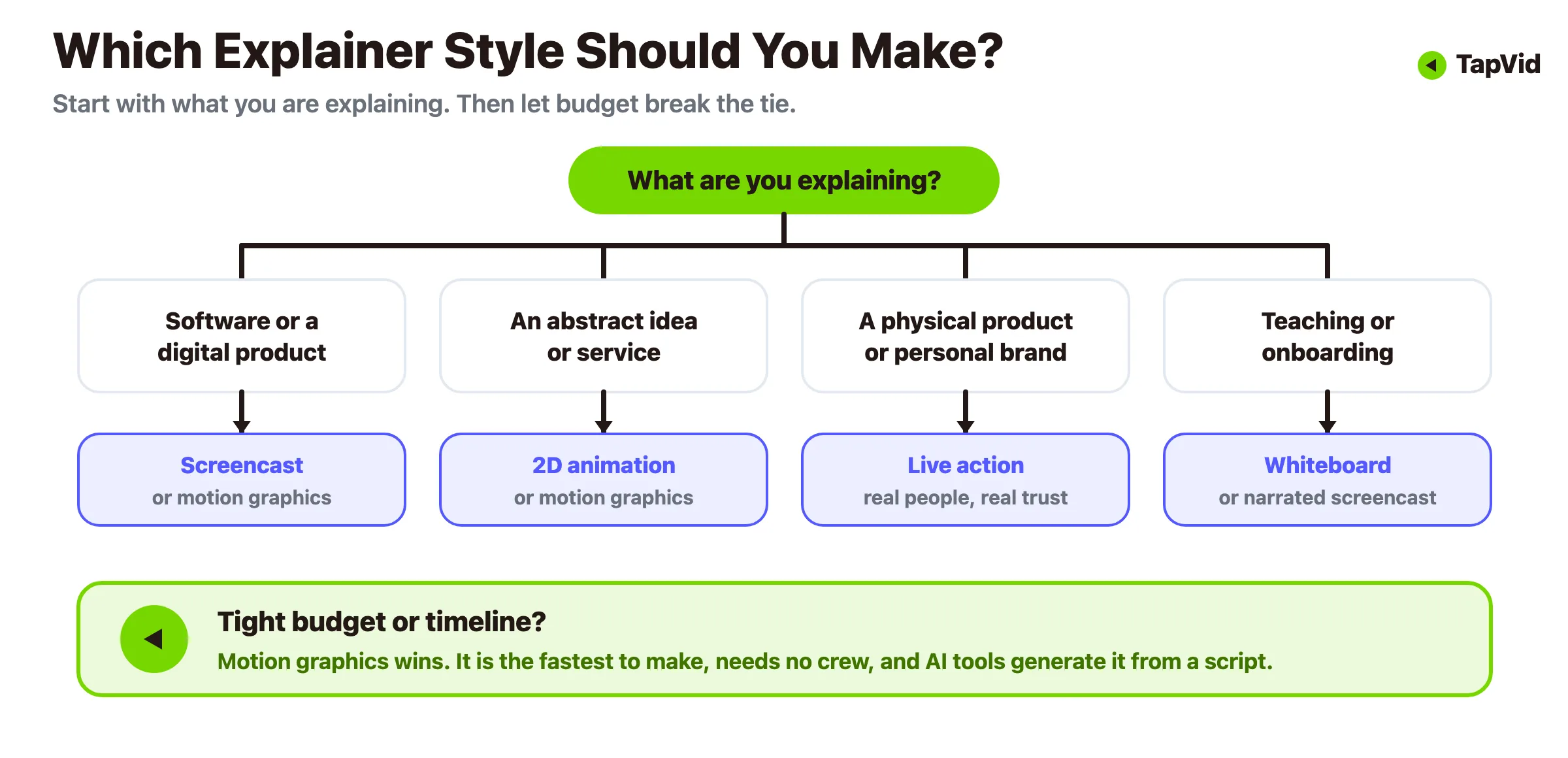
- Du erklärst Software oder ein digitales Produkt? Starte mit einem Screencast, wenn du den Beweis willst, dass es funktioniert, oder mit Motion Graphics, wenn du einen polierten Überblick willst, der die unaufgeräumten Teile der UI verbirgt.
- Du erklärst eine abstrakte Idee, eine Dienstleistung oder ein Konzept? Greife zu 2D-Animation oder Motion Graphics, die visualisieren können, was eine Kamera nicht einfangen kann.
- Du verkaufst ein physisches Produkt oder eine Personal Brand? Live-Action verdient sich Vertrauen, das Animation nicht vortäuschen kann.
- Lehren oder Onboarding? Whiteboard oder ein kommentierter Screencast fühlt sich wie eine hilfreiche Führung an statt wie ein Pitch.
- Knappes Budget oder enger Zeitplan? Motion Graphics und Screencasts sind am schnellsten und günstigsten zu produzieren, besonders mit KI-Tools, während Custom-2D und Live-Action am meisten kosten.
Wenn das Budget den Ausschlag gibt, gewinnt meist Motion Graphics. Es sieht professionell aus, braucht weder Schauspieler noch einen Dreh, und es ist das Format, das Text-zu-Video-Tools sauber beherrschen. Unser Maker für animierte Erklärvideos ist genau um diesen Weg herum gebaut.
05
Was ein gutes Erklärvideo ausmacht
Der Stil bekommt die Aufmerksamkeit, aber die Struktur ist es, die ein Erklärvideo funktionieren lässt. Fast jedes wirksame folgt demselben einfachen Bogen:
1. Das Problem als Hook (0 bis 10 Sekunden). Eröffne mit dem Schmerz, den dein Zuschauer bereits spürt. Spar dir die Logo-Animation und den langsamen Aufbau. Wenn die erste Zeile nicht sitzt, wird der Rest nie gesehen. 2. Stelle die Lösung vor. Benenne in einem schlichten Satz, was du tust. Kein Jargon, keine Buzzwords. 3. Zeige, wie es funktioniert. Zwei oder drei konkrete Schritte, keine komplette Feature-Liste. Das Ziel ist „ich könnte mir vorstellen, das zu nutzen“, nicht „hier ist unser gesamtes Changelog“. 4. Beweise den Nutzen. Wie sieht das Leben danach aus? Zeit gespart, Geld verdient, Kopfschmerz weg. 5. Bitte um eine Aktion. Registrieren, Demo buchen, kostenlose Testphase starten. Ein klarer nächster Schritt, kein Menü aus fünf.
Halte das Skript straff. Eine nützliche Faustregel: 150 gesprochene Wörter dauern etwa eine Minute, ein Skript für ein 90-Sekunden-Erklärvideo sollte also bei 200 bis 220 Wörtern landen. Wenn du es in diesem Raum nicht sagen kannst, ist die Botschaft noch nicht scharf genug. Für einen tieferen Blick auf die Skripte und das Pacing hinter stark konvertierenden Videos, sieh dir unsere Analyse von Erklärvideos, die konvertieren an.
Das Launch-Video von Dollar Shave Club ist das klassische Beispiel für diesen gut umgesetzten Bogen. Es eröffnet mit einer echten Frustration (Rasierer kosten zu viel), nennt die Lösung in einer knappen Zeile, zeigt in wenigen schnellen Beats, wie das Abo funktioniert, und endet mit einem einzigen Call-to-Action. Es dauert rund 90 Sekunden. Die Lektion gilt auch ohne Comedy-Budget: Wähle einen Schmerz, eine Lösung, eine Bitte, und streiche alles andere.
Erklärvideo vs. andere Videoformate
Ein paar nahe Verwandte werden oft verwechselt, daher lohnt es sich, die Linien zu ziehen:
| Format | Betrachterjob | Beste Beweise | Typischer nächster Schritt |
|---|---|---|---|
| Erklärvideo | Das Problem, den Mechanismus und den Wert verstehen | Zielstrebige Bilder plus eine klare Erzählung | Erfahren Sie mehr oder probieren Sie das Produkt aus |
| Produktdemo | Bewerten Sie, wie das Produkt funktioniert | Echte Benutzeroberfläche, bereitgestellte Screenshots oder eine Produkt-Walkthrough | Starten Sie eine Testversion oder buchen Sie eine Demo |
| Tutorium | Erledige eine Aufgabe korrekt | Genaue Schritte, Zustände und erwartetes Ergebnis | Wiederholen Sie den Workflow |
| Werbevideo | Bemerken Sie ein Angebot, einen Start oder eine Kampagne | Produktaufnahmen, Angebotsdetails und ein direkter Haken | Klicken, kaufen oder anmelden |
Die Erkenntnis: Passe das Format an den Moment in der Buyer Journey an. Ein kalter Besucher braucht ein Erklärvideo, ein warmer Lead will eine Demo, und ein neuer Kunde braucht ein Tutorial.
06
Wie Erklärvideos entstehen: zwei Wege
Jahrelang bedeutete ein Erklärvideo eines: ein Studio beauftragen. Diesen Weg gibt es noch, und er liefert weiterhin wunderschöne Arbeit. Er ist nur langsam und teuer. Der neuere Weg nutzt KI, um den gesamten Prozess zu komprimieren. Hier der ehrliche Vergleich.
Der traditionelle Studio-Weg. Eine professionelle Produktion kann zwei Wochen bis mehrere Monate dauern. HubSpots aktualisierte Kostenübersicht nennt einen Durchschnitt von $10,983 aus einer Wyzowl-Umfrage; die gemeldeten Projekte reichten von $600 bis $250,000. Die Spanne ist groß, weil Umfang, Animationsstil, Voiceover, Sounddesign und Korrekturrunden variieren. Ein Custom-Studio ist für einen Flaggschiff-Film mit präziser Art Direction sinnvoll, aber schwerer zu rechtfertigen, wenn du regelmäßig neue Erklärvideos brauchst.
Der KI-gestützte Weg. Text-zu-Video-Tools haben diese Timeline kollabieren lassen. Du schreibst ein Skript, wählst einen Stil, und das Tool setzt Motion Graphics, Übergänge und Pacing für dich zusammen. Keine Schnittsoftware, keine Crew, kein achtwöchiges Warten. Der Preis ist Kontrolle: KI-Output braucht eine menschliche Review-Runde, und für einen Flaggschiff-Brand-Film willst du vielleicht weiterhin ein Studio. Aber für die alltäglichen Erklärvideos, die die meisten Teams wirklich brauchen - Feature-Walkthroughs, Onboarding-Clips, Ad-Varianten - ist es ein völlig anderes Wirtschaftsmodell. Wir haben einen kompletten Kostenvergleich hier geschrieben, wenn du die Zahlen nebeneinander sehen willst.
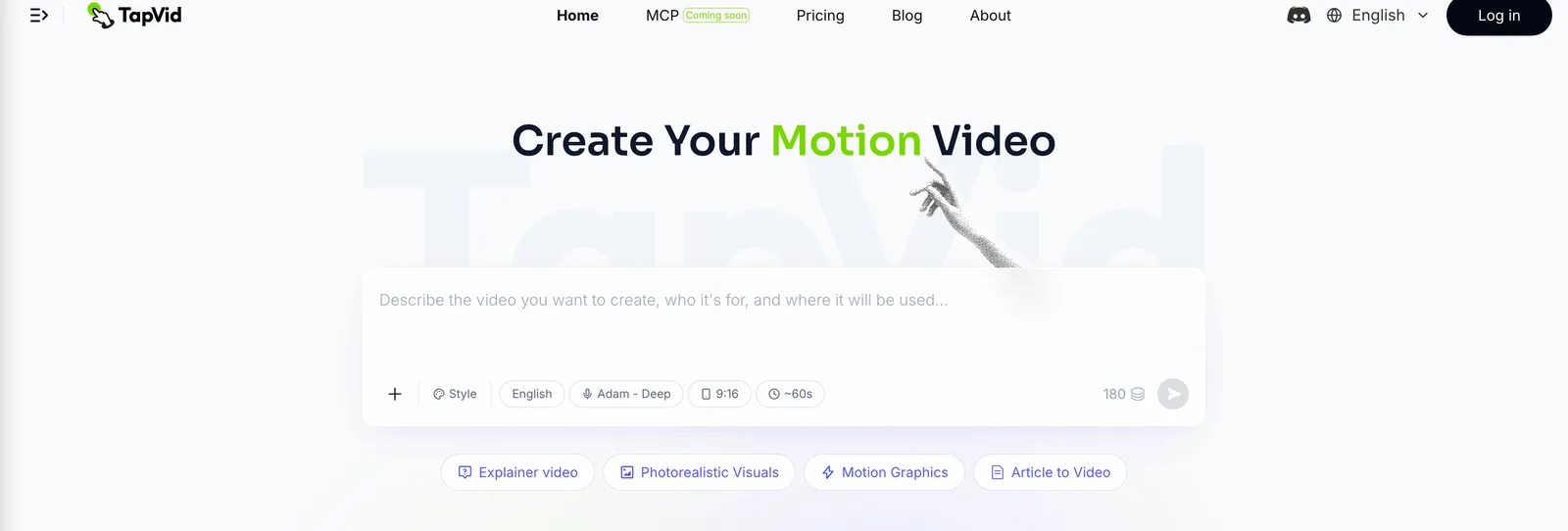
Genau für diese Lücke wurde TapVid gebaut. Du beschreibst in einfachem Text, was du willst, und unser KI-Erklärvideo-Generator verwandelt das Skript in ein strukturiertes Motion-Graphics-Erklärvideo, ganz ohne Timeline-Gefummel. Es passt besonders gut zum SaaS-Anwendungsfall, weshalb wir einen eigenen Workflow für SaaS-Erklärvideos pflegen.
07
So erstellst du eins mit KI, Schritt für Schritt
Der schnellste Weg, den KI-Pfad zu verstehen, ist, ihn einmal laufen zu sehen. Ich habe einen unserer eigenen Artikel in ein Erklärvideo verwandelt und die ganze Sache gestoppt - hier also der Prozess, mit dem, was jede Stufe tatsächlich zeigt.
Schritt 1: Gib ihm die Quelle und eine Zeile Richtung. Ich habe ein 275KB-PDF eines Blogposts hineingezogen und eine einzige Anweisung ergänzt: Mach ein schnelles Erklärvideo im YouTube-Stil, damit Leute den Punkt verstehen, ohne den Artikel zu lesen. Das war der gesamte Input, eine Datei und ein Satz.
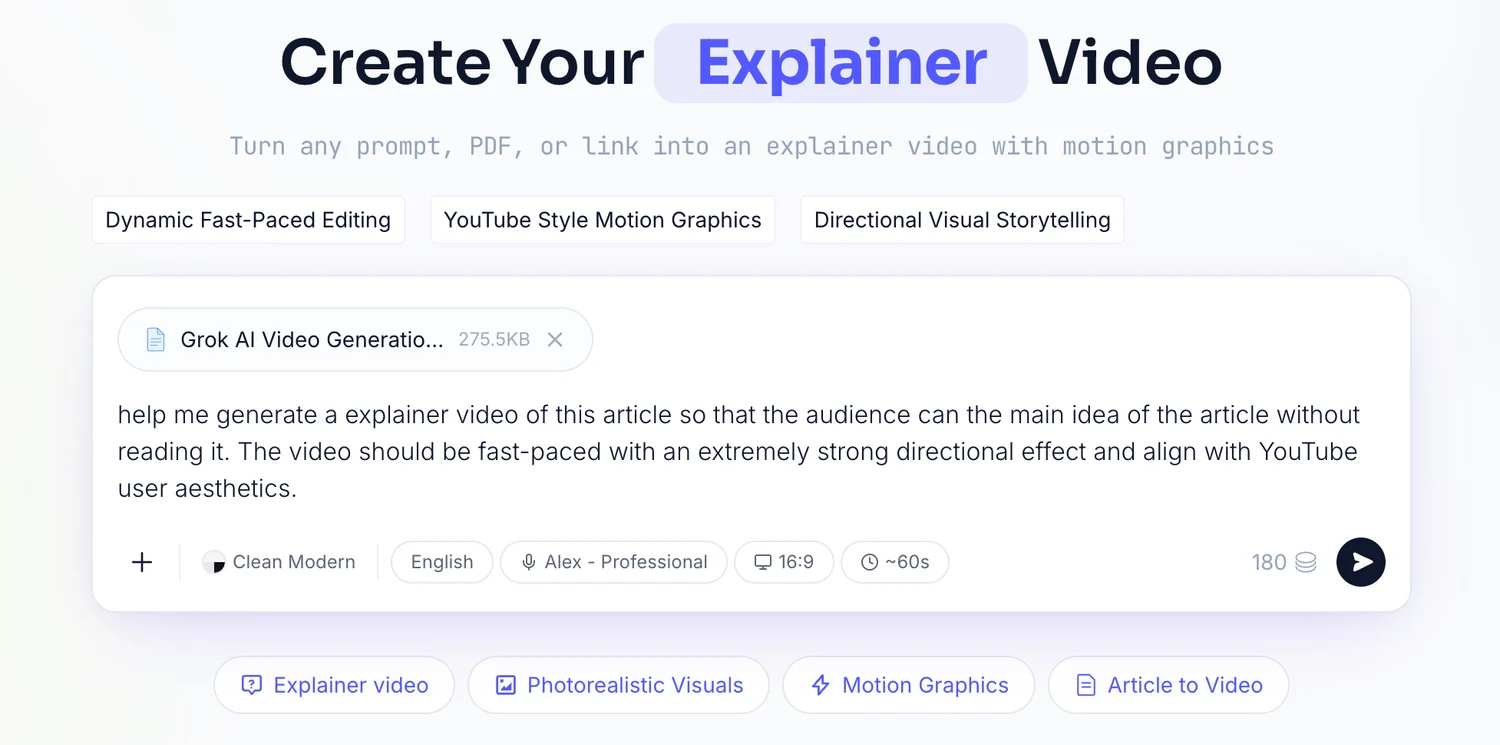
Schritt 2: Lies den Brief, den es zurückschreibt. TapVid hat die Datei geparst und einen Brief zurückgegeben: Zielreaktion, Kernbotschaft, Erzählbogen, Zielgruppe, 60 Sekunden Länge, 16:9-Format und eine männliche Sprecherstimme. Ich habe ihn mit meiner Vorstellung abgeglichen und unverändert freigegeben.
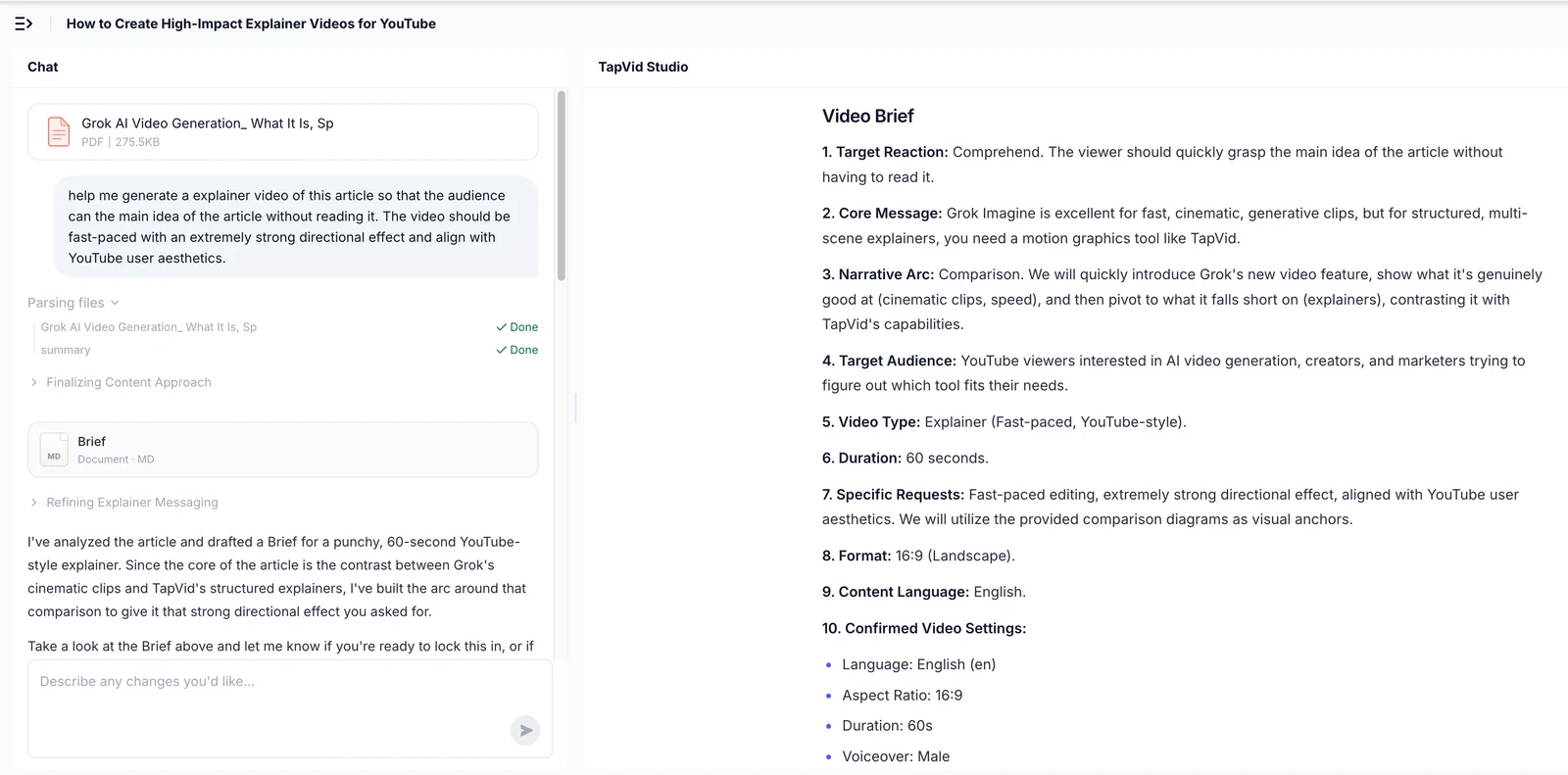
Schritt 3: Prüfe die Gliederung. Als Nächstes kam eine Gliederung aus vier 15-Sekunden-Beats, jeder mit einem erklärten Zweck. Das ist die günstigste Stelle, um eine falsche Struktur zu erwischen, bevor irgendetwas gerendert wird.
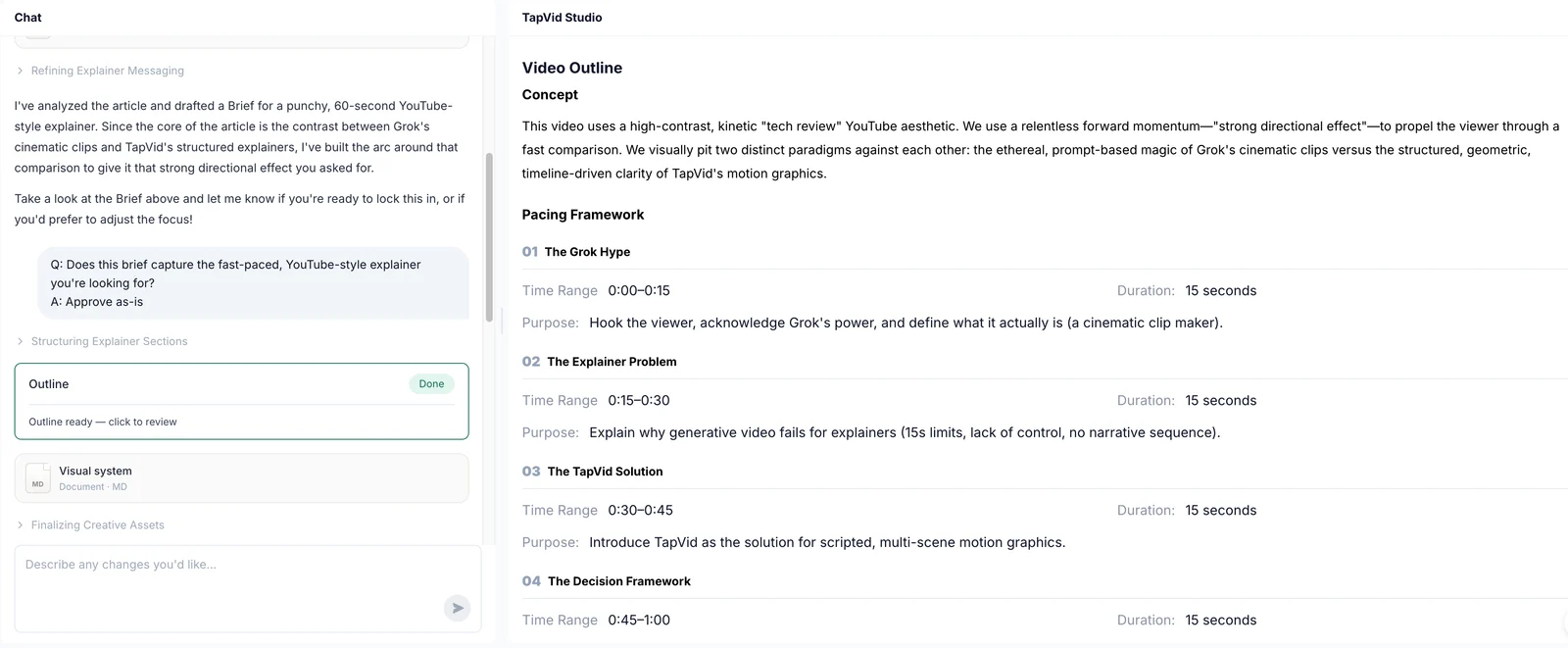
Schritt 4: Gib das Shot-für-Shot-Skript frei. Dann ein Shot-für-Shot-Skript mit der Aktion im Bild und dem Voiceover pro Timecode. Ich habe es einmal gelesen und freigegeben.
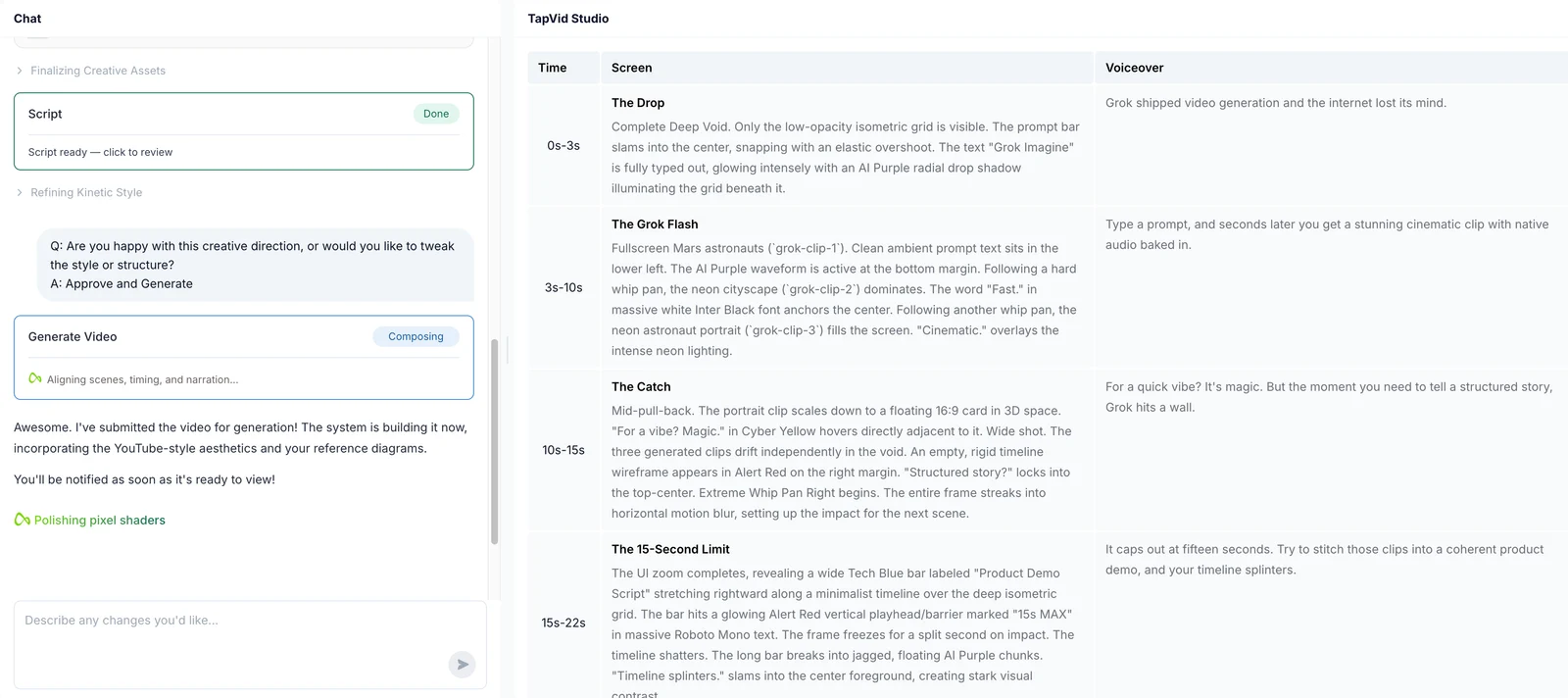
Schritt 5: Rendern und prüfen. Vom Upload bis zum fertigen Video vergingen etwa sechs Minuten, mit drei Stellen, an denen ich wirklich eine Entscheidung getroffen habe: der Prompt, der Brief und das Skript. Alles andere lief von selbst. Der letzte Durchgang ist menschlich: Schau es einmal mit frischen Augen und schneide vor dem Veröffentlichen alles heraus, was sich zieht.
Die Kurzfassung, übertragbar auf jedes Tool: Schreibe ein straffes Skript mit dem Hook-bis-CTA-Bogen von oben, wähle Motion Graphics als Standardstil, generiere den Entwurf, füge Untertitel hinzu, weil viel Video stumm geschaut wird, dann prüfe und veröffentliche. Für einen längeren Walkthrough mit Beispielen behandelt unser Schritt-für-Schritt-Leitfaden zum Erstellen eines KI-Erklärvideos jede Stufe im Detail, und der Leitfaden mit Erklärvideo-Beispielen zeigt, wie gut branchenübergreifend aussieht.
08
Wann du wahrscheinlich keins brauchst
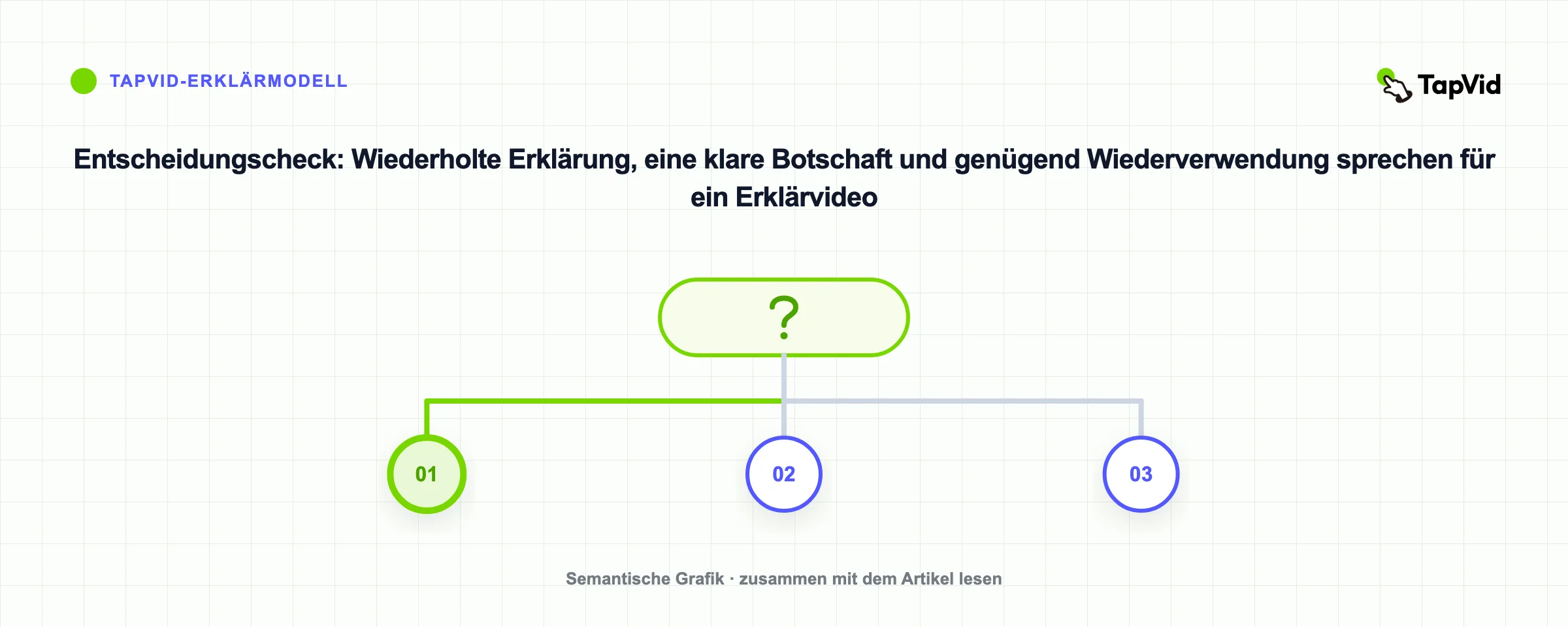
Ein ehrlicher Leitfaden sollte das laut aussprechen: Nicht jede Seite braucht ein Erklärvideo. Wenn dein Produkt wirklich simpel ist und ein einziger Screenshot es offensichtlich macht, kann ein Video Menschen eher bremsen als helfen. Wenn du noch keine klare Botschaft hast, lässt ein Video die Verwirrung nur schneller laufen. Und wenn du gerade $12,000 für einen Studio-Film für eine Landingpage mit 40 Besuchern im Monat ausgeben willst, ist das Geld zuerst woanders besser angelegt.
Der beste Zeitpunkt für ein Erklärvideo ist, wenn du dieselbe Sache immer wieder erklären musst - in Demos, in E-Mails, in Support-Tickets. Diese Wiederholung ist das Signal. Verwandle die Erklärung, die du ohnehin gibst, in ein Video und lass es in großem Maßstab für dich sprechen.
09
Häufig gestellte Fragen
Was ist ein Erklärvideo, in einem Satz?
Ein kurzes Video, meist 30 bis 90 Sekunden, das erklärt, was ein Produkt oder eine Idee tut und warum es zählt, und den Zuschauer dann auf einen klaren nächsten Schritt hinweist.
Wie lang sollte ein Erklärvideo sein?
Ziele auf 30 bis 90 Sekunden. Die Abschlussraten fallen nach zwei Minuten stark ab; brauchst du mehr Zeit, teile den Inhalt in ein separates Tutorial oder eine Serie auf.
Was kostet ein Erklärvideo?
Die Kosten variieren stark. HubSpots aktualisierte Übersicht nennt einen Wyzowl-Durchschnitt von $10,983; gemeldete Projekte reichten von $600 bis $250,000. KI-gestützte Tools können den Produktionsaufwand für wiederholbare Erklärvideos senken. Details in unserer vollständigen Kostenaufschlüsselung.
Was ist der beliebteste Typ von Erklärvideo?
Animierte Erklärvideos, besonders 2D-Charakter-Animation und Motion Graphics, sind am verbreitetsten, weil sie abstrakte Ideen visualisieren können, die schwer oder teuer zu filmen wären.
Was ist der Unterschied zwischen einem Erklärvideo und einer Produktdemo?
Ein Erklärvideo verkauft die Idee auf hoher Ebene und ist gebaut, um einen kalten Zuschauer zu konvertieren. Eine Produktdemo geht tiefer darauf ein, wie die Software wirklich funktioniert, und richtet sich meist an jemanden, der bereits interessiert ist. Viele Teams machen beides.
Kann ich ein Erklärvideo ohne Design- oder Schnittkenntnisse erstellen?
Ja. KI-Text-zu-Video-Tools wie TapVids Erklärvideo-Generator verwandeln ein geschriebenes Skript in ein fertiges Motion-Graphics-Video - du brauchst also weder Animationssoftware noch eine Produktionscrew.
10
Verwandle deine nächste Erklärung in ein Video
Wenn du dich dabei ertappst, in jeder Demo und jeder E-Mail dasselbe zu erklären, wartet dort dein Erklärvideo darauf, gemacht zu werden. Du brauchst weder ein Studio-Budget noch eine achtwöchige Timeline, um zu starten. Schreib das Skript, wähle Motion Graphics und überlass TapVid die Animation. Sieh dir die Kosten auf unserer Preisseite an, oder spring direkt in den KI-Erklärvideo-Generator und verwandle noch heute dein erstes Skript in ein Video.