
„KI-Motion-Video" wird für zwei völlig verschiedene Dinge verwendet, und die Verwechslung schickt Leute zum falschen Tool. In Creator-Foren sehe ich das ständig: Jemand will einen animierten Erklärfilm für sein Produkt, meldet sich bei einem generativen Videomodell an und landet bei einem hübschen Fünf-Sekunden-Clip von nichts Bestimmtem. Dann heißt es, KI-Video sei „noch nicht so weit", dabei ist man einfach im falschen Regal gelandet.
01
Was ist ein KI-Motion-Video?
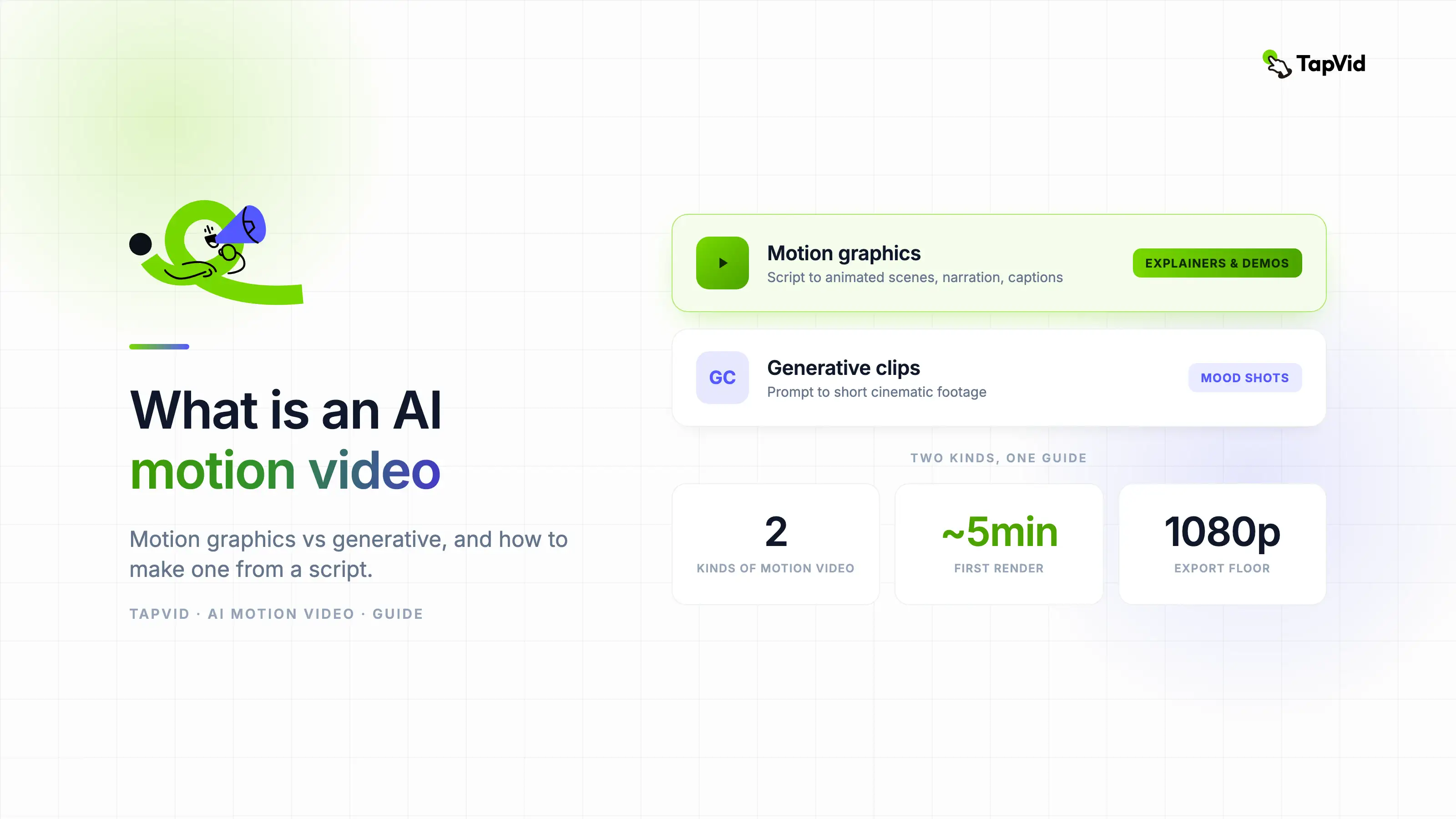
Die eine Bedeutung sind Motion Graphics: animierter Text, Formen und Illustrationen, aus einem Skript gebaut – der Stil, den man aus Erklär- und Produktvideos kennt. Die andere ist generatives Video: filmische Clips, die ein Modell aus einem Prompt erträumt. Beides ist „Motion Video". Es sind nicht dieselben Produkte, sie kosten nicht dasselbe, und sie scheitern auf völlig unterschiedliche Weise.
Dieser Leitfaden trennt beide sauber und zeigt dann, wie man die Motion-Graphics-Variante erstellt – das ist es, was die meisten meinen, wenn sie etwas erklären oder verkaufen wollen. Als roten Faden nehme ich meinen eigenen Workflow, inklusive der Stellen, an denen meine ersten Versuche danebengingen.
Ein KI-Motion-Video ist ein Video, in dem Bewegung von KI generiert oder zusammengesetzt wird, statt gefilmt oder von Hand animiert zu werden. In der Praxis teilt es sich in zwei Lager.
- Motion Graphics: Die KI verwandelt ein Skript oder einen Prompt in animierte Szenen, kinetischen Text, Icons, Illustrationen und Übergänge, mit Sprecherstimme und Untertiteln. Ziel ist es, eine Botschaft klar zu vermitteln. Ein 60-sekündiger Erklärfilm, der mit Voiceover durch dein Produkt führt, ist der Klassiker.
- Generative Clips: Die KI erfindet Filmmaterial aus einem Prompt und zielt auf realistische oder filmische Bewegung. Ziel ist ein eindrucksvolles Bild. Denk an eine Drohnenaufnahme über einer Neon-Stadt, die nie eine Drohne gefilmt hat.
Die Verwirrung ist nachvollziehbar, denn das Marketing der Tools verwischt die Grenze. Viele Produkte bezeichnen sich als "KI-Motion-Video-Generatoren", ganz gleich, ob sie dein Skript animieren oder Filmmaterial von Grund auf halluzinieren. Mein Test lautet: Fragt das Tool nach einem Skript oder nur nach einem Prompt? Aus einem Skript entsteht ein strukturiertes Video mit mehreren Szenen – das sind Motion Graphics. Aus einem Prompt entsteht ein einzelner kurzer Clip – das ist generativ. Wenn du skriptbasierte Produkte aus der ersten Gruppe vergleichst, unterscheidet unser Leitfaden zu Motion.so-Alternativen sie nach Workflow und Ausgabe.
Wenn du ein Konzept erklären, ein Feature launchen oder ein Produkt zeigen willst, brauchst du Motion Graphics. Willst du eine dramatische Aufnahme von wenigen Sekunden, brauchst du ein generatives Modell. Der Rest dieses Leitfadens dreht sich vor allem um Ersteres, mit einem Abschnitt dazu, wann sich Zweiteres wirklich lohnt.
02
Motion Graphics vs. generatives Video
| Motion Graphics | Generative Clips | |
|---|---|---|
| Gebaut aus | Deinem Skript oder Prompt | Einem Prompt |
| Look | Animierter Text, Icons, Illustration | Realistisches oder filmisches Material |
| Länge | Komplettes Video, mehrere Szenen | Kurze Clips, Sekunden |
| Am besten für | Erklärfilme, Demos, Ads mit Botschaft | Kreative und filmische Momente |
| Sprecher | Geskriptetes Voiceover und Untertitel | Meist keins, oder generiertes Audio |
| Bearbeiten | Text ändern, Szene neu generieren | Neu prompten und hoffen |
| Kostenmuster | Pauschaltarife oder Credits pro Video | Credits pro Sekunde, teuer bei Retries |
| Beispiel-Tools | TapVid, motionvid.ai, Hera | Sora, Kling, Veo |
Keines ist generell besser. Sie sind für unterschiedliche Aufgaben gebaut. Ein Launch-Erklärfilm braucht Struktur und ein Skript, also gewinnt Motion Graphics. Eine stimmungsvolle Establishing-Aufnahme braucht Realismus, also gewinnt ein generatives Modell.
Die Zeile, die in der Praxis am meisten zählt, ist das Bearbeiten. Bei Motion Graphics ist das Skript die Wahrheit: Nennt das Voiceover den falschen Preis, änderst du eine Zeile und generierst die Szene neu. Bei generativen Clips gibt es kein Skript zum Bearbeiten. Du änderst den Prompt, gibst mehr Credits aus und bekommst einen anderen Clip, der dein eigentliches Problem behebt – oder auch nicht. Ich habe peinlich viele Generierungen verbrannt beim Versuch, ein generatives Modell dieselbe Figur über zwei Aufnahmen halten zu lassen. Für alles mit Botschaft und Abfolge wird diese Lotterie teuer.
Die Kostenzeile folgt aus demselben Unterschied. Generative Modelle rechnen meist pro Sekunde Output ab, und den ersten Take behält man selten. Motion-Graphics-Tools rechnen eher pro Video ab, weil die KI gestaltete Elemente zusammensetzt statt Pixel zu träumen – ein Retry kostet also Sekunden statt eines weiteren Credit-Bergs.
03
So erstellst du ein KI-Motion-Video
Hier ist der Motion-Graphics-Weg, von Anfang bis Ende. Die gesamte Schleife, vom Skript bis zum exportierten Video, dauert bei mir für ein 60-Sekunden-Stück etwa 20 bis 30 Minuten – und das meiste davon sind Skript-Überarbeitungen.
04
1. Ein kurzes Skript schreiben
Beginne mit dem Problem oder Hook, erkläre eine Idee nach der anderen, ende mit einem einzigen nächsten Schritt. Bleib unter 90 Sekunden Sprechtext, das sind rund 200 bis 220 gesprochene Wörter.
Meine Regel, nachdem ich meine eigenen Retention-Zahlen beobachtet habe: ein Satz pro Szenen-Beat. Als ich drei Ideen in einen Absatz stopfte, versuchte die generierte Szene, alle drei gleichzeitig zu bebildern, und sah aus wie eine Kramschublade. Kurze Aussagesätze geben dem Tool saubere Szenengrenzen.
Ein Aufbau, der für Produkt-Erklärfilme funktioniert:
- Hook: der Schmerz, in einer Zeile („Dein Onboarding-Video hat drei Wochen gedauert und ist schon veraltet.")
- Problem: zwei, drei Zeilen dazu, warum die alte Methode weh tut.
- Lösung: was dein Produkt tut, eine Funktion pro Zeile.
- Beweis: eine Zahl, ein Kunde oder ein Vorher-Nachher.
- CTA: eine Aktion („Kostenlos ausprobieren unter …").
05
2. Das Video generieren
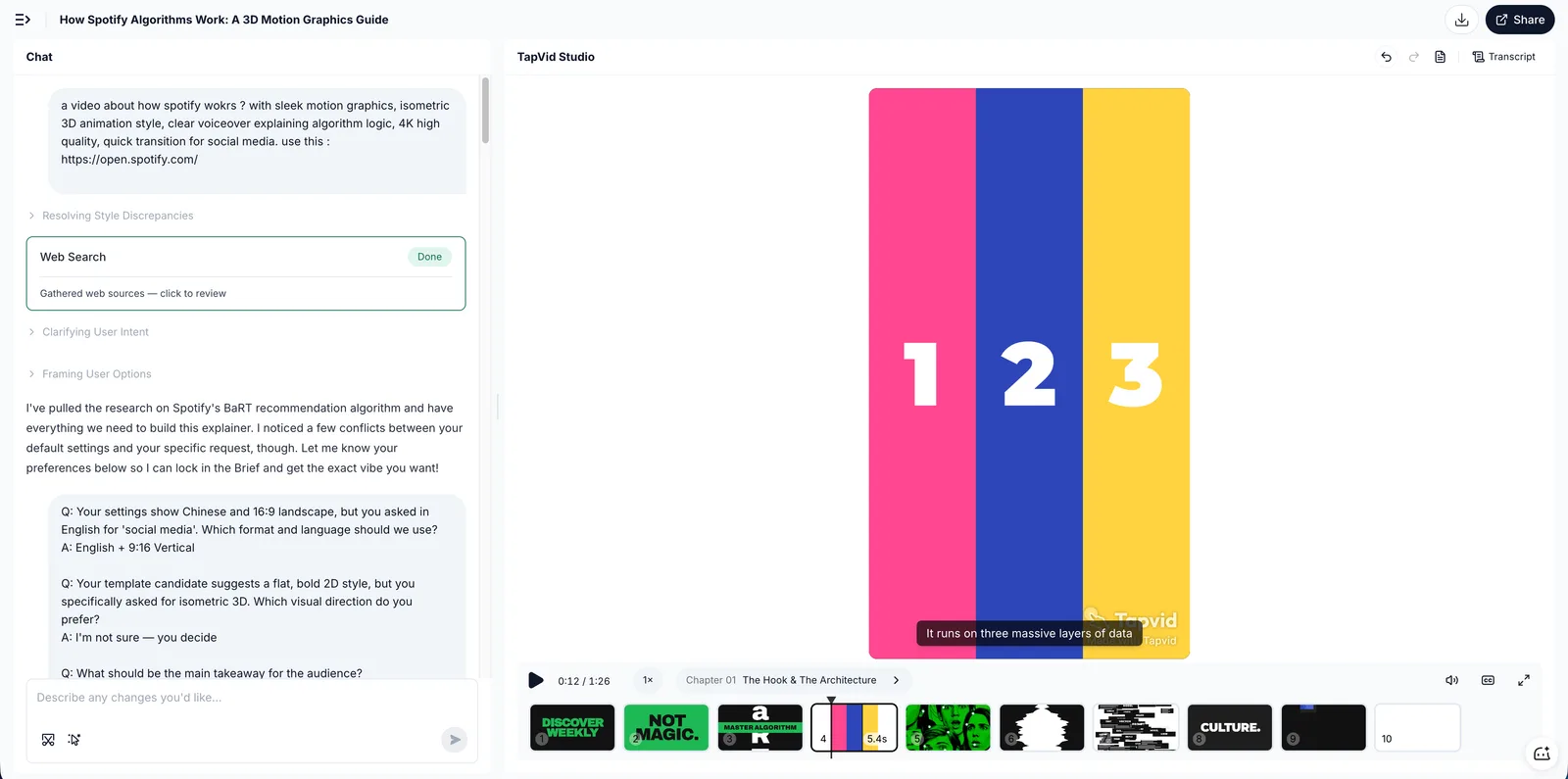
Füge das Skript in ein Motion-Graphics-Tool ein. Mit TapVid baut es die animierten Szenen, fügt ein KI-Voiceover hinzu und brennt Untertitel in einem Durchgang ein. Der erste Render dauert für ein Skript dieser Länge etwa 5 Minuten.
Zwei Dinge, die ich gelernt habe, beim ersten Render zuerst zu prüfen, bevor ich sonst etwas anfasse:
- Timing: Verweilt eine Szene auf einer kurzen Zeile, driften Voiceover und Animation auseinander. Skriptzeilen zu teilen oder zusammenzuführen behebt das schneller als das Herumspielen an Timing-Reglern.
- Betonungswörter: Das Tool wählt, welche Wörter es als kinetischen Text animiert. Betont es „das" statt deinen Produktnamen, schreib die Zeile so um, dass das wichtige Wort den Satz trägt.
06
3. Bearbeiten und exportieren
Passe Formulierung, Szenen oder Stimme an und exportiere dann. Weil nichts gefilmt ist, ist jede Änderung eine Textbearbeitung. Das fühlt sich gegenüber meinem alten Workflow noch immer leicht unfair an: Fragte ein Kunde „Können wir die zweite Zeile ändern", hieß das früher ein neu aufgenommenes Voiceover; jetzt heißt es, die zweite Zeile neu zu tippen.
Prüfe die Export-Bedingungen vor dem öffentlichen Einsatz. Kostenlose Stufen bei den meisten Tools, TapVid inklusive, versehen den Export mit einem Wasserzeichen; kostenpflichtige Pläne entfernen es. Prüfe auch die Auflösung: 1080p ist das Minimum für alles, was auf eine Landingpage kommt.
07
Wann der generative Weg die richtige Wahl ist
Ich will generatives Video nicht schlechtreden. Es gibt Aufgaben, für die es die einzig sinnvolle Option ist.
- Establishing-Shots und B-Roll: ein filmischer Fünf-Sekunden-Opener für eine Ad, wofür früher Stockmaterial-Lizenzen oder ein Dreh nötig waren. Modelle wie Sora, Kling und Veo sind darin inzwischen wirklich gut. Quelle Quelle
- Unmögliches Material: ein Produkt, das im All schwebt, eine Stadt aus Schokolade. Dazu gibt es keine Filmalternative.
- Style-Frames für Pitches: eine kreative Richtung verkaufen, bevor Budget gebunden wird.
Die Haken, basierend auf meinen eigenen Durchläufen und vielen r/aivideo-Threads: Clips sind kurz (meist 5 bis 10 Sekunden), Dialog und Erzählung sind schwach oder fehlen, Text im Bild kommt verstümmelt raus, und Konsistenz über Schnitte hinweg ist ein bekannt ungelöstes Problem. Wer generatives Video professionell ausliefert, behandelt es als B-Roll-Fabrik und macht das Storytelling im Editor. Wenn dein Video 60 Sekunden lang eine Botschaft tragen soll, würdest du ein Dutzend Clips zusammennähen und um jede Naht kämpfen.
Das Hybrid-Muster ist unterschätzt: Generiere deinen Erklärfilm als Motion Graphics und setze dann einen generativen Clip als stimmungsvolle Eröffnungsaufnahme ein. Du bekommst den filmischen Hook und behältst das editierbare, vertonte Rückgrat.
08
Wo KI-Motion-Videos eingesetzt werden
- Erklärfilme: ein Konzept mit Animation zum Klicken bringen statt mit einer Textwand. Das klassische 60- bis 90-Sekunden-Stück „Was ist X und warum sollte es mich interessieren". Siehe wie man ein KI-Erklärvideo erstellt.
- Produkt-Demos: zeigen, was ein Produkt kann, wenn die UI allein nicht die Story ist oder sich so oft ändert, dass Screen-Recordings in einem Monat verrotten. Animierte Demos überstehen Redesigns, weil du neu generierst statt neu aufzunehmen. Siehe wie man ein KI-Produktdemo-Video erstellt.
- Ads und Social: kurze, bewegungsstarke Schnitte, die in den ersten drei Sekunden die Aufmerksamkeit halten. Motion Graphics umgeht zudem das Schauspieler- und Location-Problem komplett.
- Bildung: eine Lektion in ein animiertes, vertontes Video verwandeln. Lehrkräfte, mit denen ich gesprochen habe, mögen, dass die Version fürs nächste Semester nur die Skript-Bearbeitung kostet.
- Interne Kommunikation: Richtlinienänderungen und Onboarding, die Videos, für die niemand Budget einplant. Hier zählt „günstig zu aktualisieren" am meisten, weil sich der Inhalt vierteljährlich ändert.
09
Woran die meisten beim ersten Mal scheitern
Ein paar Fehlerbilder, die ich selbst hatte oder ständig sehe:
- Einen Aufsatz statt eines Skripts schreiben. Gesprochene Sprache ist kürzer. Lies dein Skript einmal laut vor; wo du stolperst, stolpert auch das Voiceover.
- Den Wasserzeichen-Check überspringen. Auf einer kostenlosen Stufe exportieren, das Video posten und dann das Wasserzeichen in der Ecke des eigenen Launch-Posts entdecken. Prüfe vorher, nicht hinterher.
- Von einem generativen Modell erwarten, dass es eine Erzählung hält. Oben behandelt, aber es ist die häufigste Fehlpaarung.
- Szene für Szene übermäßig bearbeiten. Diese Tools belohnen Änderungen auf Skriptebene. Ist eine Szene falsch, korrigiere den Satz, der sie erzeugt hat, bevor du zu manuellen Timeline-Reglern greifst.
- Ein Video, eine Plattform. Dasselbe Skript exportiert nach 16:9 für YouTube und 9:16 für Shorts. Beide zu generieren dauert Minuten; plane die Seitenverhältnisse vor dem Export, nicht danach.
10
Häufig gestellte Fragen
Was ist ein KI-Motion-Video?
Ein Video, in dem KI die Bewegung generiert oder zusammensetzt. Es umfasst zwei Stile: Motion Graphics aus einem Skript und generative filmische Clips aus einem Prompt.
Was ist der Unterschied zwischen Motion Graphics und generativem Video?
Motion Graphics animieren Text und Illustration, um eine Botschaft zu tragen, und laufen als komplettes Video. Generative Clips erfinden realistisches Material und laufen wenige Sekunden. Andere Aufgaben, andere Tools, andere Kostenstrukturen.
Wie erstelle ich ein KI-Motion-Video kostenlos?
Schreib ein kurzes Skript, generiere es in einem Motion-Graphics-Tool mit kostenloser Stufe wie TapVid und exportiere. Kostenlose Exporte enthalten meist ein Wasserzeichen, und kostenpflichtige Pläne starten günstig genug, dass die meisten upgraden, sobald sich das Format bewährt.
Kann KI Motion Graphics aus Text erstellen?
Ja. Tools wie TapVid verwandeln ein Skript oder einen Prompt in animierte Motion Graphics mit Sprecherstimme und Untertiteln – keine manuelle Animation, kein After Effects.
Wie lange dauert es, ein KI-Motion-Video zu erstellen?
Rechne mit 20 bis 30 Minuten für ein 60-Sekunden-Video: 10 bis 15 für das Skript, etwa 5 für den ersten Render, der Rest für Formulierungs-Feinschliff und Re-Renders. Das Skript ist der lange Balken – und genau der Teil, der die Zeit wert ist.
Brauche ich Editing-Kenntnisse oder After Effects?
Nein. Genau das ist der Sinn der Motion-Graphics-Kategorie: Das Skript erledigt die Arbeit der Timeline. Wer einen klaren Absatz schreiben kann, kann ein fertiges, vertontes Video produzieren.
11
Das Fazit
Ein KI-Motion-Video ist entweder Motion Graphics oder ein generativer Clip, und die richtige Wahl beginnt mit deinem Ziel. Etwas erklären oder verkaufen? Nimm Motion Graphics aus einem Skript und steck deine Zeit ins Skript selbst. Ein filmischer Moment? Nimm ein generatives Modell und beschränk es auf Momente. Um die Motion-Graphics-Variante aus deinem eigenen Skript zu erstellen, starte mit dem KI-Videogenerator.