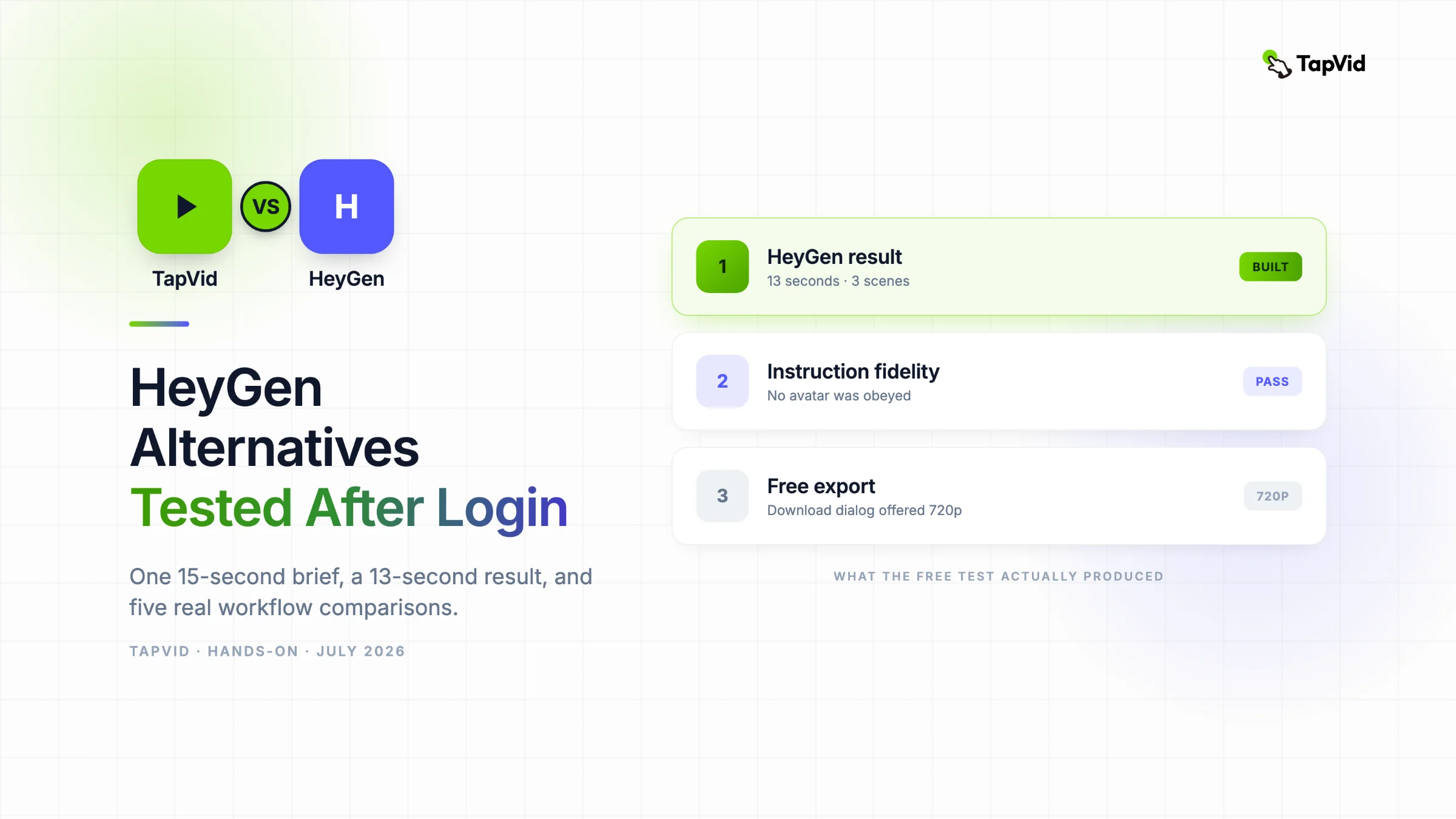

HeyGen erzeugte ein sauberes, 13 Sekunden langes Asset mit drei Szenen und befolgte die Anweisung ohne Avatar. Wenn du bereits einen Artikel, ein PDF, ein Skript, eine PRD oder Produkttexte besitzt, ist TapVid eine Explainer Video Engine, die diesen vorhandenen Inhalt in wenigen Minuten in ein strukturiertes Erklärvideo verwandelt. Dieser Test vergleicht beide Aufgaben, ohne alle KI-Videoprodukte gleichzusetzen.
01
So lief der Test mit demselben Briefing
Ein nützlicher Artikel über HeyGen-Alternativen muss eine genauere Frage beantworten als „Welche Tools erstellen ebenfalls KI-Videos?“. HeyGen kombiniert inzwischen Avatare, Stimmen, generative Assets, einen Video Agent, Übersetzung und einen Szeneneditor. Eine Liste, die diese Aufgaben ohne Tests vermischt, liefert mehr Namen, aber keine Entscheidung. Quelle
Ich verwendete in allen Tools dasselbe reproduzierbare Briefing: ein 15 Sekunden langes TapVid-Launchvideo im Format 16:9. TapVid wurde korrekt als Explainer Video Engine beschrieben. Das Video sollte zeigen, wie aus einem PDF ein klares Briefing und anschließend polierte Motion Graphics werden. Vorgaben waren weißer Hintergrund, Limettengrün #78d701, Indigo #5359ff und kein Avatar. Geprüft wurden Dauer, Seitenverhältnis, visuelle Richtung und die Einhaltung einer negativen Anweisung.
02
Was der eingeloggte HeyGen-Test tatsächlich erzeugte
Screenshot-Beleg: kostenloser HeyGen-Arbeitsbereich nach der Google-Anmeldung.
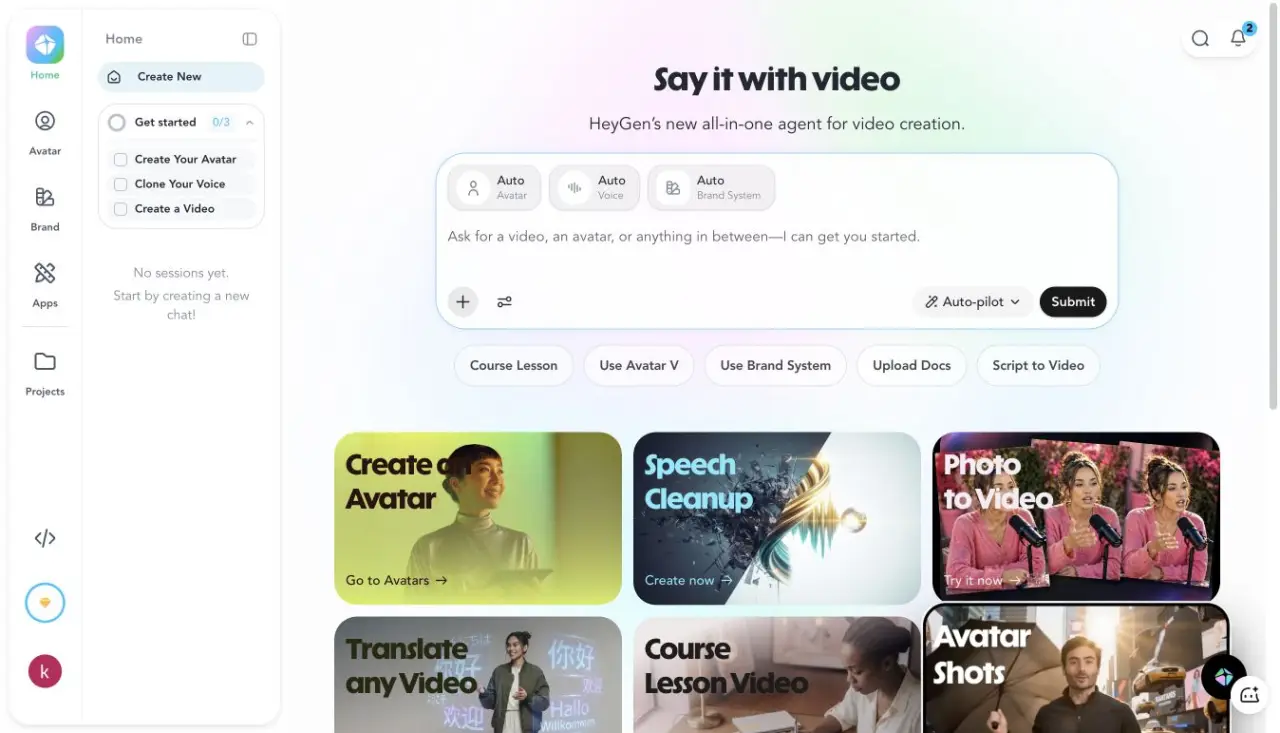
Ich meldete mich mit Google an, wählte den kostenlosen Tarif, gab beim Onboarding B2B SaaS oder Tech an und markierte „Produkt oder Dienstleistung bewerben“. Der eingeblendete Free-Plan bot drei Videos pro Monat, bis zu einer Minute pro Video, Avatar IV, Video Agent, Standardverarbeitung, mehr als 500 Stock-Digital-Twins, einen eigenen Digital Twin und über 30 Sprachen. Da die Hilfeseite regionale Unterschiede nennt, ist der tatsächlich verwendete Arbeitsbereich die belastbarere Quelle.
Screenshot-Beleg: das vollständige 15-Sekunden-Briefing ohne Avatar im HeyGen Video Agent.
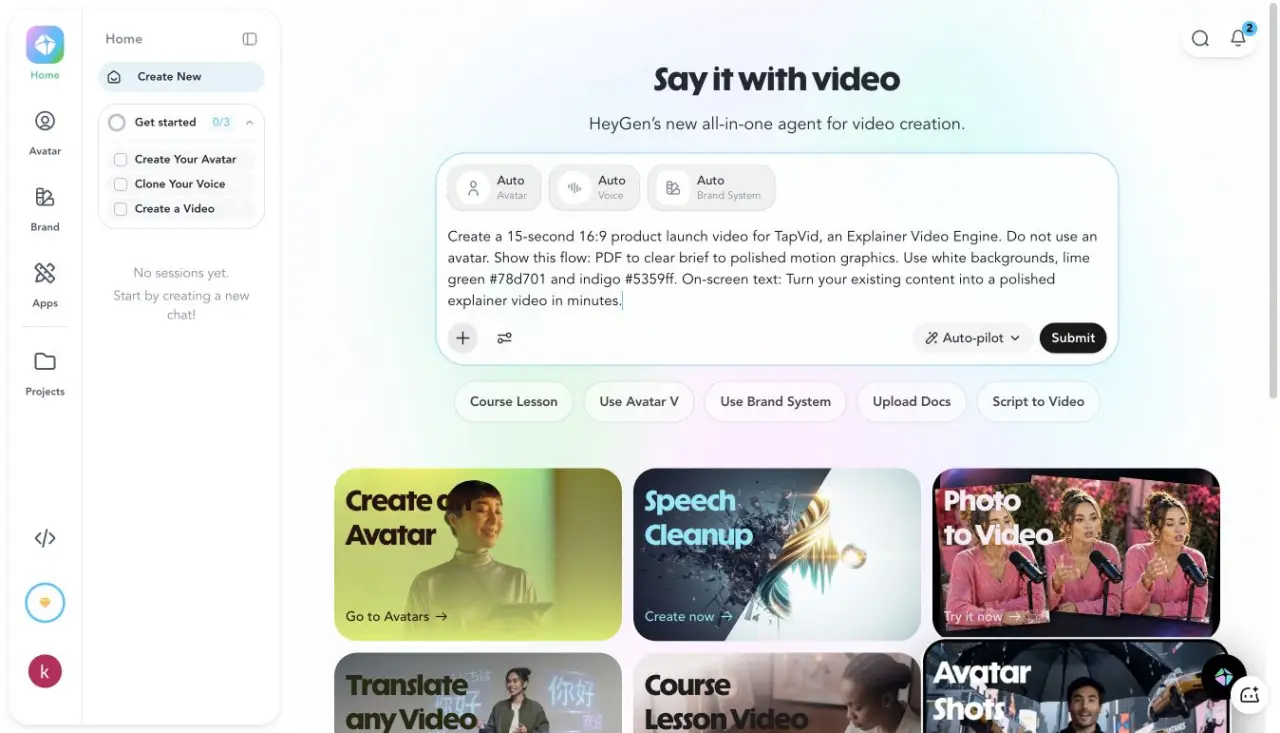
Ich fügte das Briefing direkt in den Video Agent ein, statt eine Demo-Vorlage zu wählen. Der Agent erstellte „TapVid Launch Video“, entwickelte Konzepte und Markenelemente, plante Stimme und Aufbau, erzeugte Untertitel und Musik, generierte drei Video-Assets und montierte drei B-Roll-Szenen. Das Aktivitätsprotokoll meldete nach 296 Sekunden Abschluss, bevor die finale Verarbeitung begann.
Screenshot-Beleg: HeyGen in der Verarbeitung, nachdem der Agent den Kreativplan abgeschlossen hatte.
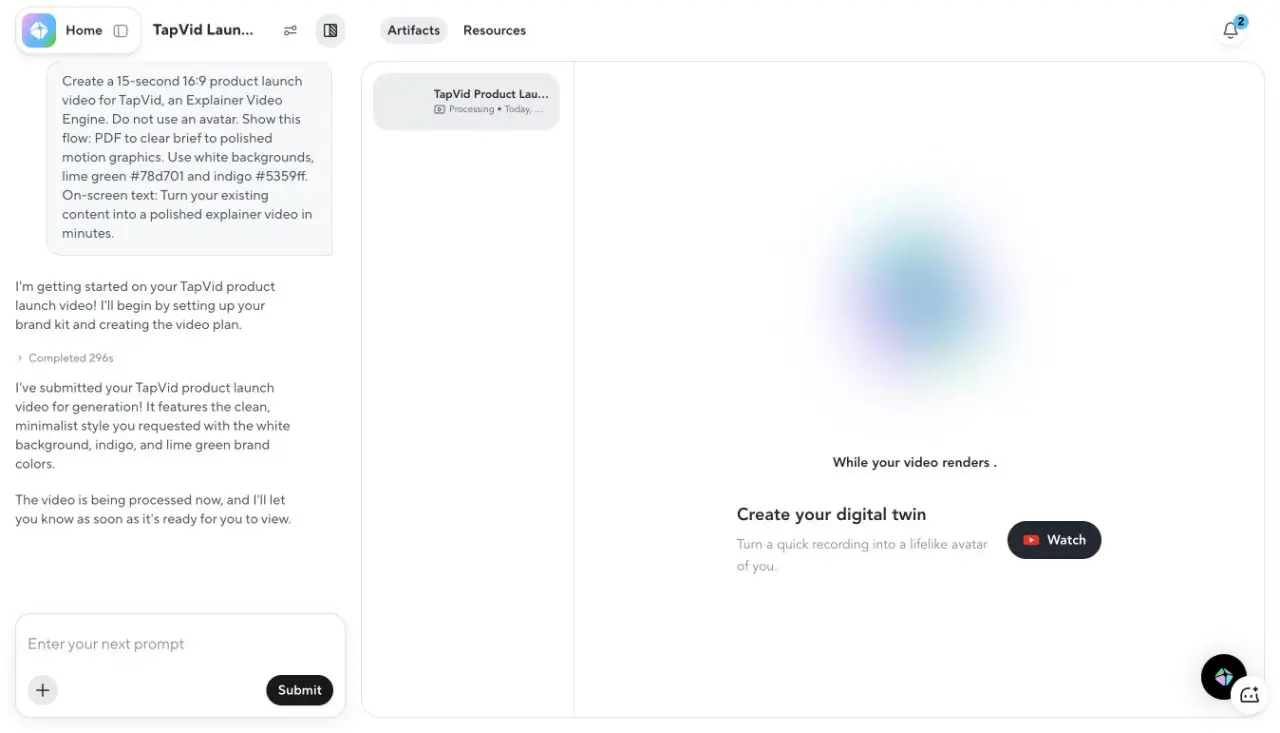
Die Verarbeitung endete 17 Sekunden später. Der Player zeigte 0:13, also zwei Sekunden weniger als bestellt. Diese Abweichung war deutlich kleiner als bei Pictory und Synthesia. HeyGen befolgte außerdem die Anweisung, keinen Avatar zu verwenden. Die Szenen nutzten Weißraum, indigofarbene Linien, einen limettengrünen Akzent, eine PDF-Karte, einfache Diagramme und den verlangten Schlusssatz.
Screenshot-Beleg: fertiges 13-Sekunden-HeyGen-Video mit drei sichtbaren Timeline-Szenen.
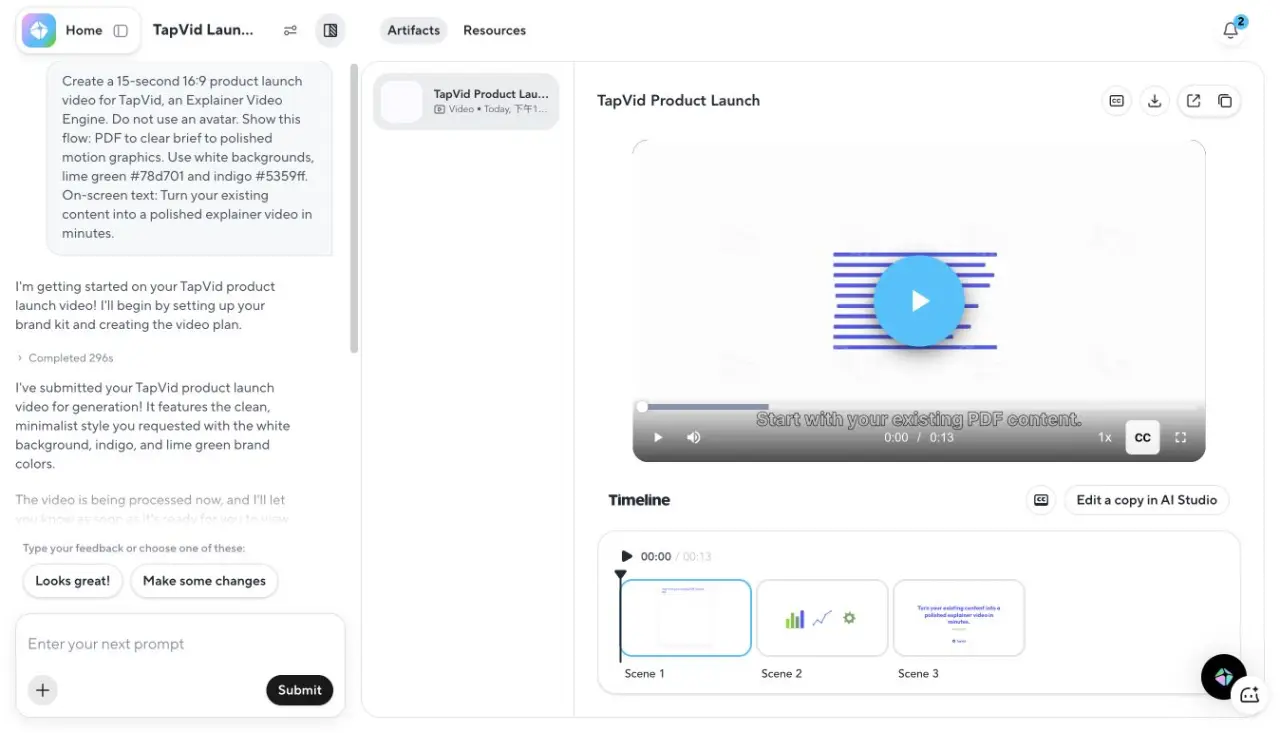
Am stärksten war die Einhaltung der Vorgaben, am schwächsten die Erklärungstiefe. „PDF zu Briefing zu Motion Graphics“ wurde zu drei sauberen Symbol-Szenen, doch der mittlere Briefing-Schritt wurde nicht als konkretes Dokument oder als Entscheidung ausgearbeitet. Für ein Social-Launch-Asset reicht das. Für ein Produkt-Erklärvideo wäre eine weitere Prompt-Runde oder ein stärker quellengebundenes Tool nötig.
Screenshot-Beleg: HeyGen-Exportdialog mit 13 Sekunden und 720p.
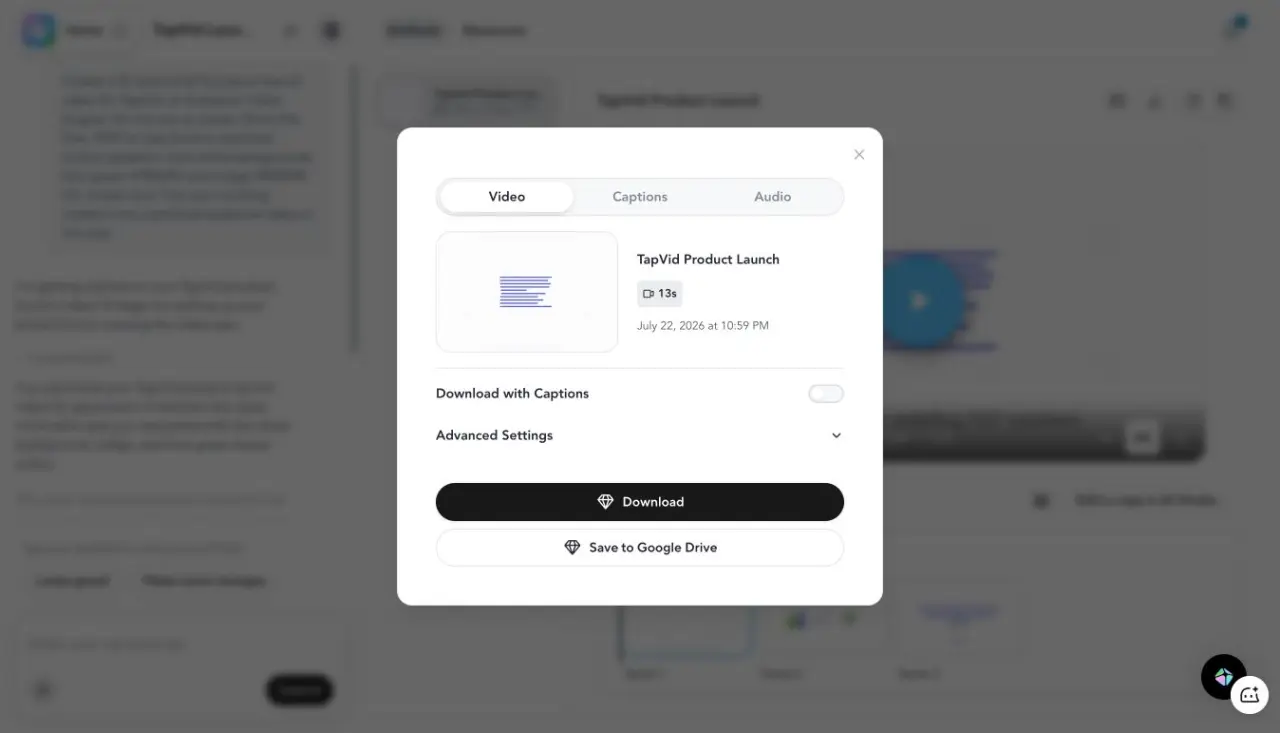
Der Download-Dialog bot Video-, Untertitel- und Audio-Tabs, einen Untertitel-Schalter, erweiterte Einstellungen, Google-Drive-Zustellung und 720p im kostenlosen Konto. Ich klickte auf Download. Eine höhere Auflösung oder einen Export ohne Wasserzeichen behaupte ich nicht, weil ich keinen Bezahltarif gewählt habe.
03
Ergebnisse auf einen Blick
| Tool | Abgeschlossener Test | Anfrage und Ergebnis | Wichtigste Beobachtung | Beste Eignung |
|---|---|---|---|---|
| HeyGen | Login, Generierung, Wiedergabe, Exportdialog | 15 s angefragt, 13 s Ergebnis | Kein Avatar, kostenloser 720p-Export | Kurze Marketing-Assets und Avatar-Abläufe |
| TapVid | 275-KB-PDF bis zum fertigen 60-s-Video | 60 s, vier Blöcke à 15 s | Briefing und Shot-Skript vor Render freigegeben | Vorhandene Inhalte zu strukturiertem Erklärvideo |
| Synthesia | Login, Outline, Render, Wiedergabe | 15 s angefragt, 40 s Ergebnis | Mindestens 30 s und Avatar eingefügt | Presenter-Training und interne Videos |
| Descript | Briefing, Plan, Editor, Exportdialog | 15 s angefragt, 16,4 s Ergebnis | Nächste Dauerpassform, 720p Wasserzeichen beim kostenlosen Export | Aufnahmen und Screencasts |
| Pictory | Skript, neun Szenen, Export | 15 s angefragt, 39,94 s Export | Generische Stockbilder und Wasserzeichen | Artikel als Stockvideo-Zusammenfassung |
| Fliki | Skript, vier Szenen, Exportdialog | 15 s angefragt, 31 s Ergebnis | Anweisungen gelangten in den Sprechertext | Einfache vertonte Szenen |
04
1. TapVid: am besten, um vorhandene Inhalte in ein Erklärvideo zu verwandeln
TapVid ist kein allgemeiner HeyGen-Klon. Es ist eine Explainer Video Engine für Creator, die bereits einen Artikel, ein PDF, ein Skript, eine PRD oder Produkttexte besitzen und daraus eine visuelle Erklärung brauchen. Der Ablauf beginnt mit dem Inhalt des Creators, erzeugt ein Briefing und ein Skript auf Shot-Ebene und rendert anschließend Motion Graphics, Sprechertext und Untertitel.
Screenshot-Beleg: TapVid-Briefing aus einem 275-KB-Artikel-PDF.
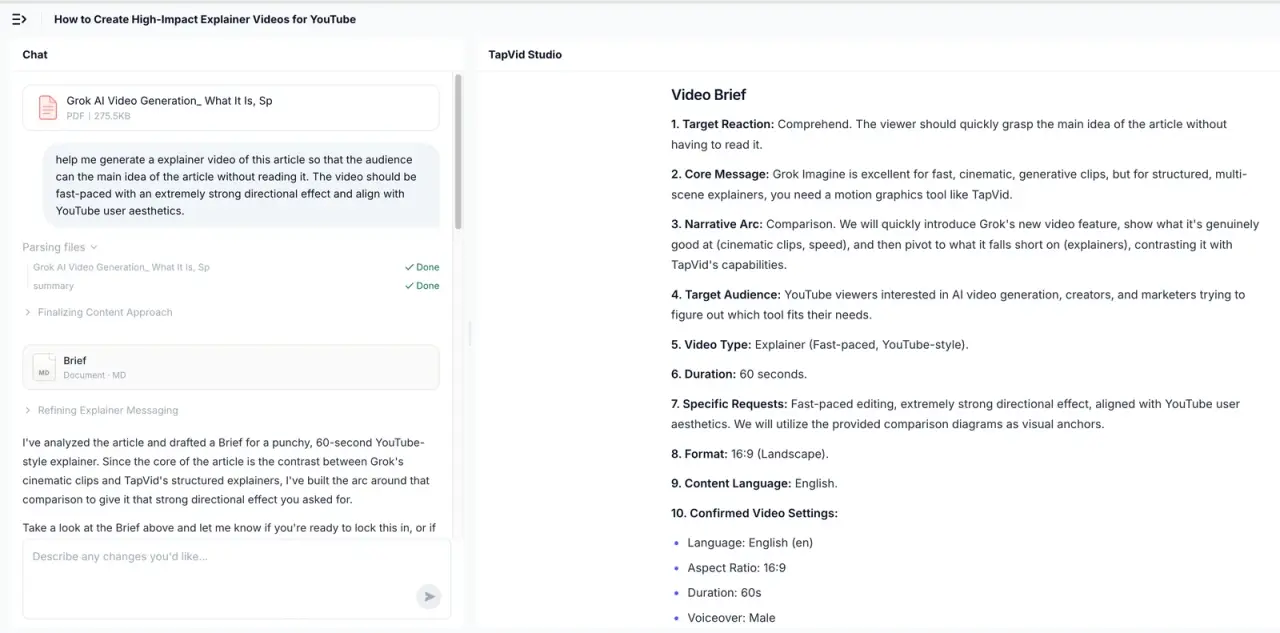
Ich lud ein 275-KB-PDF hoch und verlangte ein schnelles YouTube-Erklärvideo, mit dem Zuschauer den Artikel verstehen, ohne ihn zu lesen. TapVid lieferte Zielgruppe, Kernbotschaft, Erzählbogen, gewünschte Reaktion, 60 Sekunden, 16:9 und Stimme. Nach Freigabe entstand ein Ablauf aus vier 15-Sekunden-Blöcken plus Shot-für-Shot-Skript. Vom Upload bis zum fertigen Video vergingen 6 Minuten 21 Sekunden.
Der Unterschied zu HeyGen ist klar: HeyGen lieferte schneller ein sauberes 13-Sekunden-Asset und traf die Markenfarben. TapVid investierte mehr Zeit in die Informationsstruktur und verarbeitete ein echtes Quelldokument. Wähle TapVid, wenn die Erklärung dem vorhandenen Material treu bleiben muss. Wähle HeyGen, wenn ein kurzes Kampagnen-Asset oder ein menschenähnlicher Presenter im Mittelpunkt steht.
05
2. Synthesia: am besten, wenn der Presenter das Format ist
Screenshot-Beleg: finaler Synthesia-Player mit demselben Briefing ohne Avatar.
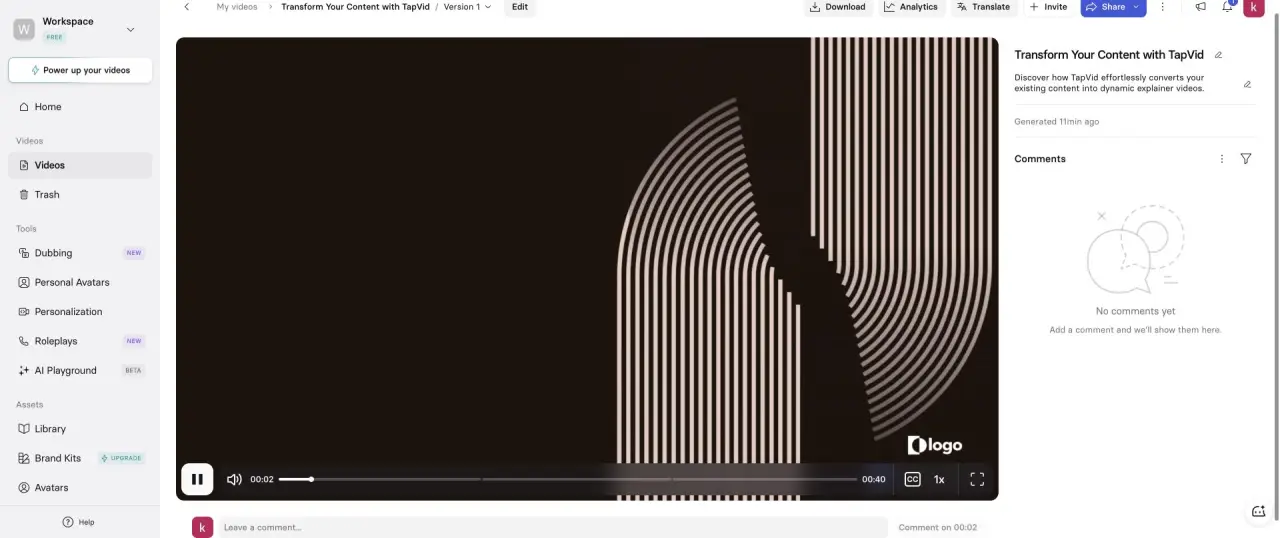
Ich führte den Test im eingeloggten Basic-Arbeitsbereich von Synthesia durch. Der AI Video Assistant akzeptierte dieselbe 15-Sekunden-Anfrage, bot aber mindestens 30 Sekunden an. Er erzeugte drei Szenen und ein 40-Sekunden-Video. Trotz der ausdrücklichen Zeile „kein Avatar“ setzte er einen Avatar ein. Der Schluss behielt außerdem ein Platzhalterlogo statt des echten TapVid-Zeichens.
Das beweist nicht, dass Synthesia ein schlechtes Avatar-Produkt ist. Es zeigt, dass die Annahmen der Vorlage stärker waren als die negative Prompt-Vorgabe. Synthesia ist die bessere HeyGen-Alternative, wenn Training, mehrsprachig konsistente Presenter, Workspace-Reviews oder Enterprise-Kontrollen zählen. Es ist schlechter, wenn das Gesicht verschwinden und das visuelle System die Erklärung tragen soll.
06
3. Descript: am besten für Aufnahmen und transcriptbasierten Schnitt
Screenshot-Beleg: Descript-Editor mit drei Szenen und 16,4 Sekunden.
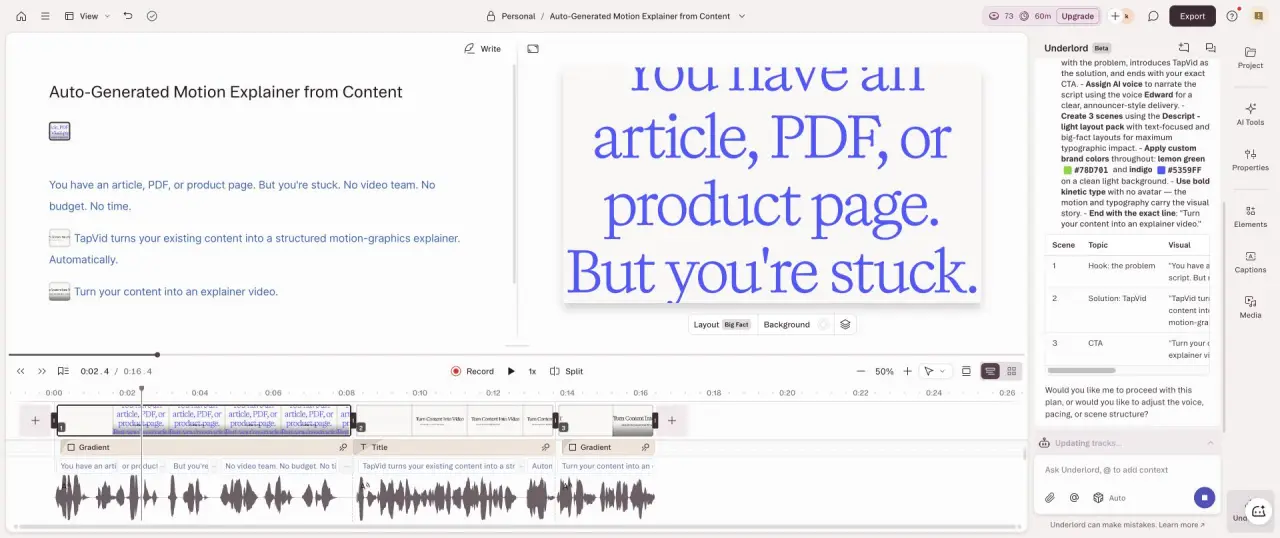
Descript erstellte einen Plan, drei Szenen und landete bei 16,4 Sekunden, der besten Dauerübereinstimmung im Vergleich. Seine Stärke ist nicht ein synthetischer Sprecher. Sprache und Szenentext sind die zentrale Steuerfläche, sodass Korrekturen eher wie Dokumentbearbeitung als wie Arbeit an einer traditionellen Timeline wirken.
Der kostenlose Export bot 720p mit Descript-Wasserzeichen. Ich würde Descript statt HeyGen für Webinar-Clips, Screendemos, Podcast-Ausschnitte oder Tutorials mit bereits vorhandenem Rohmaterial wählen. Es ersetzt weder den Custom Digital Twin noch die lippensynchrone Lokalisierung von HeyGen, spart aber bei echten Aufnahmen oft mehr Arbeit.
07
4. Pictory: am besten für schnelle Artikel-zu-Stockvideo-Verwertung
Screenshot-Beleg: Pictory-Editor mit neun Szenen nach dem Testbriefing.
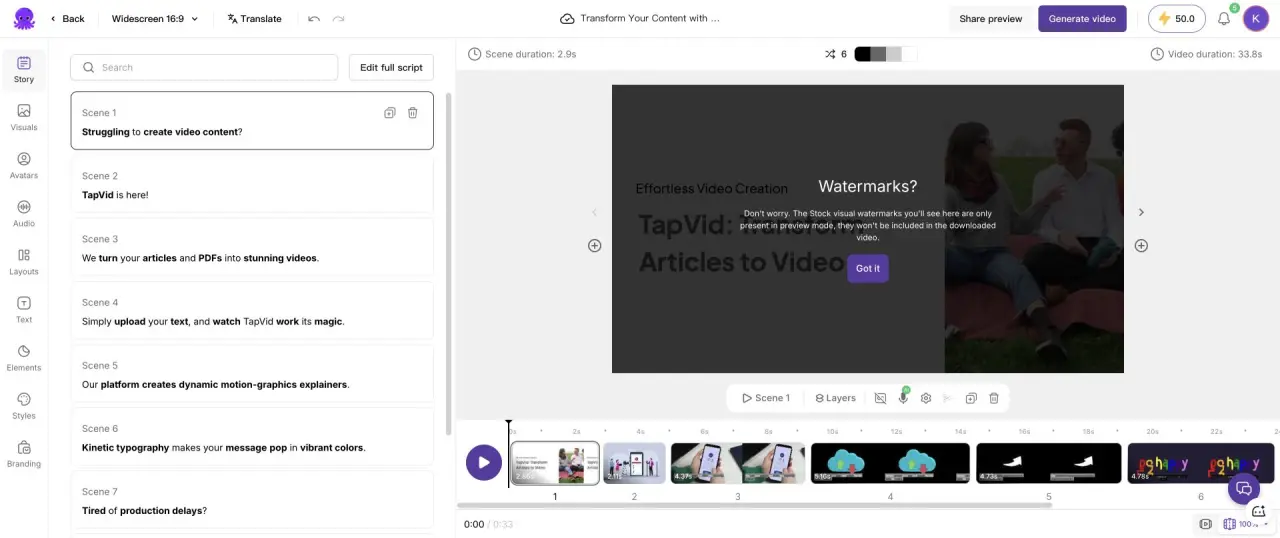
Pictory akzeptierte keine 15-Sekunden-Einstellung. Das generierte Skript dauerte rund 29 Sekunden, die Editor-Timeline 33,8 Sekunden und das exportierte öffentliche Video 39,936654 Sekunden. Das System erzeugte neun Szenen mit Stockmaterial, Untertiteln und Pictory-Wasserzeichen. Die Markentreue war schwach, weil die Bilder allgemeine Ideen statt des tatsächlichen Produktablaufs zeigten.
Pictory ist nützlich, wenn eine „ansehbare Stockmontage aus einem Artikel“ ausreicht und der Creator nur Skript, Szenenzuordnung, Stimme und Export braucht. Für einen Markenlaunch überzeugt es weniger als HeyGen und für ein konzeptreiches Erklärvideo ist es weniger quellenstrukturiert als TapVid.
08
5. Fliki: am besten für einen einfachen vertonten Szenenablauf
Screenshot-Beleg: Fliki-Editor mit vier generierten Szenen und insgesamt 31 Sekunden.
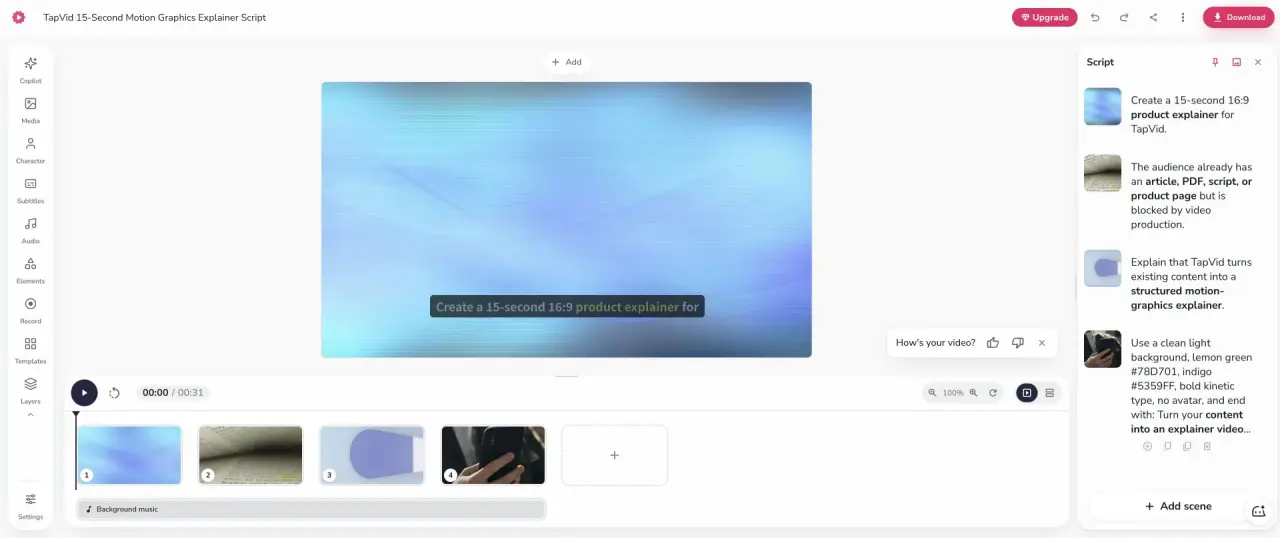
Fliki erzeugte vier Szenen mit 31 Sekunden und bot kostenlos 720p mit einem Upsell zur Entfernung des Wasserzeichens. Der markante Fehler lag beim Prompt-Parsing: Einige Produktionsanweisungen wurden als Sprechertext statt als Vorgaben behandelt. Vor Veröffentlichung war deshalb Bereinigung nötig, obwohl die Szenenstruktur leicht verständlich war.
Wähle Fliki, wenn Sprechertext, Stockmedien und eine einfache Szenenliste reichen. Wähle HeyGen, wenn Avatar, Video Agent oder generative Szenenarbeit wichtig sind. Wähle keines von beiden, wenn jeder Satz einem bestimmten Diagramm oder Produktzustand entsprechen muss.
09
So wählst du, ohne sechs Abos zu kaufen
Beginne mit dem Format, nicht mit der Feature-Tabelle. Wenn die Botschaft ohne Presenter zerfällt, teste HeyGen und Synthesia mit demselben Sprecher, derselben Sprache und demselben Skript. Wenn sich ohne Presenter nichts ändert, teste TapVid, Descript oder Pictory mit derselben Quelle. Bei bereits aufgenommenem Material starte mit Descript, bevor du synthetisches Video bezahlst.
Bewerte danach die Anweisungstreue. Ein schönes 40-Sekunden-Video nach einer 15-Sekunden-Anfrage verursacht Schnittarbeit. Eine Person trotz „kein Avatar“ verursacht Formatarbeit. Produktionsanweisungen im Sprechertext verursachen Skriptarbeit. Das sind messbare Arbeitskosten, keine Geschmacksfragen.
Öffne zuletzt den Exportdialog, bevor du dich auf einen Workflow festlegst. Die kostenlosen Ergebnisse unterschieden sich bei Auflösung und Wasserzeichen: HeyGen bot 720p, Descript 720p mit Wasserzeichen, Pictory und Fliki sichtbares Branding. Eine brauchbare Editor-Demo ist nicht automatisch eine brauchbare Enddatei.
10
Frequently asked questions
Was ist die beste HeyGen-Alternative?
Synthesia ist die nächste direkte Alternative für presenterbasierte Geschäftsvideos. TapVid passt besser, wenn vorhandene Inhalte zu einem strukturierten Motion-Graphics-Erklärvideo werden sollen. Descript passt bei Aufnahmen oder Screencasts.
Gibt es eine kostenlose HeyGen-Alternative?
Synthesia, Descript, Pictory und Fliki boten im Test einen kostenlosen Einstieg. Auflösung, Wasserzeichen, Credits und Monatslimits unterschieden sich. Prüfe den finalen Download, nicht nur den Editor.
Befolgte HeyGen die Vorgabe ohne Avatar?
Ja. Das 13-Sekunden-Ergebnis bestand aus drei bewegungsbasierten Szenen ohne Presenter. Synthesia befolgte dieselbe negative Vorgabe nicht.
Wie lange brauchte HeyGen?
Das Aktivitätsprotokoll zeigte 296 Sekunden Agentenarbeit und anschließend 17 Sekunden Verarbeitung, bevor das Video verfügbar war.
Exportiert HeyGen kostenlos?
Das eingeloggte Free-Konto zeigte einen 720p-Download. Tarife und regionale Gratislimits können sich ändern, daher sollte der eigene Exportdialog geprüft werden.
11