
TL;DR
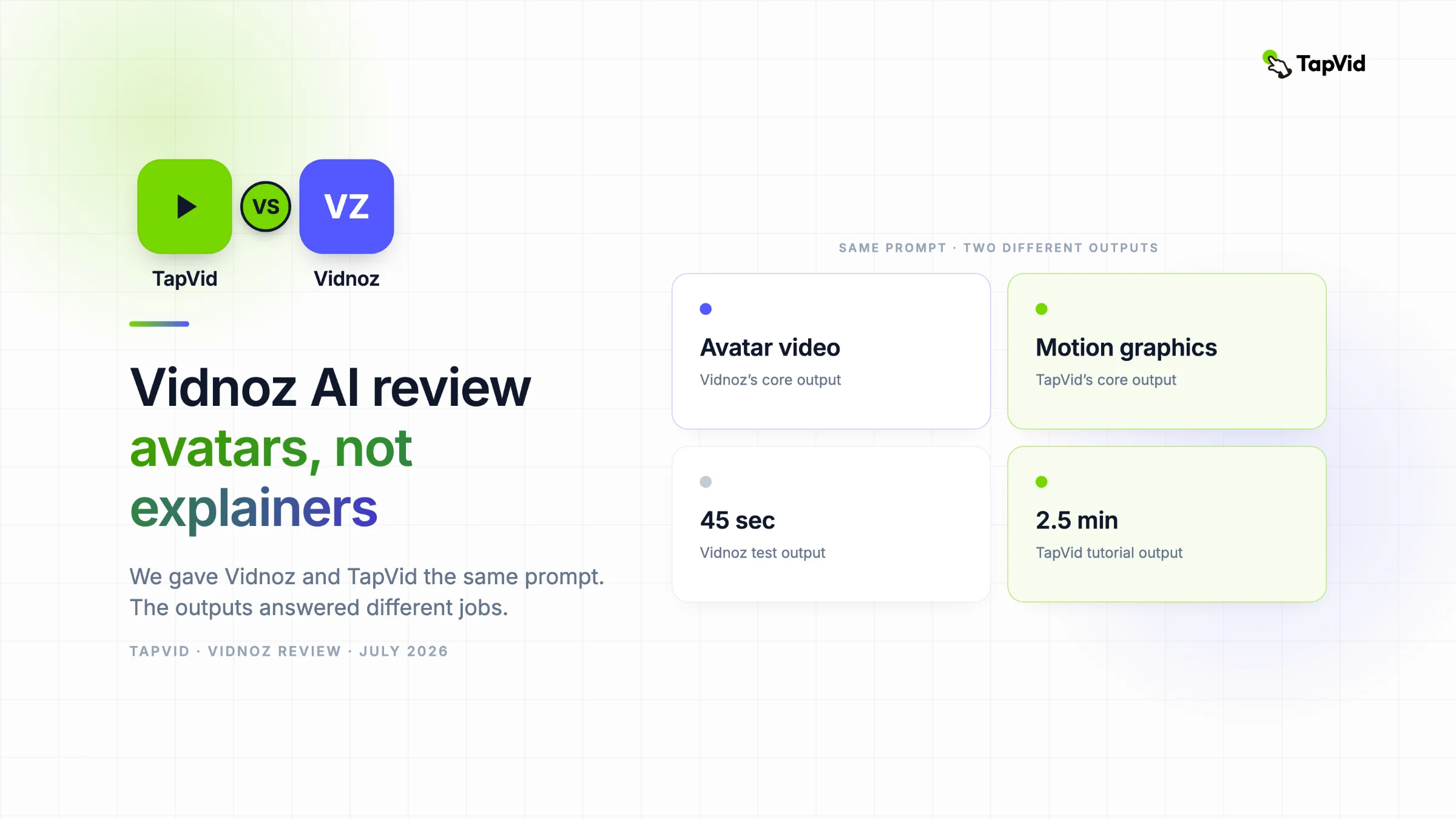
Vidnoz ist großartig für schnelle Talking-Head-Avatar-Videos, Spokesperson-Clips und schnelle Videoübersetzung. Für ein strukturiertes, informationsdichtes Motion-Graphics-Erklärvideo aus einem Prompt ist TapVid die bessere Wahl. Wir gaben beiden denselben Prompt: Vidnoz lieferte einen Avatar neben einem Stockfoto der Freiheitsstatue, TapVid ein zweieinhalbminütiges animiertes Tutorial.
Vidnoz AI ist ein schneller, großzügiger KI-Avatar-Video-Generator. Er verwandelt ein Skript oder einen Einzeiler-Prompt in ein Talking-Head-Presenter-Video, mit 1.900+ Avataren, 140+ Sprachen und einem kostenlosen Tages-Tarif. Für strukturierte Motion-Graphics-Erklärvideos ist er nicht gebaut. Wir gaben ihm denselben Prompt wie TapVid, und der Unterschied war kaum zu übersehen.
01
Was macht TapVid anders?
Kurze Offenlegung vorab: Dieser Test wird vom TapVid-Team veröffentlicht, und wir haben Vidnoz direkt im kostenlosen Tarif getestet. Wir zeigen, wo TapVid als Alternative passt, und bleiben fair, wo Vidnoz seinen Job wirklich gut macht.
Zur Einordnung, wo TapVid steht, damit der Vergleich einen Bezugsrahmen hat: TapVid ist für strukturierte Motion-Graphics-Ausgaben gebaut, nicht für Avatare. Der Unterschied zeigt sich an drei Stellen.
Input: Du beschreibst, was dein Video vermitteln oder verkaufen soll, oder du gibst ein PDF oder eine URL hinein. Du schreibst keine Zeilen, die ein Presenter vorliest.
Output: Ein strukturiertes Motion-Graphics-Video mit Kapiteln, animierten Diagrammen, On-Screen-Text, Daten-Callouts und kinetischer Typografie, plus Voiceover und Musik, fertig synchronisiert. Gebaut, um etwas zu erklären, nicht um 45 Sekunden mit einem sprechenden Kopf zu füllen.
Workflow: TapVid plant die Szenen, schreibt das Skript und animiert jeden Schritt aus deinem Prompt. Du editierst in normaler Sprache („mach das Intro kürzer“). Keine Timeline, kein Avatar-Casting, kein Template, gegen das du ankämpfst.
02
Was ist Vidnoz AI?
Vidnoz AI ist eine cloudbasierte KI-Videoplattform, die um Talking-Head-Avatare herum gebaut ist. Du wählst einen Avatar, gibst ihm ein Skript (getippt, aus einem Prompt generiert oder aus einer PPT oder PDF importiert), wählst eine Stimme, und Vidnoz produziert ein Video im Presenter-Stil. Keine Kamera, kein Schauspieler, kein Schnittprogramm.
Der Katalog ist groß: 1.900+ KI-Avatare, 3.381 Templates in den Kategorien Education, Explainer, Business, Breaking News und Social Media, dazu Stimmen in 140+ Sprachen. Gebündelt sind außerdem Voice Cloning, ein KI-Video-Übersetzer, Text-to-Speech und der neuere Modus „Expressive Avatars“.
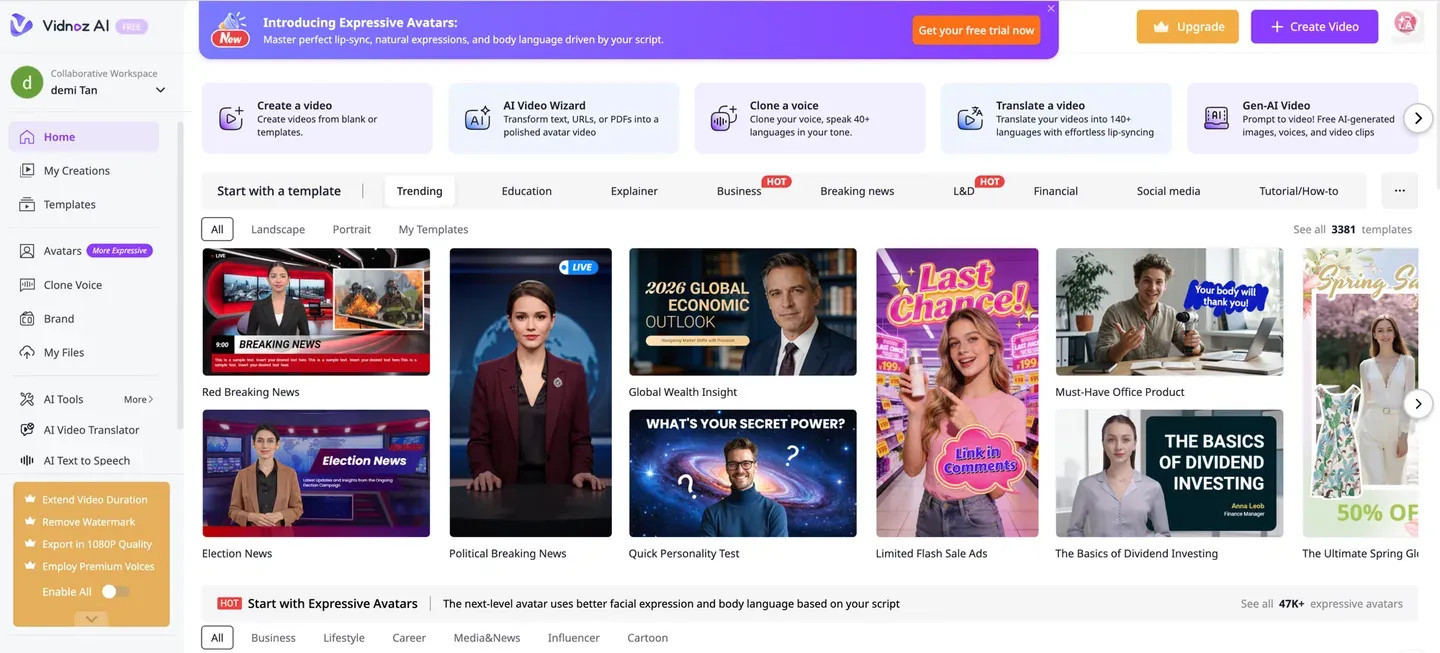
Vidnoz ist aus gutem Grund beliebt. Es ist wirklich schnell, der kostenlose Tarif macht den Einstieg leicht, und für einen simplen „Avatar liest mein Skript“-Job tut es genau, was es verspricht.
03
Zentrale Funktionen
1. KI-Avatare. 1.900+ Avatare in Business-, Casual- und Nachrichtensprecher-Optik. Das ist der Kern des Produkts und das, wofür die meisten kommen.
2. AI Video Wizard. Vidnoz’ Prompt-zu-Video-Weg. Du kannst ein Thema tippen, ein Skript einfügen oder eine PPT-, PDF- oder Word-Datei importieren, Szenenanzahl, Format und Tonalität wählen, und er entwirft ein geskriptetes Video für dich.
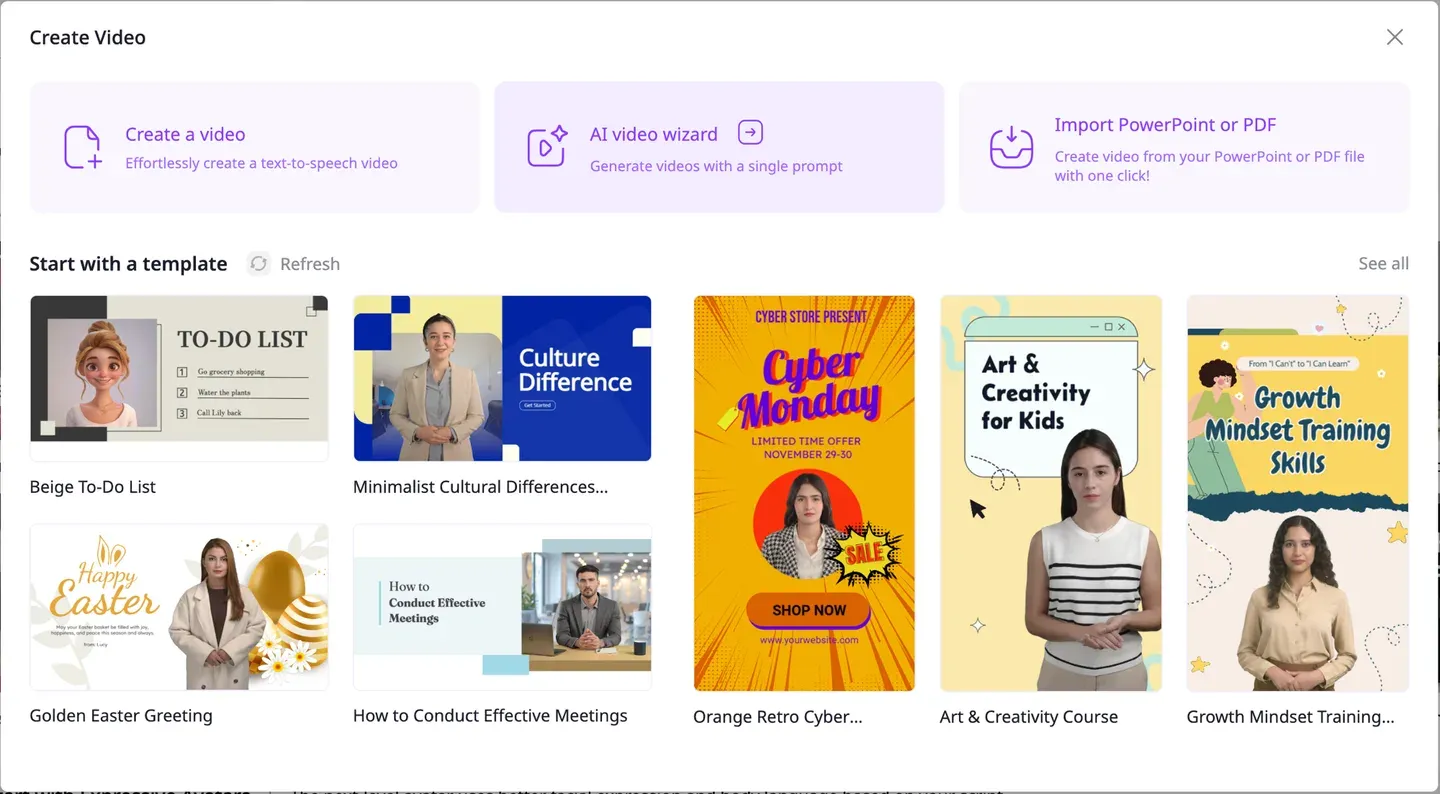
3. Templates. 3.381 Templates für News, Ads, Bildung und Social-Formate. 4. Voice Cloning und Stimmen in 140+ Sprachen. 5. AI Video Translator, der ein bestehendes Video mit Lippensynchronisation in 140+ Sprachen lokalisiert – eine echte Stärke, wenn Übersetzung dein Hauptjob ist. 6. Talking Photo und Expressive Avatars, um ein Standbild in einen sprechenden Presenter zu verwandeln.
Achte auf das Muster: Jeder Weg führt zu einem Presenter, der auf dem Bildschirm Text vorliest. Das ist das Produkt. Und genau das solltest du im Kopf behalten, wenn dein Video gar keinen Presenter haben soll.
04
Vidnoz vs. TapVid: der direkte Vergleich
Beide Tools nehmen einen Text-Prompt und liefern ein fertiges Video. Was auf dem Bildschirm landet – und wie viel von deiner Idee überlebt –, ist der Punkt, an dem sie sich trennen.
Vidnoz startet bei: „Wer ist mein Presenter und was sagt er?“ TapVid startet bei: „Was muss mein Publikum verstehen, und wie zeige ich es?“
| Vidnoz | TapVid | |
|---|---|---|
| Kern-Output | Talking-Head-Avatar-Video | Strukturierte Motion Graphics |
| Visueller Stil | Presenter + Template + Stock-Material | Animierte Diagramme, Text, Daten, kinetische Typo |
| Bester Input | Ein Skript, das ein Avatar vorliest | Ein Prompt, PDF oder eine URL zum Erklären |
| Informationsdichte | Ein Presenter, der zusammenfasst | Schritt-für-Schritt-Lehre mit Kapiteln |
| Editing-Modell | Szene neu generieren | Anweisungen in normaler Sprache |
| Respektiert ein „kein Presenter“-Briefing | Nein, es fällt auf einen Avatar zurück | Ja |
| Kostenloser Tarif | Ca. 1 Min./Tag, 720p, Wasserzeichen | Kostenloser Start, 720p, Wasserzeichen |
| Am besten für | Spokesperson, Übersetzung, Social-Templates | Erklärvideos, Demos, Tutorials, Lehre |
Wann Vidnoz gewinnt: Du willst schnell einen Presenter auf dem Bildschirm. Ein Spokesperson-Update, ein Clip im News-Stil, eine Template-Social-Ad oder die übersetzte Version eines bestehenden Videos. Dafür ist Vidnoz gebaut, und es bringt dich schnell ans Ziel.
Wann TapVid gewinnt: Dein Video soll etwas erklären oder lehren, und ein sprechender Kopf ist nicht der Punkt.
05
Praxistest: derselbe Prompt, zwei völlig verschiedene Videos
Das ist der Teil, den die meisten Tests überspringen. Wir haben Vidnoz und TapVid den identischen Prompt gegeben und verglichen, was zurückkam.
Der Prompt, Wort für Wort, an beide: "Create a simple beginner tutorial animation teaching the core rules of Go: placing stones, liberties, capturing, and surrounding territory to win, on a small board, step by step with short on-screen text. Style: motion graphics, no photorealistic images." (Erstelle eine einfache Anfänger-Tutorial-Animation, die die Grundregeln von Go lehrt: Steine setzen, Freiheiten, Schlagen und Gebiet umschließen, auf einem kleinen Brett, Schritt für Schritt mit kurzem On-Screen-Text. Stil: Motion Graphics, keine fotorealistischen Bilder.)
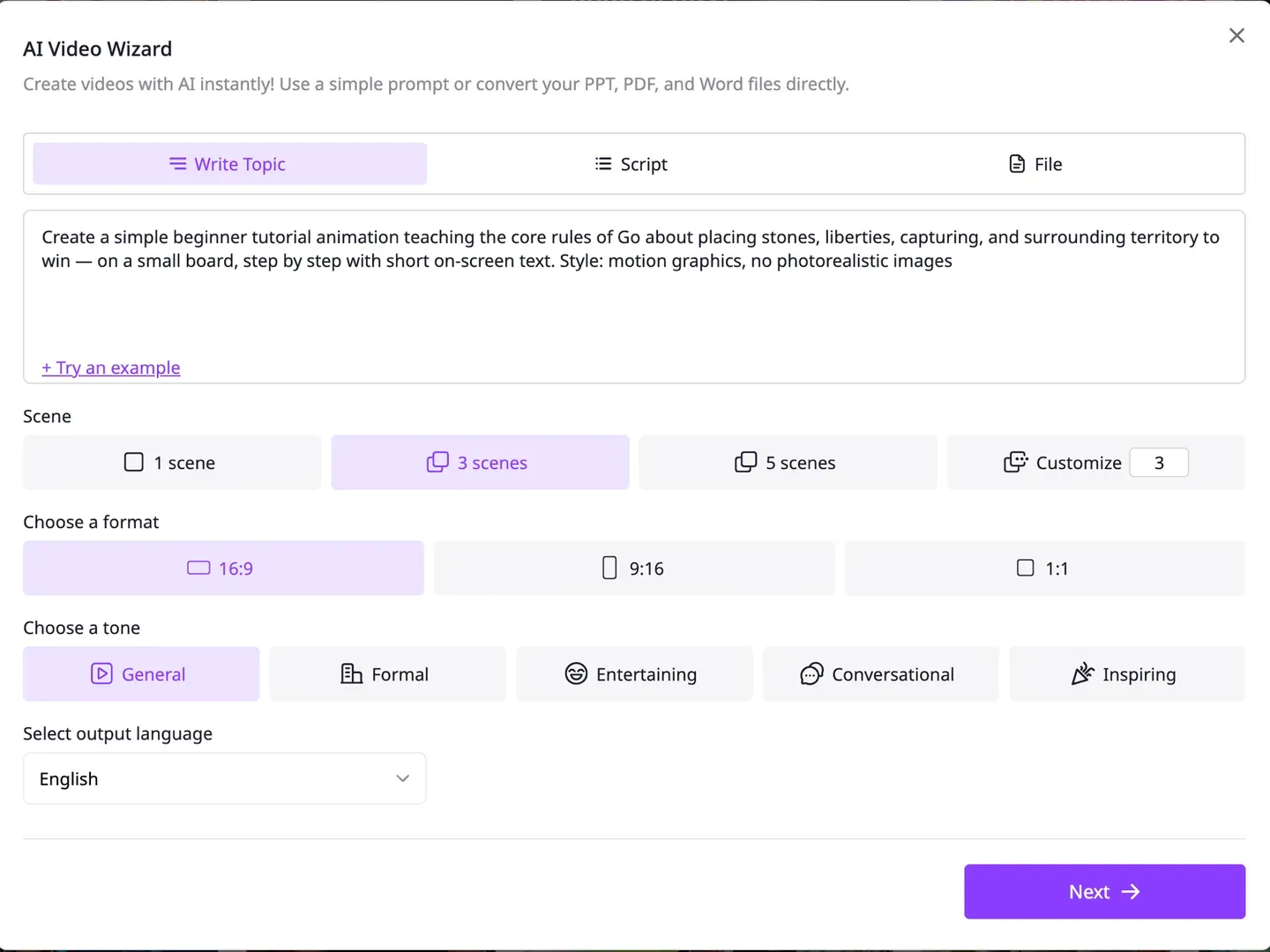
Was Vidnoz produzierte: Der AI Video Wizard entwarf ein Drei-Szenen-Skript und leitete es in ein Avatar-Template. Eine Motion-Graphics-Option gab es nicht. Das Ergebnis ist ein Presenter, der das Skript vorliest.
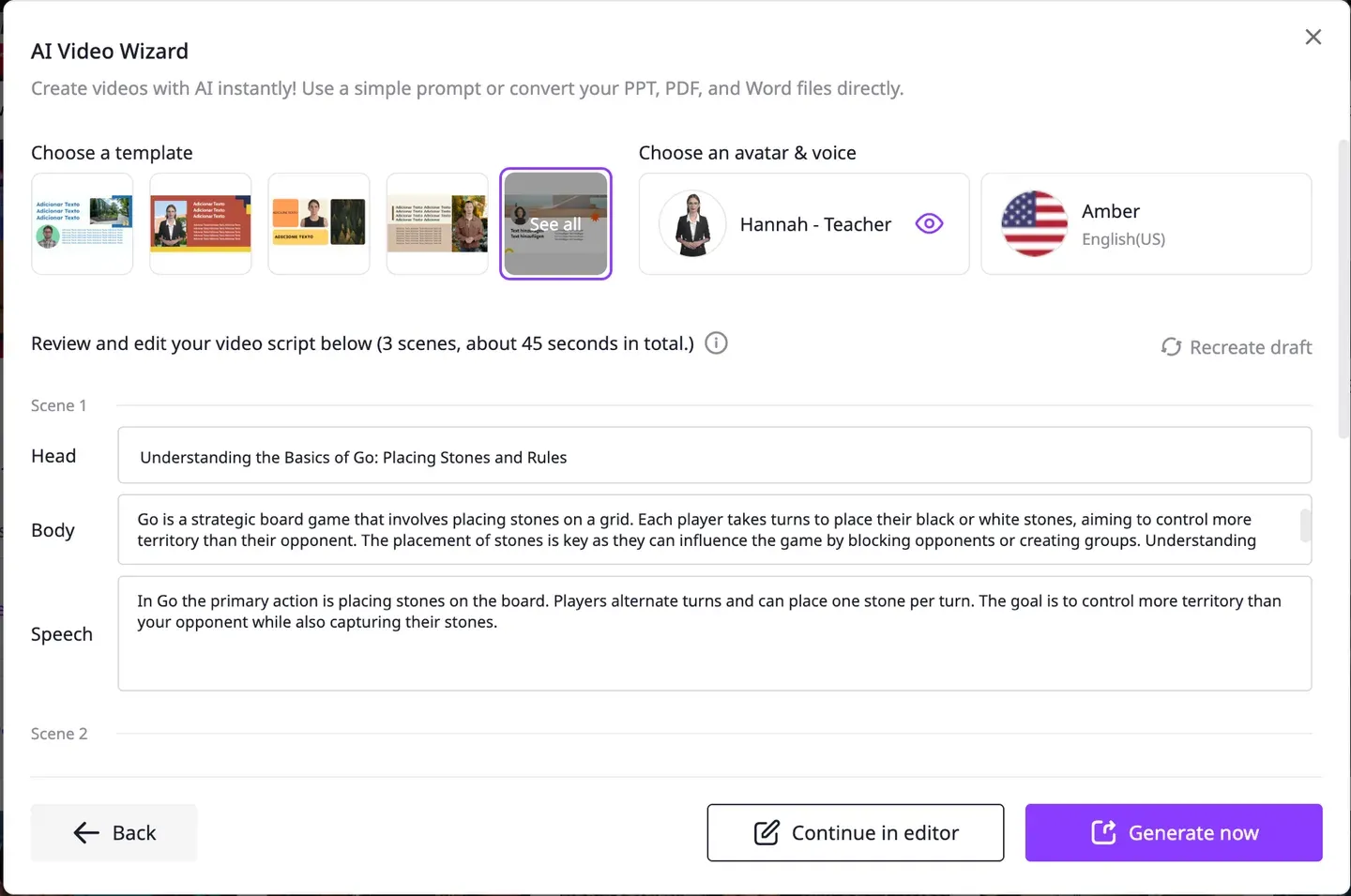
Das fertige 45-Sekunden-Video war ein Avatar im Business-Anzug neben einem Stockfoto der Freiheitsstatue, mit der Bildunterschrift "Every stone placed on the board has liberties."
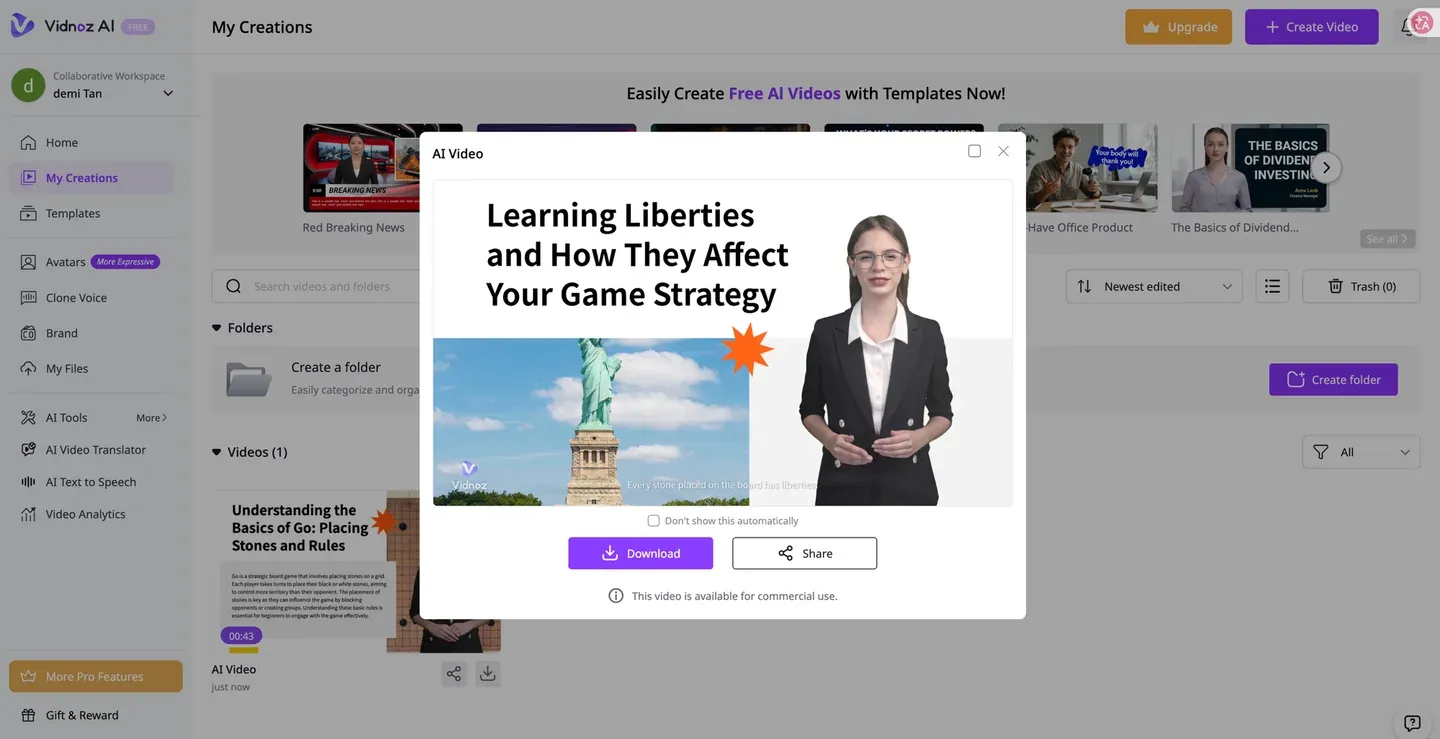
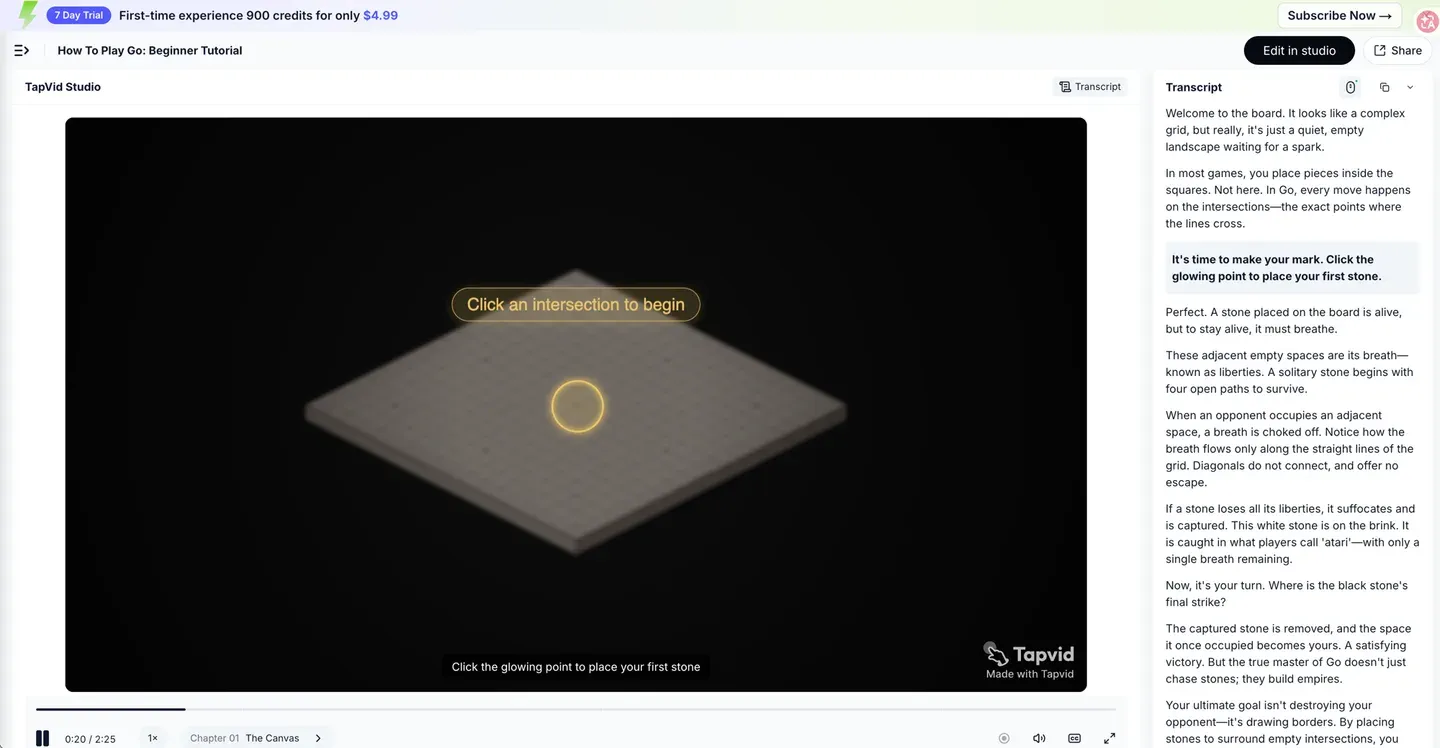
Das sollte man sacken lassen. Der Prompt sagte „motion graphics, no photorealistic images“, und Vidnoz lieferte einen fotorealistischen Avatar plus Stockfoto. Es las den Go-Begriff „liberties“ – die freien Punkte um einen Stein – als Statue of Liberty (Freiheitsstatue) und zog ein passendes Bild. Keine einzige der eigentlichen Regeln wurde visuell vermittelt.
Derselbe Prompt in TapVid lieferte ein zweieinhalbminütiges Tutorial mit dem Titel "How To Play Go: Beginner Tutorial", gebaut als animiertes Brett mit On-Screen-Text und Kapiteln. Es lehrte erst die Schnittpunkte, dann korrekt die Freiheiten (ein Stein „muss atmen“, und seine angrenzenden freien Punkte sind „sein Atem, genannt liberties“), dann den echten Begriff „Atari“ für einen Stein mit nur noch einem Atemzug, dann das Schlagen und schließlich das Umschließen von Gebiet zum Sieg. Das Brett war interaktiv und forderte dazu auf, einen Schnittpunkt anzuklicken, um einen Stein zu setzen.
Wo Vidnoz aus „liberties“ die Freiheitsstatue machte, lehrte TapVid die Freiheiten als das Konzept, das ein Go-Spieler tatsächlich braucht. Das ist der Unterschied zwischen einem Presenter, der um ein Thema herumliest, und einem Video, das gebaut ist, um es zu erklären.
Das Fazit: Für einen Spokesperson-Clip oder ein übersetztes Video wäre Vidnoz das schnellere, bessere Tool gewesen. Für dieses Briefing – ein strukturiertes Erklärvideo ohne Presenter – produzierte TapVid das Video, das der Prompt tatsächlich verlangte, und Vidnoz konnte es nicht.
06
Preise
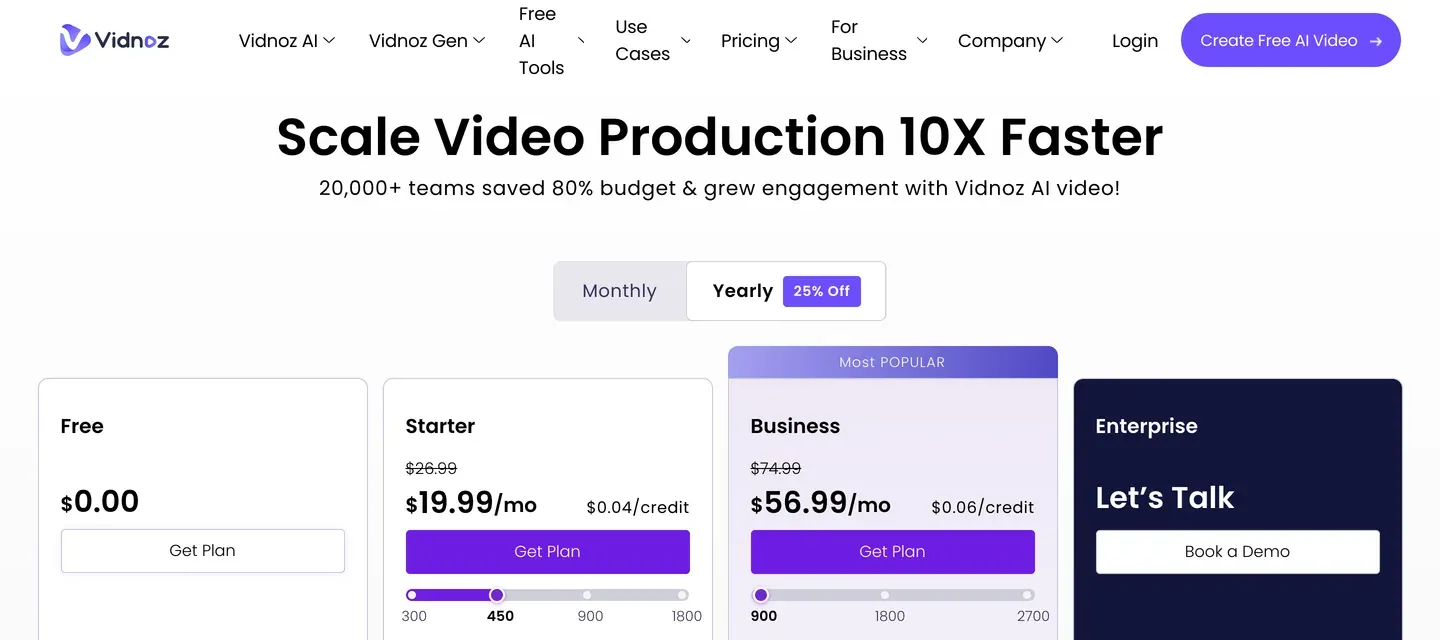
Die Vidnoz-Preise wurden im Juli 2026 gegen vidnoz.com/pricing und den kostenlosen Tarif im Produkt geprüft. Der kostenlose Einstieg ist für einen schnellen Versuch großzügig: 30 Credits pro Tag, etwa eine Minute Video, 24 Stunden gültig, in 720p mit Vidnoz-Wasserzeichen. Credits werden nicht übertragen.

| Tarif | Monatlich | Jährlich | Bemerkenswert |
|---|---|---|---|
| Free | $0 | $0 | Ca. 1 Min./Tag, 720p, Wasserzeichen |
| Starter | $26.99 | $19.99/Mon. | 1080p, kein Wasserzeichen, Videos bis 60 Min. |
| Business | $74.99 | $56.99/Mon. | Voice Cloning, Übersetzung, Brand-Kit, Team |
| Enterprise | Individuell | Individuell | API-Zugang, Avatar Pro, dedizierter Support |
Ein Hinweis vor dem Abo: Auf G2 und Trustpilot ist eine wiederkehrende Beschwerde das Thema Abrechnung und Kündigung, inklusive unerwarteter Jahresabbuchungen. Teste zuerst im kostenlosen Tarif. TapVids Pläne starten kostenlos und skalieren über monatliche Credits, mit einem günstigen Erstnutzer-Trial für einen volleren Testlauf.
07
Vorteile
- Große Bibliothek: 1.900+ Avatare und 3.381 Templates decken die meisten Presenter-Formate ab.
- Wirklich schnell für Talking-Head-Videos und einfach genug für Erstnutzer.
- Großzügige tägliche Gratis-Credits, keine Kreditkarte nötig.
- Starke KI-Videoübersetzung in 140+ Sprachen mit Lippensynchronisation – ein echter Vorteil für Lokalisierung.
- Voice Cloning in den höheren Tarifen enthalten.
08
Nachteile
- Jeder Weg führt zu einem Presenter. Auch bei einem Briefing ohne Presenter oder mit Motion-Graphics-Wunsch bekommst du einen Avatar.
- Laut G2-Reviews können die Standard-KI-Stimmen roboterhaft klingen, und die Lippensynchronisation driftet bei längeren Skripten.
- Laut Nutzerbewertungen ist die Avatar-Vielfalt begrenzt, und die meisten Avatare haben einen Business-Look.
- Du siehst das Ergebnis erst nach der Generierung; Skript oder Visuals zwischendurch feinzujustieren ist kaum möglich.
- Wiederkehrende Beschwerden zu Abrechnung und Kündigung auf Trustpilot; Gratis-Ausgaben tragen ein Wasserzeichen bei 720p.
09
Vidnoz-Alternativen
| Tool | Am besten für | Output-Stil | Bezahlt ab |
|---|---|---|---|
| Vidnoz | Avatar-Videos, Übersetzung, Social-Templates | Talking-Head-Presenter | $19.99/Mon. |
| TapVid | Motion-Graphics-Erklärvideos, Demos, Tutorials | Strukturierte Motion Graphics | $19/Mon. |
| HeyGen | Polierte Talking-Head-Avatare | Realistischer Presenter | $29/Mon. |
| Synthesia | Enterprise-Avatar-Trainingsvideos | Avatar in Studio-Qualität | $29/Mon. |
| Pictory | Lange Inhalte zu Clips umwandeln | Screen-Recording + Text | $19/Mon. |
Die Preise der Wettbewerber sind Näherungswerte. Prüfe vor dem Kauf die offizielle Preisseite jedes Tools. Schnellorientierung: Du willst schnell einen Presenter, der dein Skript liest? Nimm Vidnoz. Du brauchst ein strukturiertes Erklärvideo oder eine Produktdemo ohne Presenter? Nimm TapVid. Du willst einen Corporate-Avatar in Studio-Qualität? Schau dir HeyGen oder Synthesia an. Lange Artikel in kurze Social-Clips verwandeln? Pictory.
10
Frequently asked questions
Ist Vidnoz AI kostenlos?
Ja. Der kostenlose Tarif gibt 30 Credits pro Tag, etwa eine Minute Video, 24 Stunden gültig, ohne Kreditkarte. Gratis-Ausgaben sind 720p mit Vidnoz-Wasserzeichen, und Credits werden nicht übertragen.
Kann Vidnoz Motion-Graphics-Erklärvideos erstellen?
Nicht wirklich. In unserem Test baten wir Vidnoz um ein Motion-Graphics-Tutorial ohne fotorealistische Bilder – und bekamen stattdessen einen Avatar-Presenter neben einem Stockfoto. Vidnoz ist für Talking-Head-Videos gebaut. Für strukturierte Motion-Graphics-Erklärvideos passt ein dafür gebautes Tool wie TapVid besser.
Hat Vidnoz eine Prompt-zu-Video-Funktion?
Ja, den AI Video Wizard. Du kannst ein Thema tippen, ein Skript einfügen oder eine PPT oder PDF importieren, und er entwirft ein geskriptetes Video. Das Ergebnis ist trotzdem ein Avatar, der das Skript vorliest, keine Motion Graphics.
Ist Vidnoz gut für Marketing- oder Produktvideos?
Für Clips im Spokesperson-Stil und Template-basierte Social Ads funktioniert es gut. Für Produktdemos und Erklärvideos, die animierte UI, Diagramme oder einen strukturierten Walkthrough ohne Presenter brauchen, ist es limitiert.
Was ist die beste Vidnoz-Alternative für Erklärvideos und Demos?
Für Erklärvideos, Produktdemos und Tutorials, die einen klaren, strukturierten, informationsdichten Motion-Graphics-Look mit inkludiertem Voiceover brauchen, ist TapVid genau für diesen Anwendungsfall gebaut.
11
Das Fazit
Vidnoz AI ist ein fähiger, schneller und großzügiger Avatar-Video-Generator. Für einen Talking-Head-Clip, ein Spokesperson-Update, ein Template-Social-Video oder ein übersetztes Video macht es den Job gut und günstig, und der kostenlose Tages-Tarif macht das Ausprobieren leicht.
Die Grenze ist strukturell. Jeder Weg in Vidnoz endet mit einem Presenter, der ein Skript vorliest. Wenn dein Video ein Konzept erklären oder lehren soll, arbeitest du gegen den Strich. Unser Go-Tutorial-Test machte das konkret: Nach einer Motion-Graphics-Lektion gefragt, gab uns Vidnoz einen Avatar neben der Freiheitsstatue.
Vidnoz: 4/5 für Avatar- und Presenter-Videos. Weniger geeignet für strukturierte Motion-Graphics-Erklärvideos.