
TL;DR
如果需要一條長期信任故事,用公司介紹影片。如果成片必須精確對應網站上的產品素材,用網站宣傳影片。如果要按發布、解釋、品牌意義和優惠活動看官方案例,留在本頁。真正有用的問題不是“哪個宣傳影片最好看”,而是“哪個影片用與我相近的既有素材和製作限制,完成了同一種行銷任務”。本文按任務、素材、鉤子、證據、CTA、可遷移方法和限制拆解 12 個官方案例。要形成可重用簡報,應先確定一個目標,收集能夠證明它的已批准素材與文案,把每條主張對應到場景,並在選擇視覺風格前先寫清 CTA。
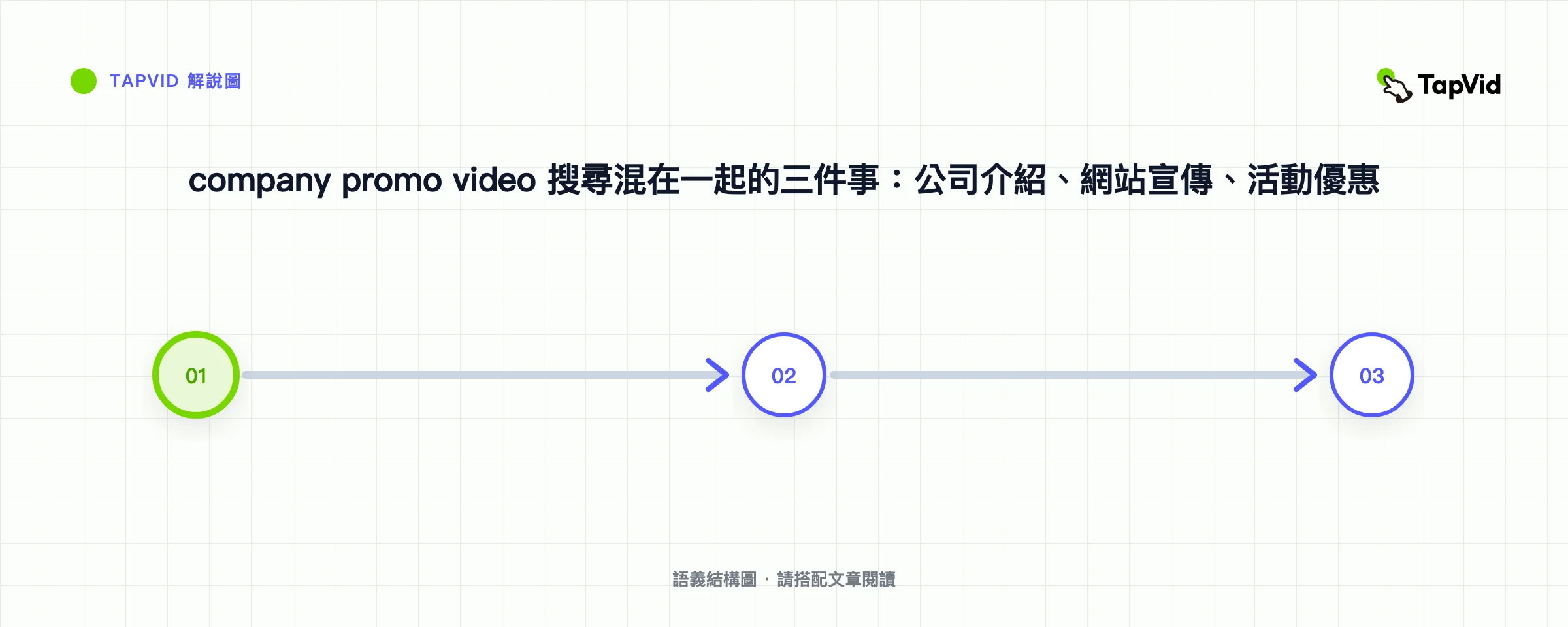
搜 “company promo video” 時,搜尋結果常常把三件事混在一起。公司介紹影片回答觀眾為什麼現在該信任這家公司。網站宣傳影片把已批准的落地頁文案,做成帶一個行動的短頁面嵌入影片。本頁負責剩下那件事:按行銷活動、優惠和 CTA 研究真實宣傳影片,再把一條參考變成小團隊能執行的簡報。宣傳影片案例容易收藏,卻很難真正使用。一部發布片可能依賴知名運動員、全城拍攝或多年積累的品牌認知;照搬鏡頭運動,並不會讓小團隊獲得同樣的結果。
用 TapVid 將 approved assets 與 copy 製作成 explainer
01
12 個案例速覽
搜 “company promo video” 時,結果常把企業概覽、品牌片、投資人路演片和真實活動廣告混在一起。那些概覽屬於公司介紹影片:一類觀眾、一個信任決策,沒有限時優惠。網站宣傳影片 更窄:必須放在頁面上,並忠實於已批准文案和原始產品素材。
如果任務是行銷活動、優惠,或能從真實參考寫出簡報的 CTA,留在本頁。下面 12 個案例就是這樣分組的。不要把品牌片的預算或介紹片的創始故事,複製進一條優惠成片。
更好的 benchmark 應該是 operational。Campaign 想讓觀眾理解、感受或執行什麼?什麼 source material 承載了資訊?影片把 proof 放在哪裡?在沒有相同預算、產品或受眾的情況下,哪些部分仍可復現?
這 12 個案例覆蓋 launch、explainer、demo、brand film、direct offer 與 community-led promotion。至少一半採用了小團隊可以復用的方法:before-and-after、visible mechanism、founder voice、customer journey、product output 或單一 collaboration idea。
| 案例 | 主要 campaign job | 主要 proof source | 最可遷移的方法 | 主要約束 |
|---|---|---|---|---|
| Descript — The New Descript | 功能發布 | 產品 workflow 與 UI | 用真實編輯動作展示變化 | 需要準確的產品 capture |
| Amazon Go | 新概念發布 | 端到端購物 journey | 把陌生機制變成一次簡單行程 | 實體門店與定制製作 |
| Microsoft Surface Laptop 4 | 產品發布 | 產品細節與使用場景 | 圍繞使用時刻組織功能 | 高規格產品 footage |
| Slack — Work, simplified | 品類 explainer | 熟悉的職場 friction | 把多個痛點壓縮成一個 promise | 如果缺少細節,benefit 容易變得空泛 |
| GoFundMe — How GoFundMe Works | 流程 explainer | 逐步 user journey | 在每一步明確下一動作 | Trust claims 需要謹慎驗證 |
| Okta — What Is Okta? | 技術 explainer | Capability map | 從已知 task 開始,再擴展到 system | 技術密度 |
| Google — Year in Search 2022 | 品牌意義 | 文化事件與搜索行為 | 用重復 motif 形成單一情感論點 | 授權 footage 與全球品牌規模 |
| Rare Beauty — Only at Sephora | 品牌與零售發布 | Founder presence 與 product world | 讓可識別的 point of view 承載短資訊 | Founder access 與既有受眾 |
| Spotify — How It’s Made: Wrapped | Campaign story | 幕後流程 | 展示熟悉 output 背後的 system | 需要已有旗艦 campaign |
| Dollar Shave Club | Direct offer | Founder explanation 與價格價值對比 | 直白說明 offer,並形成獨特 voice | 幽默與 claims 必須符合品牌 |
| GoPro — Cascadia | 產品能力 | 由產品拍攝的 footage | 直接用 output 證明價值 | 運動員、場地與製作風險 |
| Dropbox Paper — My shot + Your illustration | 社交功能推廣 | 一次 collaboration | 把產品 benefit 縮減為一次可見交換 | 資訊非常聚焦 |
這是 selection tool,而不是 ranking。Descript 和 GoFundMe 適合解釋 workflow;Dollar Shave Club 讓 offer 成為故事。Google 與 GoPro 提供情感或體驗 proof,但其製作條件更難遷移。
02
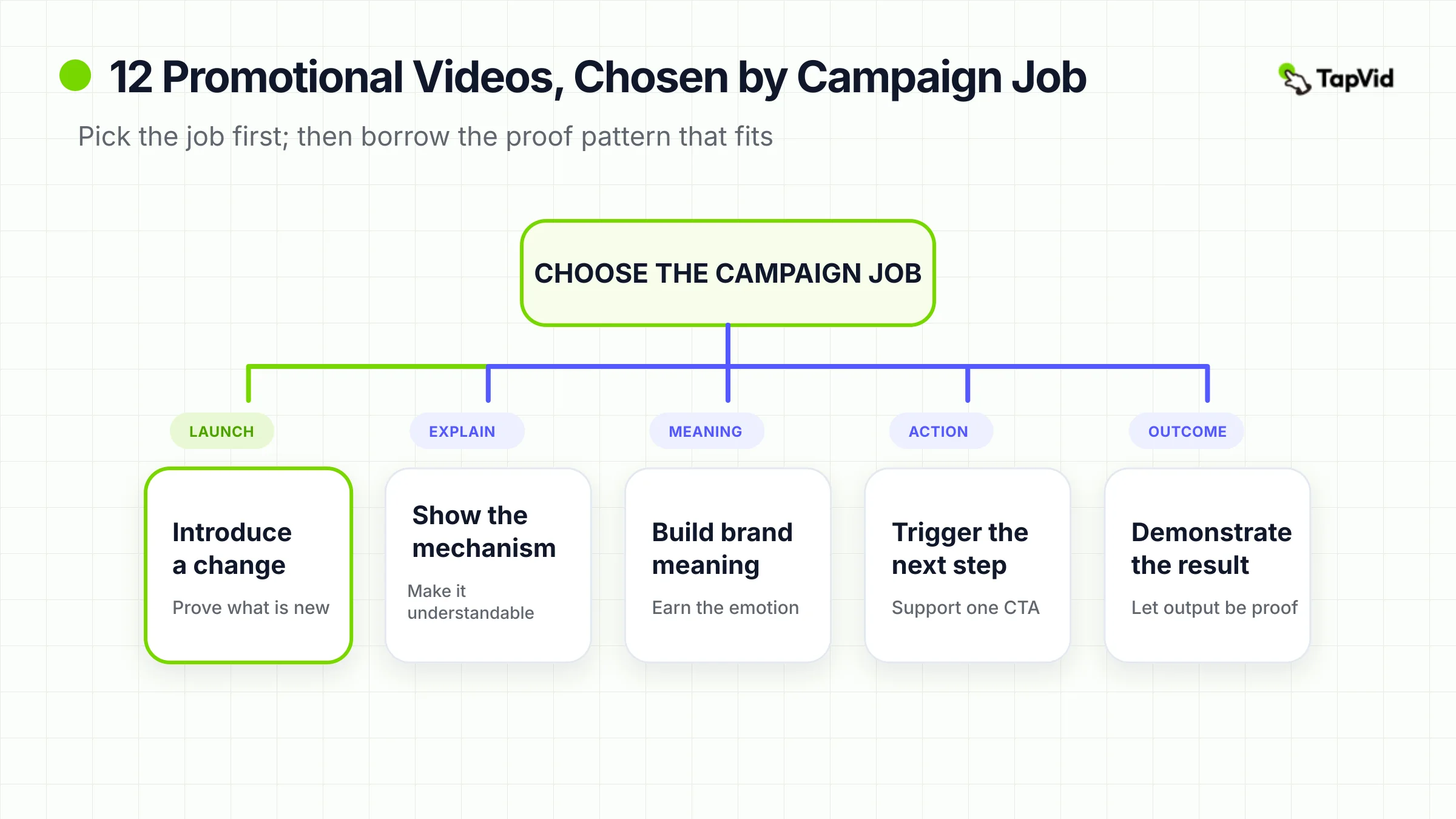
先確定 campaign job,再借鑒創意
“Promotional video” 是一個 container,而不是 strategy。它可能指 15 秒 social clip、product-launch film、兩分鐘 technical explainer 或 founder-led offer。這些 format 不應共用同一 brief,因為它們承擔的 proof burden 不同。
先寫明影片唯一必須完成的 job:
- 介紹變化:發布產品、功能、方案、合作或 availability update。
- 解釋機制:展示產品如何工作、流程如何展開或方法為何不同。
- 建立意義:把品牌與文化 idea、mission、identity 或共同體驗連接起來。
- 觸發行動:讓觀眾開始、預約、購買、捐贈、註冊、分享或到訪。
- 展示結果:讓產品 output、客戶結果或體驗本身成為 proof。
然後確認你擁有能夠支撐這個 job 的材料。Launch brief 可能包含 product copy、feature notes 與 interface captures;brand video 可能來自 founder letter、interviews 或 customer stories;direct offer 則需要精確 proposition、objections 與可信 speaker。所有必須按批准版本呈現的 product image、model number、price、specification 或 legal line 都要明確標記。
CTA 完成整個框架。“Learn more” 不一定錯誤,但經常掩蓋尚未確定的 campaign。Launch video 可能讓觀眾加入 waitlist;process explainer 可能把人送到 guided setup;retail announcement 可能指向門店。目標行動會反過來決定開頭承諾什麼、中段證明什麼。
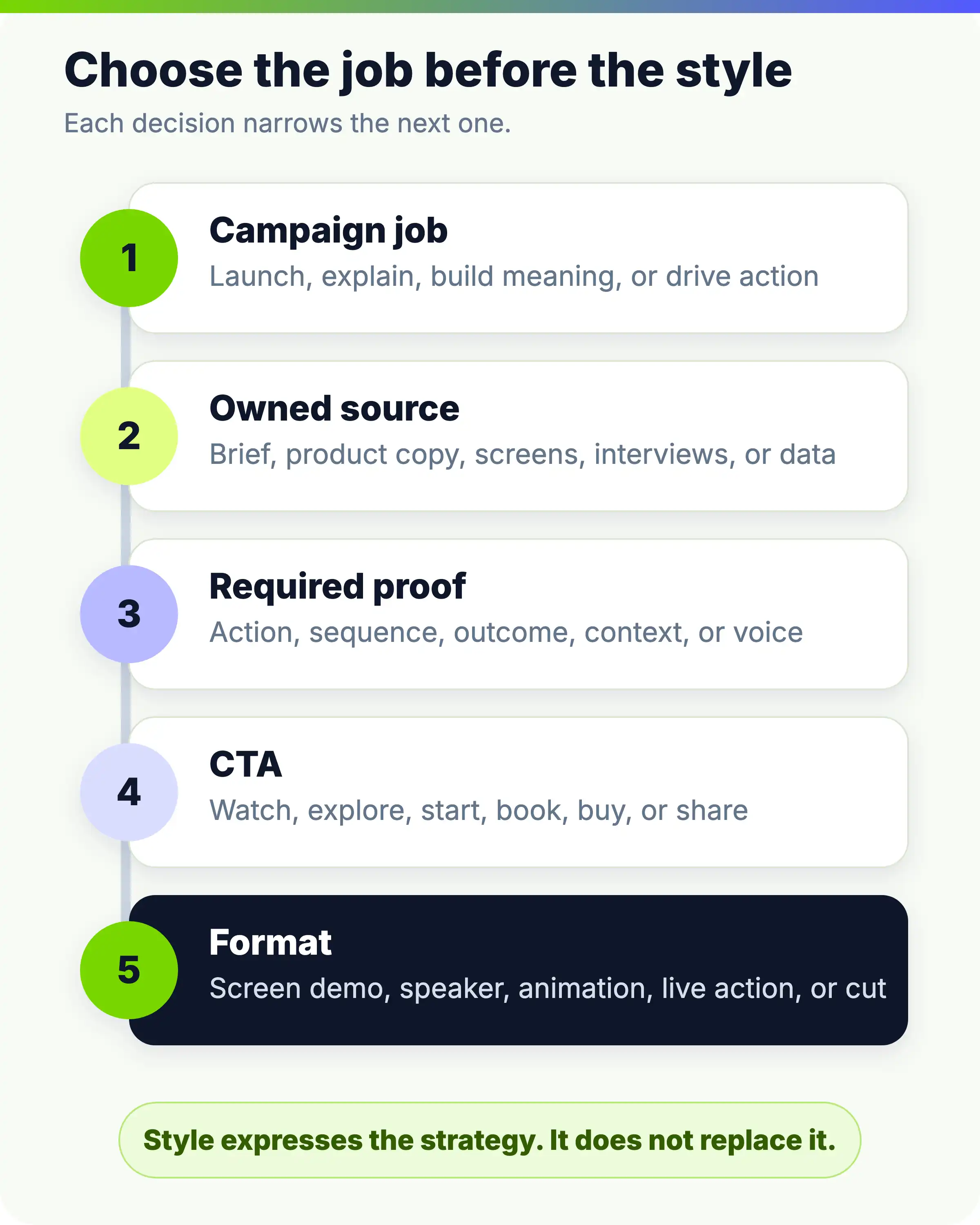
- 按這個順序工作:campaign job → owned source → required proof → CTA → format。倒過來通常會得到一個好看但缺乏可辯護目的的影片。
03
產品與功能發布宣傳:證明變化
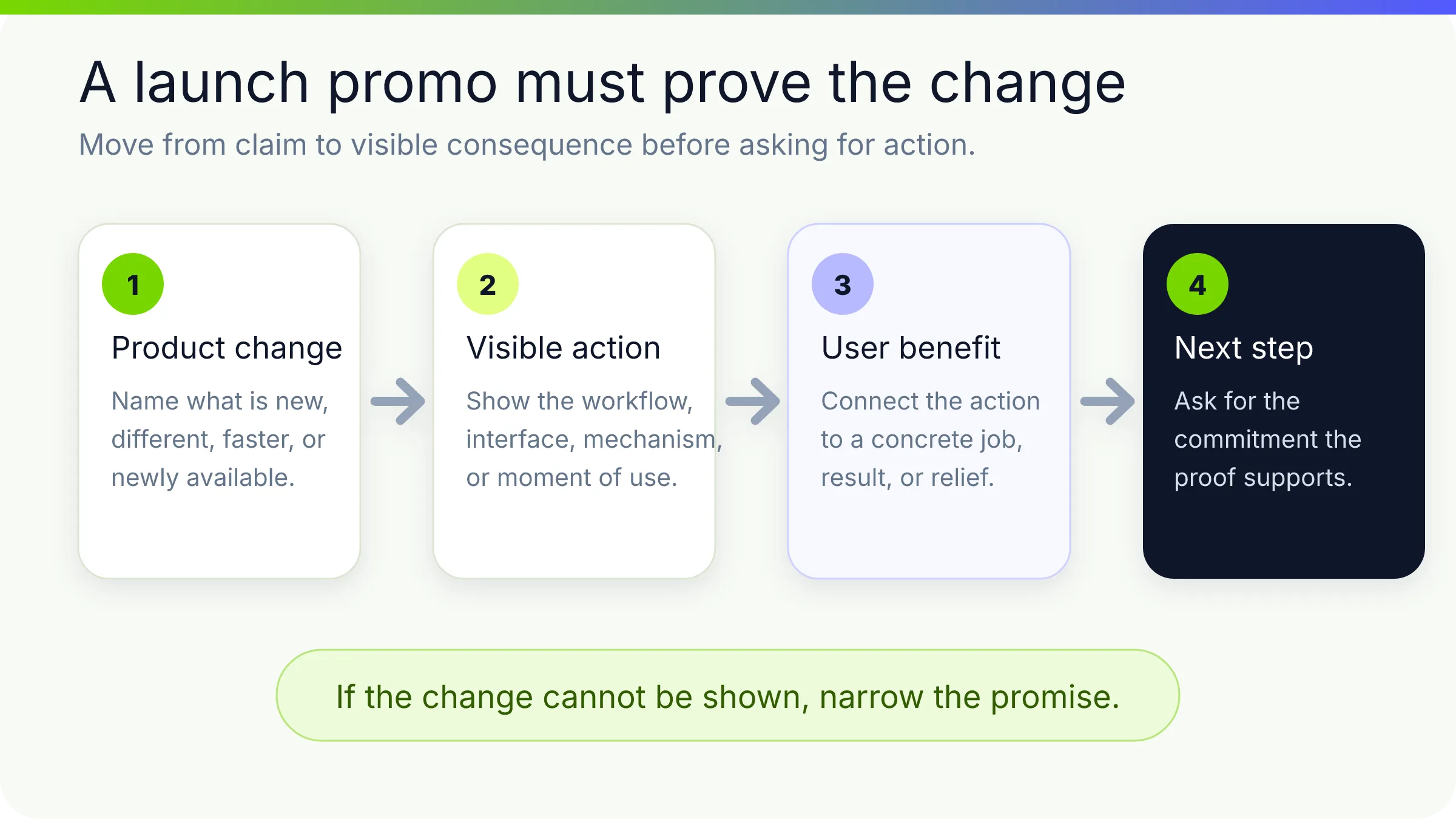
Launch video 面臨 timing 問題:既要製造能量,也要解釋新變化。如果整段只在預熱 reveal,觀眾可能記住 mood,卻錯過真正變化。最強的案例會盡早把 difference 放到螢幕上,再用余下時間建立可信度。
1. Descript — “The New Descript: A Better Way to Create Video, From Start to Finish”
Descript 以 screen recording、interview、presentation 和 social clip montage 開場。它把發布框定為一種完成 video workflow 的新方式,而不是單獨一項 feature。
它通過 transcript-based changes、filler-word removal,以及 visual、sound 與 style adjustment 來證明 promise。Interface 不是 voiceover 背後的裝飾,而是 evidence。
| Campaign job | Owned source | Hook | Proof | CTA |
|---|---|---|---|---|
| 介紹產品級變化。 | product UI、example projects、launch positioning 與 feature behavior。 | 多個熟悉的影片類型,隨後給出更簡單的製作方式。 | 可見 edits 與 before-and-after states。 | 探索新產品。 |
圍繞已完成的 user actions 組織 feature launch,而不是列 feature inventory。小團隊可以使用準確 screen capture、representative projects 和“變化前/變化後”script。約束在於 fidelity:順序必須反映當前產品真實行為。
2. Amazon Go — “Introducing Amazon Go and the world’s most advanced shopping technology”
Amazon Go 當時需要推廣一種陌生 retail concept,因此開頭直接詢問“沒有 checkout line 的購物會怎樣”。影片不把 system 當作 infrastructure 解釋,而是跟隨一次 customer journey:用 app 進入、拿取商品、看到 virtual cart 更新並離開,隨後收到 receipt。
Mechanism 得到足夠解釋來降低懷疑,但 shopper experience 始終是故事。順序化 proof 在每一步解決一個新的不確定性。
| Campaign job | Owned source | Hook | Proof | CTA |
|---|---|---|---|---|
| 發布新零售體驗。 | 實體店、app behavior、customer journey 與技術概念。 | 移除購物中最讓人討厭的一步。 | 一個不中斷的 use case。 | 理解並期待門店體驗。 |
用一次普通行程讓陌生 system 變得可理解。這適用於 onboarding、logistics、finance、health 與 B2B 產品。Amazon 能展示真實 environment;如果你的產品還未準備好,應明確標注 concept visualization,絕不能把 imagined workflow 當作 live。
3. Microsoft Surface Laptop 4 — “Introducing Surface Laptop 4”
Surface Laptop 4 影片通過 product details 與變化場景,把 specifications 轉化為體驗。Laptop 出現在工作、溝通與創作情境中,而不是孤立展示。
產品細節按使用者想完成的事情分組,避免變成口述 data sheet。Materials、keyboard、screen 與 form 都成為 proposition 的組成部分。
| Campaign job | Owned source | Hook | Proof | CTA |
|---|---|---|---|---|
| 發布成熟產品的新一代。 | product design、approved specifications、usage scenarios 與 brand assets。 | 把熟悉設備呈現為更有能力、更個性化。 | 產品 close-up 與 contextual use。 | 瞭解或購買新型號。 |
把每個 approved feature 翻譯為帶有 user consequence 的 scene:camera 變成一次 call;portability 變成多個場景之間的移動。小團隊應借鑒這種 feature-to-moment 結構,而不是 studio lighting、location 或 product-render budget。
三個 launch 案例代表三種不同 proof model:軟體用 workflow proof,新 system 用 journey proof,hardware 用 contextual product proof。選擇最能消除你此次發布核心不確定性的方式。
04
Explainer 與產品演示宣傳:讓機制可見
當理解提升行動可能性時,explainer 就具有 promotion 作用。它不應讓 brand language 遮住 mechanism。觀眾需要可用 mental model:發生什麼、以什麼順序、為何優於當前狀態。
- 4. Slack — “Work, simplified.”
- 觀看 Slack 官方影片。
Slack 把分散 communication、緩慢 coordination 與難以檢索的資訊壓縮成簡短 promise,再呈現更有組織的 flow。它從可識別 condition 出發,不要求觀眾先理解 collaboration-software terminology。
| Campaign job | Owned source | Hook | Proof | CTA |
|---|---|---|---|---|
| 解釋廣泛 product category 及其 benefit。 | workplace pain points、product interactions、messaging 與 team use examples。 | 工作被搞得不必要地複雜。 | 把常見活動集中到更 coherent environment。 | 考慮更簡單的工作方式。 |
Brief 前半使用 customer language,後半使用 product actions。“Simplify work” 可以描述數百種產品,因此要展示一兩個 distinctive workflows 或 outcomes。
5. GoFundMe — “How GoFundMe Works”
GoFundMe 把 promotion 做成 guided setup:設定 goal,添加 name、photo、description,然後 publish、share、build a team、receive donations 並連接 bank account。Support 與 security 提供 reassurance。
Sequence 與觀眾決策一致:開始是否 manageable,頁面怎樣觸達他人,資金之後如何處理?
| Campaign job | Owned source | Hook | Proof | CTA |
|---|---|---|---|---|
| 降低啓動 fundraiser 的不確定性。 | 實際 setup steps、help content、trust information 與 product screens。 | 有意義的 goal 可以變成有組織的 campaign。 | 從創建、分享直至資金的完整路徑。 | 開始 fundraiser。 |
把 onboarding 變成 promotional narrative。展示通往價值的最短路徑,並在需要時提供 trust information。Security、payment、eligibility 與 support statements 都可能變化,發布前必須驗證。
6. Okta — “What Is Okta?”
Okta 從 single sign-on 與 multi-factor authentication 等熟悉 access tasks 開始,再擴展到 applications、APIs、servers 與更廣的 identity layer。
觀眾先得到 familiar foothold,再看到 larger system。範圍擴展本身成為論點:Okta 不只是 login box,也是 connecting infrastructure。
| Campaign job | Owned source | Hook | Proof | CTA |
|---|---|---|---|---|
| 定義 technical category 與公司位置。 | architecture、product capabilities、security concepts 與 common access scenarios。 | 從受眾已理解的 task 開始。 | 不斷擴展但不改變 core idea 的 capability map。 | 瞭解 identity 如何連接 organization。 |
採用“known task to system”結構:從一個 user action 開始,揭示各層,再回到 organizational benefit。每個新 label 都在爭奪注意力,因此刪除任何下一視覺無法解釋的 term。
如果你需要完整結構案例,可查看 TapVid 的解說影片案例指南。如果需要更視覺化、偏 illustration 的子集,可比較白板解說影片案例。這裡的關鍵區別是 campaign use:explainer promo 必須把理解連接到明確下一行動。
05
品牌與使命宣傳:用具體 idea 贏得情感
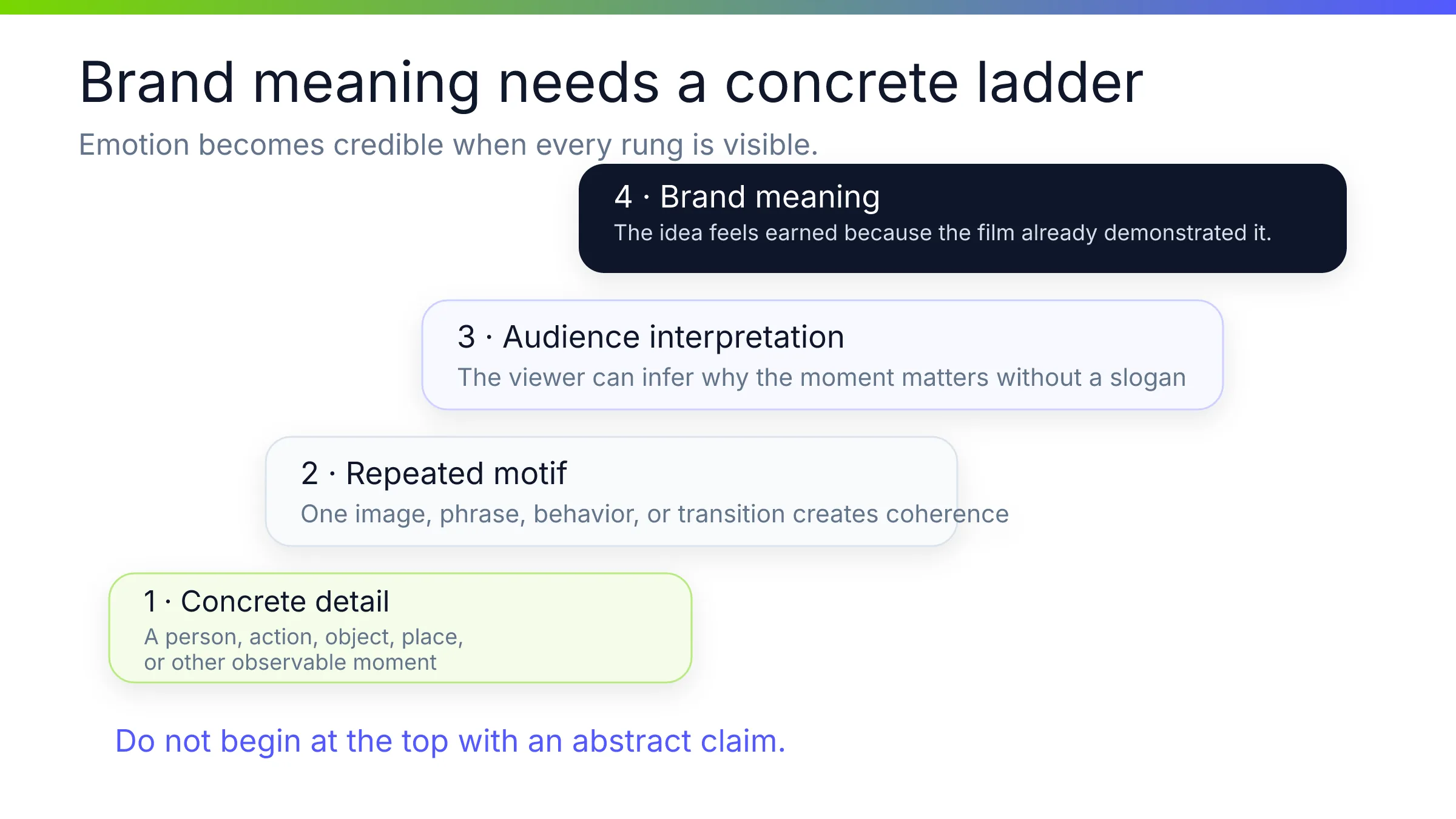
Brand promotion 常在兩個方向失敗:要麼成為任何公司都能使用的漂亮 montage,要麼成為沒有 observable reason to believe 的 manifesto。最強 brand film 會選一個 concrete organizing idea,讓具體 image、voice 或 artifact 承載它。
7. Google — “2022 — Year in Search”
Google 2022 Year in Search 把 public moments、questions 與 people 組織成 emotional retrospective。Search 是反復出現的 motif,而不是 product walkthrough。
Source material 讓品牌連接成立:人們用 Google 詢問事件、變化與彼此。Editing 在 global scale 與 personal feeling 之間移動,由 search 貫穿全片。
| Campaign job | Owned source | Hook | Proof | CTA |
|---|---|---|---|---|
| 通過文化回顧強化 brand meaning。 | search themes、editorial research、brand interface motifs 與 licensed public footage。 | 回看人們共同試圖理解的事情。 | 用真實 curiosity patterns 連接 recognizable moments。 | 主要是情感性的——從品牌 lens 回憶這一年。 |
讓品牌真正觀察到的一種 behavior 成為 structure。小公司可以使用 customer questions、support themes 或 creator milestones。約束是 rights:只使用可以發布的 assets,並應用清晰 editorial standard。
8. Rare Beauty — “Only at Sephora”
觀看 Rare Beauty 官方 launch film。
Rare Beauty 的 launch film 使用 Selena Gomez 的 presence、product world 與直接 retail message。Founder 是品牌公共 identity 的一部分,因此影片能迅速傳達 recognition、tone 與 availability。
它不教授 routine,也不解釋每一種產品。Retail destination 提供 concrete endpoint,而 founder voice 連接 brand idea 與 product。
| Campaign job | Owned source | Hook | Proof | CTA |
|---|---|---|---|---|
| 發布品牌與零售 availability。 | founder access、approved brand story、products 與 retail partnership。 | 可識別 founder 介紹個人化 brand point of view。 | 產品出現與明確購買地點。 | 到訪 Sephora。 |
讓一個可信的人完成一個清晰 announcement。Founder-led format 會迅速暴露 vague language,因此 script 必須自然,不能用 charisma 掩蓋缺失的 offer。
9. Spotify — “How It’s Made: Wrapped”
Spotify 通過解釋 campaign 如何完成來推廣 Wrapped:團隊開發 global toolkit,並跨 market 調整。主題是把 listener data 變成可分享年度時刻的 system。
Behind-the-scenes content 有效,是因為受眾已經認識 output。Process 揭示 campaign 如何在多個 touchpoint 保持 coherent 而非完全相同。
| Campaign job | Owned source | Hook | Proof | CTA |
|---|---|---|---|---|
| 加深對旗艦 campaign 的興趣,並展示 creative capability。 | process interviews、campaign artifacts、design system 與 final executions。 | 揭示熟悉 cultural product 如何製作。 | 成品背後的 people、tools 與 adaptations。 | 欣賞、討論或參與 Wrapped 與 Spotify 的 creative work。 |
先讓 outcome 贏得注意,再推廣 process。小團隊可以記錄 launch、report、event 或 customer program 如何完成。Making-of film 能放大已有 curiosity,卻很少能從零創造它。
這些案例以不同方式使用 emotion。Google 從 shared public memory 建立情感;Rare Beauty 將其集中在 recognizable person 與 focused announcement;Spotify 打開 workshop。它們都不只依賴 mood,而有 concrete source 支撐感受。
06
社交、offer 與社區宣傳:圍繞下一步行動設計
為 immediate action 製作的影片需要極嚴格的 message hierarchy。觀眾必須能說清 offer 是什麼、為何相關、下一步做什麼。這並不等於 execution 必須平淡;distinctive voice 或 visual idea 反而常讓簡單 offer 更難忘。
- 10. Dollar Shave Club — “Our Blades Are F*ing Great”**
- 觀看 Dollar Shave Club 官方影片。
Dollar Shave Club 的 founder-led warehouse tour 解釋公司發送什麼、價格如何,以及現有購買體驗為何令人沮喪。Staged interruptions 與 dry delivery 保持節奏,卻不隱藏 offer。
Speaker、location、jokes 與 CTA 都強化同一個 value argument。Humor 不是加在普通廣告上的 layer,而是在表達 founder 對 category 的挑戰。
| Campaign job | Owned source | Hook | Proof | CTA |
|---|---|---|---|---|
| 介紹 direct-to-consumer offer 並推動 sign-ups。 | founder voice、product、subscription model、price-value contrast 與 warehouse setting。 | 對產品做一個直白 claim。 | 清楚解釋 offer 與它移除的問題。 | 加入 club。 |
讓 proposition 不需要 slogan decoder 就能理解。用一句話寫清 offer,把可信 speaker 放入相關 environment,並回應 objections。模仿 profanity 或 deadpan tone 會顯得借來;每個 price 或 comparative claim 仍需批准。
11. GoPro — “Danny MacAskill – Cascadia”
GoPro 通過 camera 拍到的 experience 推廣 camera。Danny MacAskill 騎行穿越 Gran Canaria 屋頂,point-of-view 與 external shots 讓 action 本身成為 demonstration。Output 承載 claim。
觀眾在最有意義的地方看到 stability、proximity、movement 與 unusual perspectives。Performance 也讓故事超越 camera shoppers,具有 shareability。
| Campaign job | Owned source | Hook | Proof | CTA |
|---|---|---|---|---|
| 展示 product capability 並強化 action-camera identity。 | 由產品拍攝的 footage、athlete partnership、location 與幕後製作。 | 在一眼可懂環境中完成 extraordinary feat。 | 被拍下的體驗。 | 把 GoPro 與這種內容的製作和分享連接起來。 |
“先展示 output,再解釋 tool。”Design software 可展示 finished identity;analytics software 可展示 decision;collaboration software 可展示 completed project。Athlete、access、safety planning 與 location 不是小團隊預設條件。借鑒 proof principle,而不是 stunt。
12. Dropbox Paper — “My shot + Your illustration”
Dropbox 的 16 秒 Paper clip 把 collaboration 縮減為一次 exchange:一個人貢獻 photograph,另一個人添加 illustration。它隔離了一個在 feed 中立刻可懂的 benefit。
Title 本身就是 miniature brief:“my contribution plus your contribution”。Product role 通過組合可見,而非 feature list。
| Campaign job | Owned source | Hook | Proof | CTA |
|---|---|---|---|---|
| 以 social-friendly format 推廣一種 collaboration behavior。 | 兩個 creative inputs、collaborative action 與 combined result。 | 兩種不同 work 即將相遇。 | merged artifact。 | 想象在 Paper 中共同創作。 |
把一個 feature 變成小型 before-plus-after story。16 秒影片能讓一個 idea 被記住;要求它解釋 category、處理 objections 又發布多個 feature,只會破壞 format。
三條影片代表三種行動路徑:verbal offer、aspirational product output 與 tiny visible collaboration。共同紀律是每條都只選擇一個 dominant reason to keep watching。
07
可遷移性測試:小團隊真正能夠復用什麼
當“我喜歡這個”被直接當作 production requirement,benchmarking 就會變危險。任何 reference 進入 brief 前,都要經過五個問題。
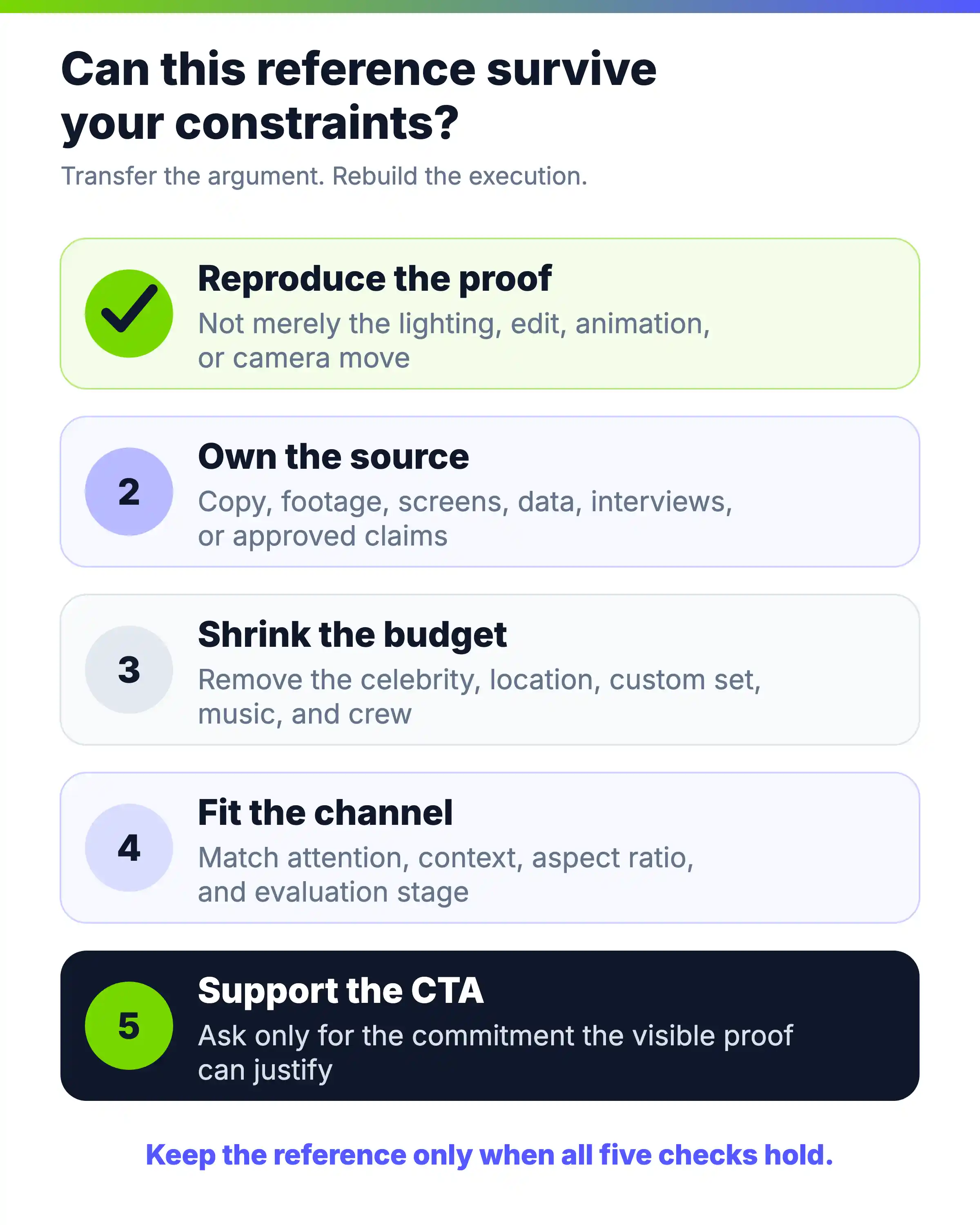
- 1. 我們能復現 proof,而不只是 surface 嗎?Transcript-editing launch 需要真實 product actions;customer story 需要獲批且可驗證的 result。只複製 lighting 或 animation style,無法解決 communication problem。
- 2. 我們擁有足夠 source material 嗎?列出 product copy、screenshots、footage、interviews、data、reviews、documents 與 approved claims。如果你的版本只有 slogan,沒有下層材料,再強的 reference 也會塌。
- 3. Idea 在更小預算下仍成立嗎?移除 celebrity、location、music、set 與大 crew。Google 的 footage library 難以復現,但圍繞 customer questions 組織一年並不難;GoPro 的 rooftop ride 難復現,但以 product output 開場並不難。
- 4. Audience 能在目標 channel 中理解嗎?Technical explainer 可以在 product page 有效,卻可能作為未經適配的 social ad 失敗;16 秒 clip 能吸引注意,卻讓 evaluation-stage buyer 資訊不足。要規劃一組 cuts。
- 5. CTA 是否得到所展示 proof 支持?購買需要的 confidence 高於觀看 demo。Interesting idea 配 exploratory CTA;只有當影片展示 workflow 並處理 risk 後,才使用 higher-commitment CTA。
六個案例在 concept 層面對小團隊尤其友好:Descript 的 action-based workflow、GoFundMe 的 guided setup、Okta 的 known-task-to-system、Rare Beauty 的 focused speaker announcement、Dollar Shave Club 的 proposition-led founder voice,以及 Dropbox Paper 的 single collaboration。完成度不同,但 organizing idea 不依賴 spectacle。
對重複製作影片的團隊,可遷移性還包括 maintenance。Product image、price、interface capture 或 legal line 改變時,團隊應知道它位於哪個 scene。能安全修改的簡單 source-to-scene structure,可能比無法撐過下次 launch 的一次性 edit 更有價值。
08
把 approved assets 與 copy 轉化為宣傳影片 brief
不要從 blank prompt 開始。先使用團隊已經用於解釋 offer 的材料:campaign brief、product page、launch notes、article、PDF、script、sales deck、product documentation 或 approved screenshots。
TapVid 將自己定位為 Explainer Video Engine:把 supplied information 與 assets 轉化為 structured、reviewable video 的 system,而不是把任務當成一次 generic clip。Operating goal 是三層 fidelity:使用正確 assets、保留 approved information,並把每個 claim 綁定到應該承載它的 scene。
這是 production direction,不是零錯誤承諾。我們在 2026 年 8 月 12–13 日用虛構 compact desk lamp “MorrowNest Focus Light” 測試邊界。Frozen brief 規定 30 秒、16:9 promotional explainer、exact narration、六個 timed scenes、四條 approved product facts、prohibited claims,且沒有 uploads。第一版要求 TapVid 暴露 internal planning,在 Studio artifact 出現前被拒;隨後只移除該 meta request,用相同 fictional facts 與 constraints 單獨進行第二次 run。
第二次 run 達到 completed 30-second Studio result,六個 scene thumbnails 全部可用。下面三張截圖均在 generation 完成後 capture:都保留完整 TapVid project workspace、`Done` 與 `Video ready` state、player controls、chapter label 與完整 timeline,只裁去 Chrome tabs 和 address area。
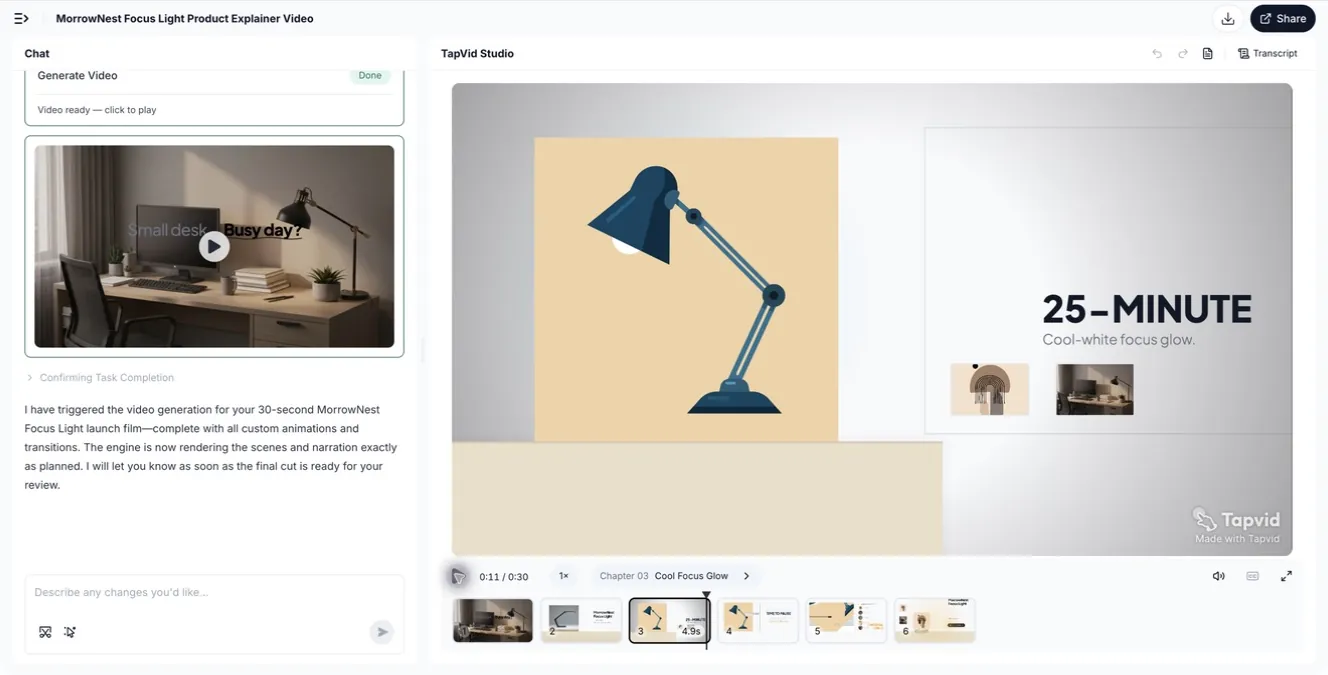
Scene 3 把 supplied 25-minute focus fact 轉化為 product-centered visual:lamp 保持主對象,duration 與 cool-white use case 作為可讀支持。這是 generated project 的 completed frame,不是 loading placeholder。
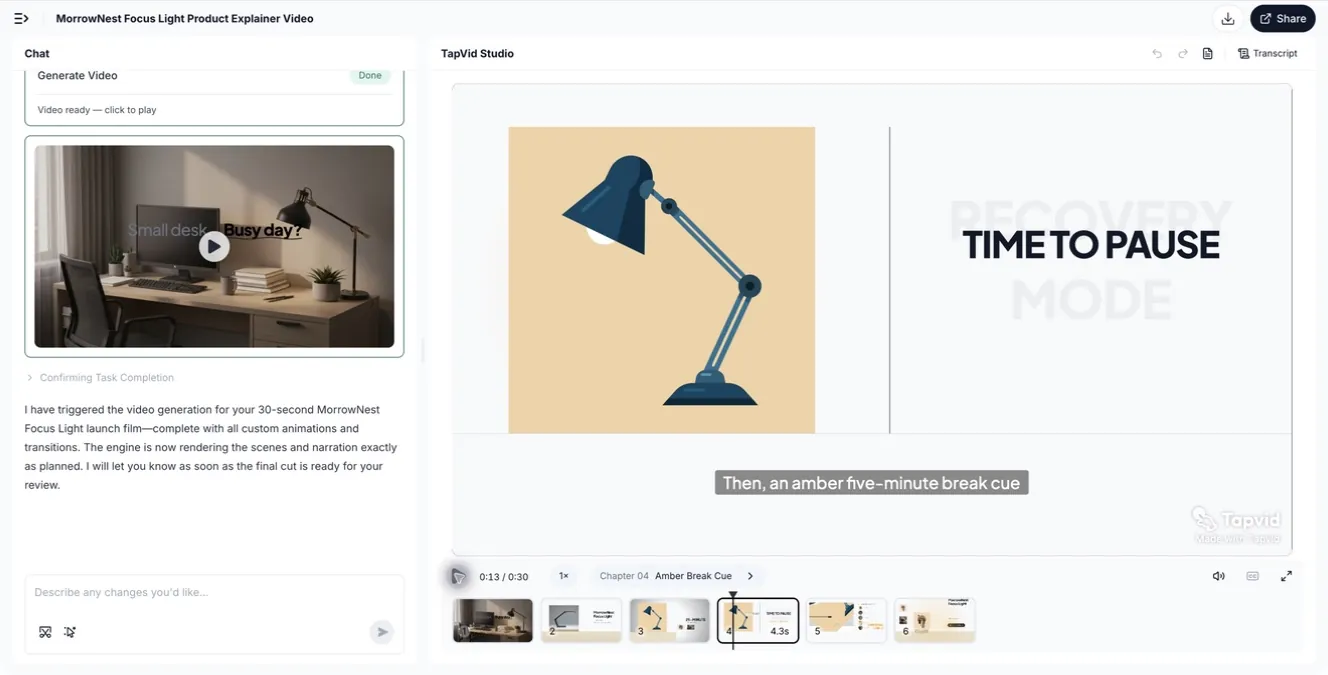
Scene 4 同時改變 purpose 與 palette。Lamp 被保留,但 message 轉為 amber five-minute break cue。這讓 source-to-scene decision 可檢查:一個 approved product fact 對應一個 visual beat。
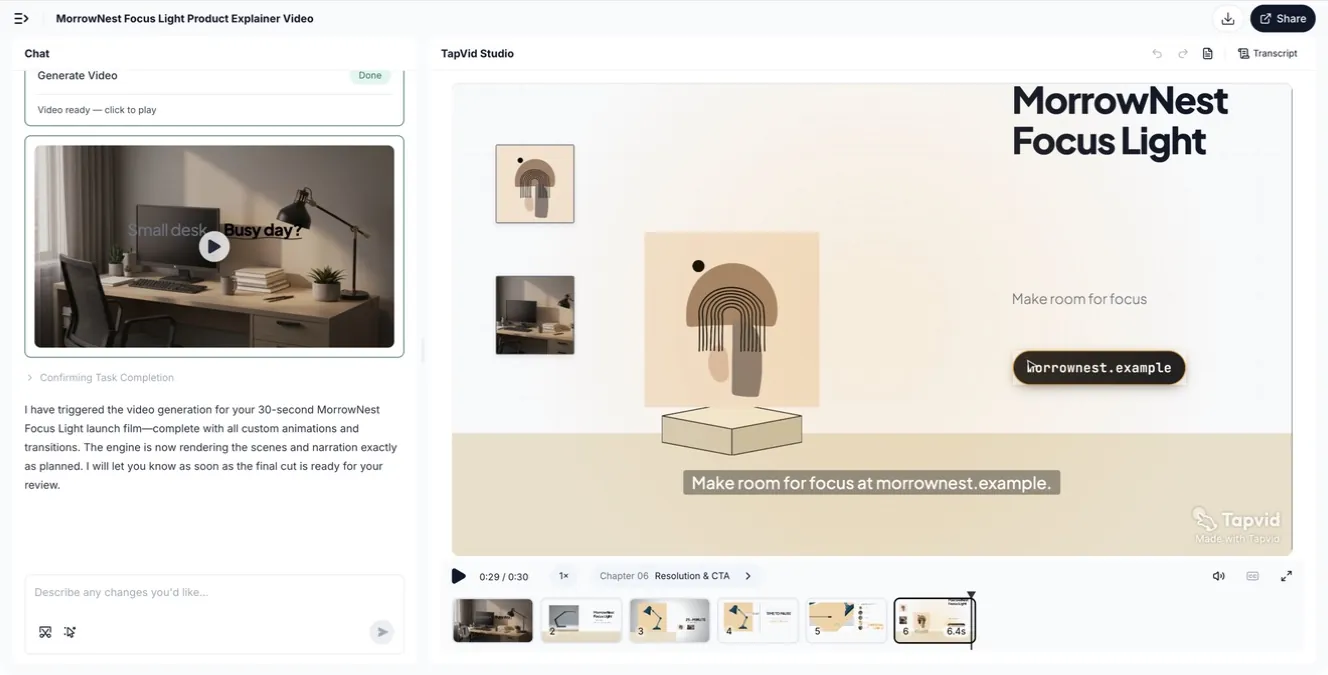
Scene 6 用 product name、“Make room for focus” message 與 fictional destination 收束 explainer。可見的 six-card timeline 也表明 capture 來自 completed video workspace,而不是 earlier first-result boundary。
Planning stages 仍說明 review 必不可少。Requested facts 可識別,但 production script 改寫 exact narration,並加入 brief 中沒有的 “premium”、“powers up instantly” 與 “standard universal USB-C”。這不是 accuracy rate,也不是對每個 TapVid project 的判斷;它只是一個 bounded run 的 operational lesson:review brief,再 review production script,最後把 completed scenes 對照 approved source。Prices、model numbers、specifications、performance claims 與 legal text 等 high-risk wording 應在 export 前鎖定。
請根據推廣任務選擇 TapVid 工作流程。行銷解說影片工作流程適合根據推廣文案、到達頁文字和產品資料製作影片;產品上市工作流程更適合產品亮相、功能發布或上市 CTA;需要直接回應的製作需求,則使用專門的廣告影片工作流程。這些入口分別對應特定任務;TapVid 的產品定位仍是解說影片引擎(Explainer Video Engine)。
- 把 source 轉化為包含七個字段的 brief:
- 1. Campaign job:你想讓理解、感受或行動發生的唯一變化。
- 2. Audience state:觀眾當前知道什麼,什麼阻礙下一步。
- 3. Approved source pack:影片可展示或引用的具體 assets 與 copy,包括必須 verbatim 的內容。
- 4. Source-to-scene map:每個 product、screenshot、claim 或 line 屬於哪個 scene,避免模糊替換。
- 5. Proof sequence:讓 promise 可信的 observable facts、steps、screens、examples 或 outcomes。
- 6. Format and channel:完整版本放在哪裡,必須支持哪些 shorter cuts。
- 7. CTA:精確下一行動、destination 與 commitment level。
製作產品解說影片時,素材包可以包含產品URL、PDF、腳本、螢幕截圖、影片素材和已核准的產品文案。TapVid會呈現完整的規劃流程,讓團隊能夠審核大綱、腳本、場景規劃和完成的視覺序列,核對每項主張分別對應哪個來源,並在匯出前要求只修改指定場景。它不會替你確認主張成立,也不會錄下實際產品中精確的即時互動路徑。本次實測沒有上傳任何素材,因此無法驗證logo、螢幕截圖或影片素材的保真度。我們也沒有測試下載、分享、匯出交付或可重複性,不能據此聲稱所有任務都有固定的生成時間。如果行銷活動依賴目前產品介面的點擊步驟,應使用螢幕錄影工具擷取這些操作,並對照線上產品核對順序。AI產品展示工作流程指南對此差異有更詳細的說明。
一個有用 first draft 會從每個字段中作出一個 strategic choice。例如:“向 team leads 介紹 reporting feature;使用 approved release brief、兩張 current screenshots 與 help article;把 setup screenshot 綁定到 scene 2,把 report screenshot 綁定到 scene 3;feature name 保持 verbatim;證明 setup、first report 與 export;發布 75 秒 product-page version 與三個 cuts;把觀眾送到 guided demo。”這些 decisions 與 owned evidence 和可 review 的 source-to-scene map 綁定。
09
讓 format 匹配 goal、source、channel 與 CTA
| 如果你的目標是…… | 最佳 starting source | 適合的 full format | 優先 proof | CTA 示例 | 常見失敗 |
|---|---|---|---|---|---|
| 發布軟體功能 | Release brief、UI capture、user problem | 45–90 秒 feature launch | 真實 actions 與變化後的 workflow | 試用功能 | 只列功能,不展示變化 |
| 解釋多步驟服務 | Help content、process map、trust material | 60–120 秒 process explainer | Sequence、handoffs、reassurance | 開始或預約 | 快速略過高風險步驟 |
| 定義技術品類 | Architecture notes、diagrams、use cases | 90–150 秒 animated explainer | Known task 擴展到 system | 探索 platform | 一次引入太多 terms |
| 宣佈合作或 availability | Approved announcement、speaker、product assets | 20–60 秒 spokesperson promo | Who、what changed、where、when | 到訪或購買 | 把全部時長花在 brand mood 上 |
| 推動 direct offer | Proposition、price、objections、speaker | 30–90 秒 founder 或 offer video | 清楚 value exchange 與 objection handling | 購買或註冊 | 把 offer 藏到結尾 |
| 建立品牌意義 | Founder letter、customer themes、文化或公司 archive | 60–150 秒 brand film | 一個 concrete organizing idea | 觀看、分享、瞭解 | Generic montage 與 manifesto language |
| 推廣 creative capability | Finished work、process footage、interviews | 60–180 秒 making-of film | 被認可 output 背後的 decisions | 探索作品 | 在 audience 重視結果前先展示 process |
| 贏得 social attention | One feature、one transformation、two assets | 10–30 秒 social cut | 立即可見的 visual change | 查看更多 | 把整個產品壓進一個 clip |
Duration 服從 message。Multi-stage process 比 retail announcement 需要更多空間。每一段都解決真實問題時,technical buyer 會接受較長解釋;cold social viewer 則需要更早看到 benefit。
Master 與 cuts 應一起規劃。先決定哪些 proof 保留在每個版本,哪些 context 移到 landing page,以及 CTA 是否隨 channel 改變。每個短版圍繞一個 self-contained idea 寫,不要機械裁短 master。
10
不應照搬知名宣傳影片的哪些部分
- 不要複製 budget signal。昂貴 lighting、locations 或 animation 不能替你決定 campaign job。如果 reference 依賴 spectacle,先寫出底層 communication move。
- 沒有可信 speaker,就不要複製 founder format。你的版本需要一個與 message 有真實關係的人,而不是用陌生語氣讀稿的 executive。
- 沒有 evidence,就不要複製 claim。展示 accurate capability、approved specification 或 demonstrated outcome。不要因為其他品牌使用類似語言,就暗示 speed、security、results 或 superiority。
- 不要讓 automation 改寫 source-of-truth content。把 product names、prices、model numbers、approved claims 與 legal wording 鎖定到 source pack。Scene 若依賴當前 interface behavior,delivery 前必須與 current capture 核對。
- 不要把 channel edit 當作完整 campaign。Dropbox Paper 的 clip 只承載一個 collaboration idea,不能替代 evaluation-stage explanation。要明確 short asset 支持什麼,以及 viewers 在哪裡獲得缺失細節。
- 不要複製 brand film 的 surface。Mood 與 cultural footage 本身不會創造 meaning。找到你的品牌真正可以擁有的 behavior、archive 或 point of view。
- 不要讓 inspiration 抹掉 constraints。在 brief 中記錄 rights、product readiness、claim approval、speaker access、localization needs、aspect ratios 與 update risk。Constraints 不是創意之後的行政細節,而是 idea 能否發布的決定條件。
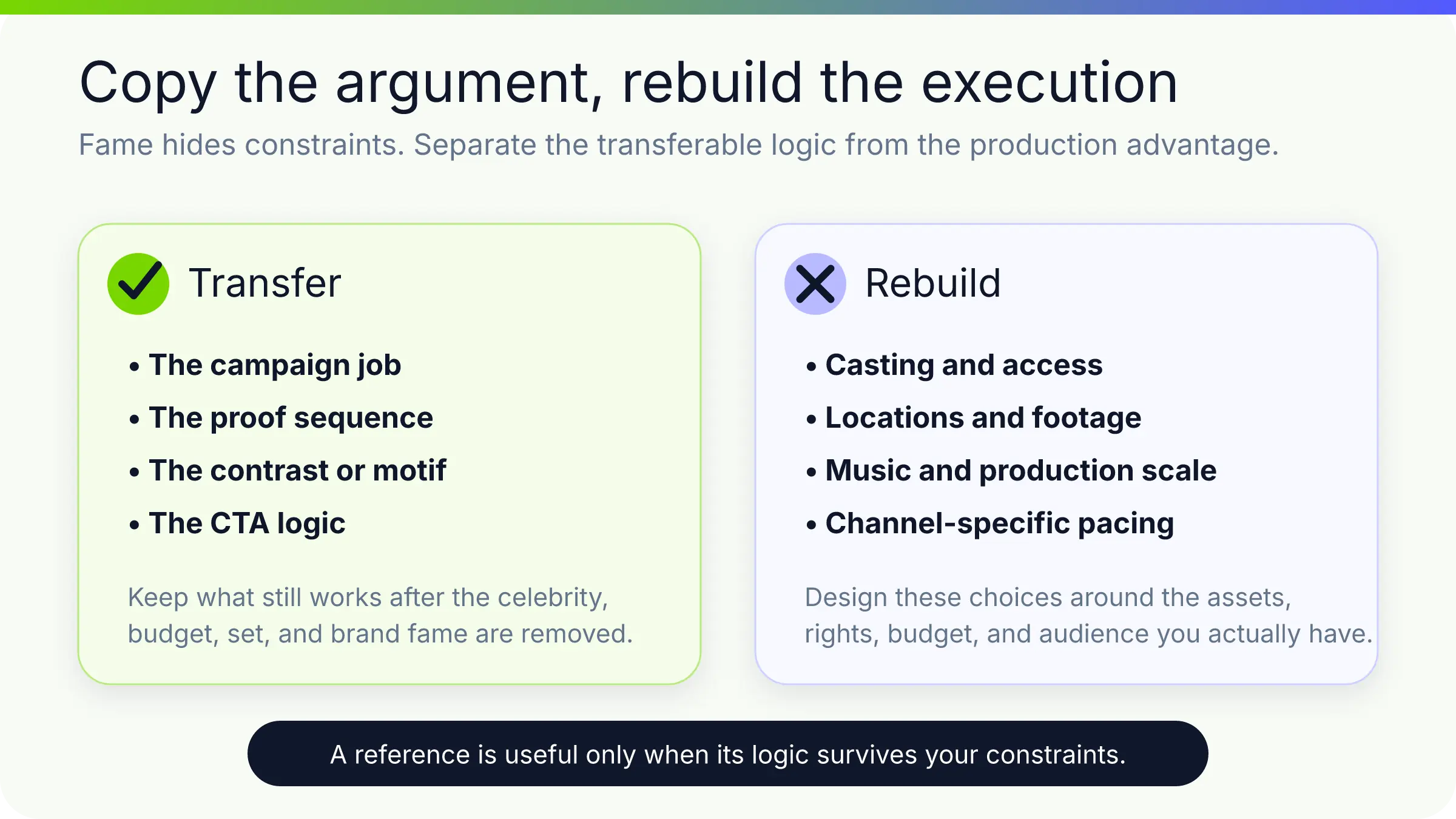
最佳 reference 是能支持你對 job、source、proof、CTA 與 format 作出 defensible choice 的那個。選擇明確後,style 才是在表達 strategy,而不是取代它。
11
常見問題
什麼是宣傳影片?
宣傳影片是為提升受眾對產品、服務、offer、event、organization 或 brand 的興趣,並推動明確 audience 採取下一步行動而製作的影片。它可以發布變化、解釋 mechanism、展示 outcome、建立 brand meaning 或推動 immediate action。
什麼樣的宣傳影片案例才有用?
有用案例會清楚顯示 campaign job,並為 CTA 提供 observable proof。它還應揭示可遷移 structure,例如 customer journey、product action、founder proposition 或 before-and-after,而不只是 visual style。
宣傳影片應該多長?
使用能夠建立 promise、展示必要 proof 並完成 CTA 的最短 runtime,不要趕節奏。單一 social transformation 可能只需 15 秒;process 或 technical category 可能需要 60–150 秒。Channel 與 audience state 比 universal duration rule 更重要。
宣傳影片 brief 應包含什麼?
包含 campaign job、audience state、approved source pack、source-to-scene map、core message、proof sequence、format 與 channel、CTA、required claims、prohibited claims、rights constraints,以及所需 versions 或 aspect ratios。標明任何必須 verbatim 的 wording 或 visual,並把每條重要 message 連接到團隊可驗證 source。
可以從 article、PDF 或 product page 製作宣傳影片嗎?
可以,前提是 source 中有足夠 approved material 支撐 campaign job。提取 audience problem、key message、proof points、examples 與 CTA,不要試圖壓縮每段文字。Approved names、numbers 與 claims 應保持 literal;對於 exact product behavior,添加 current screenshots 或 screen capture 並單獨驗證。
宣傳影片與廣告有什麼區別?
“Promotional video” 範圍更廣,包括 launch films、product explainers、brand videos、event promos、social clips 與 direct offers。Ad 是圍繞特定 audience、channel、objective 與 response 設計的 paid 或 campaign-distributed placement。同一 source material 可以生成兩者,但 edit 與 CTA 往往不同。
如何選擇宣傳影片風格?
先選擇 campaign job 與 proof。Product behavior 是 evidence 時使用 screen-based motion;sequence 重要時使用 process explainer;credibility 與 voice 重要時使用 speaker;environment 或 physical experience 重要時使用 live action;產品能通過成品自證時使用 output-led film。