
TL;DR
지속적인 신뢰 스토리가 필요하면 회사 소개 영상을 쓰세요. 컷이 사이트의 제품 소재와 정확히 맞아야 하면 웹사이트 프로모를 쓰세요. 출시, 설명, 브랜드 의미, 오퍼로 공식 프로모 사례를 보고 싶을 때는 이 페이지에 남으세요. 핵심 질문은 “어떤 영상이 가장 멋진가?”가 아니라 “우리와 비슷한 보유 자료와 제작 제약으로 같은 캠페인 목적을 해결했는가?”입니다. 공식 사례 12개를 목적, 자료, 훅, 증거, CTA, 재사용 구조와 제약으로 분석합니다. 반복 가능한 브리프를 만들려면 목표 하나를 정하고, 이를 증명할 승인된 소재와 문구를 모으고, 각 주장을 장면에 연결하고, 비주얼 스타일보다 먼저 CTA를 작성하세요.
company promo video 검색은 보통 세 가지 일을 섞습니다. 회사 소개 영상은 시청자가 지금 이 회사를 신뢰해야 하는 이유를 답합니다. 웹사이트 프로모는 승인된 랜딩페이지 문구를 한 가지 행동이 있는 짧은 페이지 삽입 영상으로 바꿉니다. 이 페이지는 남은 일입니다. 캠페인, 오퍼, CTA로 실제 프로모션 영상을 보고, 하나의 레퍼런스를 소규모 팀이 만들 수 있는 브리프로 바꿉니다. 프로모션 영상 사례는 모으기 쉽지만 실제로 활용하기는 어렵습니다. 유명 운동선수, 도시 규모 촬영, 오랜 브랜드 인지도에 의존한 론치 필름의 카메라 움직임만 따라 해서는 소규모 팀이 같은 결과를 얻기 어렵습니다.
Approved assets와 copy를 TapVid Explainer로 전환하기
01
12개 사례 한눈에 보기
“company promo video” 검색 결과는 실제 캠페인 스팟과 함께 기업 개요, 브랜드 필름, 투자자 피치를 자주 섞습니다. 그런 개요 영상은 회사 소개 영상의 일입니다. 한 명의 시청자, 한 가지 신뢰 결정이며, 기한이 있는 오퍼는 없습니다. 웹사이트 프로모 영상은 더 좁습니다. 페이지에서 재생해야 하고, 승인된 문구와 원본 제품 소재에 충실해야 합니다.
일이 캠페인, 오퍼, 또는 실제 레퍼런스에서 브리프할 수 있는 CTA라면 이 페이지에 남으세요. 아래 12개 사례가 그렇게 묶여 있습니다. 브랜드 필름 예산이나 회사 소개 창업 스토리를 오퍼 컷에 복사하지 마세요.
더 좋은 benchmark는 운영 관점입니다. 시청자가 무엇을 이해하고 느끼고 행동하게 하려 했는가? 어떤 source가 메시지를 운반했는가? proof는 어디에 배치했는가? 같은 예산, 제품, audience 없이 다른 팀이 재현할 수 있는 부분은 무엇인가?
12개 사례는 launch, explainer, demo, brand film, direct offer, community-led promotion을 포함합니다. 절반 이상이 소규모 팀도 재사용할 수 있는 방식, 즉 before-and-after, visible mechanism, founder voice, customer journey, product output 또는 하나의 collaboration idea를 사용합니다.
| 사례 | 주요 campaign job | 주요 proof source | 가장 전이 가능한 방식 | 주요 제약 |
|---|---|---|---|---|
| Descript — The New Descript | 기능 출시 | 제품 workflow와 UI | 실제 편집 행동으로 변화 보여주기 | 정확한 제품 capture 필요 |
| Amazon Go | 새 개념 출시 | 처음부터 끝까지의 쇼핑 journey | 낯선 메커니즘을 간단한 journey로 바꾸기 | 실제 매장과 맞춤 제작 |
| Microsoft Surface Laptop 4 | 제품 출시 | 제품 디테일과 사용 장면 | 사용 순간을 중심으로 기능 구성 | 고사양 제품 footage |
| Slack — Work, simplified | 카테고리 explainer | 익숙한 업무 friction | 여러 문제를 하나의 promise로 압축 | 세부 정보가 없으면 benefit가 모호해짐 |
| GoFundMe — How GoFundMe Works | 프로세스 explainer | 단계별 user journey | 각 단계의 다음 행동을 명확히 하기 | Trust claim은 신중히 검증해야 함 |
| Okta — What Is Okta? | 기술 explainer | Capability map | 익숙한 task에서 system으로 확장 | 기술 밀도 |
| Google — Year in Search 2022 | 브랜드 의미 | 문화적 사건과 검색 행동 | 반복 motif로 하나의 감정 논지 만들기 | 라이선스 footage와 글로벌 규모 |
| Rare Beauty — Only at Sephora | 브랜드·리테일 출시 | Founder presence와 product world | 알아보기 쉬운 관점으로 짧은 메시지 전달 | Founder access와 기존 audience |
| Spotify — How It’s Made: Wrapped | 캠페인 스토리 | 제작 과정 | 익숙한 output 뒤 system 보여주기 | 기존 flagship campaign 필요 |
| Dollar Shave Club | Direct offer | Founder 설명과 가격 가치 비교 | Offer를 직설적으로 설명하고 고유 voice 만들기 | Humor와 claim이 브랜드에 맞아야 함 |
| GoPro — Cascadia | 제품 역량 | 제품으로 촬영한 footage | Output으로 가치를 직접 증명 | 선수, 장소, 제작 위험 |
| Dropbox Paper — My shot + Your illustration | 소셜 기능 홍보 | 한 번의 collaboration | 제품 benefit를 하나의 보이는 교환으로 축소 | 매우 좁은 메시지 |
이는 ranking이 아니라 selection tool입니다. Descript와 GoFundMe는 workflow 설명에 좋고 Dollar Shave Club은 offer 자체를 이야기로 만듭니다. Google과 GoPro는 감정·경험 proof를 제공하지만 제작 조건은 전이하기 어렵습니다.
02
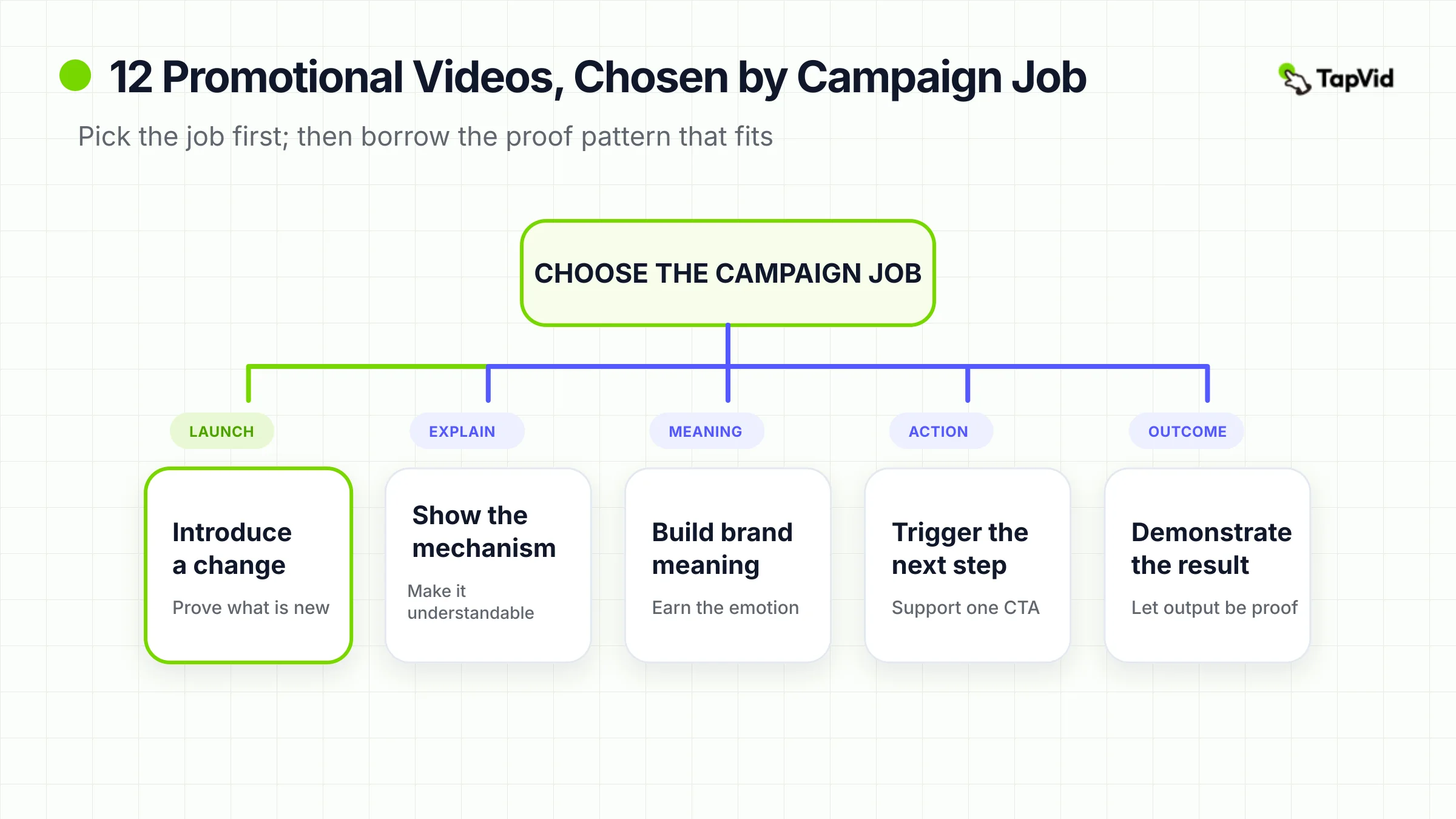
크리에이티브를 따라 하기 전에 campaign job 정하기
“프로모션 영상”은 strategy가 아니라 container입니다. 15초 social clip, product-launch film, 2분 technical explainer, founder-led offer를 모두 뜻할 수 있습니다. 증명 부담이 다르므로 같은 brief를 쓰면 안 됩니다.
먼저 영상이 반드시 수행해야 할 단 하나의 job을 적으세요.
- 변화 소개: 제품, 기능, 플랜, 협업 또는 availability update를 출시합니다.
- 메커니즘 설명: 제품 작동, 프로세스 순서 또는 접근 방식의 차이를 보여줍니다.
- 의미 구축: 브랜드를 문화적 idea, mission, identity 또는 공유 경험과 연결합니다.
- 행동 유도: 시작, 예약, 구매, 기부, 가입, 공유 또는 방문을 유도합니다.
- 결과 제시: product output, 고객 결과 또는 경험 자체를 proof로 사용합니다.
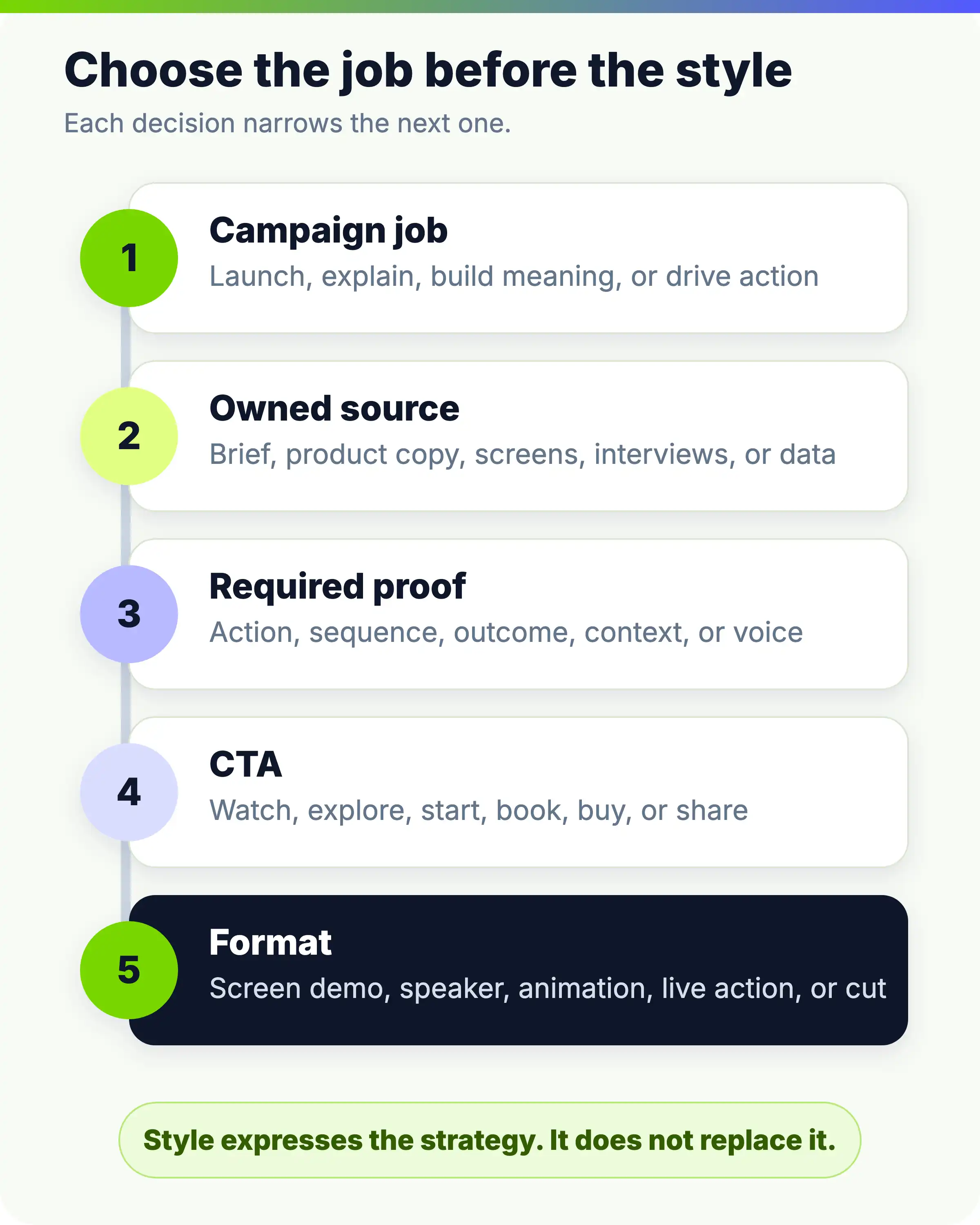
그다음 이 job을 뒷받침할 자료가 있는지 확인합니다. Launch brief에는 product copy, feature notes, interface captures가, brand video에는 founder letter, interviews, customer stories가, direct offer에는 정확한 proposition, objections, 신뢰할 speaker가 필요합니다. 승인된 그대로 보여야 할 이미지, 모델명, 가격, 사양, legal line을 표시하세요.
CTA가 프레임을 완성합니다. “Learn more”는 항상 틀리지는 않지만 미결정 campaign을 숨기기 쉽습니다. Launch는 waitlist, process explainer는 guided setup, retail announcement는 매장으로 보낼 수 있습니다. 목표 행동이 시작의 promise와 중간의 proof를 역으로 결정합니다.
- 순서는 campaign job → owned source → required proof → CTA → format입니다. 거꾸로 하면 보기 좋지만 방어 가능한 목적이 없는 영상이 되기 쉽습니다.
03
제품·기능 출시: 변화를 증명하기
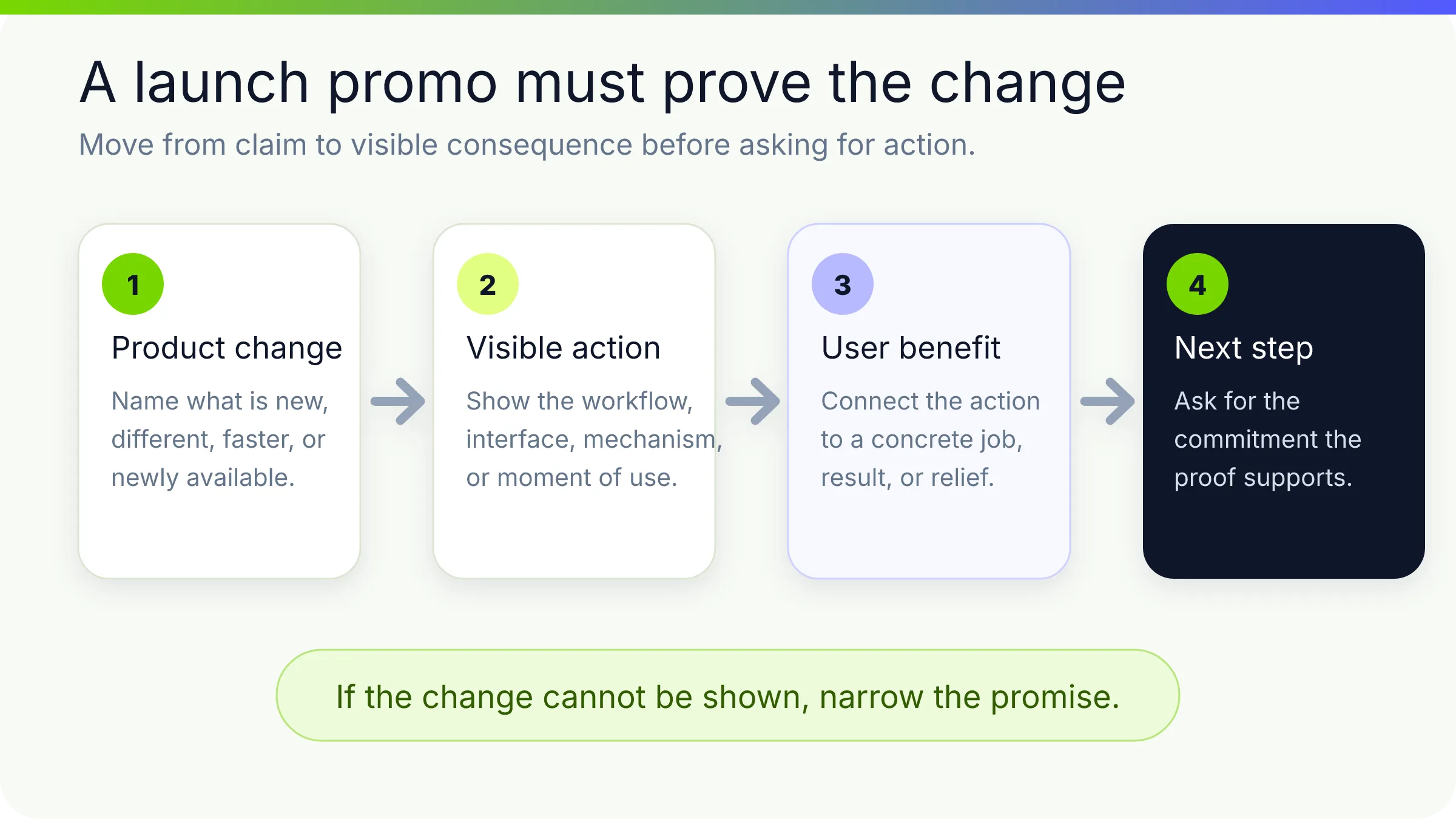
Launch video는 에너지를 만들면서 새 변화를 설명해야 합니다. 전부 reveal 예고에 쓰면 mood는 기억해도 변화는 놓칩니다. 강한 사례는 difference를 일찍 보여주고 남은 시간에 신뢰를 쌓습니다.
1. Descript — “The New Descript: A Better Way to Create Video, From Start to Finish”
Descript는 screen recording, interview, presentation, social clip montage로 시작합니다. 개별 feature가 아니라 전체 video workflow를 완성하는 새 방식으로 launch를 정의합니다.
Transcript 기반 변경, filler-word 제거, visual·sound·style 조정으로 promise를 증명합니다. Interface는 voiceover의 장식이 아니라 evidence입니다.
| Campaign job | Owned source | Hook | Proof | CTA |
|---|---|---|---|---|
| 제품 차원 변화 소개. | UI, example projects, positioning, feature behavior. | 익숙한 여러 영상 유형과 더 쉬운 제작 방식. | 보이는 edits와 before/after states. | 새 제품 탐색. |
Feature inventory 대신 완료된 user actions로 launch를 구성하세요. 소규모 팀은 정확한 screen capture, 대표 프로젝트, before/after script를 쓸 수 있습니다. 순서는 현재 제품 행동을 정확히 반영해야 합니다.
2. Amazon Go — “Introducing Amazon Go and the world’s most advanced shopping technology”
낯선 retail concept를 홍보해야 했기에 checkout line 없는 쇼핑을 직접 묻고 infrastructure가 아니라 customer journey를 따릅니다. App으로 들어가 상품을 집고 virtual cart를 확인하고 나가서 receipt를 받습니다.
의심을 줄일 만큼만 mechanism을 설명하며 shopper experience를 이야기로 유지합니다. 순차 proof가 단계별 불확실성을 해결합니다.
| Campaign job | Owned source | Hook | Proof | CTA |
|---|---|---|---|---|
| 새 retail 경험 출시. | 매장, app behavior, customer journey, 기술 개념. | 가장 싫은 쇼핑 단계를 제거. | 끊김 없는 use case. | 경험을 이해하고 기대. |
일상 journey로 낯선 system을 이해시키세요. Onboarding, logistics, finance, health, B2B에도 적용됩니다. 아직 준비되지 않았다면 concept visualization임을 밝히고 imagined workflow를 live로 제시하지 마세요.
3. Microsoft Surface Laptop 4 — “Introducing Surface Laptop 4”
Surface Laptop 4 비디오는 제품 상세 정보와 변화하는 맥락을 활용하여 사양을 경험으로 전환합니다. 노트북은 작업, 의사소통 및 창의적 상황에서 고립된 객체가 아니라 나타납니다.
제품 디테일을 사용자가 하려는 일로 묶어 낭독하는 data sheet를 피합니다. Materials, keyboard, screen, form이 proposition의 일부가 됩니다.
| Campaign job | Owned source | Hook | Proof | CTA |
|---|---|---|---|---|
| 성숙한 제품의 새 세대 출시. | design, approved specs, usage scenarios, brand assets. | 익숙한 기기를 더 유능하고 개인적으로. | close-up과 contextual use. | 새 모델 알아보기/구매. |
각 approved feature를 user consequence가 있는 scene으로 번역하세요. Camera는 call이 되고 portability는 장소 이동이 됩니다. 작은 팀은 구조를 빌리고 studio lighting, location, render budget은 따라 하지 않습니다.
세 proof model은 소프트웨어의 workflow proof, 새 system의 journey proof, hardware의 contextual product proof입니다. Launch의 핵심 불확실성을 가장 잘 없애는 것을 고르세요.
04
Explainer·제품 데모: 메커니즘을 보이기
이해가 행동 가능성을 높일 때 explainer는 promotion이 됩니다. Brand language가 mechanism을 가리면 안 됩니다. 무엇이 어떤 순서로 일어나며 왜 현재보다 나은지 쓸 수 있는 mental model이 필요합니다.
- 4. Slack — “Work, simplified.”
- Slack 공식 영상 보기.
Slack은 흩어진 communication, 느린 coordination, 찾기 어려운 정보를 짧은 promise로 압축한 뒤 더 정돈된 flow를 보여줍니다. Collaboration software 용어가 아니라 알아보기 쉬운 condition에서 시작합니다.
| Campaign job | Owned source | Hook | Proof | CTA |
|---|---|---|---|---|
| 넓은 product category와 benefit 설명. | 업무 문제, product interactions, messaging, team examples. | 일이 불필요하게 복잡함. | 익숙한 활동을 한 환경으로. | 더 단순한 업무 방식 고려. |
앞부분은 customer language, 뒷부분은 product actions를 사용하세요. “Simplify work”는 수백 제품에 해당하므로 한두 개 distinctive workflow나 outcome을 보여주세요.
5. GoFundMe — “How GoFundMe Works”
Goal, name, photo, description을 추가하고 publish, share, team 구성, donations 수령, bank 연결까지 promotion을 guided setup으로 만듭니다. Support와 security가 안심을 더합니다.
순서는 audience 결정과 일치합니다. 시작 가능한가, 페이지가 어떻게 사람에게 닿는가, 돈은 다음에 어떻게 되는가?
| Campaign job | Owned source | Hook | Proof | CTA |
|---|---|---|---|---|
| fundraiser 시작의 불확실성 감소. | 실제 setup, help, trust 정보, screens. | 의미 있는 goal을 campaign으로. | 생성부터 자금까지의 전체 경로. | fundraiser 시작. |
Onboarding을 promotional narrative로 바꾸세요. 가치까지 최단 경로와 필요한 trust 정보를 보여주세요. Security, payment, eligibility, support 문구는 게시 전에 검증합니다.
6. Okta — “What Is Okta?”
Single sign-on과 multi-factor authentication 같은 익숙한 access task에서 applications, APIs, servers와 더 큰 identity layer로 확장합니다.
먼저 익숙한 foothold를 주고 더 큰 system을 보여줍니다. 범위 확장 자체가 Okta는 login box가 아니라 connecting infrastructure라는 논지입니다.
| Campaign job | Owned source | Hook | Proof | CTA |
|---|---|---|---|---|
| technical category와 회사 위치 정의. | architecture, capabilities, security concepts, access scenarios. | 익숙한 task. | core idea를 유지하며 확장하는 map. | identity가 조직을 연결하는 방식 이해. |
“Known task to system” 구조를 쓰세요. 한 action에서 시작해 layer를 보인 뒤 organizational benefit로 돌아갑니다. 새 term은 주의를 쓰므로 다음 visual이 설명할 수 없는 term을 삭제하세요.
전체 구조는 Explainer 영상 사례 가이드, 더 illustration 중심인 사례는 Whiteboard Explainer 사례를 보세요. 핵심은 campaign use이며 이해를 다음 행동과 연결해야 합니다.
05
브랜드·미션: 구체적인 idea로 감정 얻기
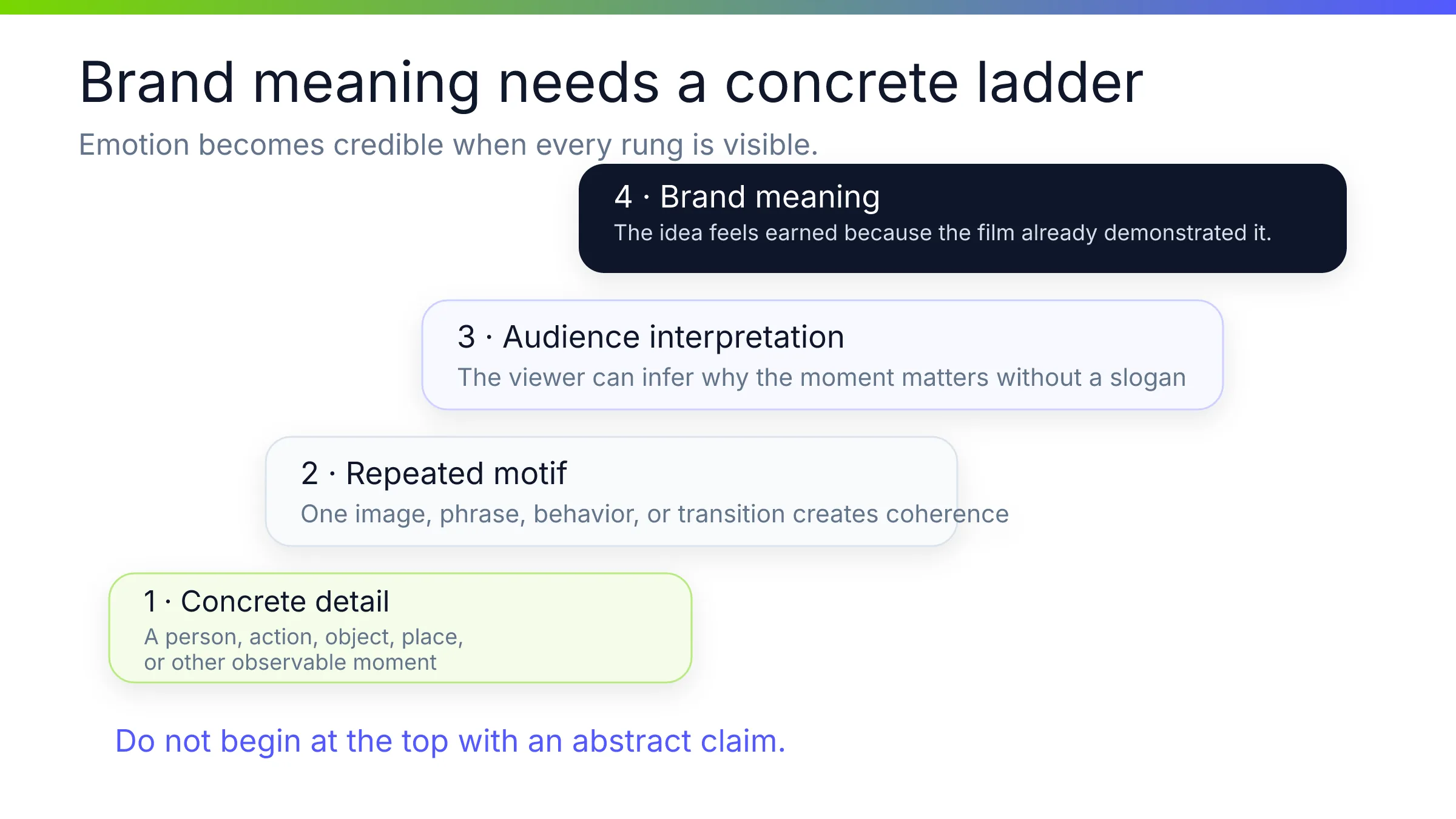
브랜드 홍보는 어느 회사나 쓸 수 있는 예쁜 montage나 믿을 관찰 가능한 이유 없는 manifesto가 되기 쉽습니다. 강한 brand film은 concrete organizing idea 하나를 고르고 특정 image, voice, artifact가 이를 운반하게 합니다.
7. Google — “2022 — Year in Search”
Google의 2022년 검색 연도는 공개적인 순간, 질문, 그리고 사람들을 감성적인 회고로 결합합니다. 검색은 제품 워크스루가 아니라 반복되는 모티프가 됩니다.
사람들이 사건, 변화, 서로를 이해하려 Google을 사용한 source가 브랜드 연결을 성립시킵니다. 편집은 global scale과 personal feeling을 search로 연결합니다.
| Campaign job | Owned source | Hook | Proof | CTA |
|---|---|---|---|---|
| 문화 회고로 brand meaning 강화. | search themes, editorial research, interface motifs, licensed footage. | 사람들이 함께 이해하려 한 것. | 실제 호기심과 알아보는 순간. | 브랜드 lens로 한 해 회고. |
브랜드가 실제로 관찰한 behavior를 structure로 만드세요. 작은 회사는 고객 질문, support themes, creator milestones를 쓸 수 있습니다. 공개 권리가 있는 assets와 명확한 editorial standard가 필요합니다.
8. Rare Beauty — “Only at Sephora”
Rare Beauty 공식 launch film 보기.
Selena Gomez의 presence, product world, direct retail message를 씁니다. Founder가 공개 brand identity의 일부이므로 recognition, tone, availability를 빠르게 전달합니다.
Routine을 가르치거나 모든 제품을 설명하지 않습니다. Retail destination이 구체적 endpoint이고 founder voice가 brand idea와 product를 연결합니다.
| Campaign job | Owned source | Hook | Proof | CTA |
|---|---|---|---|---|
| 브랜드와 retail availability 출시. | founder access, approved story, products, partnership. | 알아보는 founder의 개인적 point of view. | 제품과 구매 장소. | Sephora 방문. |
신뢰할 사람이 명확한 announcement를 하게 하세요. Founder-led format은 vague language를 드러내므로 script가 자연스러워야 하며 charisma가 offer 부재를 숨기면 안 됩니다.
9. Spotify — “How It’s Made: Wrapped”
Global toolkit을 만들고 market별 조정한 과정을 설명해 Wrapped를 홍보합니다. Listener data를 공유 가능한 연말 순간으로 바꾸는 system이 주제입니다.
Audience가 output을 이미 알기에 behind-the-scenes가 작동합니다. 여러 touchpoint가 똑같지 않아도 coherent한 방식을 보여줍니다.
| Campaign job | Owned source | Hook | Proof | CTA |
|---|---|---|---|---|
| flagship campaign 관심과 creative capability 강화. | interviews, artifacts, design system, final executions. | 익숙한 cultural product 제작법. | 사람, 도구, adaptations. | Wrapped와 creative work 감상·토론·참여. |
Outcome이 먼저 관심을 얻고 process를 홍보하게 하세요. 작은 팀은 launch, report, event, customer program의 제작을 기록할 수 있습니다. Making-of는 기존 curiosity를 확대하지만 처음부터 만들기는 어렵습니다.
Google은 shared memory, Rare Beauty는 recognizable person과 focused announcement, Spotify는 workshop에서 감정을 만듭니다. 셋 다 mood만이 아니라 concrete source가 있습니다.
06
Social·offer·community: 다음 행동 중심으로 설계하기
Immediate action 영상은 매우 엄격한 message hierarchy가 필요합니다. Audience가 offer, 관련성, 다음 행동을 말할 수 있어야 합니다. Distinctive voice나 visual idea는 단순한 offer를 더 기억하게 합니다.
- 10. Dollar Shave Club — “Our Blades Are F*ing Great”**
- Dollar Shave Club 공식 영상 보기.
Founder-led warehouse tour가 무엇을 보내고 얼마이며 기존 구매가 왜 불편한지 설명합니다. Staged interruptions와 dry delivery가 offer를 숨기지 않고 리듬을 유지합니다.
Speaker, location, jokes, CTA가 같은 value argument를 강화합니다. Humor는 일반 광고의 추가 layer가 아니라 founder가 category에 던지는 도전입니다.
| Campaign job | Owned source | Hook | Proof | CTA |
|---|---|---|---|---|
| DTC offer 소개와 sign-up. | founder voice, product, subscription, price contrast, warehouse. | 직설적 claim. | offer와 제거하는 문제. | club 가입. |
Slogan decoder 없이 proposition을 이해하게 하세요. 한 문장으로 offer를 쓰고 관련 환경에 믿을 speaker를 두고 objections에 답합니다. Profanity나 deadpan tone을 빌리면 부자연스럽고 price·comparison claim은 승인해야 합니다.
11. GoPro — “Danny MacAskill – Cascadia”
Camera가 촬영한 experience로 camera를 홍보합니다. Gran Canaria 옥상을 타는 point-of-view와 external shots가 action 자체를 demonstration으로 만들고 output이 claim을 운반합니다.
Stability, proximity, movement, unusual perspectives가 의미 있는 곳에서 보입니다. Performance는 camera shopper 밖에도 공유되는 이야기입니다.
| Campaign job | Owned source | Hook | Proof | CTA |
|---|---|---|---|---|
| capability 증명과 action-camera identity 강화. | product footage, athlete, location, behind the scenes. | 알아보기 쉬운 환경의 extraordinary feat. | 촬영된 경험. | GoPro와 제작·공유 연결. |
“Output을 먼저 보여주고 tool을 설명하세요.” Design software는 완성 identity, analytics는 decision, collaboration은 completed project를 보여줍니다. Athlete, access, safety, location은 작은 팀의 기본 조건이 아닙니다. Stunt가 아니라 proof principle을 빌리세요.
12. Dropbox Paper — “My shot + Your illustration”
16초 clip은 collaboration을 한 번의 exchange로 줄입니다. 한 사람이 photograph를 주고 다른 사람이 illustration을 더해 feed에서 즉시 이해하는 benefit가 됩니다.
Title 자체가 “내 기여 + 네 기여”라는 miniature brief입니다. Product role은 feature list가 아니라 결합에서 보입니다.
| Campaign job | Owned source | Hook | Proof | CTA |
|---|---|---|---|---|
| social-friendly format으로 collaboration behavior 홍보. | 두 creative inputs, action, combined result. | 서로 다른 work의 만남. | merged artifact. | Paper 공동 창작 상상. |
Feature 하나를 작은 before-plus-after story로 만드세요. 16초는 idea 하나를 기억하게 하지만 category, objections, 여러 기능까지 요구하면 format이 깨집니다.
세 경로는 verbal offer, aspirational output, tiny visible collaboration입니다. 모두 계속 볼 dominant reason 하나만 고릅니다.
07
전이 가능성 테스트: 소규모 팀이 실제로 재사용할 것
“이게 좋다”를 곧바로 production requirement로 바꾸면 benchmarking은 위험합니다. Reference를 brief에 넣기 전 다섯 질문을 통과하세요.
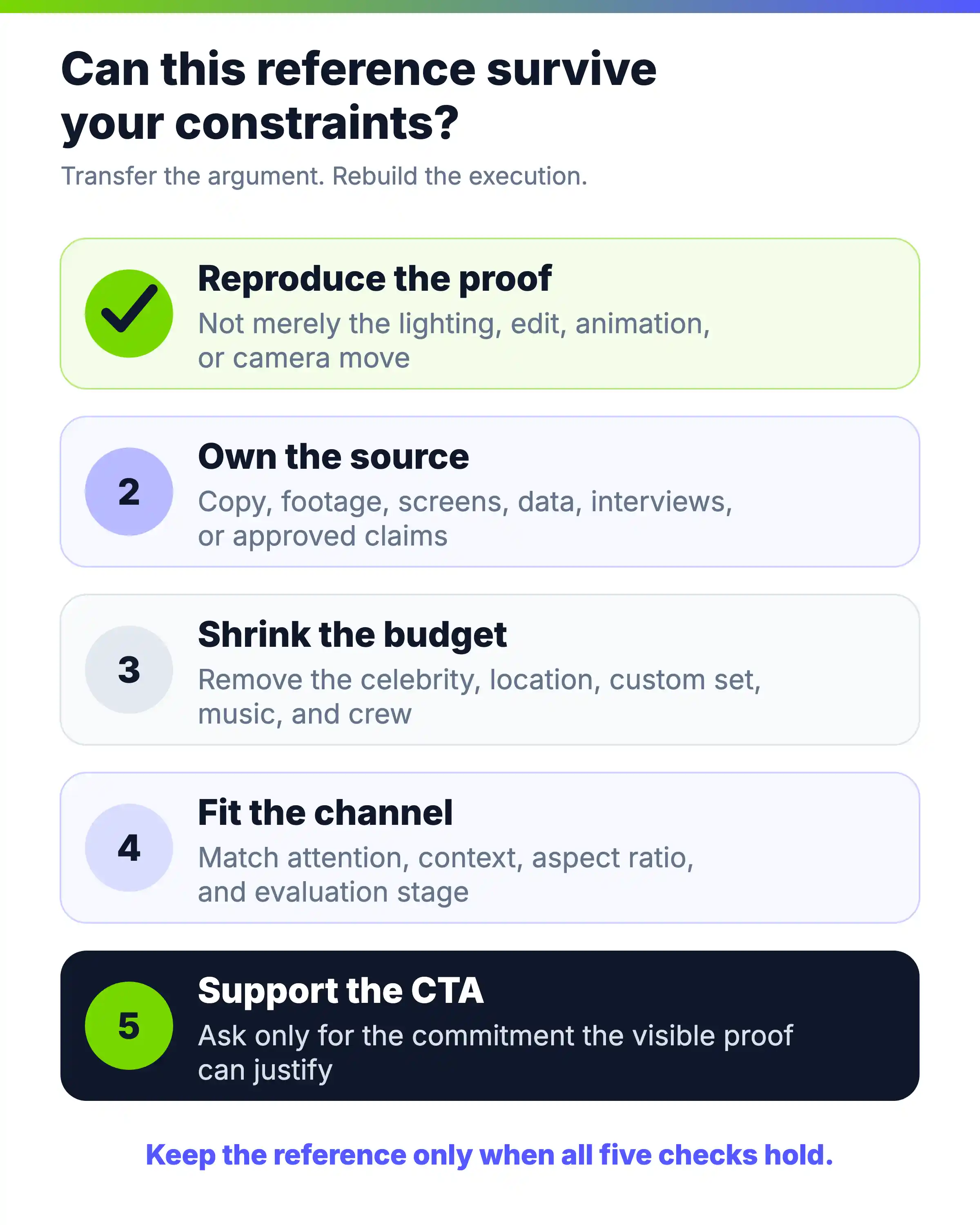
- 1. Surface가 아니라 proof를 재현할 수 있는가? Transcript editing launch에는 실제 product actions, customer story에는 승인·검증된 result가 필요합니다. Lighting이나 animation style만으로 communication problem을 해결하지 못합니다.
- 2. Source material이 충분한가? Copy, screenshots, footage, interviews, data, reviews, documents, approved claims를 나열하세요. Slogan뿐이면 강한 reference도 무너집니다.
- 3. 더 작은 budget에서도 idea가 성립하는가? Celebrity, location, music, set, crew를 제거하세요. Google footage library는 재현하기 어렵지만 고객 질문으로 한 해를 구성할 수 있습니다. GoPro rooftop ride는 어렵지만 product output으로 시작할 수 있습니다.
- 4. Target channel에서 audience가 이해하는가? Technical explainer는 product page에서 작동하지만 조정 없는 social ad에서 실패합니다. 16초 clip은 관심을 얻지만 evaluation buyer에게 부족합니다. 여러 cuts를 계획하세요.
- 5. 보인 proof가 CTA를 지원하는가? 구매는 demo 시청보다 confidence가 많이 필요합니다. Interesting idea에는 exploratory CTA, workflow와 risk를 보인 뒤 higher-commitment CTA를 사용하세요.
작은 팀에 특히 좋은 개념은 Descript action workflow, GoFundMe guided setup, Okta known-task-to-system, Rare Beauty focused speaker announcement, Dollar Shave Club proposition-led founder voice, Dropbox Paper single collaboration입니다. 실행 수준은 달라도 organizing idea는 spectacle에 의존하지 않습니다.
반복 제작에서는 maintenance도 전이 가능성입니다. Product image, price, interface capture, legal line이 바뀔 때 scene 위치를 알아야 합니다. 안전하게 수정 가능한 간단한 source-to-scene 구조가 다음 launch를 버티지 못하는 일회성 edit보다 가치 있을 수 있습니다.
08
Approved assets와 copy를 프로모션 영상 brief로 전환하기
Blank prompt로 시작하지 말고 이미 offer를 설명하는 자료, campaign brief, product page, launch notes, article, PDF, script, sales deck, documentation, approved screenshots를 사용하세요.
TapVid는 Explainer Video Engine으로 supplied information과 assets를 structured, reviewable video로 바꾸는 system입니다. 올바른 assets, approved information 보존, 각 claim을 담당 scene에 연결하는 세 층의 fidelity가 운영 목표입니다.
이는 오류가 전혀 없다는 약속이 아니라 제작 방향입니다. 2026년 8월 12~13일, MorrowNest Focus Light라는 가상의 소형 탁상용 램프로 그 경계를 테스트했습니다. 확정된 브리프에는 30초 분량의 16:9 홍보용 설명 영상, 정확한 내레이션, 시간대가 지정된 6개 장면, 승인된 제품 정보 4개, 금지된 주장, 업로드 없음이 명시돼 있었습니다. TapVid에 내부 제작 계획을 공개하라고 요청한 첫 번째 버전은 Studio 결과물이 나오기 전에 거부됐습니다. 이후 해당 메타 요청만 제거하고, 같은 가상의 정보와 제약 조건으로 두 번째 실행을 별도로 진행했다고 밝혔습니다.
두 번째 run은 6개 scene thumbnail이 있는 completed 30-second Studio result였습니다. 아래 3개 screenshot은 generation 완료 후 capture했으며 전체 TapVid workspace, `Done`, `Video ready`, player controls, chapter, timeline을 보존하고 Chrome tabs와 address만 잘랐습니다.
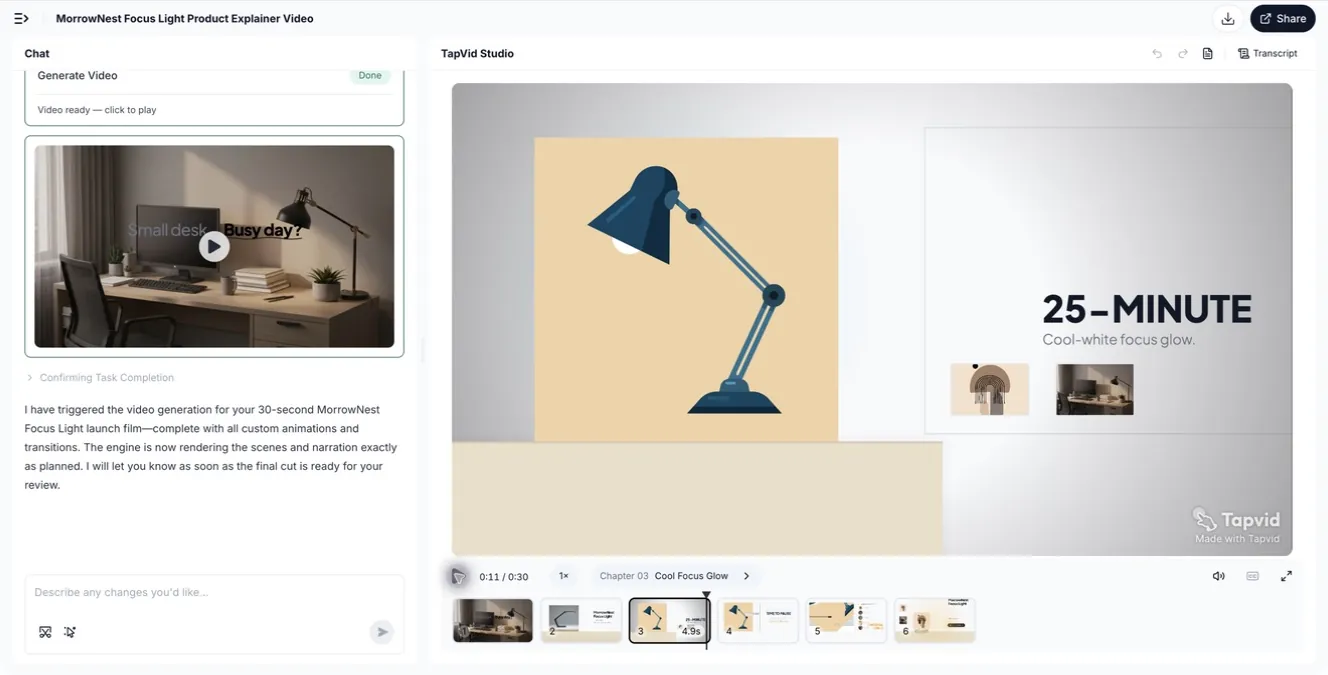
Scene 3은 25-minute focus fact를 product-centered visual로 바꿉니다. 램프가 주체이고 duration과 use case가 읽힙니다. Loading placeholder가 아니라 completed frame입니다.
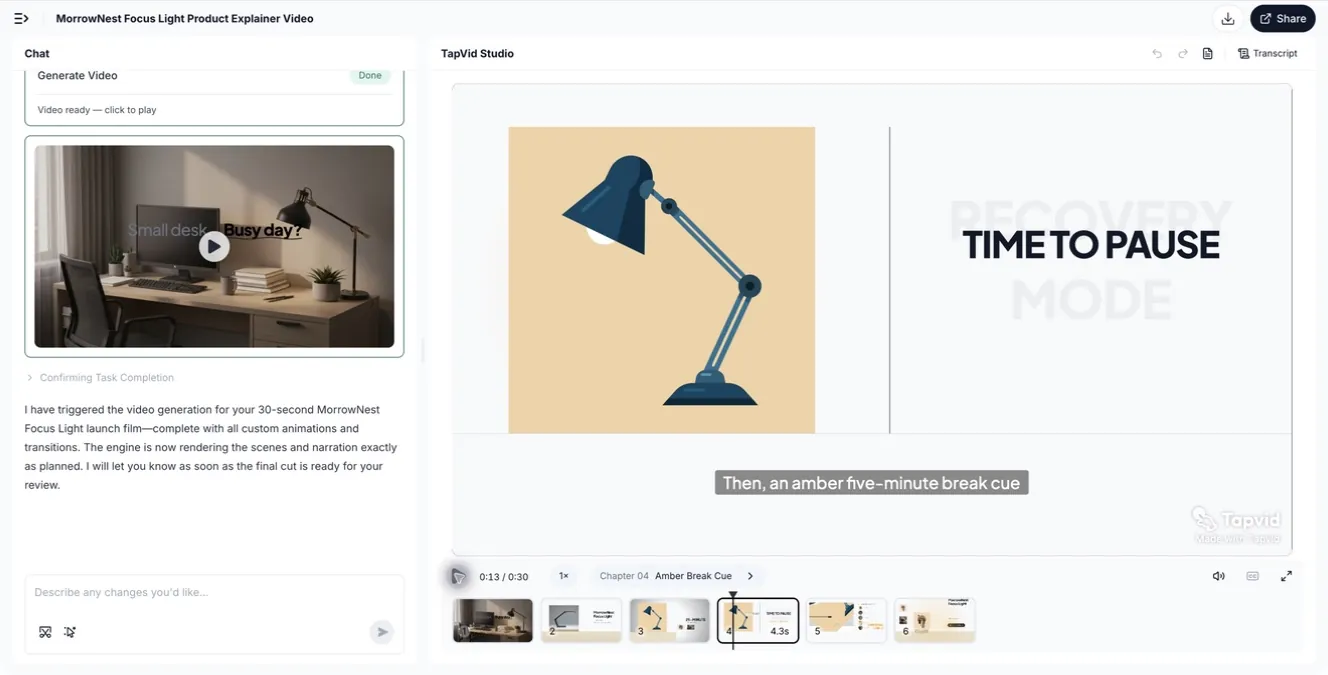
Scene 4는 purpose와 palette를 함께 바꿉니다. Lamp는 유지하고 message는 amber break cue가 됩니다. Approved fact 하나가 visual beat 하나와 대응해 source-to-scene 결정을 검사할 수 있습니다.
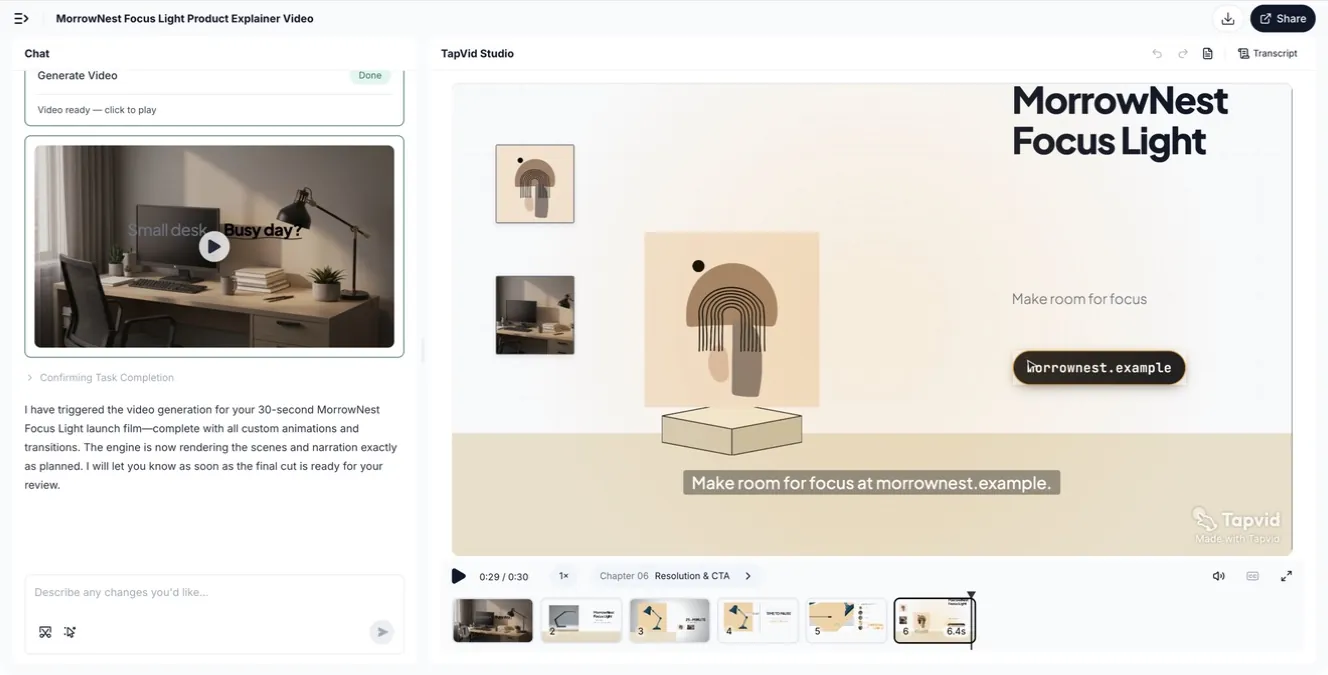
Scene 6은 product name, “Make room for focus”, fictional destination으로 끝납니다. 6-card timeline은 earlier boundary가 아니라 completed workspace에서 capture했음을 보여줍니다.
계획 단계에서는 검토가 필요한 이유도 분명히 드러났습니다. 요청한 제품 정보는 알아볼 수 있었지만, 제작 대본은 확정된 내레이션을 다시 쓰고 “premium”, “powers up instantly”, “standard universal USB-C”처럼 승인되지 않은 수식어를 추가했습니다. 이 표현들은 확정된 브리프에 없었습니다. 이는 정확도를 수치화한 결과도, 모든 TapVid 프로젝트에 대한 평가도 아닙니다. 제한된 한 번의 테스트에서 얻은 실무적 교훈은 다음과 같습니다. 브리프를 확인하고, 제작 대본을 다시 확인한 뒤, 완성된 장면을 승인된 원문과 대조해야 합니다. 가격, 모델 번호, 사양, 성능 주장, 법적 문구처럼 위험도가 높은 표현은 내보내기 전에 확정해 두세요.
Campaign job에 따라 TapVid workflow를 고르세요. Marketing explainer는 copy와 documents, product launch는 reveal과 announcement, ad video는 direct response에 맞습니다. Task-specific entry point이며 product category는 Explainer Video Engine입니다.
- Source를 7개 field의 brief로 바꾸세요.
- 1. Campaign job: 원하는 이해·감정·행동 변화 하나.
- 2. Audience state: 현재 지식과 장애물.
- 3. Approved source pack: 보여주거나 인용할 assets와 copy, verbatim 항목.
- 4. Source-to-scene map: product, screenshot, claim, line을 scene에 할당.
- 5. Proof sequence: facts, steps, screens, examples, outcomes.
- 6. Format and channel: full version과 cuts.
- 7. CTA: 정확한 action, destination, commitment.
Product explainer source pack은 URL, PDF, script, screenshots, footage, approved copy를 포함할 수 있습니다. TapVid는 outline, script, scene plan, completed sequence를 review하고 claim-source를 확인하며 export 전 scoped scene change를 요청하게 합니다. Claims를 인증하거나 정확한 live click path를 기록하지 않습니다. Upload가 없어 logo·screenshot·footage fidelity를, download·sharing·export·repeatability·universal generation time도 테스트하지 못했습니다. Current interface clicks는 screen recording 후 live product와 검증하세요. AI 제품 데모 제작 과정 가이드를 참고하세요.
좋은 first draft는 field마다 strategic choice를 합니다. 예: “team leads에게 reporting feature 소개, approved release brief와 current screenshots 2장과 help article 사용, setup을 scene 2, report를 scene 3에 연결, feature name은 verbatim, setup·first report·export 증명, 75초 product-page version과 3 cuts, guided demo로 유도.” 모든 결정은 owned evidence와 reviewable map에 연결됩니다.
09
Goal·source·channel·CTA에 format 맞추기
| 목표가… | 최적 starting source | 적합한 full format | 우선 proof | CTA 예 | 흔한 실패 |
|---|---|---|---|---|---|
| 소프트웨어 기능 출시 | Release brief, UI capture, user problem | 45–90초 feature launch | 실제 actions와 바뀐 workflow | 기능 사용 | 변화를 보이지 않고 기능만 나열 |
| 다단계 서비스 설명 | Help content, process map, trust | 60–120초 process explainer | Sequence, handoffs, reassurance | 시작/예약 | 고위험 단계를 빨리 넘김 |
| 기술 카테고리 정의 | Architecture notes, diagrams, use cases | 90–150초 animated explainer | Known task에서 system으로 | Platform 탐색 | Terms를 한 번에 너무 많이 도입 |
| 협업·availability 발표 | Approved announcement, speaker, assets | 20–60초 spokesperson promo | Who, what, where, when | 방문/구매 | 전 시간을 brand mood에 사용 |
| Direct offer 유도 | Proposition, price, objections, speaker | 30–90초 founder/offer video | Value exchange와 objections | 구매/가입 | Offer를 끝까지 숨김 |
| 브랜드 의미 구축 | Founder letter, customer themes, archive | 60–150초 brand film | Concrete organizing idea 하나 | 시청/공유/알아보기 | Generic montage와 manifesto |
| Creative capability 홍보 | Finished work, process, interviews | 60–180초 making-of | Known output 뒤 decisions | 작업 탐색 | Audience가 결과를 중시하기 전에 process 제시 |
| Social attention 획득 | One feature, transformation, two assets | 10–30초 social cut | 즉시 보이는 visual change | 더 보기 | 제품 전체를 한 clip에 압축 |
Duration은 message를 따릅니다. Multi-stage process는 retail announcement보다 공간이 필요합니다. 각 부분이 실제 질문을 해결하면 technical buyer는 길이를 받아들이고 cold social viewer는 benefit를 일찍 봐야 합니다.
Master와 cuts를 함께 계획하세요. 각 version에 남길 proof, landing page로 옮길 context, channel별 CTA를 결정하세요. Master를 기계적으로 자르지 말고 self-contained idea로 각 cut을 쓰세요.
10
유명 프로모션 영상에서 따라 하지 말아야 할 것
- Budget signal을 복사하지 마세요. 비싼 lighting, locations, animation은 campaign job을 결정하지 않습니다. Spectacle에 의존하면 그 아래 communication move를 찾으세요.
- 신뢰할 speaker 없이 founder format을 복사하지 마세요. Message와 실제 관계가 있는 사람이 필요하지, 낯선 목소리로 원고를 읽는 executive가 아닙니다.
- Evidence 없이 claim을 복사하지 마세요. Accurate capability, approved specification, demonstrated outcome을 보여주세요. 다른 브랜드의 유사 문구만으로 speed, security, results, superiority를 암시하지 마세요.
- Automation이 source-of-truth를 고치게 두지 마세요. Product names, prices, model numbers, approved claims, legal wording을 lock하세요. Current interface behavior에 의존하면 delivery 전 capture와 대조하세요.
- Channel edit을 complete campaign으로 보지 마세요. Dropbox Paper clip은 collaboration idea 하나만 운반합니다. Short asset의 역할과 빠진 정보의 위치를 명시하세요.
- Brand film의 surface를 복사하지 마세요. Mood와 cultural footage만으로 meaning을 만들 수 없습니다. 브랜드가 소유할 behavior, archive, point of view를 찾으세요.
- Inspiration이 constraints를 지우게 두지 마세요. Rights, product readiness, claim approval, speaker access, localization, aspect ratios, update risk를 기록하세요. Idea의 publish 가능성을 결정합니다.
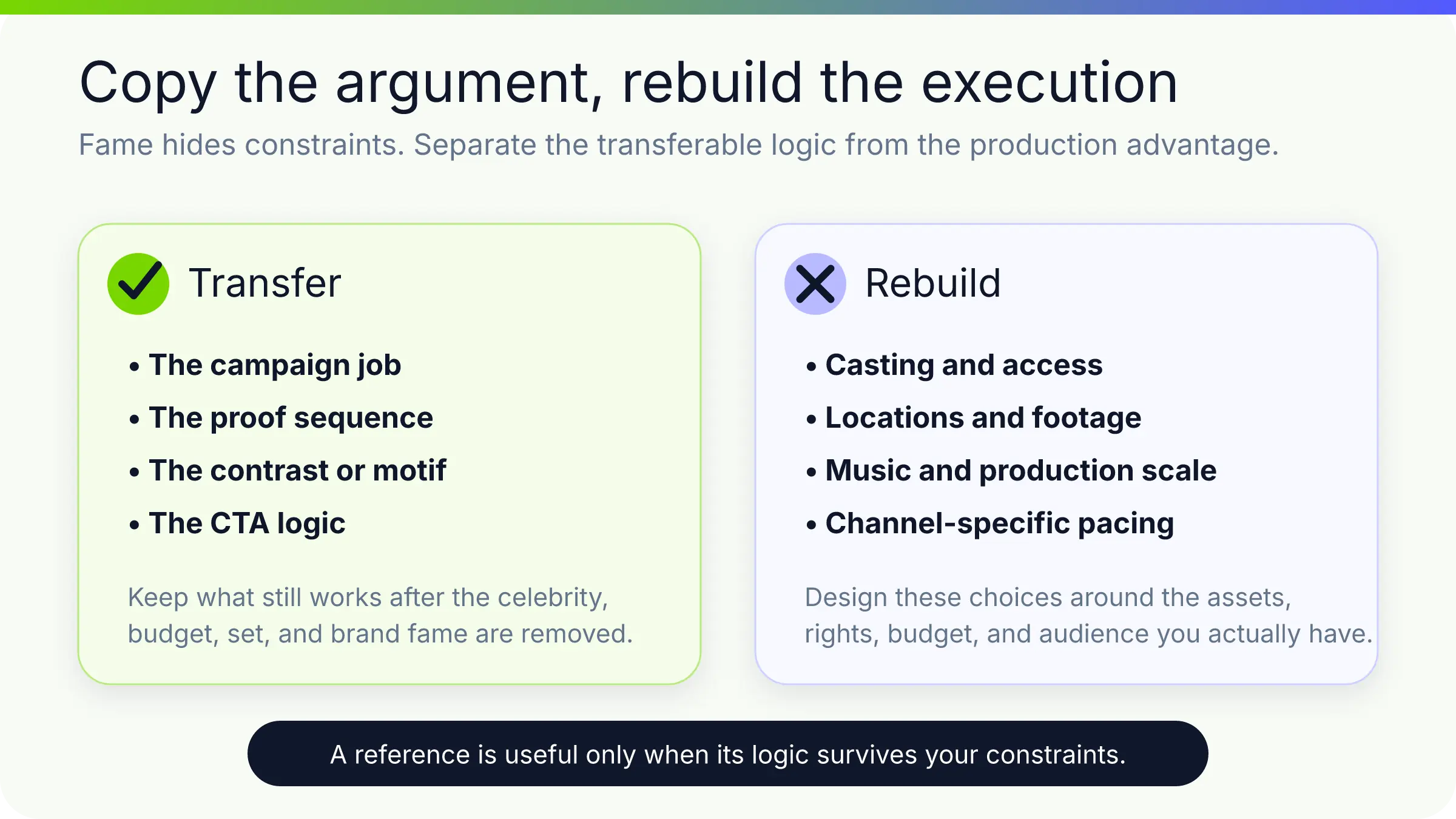
최고의 reference는 job, source, proof, CTA, format을 방어 가능하게 선택하게 합니다. 선택이 명확하면 style이 strategy를 표현하고 대체하지 않습니다.
11
자주 묻는 질문
프로모션 영상이란 무엇인가요?
제품, 서비스, offer, event, organization 또는 brand에 대한 관심을 높이고 정의된 audience를 다음 행동으로 움직이는 영상입니다. 변화 출시, mechanism 설명, outcome 제시, brand meaning 구축, immediate action 유도가 가능합니다.
유용한 사례의 조건은?
Campaign job을 명확히 하고 CTA를 위한 observable proof를 제공합니다. Customer journey, product action, founder proposition, before-and-after 같은 transferable structure도 보여주며 visual style만 보여주지 않습니다.
영상 길이는?
Promise를 세우고 필요한 proof와 CTA를 서두르지 않고 전달할 수 있는 가장 짧은 runtime을 쓰세요. Social transformation은 15초, process나 technical category는 60–150초일 수 있습니다. Universal rule보다 channel과 audience state가 중요합니다.
Brief에 무엇을 넣나요?
Campaign job, audience state, approved source pack, source-to-scene map, core message, proof sequence, format, channel, CTA, required/prohibited claims, rights, versions, aspect ratios입니다. Verbatim wording·visual을 표시하고 중요 message를 검증 가능한 source에 연결하세요.
Article, PDF, product page로 만들 수 있나요?
Campaign job을 지원하는 approved material이 충분하면 가능합니다. 모든 문단을 압축하지 말고 audience problem, key message, proof, examples, CTA를 추출하세요. Approved names, numbers, claims는 그대로 유지하고 정확한 product behavior는 current captures로 별도 검증하세요.
광고와 차이는?
Promotional video는 launch films, product explainers, brand videos, event promos, social clips, direct offers를 포함하는 넓은 용어입니다. Ad는 특정 audience, channel, objective, response를 위한 paid 또는 campaign-distributed placement입니다. 같은 source라도 edit과 CTA가 다를 수 있습니다.
스타일은 어떻게 고르나요?
먼저 campaign job과 proof를 고르세요. Product behavior가 evidence면 screen motion, sequence가 중요하면 process explainer, credibility와 voice면 speaker, physical environment면 live action, product가 결과로 자신을 증명하면 output-led film을 사용하세요.