
コミュニティ由来未ベンチマーク
人間の指の数え方モーションテスト
話しながら指の位置を一致させる単一の静止ショットコミュニティ比較テスト。
参考用のローカライズ訳です。制作者の元のプロンプトは変更せず、出典を明記して表示します。
Seedance 2.5プロンプトライブラリ
Xのクリエイターに帰属するコミュニティプロンプト120件と、TapVid編集テンプレート36件を確認できます。
参考資料のみ。モデル性能のベンチマークではありません。プロンプトから作成
プロンプトを選び、変数を置き換え、重要な制作条件を保ちます。
作業を保存
作成したプロンプト
テンプレートを選び、被写体を説明してからプロンプトを作成してください。
話しながら指の位置を一致させる単一の静止ショットコミュニティ比較テスト。
参考用のローカライズ訳です。制作者の元のプロンプトは変更せず、出典を明記して表示します。

水深3,000フィートで動物たちがクラシック音楽を奏でる、超現実的な水中オーケストラ。
参考用のローカライズ訳です。制作者の元のプロンプトは変更せず、出典を明記して表示します。

明確な解剖学、飛行、水、カメラ、音の制約を伴う垂直のライダー視点ファンタジーシーケンス。
参考用のローカライズ訳です。制作者の元のプロンプトは変更せず、出典を明記して表示します。

オレンジ色のホログラフィックエネルギーと崩壊するポータルを中心に構築された、連続した屋上からスカイラインへのアクションシーケンス。
参考用のローカライズ訳です。制作者の元のプロンプトは変更せず、出典を明記して表示します。

手持ちの動き、自然な演技、食べ物の質感、連続性を強調した30秒のカフェの朝のVlog。
参考用のローカライズ訳です。制作者の元のプロンプトは変更せず、出典を明記して表示します。

明確な障害物のリズム、表情豊かな演技、カメラ指示、解決された結末を備えた高速3D都市ショート。
参考用のローカライズ訳です。制作者の元のプロンプトは変更せず、出典を明記して表示します。
クリエイターの事例と編集テンプレートを、ベンチマークとして扱わずに絞り込めます。
AIエージェント向け
Codexが必要なときに156件のプロンプトを検索し、最も近い候補をあなたの素材と承認済みコピーに合わせ、生成を選んだ場合はTapVid MCPへ進めます。
Codexは必要なときに公開フィードを読み取ります。Codexを学習させるものではなく、Seedance 2.5モデルへのネイティブ接続でもありません。
https://tapvid.ai/video-prompts/seedance-2-5/skill.md を読み、その指示に従ってください。私の依頼に合う候補をTapVid Seedance 2.5プロンプトライブラリから探し、私の素材と承認済みコピーに合わせて調整し、出典表記を維持し、有料の動画生成ツールを使う前に私へ確認してください。QUICK ANSWER
Lock one subject identity, give every reference a single job, and describe a few timed actions that cause one another. Add one camera intention, explicit continuity rules, and negative constraints; keep final text, logos, and verified claims for post-production.
PRODUCTION GUIDE
Control the dependencies first. Style should finish a coherent shot, not rescue an unclear sequence.
Lock one primary subject, its materials, scale, and the details that must stay recognizable.
Say which input controls identity, motion, composition, lighting, or finish.
Write a few causal beats with explicit time ranges instead of a list of unrelated events.
Choose one dominant camera intention and describe its speed, path, and stopping point.
State what stays fixed across cuts: face, product geometry, wardrobe, light direction, and screen position.
Exclude generated copy, warped logos, extra objects, random cuts, identity drift, and unsupported claims.
Show the subject, spatial logic, and one readable visual problem or promise.
Let one action cause the next while the identity and lighting remain coherent.
Land on a stable hero frame with deliberate negative space for verified post-production copy.
For image-to-video, assign roles before describing motion. More inputs help only when they do not compete.
| Move | Best for | Control note |
|---|---|---|
| Locked shot | Interfaces, comparisons, and product geometry | Let the subject provide the motion. |
| Slow dolly-in | Feature reveal or emotional emphasis | Name the final framing so it does not overshoot. |
| Lateral track | Process, shelf, or environment reveal | State the screen direction and keep it consistent. |
| Orbit | One stable hero object | Limit the arc; a full spin often exposes unstable geometry. |
| Top-down descend | Unboxing, assembly, and layout | Keep the optical axis centered on the main object. |
| Rack focus | Move attention between two planes | Use only two focus targets and name the order. |
PROMPT REWRITE
This is an editorial rewrite, not a benchmark result. Its advantage is explicit production logic, not extra adjectives.
“Make a cool cinematic video of a CRM dashboard with dramatic camera movement and lots of features.”
No stable identity, causal action, timing, end frame, or rule for generated interface text.
Create a polished 10-second 16:9 product reveal for a calm CRM analytics workspace. Preserve the supplied dashboard layout and brand-indigo accent; do not invent interface copy. 0–4s: begin on a locked wide view as three clean data panels assemble from existing layout regions. 4–7s: use one slow dolly-in while a single pipeline chart resolves and the surrounding panels remain fixed. 7–10s: stop on a stable hero frame with the primary metric area highlighted and clear negative space at upper right for post-production copy. Maintain panel geometry, light direction, and indigo accent across the shot. No handheld shake, extra widgets, warped logos, generated text, or random cuts.
Treat a failed output as a production diagnosis. Change the smallest instruction that explains the symptom.
Likely causeToo many identity references or no explicit invariant.
Prompt fixChoose one identity source and list the exact features that must persist.
Likely causeEvents are listed without cause, timing, or an end state.
Prompt fixReduce the sequence to three timed beats and make each beat trigger the next.
Likely causeThe prompt asks the model to typeset final copy or a logo.
Prompt fixReserve a clean area and add verified text and supplied branding in post-production.
Likely causeSubject, camera, background, and effects all move at once.
Prompt fixKeep one dominant movement; lock or simplify the other motion layers.
Likely causeTwo inputs compete for identity, composition, or style.
Prompt fixAssign every reference one job and state which source wins if roles overlap.
TRACEABLE PUBLIC EXAMPLES
These are public source examples, not outputs from TapVid's 36 editorial templates. Use them to study structure, then validate your own direction.
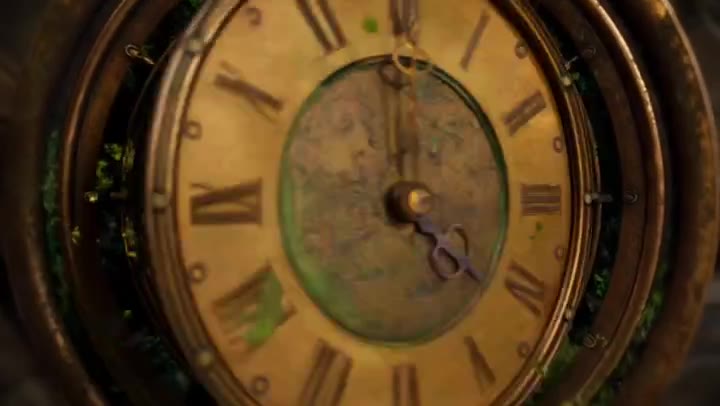
30-second cinematic sequence
Three timed chapters, continuous travel, recurring clock geometry, and an explicit return to the opening frame.
Source checked August 7, 2026
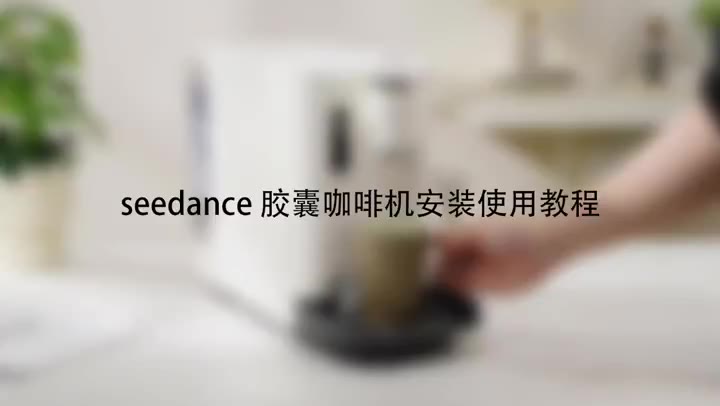
Product tutorial
Stable product geometry, ordered handling steps, close-up detail, and a clean completion state.
Source checked August 7, 2026
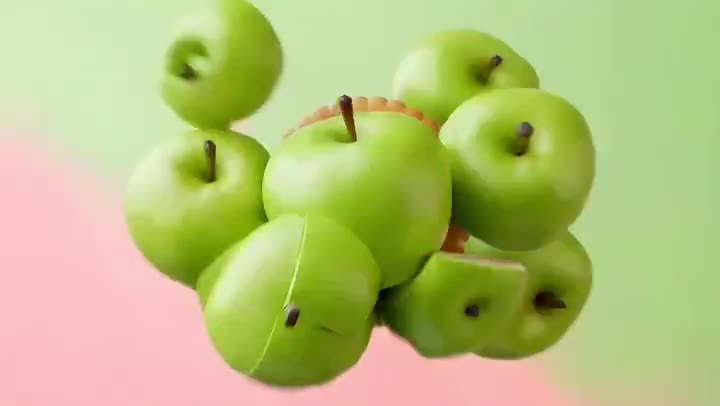
Ecommerce product ad
Material transformation, appetizing texture, restrained camera movement, and a stable final packshot.
Source checked August 7, 2026
LEARN BY INTENT
Use a focused prompt detail to study the shot. When the idea needs a complete explanation, bring your existing article, script, PDF, PRD, or product copy into the matched TapVid workflow.
Reveal one interface capability without inventing microcopy.
Show handling, texture, and a stable packshot.
Turn a system or process into a causal visual sequence.
Build a fast hook with a controlled final message area.
SEEDANCE → TAPVID
帰属を明記したコミュニティプロンプト120件とTapVid編集テンプレート36件、合計156件です。
性能は主張していません。未ベンチマークのライブラリを参考資料として提供しています。
クリエイターへの帰属を保持し、Xの元投稿へリンクしています。
はい。必要な参照情報、タイミング、制約を保ちながら、変数や指示を調整できます。
RELATED TAPVID TOOLS
FROM HOOK TO EXPLAINER
Bring your own article, script, PDF, PRD, or product copy to TapVid. The Explainer Video Engine turns that existing content into a polished, structured explainer video.