
The team that produced one excellent animation video and then couldn't reproduce it is one of the most common things I see when I consult with in-house creative teams. The first video was great because everyone cared enormously and there were no constraints yet. The second video took twice as long, looked different, and no one could explain why. The problem is almost never talent. It's always the absence of a system.
01
Match the animation style to where the video actually lives
I see teams make this mistake regularly: they choose an animation style based on what they find aesthetically interesting rather than what works in the specific context where the video will be watched. A richly textured motion graphics piece looks stunning in a demo reel and gets completely ignored when it's embedded mid-page in a SaaS onboarding flow.
Before you open any animation video maker, answer two questions in writing: where specifically will this video play, and how will viewers arrive at it? A video that plays in a LinkedIn ad needs to work without sound, at thumbnail scale, and in the first two seconds. A video embedded in an email onboarding sequence has different constraints entirely. The deployment context determines the creative constraints, and the creative constraints should determine the style.
The practical categories: product UI walk-throughs work best with screen-recording-plus-motion-overlay styles; conceptual explainers work with icon-based flat animation; brand content works with higher-production motion graphics; internal documentation works with simple annotated screencasts. None of these is inherently better — they're each right for a specific job.
02
Why teams that produce one good video can't produce ten
The first animation video a team produces almost always goes well, for a specific reason: there are no constraints yet, so everyone makes decisions carefully. The second video is where the process breaks. Someone has to make the same decisions again but faster, with less certainty, and no documentation of what the first round decided.
The solution isn't more talented people. It's documentation. A briefing template that every animation request starts from. A defined visual style — specific font choices, a named palette, two or three approved motion behaviors — that doesn't get reinvented from scratch each time. A review checkpoint at script stage before any animation begins, so structural problems get caught cheaply.
- One briefing template: forces the requester to specify the audience, placement, duration, and goal before production starts.
- A visual standards document: specific typefaces, hex values, and named easing curves used consistently across all output.
- Reusable scene modules: a library of pre-built scene types (title card, bullet list, transition) that get reused rather than recreated.
- A script review gate: no animation begins until the script is approved — this alone eliminates most costly late-stage revisions.
03
Where AI animation tools actually save time and where they don't
I've been using AI animation tools professionally since early 2024. The honest assessment: they are genuinely excellent at the parts of animation production that are time-consuming but don't require creative judgment. Scene blocking, timing approximations, generating multiple visual variants from a single brief, and adapting existing content for different aspect ratios.
They are not good at maintaining visual consistency across a long series, applying brand nuance that requires understanding the emotional register of a brand, or making narrative judgment calls about which information matters most. Those decisions still require a human who understands the audience.
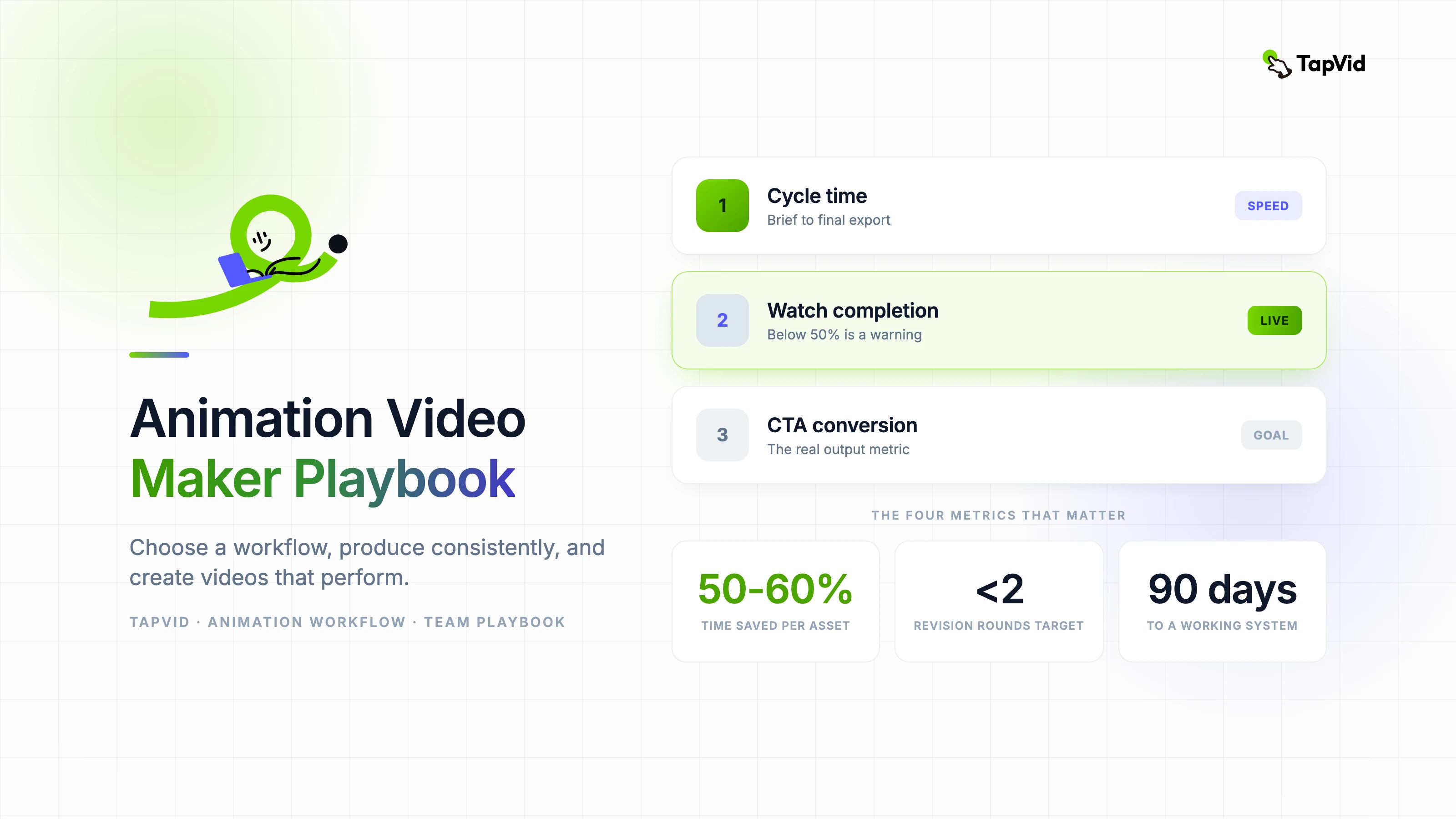
The workflow that works: use an AI animation video maker to generate the structural draft — the scene sequence, the basic timing, the compositional blocking. Then have a human animator spend an hour refining timing nuance, brand alignment, and transition quality. The net time saving is roughly 50 to 60 percent per asset with no meaningful sacrifice in output quality.
04
The four metrics that actually matter for animation production
Production teams measure what's easy to measure: hours per video, revision count, cost per asset. These are useful but they miss the question that matters: is the animation producing the outcome it was made for?
Track production metrics and business metrics in parallel. Production metrics tell you whether your workflow is efficient. Business metrics — watch completion rate, CTA click-through, conversion on the page where the video lives — tell you whether the animation is working.
- Cycle time: hours from approved brief to final export. This reveals workflow friction.
- Revision count: number of feedback rounds before approval. More than two suggests a broken brief process.
- Watch completion rate: what percentage of viewers watch to the end. Below 50% is a structural warning sign.
- CTA conversion: what percentage of viewers take the action the video asks for. This is the real output metric.
05
A realistic 90-day roadmap for teams starting from scratch
Month one is entirely process work. Build the briefing template, define the visual standards, establish the review checkpoints. Don't produce any public-facing animation yet. Teams that skip this step and go straight to production are the ones who can't reproduce their first good result.
Month two: produce three videos using the new system. These don't need to be your most ambitious projects — the goal is to test the system and find where it breaks down. Document every decision and every deviation from the template.
Month three: review the business metrics from those three videos and adjust the system accordingly. This is where you find out whether your animation style is actually connecting with viewers or just satisfying internal stakeholders. The data will tell you what internal feedback cannot.