
TL;DR
分別定義1位觀眾、觸發情境、替代做法、運作方式、證據及CTA。先寫匯出語故事,讓每一行承擔1項畫面任務,計時朗讀,在提出證據前刪除重複內容,核實每項主張,最後把附有來源及發音備註的核准雙欄腳本交給製作團隊。
解說影片腳本有兩項任務:朗讀時要自然,也要讓畫面承擔有意義的工作。本指南提供60秒與90秒範本、完整的共用收件匣SaaS案例、逐行畫面任務、3個改寫版本,以及與8月6日TapVid測試產出的66.837秒影片比較。
01
1. 複製這些60秒與90秒腳本範本
將模板用作通訊作業的序列,而不是作為完成的副本。用您的觀眾使用的語言替換每個括號,並用您的團隊可以驗證的證據。60秒版本是為一個問題和一個機制設計的。90秒的版本透過新增證明或第二個用例來獲得額外的時間,而不是用不同的詞重複好處。
| 打 | 60秒模板 | 90秒延長 |
|---|---|---|
| 鉤 | [角色],當[觸發矩]發生時,[特定摩擦]隨之而來。 | 增加一個增加摩擦成本的可見後果。 |
| 問題 | 通常的變通辦法是[舊方法],但它因為[原因]而失敗了。 | 展示臨時應對辦法如何影響第二個人、步驟或系統。 |
| 機制 | [產品或方法]透過[可觀察機制]改變過程。 | 演示兩個連線節拍的機制。 |
| 證明 | 現在[相同的觸發]產生[觀眾可以看到的已解決狀態]。 | 新增經過驗證的示例、比較或產品狀態。 |
| CTA | 為了[想要的第一個結果],[一個具體的行動]。 | 保持一個動作;使用額外的幾秒鐘來清除目的地。 |
- 在訊息簡介後面寫鉤子,這樣它就說出了正確的情況,而不是追逐新奇事物。
- 在開場白和證明中使用相同的問題;改變問題會讓結果感覺不相關。
- 用路線、比較、分配、突出顯示或轉換等動詞來描述機制。
- 保持CTA可見和可說話;導航選單不是腳本結尾。
02
2. 先用6個問題撰寫資訊說明
當六個決定已經固定時,腳本就變得更容易了:檢視器、觸發時刻、當前變通辦法、機制、證明和下一個操作。這些比提高意識等廣泛目標更有用,因為它們決定了觀眾聽到和看到的內容。在潤色開頭之前,為每個欄位寫一兩句話,並要求產品或主題所有者核准它們。
對於共享收件箱測試,檢視者是一個小型的SaaS支援團隊。觸發器是,當幾個隊友處於活躍狀態時,新請求到達。變通辦法是跨一個收件箱進行手動協調。該機制是路由規則,將請求分配給正確的渠道和所有者。證據是請求到達一次,並收到一個協調的響應。下一個動作是建立第一個規則。
- 誰是觀眾,當問題出現時,他們扮演什麼角色?
- 具體是什麼事件觸發了對正在解釋的產品、流程或想法的需求?
- 觀眾現在在做什麼,這種變通辦法在哪裡變得緩慢、有風險或令人困惑?
- 哪些可觀察到的機制改變了舊的過程,而不僅僅是承諾了更好的結果?
- 哪些已核准的螢幕、示例、狀態更改或來源表明該機制有效?
- 理解解釋後,觀眾應該立即採取什麼單一行動?
03
3. 用計時朗讀規劃片長,不要只靠公式
字數給出了一個起始範圍,但說話的節奏會隨著詞彙和意圖而變化。產品名稱、首字母縮略詞、數字和不熟悉的術語比簡短的對話短語需要更多的時間。故意的停頓可以有意義,特別是在證明或CTA之前。即使敘述者繼續前進,螢幕上的文字也需要視覺保留時間。在故事板獲得核准之前,先記錄粗略閱讀。
| 目標 | 計劃詞 | 可用的故事 | 編輯優先順序 |
|---|---|---|---|
| 30秒 | 55到75歲 | 觸發器、機制、結果、CTA | 移除放置已提供的上下文 |
| 60秒 | 120到150 | 鉤子,問題,機制,證明,CTA | 保護機制和一個可見的證明 |
| 90秒 | 175到220 | 完整的結構加上第二節拍或更深的證明 | 削減重複的福利宣告 |
| 120秒 | 235到300 | 技術流程或教育順序 | 如果受眾或CTA發生變化,則進行分割 |
- 在判斷句子是否合適之前,標記首字母縮略詞的發音和擴充套件。
- 允許可見的數字、介面標籤和比較有足夠的時間來閱讀和檢查。
- 為音樂過渡、場景變化和本地化版本留出一小部分餘地。
- 每次結構變化後重新測試完整閱讀,因為後期的節拍可能會失去時機。
- 如果最後一幀在觀眾做出回應之前就消失了,不要將其算作有用的CTA時間。
04
4. 採用5段式結構,讓每個段落都有任務
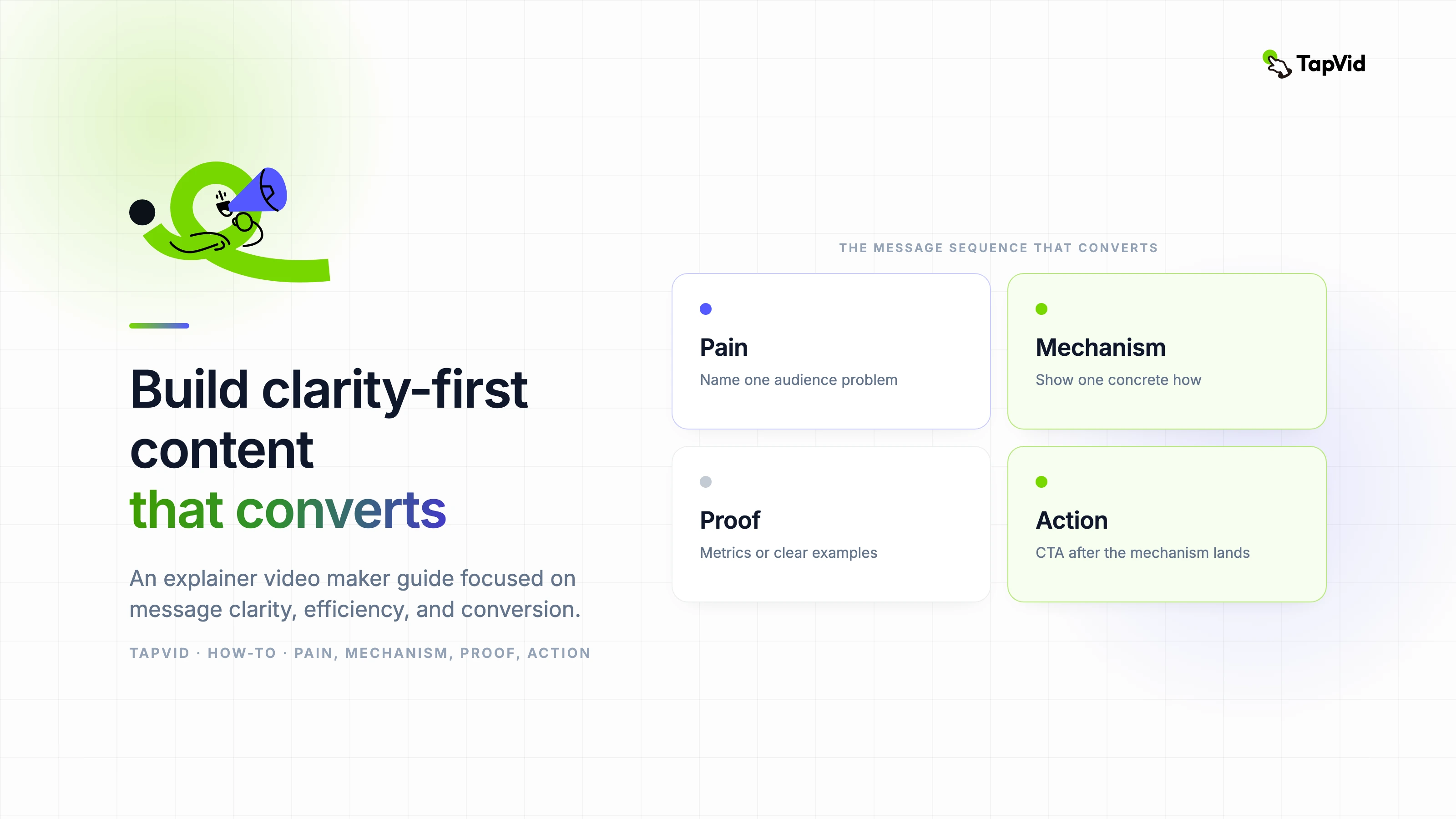
五部分結構是鉤子、問題、機制、證明和CTA。它的價值不是標籤。它創造了一個因果鏈。鉤子識別情況。這個問題說明瞭為什麼當前狀態很重要。該機制解釋了哪些變化。證明顯示了在相同條件下改變的狀態。CTA為理解提供了一個目的地。刪除任何連結都會使腳本感覺像廣告或教程片段。
| 打 | 工作 | 弱版本 | 更強的方向 |
|---|---|---|---|
| 鉤 | 迅速獲得相關性 | 管理支援很難。 | 兩個隊友回答了同一個請求,但都沒有看到對方的回覆。 |
| 問題 | 具體化成本 | 你的收件箱效率低下。 | 客戶收到相互矛盾的回答,而另一個請求沒有所有者。 |
| 機制 | 解釋變化 | 我們的平臺簡化了支援。 | 路由規則將每個請求傳送到正確的通道,並分配一個所有者。 |
| 證明 | 解決開口問題 | 團隊的工作效率更高。 | 下一個請求出現一次,到達正確的所有者,並收到一個協調的響應。 |
| CTA | 說出下一步 | 今天瞭解更多。 | 建立您的第一個路由規則。 |
- 在專注的60秒腳本中給鉤子五到八秒鐘。
- 用問題來增加後果,而不是用更強的形容詞重述鉤子。
- 在機制上花費最大的份額,因為那是創造理解的地方。
- 證明,直觀地回答開場情況提出的相同問題。
- 以一個操作和一個目的地結束,而不是產品導航選項列表。
05
5. 使用音訊與畫面雙欄腳本
僅敘述的檔案是不完整的,因為視覺團隊必須猜測每行需要證明什麼。僅故事板的檔案也是不完整的,因為移動可以隱藏一個薄弱的論點。將語音音訊和畫面任務並排放置。為定時、螢幕文字、源、過渡和稽核者新增可選列。這種格式將劇本變成了製作合同,而不是鼓舞人心的段落。
| 專欄 | 必填內容 | 回顧問題 |
|---|---|---|
| 時間 | 預計開始、結束和視覺保留 | 臺詞可以說出來,證據可以自然地解讀嗎? |
| 聲音 | 一個帶有發音註釋的可說話的想法 | 觀眾會在不看檔案的情況下理解它嗎? |
| 畫面任務 | 上下文、機制、比較、證明或CTA | 視覺是否增加了證據而不是裝飾? |
| 螢幕文字 | 僅基本標籤、數字或CTA | 可以在移動寬度下讀取嗎? |
| 來源 | 核准的螢幕、檔案、URL或所有者 | 每一個事實暗示都能被追蹤嗎? |
| 過渡 | 下一個場景之後的原因 | 故事的聯絡在沒有華麗的效果的情況下還能生存嗎? |
- 每行分配一個畫面任務;當它要求框架做不相關的工作時,將行分開。
- 編寫與已核准產品版本中顯示的UI標籤完全一致。
- 標記概念性的視覺效果,這樣評論者就不會將其誤認為是字面產品行為。
- 在相關情況下,保留產品、編輯、品牌、法律和最終核准的審查員專欄。
06
6. 附畫面任務的完整共用收件匣SaaS腳本
下表是用於實際操作共享收件箱解說影片的工作腳本。它是故意狹窄的。它沒有解釋報告、整合、許可權或整個支援類別。每行都推進了一個故事:重複的回覆成為一個路由工作流程,有一個所有者和一個下一個操作。生產檔案中的源列將連結到已核准的螢幕和檔案。
| 時間 | 敘述 | 畫面任務 | 螢幕文字 | 回顧問題 |
|---|---|---|---|---|
| 0到6秒 | 兩位團隊成員回答了相同的支援請求,但兩人都沒有看到對方的回覆。 | 顯示一個請求分成兩個相互衝突的響應路徑。 | 兩個回覆。一位顧客。 | 在產品出現之前,問題是否可以理解? |
| 6到13秒 | 另一個請求在等待,沒有明確的所有者。 | 按住繁忙的共享收件箱,並隔離一個未分配的專案。 | 未分配 | 第二個後果是加深而不是重複鉤子嗎? |
| 13到20歲 | 手動協調將每條新訊息變成一個小的路由決策。 | 展示隊友檢視、傳送訊息和重新檢視收件箱。 | 這個是誰的? | 變通辦法是否具體且可信? |
| 20到29秒 | 路由規則在任何人詢問之前就改變了流程。 | 引入一條連線請求型別、渠道和所有者的規則。 | 如果是賬單,請傳送至賬單 | 觀眾能看到機制,而不僅僅是聽到好處嗎? |
| 29到38秒 | 每個請求都會移動到正確的渠道,並接收一個所有者。 | 動畫傳送到不同標記頻道的三個請求。 | 賬單、技術、帳戶 | 渠道標籤是否可讀且產品行為是否獲得核准? |
| 38到47秒 | 團隊成員看到相同的狀態、上下文和後續步驟。 | 顯示一個與所有者、狀態和對話的協調檢視。 | 所有者:瑪雅 | 框架是否在不顯示密集的使用者介面的情況下證明瞭協調性? |
| 47到56秒 | 現在,下一位客戶會得到一個明確的答案,而不是相互矛盾的答案。 | 返回開啟的請求,並透過一個路徑解決它。 | 一個請求。一個主人。一個回覆。 | 證明能解決確切的開場問題嗎? |
| 56到64秒 | 建立您的第一個路由規則,併為每個請求提供明確的路徑。 | 顯示規則操作,然後保留最終的CTA。 | 建立您的第一個路由規則 | 是否有一個可見的動作和足夠的時間來閱讀它? |
- 只有在機制開始時才會介紹產品,因此開場保持以觀眾為中心。
- 證明返回到相同的請求模式,這使得前後比較易於遵循。
- CTA透過要求第一條規則來延續該機制,而不是改為不相關的註冊承諾。
- 一旦包括視覺保持,語音計劃將略長於60秒,測試證實了這一點。
如果您的產品無法支援這些狀態之一,請在生產前更改腳本。不要讓動畫暗示產品未提供的分配、狀態或自動化。虛構的例子仍然可以教授寫作結構,但品牌產品影片必須區分說明性流程和實際行為。驗證是劇本寫作的一部分,而不是最終的法律通行證。
07
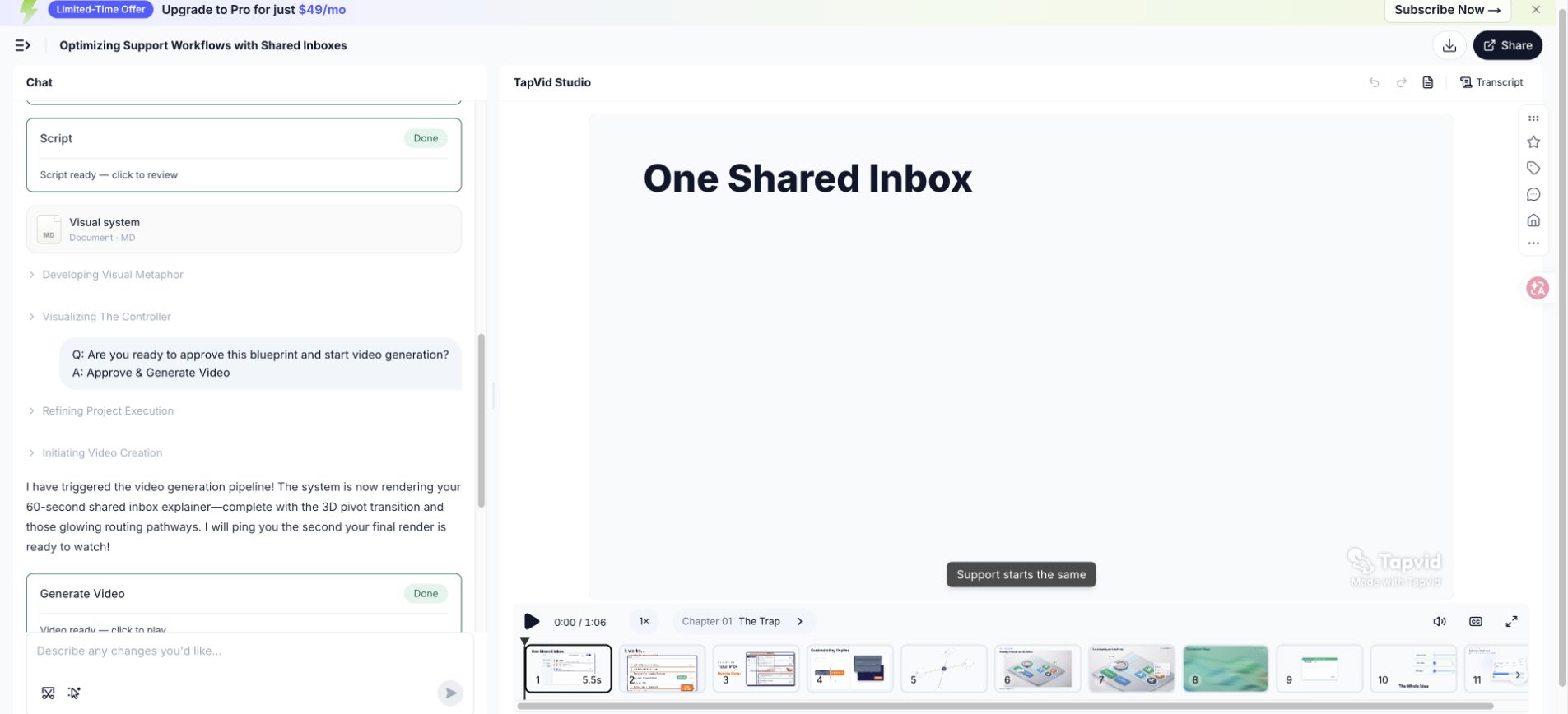
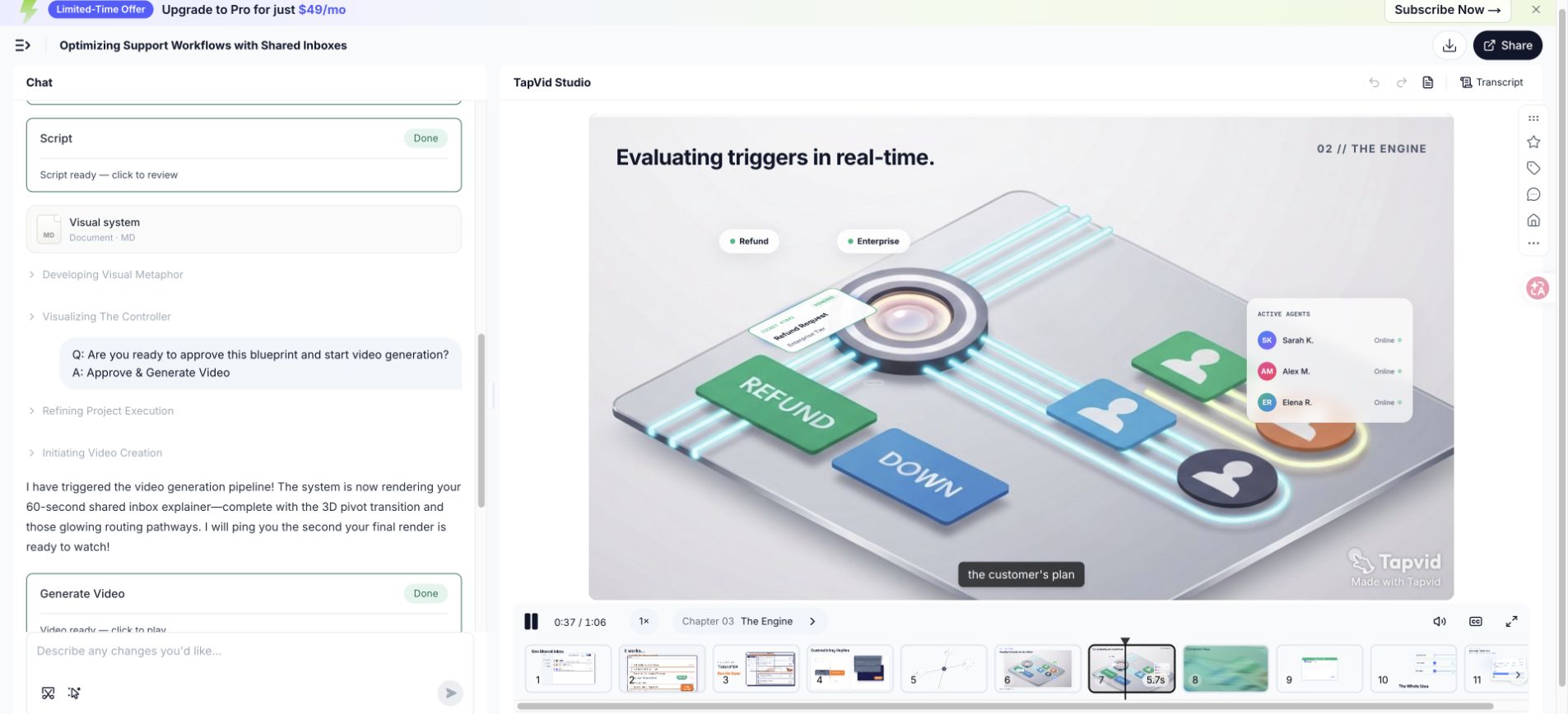
7. 比較腳本與66.837秒算繪結果
匯出的測試影片測量了66.837秒,因此大約60秒的製作需求產生的結果比圓形目標長約6.8秒。這種差異是有用的編輯證據。該腳本包括幾個標籤、一個機制序列和一個CTA保留。消除所有停頓或加快聲音會保護數字,但會削弱理解力。第二次修訂應該在壓縮證據之前刪減語言。
| 腳本區域 | 為什麼它需要時間 | 第二次修訂選項 |
|---|---|---|
| 開場後果 | 兩個失敗狀態建立了重複和未擁有的工作 | 將它們組合成一個句子,同時保持兩個視覺節拍 |
| 手動變通辦法 | 觀眾需要識別舊的過程 | 刪除短語小路由決策,讓視覺顯示它 |
| 規則機制 | 標籤和運動需要閱讀時間 | 保持持有,並縮短圍繞它的敘述 |
| 協調狀態 | 所有者、地位和背景爭奪注意力 | 僅顯示證明所有權所需的欄位 |
| CTA | 動作必須保持可讀性 | 保護保持;而是縮短前導 |
- 第一個切口:刪除視覺已經傳達的重複設定。
- 第二切:用明確的主語和主動動詞替換長名詞短語。
- 第三次切割:在觸及機制或證明之前刪除次要示例。
- 最終時機:記錄新的閱讀,並用實際場景重播。
08
8. 改寫薄弱的開場、功能堆砌與CTA
良好的編輯會改變句子所執行的工作。它不只是用更有活力的詞語取代簡單的詞語。下面的示例識別了故障,保留了必要的資訊,並將線路重新連線到檢視器、問題、機制、證明或行動。每當利益相關者要求使劇本更令人興奮時,請使用此過程,而不識別觀眾仍然無法理解的內容。
| 問題 | 以前 | 之後 | 為什麼編輯有效 |
|---|---|---|---|
| 行話繁重的開頭 | 現代支援運營需要跨分散式客戶接觸點進行全渠道協調。 | 兩個隊友回答同一個請求,而另一個請求在沒有所有者的情況下等待。 | 修訂版為觀眾提供了一個可以視覺化的角色、場景和後果。 |
| 功能轉儲 | 我們的平臺包括路由、標籤、渠道、狀態、分析、整合和自動化。 | 路由規則將每個請求傳送到正確的通道,並賦予它一個所有者。 | 修訂版選擇一個機制,並展示它如何改變流程。 |
| 模糊的CTA | 改變您的客戶體驗,立即瞭解更多資訊。 | 建立您的第一個路由規則。 | 修訂要求採取一項行動來繼續解釋。 |
- 圈出抽象名詞,並詢問一個人或系統實際上在做什麼。
- 將類別宣告替換為預期檢視者識別的觸發時刻。
- 僅當功能參與故事中顯示的機制時,才保留功能。
- 將證明移到它支援的索賠旁邊,而不是在最後收集模糊的利益。
- 將CTA重寫為可見的動詞加物件,例如建立規則或審查初稿。
09
9. 錄下計時朗讀,並依正確順序刪減
在安靜的房間裡用手機或膝上型電腦記錄粗略的閱讀。目標不是語音品質。這是要聽到呼吸、節奏、模稜兩可和時機。標記您重新啟動的每個位置,新增一個計劃外的單詞,或強調錯誤的術語。自然修正通常會揭示你嘴上預期的更簡單的句子。將錄音與腳本共享,以便審稿人評估口語,而不是無聲的散文。
刻意按順序切割。首先刪除重複的設定,然後刪除不改變含義的形容詞、次要示例、功能側跳和額外的CTA。保護機制、已核准的證據、所需的安全或合規性環境,以及足夠的視覺理解時間。如果故事在這些剪輯後仍然太長,請縮小承諾範圍或增加片長,而不是不自然地快速說話。
- 讀一遍意思,並記錄自然持續時間,不要追逐目標。
- 在預期能量下再讀一遍,並標記呼吸、強調、發音和尷尬的語法。
- 將錄音與粗糙的場景對立,併為標籤和證據增加視覺保留時間。
- 按該順序剪下重複的上下文、修飾符、側面示例和其他操作。
- 從頭開始錄製修訂後的劇本,因為區域性剪輯可能會改變以後的節奏。
- 讓一位不熟悉的聽眾在聽完一遍後陳述問題、機制、證明和CTA。
10
10. 把這套架構套用到不同解說任務
這五項工作在各個類別中仍然有用,但它們的重點發生了變化。SaaS產品影片通常需要可見的工作流程證明。專業服務可能會解釋診斷、流程和信任,而不是介面。技術概念需要準確的定義和精心選擇的抽象。入職培訓可以假設意圖,並更接近任務。教育可能需要檢索檢查或摘要,而不是轉換CTA。
| 用例 | 開場焦點 | 機制證據 | 典型的CTA |
|---|---|---|---|
| SaaS產品 | 工作流程中的觸發時刻 | UI狀態更改或簡化產品流程 | 開始第一個工作流程或試用 |
| 專業服務 | 當前方法的成本或風險 | 診斷方法、流程或可交付成果 | 預約評估或回顧 |
| 技術概念 | 問題或誤解 | 圖表、比較或逐步模型 | 探索下一個概念或應用模型 |
| 入職 | 登入使用者想要完成的任務 | 確切核准的UI步驟和結果 | 完成產品中的任務 |
| 訓練 | 必須做出決定的情況 | 規程、示例和知識檢查 | 練習或確認理解 |
| 內部支援 | 政策、流程或責任的改變 | 與業主的前後工作流程 | 使用新的流程或參考材料 |
- 每個簡短的腳本都保留一個受眾;當角色需要不同的證明或語言時,建立變體。
- 僅當確切行為重要且螢幕保持足夠當前時,才使用真實介面。
- 技術解釋中的陳述假設,因此簡化不會變得不準確。
- 當檢視者已經決定使用該產品時,將銷售證明替換為任務確認。
- 當目標是保留和應用時,使用學習行動而不是行銷CTA。
未經主題審查,不要將成功的SaaS結構複製到醫療、財務、法律或安全敏感的解釋中。腳本可能需要所需的上下文、風險語言或不同的操作。該框架組織了溝通,但它並不能取代領域責任。在交接中說出核准專家的名字,並保留每個敏感陳述的來源。
11
11. 使用AI協助,但不要虛構產品內容
人工智慧可以幫助組織源材料,生成替代措辭,識別重複,提出場景劃分,並測試結構是否完整。它不應該決定哪些產品宣告是正確的。給它一個已核准的證據包、明確的受眾、機制、執行時、被禁止的宣告、術語和CTA。要求它標記缺失的證據,而不是用聽起來可能的細節來填補空白。
- 提供已核准的訊息簡介和來源段落,而不是無限制地請求解釋公司。
- 將引用的產品事實與編寫說明分開,以便模型可以保留宣告邊界。
- 為特定節拍要求兩到三個替代方案,而不是重複完整的劇本重寫。
- 要求每個數字、能力和比較指向提供的來源或所有者審查。
- 將版本名稱、使用者介面標籤、發音、計劃限制和當前定價保持在通用假設之外。
- 審查生成的語言,以瞭解空的強化詞、重複的結論和暗示因果關係的過渡。
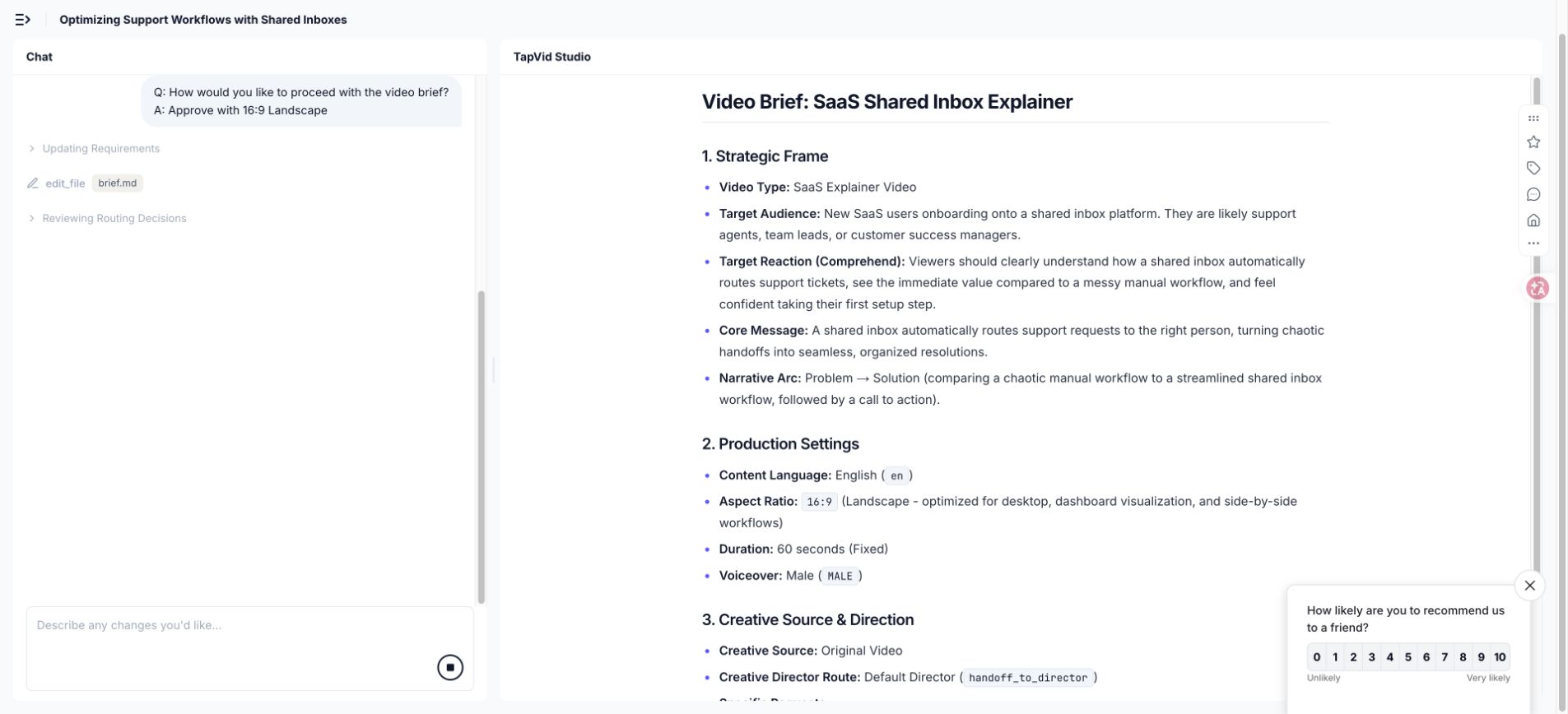
在TapVid執行中,生成的製作需求建議從9:16移到16:9,因為解釋依賴於介面主導的故事。這是一個有用的建議,但它仍然需要核准。腳本建議使用相同的標準。一個模型可以出現一個權衡;創作者決定它是否與觀眾、位置、證據和品牌相匹配。
12
12. 準備不必靠猜測的製作交接資料
製作就緒的劇本不僅僅是經過核准的敘述。它包括時間、畫面任務、所需螢幕、源連結、螢幕上的文字、發音、音樂方向、比例、標題、品牌約束、過渡以及每個核准的狀態。目標是消除無聲的假設。設計師應該知道哪些元素是證據,哪些是說明性的,哪些可以更改以保持視覺清晰度。
| 交接專案 | 它阻止了什麼 |
|---|---|
| 核准的雙列腳本 | 敘述和視覺效果漂移成不同的解釋 |
| 證據包和索賠所有人 | 進入影片的未經驗證的能力、數字或比較 |
| 發音和術語列表 | 錯誤的產品名稱、首字母縮寫詞、名稱和技術術語 |
| 品牌和視覺限制 | 型別、調色盤、圖示語言、視角和運動不一致 |
| 標題和輔助功能說明 | 無法辨讀的線條、缺少上下文和與聲音相關的含義 |
| 長寬比和放置計劃 | 重要的視覺效果被裁剪或重建得很晚 |
| 核准狀態和變更日誌 | 決定結束後重新引入舊的反饋 |
- 在每個產品螢幕上標記其捕獲日期以及它所代表的版本或計劃。
- 解釋概念圖是字面行為、簡化行為還是純粹的隱喻。
- 包括每個預期寬高比的安全作物區和移動文字檢查。
- 說出誰可以核准事實、編輯、品牌、法律和匯出更改。
- 當視覺修訂更改隱含的產品行為時,再次要求腳本核准。
使用實際檔案進行簡短的交接稽核。閱讀資訊說明,播放粗略的敘述,檢查證據,並走過困難的場景。在這次會議上回答的問題應該寫在交接中。當另一個團隊成員或工具恢復專案時,從未觸及檔案的口頭決定將成為未來的不一致。
13
13. 製作前先規劃在地化與字幕
本地化會改變時間、換行、強調,有時還會改變場景設計。直接翻譯可以擴充套件到足以與視覺保持碰撞。產品使用者介面可能不使用相同的標籤長度,甚至不能使用相同的功能名稱。幽默和隱喻會失去其功能。在將每個運動提示鎖定到英語波形之前,計劃可編輯的文字、靈活的場景定時、安全字幕區域和本地化的介面證據。
翻譯每個節拍的溝通工作,然後重建自然的口語。本地化的鉤子必須識別相同的觸發時刻,但它不需要相同的單詞順序。機制和證明必須保留事實意義。CTA應使用目標介面中的術語。錄製母語或流利的閱讀,並重新計時視覺序列,而不是將每種語言強制進入英語持續時間。
- 維護產品名稱、使用者介面標籤、首字母縮寫詞和必須保持未翻譯的單詞的術語表。
- 只要製作允許,就將旁白、字幕和螢幕上的標籤保留為單獨的可編輯欄位。
- 檢查最終顯示尺寸的讀取速度和換行符,特別是對於移動放置。
- 檢視渲染場景中的數字、單位、日期格式、標點符號和文字方向。
- 使用精通產品和目標受眾的流利評論員,而不是僅僅理解語法。
- 匯出並觀看每個本地化版本,因為正確的文字仍然可能被錯時或裁剪。
在內容包中保持結構平等,以便每種語言都能收到相同的示例、證明、限制、常見問題和操作。平價並不意味著字面意思。這意味著本地化的觀眾會收到同樣有用的決定和證據。當來源或產品螢幕僅提供英文版本時,請說明該約束,而不是默默地刪除支援細節。
14
14. 解說影片腳本常見問題
使用這些答案作為指導。繼續生產工作流程和15-example analysis。使用W3C指南計劃字幕。
一個60秒的解說影片腳本應該包含多少個單詞?
大約120到150個口語單詞的規劃範圍很常見,但術語、停頓、能量和視覺閱讀時間可以推動結果。錄製自然閱讀,將其放在粗糙的場景中,並保護重要標籤、證明和CTA的時間。儘管有大約60秒的製作需求,但記錄在案的測試以66.837秒的速度匯出。
解說影片腳本的最佳結構是什麼?
鉤子、問題、機制、證明和CTA是一個可靠的起始結構,因為它創造了一個因果解釋。調整重點以適應觀眾。入職可以在任務附近開始,而技術概念可能需要定義。最終的劇本仍然應該使更改、證據和下一步行動變得清晰。
腳本是否應該描述每個產品功能?
不。僅當它們參與所選檢視器問題的機制或證明時,才包括功能。其他功能可以成為單獨的影片、幫助內容或支援頁面副本。一個簡短的解說影片,顯示一個連貫的結果,通常教的不僅僅是一個列出產品每個部分的列表。
我可以在解說影片腳本中使用幽默嗎?
當幽默澄清問題、適合觀眾並充分關注機制時,請使用幽默。避免那些需要比產品更多上下文的笑話,削弱嚴肅的主題,或者在解釋消失時成為主要記憶。與與目標受眾相匹配的人一起測試臺詞。
人工智慧能寫出整個腳本嗎?
人工智慧可以組織和編輯提供的材料,但出版商必須驗證產品行為、數字、比較、敏感宣告和含義。為系統提供核准的來源,並要求它揭露缺失的證據。人類評論員仍然擁有範圍、強調、說話節奏、視覺效果、品牌和最終核准。
旁白和螢幕文字有什麼區別?
敘述承載著口頭論點。螢幕上的文字應該保留檢視者需要檢查或記住的標籤、數字、區別和操作。重複螢幕上的每一個口語都會使畫面超載。讓兩個通道在保持同步的同時劃分解釋。
我什麼時候應該僱傭專業的編劇或製作團隊?
當資訊影響重大釋出、產品技術複雜、宣告敏感、自定義故事講述很重要、多個利益相關者需要促進,或者團隊無法審查口頭敘述和視覺邏輯時,請提供專家幫助。強大的內部製作需求和證據包仍然使外部工作更快、更安全。
在開始影片生成之前,應該核准什麼?
核准觀眾、問題、機制、證明、CTA、來源證據、完整的口語腳本、場景工作、所需螢幕、術語、片長範圍、聲音、寬高比、視覺系統、標題、禁止宣告和指定核准者。生成應該從受控的生產決策開始,而不是從未解決的頭腦風暴提示開始。