
Aviso: esta comparación la escribe el equipo de TapVid. Probamos Motionvid.ai directamente en su plan gratuito e intentamos representarlo con precisión, incluso donde de verdad nos supera.
01
TL;DR
- Motionvid.ai es un estudio de motion generativo pensado para cineastas y youtubers que quieren flexibilidad multimodelo, controles cinematográficos y buenas animaciones de mapas o logotipos, y a quienes no les importa gestionar créditos y elegir modelos a mano.
- TapVid parte de una idea completamente distinta: dale cualquier entrada —un brief, un PDF, una idea vaga, incluso la captura de una conversación de texto— y estructura esa entrada en un video completo con voz en off y música, sin necesidad de elegir modelo ni editar una línea de tiempo.
- Ambas herramientas comparten un nombre de categoría ("motion graphics con IA"), pero resuelven problemas fundamentalmente distintos. Aquí tienes el desglose completo.
02
Qué es Motionvid.ai
Motionvid.ai es una plataforma de motion graphics con IA creada por Nick Nicolaou, un cineasta de Chipre que quería un camino más rápido de la idea a los motion graphics terminados sin pasar días en After Effects. Se lanzó en AppSumo a principios de 2026 y ha construido una sólida comunidad entre youtubers y creadores independientes.
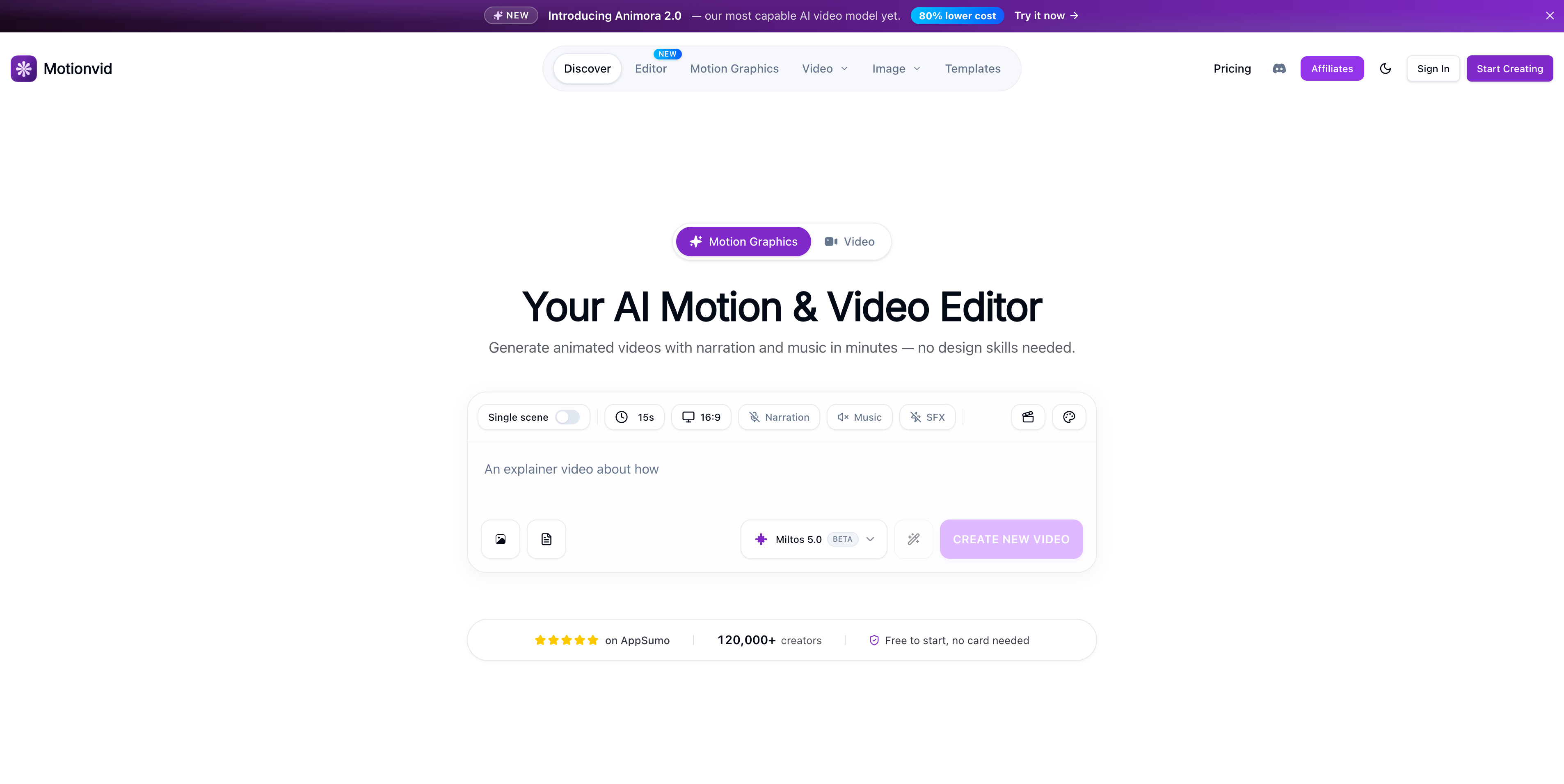
La plataforma ofrece a los usuarios una colección de modelos de IA con los que trabajar: Miltos 5.0 para motion graphics, Animora 2.0 para video cinematográfico y Nano Banana 2 para imágenes de alta resolución. Los usuarios eligen el modelo que encaja con su tarea, generan el resultado y luego lo refinan en un editor de línea de tiempo integrado con controles de zoom.
Donde de verdad destaca: mapas animados y narrativa geográfica, reveals de logotipos, tipografía cinética y animación de infografías. Son fortalezas concretas que los reseñadores independientes señalan una y otra vez.
Donde los usuarios señalan fricción: el consumo de créditos es alto en videos largos (un usuario reportó que un video de 1 minuto consumió 185 de sus 500 créditos mensuales), las funciones de audio se describen como básicas en varias reseñas de AppSumo, y saber qué modelo elegir para cada tarea requiere algo de prueba y error.
03
Qué es TapVid
TapVid es un generador de video con IA construido sobre otra premisa: la parte más difícil de hacer un video no es la producción, es la estructura. La mayoría de la gente no falla porque no sepa manejar un editor de línea de tiempo. Falla porque no sabe cómo convertir una idea vaga en una secuencia que valga la pena ver.
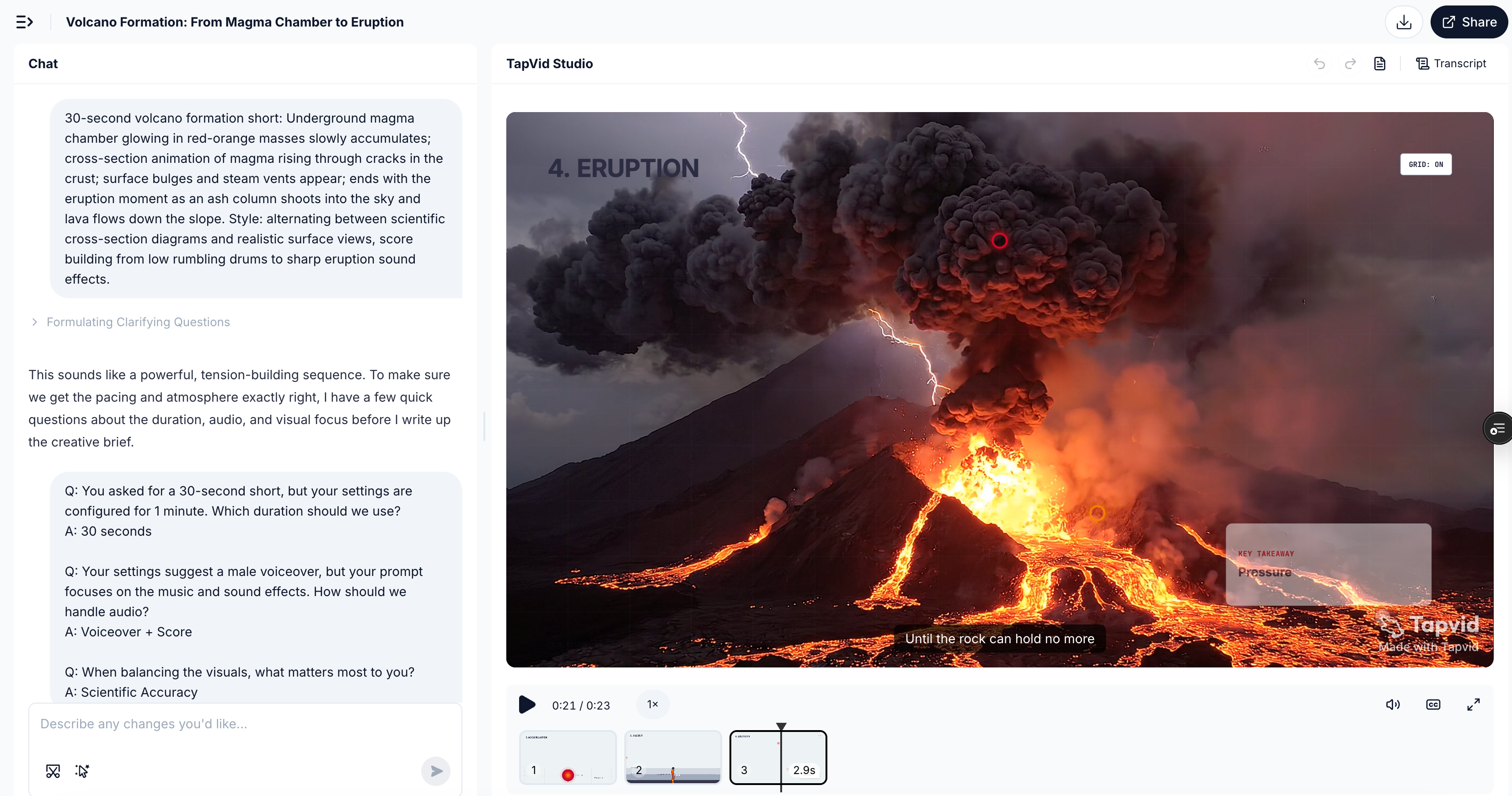
TapVid toma cualquier entrada —una frase, un PDF, una página de producto, un brief improvisado o incluso la captura de una conversación— y genera un video estructurado con narración y música de fondo. La edición se hace en lenguaje natural: "haz la intro más rápida", "cambia el tono a algo más informal", "añade un CTA más fuerte al final". Sin elegir modelo. Sin arrastrar la línea de tiempo. Sin herramienta de audio aparte.
La filosofía de diseño de fondo es distinta a la de la mayoría de herramientas de video con IA: TapVid no te entrega un estudio. Te entrega un borrador estructurado que ya está cerca de poder publicarse.
04
La diferencia clave de la que nadie habla
La mayoría de las comparaciones de herramientas de video con IA se centran en la calidad del resultado. Ese es el enfoque equivocado para comparar estas dos.
Motionvid.ai es un estudio generativo. Te da instrumentos profesionales: varios modelos, un editor de línea de tiempo, controles de zoom, parámetros de nivel cine, y confía en que dirijas el resultado. El techo es alto. También lo es el nivel mínimo que hace falta para llegar allí de forma consistente.
TapVid es un flujo de trabajo estructurado. Toma tu entrada, por tosca que sea, y construye la arquitectura del video por ti: gancho, estructura, guion, escenas, audio. Editas el resultado, no el proceso de producción.
La diferencia práctica aparece de inmediato: en Motionvid, tu primera pregunta es "¿qué modelo debería usar?". En TapVid, tu primera pregunta es "¿qué quiero que diga este video?".
Una herramienta está optimizada para quienes piensan en términos de producción. La otra, para quienes piensan en términos de comunicación.
05
Comparación de funciones
| Función | Motionvid.ai | TapVid |
|---|---|---|
| Método de generación | Prompt + selección manual de modelo | Solo lenguaje natural |
| Motion graphics | ✅ Miltos 5.0, buen resultado | ✅ Función central |
| Voz en off | ⚠️ Básica (comentarios recurrentes de usuarios) | ✅ Generada y sincronizada automáticamente |
| Música de fondo | ⚠️ Limitada | ✅ Generada y sincronizada automáticamente |
| Edición dentro del video | ✅ Editor de línea de tiempo + controles de zoom | ✅ Edición en lenguaje natural |
| Animaciones de mapas / geografía | ✅ Función única destacada | ❌ No es un enfoque |
| Animaciones de logotipos | ✅ Basadas en prompt | ✅ Compatible |
| Entrada no estructurada | ❌ Solo prompt | ✅ PDF, brief, conversación, cualquier idea |
| Requiere elegir modelo | ✅ Sí | ❌ No |
| Sistema de skills / plantillas | ✅ Más de 13 categorías de plantillas | 🔜 Skill Community (próximamente) |
| Plan gratuito | ✅ Gratis para empezar | ✅ Prueba gratuita |
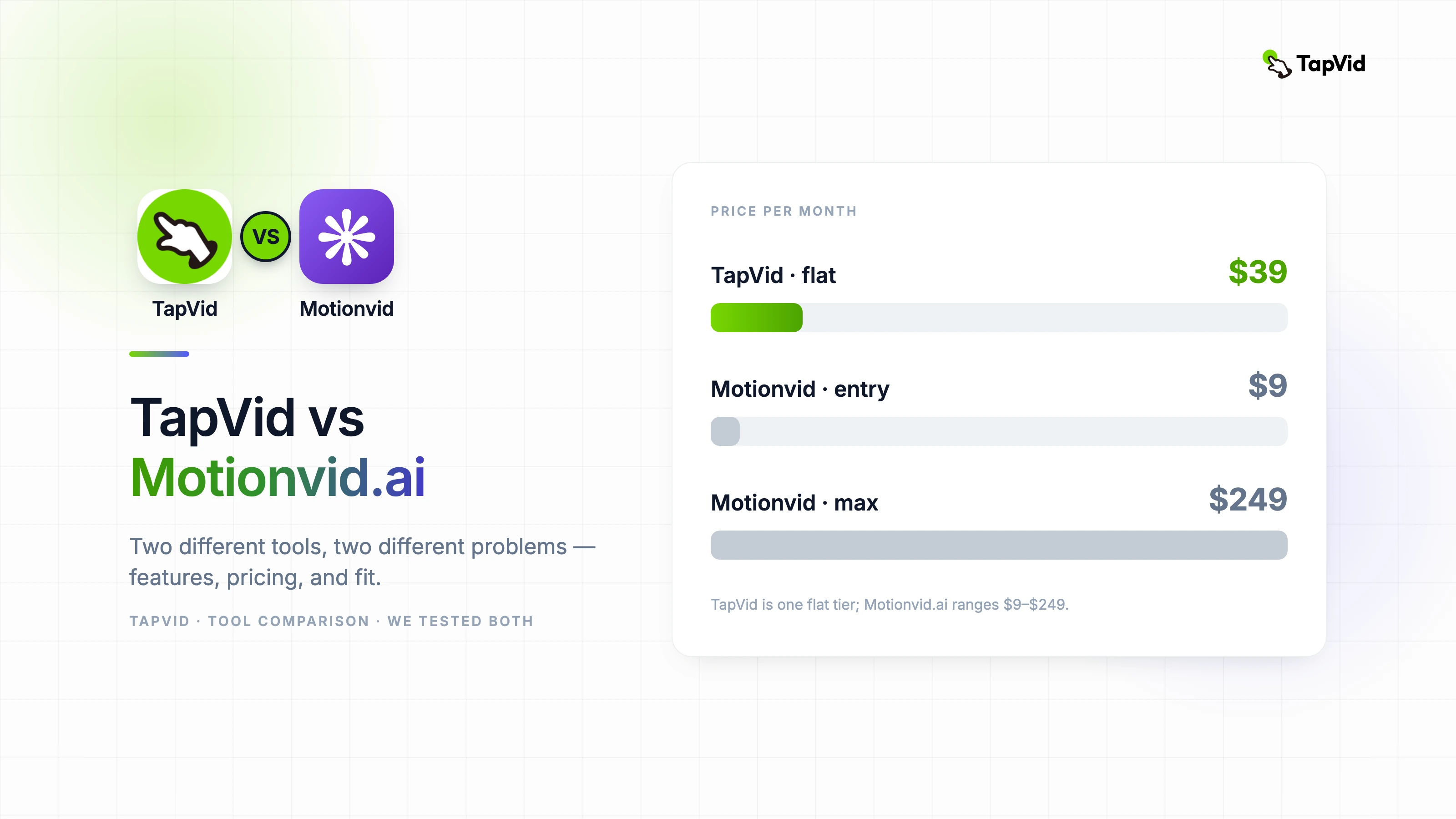
| Plan de pago desde | 9 $/mes | 39 $/mes |
| Videos generados al mes | Basado en créditos (ver sección de precios) | ~3–5 videos/día |
06
Escenario 1: video explicativo de marketing
Brief: "Un explicativo de 30 segundos para una herramienta de escritura con IA, que muestre el flujo del producto, con textos animados, estilo limpio y moderno, y voz en off incluida."
Motionvid.ai: Motionvid.ai usa Miltos 5.0 como su modelo central de motion graphics. Según varias reseñas de usuarios en AppSumo, la calidad visual del resultado se valora de forma consistente como sólida, pero el manejo del audio es un punto de fricción recurrente: los reseñadores describen el audio integrado como básico y que requiere herramientas aparte para completarlo. Los usuarios también señalan que lograr que el resultado se sienta coherente con la marca, en lugar de cinematográfico, suele requerir varias iteraciones de ajustes de estilo.
TapVid: el mismo brief introducido como un solo prompt. El resultado incluyó motion graphics, voz en off y música de fondo, todo sincronizado, sin pasos adicionales. El estilo visual resultó listo para la marca desde la primera generación.
Nota: no pudimos obtener un resultado del plan de pago de Motionvid.ai para una comparación visual directa. La descripción anterior se basa en reseñas de usuarios de AppSumo y documentación publicada.
Conclusión: para equipos que necesitan un resultado completo y publicable —video más audio— sin ensamblar los componentes por separado, TapVid elimina dos pasos de producción que Motionvid te obliga a resolver por tu cuenta.
07
Escenario 2: animación de mapas / geográfica
Brief: "Anima una ruta de viaje de Nueva York a Londres, con movimiento de cámara cinematográfico y estilo de narrativa geográfica."
Motionvid.ai: aquí es donde Motionvid realmente no tiene un competidor cercano. Animación de mapas, terreno 3D, narrativa de rutas geográficas: varios reseñadores independientes lo destacan como la capacidad estrella de Motionvid. Resuelve este brief mejor que cualquier herramienta comparable que hayamos probado.
TapVid: la animación de mapas geográficos no es un enfoque actual de TapVid. Si tu contenido gira en torno a viajes, historia o datos geográficos, Motionvid.ai es la opción más clara.
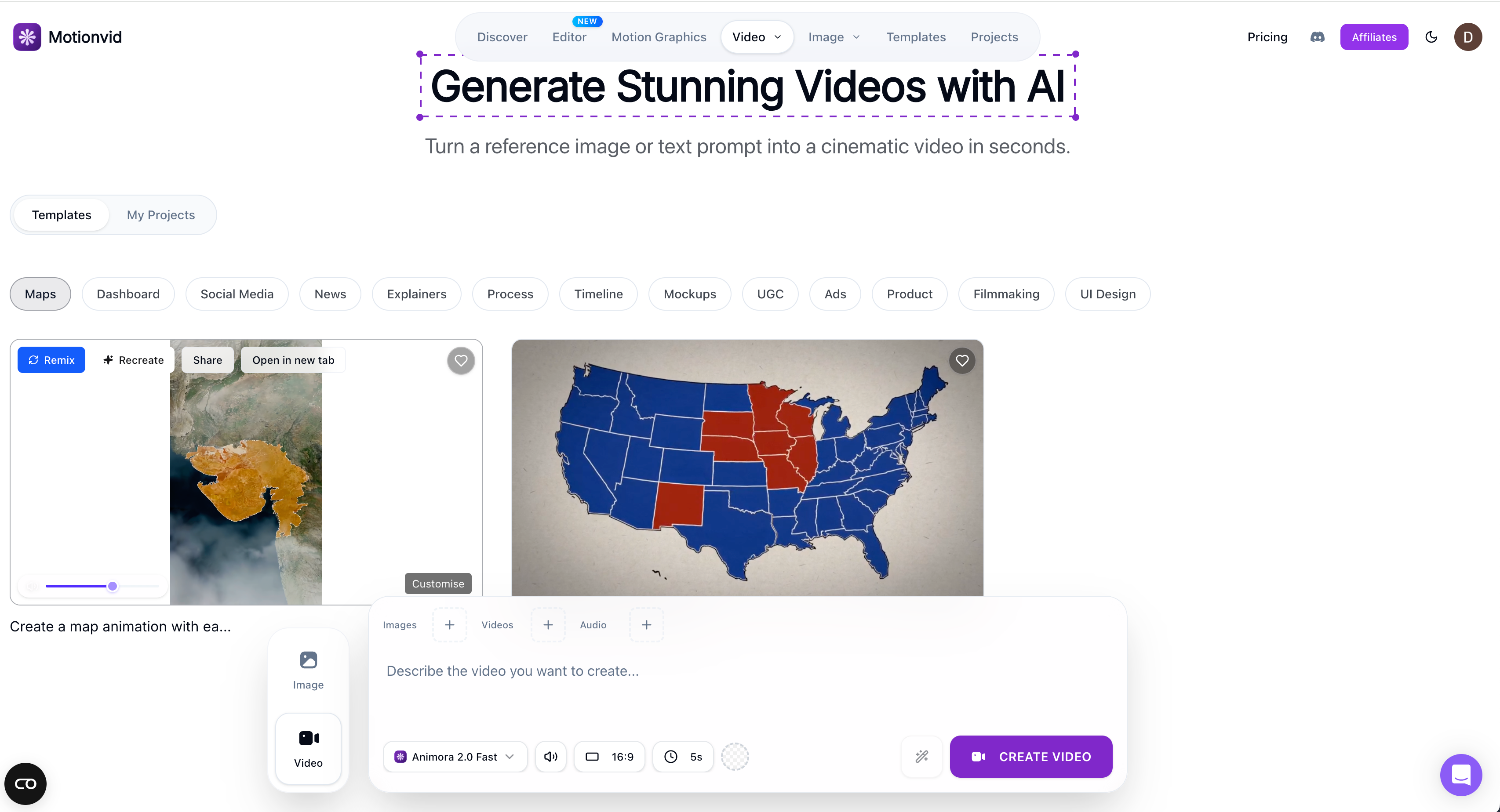
Conclusión: seamos honestos. Si las animaciones de mapas son clave para tu contenido, usa Motionvid.
08
Escenario 3: de cualquier entrada real a un video publicable
Brief: "Toma esta conversación de WhatsApp entre dos amigos que discuten sobre quién olvidó reservar el Airbnb y conviértela en un video corto con música dramática, burbujas de chat animadas y un desenlace divertido."
Motionvid.ai: este tipo de entrada —no estructurada, conversacional, sin un brief visual claro— no encaja bien con el flujo basado en modelos de Motionvid. La herramienta necesita un prompt visual que pueda ejecutar; no está diseñada para interpretar y estructurar un escenario real en bruto.
TapVid: este es exactamente el tipo de entrada para el que está hecho TapVid. La conversación se convierte en el gancho del guion. La estructura, las escenas, la voz en off y la música se generan en torno al contenido real. El resultado es un video específico y personal, no una plantilla genérica aplicada a tu entrada.
Conclusión: el rango de entradas es fundamentalmente distinto. Motionvid necesita un brief visual. TapVid necesita una idea, en cualquier forma.
09
Precios comparados
| Plan | Motionvid.ai | TapVid |
|---|---|---|
| Plan gratuito | ✅ Gratis para empezar, sin tarjeta | ✅ Prueba gratuita |
| Pago de entrada | 9 $/mes · 100 créditos · 25 exportaciones · 1080p | — |
| Plan principal | 29 $/mes · 500 créditos · 50 exportaciones · 4K | — |
| Nivel Power | 49 $/mes · 1.000 créditos · 150 exportaciones · 4K | 39 $/mes · ~3–5 videos/día |
| Nivel Max | 249 $/mes · 5.000 créditos · exportaciones ilimitadas · 8K | — |
| Modelo de precios | Basado en créditos (cuota mensual) | Suscripción plana |
La cuenta de créditos que importa: según reportes reales de usuarios en AppSumo, un video de Motionvid de 1 minuto con música y voz en off consumió aproximadamente 185 créditos. En el plan de 29 $/mes (500 créditos), eso equivale más o menos a 2 o 3 videos completos al mes antes de que se acaben los créditos. Con 39 $/mes planos, los 3 a 5 videos diarios de TapVid suponen unos 90 a 150 videos al mes: otro orden de magnitud para cualquiera con necesidades de producción regulares.
El modelo de créditos no es un fallo de Motionvid. Refleja el coste de ejecutar varios modelos de IA premium bajo demanda. Pero es una consideración real para quien planee un volumen constante.
10
Pros y contras honestos: Motionvid.ai
Pros:
- Resultado de motion graphics de verdad sólido, especialmente en animaciones de mapas, reveals de logotipos y tipografía cinética
- La flexibilidad multimodelo da rango real a los creadores con experiencia
- Editor de línea de tiempo y controles de zoom para un refinamiento preciso
- Equipo de desarrollo activo que lanza rápido y escucha los comentarios de los usuarios
- Oferta de por vida en AppSumo disponible para los primeros adoptantes
11
Motionvid.ai: los contras
- El consumo de créditos es alto en videos largos o con mucho audio: hace falta una planificación real de presupuesto
- El audio (voz en off, música) es un punto débil conocido, señalado de forma consistente en reseñas independientes
- Elegir modelo añade una capa de decisión que la mayoría de quienes no son cineastas no quiere
- No está diseñado para entradas no estructuradas o conversacionales
12
Pros y contras honestos: TapVid
Pros:
- Maneja cualquier tipo de entrada: brief estructurado, idea vaga, PDF, página de producto, conversación real
- La voz en off y la música se generan y sincronizan automáticamente, sin necesidad de un flujo de audio aparte
- Edición en lenguaje natural en lugar de manipulación de la línea de tiempo
- Precio de suscripción plano, coste predecible sin importar el volumen de producción
- Skill Community en camino: no solo plantillas, sino flujos completos de producción de video
13
TapVid: los contras
- Las animaciones de mapas y geográficas no son un enfoque actual
- Precio de entrada más alto que el nivel básico de 9 $ de Motionvid
- Producto más nuevo: Skill Community y funciones avanzadas aún se están desplegando
14
Quién debería usar cuál
Elige Motionvid.ai si eres youtuber, cineasta o productor creativo y quieres un estudio de motion multimodelo; si las animaciones de mapas o los controles de cámara cinematográficos son clave en tu trabajo; si te sientes cómodo gestionando un sistema de créditos; o si conseguiste la oferta de por vida en AppSumo.
Elige TapVid si necesitas video a partir de cualquier tipo de entrada, estructurada o no; si la voz en off y la música deben ser parte del resultado y no un paso aparte; si quieres editar con palabras en lugar de una línea de tiempo; si produces volumen de forma regular y necesitas precios predecibles; o si eres marketer, docente, creador de contenido o cualquiera que piense primero en ideas y después en producción.
15
Frequently asked questions
¿Motionvid.ai es gratis?
Sí. Motionvid.ai ofrece un plan gratuito sin tarjeta de crédito. Los planes de pago empiezan en 9 $/mes por 100 créditos y 25 exportaciones de video al mes.
¿Cuántos videos se pueden hacer al mes en Motionvid.ai?
Depende de qué modelos uses y de la duración del video. Según datos reportados por usuarios, un video de 1 minuto con audio consume unos 185 créditos. El plan de 29 $/mes (500 créditos) permite más o menos 2 o 3 videos completos al mes. Los clips más cortos estiran más los créditos.
¿Cuál es la mejor alternativa a Motionvid.ai para un alto volumen de video?
Si necesitas producir video con regularidad, la suscripción plana de TapVid a 39 $/mes permite de 3 a 5 videos al día sin seguimiento de créditos ni preocupaciones por excedentes.
¿Puede TapVid manejar entradas no estándar como conversaciones reales o notas sueltas?
Sí. TapVid está diseñado para tomar cualquier entrada —una idea vaga, un PDF, una página de producto, la captura de una conversación— y estructurarla en un video publicable con voz en off y música. Este es precisamente el caso de uso para el que Motionvid.ai no está hecho.
¿En qué es mejor Motionvid.ai?
Animaciones de mapas, narrativa geográfica, reveals de logotipos y tipografía cinética. Son áreas donde tiene una ventaja de capacidad real sobre la mayoría de herramientas de video con IA.
¿TapVid es solo para equipos de marketing?
No. TapVid sirve para cualquiera que parta de una idea en lugar de un brief de producción, incluidos docentes, creadores independientes, autores de cursos, marketers y cualquiera que quiera convertir cualquier contenido en un video que valga la pena ver sin aprender producción de video.
16
Nuestra opinión
Motionvid.ai es un estudio generativo bien construido para creadores que quieren controles de nivel cineasta. Sus animaciones de mapas son de verdad únicas, la calidad del resultado es alta y el equipo lanza mejoras rápido. Los principales límites prácticos son el consumo de créditos en los planes intermedios y la producción de audio, que todavía necesita complementarse con otras herramientas.
TapVid está construido en torno a otra restricción: la mayoría de quienes necesitan video no piensan en términos de producción. Piensan en ideas, briefs, conversaciones y contenido que ya tienen. TapVid toma esa entrada, en cualquier forma, y devuelve algo cercano a lo publicable, con voz en off y música incluidas.
Si quieres un estudio, Motionvid.ai es una opción seria. Si quieres pasar de la idea al video sin convertirte en productor de video, para eso está TapVid.
Motionvid.ai: 4/5 — Estudio generativo sólido; la eficiencia de créditos y el audio son las salvedades que conviene prever.
Prueba TapVid gratis en tapvid.ai: trae cualquier idea y obtén un borrador de video estructurado con voz en off y música.